

For related tools, see AlignMint features.
Nonprofit CRM Software: 2026 Buyer Guide
Quick Answer: Nonprofit CRM Software: Guide to Choosing the Right Solution
Nonprofit CRM software should do more than store donor names. The right system connects gifts, volunteers, events, communications, and fund accounting so your team can trust one record when it thanks donors, prepares board reports, and protects restricted money.
You may already have donor names in one system, gifts in another, volunteers in a third, and the books somewhere else entirely. That setup works until you need one clear answer about a donor, a grant, or a restricted balance, and nobody trusts the numbers without checking three places first.
That's why choosing nonprofit CRM software isn't really about buying a better contact database. It's about deciding whether your organization will keep stitching together partial truths, or move to one system that helps you raise money, protect donor intent, and close the month without drama.
Beyond a Digital Rolodex
Most executive directors don't wake up wanting new software. You want fewer surprises, cleaner reports, and less staff time spent reconciling things that should already match.
The trouble usually isn't that you lack tools. It's that the tools don't speak the same language. Your CRM says one thing, your accounting file says another, and your development and finance teams spend hours proving which one is right.
A major gap in many buying guides is the link between donor records and financial reporting. That gap matters because 45% of financial errors in small nonprofits stem from disconnected systems between donor management and accounting, and over 60% of small nonprofits lack dedicated finance staff, according to the fact set provided in this brief. If your team is small, those errors don't get absorbed by a back office. They land on the executive director's desk.
What bad software looks like in real life
You see it in ordinary moments:
- A gift is entered twice. Development records the donation, finance posts it later, and the two records don't line up.
- Restricted money gets murky. A donor intended support for one purpose, but reporting lives in spreadsheets and memory.
- Board reports take too long. Staff pull numbers manually because no one trusts a single system.
- Thank-you letters go out late. Gift data sits in one tool while acknowledgments sit in another.
That's not a training problem alone. It's a systems problem.
Practical rule: If your staff has to export data to prove basic facts, your software isn't helping enough.
A true nonprofit CRM should reduce uncertainty. It should tell you who gave, what they gave to, what else they've done with your organization, and whether the financial record agrees. If it can't do that, it's not giving you clarity. It's giving you another screen to check.
That's why it helps to look past generic "relationship management" claims and study how the donor CRM record connects to the rest of operations. When the connection is sound, fundraising and finance stop operating like separate departments with separate versions of reality.
What Is Nonprofit CRM Software Really For
A lot of people hear "CRM" and think contact list. That definition is too small to be useful.
Nonprofit CRM software should function more like your organization's central nervous system. It should connect gifts, volunteer activity, event participation, communications, pledges, households, and organizational relationships into one living record of each supporter.
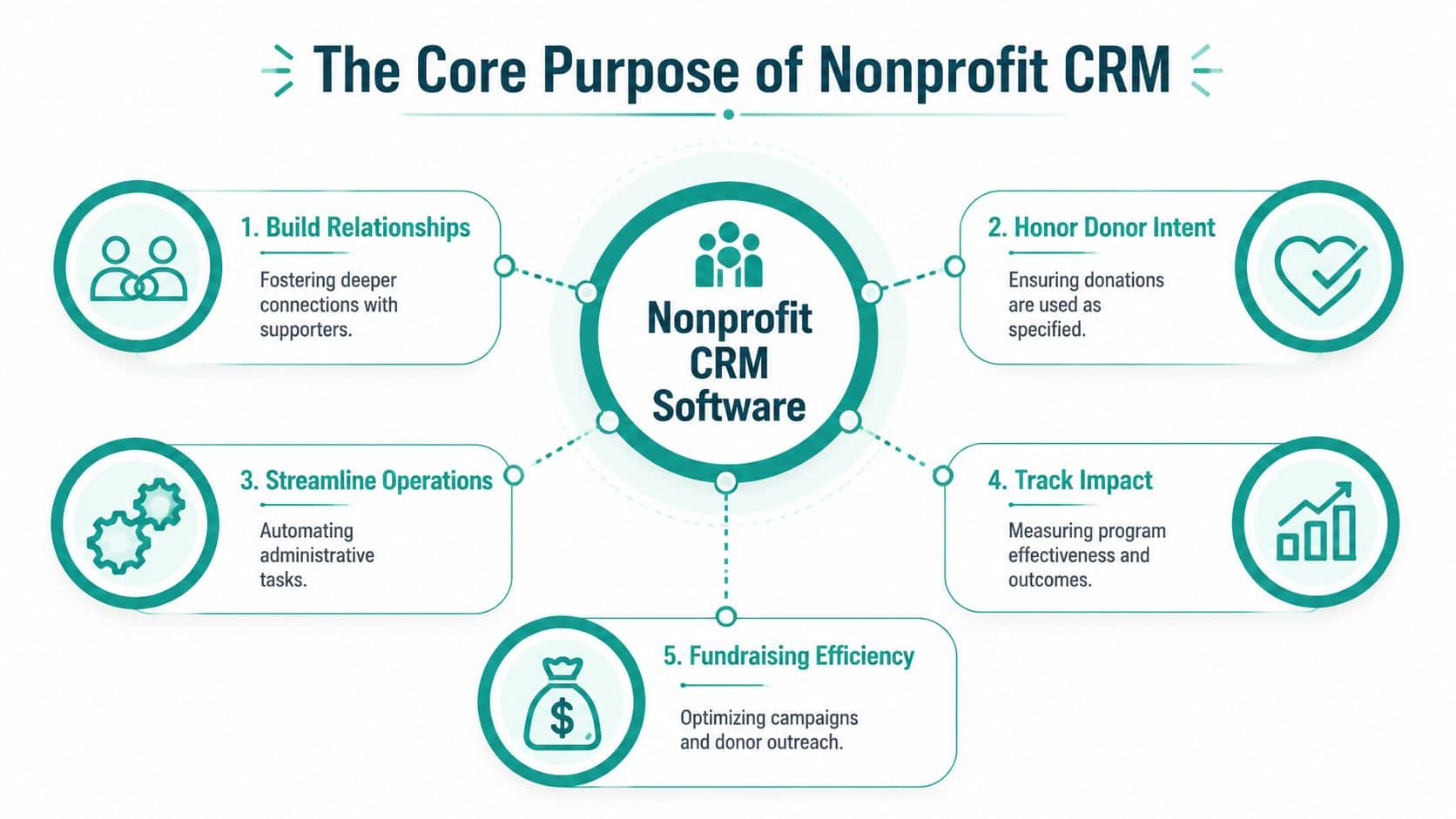
One record changes the conversation
When a staff member opens a supporter profile, they shouldn't have to guess. They should see a usable history.
A technically strong nonprofit CRM keeps a unified constituent record that links donations, soft credits, household and organizational relationships, communication preferences, and engagement history, as described in StratusLive's nonprofit CRM feature checklist. That structure supports cleaner segmentation and reduces manual list-building errors.
In practice, that means your team can answer questions quickly:
| Question | What a real CRM should show |
|---|---|
| Has this person given before | Full giving history and pledge activity |
| Who else is connected to them | Household and organizational relationships |
| How should we contact them | Communication preferences and prior outreach |
| What do they care about | Program interests and engagement history |
That's the difference between a static database and a working system.
The real purpose is stewardship
The best reason to invest in nonprofit CRM software isn't convenience. It's stewardship.
If a donor attends events, gives to a scholarship fund, volunteers once a quarter, and prefers email over phone, your organization should know that without digging through folders. If a church member gives to missions and also serves in children's ministry, that should live in one place. If a school parent supports athletics but not the annual fund, that should shape your next message.
A CRM earns its keep when it helps your team treat people like known supporters, not fresh strangers every time they engage.
This is also where a lot of general business CRMs fall short. They can store contacts well enough, but they often need extra configuration to reflect donor intent, householding, volunteer relationships, or nonprofit reporting needs. A nonprofit-specific system starts closer to the way your organization works.
Good CRM software helps you act
Once your records are connected, simple but important things get easier:
- Targeted communication based on real behavior
- Smarter fundraising asks tied to giving history and interests
- Cleaner acknowledgment because gift details are already present
- Better board reporting because the same underlying record supports multiple views
That's what nonprofit CRM software is really for. It gives your team one version of the truth, so you can make better decisions without chasing your own data.
Key Features That Truly Matter to Your Mission
Feature lists can get silly fast. Most vendors can produce a long checklist. What matters is whether the system solves the problems that wear your team down every week.
See your true financial health
If you manage restricted gifts, grants, or multiple programs, general accounting software often forces workarounds. You can make it function, but someone has to remember the logic behind the classes, tags, or side spreadsheets.
You're better served by software that shows restricted balances, program activity, and grant reporting in the same operational picture as donor activity. That matters for Form 990 readiness, for board confidence, and for staying faithful to donor intent.
QuickBooks is familiar and widely used. It can be a reasonable accounting tool. But it wasn't built as true nonprofit fund accounting tied directly to donor records. That distinction becomes painful once your development and finance teams need live answers instead of month-end reconciliations.
Know your donors in context
Strong donor management doesn't just tell you who gave last December. It shows the full relationship.
That includes giving history, pledges, households, communication preferences, event attendance, volunteer participation, and notes your team can use. If your records are fragmented, major details disappear in practice. A donor may look inactive in one system while being very engaged in another.
For a closer look at what this should include, review the core elements of donor management for nonprofits.
Communicate with purpose
Many nonprofits use one tool for the CRM, one for email, one for event invites, and another for text updates. That setup creates lag. It also leads to awkward mistakes, like sending the wrong ask to the wrong people because the list was built from stale exports.
A built-in marketing suite changes that. Your communication reflects current donor activity because the CRM and outreach tools share the same records. That's especially helpful for annual appeals, volunteer reminders, event follow-up, and church or school communications where timing matters.
Keep volunteers and events tied to the same story
Volunteer hours and event attendance shouldn't sit off to the side as "nice to know" information. They often explain future giving better than a contact note ever will.
If someone hasn't donated recently but keeps showing up, that matters. If a supporter attends every school fundraiser but never opens emails, that matters too. Good nonprofit CRM software helps your team see those patterns without piecing together separate reports.
Make team communication less fragile
A strong system also reduces dependence on memory. If the development director knows a donor's preferences but that knowledge lives only in her head, the relationship is vulnerable.
Look for systems that make notes, tasks, follow-up, and shared context easy to find. Some organizations also benefit from AI support inside the platform. AlignMint, for example, includes Minty alongside accounting, CRM, volunteers, events, and marketing in one system. That kind of setup can help smaller teams ask plain-language questions about their own data instead of exporting reports and sorting them manually.
The right software doesn't just store information. It helps the next staff member make a sound decision.
The Small Nonprofit's Evaluation Checklist
Vendor demos can be polished and still leave you with the wrong tool. The safest approach is to ask questions that force the system to show its actual behavior.
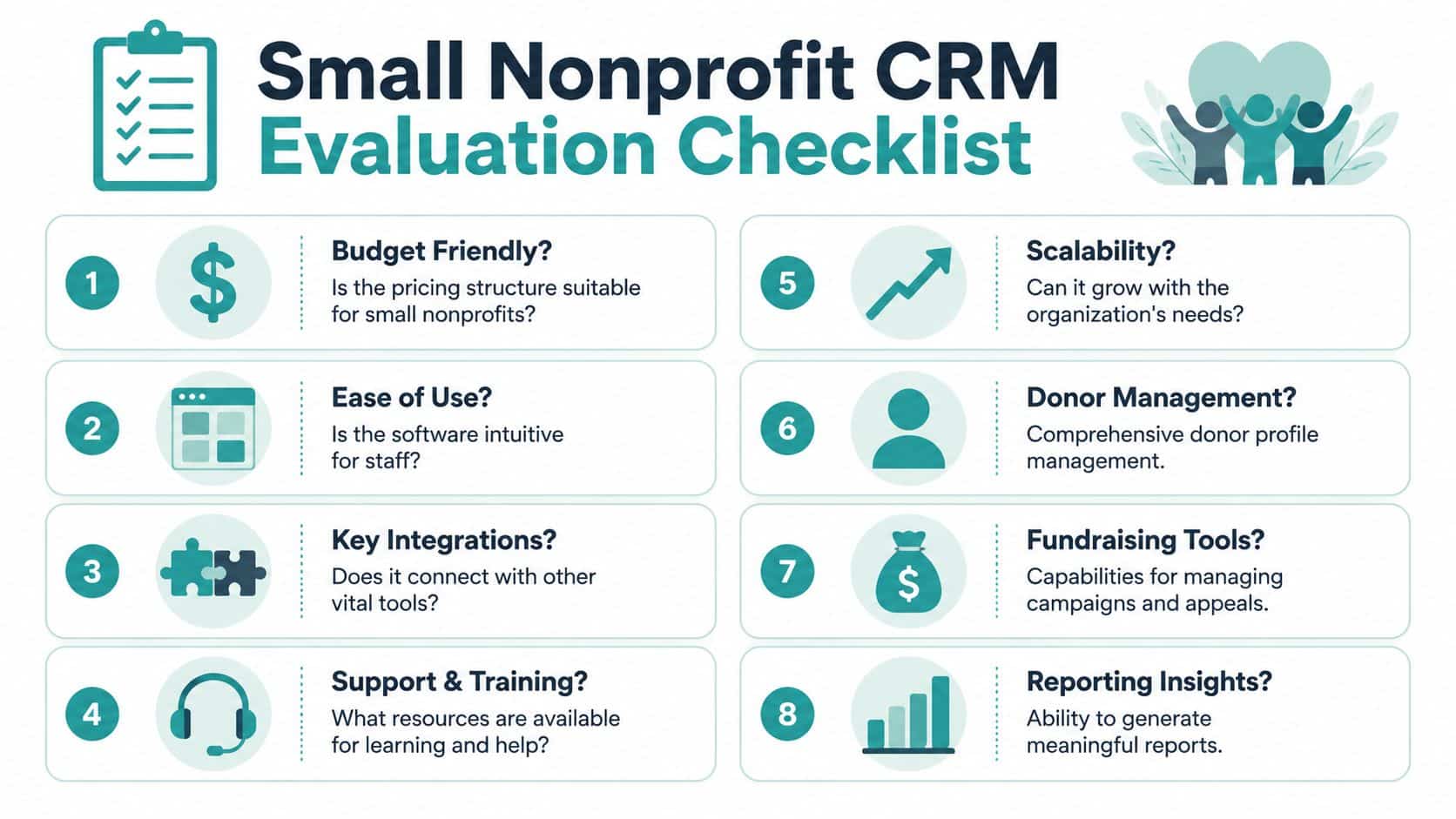
Ask for proof, not promises
Here are the questions that matter most in a real evaluation meeting.
- Show me a restricted gift from entry to report. Ask the vendor to enter a donation with a restriction, then show where that restriction appears in financial reporting.
- Show me one supporter across modules. You want to see donations, emails, event attendance, volunteer history, and notes in one place.
- Show me how acknowledgments happen. If receipts and thank-yous depend on exports, someone on your staff will be patching the process forever.
- Show me what the executive director sees. Dashboards for frontline users and dashboards for leaders are not the same thing.
Ask about the hidden costs early
A lot of software seems affordable until the extras appear.
Use direct questions:
- Do you charge per user
- Do key functions sit behind add-ons
- What does migration include
- What kind of support is standard
- Will we need outside consulting to make this work
Some well-known tools deserve a fair but careful look. Salesforce is powerful and highly configurable. For larger organizations with technical help, that flexibility can be a real strength. But smaller nonprofits often discover that flexibility also means more setup choices, more outside help, and more dependency on specialists.
Bloomerang is easier for many fundraising teams to grasp and has broad adoption in the sector. That can make it attractive for donor-centered work. But if your bigger headache is donor-to-accounting reconciliation, you need to test that connection very carefully rather than assume it's covered.
Use a simple scorecard
A short scorecard can keep your team honest during demos.
| Evaluation area | What to look for |
|---|---|
| Financial fit | Clear pricing, no surprise seat fees, no critical add-ons |
| Ease of use | Staff can complete common tasks without heavy training |
| Donor context | One supporter record shows full engagement |
| Accounting link | Gift entry and financial reporting agree |
| Leadership visibility | Board and management reports are easy to produce |
If your team needs more detail before demos, this guide to donor management software for small nonprofits is a useful companion.
Don't ask whether the software has a feature. Ask whether your staff can trust it under deadline.
The All-in-One vs Best-of-Breed Approach
There's a reason many nonprofits end up with a patchwork stack. The best-of-breed approach sounds sensible. Use QuickBooks for accounting, Mailchimp for email, Eventbrite for events, a separate volunteer tool, and a CRM for fundraising.
On paper, that can look like freedom. In practice, it often turns into a full-time reconciliation habit.
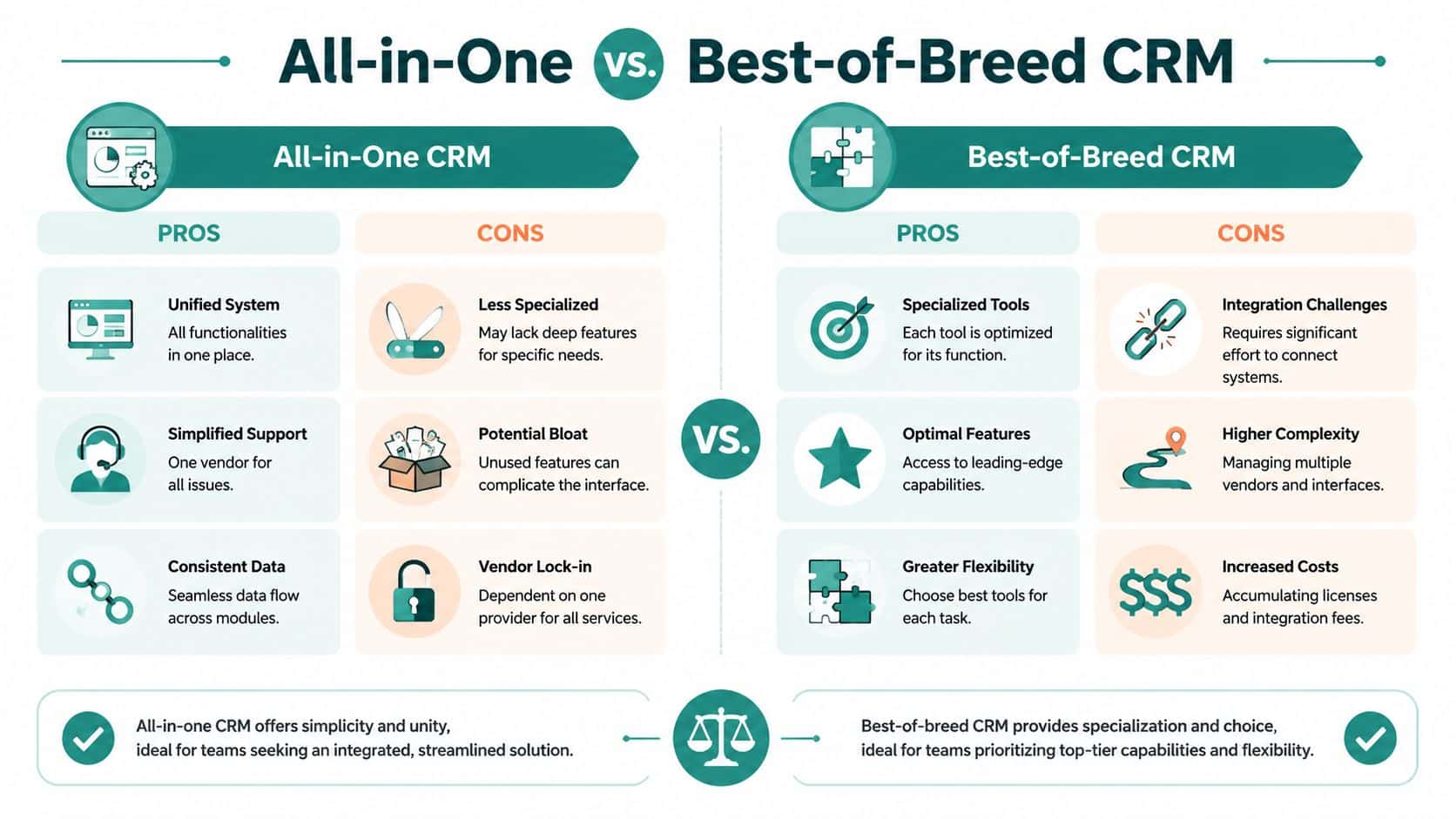
Why separate tools appeal to smart teams
The appeal is real.
- Specialized tools can be strong in one area. Mailchimp is familiar for email. QuickBooks is familiar for accounting.
- You can replace one tool at a time. That feels lower risk.
- Staff may already know the products. Familiarity reduces initial friction.
For some organizations, especially those with a very simple operating model, that setup can work for a while.
The fragmentation tax is real
The hidden cost shows up in staff time and donor experience. According to the fact set provided in this brief, a 2025 study by the Volunteer Management Association found that small nonprofits spend an average of 12 hours per week manually transferring data between volunteer, event, and donor systems. The same fact set also notes that data silos can lead to a 20% drop in donor retention rates.
Those two numbers explain a lot. Fragmented systems don't just waste time. They weaken follow-up.
A donor updates preferences in one place, registers for an event in another, and gives through a separate form. If those details don't meet in one record, your next message can feel tone-deaf. You may thank them late, ask them for the wrong thing, or miss a clear signal that they're ready for a different kind of engagement.
One disconnected tool is manageable. Four disconnected tools become a management style.
How common platforms fit into this choice
Salesforce can sit at the center of a broad stack, and many nonprofits build serious infrastructure around it. That strength comes from flexibility. It also means integration and configuration work rarely disappears on its own.
Bloomerang can be a practical choice for fundraising teams that want a more focused CRM experience. But if finance, volunteers, events, and donor communications still live elsewhere, your staff may keep doing the human glue work.
If you're weighing the operational trade-offs, this breakdown of a CRM with accounting integration gets to the heart of the issue.
The all-in-one route is not perfect for every nonprofit. Some systems feel bloated. Some do many things adequately but nothing thoroughly enough. Still, for small and mid-sized nonprofits without extra technical help, a well-designed all-in-one often wins because it reduces duplicate entry, improves trust in the data, and gives leaders one place to look when something feels off.
Making the Switch A Practical Plan
Switching systems feels risky because it is. But it doesn't have to be chaotic.
The key is to treat the change as an operations project, not a software event. You're not just moving records. You're deciding how your team will work from now on.
Step one starts before migration
Clean your data first. If two donor records should be one, fix that before the move. If your fund names are inconsistent, standardize them now. If nobody agrees on campaign naming, settle it before import day.
Bad data moved into a new platform is still bad data. It just has a newer logo around it.
The broader market trend should give you some confidence here. The nonprofit CRM software market was valued at $846.59 million in 2025 and is projected to reach $1.17106 billion by 2034, with a 3.67% CAGR, according to Custom Market Insights' nonprofit CRM software market report. That tells you this isn't experimental technology. It's established operating infrastructure.
Run old and new side by side briefly
A short overlap period helps. You don't need to maintain two systems forever, but you do need a window to compare outputs.
Use that time to verify:
- Gift totals match
- Restricted balances behave correctly
- Acknowledgments trigger as expected
- Key leadership reports look right
This is also the moment to test your ugly edge cases. The memorial gift. The split gift. The event sponsorship. The donor-advised fund note that always confuses everyone. If the new system can handle your real edge cases, confidence rises fast.
Train people on outcomes
Staff don't need a grand tour of every menu. They need to know how to complete their most important jobs.
Frame training around tasks:
| Role | Outcome-focused training |
|---|---|
| Development staff | Enter gifts, review donor history, send acknowledgments |
| Finance staff | Reconcile transactions, track restrictions, close the month |
| Executive director | Read dashboards, review reports, monitor cash and restricted funds |
| Program or volunteer staff | Log engagement, check participation, update records |
Avoid one common mistake. Don't rebuild every old workaround in the new system just because people are used to it. A better platform often requires simpler habits, not more faithful copies of legacy processes.
If you're preparing for the move, a nonprofit data migration checklist can help your team organize the migration without making it feel technical.
Your Next Step Toward Clarity and Control
Monday morning usually exposes the problem. Development says the campaign worked. Finance says the cash report is short. The executive director is left sorting through donor records, restricted gifts, and spreadsheet exports to figure out which version is real.
Nonprofit CRM software earns its place when that scramble stops. A good system gives one usable view of donor history, gift restrictions, volunteer activity, communications, and reporting. More important, it keeps your donor records and fund accounting close enough that finance and development are not telling different stories from the same week of work.
On its nonprofit technology page, Salesforce states that nonprofit customers see faster decision-making after implementation, and it describes CRM use as common among fundraising teams. That lines up with what many nonprofit leaders already know from experience. The problem is rarely whether a CRM exists. The problem is whether it connects cleanly to accounting, preserves donor intent, and reduces manual reconciliation instead of creating more of it.
That is the decision in front of executive directors and finance leaders. Choose a system that gives your team one reliable picture of gifts, restrictions, and operating reality. Or keep paying the hidden cost of disconnected tools through rework, delayed closes, reporting mistakes, and uncomfortable donor conversations.
Clarity is the outcome to buy. Features matter only if they help your staff trust the numbers and act on them.
If you're ready to see whether an all-in-one approach fits your organization, take a look at AlignMint. We built it for nonprofits that are tired of reconciling donor data, accounting, volunteers, events, and marketing across separate tools. You can watch a demo, explore the platform, or check whether your organization qualifies for the free tier for nonprofits under $100K.
Ready to try AlignMint with your nonprofit?
Start free — set up donor tools, giving pages, and Minty. Upgrade when you need accounting.