

For the product workflow behind this guide, see the church fund accounting hub. Your Sunday offering can feel like a blessing. Monday’s bookkeeping can feel like a burden. If you’re trying to track designated gifts, online giving, and board reports with tools that weren’t built for church finances, bookkeeping quickly becomes heavier than it should be.
Church accounting software for small churches can fix that. The right system gives you clearer records, cleaner reports, and less guessing about where ministry dollars stand.
Quick Answer: Small Church Accounting Software
Pricing as of May 2026. Check vendor websites for current pricing.
Small church accounting software should help your treasurer track tithes, offerings, designated gifts, expenses, reimbursements, bank activity, and board reports without rebuilding the same numbers in a spreadsheet. The best fit is usually the tool your team can keep current every week, not the one with the longest feature list. Compare vendors in our best church accounting software guide before you commit, or see free church accounting options if budget is the first question.
If your church receives gifts for missions, benevolence, youth trips, building projects, or grants, look for fund accounting from the start. That keeps restricted money separate and gives leaders a clearer answer when they ask what is available to spend. See how to track tithes and offerings for detailed gift recording workflows, and the church fund accounting hub for the full finance workflow.
| Small church need | What to check |
|---|---|
| Tithes and offerings | Gifts connect to donor records, deposits, and giving statements. |
| Designated gifts | Building, missions, benevolence, and youth funds stay separated. |
| Expenses | Bills and reimbursements are coded to the right ministry or fund. |
| Reports | The treasurer can prepare board summaries without side spreadsheets. |
| Payroll | Wages, tax filings, and clergy housing are handled or integrated cleanly. |
| Audit readiness | Records, approvals, and fund reports stay organized year-round. |
| Handoff | The next volunteer officer can understand current balances and open tasks. |
Church Accounting Software vs. Bookkeeping Software
Many small churches search for "church accounting software," "accounting software for churches," and "bookkeeping for small churches" as if they are the same thing. They overlap, but they are not identical. Bookkeeping records what happened. Church accounting software also preserves the purpose behind the money, especially when gifts are designated for missions, benevolence, youth trips, building projects, or grants.
| Option | What it can handle | Where small churches should be careful |
|---|---|---|
| General bookkeeping software | Bank reconciliation, bills, basic expense categories, and financial statements. | Restricted gifts often need classes, tags, sub-accounts, or spreadsheet notes to stay clear. |
| Giving-only software | Online giving, donor records, receipts, and year-end statements. | It may not update fund balances, expenses, reimbursements, or board finance reports. |
| Church accounting software | Tithes, offerings, designated funds, expenses, reports, and giving statements in one workflow. | Confirm whether it is true fund accounting or a general ledger with church labels. |
| All-in-one nonprofit platform | Donors, giving pages, fund accounting, events, volunteers, and reports together. | Make sure the weekly treasurer workflow is simple enough for volunteers to maintain. |
Small Church Bookkeeping Checklist
Use this monthly checklist to keep small church books current without rebuilding numbers in a spreadsheet.
| Step | What to do | Why it matters |
|---|---|---|
| Record Sunday gifts | Enter checks, cash, and online gifts with fund and donor from the start. | Deposits and giving statements stay aligned before month-end. |
| Match deposits | Reconcile the bank feed to open gifts and any processor batches. | Treasurers catch missing or duplicate entries early. |
| Code expenses | Post bills, reimbursements, and card charges to the right ministry or fund. | Board reports show where money went without cleanup work. |
| Review restricted funds | Confirm building, missions, benevolence, and youth balances before spending. | Leaders do not accidentally use designated money for operations. |
| Close payroll | Post wages, housing allowance, and tax withholdings to the correct accounts. | Clergy and staff payroll stay separate from ministry gifts in reports. |
| Prepare board summary | Export fund balances, budget vs. actual, and giving trends in plain language. | Volunteers and elders can decide without decoding accounting jargon. |
Multi-site churches should read multi-campus church accounting.
Your Guide to Financial Clarity and Confidence
Monday morning arrives. The deposit from Sunday is in the bank, online gifts are sitting in a giving app, and your treasurer needs numbers for the board packet by Wednesday. One family gave to missions, another gave to the youth retreat, and a third gave to the general fund. If those records live in three different places, someone has to stitch the story together by hand.
That is where small churches lose time and confidence.
For many churches, the main problem is not a lack of effort or care. It is the data gap between giving, accounting, and reporting. A gift comes in through one system, gets entered again in another, and then gets checked against a spreadsheet before anyone feels sure the number is right. Each handoff creates another chance for delay, misclassification, or a late-night scramble before a finance meeting.
I have seen this firsthand. Separate tools can feel manageable at first because each one solves a single problem. One tracks donations. One handles bookkeeping. One produces a report. Together, though, they can work like three volunteers who never attend the same planning meeting. Everyone is busy, but no one has the full picture.
That full picture matters. Church leaders need to know whether the numbers in the bank match the purpose attached to each gift, whether restricted money is still available, and whether reports can be trusted without a second round of detective work. If you want a plain-language reference for general ledger and financial reports, that guide explains the records and summaries leaders review most often.
Practical rule: If answering “How much is left in the building fund?” takes more than a few clicks, your system is creating work instead of reducing it.
An all-in-one system closes that gap. Giving records flow into accounting. Fund balances update in the same place. Reports pull from the same source instead of patched-together exports. The result is not just cleaner bookkeeping. It is the quiet relief of knowing your board report, donor records, and books are telling the same story.
If you are comparing church tools with broader nonprofit options, this guide to nonprofit accounting software for growing organizations can help you see where church-specific needs start to differ.
Why Your Church Needs More Than Business Software
Church finances look simple from the outside. Money comes in, bills get paid, and reports go to the board. But churches aren’t managed like ordinary businesses.
A business asks, “Did we earn more than we spent?” A church often needs to ask, “Did we use this money for the purpose it was given?” That second question changes everything.
Fund accounting feels simpler than it sounds
Think of fund accounting like a set of labeled envelopes.
One envelope is for general ministry. Another is for missions. Another is for benevolence. Another is for a building project. Even if all the money sits in one bank account, each dollar still carries a purpose.
That’s what fund accounting does. It keeps money with donor restrictions separate from money without donor restrictions, so you can see what belongs where.
If you want a straightforward backgrounder on the basic idea, fund accounting for nonprofits is a useful companion read.
Why QuickBooks workarounds wear people down
QuickBooks is familiar, and many churches already know it. That’s a real strength. It can handle bookkeeping tasks well when someone sets it up carefully.
The problem is that churches often have to force church logic into business software. Instead of true funds, you end up using class tracking, sub-accounts, or spreadsheet notes to mimic restrictions.
According to Grain Ledger’s overview of church accounting software for small churches, generic tools like QuickBooks often require workarounds such as class tracking and sub-accounts, leading to 20-30% higher error rates in fund balance reporting, while specialized software provides native multi-fund ledgers and church-specific reports with 99% accuracy in real-time.
That gap matters in daily work. The same source says small churches using generic software often spend 15-25 hours each month on reconciliations compared with 2-5 hours when fund accounting is built into the system.
The issue isn’t that business software is bad. It’s that your church ends up carrying the logic the software should be carrying for you.
What good church software changes
When church accounting software is built around funds from the start, routine questions become easier to answer.
You can usually see:
- Fund balances clearly so restricted money doesn’t get confused with general cash
- Budget versus actual by fund so ministry leaders can stay grounded in what’s available
- Statements of Activities and related church reports without rebuilding them by hand
- Current financial position faster because the data is already organized correctly
If you’ve wrestled with whether QuickBooks is enough, our article on church fund accounting and why QuickBooks isn’t enough walks through the issue in plain terms.
Essential Features of Modern Church Accounting Software
A small church treasurer closes the month, opens the giving report, and realizes the totals do not match the accounting system. The gifts are real. The problem is the gap between tools. One system collected the donation, another stored the donor record, and a third tried to explain the finances to the board.
That is the frustration many churches are trying to solve.
The best modern church accounting software does more than post transactions. It keeps giving, accounting, and reporting connected so money keeps its story from the moment a gift comes in to the moment a leader reviews a report. When those pieces stay together, the load gets lighter and the answers get clearer.
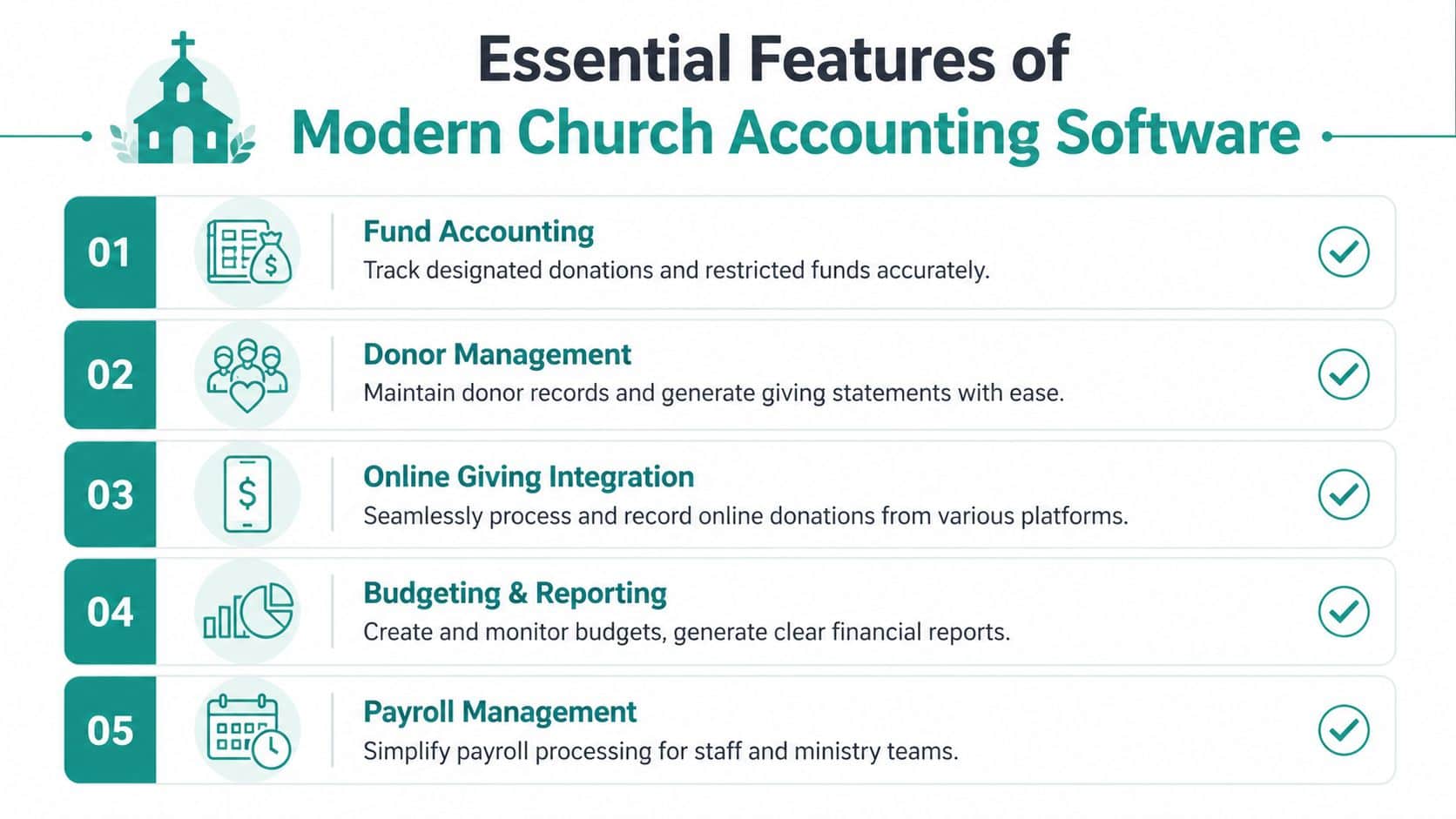
True fund accounting
Start here, because this feature affects everything else.
Church money is not one bucket. It is more like a set of labeled envelopes. General offerings, benevolence gifts, mission support, and building donations may all sit in the same bank account, but they do not serve the same purpose. Your software should track those purposes automatically inside the ledger.
That means each transaction carries its fund information from the start. You do not have to rebuild the logic later with spreadsheet notes or extra cleanup. Our fund accounting tools for restricted and unrestricted funds show what that looks like in a nonprofit system designed around this structure.
Donor management tied to accounting
A donor database should not sit off to the side like a separate filing cabinet. If it does, staff ends up exporting spreadsheets, checking for duplicates, and wondering whether the year-end statement matches the books.
Connected donor and accounting records help in very practical ways:
- Giving statements match the ledger because both pull from the same gift record
- Designations stay attached to each donation instead of getting lost during import
- Pledge history and donor activity stay visible when finance staff review transactions
- Pastoral follow-up is easier because staff can see giving context without asking for another report
Many small churches lose hours each month. The issue is rarely one big mistake. It is the steady drag of re-entry, cross-checking, and fixing preventable mismatches.
Online giving that posts correctly
Online giving should reduce work, not create a second round of bookkeeping.
If someone gives to youth camp on Sunday night, that gift should flow into the right donor record, the right fund, and the right reports without manual sorting on Monday morning. That is the true test. A giving form may look polished on the front end, but if staff still has to reclassify transactions by hand, the data gap is still there.
If you want a simple overview of the payment side, what is a payment gateway explains how digital payments move from donor to processor to your records.
Team access and shared visibility
Small church finances usually involve more than one person. The bookkeeper may enter bills. The pastor may approve expenses. A ministry leader may need to check a budget. The treasurer may prepare reports for the board.
Good software handles that shared work without turning everything into email chains and side conversations. Look for tools that offer:
- Role-based access so each person sees the right information
- Approval trails and shared notes so decisions stay attached to the transaction
- Clear dashboards or status views so leaders can answer routine questions without asking finance to build another custom report
A healthy system reduces hallway accounting.
Practical AI help
AI features deserve a calm look, because plenty of software companies talk about them in vague terms. For a church team, the useful question is simple. Does it help you get to a trustworthy answer faster?
Helpful AI should translate plain-English questions into usable insight. A treasurer might ask which restricted funds are getting low, whether any gifts need review, or why this month looks different from last month. The value is speed and clarity, not hype.
AlignMint is one example of an all-in-one platform that includes CRM, online giving pages, fundraising tools, Minty, and a paid path to true fund accounting, reporting, volunteers, events, and more. Its Free plan is for nonprofits on the free plan based on the company's published product information.
If your church has to stitch together giving, bookkeeping, and reporting with exports and manual checks, the software is still leaving the hardest part to your team. The right system closes that gap so leaders can trust the numbers and get back to ministry.
Navigating Compliance for Donations and Grants
A member gives to the building fund on Sunday. A grant reimbursement comes in on Tuesday for the food pantry. By Friday, the treasurer is trying to answer a simple question from the board. How much of that money can we spend, and what proof do we have?
That is where many small churches feel the strain. The problem is often not the intent. Leaders want to honor donor wishes and follow grant rules. The problem is the data gap between the giving tool, the accounting records, and the reports people need to review. Once those records live in different places, compliance turns into detective work.
Donor restrictions need a clear trail
A restricted gift has instructions attached to it. “Missions,” “student ministry,” and “benevolence” all mean the church is receiving money for a defined purpose. An unrestricted gift gives leadership room to use the funds where they are needed most.
The accounting part is straightforward. The hard part is keeping the instruction attached to the money all the way through deposit, entry, spending, and reporting.
That trail matters.
If the donor note sits in one system, the deposit sits in another, and the expense report lives in a spreadsheet, your team has to reconnect the story by hand. That is where mistakes start. A treasurer may know the right answer from memory, but memory is not the same as a record you can show to the board, an auditor, or a grantor.
A church system should keep the purpose with the transaction from the start, then carry it into fund balances, statements, and board reports without extra exporting or relabeling.
Grants add another layer of proof
Grants usually require more than good intentions. They require documentation.
A designated offering might only need clear internal tracking. A grant may require separate revenue tracking, support for each expense, and reports that show how the money was used. If your church runs a pantry, counseling program, preschool, or community outreach effort, that difference matters quickly.
Here is a simple way to look at it. Donation compliance asks, “Did we use this money for the purpose promised?” Grant compliance asks the same question and adds, “Can we prove it with clean records?”
That second question exposes the data gap fast. If giving records, expense records, and reporting tools do not speak to each other, staff end up retyping numbers, saving receipts in scattered folders, and checking one report against another before every meeting. An all-in-one system reduces that friction because the gift, the fund, the expense, and the report stay connected.
What to look for if your church handles grants
If grants are part of your ministry, your software should help you answer ordinary questions without a last-minute scramble. Look for tools that support:
- Separate fund tracking so grant activity stays distinct from general ministry funds
- Clear expense support so each payment can be tied back to the right program or restriction
- Consistent records across giving and accounting so reports match the underlying transactions
- Filing support for organizations that need it, including resources such as a Form 990 builder documentation guide
Small churches do not need more complexity. They need one reliable chain of custody for the money.
When the system keeps donations, accounting, and reporting in sync, compliance becomes much less intimidating. You can answer questions faster, protect trust with donors and grantors, and lead with more confidence because the numbers hold together.
Comparing Different Church Software Approaches
A lot of small churches start with whatever is familiar. That often means one tool for bookkeeping, another for online giving, and a spreadsheet that becomes the glue holding everything together.
That setup can work for a while. Then month-end comes, the board asks for clean fund balances, and someone has to trace one gift across three places to make sure the story matches.
That is the key comparison point. You are not only choosing software. You are choosing how many times your team will touch the same information before it becomes a report you trust.
Church Software Approach Comparison
| Approach | Best For | Pros | Cons |
|---|---|---|---|
| QuickBooks plus spreadsheets plus separate giving tool | Churches with a skilled bookkeeper who can maintain custom processes | Familiar accounting environment, broad accountant familiarity, flexible setup | Fund tracking often depends on workarounds, more hand entry, greater risk of records drifting apart between giving and reporting |
| Standalone church software such as ChurchTrac or Aplos | Churches that want church-focused features at a modest starting price | Built for churches, easier than generic business tools for many teams, often includes donation tracking and basic church management features | Some churches still add other tools for communication, events, volunteers, or reporting, which can reopen the data gap |
| All-in-one church and nonprofit operations platform | Churches that want one shared record across giving, accounting, donor management, volunteers, and reporting | Fewer handoffs, less duplicate entry, one place for staff and board reporting, easier to connect ministry activity with financial records | Requires thoughtful setup at the start and a willingness to replace several old habits at once |
The biggest difference is where the data lives.
In a disconnected setup, each system holds one piece of the truth. Giving knows what the donor intended. Accounting knows what got posted. A spreadsheet often becomes the unofficial referee when those two do not line up. That is exhausting for a small staff.
An all-in-one system closes that gap. It works like using one map instead of three hand-drawn directions. The gift, designation, deposit, and report stay connected, so your treasurer is not rebuilding the trail every time someone asks a normal question.
Where frustration usually starts
Price gets attention first. Daily friction is what wears people down.
A member gives online. Someone exports the transaction. Another person enters or imports it into accounting. Later, the bank activity has to be matched. At the end of the month, the board packet still needs fund reports that agree with the donor records.
None of those steps is hard by itself. The problem is the handoff between them.
Every handoff creates one more place for a designation to be missed, a split gift to be posted incorrectly, or a report to show numbers that are technically explainable but hard to trust. If you want a practical picture of what one shared record looks like, a church operations dashboard view helps make that difference concrete.
A fair way to compare your options
Ask questions that reveal whether the system reduces rework.
- Does the donor’s designation stay attached from the moment of giving through the accounting record and final report
- Can your treasurer answer ordinary board questions without building side spreadsheets
- Will staff need to update the same gift, family record, or fund balance in more than one place
- Does the system support ministry operations and financial reporting from one shared set of records
- If a donor, auditor, or board member asks for backup, can your team trace the transaction without a scavenger hunt
QuickBooks can still be a reasonable choice if your church has strong bookkeeping skill and clear internal processes. ChurchTrac and Aplos can be good starting points for churches that want church-specific tools without business software workarounds. But if your staff keeps running into three versions of the same number, the problem is usually not effort. It is the data gap between separate systems.
See How an Integrated System Works Day to Day
The easiest way to judge church accounting software for small churches is to follow one gift from start to finish.
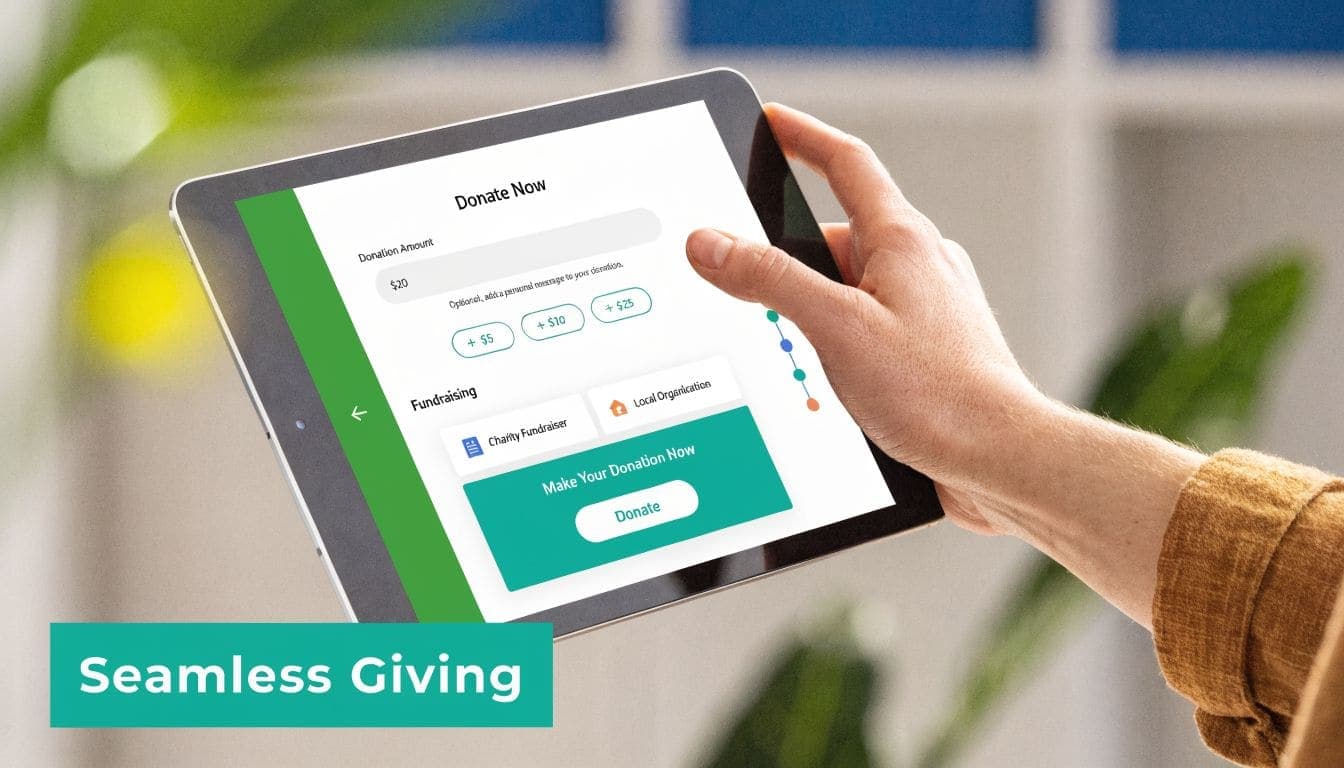
A church member gives online after Sunday service. They choose two designations in one transaction. Part goes to the general fund, and part goes to the building project.
What happens in a disconnected setup
In a patchwork system, the giving platform records the gift first. Then someone exports it or types it into accounting. Later, the bank deposit arrives and needs to be matched. If the donor’s record sits in a separate CRM, another update may happen there too.
Nothing is impossible in that process. It’s just fragile.
One missed designation or one mistyped split can throw off the fund report. Then the treasurer starts tracing transactions backward to find the break.
What happens in an integrated setup
In an integrated system, the gift is recorded once and carried through the rest of the workflow.
The donor receives a receipt. The donor record updates. The accounting entry lands in the correct funds. The current fund balances change right away. When the bank activity comes in, reconciliation is much easier because the transaction trail is already intact.
A dashboard should make that easy to see. If you want an example of the kind of view leaders use each day, the dashboard overview gives a helpful reference point.
When giving, accounting, and reporting share one record, the monthly close stops feeling like detective work.
That’s also where plain-English AI can help. A finance lead or executive pastor shouldn’t need to click through six screens to answer a simple question about a fund, donor activity, or current balances.
Take the Next Step Toward Financial Peace
It is Saturday night. The treasurer is checking one report, the bookkeeper is looking at another, and the pastor is asking a simple question about what the church can spend next month. Everyone is trying to be careful, but the numbers do not line up fast enough to give anyone peace.
That strain usually comes from a data gap. Giving lives in one tool. Accounting lives in another. Reports get built from both, often by hand. An all-in-one system closes that gap, so your team can trust that the gift received, the fund balance, and the report to the board are all telling the same story.
The right church accounting software supports ministry by removing avoidable rework, protecting donor intent, and making financial decisions easier to explain. It gives small churches something every finance team wants. A clear record from first gift to final report.
If you want a practical next step, take a look at AlignMint. You can review how one system handles accounting, giving, volunteers, events, and reporting in one place, including a free plan for organizations with no donation cap.
Related:
- Best church accounting software (2026 comparison) - Compare vendors for fund accounting, payroll, and board reports
- Free church accounting software options - Budget-first comparison for small churches
- Church fund accounting hub - Product workflow for tithes, offerings, and designated gifts
- Church fund accounting: why QuickBooks isn't enough - Classes vs true funds
- Fund accounting - How AlignMint handles funds and restricted gifts
Frequently Asked Questions
Ready to try AlignMint with your nonprofit?
Start free — set up donor tools, giving pages, and Minty. Upgrade when you need accounting.