CRM Donation Management: A Director's Practical Guide
For related tools, see AlignMint features.
Quick Answer: CRM Donation Management: A Director's Practical Guide
CRM donation management works when each gift updates the donor relationship and the financial record at the same time. If your CRM helps fundraising but leaves finance reconciling by hand, it is only solving part of the problem.
Your week probably already has this moment. A board member asks how much cash is available, your development lead shows one number, your bookkeeper shows another, and you end up sorting spreadsheets instead of leading the organization.
That's where crm donation management either helps or creates more work. Done well, it gives you one reliable record of the donor, the gift, the receipt, and the fund it belongs to. Done poorly, it becomes another system your staff has to reconcile by hand.
Your Guide to Confident Financial Oversight
When nonprofit leaders ask about crm donation management, they usually aren't asking for more software. They're asking for fewer surprises, cleaner board reports, and less time spent tracing gifts across disconnected tools.

The practical definition is simple. CRM donation management is the process of recording gifts in a way that also preserves the donor relationship and supports accurate financial reporting. If your current setup makes you retype gifts, check multiple reports, or guess which balance is current, your issue isn't staff discipline. It's system design.
A useful place to start is with your accounting view. If you want a grounding in what nonprofit finance software should do, this overview of nonprofit accounting software is worth reading before you evaluate any donor system.
What a director actually needs
Most executive directors don't need more dashboards. You need to answer ordinary questions quickly:
- Who gave what: without digging through email receipts
- What is restricted: without checking a side spreadsheet
- What still needs acknowledgment: without asking three staff members
- What changed this month: without waiting for a custom export
Practical rule: If a donation record can't help both your fundraiser and your finance lead, it's incomplete.
What crm donation management should feel like
The right setup feels boring in the best way. A gift comes in. The donor record updates. The receipt goes out. The right fund reflects the transaction. Your reports stay current.
That's the standard to hold. Not flashy features. Not sales language. Just fewer moving parts, better visibility, and more confidence when someone asks for numbers you need to trust.
Why Spreadsheets and Generic Tools Fail You
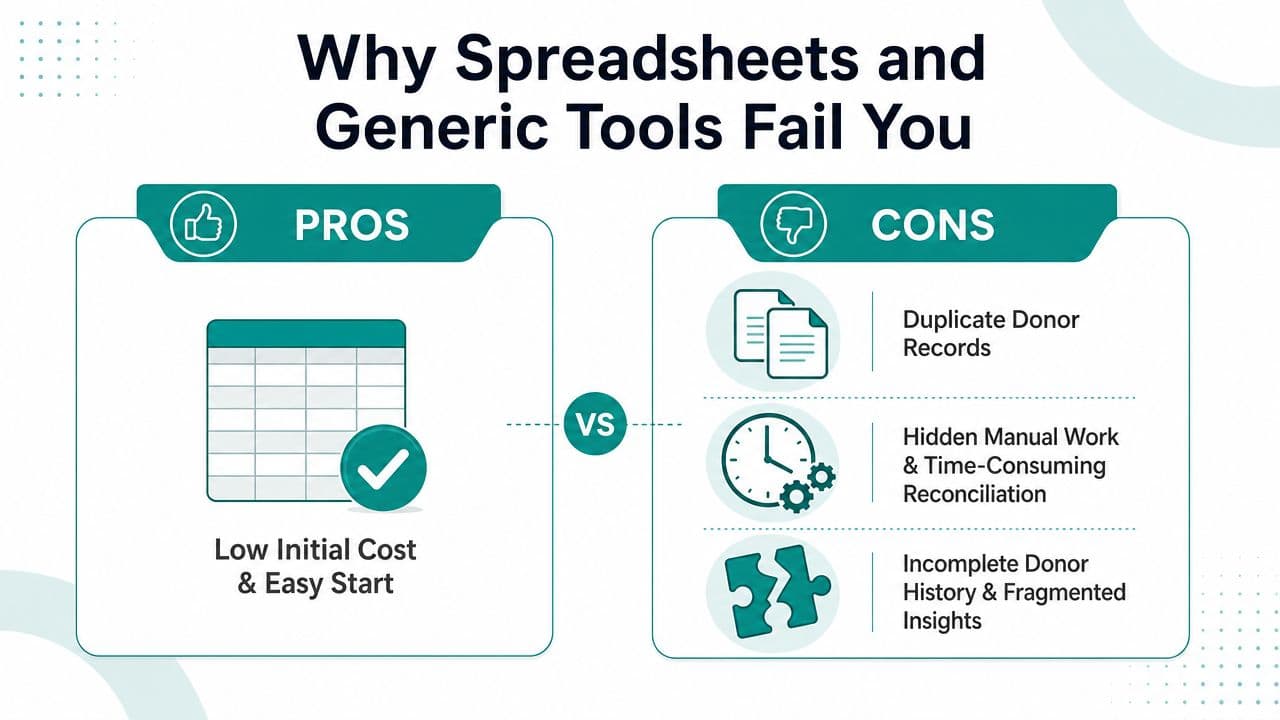
Spreadsheets are familiar, and familiarity is powerful. They're often where a nonprofit starts because they're cheap, available, and easy to bend around immediate needs.
The problem is that spreadsheets keep becoming permanent. Then your donor list lives in one file, event names live in another, mailed checks sit in accounting, and online gifts flow through a separate tool. The organization grows, but the structure underneath it doesn't.
A dedicated system is no longer a niche choice. More than 67% of charities now use CRM software to manage donor interactions and contributions, reflecting a broad move away from spreadsheets and manual tracking toward centralized donor records and stewardship workflows, as noted by Coat Rack's discussion of nonprofit CRM adoption.
Where generic tools break down
QuickBooks deserves credit for what it does well. It handles general business accounting capably, and many nonprofits know it well. But it wasn't built to give your development team a full donor history, track relationship activity, and keep stewardship actions connected to accounting consequences in one place.
The same is true for spreadsheets. They can store data, but they don't manage process.
Here's what usually goes wrong:
- Duplicate records appear: "Jane Smith," "Jane A. Smith," and "J. Smith" become three people.
- Giving history gets fragmented: event gifts, online gifts, and mailed checks land in separate places.
- Restricted gifts become manual work: someone has to remember the fund assignment and update it later.
- Annual summaries take too long: donor service depends on staff memory and cleanup.
A spreadsheet can hold a donation log. It can't enforce a dependable workflow.
The hidden cost is staff attention
Accuracy isn't the only drain. It's interruption. Every time staff stop to confirm a balance or reconcile donor history, they lose time that should go to donor calls, volunteer coordination, and grant follow-up.
If you're still living in that patchwork, this guide to moving from spreadsheets is useful because it treats migration as an operational cleanup exercise, not a technical project.
A generic stack can work for a while. It stops working when your team needs one answer and your systems keep producing three versions of it.
Essential Workflows for Real-Time Clarity
The value of crm donation management shows up in routine moments. Someone gives online after reading your email. A board member pledges support at lunch. A volunteer later becomes a donor. The system should connect those actions without anyone rebuilding the story by hand.
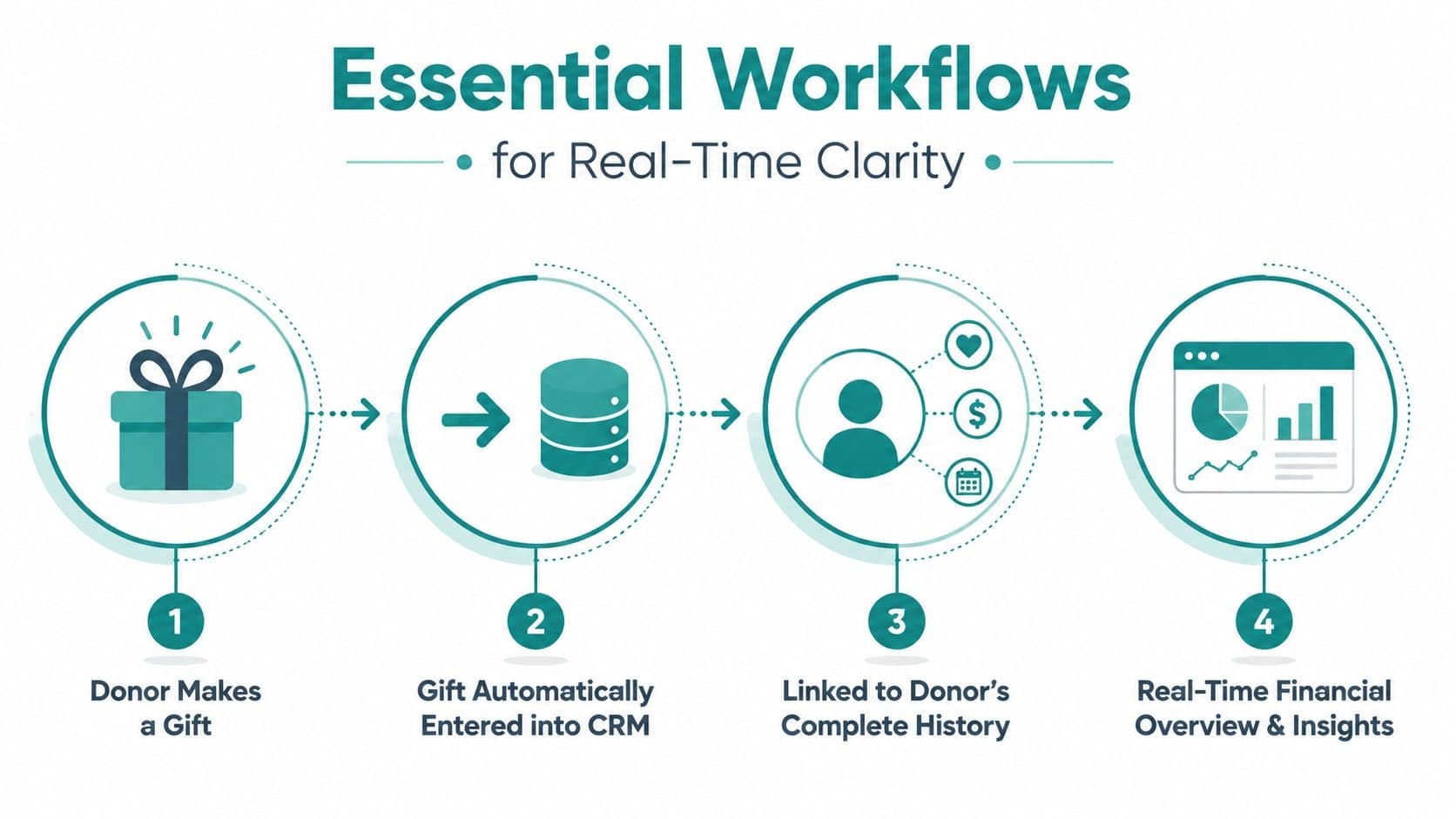
A sound nonprofit CRM treats each gift as part of a larger record. A strong nonprofit CRM should treat every gift as a record linked to the donor's full giving history, not as an isolated transaction, connecting donations to constituent profiles, recurring gifts, pledges, and campaign interactions in one database, as described in DonorPerfect's overview of nonprofit CRM features.
Start with the gift record
If the gift enters cleanly, everything else gets easier. The system should capture the amount, date, campaign, payment source, and donor identity in one motion.
That matters because the next steps depend on it. Your thank-you process, pledge reminders, campaign reporting, and year-end summaries all rely on the same original record.
Keep one supporter history
Many setups fall apart due to siloed donor information. A person attends your gala, volunteers at a school event, responds to an appeal, and starts monthly giving. If those actions live in separate systems, your staff sees fragments instead of a relationship.
A better setup gives you one supporter view that includes:
- Giving behavior: one-time gifts, recurring gifts, pledges, and soft credits
- Engagement activity: events attended, campaigns responded to, communication history
- Volunteer involvement: hours served, roles held, interests, and availability
- Practical service data: receipting status, refund history, and open follow-up tasks
The point isn't a prettier record. The point is that your team can act on current information instead of stale exports.
Automate the pieces donors notice
Donors usually don't see your database. They do notice whether they receive a prompt thank-you, an accurate receipt, and communication that reflects their actual history.
That's why the best workflows automate the obvious next step after the gift. Receipts should send quickly. Pledge reminders should follow a schedule. Staff should be notified when a major supporter gives or when a recurring gift fails.
Don't ignore newer payment channels
Some nonprofits now accept digital assets alongside traditional payment methods. If that's on your radar, this guide to CoinPay solutions for accepting digital currencies is a practical starting point for thinking about how alternative payment channels fit into gift processing and recordkeeping.
A simple workflow test
Ask any vendor to walk through this exact scenario:
- A donor gives online
- The gift enters the system automatically
- The donor's history updates immediately
- The receipt goes out
- The campaign and finance views reflect the same transaction
If the demo requires side notes, later syncing, or manual exports, it isn't real-time clarity. It's delayed cleanup dressed up as automation.
The Critical Link Between Your CRM and Your Books
Here's the uncomfortable truth. A fundraising CRM can be good at donor relationships and still leave your finance team with a mess.
That's why so many executive directors feel disappointed after a CRM purchase. The fundraiser is happier because segmentation, notes, and campaign tracking improved. The controller or bookkeeper is less happy because gifts still need to be checked, exported, mapped, and posted somewhere else.
Fundraising truth and finance truth must match
This gap is widely underexplained. Most guidance on nonprofit CRMs stops short of explaining how to ensure donation records reconcile with restricted funds, grants, and accounting reports, because many CRMs are positioned as a fundraising source of truth while still leaving finance with exports and manual work, as discussed in NetSuite's donor management article.
That's the issue to focus on when you compare products. Not whether the CRM can send an email. Most can. The critical question is whether a gift can move from donor action to financial truth without staff rebuilding the transaction.
Why this matters in ordinary operations
Let's say a donor gives to a scholarship fund, a church building fund, or a restricted youth program. If the CRM records the gift but your books don't reflect the restriction correctly, you now have two versions of reality.
One version is donor-facing. The other is audit-facing.
Those versions need to agree. If they don't, several problems follow:
| Operational need | What happens in a disconnected setup |
|---|---|
| Restricted fund tracking | Staff maintain a separate spreadsheet to confirm balances |
| Grant and pledge visibility | Finance waits for exports before updating reports |
| Board reporting | Development and accounting present different numbers |
| Year-end close | Teams spend extra time reconciling gift detail to the ledger |
Competitors often solve only part of the problem
Bloomerang, DonorPerfect, and similar systems can be strong on donor communications, relationship notes, and fundraising workflows. They've helped many nonprofits move beyond spreadsheets, and that matters.
But many organizations still pair those systems with separate accounting software. That can work if your staff are disciplined and your volume is manageable. It becomes fragile when you have restricted funds, multiple programs, recurring gifts, events, fiscal sponsorship activity, or a lean finance team.
If your CRM ends where accounting begins, your staff become the integration.
This is why some nonprofits look for software that combines donor CRM and accounting in one operating model. If you want to evaluate that approach, this explainer on a CRM with accounting integration is useful.
One option in that category is AlignMint, which combines donor records, fund accounting, volunteers, events, and marketing in a single system. The important point isn't the brand name. It's the design choice. When the gift record and the fund ledger are part of one workflow, you reduce the reconciliation gap that causes most of the monthly stress.
Key Metrics That Answer Your Board's Questions
Boards rarely want more data. They want fewer unanswered questions.
The most useful crm donation management setup helps you answer those questions without a special project. You shouldn't need a development export, an accounting export, and a meeting to decide which one is correct.
The questions behind the metrics
A good board packet usually comes down to a short list:
- Are fundraising efforts working
- Are donors staying engaged
- What cash is available
- Which campaigns deserve more attention
- Where are we drifting off plan
A CRM can help because it improves operating discipline, not because it adds complexity. Nonprofit CRM systems can improve fundraising efficiency by automating repetitive tasks, supporting donor segmentation, and helping teams make data-driven decisions, as described in Beyond Key's discussion of donor CRM value.
The metrics that matter most
You don't need every possible KPI on one screen. You need the handful that change decisions.
Donor retention view
This tells you whether your stewardship is working. If long-time donors are slipping away, you need that signal early enough to act.
Campaign performance view
This helps you compare appeals, events, and seasonal pushes. The useful question isn't which campaign looked busy. It's which one produced support worth repeating.
Current giving pipeline
Pledges, recurring gifts, and expected follow-ups should be visible in one place. Otherwise future revenue lives in staff memory instead of in your reporting.
Fund availability
This is often the hardest question in a disconnected stack. Your board wants to know what is available to spend, not just what has been raised on paper.
Board-ready test: Can you explain restricted and unrestricted availability without opening three files?
If your system can't answer that calmly, you don't have a reporting problem. You have a workflow problem.
For teams that want a practical framework for dashboards and trend review, this guide to metrics and trends for nonprofits is a helpful reference.
A Practical Checklist for Making the Switch
Changing systems feels larger than it is. In practice, most of the effort is deciding what information matters, cleaning it up, and making vendors prove the workflow.
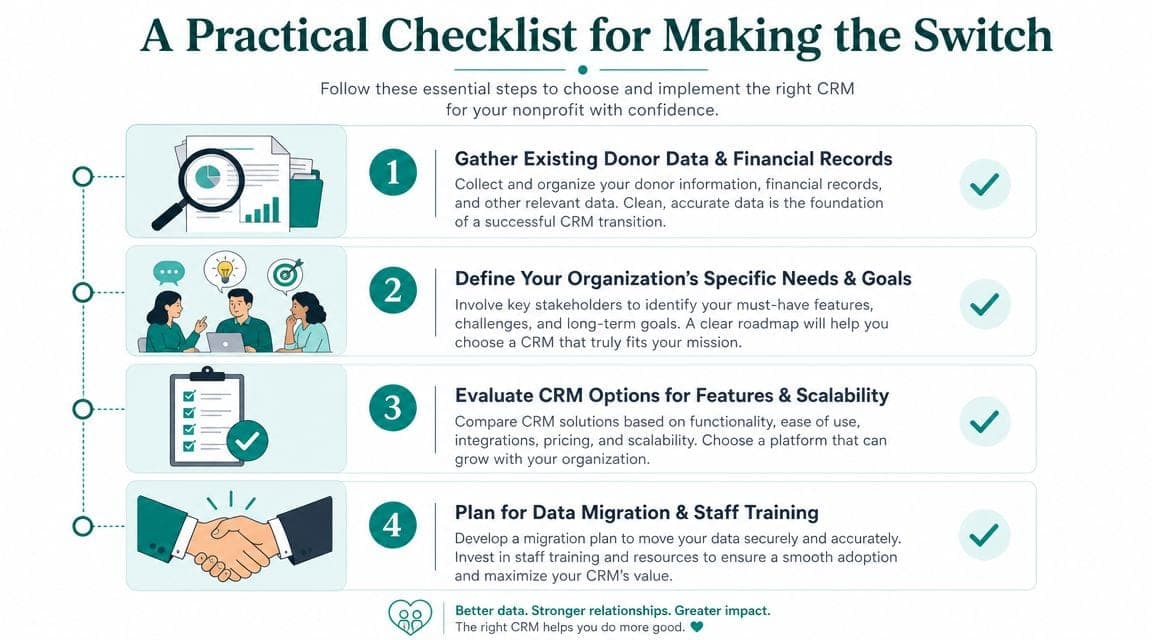
The standard to keep in mind is straightforward. Donation management works best when it is an integrated payment and compliance layer, where the system can handle online and offline gifts, create the donor record, post the transaction, and trigger the correct tax receipt without staff intervention, as outlined in Givebutter's donor management CRM overview.
What to prepare before demos
Most nonprofits already have the information they need. It's just spread across places.
Gather these first:
- Donor records: names, emails, mailing addresses, and communication preferences
- Gift history: one-time gifts, recurring gifts, pledges, soft credits, and event payments
- Fund structure: restricted funds, programs, grants, and current balances
- Payment channels: online forms, checks, events, text giving, stock, or other methods
- Key reports: the reports your board, auditor, and managers ask for regularly
Questions vendors should answer live
Don't settle for feature lists. Ask for a working demonstration.
Use questions like these:
- Show me one online gift from start to finish. I want to see entry, receipt, donor record update, and reporting impact.
- Show me how a restricted gift appears in the books. Not in theory. In the actual workflow.
- Show me how you prevent duplicates. Staff shouldn't have to merge records constantly.
- Show me year-end donor statements. If this takes too many steps, it will become a staff bottleneck.
- Show me what finance sees that development also trusts. Shared truth matters more than specialized screens.
Don't buy a promise that two modules can talk later. Buy a workflow you can watch happen now.
Keep migration plain and manageable
This part doesn't need drama. Set one owner. Decide what legacy data must come over. Drop what nobody uses. Test with real gifts before full launch.
A practical starting point is this nonprofit data migration checklist, which helps teams sort source files, priorities, and cleanup tasks before implementation begins.
The switch goes better when you treat it as an operations decision, not an IT project.
Your Path to Calm and Confident Operations
The goal isn't to become more technical. It's to stop wasting leadership time on preventable reconciliation work.
A sound crm donation management approach gives you one version of the donor, one version of the gift, and one version of the financial truth behind it. That's what lets your development, finance, volunteer, and program teams work from the same record instead of defending separate spreadsheets.
For many nonprofits, the next step is to stop buying disconnected tools one by one. Accounting, donor management, volunteers, events, marketing, online giving pages, and team communication affect each other every week. When they live apart, your staff spend their time translating.
That's why an all-in-one model appeals to practical leaders. It can support true fund accounting rather than QuickBooks classes, keep donor service tied to receipting and reporting, give volunteer activity context, and make AI assistance more useful because the underlying data lives in one place. It also matters when pricing is simple, users aren't charged per seat, and smaller nonprofits have a free entry point.
Calm operations aren't glamorous. They're consistent. You trust the reports, your team knows where to work, and your board gets clear answers without a scramble.
If you want one place for accounting, donor CRM, volunteers, events, marketing, and AI-assisted reporting, take a look at AlignMint. We built it for nonprofits that need donor management and real fund accounting to agree, so your team can spend less time reconciling and more time running the mission.
Ready to try AlignMint with your nonprofit?
Start free — set up donor tools, giving pages, and Minty. Upgrade when you need accounting.