

For related tools, see AlignMint features.
Expense Reimbursement Form for Nonprofits: A Clear Guide
Quick Answer: Expense Reimbursement Form for Nonprofits: A Clear Guide
A nonprofit expense reimbursement form should capture who paid, what they bought, why it served the mission, which fund or grant should pay, who approved it, and whether the receipt is attached. The form should prevent finance from rebuilding the story later.
You're probably dealing with the same scene many nonprofit leaders know too well. A staff member emails a spreadsheet, a board member forwards a photo of a receipt, and someone asks whether the expense should hit a grant or general operating funds.
A good expense reimbursement form fixes more than paperwork. It gives you cleaner books, faster approvals, and fewer compliance headaches, especially when restricted funds and non-employee reimbursements are involved.
Moving Beyond the Reimbursement Spreadsheet Mess
Spreadsheets work until they don't. They're fine for a short season, then one missing receipt or vague note turns reimbursement into detective work.
The problem isn't the form itself. It's that reimbursements often sit outside your actual financial controls, so you end up reconciling the same expense in email, spreadsheets, and your accounting records.
If your finance view still depends on scattered files, it helps to see why so many nonprofits eventually move beyond spreadsheet-based operations. The issue isn't that spreadsheets are bad. It's that they don't hold fund codes, documentation, approvals, and payment history together in one reliable trail.
What leaders actually need
You need a reimbursement process that answers practical questions quickly:
- Which fund paid for this expense
- Who approved it
- Whether the receipt supports the charge
- Whether the request came in on time
- Whether the expense belongs to an employee, volunteer, board member, or contractor
That last point matters more than many generic guides admit. Nonprofits reimburse people who don't sit on payroll, and they often spend against funds with donor restrictions attached.
A reimbursement process should help you answer board and audit questions without rebuilding the story from scratch.
Messy reimbursement habits also create leadership drag. When your program team can't tell what grant line an expense belongs to, the question lands on your desk. When a volunteer submits mileage with no supporting detail, finance has to chase them down later.
A clear system solves this at the front end. The form captures what matters. The documentation standards stay consistent. The approval path matches the kind of expense being claimed.
That's how you stop treating reimbursement as a clerical task and start treating it as part of fund stewardship.
Designing Your Nonprofit Expense Reimbursement Form
A strong form saves time because it asks for the right information once. A weak form creates follow-up emails, coding errors, and avoidable audit stress.
The biggest mistake in generic templates is simple. They collect who spent the money and how much, but they don't collect enough information to tell finance where that money belongs.
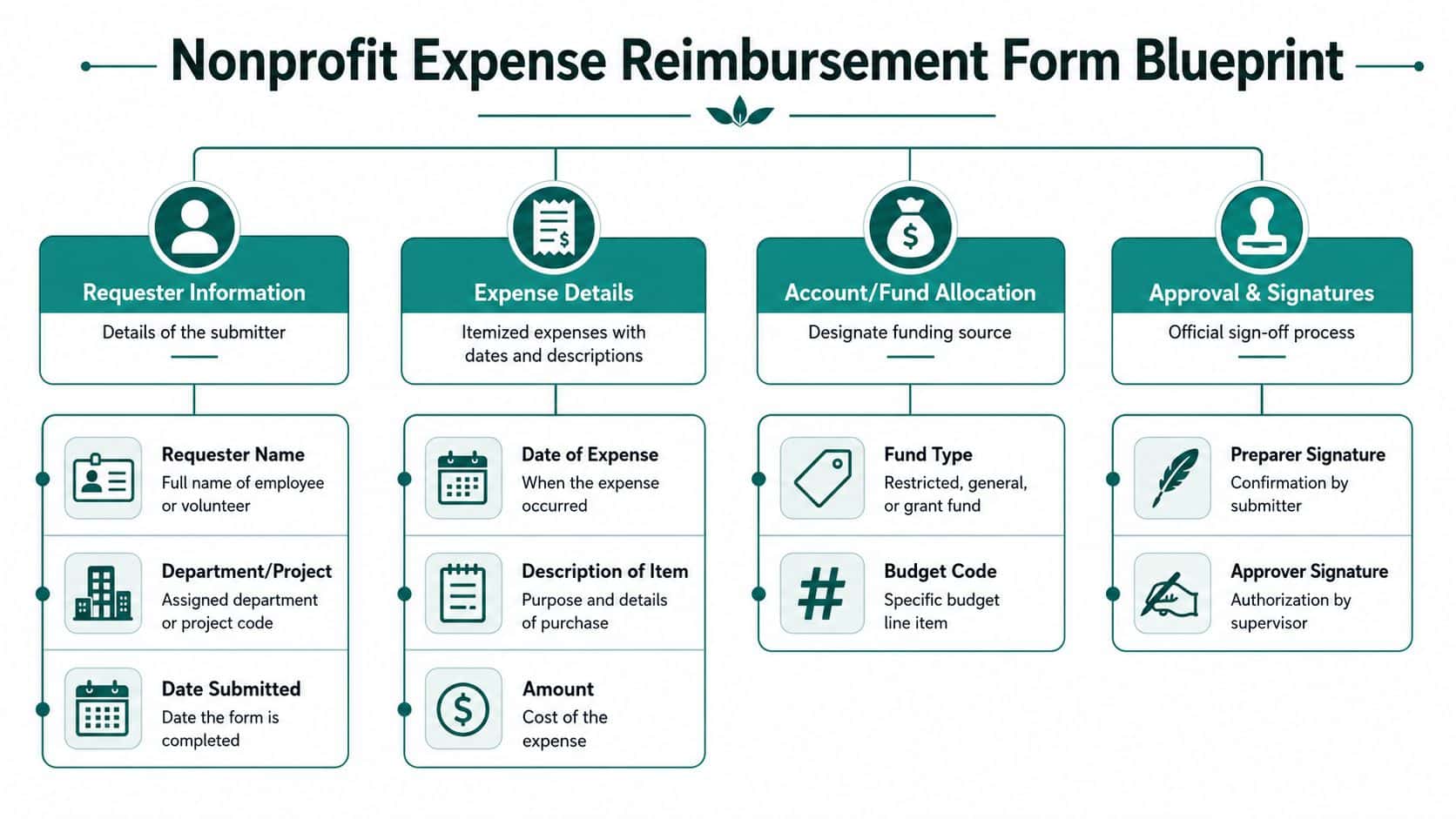
According to AlignMint's discussion of nonprofit reimbursement form gaps, the most common gap in generic expense forms is the failure to address fund accounting nuances, and 68% of small nonprofits struggle with charging reimbursements to specific grants or restricted funds, often leading to audit findings.
The fields your form should always include
Every nonprofit expense reimbursement form should capture the basics clearly:
- Requester identity. Full name and role. This should make clear whether the person is staff, volunteer, board member, or contractor.
- Submission date. You need this to enforce your deadline and keep reimbursements moving.
- Expense date. The date of purchase or travel matters for coding and review.
- Business purpose. Require a plain-language explanation. "Lunch" is weak. "Lunch with school partner to review after-school program launch" is useful.
- Expense category. Travel, meals, supplies, lodging, mileage, and similar categories make review easier.
- Exact amount. Don't accept rounded estimates.
- Receipt attachment confirmation. The form should make the submitter confirm that each line item has support.
The nonprofit-specific fields that matter most
A nonprofit form meaningfully differs from a basic business template.
Use fields for:
| Field | Why it matters |
|---|---|
| Fund code | Tells finance whether the expense belongs to unrestricted, restricted, or grant-funded activity |
| Program code | Connects spending to the ministry, school, service line, or initiative |
| Grant code | Supports reporting back to grantors and helps track drawdowns correctly |
| Project or event name | Helps when one fund supports several activities |
| Pre-approval reference | Useful for travel, conferences, and larger purchases |
| Non-employee status | Flags the need for different review and documentation |
If you run a church, school, or fiscal sponsorship model, these fields matter even more. Expenses often serve one mission area but must still be tied to the right funding source.
Practical rule: If your form can't capture fund, program, and grant coding at the moment of submission, your finance team will do that work later under pressure.
Keep the form short, but not vague
Too many fields can frustrate your team. Too few fields create accounting cleanup later.
A practical compromise is to keep the first screen simple, then show extra fields only when needed. For example, if someone selects "grant-funded expense," the form should prompt for grant code and program. If they select "volunteer reimbursement," it should prompt for non-employee details and any mileage record.
That same logic is useful when you adapt a social club reimbursement policy template for nonprofit controls. The structure may start simple, but your approval and coding needs are different because donor intent and restricted funds matter.
What works better than a generic template
QuickBooks can be a familiar accounting tool, and many nonprofits use it for basic bookkeeping. Formstack can also help teams create digital forms. Both can be useful in the right setting.
But generic forms often separate submission from accounting. That means staff enter the expense once, then finance re-enters or reclassifies it later. For nonprofits, that break causes most of the trouble. The form needs to gather enough detail to support fund accounting from the start.
Getting Receipts and Documentation Right Every Time
Documentation saves time when the rules are clear before people spend money. It wastes time when staff guess what counts and finance has to clean it up later.
The easiest standard to enforce is this one. If a line item doesn't have support, it isn't ready for review.
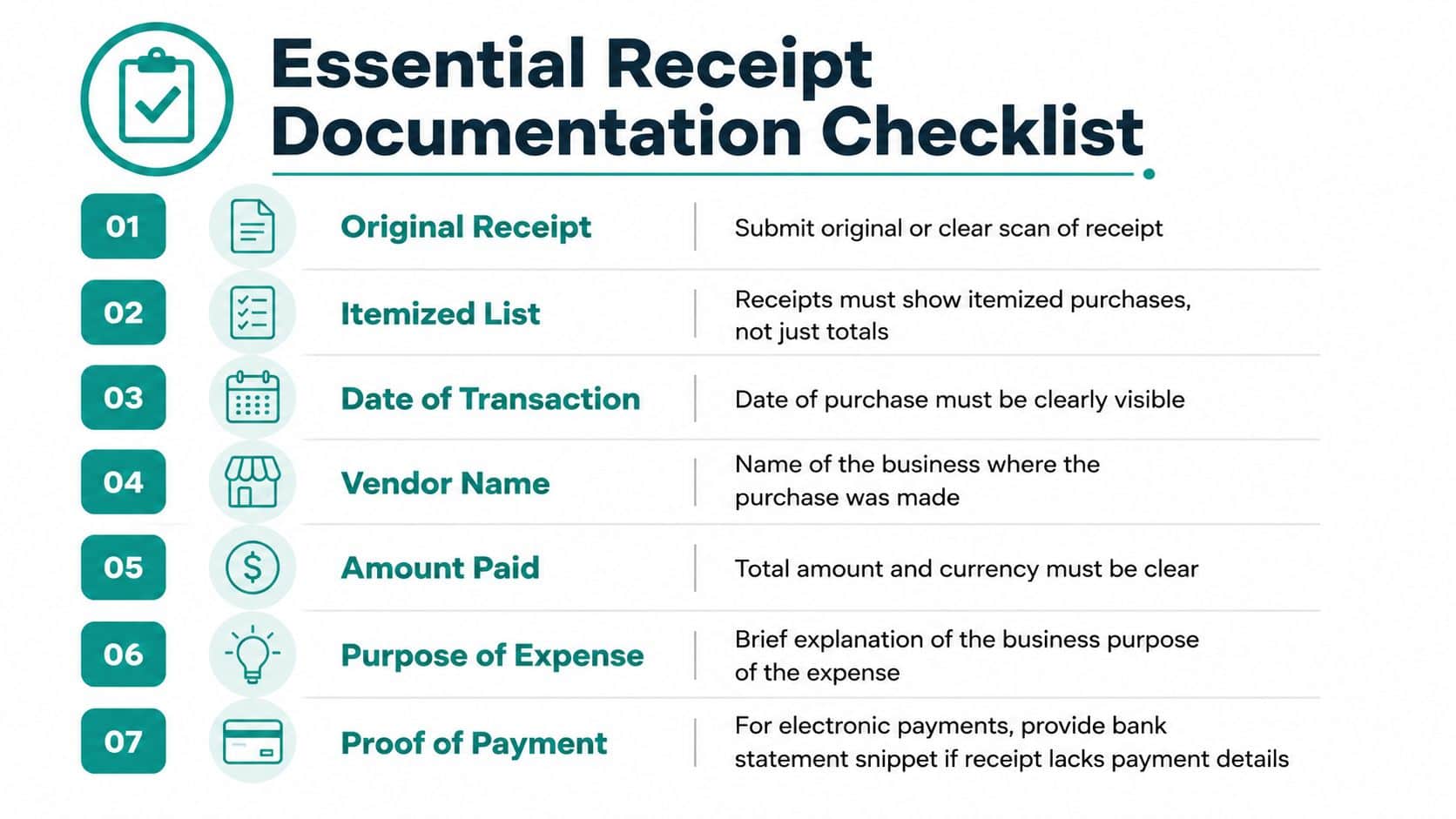
Institutions often enforce a 60-day submission deadline, and if a report arrives after that window, the reimbursement may be treated as taxable income to the employee. A common standard also requires itemized receipts for any single expense of $75 or more, as outlined by UC Berkeley reimbursement guidance.
The documentation rule set worth adopting
Use a short, firm checklist for every request:
- Itemized receipt when required. Don't accept a credit card slip alone when the itemized receipt is required.
- Business purpose written in plain language. Someone outside the program team should still understand why the expense mattered.
- Date and vendor visible. If either is missing, finance can't verify the charge properly.
- Proof attached to each line item. One receipt should match one expense entry, not a loose batch at the end.
- Submission within your deadline. This protects both the organization and the person being reimbursed.
A lot of back-and-forth disappears once people know these rules aren't optional.
What staff and volunteers often get wrong
The most common problems are ordinary, not dramatic. A meal receipt shows only the card total. A traveler combines several purchases into one line. A volunteer submits weeks later and can't remember which event the expense supported.
Those aren't bad intentions. They're signs that your process depends too much on memory.
The more your reimbursement process relies on people remembering details later, the slower and weaker it becomes.
A simple way to improve consistency is to give everyone one reference sheet and one submission path. If your team needs help capturing documents as they happen, a guide to receipt scanning for nonprofit records can reduce missing paperwork and cut down on rework.
Set expectations before approval starts
Finance shouldn't be the first team discovering missing support. Department leaders should know what a complete request looks like before they approve it.
That means your policy should say, in plain language, when receipts are required, what counts as itemized support, and how quickly requests must be submitted. Once those expectations are written down and repeated often, approvals move faster because fewer incomplete requests enter the queue.
Creating an Approval Workflow That Saves You Time
The right workflow gives you fewer interruptions. The wrong one turns reimbursement into a parade of forwarded emails and missing signatures.
Most delays don't come from one hard decision. They come from unclear routing. People don't know who approves first, finance gets pulled in too early, and leaders review requests without enough context.
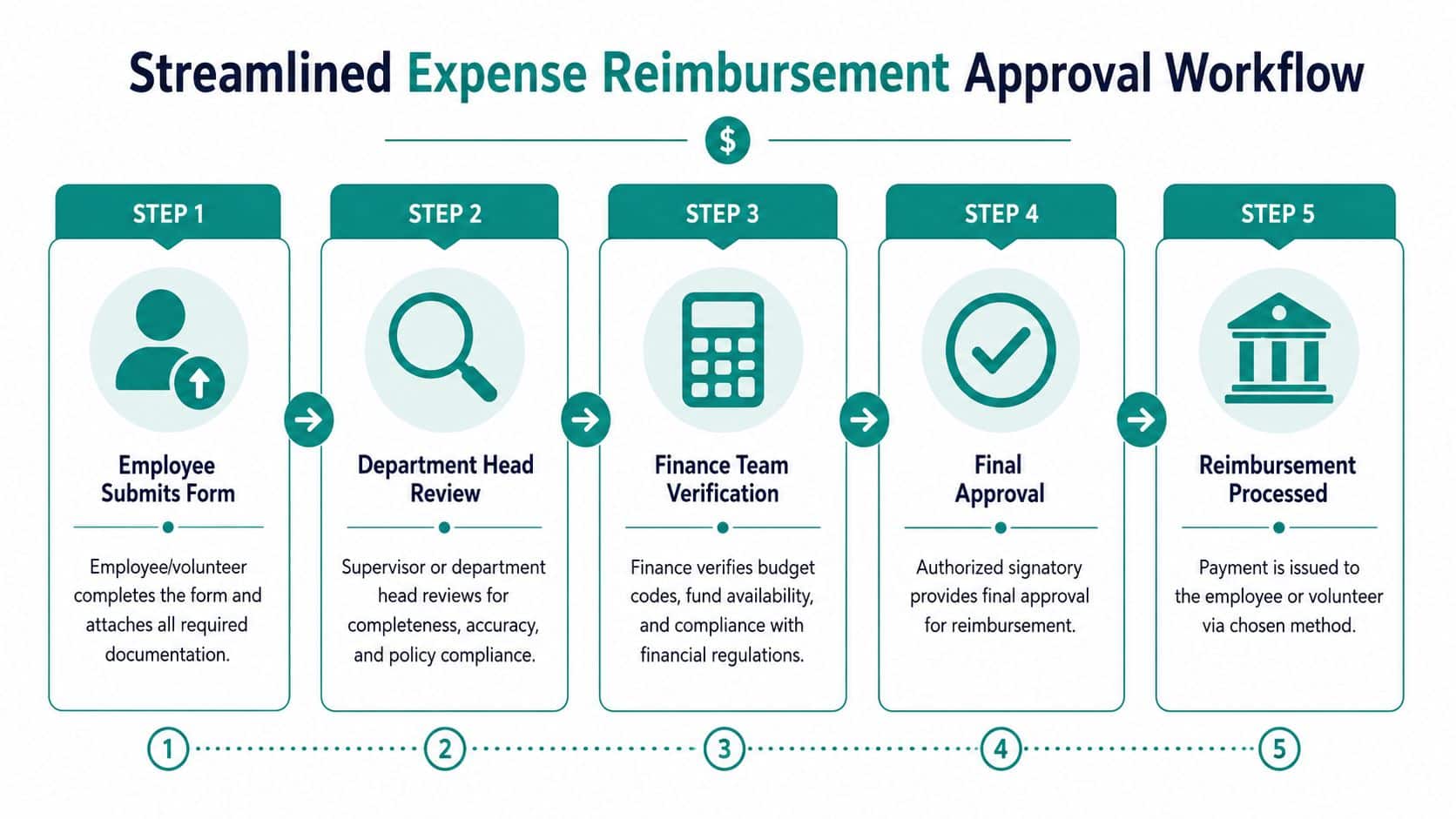
A strong process uses automated approval routes that send claims to specific managers based on spending levels or project codes, which reduces manual back-and-forth and helps enforce policy automatically, according to Smart Receipts' reimbursement workflow guidance.
Manual routing versus policy-based routing
Here's the difference in practice:
| Approach | What usually happens |
|---|---|
| Email and spreadsheet routing | Requests sit in inboxes, approvals get skipped, and finance has to check coding manually |
| Policy-based routing | The request goes first to the manager who knows the program, then to finance with the right context attached |
When a reimbursement ties to a grant, the program lead should usually review it before finance issues payment. That person knows whether the purchase fits the grant purpose and budget.
When a reimbursement is general operating, the route may be simpler. The point is that not every expense needs the same path.
Build approval around real nonprofit decisions
A practical workflow often looks like this:
- Submitter completes the form with expense details, fund coding, and attachments.
- Direct supervisor or program lead reviews for business purpose and policy fit.
- Grant or fund owner reviews when needed if the expense hits restricted money.
- Finance verifies coding and documentation before payment.
- Authorized final approver signs off when your policy requires it.
That structure respects both operations and stewardship. It also protects your time, because you're not acting as the first reviewer for every minor request.
Where generic systems fall short
QuickBooks is strong for general bookkeeping and familiar to many finance teams. But it often requires manual checking when you're trying to enforce grant restrictions at the approval stage, because the submission and approval logic may live outside the accounting record.
A standalone form builder can help collect requests, but it may create a second system your team has to manage. That's where approvals slow down. The request lives in one tool, the budget sits in another, and the final accounting happens somewhere else.
If you're refining controls across the whole organization, it helps to review a broader nonprofit budget approval workflow so reimbursement decisions follow the same discipline as your budgeting process.
Approval should happen closest to the program first, and closest to the books second. Reversing that order creates friction.
Keep exceptions visible
Your process should also flag exceptions early. Non-employee reimbursements, restricted fund charges, and unusual travel claims deserve a different review path than routine staff expenses.
That doesn't mean making the workflow complicated. It means making it intelligent enough to notice when a request needs one more set of eyes.
Handling Special Cases Restricted Funds and Volunteers
Many reimbursement systems struggle at this stage. They work fine for staff office supplies, then fail when a board member travels to a donor meeting or a volunteer buys materials for a church event funded by a restricted gift.
Those are not edge cases in nonprofit work. They're normal operations.

A critical compliance point for auditors is tracing donor restrictions from the original agreement directly to the general ledger. That requires saving donor designation letters and entering the correct fund codes from the moment a gift is entered, as explained in Chazin & Company's guidance on restricted funds.
Restricted fund reimbursements need more than an account code
If a reimbursement will be paid from a restricted fund or grant, your form should require three things before approval:
- The exact fund or grant code
- A short explanation of how the expense fits the restriction
- Approval from the person responsible for that fund or program
That matters because reimbursements don't just affect cash. They affect grant balances, donor reporting, and your ability to show that funds were spent as intended.
A donor restriction should never live only in someone's memory or in the wording of an email. It should be reflected in the coding and documentation attached to the expense.
For organizations that need a stronger handle on this, guidance on restricted funds and coding controls can help shape your internal process.
Non-employee reimbursements need their own lane
Volunteers, board members, and contractors shouldn't be pushed through a staff-only process. Their forms should identify them clearly as non-employees and ask for details that make sense for their role.
For example:
- Volunteer reimbursements often need event or program context.
- Board reimbursements may need clearer approval authority because the submitter isn't in a staff reporting line.
- Contractor reimbursements should be checked against contract terms so you don't reimburse something already covered by their fee.
Mileage is another place where nonprofits need a separate habit for non-employees. The University of Colorado guidance on creating a non-employee expense report highlights the importance of handling non-employee reporting distinctly. For charity mileage, the available reference in the source material notes 14 cents per mile in 2026 as a future-year figure, so if you use mileage reimbursement, label your policy by tax year and keep logs complete.
If volunteers are central to your mission, their reimbursement process should be as clear as your donor acknowledgement process.
One record should tell the whole story
When a volunteer buys supplies for a grant-funded school program, your records should show:
| Needed record element | Why it matters |
|---|---|
| Volunteer status | Shows this wasn't a payroll reimbursement |
| Program or event connection | Explains mission purpose |
| Fund or grant code | Ties the expense to the right source of support |
| Receipt or mileage log | Supports the amount claimed |
| Approver with fund knowledge | Confirms the expense fits the restriction |
That single trail is what makes audits less painful. It also helps when your development, finance, and program teams need to answer the same question from different angles.
Avoid Common Pitfalls and Unify Your Operations
Most reimbursement trouble comes from a handful of repeated mistakes. The form is too generic. The documentation standards aren't clear. The approval path depends on chasing people. Training happens once and then disappears.
One of the most common problems is simple. People don't fully understand your rules. According to Formstack's reimbursement process guidance, a high-frequency pitfall is the lack of employee training on reimbursement policy details, timelines, and which expenses are non-reimbursable. Organizations improve outcomes when they provide tutorials and FAQs.
The mistakes worth fixing first
Start with these:
- Unclear reimbursable versus non-reimbursable expenses. If staff and volunteers have to guess, finance will spend its time correcting preventable errors.
- Disconnected systems. A digital form by itself isn't enough if accounting, donor records, volunteer records, and budget oversight all live in separate tools.
- No special handling for restricted or non-employee requests. Generic business processes rarely fit nonprofit reality cleanly.
Tools like Formstack are useful for building forms. QuickBooks is familiar and capable for many accounting tasks. Their strength is that they're widely known and can solve part of the problem.
The gap is coordination. If one tool holds the request, another holds the accounting, and a third tracks donors or volunteers, your team keeps re-entering information and checking the same facts in different places.
Why unified operations matter
When your systems connect, reimbursement stops being an isolated admin chore. It becomes part of a larger operating picture that includes fund accounting, donor management, volunteer management, team communication, fiscal sponsorship oversight, church and school workflows, online giving pages, and your marketing suite.
That's also where AI intelligence proves useful. It's not about flashy automation. It's about getting clear answers from your real records, without exporting data into another spreadsheet.
For many organizations, the cleaner path is an all-in-one setup where accounting, CRM, volunteers, events, and communications live together. That reduces duplicate entry, keeps fund coding closer to the original transaction, and gives leadership faster answers.
If you want one system built around true fund accounting rather than QuickBooks classes, with a free tier for nonprofits under $100K, plan-based user allowances (1 on Free, up to 10 on Plus, up to 25 on Pro, and unlimited on Enterprise), a built-in marketing suite, and Minty assistant support, take a look at AlignMint. We built it as an all-in-one platform for nonprofit operations, so your expense reimbursement form connects to the rest of your work instead of becoming one more disconnected process.
Ready to try AlignMint with your nonprofit?
Start free — set up donor tools, giving pages, and Minty. Upgrade when you need accounting.