

QuickBooks Nonprofit Accounting Software: A Director's Guide
Comparison data as of May 2026. Features and pricing may change.
For related tools, see AlignMint features.
Quick Answer: QuickBooks Nonprofit Accounting Software: A Director's Guide
QuickBooks nonprofit accounting software can be a practical starting point for smaller organizations, especially when the bookkeeping is simple and staff already know the product. The limits usually appear when restricted funds, grants, donor records, functional expense reporting, and board reporting need to stay connected without class-tracking workarounds and side spreadsheets.
If you're using quickbooks nonprofit accounting software, you're probably asking a fair question. Is it helping your team stay clear and compliant, or is it creating extra work every month.
For many nonprofits, QuickBooks is the obvious starting point. This guide gives you a practical look at where it works well, where it starts to strain, and how to tell when your software is no longer serving the mission.
Is Your Accounting Software Working For or Against You?
You know the scene. A board packet is due, your finance person is pulling reports, and someone is still fixing labels in Excel so the numbers read like nonprofit statements instead of business reports.
That doesn't mean you've chosen badly. It means you're working with software that started life as a general business tool, while your organization has donor restrictions, grant rules, program budgets, and a board that needs clear answers fast.
QuickBooks is common for a reason. It's familiar, widely supported, and often good enough at the beginning. But "good enough" can become expensive when your team spends too much time translating your books into nonprofit language.
Practical rule: If your staff has to explain the accounting system every time they present the numbers, the software is creating work instead of removing it.
What matters isn't whether QuickBooks is popular. What matters is whether it still fits the way your nonprofit runs.
Why Most Nonprofits Start with QuickBooks
QuickBooks usually enters the picture for sensible reasons. Your bookkeeper knows it. Your CPA knows it. A board treasurer may have used it somewhere else. That familiarity lowers the risk of getting started.
It also has reach. QuickBooks holds an 81% market share in accounting software among nonprofits, which has helped make it the default option for organizations under $5M in revenue with simpler operations, especially when TechSoup discounts are part of the decision (Complete Balance CPA on QuickBooks for nonprofits).
It handles the basics well
If your organization is small, your funding is straightforward, and your reporting needs are still manageable, QuickBooks can do the core accounting jobs you need.
That includes things like:
- Recording donations: You can enter individual gifts, recurring gifts, and grants.
- Producing standard reports: It can generate reports such as the Statement of Financial Position, Statement of Activities, and Statement of Functional Expenses when set up properly.
- Supporting oversight: Boards, donors, and auditors can get the basic financial picture without building everything from scratch.
- Working with common tools: It connects with many apps, which is helpful if you already have a donation system or CRM in place.
For a newer nonprofit, that can be enough. If you have one main program, a modest budget, and only a handful of restricted funding sources, QuickBooks often feels like a practical choice.
It gives you a familiar path
A lot of directors don't want a finance experiment. They want something known, stable, and easy to hire around. That's where QuickBooks earns its reputation.
Bookkeepers are easier to find. CPAs are used to cleaning it up. Staff can learn the basics without a long adjustment. If you want a grounded overview of that starting point, this guide to QuickBooks Online for nonprofits is a useful companion.
QuickBooks makes sense when your accounting is still mostly bookkeeping, not grant management by another name.
Its best fit is narrower than many teams realize
The strength of QuickBooks is not that it was built for every nonprofit. Its strength is that it can be adapted for many nonprofits, especially those with simpler needs.
That distinction matters.
QuickBooks works best when your team can keep the setup disciplined from day one. It also works best when your financial structure is still relatively clean. Once you have more grants, more reporting audiences, or more pressure to show restricted balances clearly, the workarounds start to matter.
That doesn't make QuickBooks a bad choice. It makes it a starting point, not a permanent answer for every organization.
The Fund Accounting Workaround Explained
The biggest point of confusion with quickbooks nonprofit accounting software is fund accounting. Many directors assume that if QuickBooks can label nonprofit reports, it must also enforce nonprofit fund rules in the background. It doesn't work that way.
Think of true fund accounting like keeping money in separate, clearly marked envelopes. One envelope is unrestricted. Another is for a grant. Another is for a scholarship fund. Another is for a church building project. You can see what belongs where, and the system helps stop accidental mixing.
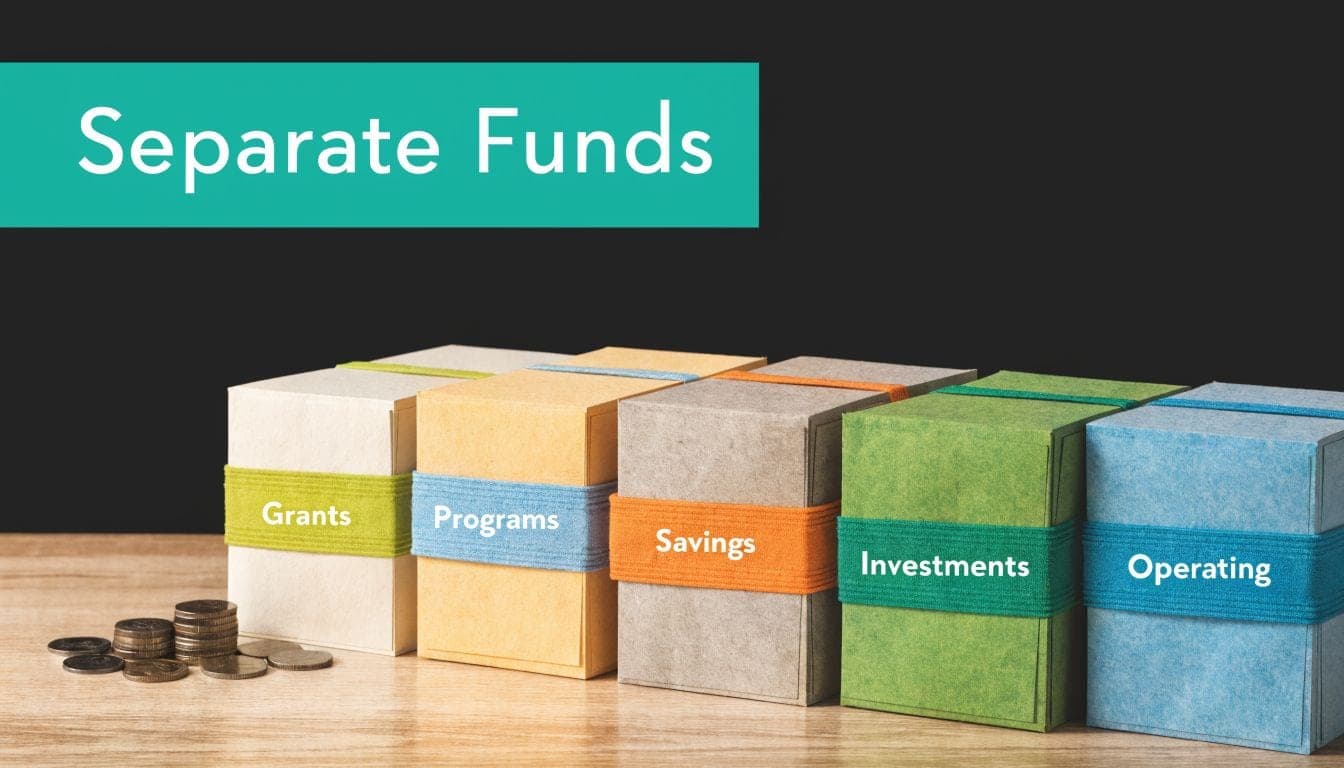
QuickBooks does not give you those separate envelopes natively. It gives you a way to label transactions so you can imitate that structure.
How class tracking works
In QuickBooks Online Plus or Advanced, nonprofits typically turn on class tracking. That lets your team assign a class to each transaction so income and expenses can be segmented by fund, program, or grant.
The setup itself is straightforward. The hard part is what follows. Every entry has to be classified correctly, every time, by everyone who touches the books.
That's the workaround. It's manual discipline standing in for software enforcement.
If you'd like a plain-English explanation of what true nonprofit accounting is meant to do, this article on fund accounting for nonprofits lays out the underlying model well.
Where the risk shows up
QuickBooks requires enabling class tracking to segment transactions by fund. However, this lacks true fund accounting enforcement, meaning misclassification can lead to commingled funds and require over 20 hours of mid-year corrections, risking non-compliance with donor restrictions (Wiss on QuickBooks for nonprofits).
That sounds technical. In practice, it means a simple coding mistake can create real trouble.
A few common examples:
- A restricted grant expense gets posted without the right class: Your grant balance is now wrong.
- A deposit is coded to the wrong bucket: Your board report shows money as available when it isn't.
- Staff members classify transactions inconsistently: Month-end turns into detective work.
If your accounting system depends on every person remembering every rule on every entry, the system is fragile.
What this means for a director
You don't need to become an accountant to understand the trade-off. QuickBooks can help you report by fund, but it won't reliably protect the integrity of those funds on its own.
That's why some nonprofits manage fine in QuickBooks for years, while others struggle early. The difference usually isn't effort. It's complexity.
For a very small nonprofit, the workaround may be manageable. For a grant-heavy organization, a fiscal sponsor, or a school or church with multiple designated funds, the manual nature of class tracking starts to create avoidable risk.
Clear Signs You Have Outgrown QuickBooks
Outgrowing QuickBooks rarely happens in one dramatic moment. It usually shows up as steady irritation. Reports take longer. Staff rely on side spreadsheets. Confidence drops, even when the books are technically closed.

Most content on QuickBooks for nonprofits overlooks common setup failures. Industry surveys show 70% of nonprofits find class tracking workarounds time-intensive, and many eventually switch due to scalability issues with grant reporting and functional expense allocation (Intuit Australia on nonprofits).
The symptoms directors notice first
You may have outgrown QuickBooks if any of these feel familiar:
- You need a spreadsheet to explain a QuickBooks report. If the official report isn't board-ready, your team is doing translation work every month.
- You can't answer restricted fund questions quickly. A director should be able to ask, "How much is left in this grant?" and get a clean answer.
- Audit or Form 990 prep feels like reconstruction. When reporting season arrives, staff shouldn't have to rebuild the year from exports.
- Your program leads don't trust the numbers. If managers keep shadow budgets outside the accounting system, the system has lost credibility.
- Your fundraising and finance data don't match. Donor records in one tool and deposits in another create confusion that spreads across the organization.
The pain gets sharper with multi-entity work
This gets even harder if you're overseeing more than one operating unit, sponsored project, campus, church ministry, or school program. In those cases, you're not just coding transactions. You're trying to tell several financial stories at once from one general ledger structure.
If that's your reality, this guide to multi-entity nonprofit accounting can help you think through what the software should be handling for you.
A nonprofit doesn't outgrow QuickBooks because it failed. It outgrows QuickBooks because the organization now needs software that understands nonprofit structure without constant human correction.
A quick self-check
Ask yourself these questions:
| Question | If the answer is yes |
|---|---|
| Do we maintain key finance reports in Excel after closing the books? | Your accounting system isn't delivering the final answer |
| Do we track grants in a separate sheet to stay safe? | Your fund structure lives outside the ledger |
| Do staff avoid entering transactions because coding is confusing? | Process complexity is raising error risk |
| Do leaders wait too long for useful reports? | The delay is now operational, not just administrative |
If several of these hit home, the issue isn't training alone. It's that your software asks too much from your people.
QuickBooks vs All-in-One A Director's Comparison
When directors compare software, they often compare monthly subscription prices first. That's understandable, but it misses the bigger decision.
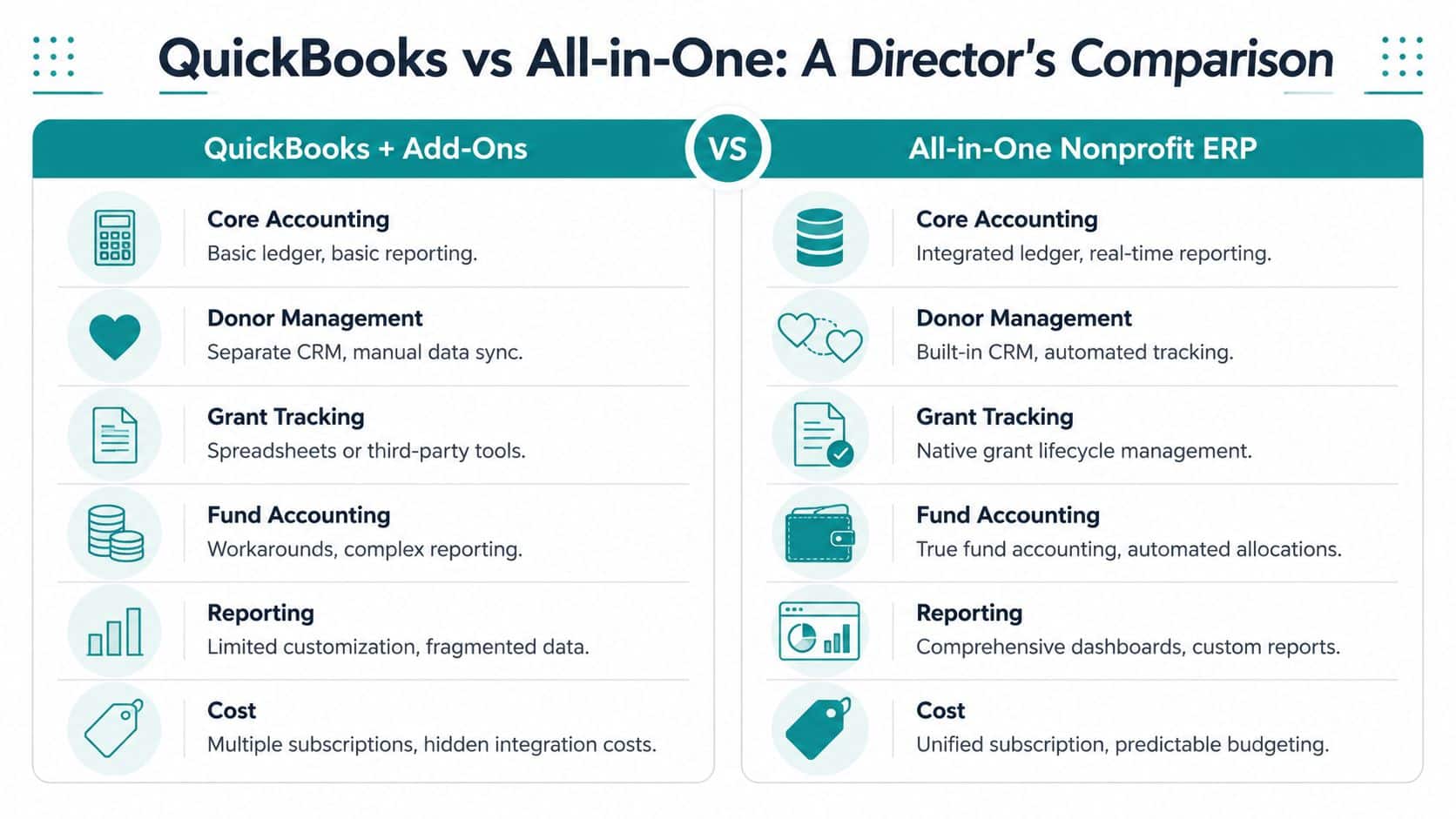
You're really choosing between two operating models. One is QuickBooks plus add-ons. The other is an all-in-one nonprofit platform where accounting, donor records, volunteers, events, and communications live in the same place.
The QuickBooks plus add-ons model
This model is common because it grows gradually. You start with QuickBooks. Then you add a donor CRM. Then a volunteer tool. Then email software. Then event software. Each purchase feels reasonable by itself.
The trouble is that each tool solves only its own part of the problem.
QuickBooks pricing starts low but often requires 2-3 additional tools for CRM, donations, or volunteers. This can inflate the total cost of ownership by 50-100%, often exceeding $500/year in extras, a hidden cost not present in all-in-one platforms with free tiers (Givebutter on QuickBooks pricing for nonprofits).
The cost isn't only financial. It also shows up in daily friction:
- Data has to move between systems: Gifts entered in one place still need to align with deposits and reports elsewhere.
- Staff learn multiple interfaces: That raises training time and lowers consistency.
- Reporting gets fragmented: Finance, development, and operations are looking at different versions of reality.
- Responsibility becomes muddy: When numbers don't match, teams spend time deciding which system is right.
The all-in-one model
An all-in-one nonprofit platform takes a different approach. Instead of adapting business accounting and connecting separate tools around it, the platform starts with nonprofit operations as the center.
That matters most when your organization needs more than bookkeeping.
You may need true fund accounting, not class workarounds. You may need donor management tied directly to accounting. You may need volunteer management, online giving pages, marketing tools, team communication, fiscal sponsorship workflows, or support for churches and schools with designated funds and recurring community activity.
A strong all-in-one system can also reduce the usual seat-count headaches by allowing broad staff access without per-user penalties. It can give small organizations a simpler entry point too, especially if there's a free tier for nonprofits under $100K and no need to stitch together several separate subscriptions.
For a closer look at that model, this overview of all-in-one nonprofit management software is worth reading.
Director's test: If one donor gift touches three systems before it appears in a useful report, your software stack is too fragmented.
Comparing your options
Here is the practical difference.
| Capability | QuickBooks + Add-ons | All-in-One Platform (like AlignMint) |
|---|---|---|
| Accounting foundation | General accounting adapted for nonprofits | Nonprofit operations designed into the accounting structure |
| Fund accounting | Class tracking workaround | Native restricted funds, grants, and program tracking |
| Donor management | Separate CRM or fundraising app | Built-in donor records tied to finance |
| Volunteer management | Separate volunteer tool | Built into the same operating system |
| Online giving and events | Usually separate tools | Included within one platform |
| Marketing and outreach | Email or text tools added separately | Built-in marketing suite |
| AI help | Often absent or split across vendors | One assistant working from your live nonprofit data |
| Fiscal sponsorship | Requires custom processes and manual reporting | Better suited to multi-project oversight |
| User access | May vary by plan and product | Often simpler access across the organization |
| Reporting | Pulled from several systems, then reconciled | Shared dashboards and unified reporting |
Which one fits when
QuickBooks plus add-ons can still be the right answer if your nonprofit is relatively simple and your team already has trusted tools around it. There's no prize for switching early if your current setup is calm and accurate.
But once the add-ons start replacing clarity instead of adding it, the structure itself becomes the problem. That's usually the point where an all-in-one platform stops sounding like a big change and starts looking like basic operational common sense.
Is Switching Your Software Worth the Effort?
Most directors don't stay on the wrong software because they love it. They stay because switching sounds tiring.
That's reasonable. Any software move touches finance, fundraising, staff habits, and old data. If you've been burned by messy implementations before, caution is healthy.

The real comparison is not effort versus no effort
The primary comparison is short-term migration effort versus long-term daily drag.
Keeping a strained setup also takes work. Your team exports reports. They correct coding mistakes. They reconcile donor records against accounting records. They prepare for board meetings by translating, not just reporting.
That work doesn't feel like a project because it's familiar. But it still costs attention.
A sound migration is phased
A responsible switch shouldn't ask your staff to change everything overnight. The best moves happen in stages:
- Clean the essentials first. Opening balances, active funds, current grants, donors, and vendors matter most.
- Import with structure. Good software partners provide templates and guide the field mapping.
- Run core processes early. Start with gifts, payables, and standard reports before tackling every edge case.
- Train by role. Finance, development, and operations don't need the same instruction.
- Retire side spreadsheets gradually. Don't force confidence. Replace manual work as the system proves itself.
Switching is worth it when your new system removes recurring pain, not just when it adds new features.
What to look for before you move
The best predictor of a successful switch isn't flashy software. It's practical support.
Look for a vendor that can explain reporting in plain language, handles imports carefully, and understands nonprofit realities like restricted funds, donor acknowledgments, grant tracking, volunteer records, and board reporting. If you're reviewing options, this roundup of the best nonprofit accounting software can help frame the market in a useful way.
If your current setup still works, you don't need urgency for its own sake. But if your staff is compensating for the system every week, delay has a cost too.
Find Your Path to Financial Clarity
If you take one thing from this guide, let it be this. QuickBooks is often a reasonable starting point, but it isn't automatically the right long-term home for every nonprofit.
For some organizations, it's still enough. If your funding is simple, your reporting is under control, and your team isn't relying on side systems to keep the books meaningful, staying put may be the practical decision.
Three paths that make sense
Path one is stay and tighten. If you're small and stable, keep QuickBooks and improve setup discipline. Clean up classes, reporting, and internal processes. This is often enough for a young nonprofit with limited complexity.
Path two is review your inflection point. If grants are getting harder to track, restricted balances take too long to answer, or your board reports need too much manual cleanup, you're at the point where software fit deserves serious attention.
Path three is move to a nonprofit-native platform. If finance, fundraising, volunteers, events, and communications are all split across separate systems, the next smart move may be consolidation rather than another add-on.
Keep the mission in view
Software isn't the mission. But it does affect how much time your people spend serving it.
Clear systems also support better relationships. If you're strengthening fundraising alongside financial cleanup, this practical resource on building donor loyalty for charities adds helpful perspective on keeping supporters engaged over time.
One final test is simple. If your software gives you confidence, keep using it. If it gives you hesitation every time someone asks for a clear answer, it's time to look for something better.
If you're weighing whether to stay with QuickBooks or move to an all-in-one nonprofit platform, AlignMint is worth a look. We built it for nonprofits that want true fund accounting, built-in donor and volunteer management, online giving, events, marketing, team communication, and Minty in one place. If your organization is under $100K, you can start with our free tier, or schedule a no-pressure conversation to see whether it fits the way your team works.
Ready to see how AlignMint fits your workflow?
Schedule a free walkthrough — we will help you map donors, funds, and migration steps.