For related tools, see Alignmint features.
Volunteer Management Software: Top Choices for Nonprofits
Quick Answer: Volunteer Management Software: Top Choices for Nonprofits
Volunteer management software helps nonprofits keep volunteer profiles, scheduling, communication, hour tracking, and reporting in one reliable system. The best fit reduces manual cleanup and connects volunteer activity to donor records, events, and finance when possible.
Your volunteer coordinator is chasing three email threads, your board wants cleaner reports, and someone just asked for last quarter's hours by program. Meanwhile, essential work of caring for volunteers keeps getting pushed aside by clerical cleanup.
That's usually the moment leaders start looking at volunteer management software. The good news is that the category is no longer experimental. It's a mature part of nonprofit operations, and the right system can bring order to scheduling, communication, reporting, and supporter records without adding more chaos.
Are Spreadsheets Draining Your Volunteer Program
Most volunteer programs don't break all at once. They fray at the edges.
A spreadsheet starts as a quick fix. Then it becomes the master list for names, phone numbers, availability, waivers, and hours. Soon your team is checking that file against inboxes, paper sign-in sheets, and texts from volunteers who need to switch shifts. Nothing feels impossible, but everything takes longer than it should.
If that sounds familiar, you're in good company. Volunteer management software is a large and growing software category, not a niche side tool. Business Research Insights estimates the global market at about USD 2.2 billion in 2026, with a projection of USD 5.1 billion by 2035 and a projected 11.2% CAGR over that period, which signals that many nonprofits and mission-driven organizations now treat these systems as core operating tools, not optional add-ons (Business Research Insights market report).
The hidden cost of making do
The problem with spreadsheets isn't that they're bad. It's that they don't hold a living program together very well.
You can store names in a sheet. You can't easily tell who is available on Tuesdays, who still needs a waiver, who worked at the food pantry last month, and who should get the next family event invitation. That usually lives in staff memory, scattered notes, or somebody's inbox.
Here's what that looks like in practice:
- Hours are hard to trust because they come from paper forms, emailed estimates, and late follow-up.
- Communication gets blunt because staff send broad messages instead of reaching the right volunteers.
- Board reporting becomes a scramble because no one source holds the full record.
- Volunteer experience slips because people get reminders late, or not at all.
Practical rule: If your team spends more time reconciling volunteer data than acting on it, the system has stopped serving the mission.
That's why many organizations eventually move past spreadsheets. The question isn't whether a sheet can track volunteers. It can. The question is whether it can do that while your program grows, staff turns over, and reporting demands increase.
If your files are doing too much, it helps to see how spreadsheets create nonprofit data migration problems. The pattern is common. The fix is usually simpler than leaders expect.
What leaders usually want instead
Most executive directors I talk with aren't asking for fancy software. They want fewer moving parts.
They want one place to see who volunteered, who is scheduled, who still needs follow-up, and what the program accomplished. They want staff to spend less time cleaning data and more time building relationships. That is where volunteer management software starts to earn its keep.
Moving Beyond Sign-Up Sheets
A lot of people still picture volunteer management software as an online sign-up form. That's too narrow.
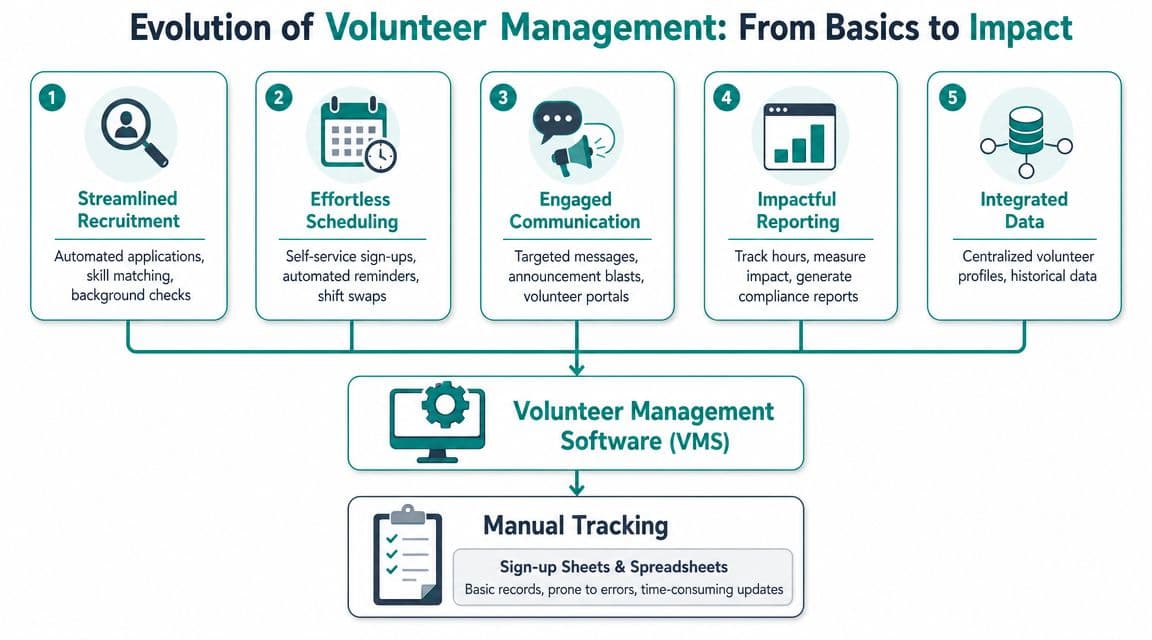
A better way to think about it is this. It acts like a very organized administrative assistant that never loses the roster, remembers every shift, sends reminders on time, and keeps the history of each volunteer in one place. The software isn't replacing your volunteer manager. It's taking the repetitive clerical work off their desk.
Mobilize describes modern nonprofit software as covering recruitment, management, communication, and follow-up, and other nonprofit guides describe the category as one centralized system for scheduling, hour tracking, messaging, and reporting. That shift matters because these tools have moved well beyond simple sign-up lists into operational infrastructure that helps teams work with less friction and clearer records (Mobilize overview of volunteer management software).
Job one is keeping a real volunteer record
The first thing good software does is create a dependable home for volunteer information.
That means one profile for each person, not separate notes in different places. Staff can store contact details, service history, availability, documents, and role fit in the same record. When someone calls and asks, "Have I already submitted that waiver," your team should be able to answer without hunting through folders.
Many organizations first feel relief. Not because the tool is exciting, but because confusion drops.
Job two is making scheduling manageable
Scheduling is where manual systems wear people down. Recurring shifts, event roles, cancellations, no-shows, and substitutions all create extra administrative work.
A useful system lets volunteers claim roles, lets staff assign coverage, and keeps everyone looking at the same schedule. That simple shared view does more work than most leaders expect. It cuts back on duplicate communication and lowers the odds that two people think someone else filled the shift.
A basic test is whether the system helps with these tasks:
- Role matching: Staff can see who is a fit for a role before sending invitations.
- Calendar visibility: Volunteers can view open opportunities without calling the office.
- Reminder handling: Messages go out automatically so staff aren't manually chasing attendance.
- Change tracking: Cancellations and updates don't disappear in a text thread.
For nonprofits that are still at the "clipboards and shared drive" stage, this is often the most practical next step. If you want to compare that stage of growth with more structured tools, this guide to volunteer registration software for nonprofits is a useful companion.
Job three is improving communication without more email
Most volunteer programs don't have a communication problem. They have a targeting problem.
When every message goes to everyone, volunteers stop paying attention. Modern systems solve that by tying communication to the schedule and the volunteer record. The right people get the right message based on the role, date, location, or need.
Good volunteer communication feels personal to the recipient, even when the system helped send it.
That doesn't mean every nonprofit needs the most advanced tool on the market. It means your software should help staff stop broadcasting and start directing.
Gaining Clarity and Proving Your Impact
Leadership usually starts caring about volunteer systems for one of three reasons. Staff time is getting swallowed by administration. Volunteers are having an uneven experience. Or the board keeps asking for better proof of impact.
A good system helps with all three because it gives your program a central operating record. Boardable describes effective volunteer management software as a centralized data layer for the volunteer lifecycle, one that can match volunteers to opportunities, trigger reminders, and capture hours while reducing manual entry and scheduling conflicts (Boardable guide to volunteer management software).

You get staff time back
This is the first payoff most directors notice.
When reminders, assignments, and hour capture happen in one system, staff stop rebuilding the same information every week. They spend less time confirming attendance, cleaning spreadsheets, and answering routine questions. That time can go back into volunteer support, event quality, and program improvement.
The savings are not abstract. They show up as fewer last-minute scrambles and fewer "Can you resend that" messages.
Volunteers feel the difference
Volunteers don't judge your software. They judge how organized your organization feels.
If sign-ups are clear, reminders are timely, and check-in is simple, people trust the program more. If assignments are confusing or records are wrong, they notice that too. Even committed volunteers lose patience when they have to repeat information or wonder whether anyone knows they showed up.
A stronger volunteer experience usually comes from better operations, not better slogans.
- Clear expectations help volunteers understand where to go and what to do.
- Consistent follow-up shows that your organization notices participation.
- Accurate records make recognition more meaningful because you know who did what.
Leadership lens: Volunteers are more likely to stay when your systems show respect for their time.
If your current process makes hour reporting difficult, a purpose-built volunteer hour tracking system can tighten up one of the most board-visible parts of the program.
Better records make better board conversations
Most boards don't need more anecdotes. They need confidence.
They want to know whether volunteer roles were filled, whether hours were tracked, whether programs were staffed reliably, and whether the organization can document activity when grant or audit questions arise. A centralized system gives you a cleaner basis for those conversations.
That matters just as much with funders and major donors. If your program can show who served, where they served, and how activity changed over time, leadership can talk about volunteer engagement with far more credibility.
Personalizing Your Volunteer Experience
Once the basics are in place, the next improvement is not more automation. It's better matching.
The strongest volunteer programs don't treat every supporter the same. They group people by the information that is relevant. Skills. Availability. Geography. Past service. Special certifications. Preferred roles. Modern platforms can track those attributes and use them for targeted outreach and assignment logic, which helps staff communicate based on real constraints instead of broad email blasts (University of San Diego overview of volunteer management software).
Start with the fields that change decisions
Not every data point deserves a place in your system. The useful ones are the ones that help your team make a decision.
If you run a meal program, dietary handling training might matter. If you host neighborhood cleanup days, location and transportation may matter more. If you operate youth programs, background status and role restrictions may be essential.
A practical starting set often includes:
- Skills and qualifications: First aid, language fluency, teaching experience, event setup.
- Availability: Weekdays, evenings, weekends, recurring shifts, one-time events.
- Location: Neighborhood, campus, parish, school, or service region.
- Role interests: Direct service, administration, mentoring, event support.
- Custom tags: Anything unique to your work, such as alumni parent, retired nurse, or board spouse.
Those categories make communication more relevant. They also keep your staff from relying on memory.
Personalization works because it feels respectful
Volunteers can tell when an email was meant for them and when they were swept into a broad list.
If you need help at a health fair, you can contact volunteers with the right certification. If you need weekend greeters, you can reach people who prefer short public-facing shifts. If a longtime volunteer hasn't served in months, you can send a note that reflects their history instead of a generic appeal.
That kind of communication is not complicated. It's just informed.
A volunteer database becomes valuable when it helps you ask the right person for the right job at the right time.
A self-service experience also matters here. When volunteers can update their own profile, review open opportunities, and keep their records current, your staff spends less time acting as a middleman. A well-designed volunteer portal supports that without making supporters learn something technical.
What does not work
Three habits usually get in the way.
First, collecting far more data than your team will ever maintain. Second, sending the same message to every volunteer because segmentation feels like extra work. Third, keeping useful volunteer information trapped in a separate system where fundraising and program staff never see it.
Personalization only helps when the data stays current and someone uses it.
Should Your Volunteer Tool Talk to Your Donor Database
This is the buying question many reviews skip.
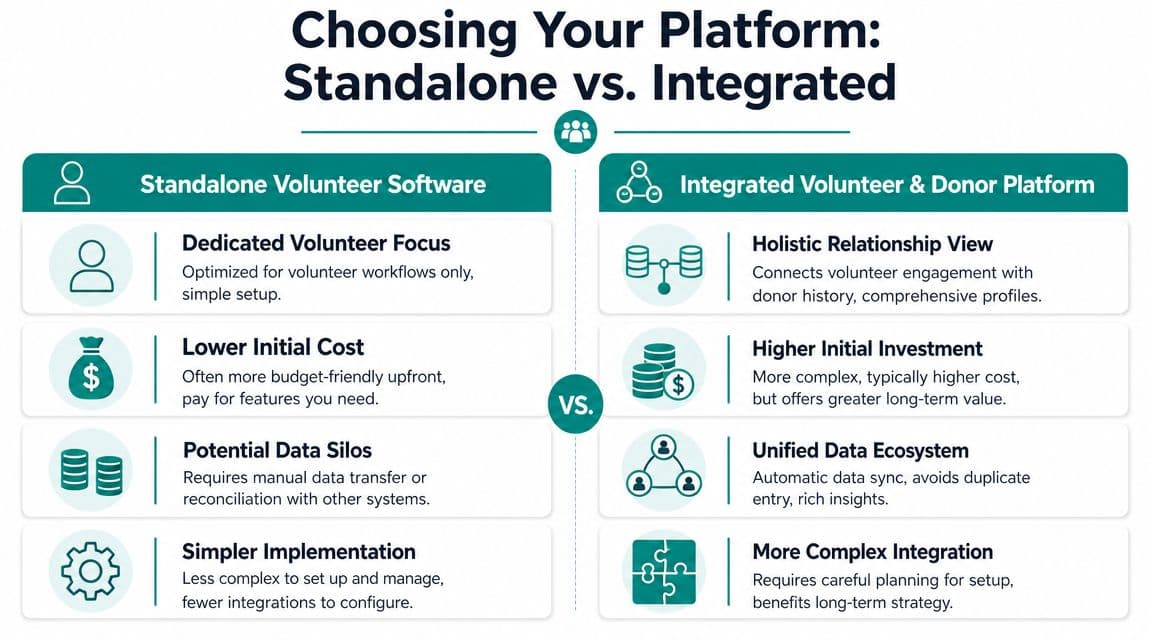
A standalone volunteer tool can be the right choice. SignUpGenius, Timecounts, Better Impact, Galaxy Digital, and other focused products each solve real problems. Some are simple to adopt. Some are strong at scheduling. Some handle more complex volunteer operations well. If your immediate need is getting sign-ups under control, a focused tool can be a sensible move.
The trouble starts when volunteer records live apart from donor records and accounting records. Then your team is forced to reconstruct the same supporter in multiple places.
Bloomerang notes a practical reality that many nonprofits already know from experience. Many volunteers also donate, and separate databases create duplicate records, missed opportunities, and an incomplete picture of supporter relationships. A unified view matters because it helps you see and nurture the full relationship over time (Bloomerang on volunteer management software).
The donor volunteer overlap is not a side issue
Consider a familiar supporter. She volunteers at your annual event, makes a year-end gift, and occasionally brings friends to serve. In a standalone volunteer tool, her hours and availability live in one record. In your donor system, her gifts and appeals live in another. In accounting, the financial story lives somewhere else again.
Now nobody sees the full relationship unless staff manually connect it.
That creates predictable problems:
- Duplicate records force staff to update the same person in more than one place.
- Missed context weakens stewardship because gift officers and program staff see only part of the story.
- Reporting gaps make it harder to explain how service and giving relate to each other.
- Manual reconciliation turns ordinary supporter management into cleanup work.
When an integrated platform makes more sense
If volunteers are central to your mission, and many of them also give, integration stops being a nice feature. It becomes an operational advantage.
All-in-one nonprofit platforms deserve a fair look. Giveffect is one example people consider when they want fundraising and volunteer records together. Bloomerang is another option for organizations that want volunteer and donor information in one broader platform. Alignmint is also in this category, combining volunteer records with donor management, fund accounting, events, marketing tools, and no per-seat user fees in one system.
That doesn't mean integrated software is always the right answer. If your volunteer work is simple and mostly separate from fundraising, a standalone tool may still be enough.
If you're weighing that decision, this guide to nonprofit CRM databases helps frame the bigger data question behind the software choice.
Separate tools can be perfectly workable. Separate records for the same supporter usually are not.
An Evaluation Checklist for Busy Directors
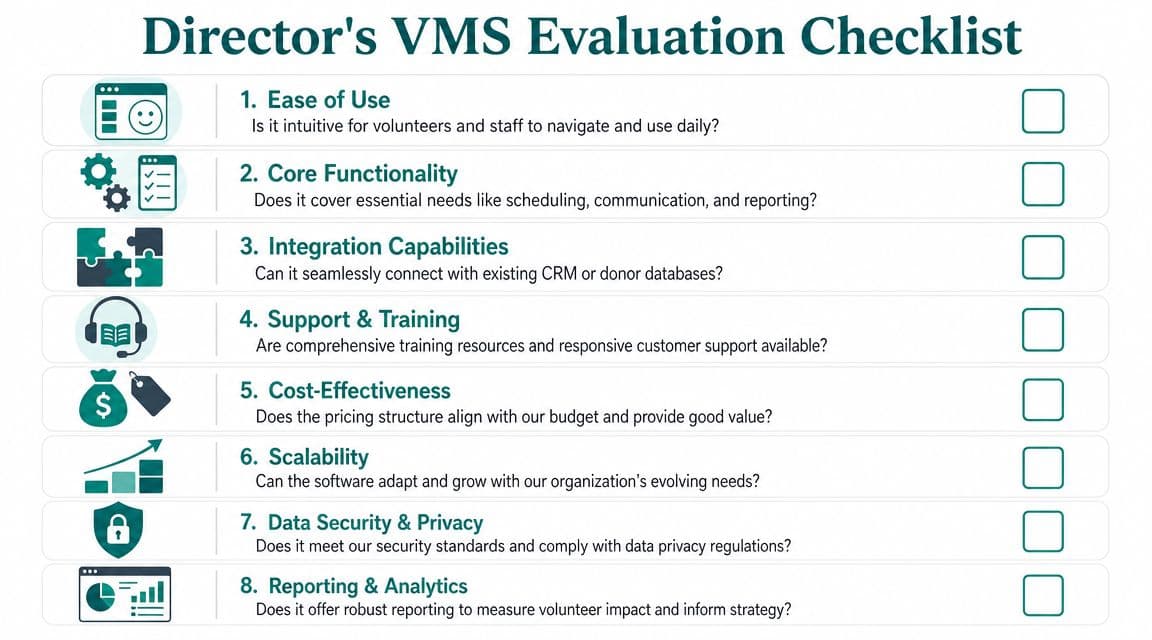
When you review volunteer management software, it helps to ignore the long feature list at first. Start with the daily realities your team has to live with.
Can staff learn it quickly. Can volunteers use it without hand-holding. Can you get the reports leadership needs. Can it fit your budget without charging you more every time another staff member needs access.
That is the actual evaluation.
Use a simple scorecard
A plain scorecard keeps demos honest. Rate each product from 1 to 5 in each category, then compare notes with the people who will use it.
| Evaluation Criteria | What to Look For | Score (1-5) |
|---|---|---|
| Ease of Use | Clear staff workflow, volunteer self-service, simple navigation | |
| Scheduling | Recurring shifts, event roles, substitutions, reminders | |
| Communication | Targeted messaging tied to roles, dates, or groups | |
| Hour Tracking | Reliable logging, approvals, exports, reporting by program | |
| Supporter Records | One clean profile with service history and key documents | |
| Integration | Connection to donor management, email tools, and accounting | |
| Cost Structure | Predictable pricing, no surprise user or admin charges | |
| Reporting | Board-ready summaries and usable detail for staff follow-up |
Questions worth asking in every demo
Some questions reveal more than the polished presentation does.
- Ask how pricing grows: Does the vendor charge by admin, by contact count, or by feature bundle.
- Ask what staff do manually: If reminders, updates, or exports still require workarounds, that matters.
- Ask how volunteers interact: A good staff view is not enough if volunteers struggle with sign-up or hour logging.
- Ask where data goes next: If volunteer information can't connect to donor or finance records, someone will bridge that gap by hand.
- Ask what implementation requires: A simpler tool may solve today's problem faster, while a broader platform may reduce more long-term clutter.
Watch the total cost, not just the subscription
Cheaper software can become expensive if it creates duplicate entry, extra reconciliation, or seat limits that discourage adoption.
This is also where pricing structure matters. Some nonprofits do better with a focused low-cost tool. Others need broader functionality and should ask whether per-seat fees will punish growth. Alignmint's model is unusual in that it offers unlimited users and a free tier for nonprofits under $100K, which is worth comparing if your current stack is spread across separate accounting, CRM, volunteer, and marketing tools.
The best software fit is the one your staff will actually keep current six months from now.
Bringing Your Team and Data Together
Volunteer management software matters because it gives you time back and makes your program easier to trust. It replaces scattered records with a working system your staff, volunteers, and board can rely on.
The bigger lesson is that volunteer coordination rarely stands alone. It touches donor relationships, communications, events, and finance. When those records stay disconnected, staff spend too much time stitching together a story that your software should already be telling.
If you're rethinking your setup, start with the data question before the feature question. Decide whether you want another standalone tool or one system that connects volunteer work to fundraising and finance. You can see how Alignmint's volunteer management tools fit into a broader nonprofit operations platform, and it may also help to read our related guides on nonprofit accounting software and fund accounting software for nonprofits.
If you want fewer spreadsheets, cleaner supporter records, and a clearer link between volunteer work, donor history, and fund accounting, take a look at Alignmint. We built it for nonprofits that are tired of juggling separate systems, and our free tier for organizations under $100K gives smaller teams a practical place to start.
Ready for One Clearer Nonprofit System
If you want accounting, donors, volunteers, events, marketing, and reporting in one place, Alignmint was built for that kind of day-to-day nonprofit work.
Ready to see how Alignmint works for your nonprofit?
Schedule a free walkthrough - we'll set everything up for you.