Best Accounting Software for Nonprofit Organization 2026
Quick Answer: Best Accounting Software for Nonprofit Organization 2026
The best accounting software for a nonprofit organization should separate restricted and unrestricted funds, connect donations to finance, support Form 990 reporting, and give leaders real-time answers without spreadsheet cleanup. Generic accounting tools can work for simple teams, but nonprofits with grants, programs, and donor restrictions usually need purpose-built fund accounting.
The board packet is due tomorrow. Your finance person is asking one question, and you still don't have a clear answer: how much money is available for the after-school program, not just in the bank, but available to spend.
That's the point where many leaders realize they don't have an accounting problem. They have a system problem. If you're searching for accounting software for nonprofit organization needs, you're usually trying to get back control, reduce risk, and stop wasting staff time on workarounds that were never built for nonprofit finance.
Your Guide to Financial Clarity and Confidence
If you're still running key reports from spreadsheets, or bending QuickBooks into something close to nonprofit accounting, you're not alone. Many organizations start there because it's familiar, affordable, and good enough for a while.
Then growth changes the picture. A new grant arrives. Donor restrictions stack up. Your auditor asks for support by program, by fund, and by functional expense. Suddenly, simple bookkeeping becomes a weekly scramble.
That's why choosing accounting software for nonprofit organization work is not just an admin purchase. It affects board confidence, grant reporting, donor trust, and your ability to make decisions without waiting three days for someone to reconcile the numbers.
A good system should help you answer questions like these without drama:
- What can we spend today: Not total cash, but unrestricted cash and each restricted balance.
- What does this program really cost: Including shared expenses and grant-backed spending.
- Are we ready for Form 990: Not in theory, but with reports that already line up.
- Can staff stop re-entering data: Across donations, deposits, receipting, and finance.
Most nonprofit leaders don't need more software features. They need fewer financial surprises.
If you want a plain-English starting point, this guide on nonprofit accounting software is a useful companion. The goal isn't to turn you into an accountant. It's to help you choose a system that lets your team spend less time translating numbers and more time running the mission.
Why Your Nonprofit's Money Works Differently
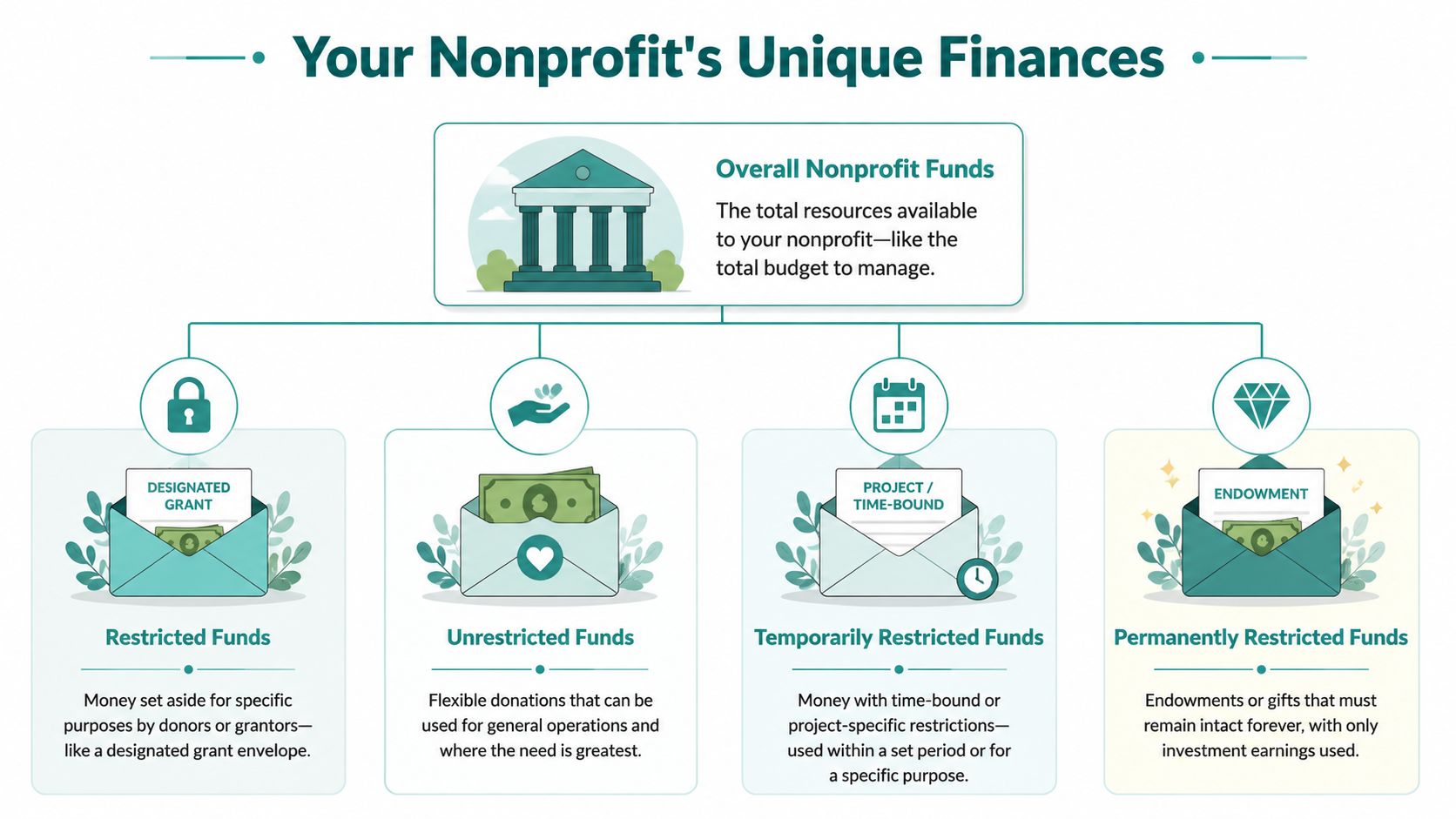
A nonprofit's money has strings attached. A donor may restrict it to scholarships. A grant may limit it to a service period. Your board may reserve part of it for a future project. That changes the job of your accounting system.
In a business, the main question is whether operations produced a profit. In a nonprofit, the harder question is whether each dollar was used the way it was promised.
That difference drives everything from daily spending decisions to audit prep.
The real issue is purpose, not just balance
A healthy bank balance can still mislead you. If half that cash belongs to a grant that starts next quarter, and another portion is restricted for a capital project, your usable operating cash is much smaller than it looks.
That is the heart of fund accounting.
You need a system that can track:
- Restricted funds: Money that must be spent on a stated purpose
- Unrestricted funds: Money available for general operations
- Time-bound gifts: Money that cannot be used until a date or project period
- Long-term or permanent restrictions: Funds that must remain intact
When software handles those categories natively, leaders can answer basic questions quickly. What is available to spend this month. Which program is burning through grant funds too fast. Whether shared costs are being assigned in a way that will hold up under review.
When software cannot do that, the cost shows up elsewhere. Staff keep shadow spreadsheets. Finance spends extra time checking reports by hand. Program leaders lose confidence in the numbers because every answer comes with a caveat.
I have seen that pattern more than once. The accounting tool looked affordable. The workarounds were not.
Why generic business software starts to crack
QuickBooks has real strengths. It is familiar, widely understood, and often workable for smaller nonprofits with simple funding. A disciplined bookkeeper can do a lot with classes, tags, and a clean chart of accounts.
The trouble starts when complexity becomes normal instead of occasional.
Add multiple grants, restricted donations, fiscal sponsorships, locations, or school and church funds, and the manual structure gets fragile fast. Reports take longer to prepare. Month-end closes stretch out. Board packets turn into custom projects. Audit support often depends on one person who knows where every spreadsheet lives.
That is the hidden operational cost of using the wrong tool. The software fee may look low, but the organization pays in staff time, rework, delayed decisions, and avoidable risk. Over a year, that drag can cost more than the difference between a generic system and one built for nonprofit accounting.
A better setup also makes compliance part of regular operations instead of a year-end fire drill. If you want a practical example of how your records should support filings throughout the year, review this Form 990 builder for nonprofit reporting.
Practical rule: If your team cannot see a current restricted fund balance without checking a spreadsheet, your accounting system is creating work instead of reducing it.
Four Essential Jobs Your Accounting Software Must Do
Features don't matter if they don't remove real pressure from your week. The right system should do four jobs well. If it misses even one, your staff will fill the gap with email threads, spreadsheets, and extra accounting hours.
Always show your true balances
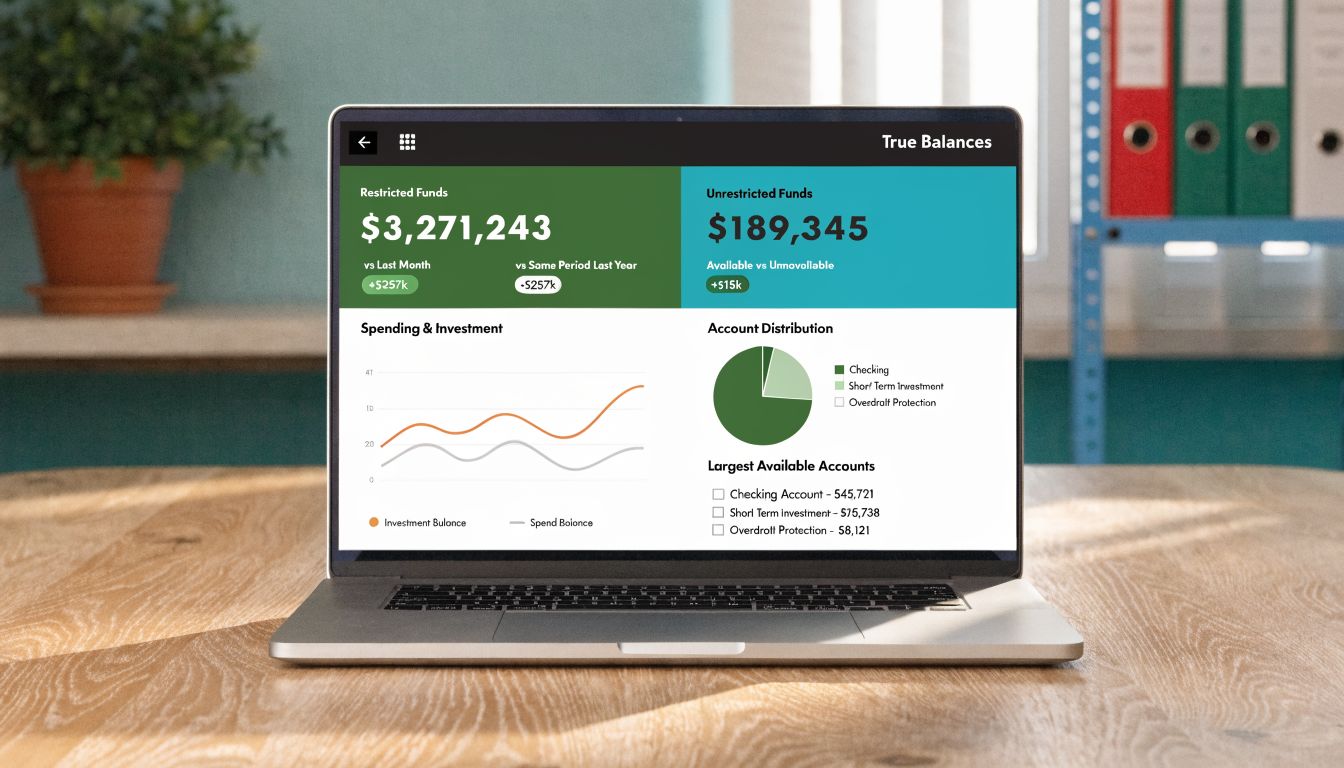
You need more than a bank balance and a profit-and-loss report. You need to know what's available by fund, by grant, and by program, in real time.
True fund accounting changes daily operations. According to the U.S. Chamber summary, true fund accounting software cuts closing times from weeks to hours, and evidence from more than 40,000 Aplos users points to faster Statement of Functional Expenses reporting and real-time restricted balance visibility in purpose-built systems, as described in this nonprofit accounting tools overview.
If your current tool can't do that without custom reports, that's your warning sign. A system built around fund accounting for nonprofits should treat restrictions and programs as native parts of the ledger, not optional tags staff may forget to apply.
Make audit and Form 990 prep boring
That's the goal. Boring is good.
When audit prep works, your team doesn't spend weeks rebuilding how expenses were allocated across program, management, and fundraising. They don't discover in month eleven that grants were coded inconsistently. They don't need a consultant to translate the books into nonprofit reporting language.
What works is simple:
- Transactions are coded correctly at entry
- Restricted and unrestricted activity stays separate
- Functional expense reporting is available all year
- Form 990-related reports can be reviewed before panic season
If you only prepare for Form 990 at the end of the year, you're already late.
This matters even more for fiscal sponsors and multi-program organizations. One grant report might ask by project. Another by department. Your board may want a mission-first summary. Your auditor wants support. Good software lets all of those views come from the same underlying records.
Honor every donor promise
A donor doesn't care that your team was busy. A grantmaker doesn't care that your accounting system needed a workaround. They expect clear stewardship.
That means your software should connect donations, restrictions, grants, and spending. If a family foundation funds youth literacy, your team should be able to show receipts, balances, and remaining funds without hand-building a report every quarter.
For churches and schools, the same issue appears under different labels. Benevolence funds, building campaigns, scholarships, missions, classrooms, and special events all need separate treatment. A system that only thinks in general business categories creates friction where trust should be strongest.
Give leaders answers without a finance meeting
Executive directors often wait too long for basic financial answers. That delay slows hiring, program decisions, board communication, and grant planning.
Dashboards and AI can help if they are grounded in your actual data. A useful AI assistant should answer plain-language questions about your books, donor trends, open pledges, volunteer activity, or campaign performance. It should not require exports, formulas, or special training.
A practical setup today can include accounting, donor history, online giving, volunteer records, and team communication in one place. That makes it easier to see what's happening across the organization, not just inside the finance office.
Here's the standard I'd use. Your software should let a non-technical leader answer these questions quickly:
- Can we afford this program expansion
- Which restricted funds are underused
- What grant deadlines need attention
- Which donors gave, pledged, or lapsed
- What changed this month that the board should know
If the system can't answer those questions cleanly, it's bookkeeping software. It isn't management software.
The Power of a Truly All-In-One Platform
Disconnected tools create invisible labor. That's the cost most software comparisons miss.
One system tracks online donations. Another sends receipts. Another holds volunteer records. Another manages events. Your accounting system sits off to the side, waiting for someone to re-enter, reconcile, and explain what happened. That may not show up as a line item, but your staff feels it every week.
Where separate systems break down
The classic example is a donation report that doesn't match the bank deposit. Development says the campaign performed well. Finance says the batch is off. Someone checks the payment processor. Someone else checks the CRM. Then a staff member builds a reconciliation sheet to explain timing, fees, pledges, and failed transactions.
That's not strategy. It's glue work.
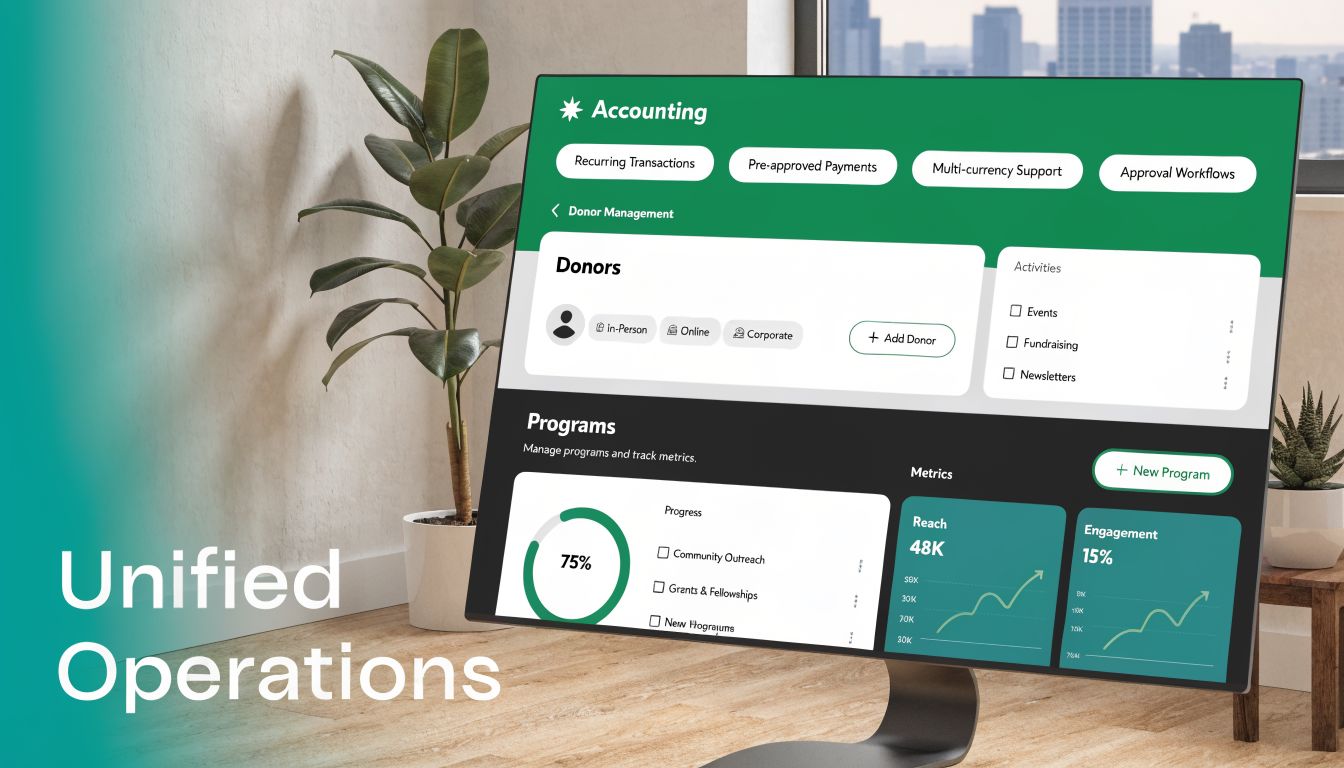
An all-in-one platform changes the flow. A donation made on a giving page should update the donor record, trigger a receipt, post correctly to the books, and appear in reporting without duplicate entry. If a volunteer later joins an event or a campaign segment, that history should stay attached to the same constituent record.
Why this matters beyond accounting
When your tools share data, leadership gets a clearer picture of the whole organization.
That affects:
- Fundraising: Development can see giving history next to pledge status and accounting records
- Volunteer management: Staff can connect hours, skills, scheduling, and program activity
- Marketing: Email and text campaigns can target real donor and participant behavior
- Fiscal sponsorship: Sponsored projects can be tracked without patching together reports from separate systems
- Team communication: Everyone works from one source of truth instead of arguing over versions
Blackbaud and Sage Intacct deserve credit here. They are respected systems, and a 2026 survey cited by Funraise reports 98% of nonprofits using tools like Blackbaud or Sage Intacct report 99% satisfaction, driven by automation and reliability, according to this Funraise review of nonprofit accounting software. That tells you organizations value stable platforms once they find the right fit.
The trade-off is fit and complexity. Enterprise systems can be powerful, but some smaller organizations find them heavier than they need. Aplos often fits smaller nonprofits well for accounting. QuickBooks is familiar and accessible. The gap often appears when you want accounting, donor CRM, volunteer coordination, events, online giving pages, marketing, and AI insight under one roof.
One example is Alignmint, which combines accounting, donor CRM, volunteers, events, marketing, online giving pages, team communication, true fund accounting, Minty AI, and unlimited users in one platform, with a free tier for nonprofits under $100K. That won't be the right answer for every organization, but it reflects where many executive directors now want the market to go.
Separate tools look cheaper until staff become the integration layer.
Your Practical Software Selection Checklist
Vendor demos often look polished because they avoid the messy parts. They show a dashboard. They don't show month-end. They mention donor tracking. They don't show how a restricted grant flows from gift entry to bank reconciliation to board report to Form 990 support.
A better buying process is simple. Ask the vendor to do real tasks with your real scenarios.
The test that matters
Don't ask, "Do you support nonprofits?" Ask, "Can you show me this right now?"
Without automation, 20 to 30% of donation transactions can have mismatch errors due to manual re-typing, while modern bank feeds with AI matching can reach 95% auto-reconciliation rates, as described in this Daxko guide to nonprofit accounting software. That gap is one reason I'd treat reconciliation and donation flow as a live demo item, not a promise on a slide.
Key questions to ask software providers
| Question for the Vendor | What You're Really Asking |
|---|---|
| Can you show our real-time restricted fund balance on screen? | Does the system handle true fund accounting, or is it faking it with tags and spreadsheets? |
| Can you generate a Statement of Functional Expenses from posted data? | Will audit prep be built in, or pushed onto staff later? |
| How does a donation from our giving page reach the books? | Are fundraising and accounting connected, or will staff re-enter data? |
| Can the system connect directly to our bank feed? | How much manual reconciliation work will remain each month? |
| What does Form 990 prep look like in the software? | Are nonprofit reports native, or dependent on exports and cleanup? |
| How do you handle grants, programs, and departments together? | Can we report the way funders, auditors, and boards actually ask? |
| What happens if we add staff, volunteers, or board users? | Will the cost rise with every seat, or can more people see what they need? |
| Can you show a fiscal sponsorship or multi-entity setup? | Is the system workable for growth, partnerships, or sponsored projects? |
How I'd frame the major options
QuickBooks is a reasonable entry point if your needs are basic and your finance process is disciplined. Its strength is familiarity. Its limit is that many nonprofit functions still depend on setup choices and workarounds.
Aplos is often a stronger fit when fund accounting is your first priority and you want something built with nonprofit use cases in mind. Blackbaud and Sage Intacct are serious options for organizations that need depth, controls, and broad reporting.
For any of them, I'd ask to review the underlying account structure. A clean nonprofit chart of accounts tells you a lot about whether the software was designed to support nonprofit reporting or adapted after the fact.
Board-level question: Will this system help us make decisions faster, or just store transactions in a new place?
Making the Switch Without the Headache
The hard part is not picking new software. It is deciding that your team can survive the change without dropping a grant report, delaying close, or losing confidence in the numbers.
That concern is valid. I have seen finance teams stick with a weak system for years because the short-term disruption felt riskier than the long-term drag. But the wrong tool already has a cost. It shows up in extra review time, slower board reporting, messy audit prep, and staff energy spent checking work that should have been right the first time.
The transition goes better when leadership treats it as an operations decision with financial consequences, not a software project sitting off to the side. The goal is simple. Protect continuity, reduce avoidable rework, and get to trustworthy reporting fast.
A calmer way to handle the transition
Pick a start date that gives your team breathing room. A new fiscal year is cleanest, but a new month is often good enough if the data is organized and someone owns the timeline.
Keep phase one narrow. Bring over the structure and information you need to run the organization well: chart of accounts, funds, grants, donor records, bank connections, opening balances, and the few reports your finance committee and program leaders use. Save edge cases and nice-to-have automations for later.
A few practices lower the odds of a painful rollout:
- Choose a clean cutoff: Start at a point where balances can be verified without heroic cleanup.
- Run both systems briefly: Compare cash, restricted balances, and a small set of core reports until the numbers match.
- Reduce early customization: Standard reports are easier to test and easier for staff to trust.
- Name one decision-maker: One internal owner should collect questions, approve changes, and keep the project from drifting.
- Use a structured nonprofit data migration process: Good migration work prevents duplicate records, missing history, and opening balances that create problems months later.
The actual payoff comes right after go-live.
That is when month-end starts to feel manageable again, your team spends less time reconciling around the system, and the board gets numbers that are ready to discuss instead of numbers that still need explanation. That is why this switch is worth doing carefully. Done well, it is not just a cleaner accounting setup. It is a direct investment in mission time.
Take Back Your Time and Focus on Your Mission
The right accounting software for nonprofit organization work should do more than balance the books. It should reduce uncertainty, protect restricted funds, simplify reporting, and give your team clean information when decisions can't wait.
That's the hidden return on this choice. You're not just buying accounting. You're buying fewer workarounds, fewer avoidable errors, better board conversations, and more time spent where your organization creates value.
If you want to keep digging, these two guides are worth your time:
- A deep dive into true fund accounting
- How to prepare for your next board meeting
For smaller nonprofits, starting with a simpler platform and a clean structure may be enough. For growing organizations, especially those managing grants, volunteers, events, churches, schools, or fiscal sponsorship, the better move is often to choose a system that keeps operations connected from the start.
You don't need to become more technical. You need software that asks less of your staff and gives more back in clarity.
If you want a low-risk next step, try Alignmint if your nonprofit raises under $100K and see how an all-in-one setup feels in practice. If your organization is larger or more complex, book a no-pressure demo and test your real reporting, donor, volunteer, and fund accounting questions against the platform before making a decision.
Ready for One Clearer Nonprofit System
If you want accounting, donors, volunteers, events, marketing, and reporting in one place, Alignmint was built for that kind of day-to-day nonprofit work.
Ready to see how Alignmint works for your nonprofit?
Schedule a free walkthrough - we'll set everything up for you.