


Quick Answer: A Real-World Nonprofit Budget Template for Excel
A practical, downloadable nonprofit budget template for Excel with step-by-step setup, fund tracking, expense allocation, and tips for outgrowing spreadsheets. The sections below walk through practical steps, examples, and what to watch for.
For related tools, see AlignMint features. Creating your annual budget can feel like a battle against messy spreadsheets. If you're wrestling with a generic nonprofit budget template for Excel, you know the pain of trying to track restricted funds or pull the right numbers for your Form 990. This guide gives you a practical, downloadable template and a clear path from budget chaos to total financial confidence.
Move Beyond Messy Spreadsheets and Budget with Confidence
As an executive director, you know the annual budget is the financial engine of your mission. But for many, the process is a source of frustration. You are forced to stitch together disorganized Excel files where nothing connects, creating confusion and wasting time.
The core issue is that most templates are not built for a nonprofit's unique finances. They lack the structure for proper fund accounting. This makes tracking restricted grant money accurately almost impossible.
This manual, patched-together approach leads to common pain points:
- Wasted Hours: You spend days, not hours, piecing together reports for your board or a last-minute grant application.
- Lack of Clarity: You struggle to get a quick, accurate snapshot of your financial health or answer a simple question about a program's spending.
- Risk of Errors: Manually moving data between spreadsheets is a recipe for mistakes that can damage your compliance and donor trust.
"We have been there. A budget should be a clear roadmap that guides your decisions. It should not be a puzzle you have to solve."
A Tool Designed for Your Reality
Our goal was to create a tool that bridges the gap between a simple spreadsheet and a complex accounting system. This downloadable nonprofit budget template for Excel is designed with your actual workflow in mind. It helps you see the complete picture, from program spending to your overall operational health.
Throughout this guide, we'll walk you through setting it up so it works for your organization. You will learn how to customize it to manage different funding sources. This is essential for any director who needs to steward resources effectively.
For a deeper dive into managing different funding streams, our guide on fund accounting for nonprofits offers valuable insights. It explains why separating funds is so critical for financial transparency.
Ultimately, a well-organized budget gives you control. It allows you to move from fighting with your finances to leading with confidence. You'll know every dollar is accounted for and working toward your mission.
Downloading and Setting Up Your Budget Template
Alright, let's get your new budget organized. We built this nonprofit budget template for Excel based on real-world feedback from directors like you. Think of it as a flexible starting point, not a rigid file.
First things first, grab your copy here. Once you have the file open, you'll see it's a clean slate, ready for your specific numbers.

Customizing Your Template for Your Organization
Your first move is to make the template your own. This initial personalization ensures the budget aligns perfectly with your operations from day one.
Start by putting your organization's name and fiscal year at the top. This seems small, but it is a critical reference point for all future reporting. Clear identification prevents confusion when sharing the file with your board.
Next, you will want to adjust the revenue and expense line items. Our template comes with common categories, but your chart of accounts is unique. Do not be shy about adding or removing rows to match your financial structure.
- For revenue, you might add lines for a major annual gala, earned income, or a significant multi-year grant.
- For expenses, you could add categories for software, professional development, or direct client assistance costs.
This customization makes the template powerful. It adapts to you, not the other way around. A budget that mirrors your actual financial activity is one you can trust.
Organizing Your Programs and Funds
Many nonprofits struggle with tracking program-specific finances in one spreadsheet. You can solve this by using separate tabs for distinct programs or restricted funds. This is a crucial step for clarity.
Imagine you run an after-school program and a community food bank. You can create a dedicated tab for each one. Just duplicate the main budget sheet and rename it for that specific program.
"A key benefit of this structure is financial clarity. You can see exactly how much you plan to spend on each program. This is essential for reporting to donors who fund specific work."
This method keeps your data clean from the start. You'll avoid the common pitfall of mashing all your numbers into one unreadable sheet. It also prepares you for true fund accounting.
Best Practices for Version Control
Once your budget is set up, maintaining a single source of truth is vital. Version control can become a real headache when multiple people are involved. It is painfully easy for someone to end up working from an outdated file.
Here is a simple naming convention we recommend:
- Start with the basics:
[YourOrganizationName]_Budget_FY[Year].xlsx - Add a status for drafts:
[YourOrganizationName]_Budget_FY2025_DRAFT_v1.xlsx - Clearly mark the approved version:
[YourOrganizationName]_Budget_FY2025_BoardApproved_2024-11-15.xlsx
This small habit saves time and prevents costly errors. But this manual process also highlights the limits of spreadsheets. When you're ready to stop versioning issues for good, an all-in-one system is the next logical step. You can explore how our unified platform works by checking out our getting started guide.
Forecasting Revenue and Detailing Your Expenses
A budget is useless if it is built on wishful thinking. Now that your nonprofit budget template for Excel is set up, it's time to fill in the numbers. You need to fill it out with thoughtful, realistic projections. This transforms a blank spreadsheet into a strategic guide for the year.
We will start with your income. Projecting your revenue is a blend of looking at historical data and having real conversations with funders. This is what grounds your plans in financial reality.
Projecting Your Nonprofit's Income
Forecasting revenue can feel like gazing into a crystal ball, but you have solid data. The key is to break your income into manageable categories. You can then build the forecast piece by piece.
- Individual Donations: Pull your giving history for the last three years. If donations grew by 5% last year, projecting a 5-7% increase is a reasonable start. Factor in new marketing campaigns or outreach that could raise that number.
- Major Grants: This category should only be based on secured grants. You can also include grants you have a very high confidence in winning. It's smart to list each major grant as a separate line item.
- Fundraising Events: Look at the net income from past events, not the gross. If your annual gala netted $50,000 last year, is it realistic to project $60,000 this year? New elements, like a higher ticket price, should support that increase.
- In-Kind Contributions: These are non-cash donations, like volunteered legal services. You have to assign a fair market value to them. For example, if a marketing firm donates work worth $5,000, you record that as $5,000 in revenue and a corresponding $5,000 marketing expense.
This detailed approach gives your board and funders confidence that your plan is achievable. It proves you have done your homework.
Detailing Your Expenses for Form 990 Clarity
On the expense side, your main job is to assign every dollar to one of three functional categories. This is required by the IRS for your Form 990. Getting this right in your budget makes year-end reporting dramatically simpler.
This three-bucket system is a best practice across the sector. Most templates organize expenses by function to boost accountability. You can find more examples of standard budget categories from WordLayouts.com.
Here are the three core expense buckets:
- Program Services: These are costs directly tied to carrying out your mission. For a food bank, this is the cost of food, warehouse staff salaries, and truck fuel.
- Management and General (Admin): These are essential operating costs that support the entire organization. This includes your salary, office rent, insurance, and accounting fees.
- Fundraising: This bucket holds all costs to raise money. That means fundraising staff salaries, event costs, and online giving platform fees.
"A common challenge is allocating staff time. If a director spends 70% of their time on programs and 30% on admin, their salary must be split accordingly. Documenting how you arrived at these allocations is critical."
Thinking through these allocations during the budget process saves you from a headache later. It builds a solid foundation for transparency and compliance. You can show donors exactly how their support is put to work. For a deeper dive, our post on nonprofit bookkeeping software is a great next step.
How to Manage Restricted Funds and Program Budgets
Managing restricted funds is where most generic budget templates fall apart. I have seen organizations try to use workarounds in tools like QuickBooks. But using their "classes" feature is not true fund accounting. It just creates manual work and the fear of spending grant money incorrectly.
Our nonprofit budget template for Excel is structured to help you sidestep this mess. The goal is to give you a clear, real-time view of each restricted grant. This provides a running balance for each fund, which is essential for accurate grant reporting.
Separating Funds for Financial Clarity
The first step toward confident financial management is giving each restricted fund its own space. In our template, we recommend creating a separate tab for every major grant. Think of it as building a "digital wall" between your different funding pools.
It is simple to do. Just duplicate the main budget sheet and rename it (like "Miller Foundation Grant"). Then, enter only the revenue and expenses tied to that specific grant.
This one move gives you several immediate wins:
- At-a-glance balances: You can instantly see how much of a grant is left without hunting through a tangled spreadsheet.
- Simplified grant reporting: When a funder asks for a report, you have all the data organized in one place.
- Smarter decisions: You can confidently decide where to put new expenses, knowing which funds are available.
This separation is the foundation of good stewardship. For a more detailed walkthrough, our documentation on how to handle restricted funds provides practical steps to ensure you stay compliant.
Tying Expenses to the Right Program
Once your funds are separated, the next step is connecting every expense to the right functional area. Every dollar you spend needs to be assigned to one of three buckets: Program Services, Management & General, or Fundraising. This is known as functional expense allocation.
This process shows how your organization's resources are being put to work.
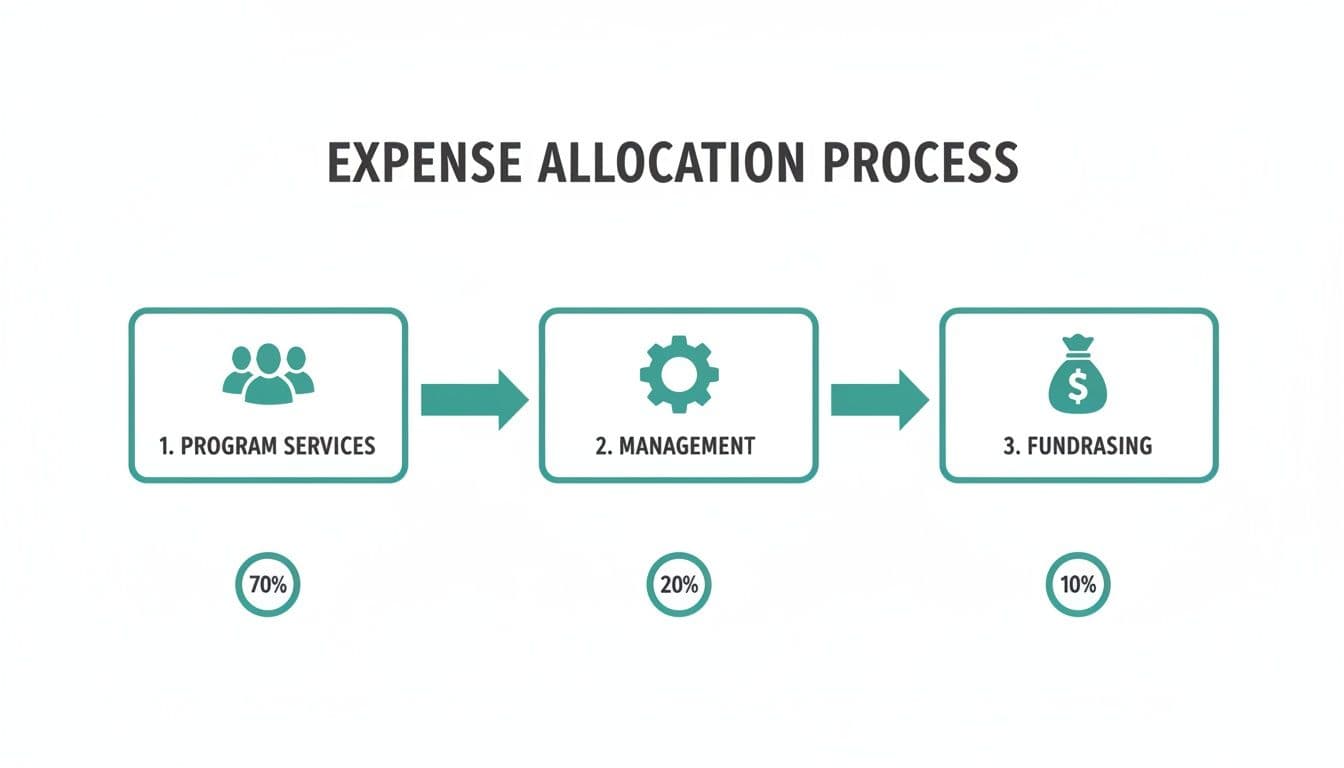
This is the story your budget should tell. It shows that most resources go directly toward your mission. It also acknowledges the essential costs of running the organization and raising more money.
Even the best Excel templates have their limits. They still depend on manual work and carry the risk of human error. For example, if your director's salary is split, someone has to remember to manually enter those allocations every time.
Spreadsheet workarounds are a temporary fix that create more work. The time spent double-checking formulas is time you are not spending on your mission. This is the exact problem that a true fund accounting system solves.
Spreadsheet Workarounds vs. True Fund Accounting
| Feature | Excel Template / QuickBooks Classes | AlignMint (True Fund Accounting) |
|---|---|---|
| Fund Balances | Manual calculation; high risk of error. You have to run a report and hope the tags were right. | Real-time and always accurate. You see the spendable balance for every fund instantly. |
| Expense Allocation | Manual splits for every shared cost. This is tedious and easy to forget. | Automated. You set the allocation rule once, and the system does it for you. |
| Grant Reporting | Manual process of filtering and copying data from different sheets into a new report. | Automatic. Click on a grant and get a budget-vs-actual report instantly. |
| Overspending Prevention | No built-in alerts. You only find out you've overspent after the fact. | Proactive alerts warn you before you approve an expense that would go over budget. |
| Audit Trail | Limited or non-existent. It is hard to prove why a number changed. | Comprehensive. Every transaction, allocation, and approval is logged automatically. |
While a well-structured spreadsheet is a good start, it can't replace a real fund accounting system.
This is why we built AlignMint with true fund accounting at its core. Those salary allocations happen automatically based on rules you set. This gives you an error-free, real-time picture of your finances without the manual gymnastics.
Knowing When You Have Outgrown Your Excel Budget
This nonprofit budget template for Excel is a fantastic starting point. Research shows that around 88% of nonprofits have budgets under $500,000. This has fueled demand for practical budgeting tools, a trend you can read about in Givebutter's analysis of nonprofit financial tools.
But as your mission gathers steam, even the best spreadsheet starts to show its cracks. That once-simple file can become a fragile web of linked tabs and complex formulas.
If you're spending days pulling numbers for board reports, that is a clear signal. It means you have outgrown your system.
The Telltale Signs of an Overburdened Spreadsheet
Recognizing the symptoms of an outdated process is the first step toward finding a better way. These are not signs of failure; they are signs of growth. Your organization is becoming more complex, and your tools need to keep up.
You know it is time for a change when you're facing these challenges:
- You can't answer simple questions quickly. When a board member asks, "How much of the Miller Foundation grant is left?" and your only answer is, "I'll get back to you," that's a problem.
- Manual data entry is eating your week. You find yourself re-typing numbers from your online giving pages or volunteer logs. This double-work is a massive time-sink and a source of errors.
- Reporting is a painful, multi-day process. Pulling together a grant report involves copying and pasting data from multiple sources. It's a stressful fire drill every single time.
- Version control is a constant headache. Your shared drive is littered with files like
Budget_Final_v3_Approved.xlsx, and you're not sure everyone has the right numbers.
"If these sound familiar, you are not alone. We have spoken with hundreds of directors who hit this exact wall. It's the natural point where the risks of a manual system start to outweigh its simplicity."
This is the moment when an all-in-one platform becomes a necessity. It is required for responsible financial stewardship.
Moving to a Purpose-Built System
You can finally get true financial clarity with an all-in-one system. Our platform, AlignMint, combines true fund accounting with your donor management, volunteer tracking, and marketing tools. We built it to solve these exact problems because we experienced them firsthand.
Your budget becomes a live financial dashboard. When a donation comes in through an AlignMint giving page, it is automatically recorded and allocated to the correct fund. There is nothing for you to manually transfer.
You can also generate reports in a few clicks. A grant report or a Statement of Functional Expenses is ready instantly. The system already knows which expenses are tied to which funds.
We believe practical tools should be accessible to small nonprofits. That is why our free plan for nonprofits under $100K includes donor management, giving pages, fundraising tools, Minty, and My Workspace. Fund accounting starts on Plus, so you can upgrade when your budget and reporting needs grow.
Your Nonprofit Budgeting Questions, Answered
As you start working with your nonprofit budget template for Excel, questions will come up. Below are straightforward answers to questions we hear most often from executive directors.
How Do I Create a Budget with No Financial History?
This feels like a major hurdle, but I see it as an advantage. Starting from scratch gives you an opportunity to be incredibly deliberate. Your budget becomes a direct translation of your strategic plan.
Your first step is research. Look up local nonprofits with a similar mission. Their public Form 990s, on sites like GuideStar, are a goldmine. They give you a realistic baseline for what things cost in your area.
With that context, start building your budget around your most critical activities.
- What specific programs are you launching in year one?
- Who are the essential staff needed to make them happen?
- What are the non-negotiable overhead items, like insurance or accounting fees?
List every single cost you can think of. It is always better to start with a long list and cut back later.
When it comes to revenue, be conservative. Ground your forecast in secured grants and realistic fundraising goals. The most important part is tracking your actual income and expenses against this plan every month.
What Is the Difference Between an Operating Budget and a Capital Budget?
Getting this distinction right is crucial for clean financial reporting. Your operating budget covers the day-to-day costs to run your mission for one year. A capital budget is for big, long-term investments.
Your operating budget is for recurring items like:
- Salaries and benefits
- Rent and utilities
- Program supplies and software subscriptions
- Fundraising and marketing costs
Your capital budget is for significant, often one-time purchases, such as:
- Buying or renovating a building
- Purchasing a new vehicle for program delivery
- A major technology overhaul, like a new server system
These two budgets are planned and funded separately. Operating costs are meant to be covered by your annual revenue. Capital projects are usually funded through dedicated campaigns or special grants.
What Percentage of My Budget Should Go to Overhead?
There is no magic number, and it is time we moved past the outdated "overhead myth." For years, a rule of thumb suggested 15-25% for administrative and fundraising costs. But savvy funders now understand that investing in strong operations makes a nonprofit effective.
"Instead of obsessing over a percentage, focus on telling the story behind your numbers. You need to explain how admin and fundraising costs support your mission's impact."
A new organization will naturally have higher fundraising costs. An organization expanding into a new city will have legitimate administrative costs tied to that growth. Context is everything. Your budget is the tool you use to articulate that story. For more on this, our post on nonprofit financial reporting can be very helpful.
How Does an All-In-One Platform Simplify Budgeting?
A nonprofit budget template for Excel is a great starting point, but it's static. An all-in-one platform like AlignMint fixes this by connecting your budget to your live financial activity. This eliminates nearly all manual data entry.
You get a true, real-time view of your budget versus actuals. When a donation comes in through your online giving page, the income is instantly recorded and posted to the correct fund. When you pay an expense for a grant, it's automatically deducted from that grant's balance.
This integration completely changes how you manage your finances.
- You can create a Statement of Functional Expenses in a few clicks. The system already knows which expenses are for programs, admin, or fundraising.
- The platform's Minty assistant can answer plain-language questions like, "Show me our top donors," pulling live data from your records.
- You get proactive alerts, stopping you from overspending a restricted grant before it happens.
It transforms your budget from a document into a dynamic tool. This gives you back the time you need to focus on what really matters: your mission.
Are you tired of fighting with spreadsheets and ready for a system that gives you real-time financial clarity? See how AlignMint brings your accounting, fundraising, and marketing together in one simple platform.
Frequently Asked Questions
Ready to try AlignMint with your nonprofit?
Start free — set up donor tools, giving pages, and Minty. Upgrade when you need accounting.