

For related tools, see AlignMint features.
Nonprofit Event Budget: Line Items and Cash Flow
Quick Answer: How to Budget for a Nonprofit Event
Budgeting for event work starts with mission and funding sources, then builds a line-item expense sheet, cash flow calendar, and restricted-fund map before deposits are due. Most overruns come from hidden costs and timing gaps-not bad ticket math-so hold a 5-10% contingency and reconcile budget versus actuals after the room clears.
Your event can look fully funded on paper and still put your organization in a bind. That usually happens when the budget lives in a spreadsheet, while restricted gifts, vendor due dates, and real cash needs live somewhere else.
Good budgeting for event work starts earlier and goes deeper than most guides admit. If you treat it as a finance exercise tied to mission, fund rules, and payment timing, you can protect your staff, your board, and your net revenue.
Define Your Event Goals and Funding Sources First
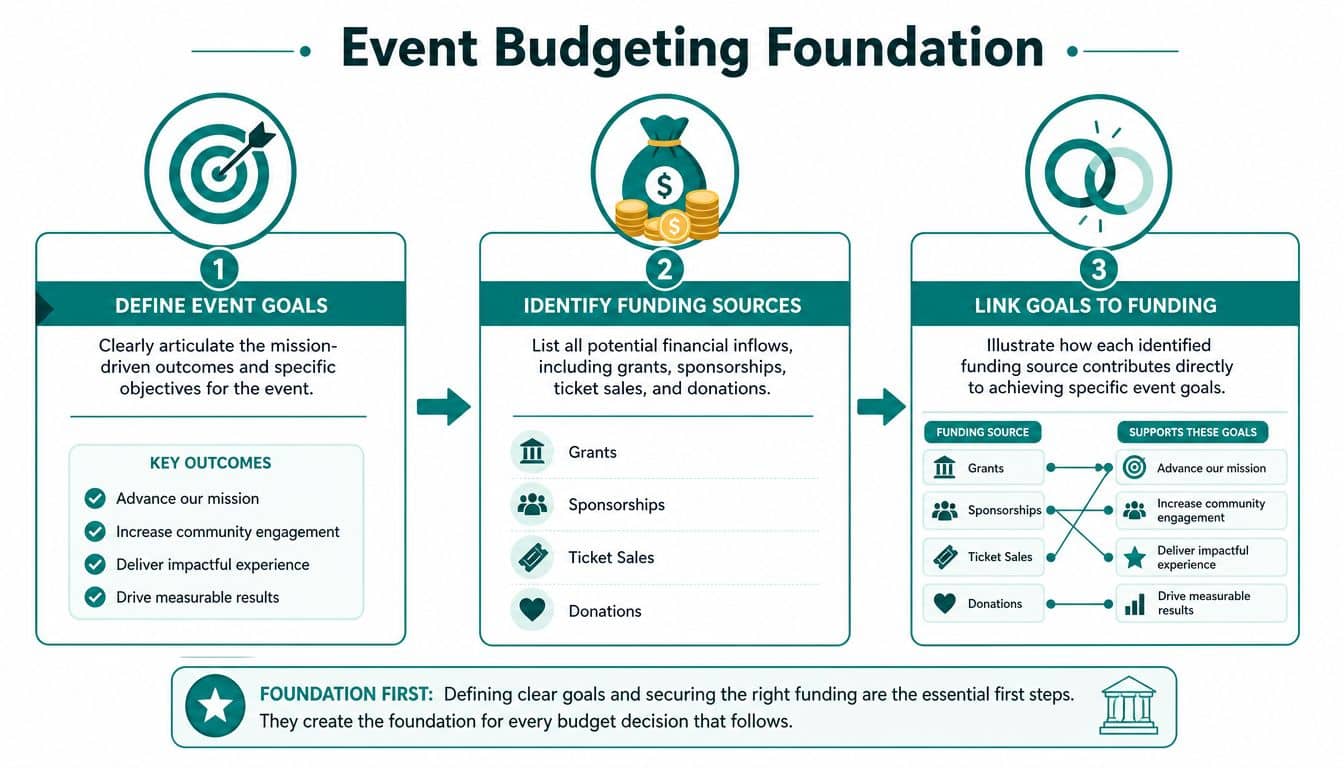
If you start with venue quotes, you're already behind. The first job is deciding what the event must accomplish for your mission and your finances.
For some organizations, the event's purpose is net revenue. For others, it's donor renewal, community trust, volunteer recruitment, church engagement, school visibility, or sponsor cultivation. Until you name that outcome, your budget doesn't have a spine.
Start with the outcome, not the event format
A practical nonprofit method is a four-step process. You set holistic event goals based on annual finances, historical event data, and strategic plans, then determine upfront costs, look for ways to reduce expenses, and identify revenue sources to close the gap, according to Handbid's nonprofit event budget guide.
That sequence matters. If your board wants stronger donor retention, a gala may not be the answer. If your school needs sponsor visibility and parent participation, the right structure may be very different from a formal dinner. If your church is trying to deepen community ties, ticket revenue might matter less than accessibility.
I usually pressure-test goals with three questions:
- Mission result: What should be different after this event?
- Financial result: Are you trying to raise unrestricted cash, fund a specific program, or support a grant-backed initiative?
- Relationship result: Which people need to leave more connected to your organization?
Practical rule: If you can't explain the event's purpose in one sentence, your budget will drift.
Map every funding source before expenses multiply
Most event budgets understate revenue complexity. Ticket sales are only one lane. A fuller view includes sponsorships, table captains, major gifts, grants, direct donations, matching gifts, in-kind support, and post-event follow-up gifts.
Write each stream separately. Don't bundle them into one fundraising line. That makes forecasting weaker and hides risk.
A simple way to frame funding sources is this:
- Committed money such as signed sponsors, awarded grants, or pledged gifts.
- Probable money such as recurring sponsors likely to renew or loyal donors likely to attend.
- Aspirational money such as new sponsors or expanded ticket tiers.
That distinction keeps you from spending against optimism.
If sponsorship revenue is central, it helps to sharpen your package structure early. These sponsorship proposal templates for nonprofits can help you turn a vague ask into a defined revenue plan.
Tie funding to actual event decisions
Once the money map is visible, connect each source to a goal. Sponsorship may cover the guest experience. Grants may underwrite program-related portions. Ticket sales may offset direct event costs. Major gifts may protect your margin.
That connection helps when trade-offs appear, and they always do. You can cut decor before you cut donor hospitality if donor renewal is the point. You can simplify catering if the event exists mainly to activate volunteers.
For teams planning food service at scale, Chef Royale's catering success blueprint is a useful operational reference because it forces you to think through logistics before those choices become expensive surprises.
Build Your Detailed Line-Item Expense Budget
Most overruns don't come from the obvious items. They come from the things nobody wrote down when the budget was first approved.
Venue, food, and audio visual will get attention. Shipping returns, overtime, merchant fees, extra signage, security adjustments, volunteer meals, insurance certificates, and last-minute printing often won't. That's where budgeting for event work gets real.
Treat the first quote as incomplete
Initial venue quotes often leave out charges that change the total. The Maritz Global Events March 2026 Industry Trends Report projects average overall costs for hotels, airfare, food and beverage, and event-staff wages to rise by 2 to 4% annually through 2026 to 2028, notes that major city markets can run 30 to 50% higher than national averages, and says service charges and taxes often add 18 to 25% to final venue bills. The same report also says city selection can shift total event spend by 20 to 40%, summarized in EventMobi's event budget basics.
That means your line-item sheet needs two habits. First, every major quote should include a notes field for exclusions. Second, every budget review should ask, "What isn't in this number yet?"
A balanced worksheet isn't the same thing as a complete budget.
Hidden costs deserve their own category
Exhibit Concepts' event budget mistakes guide reports that 15 to 20% of corporate event budgets are lost to hidden costs such as return shipping, overtime labor, and administrative overhead. It also says first-time events may need a 15 to 20% buffer for these operational variances.
Even if your nonprofit event is simpler than a trade show, the lesson holds. Hidden costs are not rare. They are ordinary.
Use a worksheet that forces detail:
| Category | Line Item | Estimated Cost | Actual Cost | Notes |
|---|---|---|---|---|
| Venue | Room rental | Include setup and teardown windows | ||
| Venue | Service charges and taxes | Confirm what's excluded from quote | ||
| Catering | Meals and beverages | Separate guaranteed count from final count | ||
| Production | AV, microphones, projection | Include technician time | ||
| Staffing | Event staff or overtime | Add check-in and post-event breakdown | ||
| Marketing | Printing, email, text, signage | Include online giving page graphics | ||
| Ticketing | Payment processing | Tie to expected payment methods | ||
| Volunteers | Meals, shirts, parking | Track support costs and in-kind help | ||
| Compliance | Insurance, permits, licenses | Check venue requirements | ||
| Logistics | Shipping, storage, rentals, return freight | Easy to miss | ||
| Guest care | Accessibility, translation, child care | Mission-critical for many groups | ||
| Security | On-site security or traffic support | Get local guidance early | ||
| Admin | Staff time, supplies, office support | Often omitted | ||
| Contingency | Reserve | Hold for approved surprises |
Budget categories that boards often overlook
A short review with your finance chair can save you later. I would always ask about these:
- People costs: Overtime, temp help, volunteer support, and post-event cleanup.
- Operational extras: Return shipping, replacement badges, rush printing, and added rental hours.
- Communications costs: Email, text reminders, giving page setup, sponsor recognition materials, and guest follow-up.
- Governance needs: Insurance, permits, contracts, and any grant-specific reporting burden.
For security planning, GM GROUP Services' budget guide is a helpful reminder that crowd management costs can shift quickly based on venue and event type.
If you want a starting point your team can adapt, this nonprofit budget template in Excel is useful for turning scattered estimates into one working sheet.
Forecast Revenue and Manage Your Cash Flow
Many nonprofit leaders still ask one question first. Will the event make money. That's the wrong first question if large bills come due before your cash arrives.
A paper surplus doesn't pay the caterer. Timing does.
Separate the budget total from the cash calendar
Lensmor's event budget planning article warns that failing to distinguish between budget total and cash flow timing is a critical oversight. It says many planners face liquidity crises because vendor payments and sponsor disbursements don't line up, and that mismatch drives 60 to 70% of nonprofit event funding shortfalls.
That's why I don't look at revenue as one number. I break it into expected receipt dates. Sponsor invoices may clear late. Grants may reimburse after the event. Ticket sales may come in waves. Refund exposure may sit right next to deposit deadlines.
Build a cash flow calendar, not just a revenue forecast
A simple working model is enough:
- List incoming cash by expected date: sponsorship payments, ticket revenue, gifts, grants.
- List outgoing cash by due date: deposits, catering installments, rentals, marketing, payroll, refunds.
- Mark restricted and unrestricted cash separately: you need to know what can cover general event bills.
- Review weekly as the event approaches: assumptions change fast near the finish line.
Stand-alone tools can create blind spots. Eventbrite is strong for ticketing. QuickBooks is familiar for bookkeeping. A donor database may track pledges well. But when each system holds one slice, staff end up reconciling timing by hand.
Cash trouble usually starts in the gap between when revenue is promised and when bills are due.
For a practical framework, keep a rolling cash projection beside the budget itself. That one habit can stop an avoidable scramble.
Be conservative with variable assumptions
When registration is uncertain, don't spend as if every expected guest will attend. The earlier Maritz guidance summarized by EventMobi recommends building variable costs at 80% of projected attendance and scaling up only as registrations confirm. That keeps food, staffing, and materials from racing ahead of actual demand.
This is one of the quiet disciplines that protects your unrestricted cash. It isn't glamorous, but it works.
Correctly Allocate Restricted Funds and Grants
Nonprofit event budgeting diverges from ordinary event planning. If part of the event is supported by a grant or a donor-restricted gift, the budget isn't just a planning tool. It's also a compliance document.
Too many teams treat restricted support as general money until someone asks for a report. That's how mistakes happen.
Restricted money must be identified first
Under FASB ASC 958-605, contributions with donor restrictions must be recognized as revenue when received, not when spent. That also requires written documentation of each restriction and separation of restricted and unrestricted revenue on financial statements, as explained in One Abacus Advisory's restricted funds accounting article.
That rule changes how you build the event budget. You don't start with one combined pot of income. You start by listing restricted revenue already committed to the event or its related program purpose, then assign it only to allowable uses.
If a grant covers youth program outreach tied to the event, that doesn't automatically mean it can cover the whole dinner. If a donor funds scholarships for attendees, that doesn't make it available for general production costs.
Why spreadsheet workarounds fail
QuickBooks is a solid bookkeeping tool for many organizations. It's well known, and a lot of nonprofits already have it. But using classes as a stand-in for true fund accounting often leaves finance staff doing extra manual checks to confirm whether restricted balances are still accurate.
That matters even more for fiscal sponsors, schools, and churches, where one event can touch several funds or programs at once. A school auction might involve annual fund revenue, a restricted scholarship gift, sponsor income, and volunteer support. A church conference may include designated ministry funds, registration fees, and general operating support.
Here is the safer sequence:
- Collect the documents first. Grant letters, donor emails, pledge forms, and agreements belong in one file.
- Assign each dollar to its proper fund. Don't wait until month-end.
- Charge expenses to the right place from the start. Reclassing after the event creates avoidable risk.
- Check unrestricted need last. Only after restricted support is mapped can you see the actual fundraising gap.
Restricted revenue gives clarity only when you separate it early.
Jitasa's guidance on restricted funds makes the same operational point in practice. Budget restricted revenue first, maintain distinct fund categories in the general ledger, and avoid co-mingling that confuses reports and donor compliance.
For teams that need a plain-language reference, this documentation on restricted funds is a helpful checklist.
Plan for Surprises with a Contingency Fund
Even careful budgets get tested on event week. A speaker changes travel. A rental order needs an extra item. A room flip takes longer than expected. Those moments don't mean the budget failed. They mean the budget was real enough to expect friction.
The answer is a contingency line that stays protected until you need it.
Set the reserve before you feel pressure to spend it
Cadmium's guide to budgeting for nonprofit events says best practices call for a contingency fund of 5 to 10% of the total budget to cover unexpected fees. The same guide says successful nonprofit events often aim for a 2 to 1 to 3 to 1 return on investment, meaning they raise two to three times what they spend.
Both numbers matter together. If your event model is thin, even a minor surprise can erase the return your board expected.
Decide what contingency can and can't cover
A contingency fund works best with rules. Otherwise staff start treating it like spare cash.
I recommend three simple guardrails:
- Use it for unplanned needs, not upgrades. Replacing failed equipment qualifies. Premium linens usually don't.
- Require one approver. One person should confirm that the spend is necessary and documented.
- Track every draw against a note. The lesson matters as much as the expense.
That history becomes useful next year. You may find that "surprises" are recurring omissions.
Watch budget versus actuals while the event is happening
Real-time visibility prompts a change in behavior. If your team can see committed spend, actual invoices, ticket revenue, online giving, and sponsor receipts in one place, you make calmer decisions on site.
That matters for more than finance. It affects team communication, volunteer coordination, donor care, and guest experience. If the registration line is growing and you need one more support person, you should know whether that choice is harmless or expensive before you approve it.
The best contingency funds don't just absorb surprises. They teach you which line items were never realistic.
A live view is especially helpful for organizations that run many moving parts at once, including volunteer teams, donor outreach, and event-day marketing. That's where integrated reporting and even an AI assistant like Minty can reduce the number of calls, texts, and hallway decisions your staff has to make under pressure.
Reconcile Your Budget and Report on Your Success
The event isn't finished when the room is empty. It finishes when the numbers are reconciled, restricted allocations are confirmed, and the board can see what the event accomplished.
This final step is where your next strong budget begins.
Compare assumptions against reality
Start with the worksheet you built before the event. Fill in actual costs and actual revenue by line item, not just category totals.
Look for three things:
- Variance patterns: Which estimates were consistently low or high?
- Revenue quality: Which income arrived as expected, and which was delayed, reduced, or more expensive to secure?
- Mission outcome: Did the event meet the purpose you defined at the beginning?
That last point is easy to skip. If the gala raised money but failed to renew donor confidence, the event needs a different design next time. If the community event brought in fewer dollars but expanded volunteer participation and sponsor interest, the result may still be strong.
Build reports your board can trust
Boards don't need a pile of receipts. They need a clean explanation of what was budgeted, what happened, and what changed.
A good post-event report usually includes:
| Report element | What it should show |
|---|---|
| Budget versus actual | Variance by major line item and total net result |
| Revenue summary | Tickets, sponsorships, donations, grants, and follow-up gifts |
| Fund summary | Which revenues and expenses belonged to restricted or unrestricted funds |
| Cash flow note | Any timing issues that affected operations |
| Outcome note | Donor response, volunteer engagement, and mission impact |
| Next-year actions | Specific changes to pricing, staffing, venue, or format |
Connected systems beat disconnected ones. If your accounting, donor records, volunteer information, online giving pages, and marketing activity all sit in different places, reporting takes too long and staff confidence drops.
For a cleaner closeout process, use an event financial report that ties expenses, revenue, and fund treatment together.
Turn one event into institutional memory
Post-event review should also serve your future self. Save final vendor invoices, contract notes, sponsor outcomes, volunteer feedback, and board questions in one folder tied to the event.
That's especially important for executive directors who carry too much context in their heads. Good records reduce dependence on memory. They also make staff transitions less painful.
Your best event budget next year won't come from a better template alone. It will come from documented choices, honest variance review, and a finance process that respects both cash timing and fund restrictions.
If you're tired of juggling spreadsheets, QuickBooks workarounds, separate donor tools, and ticketing data silos, AlignMint is built for this exact problem. We bring accounting, donor management, volunteer management, events, team communication, online giving pages, marketing, fiscal sponsorship workflows, and true fund accounting into one place, with plan-based user allowances (1 on Free, up to 10 on Plus, up to 25 on Pro, and unlimited on Enterprise). Nonprofits under $100K can start on our free tier, and teams serving churches, schools, and growing community organizations can use Minty to answer day-to-day questions without exporting data first.
Ready to try AlignMint with your nonprofit?
Start free — set up donor tools, giving pages, and Minty. Upgrade when you need accounting.