Small Nonprofit CRM Guide: How to Choose the Right One
Tuesday starts with your laptop open to three donor spreadsheets, an inbox full of receipt requests, and a sticky note about who promised what. By the time the board call arrives, you're checking duplicate names, searching for restricted gifts, and rebuilding reports you thought were finished.
A small nonprofit CRM should end that recovery cycle. This guide shows you how to recognize the moment a donor-only database stops being enough, what features repay their cost in saved hours, and how to choose software for a team of two to fifteen people.
Quick Answer: Small Nonprofit CRM
A small nonprofit CRM should end the search across donor spreadsheets. One record needs the gift, the restriction, the receipt, and the next follow-up, and that record has to post to the fund ledger without a second entry.
Start with nonprofit CRM software and donor management. For the books, see nonprofit CRM with accounting.
The Spreadsheet Trap and What a Real CRM Solves
The problem isn't that spreadsheets are bad. They're familiar, flexible, and inexpensive. The trouble starts when several versions become the organization's memory.
One file holds donor names, another tracks gifts, and a third contains board metrics. Your finance volunteer keeps a separate list for restricted funds, while someone else records volunteer hours in a form export. That setup creates duplicate donors, missed acknowledgements, restricted gifts buried in rows, and last-minute reporting work.
Practical rule: If you're correcting the same donor data in more than one place, you need a system of record.
A small nonprofit CRM brings the relationship together. One supporter record can hold contact details, giving history, receipts, notes, pledges, communications, volunteer activity, and follow-up tasks. The system can then turn that history into action through reminders, segments, acknowledgements, and reports.
That change matters most on ordinary days. You stop asking which spreadsheet is current and start asking which donor needs attention next. You also reduce the data-entry mistakes that multiply when people copy information between files. Matil's guide to error reduction offers a useful explanation of why repeated manual entry creates avoidable problems.
Before moving anything, make a list of every file your team depends on. Our spreadsheet migration guidance can help you identify what should move, what needs cleaning, and what belongs in an archive.
The right tool for a small nonprofit isn't a stripped-down version of software built for a 200-person development department. It should fit your staffing reality, support the records you're accountable for, and help your team spend more time with people than with corrections.
What a Small Nonprofit CRM Actually Is
A small nonprofit CRM is a relationship system built around supporters rather than transactions alone. It keeps each person or household in one record, then connects gifts, conversations, notes, tasks, events, volunteering, and communications to that relationship.
That definition separates a CRM from a contact list. Gmail can tell you who emailed the organization. A spreadsheet can tell you who attended the spring event. A fundraising form can record a payment. None of those tools, by themselves, explain the whole relationship.
A donor system can show that the same person attended the event, gave last March, restricted that gift to scholarships, prefers email, and still has an uncompleted pledge. That context helps you make a better call, send a more appropriate message, and avoid asking a supporter for information they already provided.
A CRM also isn't just a generic sales platform borrowed from a for-profit playbook. Sales tools often center on leads, deals, quotas, and closing stages. Nonprofits need donor history, recurring gifts, acknowledgements, pledges, restricted purposes, volunteer engagement, and mission-related reporting.
Our nonprofit CRM database guide explains how to think about the database before you compare products.
The core jobs
Your CRM should help you:
- Know the relationship: See gifts, notes, messages, attendance, and volunteer activity together.
- Complete routine work: Send receipts, schedule follow-ups, and remind people about pledges.
- Group supporters thoughtfully: Build segments based on giving, interests, programs, or engagement.
- Answer leadership questions: Produce board, grant, finance, and compliance reports without rebuilding them manually.
If a product only stores names and gifts, it's a donor database. If it helps your team decide what to do next, it's functioning as a CRM.
Must-Have Features That Pay You Back in Time
The best features are the ones that remove recurring work from your week. Judge each capability by the task it eliminates, not by how impressive it sounds in a demo.
One record should end the search
You should find a donor's contact details, gifts, receipts, notes, tasks, and communications without opening several tabs. A donor-centric data model connects those details to one household or constituent record.
That prevents a common mistake: thanking someone for a gift while missing their previous conversation, volunteer role, or pledge status. The time returned is the few minutes you no longer spend assembling a relationship history before every call.
Acknowledgements should happen while the gift is fresh
Your CRM should generate acknowledgement letters and tax receipts automatically after a gift arrives. You can still review exceptions, but routine gifts shouldn't wait for someone to remember a weekly batch.
The practical benefit is consistency. Donors receive prompt confirmation, staff avoid repetitive copying, and your records show what was sent. That saves the administrative block that otherwise grows after every campaign.
Restricted funds need clear boundaries
A grant for a youth program shouldn't become money for office snacks. Your system must record the restriction at the transaction level and preserve it through reporting, budgeting, and spending.
That's where many basic donor tools stop short. Fund accounting needs separate treatment for restricted and unrestricted resources, not merely a label added to a general ledger entry. You save time during month-end review because finance staff can trace the gift and its permitted use.
Pledges should remind you before donors do
Multi-year commitments require more than a total amount in a note field. The CRM should record installments, due dates, payment history, and follow-up tasks.
A reminder before an installment is late gives you a stewardship opportunity instead of an uncomfortable collection call. It also saves the executive director from maintaining a second pledge calendar.
Communications should use real segments
Email and text campaigns work better when they draw directly from donor records. You should be able to identify monthly donors, first-time givers, lapsed supporters, volunteers, event attendees, or people connected to a program without exporting lists manually.
Built-in marketing also keeps engagement history attached to the constituent. You can see who received a message, responded, gave, or needs a personal follow-up. AlignMint's nonprofit features describe this broader connection between donor management, communications, events, volunteers, and finance.
Volunteer activity belongs beside giving history
Your biggest giver might also lead Saturday drives. Your most reliable volunteer might never make a large donation but could introduce three valuable supporters.
Volunteer management tied to the same contact record gives you that fuller view. You can track skills, availability, shifts, hours, and group participation without creating another isolated database. The executive director gets back the time spent matching names across exports.
Reports should answer real questions
Choose reports that support board decks, grant applications, Form 990 preparation, retention reviews, campaign attribution, and restricted-fund monitoring. The IRS requires tax-exempt organizations to provide information through Form 990, with the filing form depending on organizational thresholds. The IRS Form 990 instructions explain those filing requirements.
A useful report tells you what happened and what needs attention. It should show giving history, pledge status, campaign results, and fund balances without asking you to rebuild formulas. That's the difference between saving a report and saving an afternoon.
Why Donor Data Has to Talk to Your Accounting
Donor management and bookkeeping can operate separately until restricted funds force them together. Suppose a $25,000 grant arrives for a youth program. The CRM records the donor, sends thanks, and tracks the restriction, while accounting records the restricted fund.
When the program spends $18,000, reconciliation depends on both systems preserving the original amount, restriction, donor or transaction identifier, and remaining balance. If one system treats the gift as unrestricted, your reports can disagree even though both entries look reasonable by themselves.
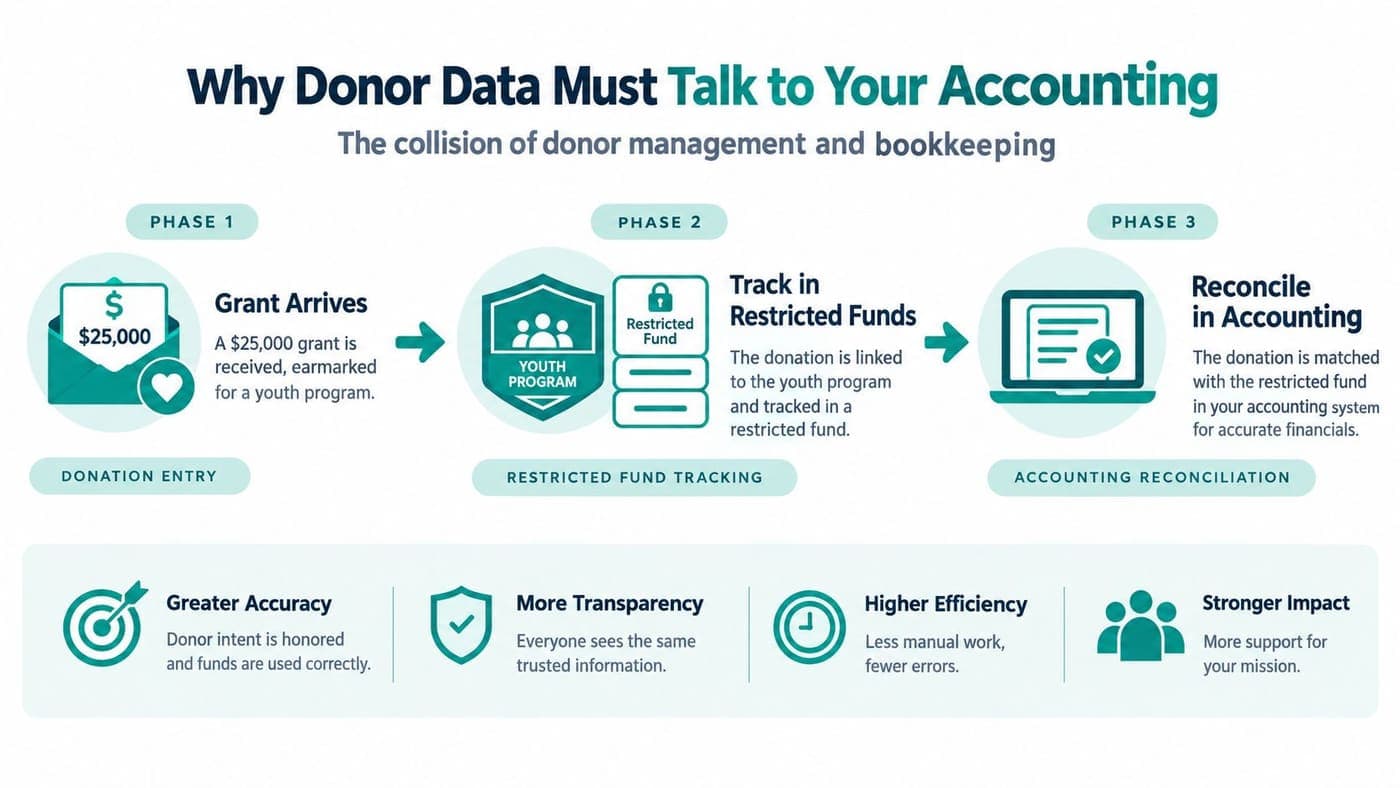
Disconnected systems create familiar headaches: duplicated entry, reconciliation drift, delayed updates, incorrect fund balances, audit questions, and Form 990 Schedule B errors. The underlying issue is usually field mapping. Date, amount, transaction type, restriction, and identifiers must land in the right accounting fields.
Industry guidance also recommends deciding whether the connection is one-way or bi-directional, and whether updates happen in real time or in batches. Blackbaud's guidance on integrating accounting and fundraising systems provides a practical framework for making those decisions. For teams studying broader analytics connections, PlotStudio AI's discussion of agentic analytics integration offers useful context on how connected data can support analysis.
The test I use
If you retype donor information into QuickBooks every month, your systems aren't integrated, regardless of what the vendor calls the connection.
A properly mapped flow posts the gift to the correct fund, preserves the transaction detail, and supports available-versus-restricted balance reporting. This explanation of nonprofit CRM and accounting integration covers the practical questions to ask before signing a contract.
The Case for an All-in-One Platform Over a Stack of Tools
Many small nonprofits begin with Mailchimp for email, Eventbrite for events, a donor database, QuickBooks for accounting, and a volunteer signup form. Each tool may work well on its own. The hours disappear at the seams.
Your staff exports contacts from one system, cleans them in another, uploads them somewhere else, and checks whether the totals match. At 9 p.m., the executive director becomes the integration layer. Later, a price increase, a retired feature, or a changed login process creates another round of work.
| Category | Stacked Tools | All-in-One Platform |
|---|---|---|
| Data entry | The same donor or event details move between systems | One donor record supports several workflows |
| Subscriptions | Several contracts and renewal dates | One platform relationship |
| Training | Staff learn multiple interfaces | Staff learn one shared system |
| Reporting | Exports need matching and cleanup | Finance, fundraising, volunteer, and event data connect |
| Support | Responsibility can sit between vendors | One support path for the platform |
| Risk | A single changed integration can interrupt work | Fewer handoffs to monitor |
An all-in-one platform connects donor records, gifts, campaigns, volunteer shifts, events, and fund accounting in one database. You get one login, one support relationship, one chart of accounts, and one donor view that includes giving history, event attendance, and volunteer hours.
The trade-off is real. A specialist may offer deeper event, auction, email, or major-gift features than an all-in-one product. Bloomerang, for example, is recognized for donor engagement and retention-focused workflows, while Salesforce offers broad customization and a large partner network. Those strengths matter when you have dedicated staff for administration.
For a small or midsized organization without a systems administrator, consolidation usually wins because fewer handoffs matter more than maximum depth in one module. SleekPost's overview of all-in-one platforms provides a broader view of that trade-off.
AlignMint is one option in this category. It combines accounting, donor CRM, volunteers, events, marketing, online giving, and Minty AI, with plan-based access and no per-seat fees. Eligible nonprofits raising under $100,000 per year can use its free tier, according to the platform's stated offering.
Moving From Spreadsheets Without Losing Your Mind
The hardest part of migration isn't learning the new software. It's deciding which information deserves a clean future and which belongs in an archive.
Start with one data steward. That person doesn't need to be technical, but they must have authority to resolve conflicting names, addresses, gift classifications, and pledge records.
Follow a controlled migration
- Audit every source: Export each spreadsheet, flag columns nobody trusts, identify duplicate donor records, and document formulas your team relies on.
- Clean the working data: Merge duplicates, standardize addresses, separate restricted and unrestricted gifts, and close recurring pledges that were never fulfilled.
- Test the new system: Import the cleaned records, load no more than 24 months of historical gifts, and reconcile one full month against the old spreadsheet.
- Cut over carefully: Archive old event RSVPs, test acknowledgement letters, and retire the spreadsheet only after totals match to the penny.
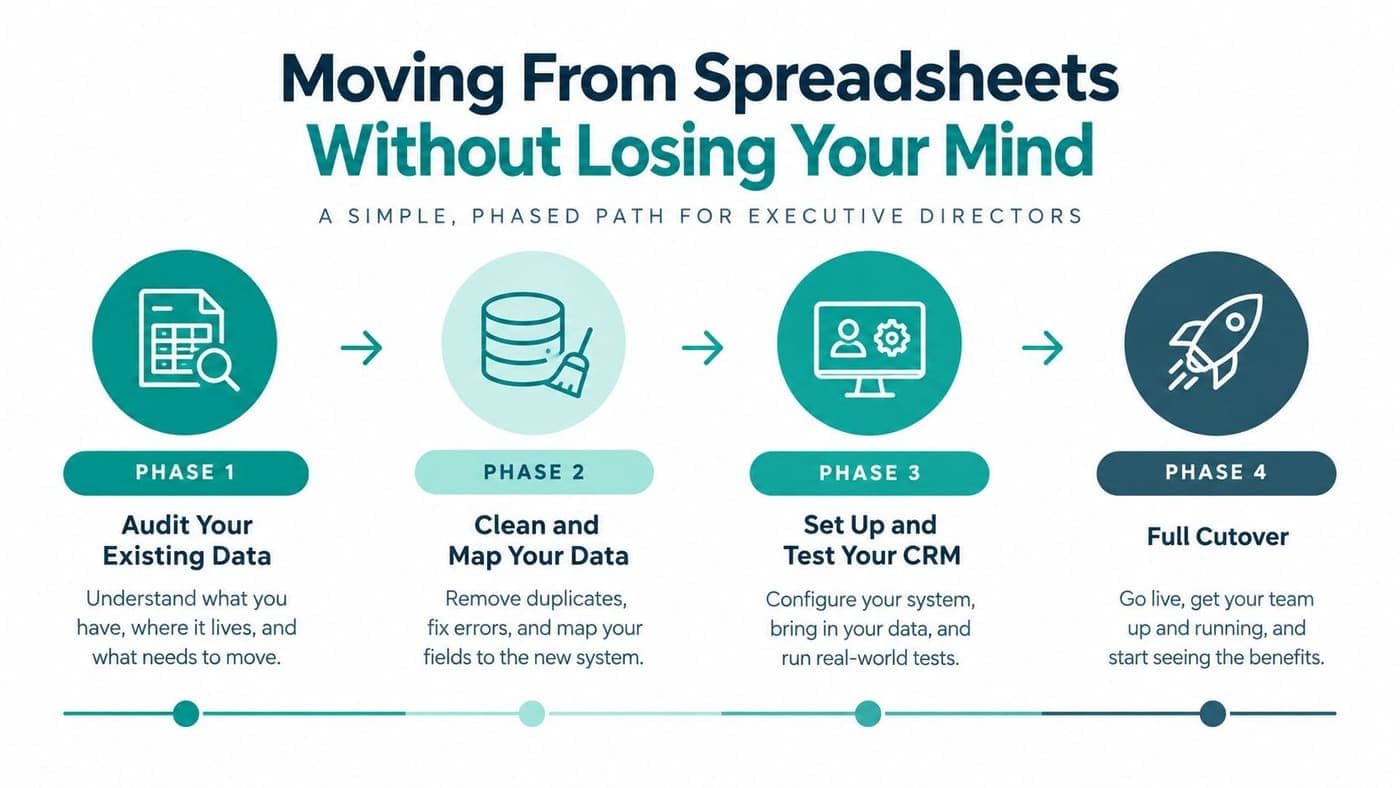
Don't migrate every historical detail just because you can. Old event attendance may matter for reference, but it doesn't always belong in the active CRM. A smaller, trusted dataset is more useful than a large file filled with unresolved contradictions.
Use this nonprofit data migration checklist before importing anything. A messy import creates new uncertainty, so a clean late migration beats a fast dirty one every time.
How the Leading Options Compare for Small Nonprofits
No vendor wins for every organization. The right choice depends on your donor volume, reporting needs, operational breadth, budget, and comfort with administration.
| CRM | Starting Price | Best Donor Count | Standout Feature | Where It Falls Short |
|---|---|---|---|---|
| Little Green Light | Public entry pricing should be confirmed | Smaller databases | Clean simplicity and basic donor management | Limited operations and customization |
| Bloomerang | Quote or current plan pricing should be confirmed | Small to midsized databases | Retention-focused engagement tools | Costs and add-ons can rise as needs expand |
| DonorPerfect | Quote required | Small to midsized organizations | Detailed gift entry and donor records | More administration for lean teams |
| Salesforce Nonprofit Cloud | Quote and configuration dependent | Growing or complex organizations | Scale, customization, and integrations | Consultant and configuration overhead |
| Neon One | Quote or current plan pricing should be confirmed | Small to midsized organizations | Websites, events, and connected fundraising tools | Breadth can bring setup complexity |
| Kindful | Current availability and pricing should be confirmed | Smaller email-first teams | Straightforward donor communication | Teams may outgrow its operational depth |
Little Green Light is a sensible starting point when you want a clean donor database and don't need volunteers, fund accounting, or broad operations in the same system. Bloomerang is attractive when retention reporting and donor engagement are central. DonorPerfect handles detailed gift entry well, especially for teams comfortable with a more traditional database.
Salesforce Nonprofit Cloud can support serious complexity, but small organizations should budget for configuration and outside help. Neon One makes sense when events, websites, and fundraising need to sit together. Kindful can suit an email-first shop, though you should ask what happens when finance, volunteer, or program needs become more important.
The decision test: Choose the smallest system that solves today's work without blocking the next operational responsibility.
Ask every vendor to demonstrate your own workflow. Enter a restricted gift, issue a receipt, assign a volunteer shift, run a campaign segment, and reconcile the transaction. A polished tour tells you less than watching the system handle an ordinary Tuesday.
Your Buying Checklist and the Next Step Forward
Take this checklist into every demo. Score what you see, not what the salesperson promises.
Must-have
- True fund accounting: Restricted and unrestricted funds remain distinct.
- Donor history: Gifts, receipts, pledges, notes, and follow-up share one record.
- Integrated communications: Email and text segments use current constituent data.
- Volunteer records: Shifts, skills, availability, and hours connect to supporters.
- Reporting: Board, grant, retention, and Form 990 work starts from reliable data.
- Online giving pages: Donors can give through branded pages with automatic receipts.
Nice-to-have
- AI assistance: An assistant such as Minty can answer questions using your organization's data.
- Team communication: Staff can assign tasks and share context without forwarding long email threads.
- Vertical support: Churches, schools, and fiscal sponsors can manage their distinct programs and reporting needs.
- User access: plan-based access avoids restricting volunteers or board members because of per-seat fees.
Walk away if
- Pricing is unclear: Ask whether contacts, users, transactions, modules, or integrations trigger increases.
- Accounting requires retyping: An export is not the same as an integrated flow.
- Migration is vague: You need a clear answer about data cleaning, imports, training, and support.
- Core features require add-ons: Confirm the cost of giving pages, volunteers, events, marketing, and reporting.
For planning purposes, many small nonprofits should expect $50 to $250 per month for a CRM, depending on contacts and functionality. Treat that as a budgeting range, not a promise, and watch for per-user charges. Set aside 10% to 15% of first-year cost for migration help if your data is spread across several files.
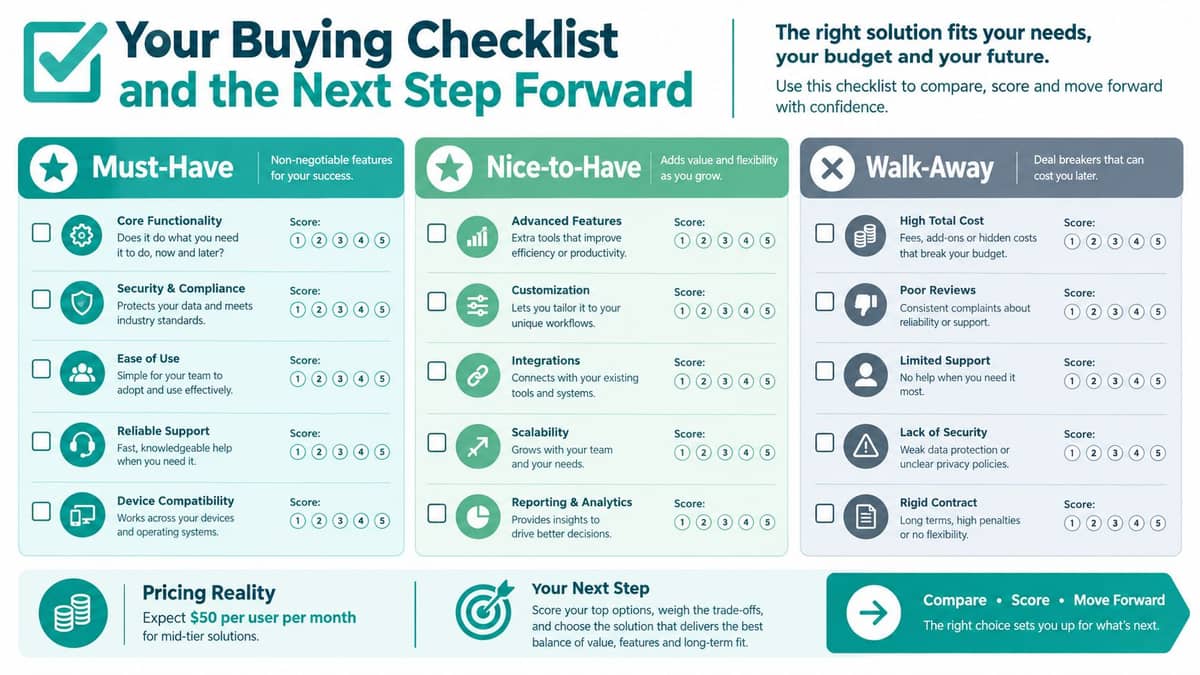
Ask every vendor two questions: What does setup include? And what triggers a price jump as we grow? Then export your donor spreadsheet to CSV and open a trial using your own data. A CRM decision becomes clear when you can see whether it fixes your Tuesday morning.
AlignMint brings fund accounting, donor management, volunteers, events, marketing, online giving, team communication, and Minty AI into one platform, with a free tier for eligible nonprofits under $100,000 in annual revenue. Visit AlignMint and test your own donor records, restricted gifts, and reporting workflow before your next board meeting.
Ready to see how AlignMint fits your workflow?
Schedule a free walkthrough — we will help you map donors, funds, and migration steps.