

For related tools, see AlignMint features.
Social Media for Nonprofit Organizations (2026)
Quick Answer: Social Media for Nonprofit Organizations: 2026 Strategy
Social media for nonprofit organizations works when posts connect to mission outcomes-recurring donors, volunteer signups, and clean gift records-not vanity metrics. Pick one or two platforms, run a donor-centric content rhythm, test small paid boosts on proven posts, and measure the path from click to donation in your CRM and fund accounting.
You probably already know the feeling. A staff member asks whether your nonprofit should post more on Facebook, try Instagram, start LinkedIn, maybe test paid ads, and somehow prove it all worked by the next board meeting.
That's where most advice on social media for nonprofit organizations falls apart. It talks about reach and engagement, but not donor retention, volunteer response, or what happens when gifts from a campaign have to show up cleanly in finance. The practical answer is to treat social media as an operating tool, not a side project. When you do that, your posts support fundraising, staffing, and reporting instead of draining your week.
Start with Your Mission Not Your Metrics
Most nonprofits waste time on social media for one simple reason. They start with the channel instead of the outcome.
If your team begins by asking whether to post reels, stories, or updates three times a week, you're already in the weeds. The better starting point is your mission plan for the next quarter and the next fiscal year.

A strong social plan begins with a clear objective. A review of nonprofit social media practice found that a rigorous step-by-step methodology for nonprofit social media success begins with defining specific, measurable objectives, and organizations that follow that discipline report meaningful gains in capacity, as noted in this nonprofit social strategy review.
Pick outcomes your board would care about
Start with questions that matter in a real leadership meeting:
- Monthly giving growth: Can social media help you bring in more recurring donors, not just one-time gifts?
- Volunteer response: Can it help fill event shifts, committee roles, or seasonal service needs faster?
- Program awareness: Can it reach families, students, congregants, or community members who need the service?
- Stewardship: Can it keep current donors connected between appeals so your development work feels less transactional?
Those are mission goals. Follower counts are not.
Practical rule: If a social goal wouldn't matter to your finance chair or program director, it probably shouldn't lead your plan.
Turn broad hopes into clear targets
You don't need a complicated dashboard. You need a short list of decisions your team can act on.
A good nonprofit social goal sounds like this: increase volunteer signups for the fall event series, grow recurring donor inquiries, or drive more traffic to a specific giving page. If you want a simple framework for writing those goals clearly, this guide on smart goals for founders and teams is a useful prompt.
Then document the basics:
- Name the outcome your organization needs.
- Choose the audience most likely to act.
- Define the action you want them to take.
- Assign ownership to one staff member, even if others help.
- Review monthly and adjust fast.
That's also why your social plan should sit next to your annual communications and fundraising planning, not in a separate folder nobody revisits. If you need a simple way to connect those pieces, this post on a marketing plan for nonprofit organizations gives a practical planning structure.
Keep the workload honest
Executive directors don't need another strategy document that creates more work than value. Keep your social plan on one page if needed.
Write down the mission priority, the main audience, the call to action, the lead staff member, and how you'll know if it helped. That alone will put you ahead of many organizations, especially since a lot of nonprofits still operate without a written social strategy.
The payoff is simple. Your team stops posting to "stay active" and starts posting with purpose. That shift saves time, sharpens messaging, and makes it easier to explain why social media belongs in the budget at all.
Choose Your Platforms Wisely
The fastest route to burnout is trying to show up everywhere. Most small and mid-sized teams don't have the staff time for that, and they don't need it.
The better rule is the 80/20 approach. Put most of your effort into one or two platforms that match your audience and your goals. Let the rest wait.
Facebook still matters, but not in the way many leaders hope
For nonprofits, Facebook is still the default place to start. According to the NP Tech for Good nonprofit social media statistics, 93% of nonprofits maintain a Facebook Page, but the average engagement rate is only 0.046%. The same source notes that video posts see 135% more organic reach than static images.
That combination tells you something important. Facebook can still give you broad visibility, but it won't reward generic updates. "Support our mission" posts with a flyer image and a donation link usually fade fast. Short video, direct stories, and clear community relevance do better.
Compare platforms by job, not popularity
Here's the practical lens I use. Don't ask which platform is hottest. Ask what job each platform can do for your organization.
| Platform | Best For | AlignMint Integration |
|---|---|---|
| Broad community visibility, event promotion, local donor awareness, volunteer recruitment | Connect social traffic to donation pages, contacts, and campaign records | |
| Visual storytelling, behind-the-scenes updates, volunteer culture, program moments | Pair content with giving pages and supporter follow-up in one record | |
| Board visibility, corporate partnerships, professional credibility, hiring and leadership messaging | Tie outreach to donor and relationship tracking for major or institutional prospects |
Facebook is often the right first platform for community-facing nonprofits. Instagram is useful when your mission shows well through people, place, and momentum. LinkedIn earns its place when your growth depends on partnerships, sponsorships, church or school relationships, and board-level visibility.
A platform is a good fit when it helps the right people take the next step. Not when it just gives you another feed to maintain.
Let your internal capacity make the final decision
A common pitfall makes many plans unrealistic. A platform may fit your audience perfectly, but if your team can't maintain it, it becomes another stale account.
Use these decision filters:
- Staff capacity: Can someone monitor comments and messages without neglecting donor follow-up?
- Content fit: Do you naturally have stories, photos, or updates that belong there?
- Call to action: Can you move people from the post to a sign-up, event page, or donation form?
- Values fit: Does the platform match how your organization wants to show up publicly?
That values question matters more than many guides admit. Some nonprofit leaders are rethinking whether every platform deserves their attention or ad dollars, especially when community trust is central to the mission.
If you're also comparing social tools with email and text in the mix, this roundup of nonprofit email and text marketing platforms helps frame the trade-offs.
A final word on competitors. Hootsuite, Buffer, and Sprout Social are all strong publishing tools. They help teams plan content and manage posting. Their gap is operational, not functional. They don't give you the full line of sight from post to donor record to volunteer response to fund reporting. That gap matters more than any scheduling feature.
Build Your Donor-Centric Content Plan
Most nonprofit feeds talk about the organization. Better content talks to the supporter.
That sounds small, but it changes everything. Donor-centric content answers the quiet question every supporter asks: where do I fit in this story?
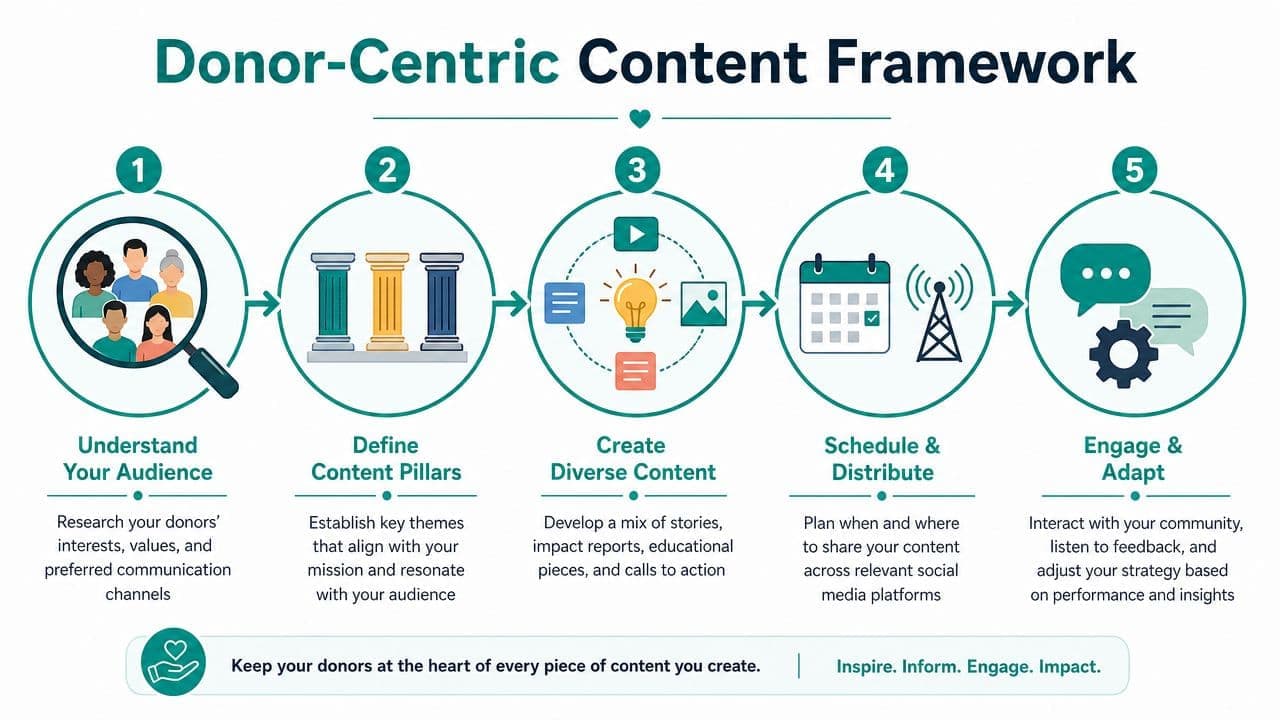
Social media can move people to act when the message is right. Research summarized in the Global NGO Technology Report analysis found that 55% of people who engage with nonprofits on social media take a tangible action, and 59% of those people go on to donate money.
Write for the supporter, not the annual report
A donor-centric post doesn't list your accomplishments in institutional language. It shows a person, a problem, and the supporter's role in what happens next.
Here's the difference.
An organization-centered post says: "Our nonprofit delivered services across multiple program areas this month and remains committed to community impact."
A donor-centered post says: "A volunteer stayed late to help a student finish an application before the deadline. That's what your support makes possible."
The second version gives the reader a human entry point. It also sounds like someone people trust.
A simple monthly content rhythm
You do not need a complicated content machine. You need a repeatable rhythm your team can keep.
A practical monthly calendar usually includes a mix like this:
- One mission story: A short post about a person, family, student, parishioner, or community outcome.
- One volunteer spotlight: Thank someone by name, with permission, and explain what their time changed.
- One donor stewardship update: Show what support made possible without making the post feel like a receipt.
- One direct invitation: Ask people to sign up, give, attend, or share.
- One behind-the-scenes post: Let supporters see the mission in action, not just the polished result.
That mix keeps your feed relational. It also protects you from becoming the organization that only appears online when it needs money.
When every post asks for a gift, supporters stop feeling invited into a mission and start feeling managed.
Use stories that lower the barrier to action
One strong example is a volunteer recruitment post for a Saturday food distribution. Instead of listing logistics first, begin with the need and the role.
Try this structure:
- Open with the human reality. Keep it concrete.
- Show the response already in motion. Staff, volunteers, or partners are doing something now.
- Name the gap. Point out how the audience can help.
- Ask for one clear action. Sign up, donate, or share.
If you're creating short-form video to support that rhythm and your team wants help simplifying production, Storyshort's guide to AI video tools is worth reviewing. It's practical for nonprofits that need better storytelling without a full media team.
You'll also want your content tied to actual fundraising outcomes. This post on social media fundraising ideas offers useful examples that move beyond generic "donate now" posts.
Keep your calendar connected to real relationships
Many tools exhibit limitations. You schedule content in one place, collect donations in another, track volunteers in a spreadsheet, then ask development to piece it all together later.
That arrangement creates blind spots. If a supporter comments on a campaign post, signs up to volunteer, then makes a gift two weeks later, your team should be able to recognize that journey without a manual detective project.
Donor-centric planning works best when content, outreach, and follow-up share the same records. Otherwise, staff spend more time exporting lists than stewarding people.
Run Low-Cost Paid Campaigns That Work
Many executive directors hear "paid social" and think two things. It sounds expensive, and it sounds easy to waste money.
That concern is fair. Plenty of nonprofits have boosted the wrong post, targeted too broadly, and ended up with clicks that never turned into a donor or volunteer.
Start with one small test
The case for paid social is simple. If an organic post already proves that a message is connecting, a modest paid push can put that message in front of more of the right people.
The key is not complexity. The key is discipline.
Start with one post that already earned comments, shares, or direct responses from your community. Then put a small budget behind it and send people to a focused next step, ideally a clean donation page or event signup form.
Use campaigns like these:
- Boost a strong local story: Good for volunteer drives, church events, school appeals, and neighborhood fundraisers.
- Promote an event deadline: Useful when registration is lagging and you need a final push.
- Re-engage warm audiences: Target people who already know your organization through email lists or prior donors where the platform allows it.
Measure the next action, not the vanity signal
A paid campaign is worth it when it produces a useful action. That might be a completed gift, a volunteer registration, or a response from a likely partner.
It is not enough to say the ad got attention. If a campaign generates traffic but your donation page confuses people, the ad isn't your main problem. The page is.
That's why this guide on nonprofit donation page best practices matters so much. Your social campaign can only perform as well as the page waiting on the other side.
Budget test: If you can't explain how a paid post connects to a donation, signup, or follow-up action, don't spend on it yet.
Keep the creative simple
You don't need an agency-grade video to test a campaign. Often, a clear photo, a direct headline, and a single call to action are enough to learn what resonates.
If your staff wants help creating first-draft ad creative without starting from scratch, ShortGenius AI ad generator can be a practical option to explore. Used carefully, tools like that can help a small team produce variations faster.
Meta Ads Manager remains the main tool for Facebook and Instagram campaigns. LinkedIn Campaign Manager can make sense for partnership outreach or professional audiences, though many nonprofits should begin with the lower-friction option first.
Competitor note. Constant Contact and Mailchimp both help with digital outreach and audience segmentation. They're solid for email campaigns. Their limitation is that paid social decisions still sit apart from your accounting, volunteer response, and donor records, so proving actual return often becomes a manual process.
Measure What Matters to Your Mission
Social media's credibility within your organization, or its designation as a side activity, hinges on its connection to operational outcomes. Without such a link, skepticism is justified.
Board members don't approve a budget because a post got likes. They approve a budget because outreach produced donors, volunteers, attendance, or stronger stewardship.
Track the path from post to payment
The most useful measurement model is a simple chain:
social post → click → form completion → donation or signup → accounting record → report
That sounds obvious, but many nonprofits still break this path across several systems. Marketing sees the click. Development sees the donor. Finance sees the deposit. Nobody sees the whole story without a spreadsheet.
That disconnect becomes more serious when the gift is restricted, tied to a grant effort, or associated with a campaign that leadership needs to report on later. At that point, social media isn't just a communications issue. It becomes a reporting issue.
Know what finance needs from you
Executive directors need social metrics that stand up in operational review, not just in a marketing recap. That means you should be able to answer questions like:
- Which campaign brought in gifts, not just traffic
- Which volunteer post led to actual signups
- Which audience segment gave to a restricted purpose
- Which fundraising expenses belong in fundraising versus program support
Those last questions matter because financial reporting has rules. The Sage guide to streamlining nonprofit Form 990 reporting notes that the Statement of Functional Expenses requires nonprofits to classify expenses into exactly Program, Administration and management, and Fundraising, and that automated tracking helps avoid manual allocation errors.
Replace spreadsheet reconciliation with a clean operating record
Here's the practical difference between disconnected tools and an integrated approach.
In the disconnected version, your communications staff exports campaign results. Development pulls the donor list. Finance checks deposits. Someone then tries to match dates, names, gift purposes, and campaign notes before a board meeting or Form 990 prep.
In the integrated version, the same activity can be reviewed as one record. The donor clicked from a campaign, completed a giving form, and the gift entered the CRM and accounting ledger with the right designation. Staff can then review campaign performance by audience, appeal, or purpose without re-keying data.
Social media becomes strategically useful when the data survives contact with finance.
This matters even more for organizations with grant restrictions, fiscal sponsorship structures, church or school funds, and multiple program lines. Those leaders don't just need evidence that a campaign performed. They need auditable records that match how the money must be tracked.
A separate but related point is federal filing. The Council of Nonprofits guidance on federal filing requirements explains that nonprofits with annual revenue of $500,000 or more must file the full IRS Form 990, which includes detailed reporting needs around fund balances. If your outreach creates gifts that finance later has to sort manually, the hidden cost of disconnected systems rises quickly.
For a deeper look at how leaders can tie operational activity to board-ready and finance-ready outputs, this overview of nonprofit reporting software is a useful next read.
Focus your dashboard on four questions
A helpful executive dashboard for social media doesn't need dozens of widgets. It needs answers to four plain questions:
- Did this campaign bring in new supporters or re-engage existing ones?
- Did people give, sign up, or respond?
- Did the related revenue or expense land correctly for reporting?
- Should we repeat, refine, or stop this approach?
That framework keeps your team out of vanity metrics and inside mission management.
Your All-in-One Operations Hub
The deeper lesson here is simple. Social media works best when it isn't treated as a separate marketing hobby.
When your outreach connects directly to donor management, volunteer records, online giving pages, team communication, and true fund accounting, you spend less time chasing data and more time leading. That matters for small nonprofits, churches, schools, and fiscal sponsors alike. It also matters when staff turnover happens and you need systems that hold together without tribal knowledge.
QuickBooks can help with general bookkeeping. Salesforce can be powerful for CRM. Bloomerang, DonorPerfect, and Neon One each have strengths in fundraising and donor workflows. Planning tools like Buffer and Hootsuite can help with publishing. The common gap is that most organizations still end up stitching those tools together, then paying for the time and errors that come with handoffs.
We built AlignMint for leaders who are done with that patchwork. Our platform brings together accounting, CRM, volunteers, events, marketing, online giving pages, fiscal sponsorship support, team communication, and true fund accounting, not QuickBooks classes. You also get Minty to answer questions about your actual data and a built-in marketing suite. For nonprofits under $100K, there's also a free tier.
If you want social media for nonprofit organizations to produce more than activity, take a close look at how your systems connect after someone clicks.
If you're ready to replace disconnected tools with one practical system, explore AlignMint. We built it for nonprofit directors who need cleaner reporting, stronger donor and volunteer management, built-in marketing, and real fund accounting without paying for another stack of software.
Ready to try AlignMint with your nonprofit?
Start free — set up donor tools, giving pages, and Minty. Upgrade when you need accounting.