Find the Best Software for Donation Management
Quick Answer: Find the Best Software for Donation Management
The best software for donation management keeps donor records, gifts, receipts, restrictions, campaigns, and financial reporting connected. Choose a CRM-only tool when fundraising is the main gap, or an all-in-one platform when donor management and fund accounting need to stay in sync.
AlignMint fits nonprofits that want fundraising and finance in one place, DonorPerfect fits teams that want a well-known mid-tier donor CRM, and Blackbaud fits larger organizations with more complex enterprise needs. The point of software for donation management is simple: it centralizes donor data so you can raise money and report on it with less scrambling.
If you're like most directors I know, the problem isn't that you lack data. It's that your data lives in five places, none of which agree with each other. A donor report comes from one system, the deposit detail sits in another, the volunteer list is still in a spreadsheet, and your finance person is trying to make sense of all of it before the board packet goes out.
That mess wears people down. It also makes good decisions harder than they should be. You shouldn't need a half day and three exports to answer a basic question about who gave, what it was for, and whether it has been recorded correctly.
Your Guide to Choosing Donation Management Software
A lot of software for donation management is sold as if a better donor list will solve everything. Sometimes it helps. But if donations, acknowledgments, restrictions, and financial reports still live in separate tools, you're still doing cleanup work at the end of every week.
That's why the category matters more now than it used to. The U.S. donation management software market was valued at $1.23 billion in 2024 and is projected to reach $2.91 billion by 2031, according to this industry overview of donor management software options. The same overview says 65% of nonprofits upgraded their donor management software between 2022 and 2023. That tells me this is no longer a niche purchase. It's core operating software.
Three common paths directors compare
If you're sorting through options, these are usually the lanes:
- All-in-one operations software: Organizations consider this software when they want donor records, fund accounting, volunteers, events, and marketing in one system.
- Mid-tier donor CRM: Tools like DonorPerfect are often considered when fundraising is the immediate pain point and finance already has a separate home.
- Enterprise suites: Blackbaud often comes up when a larger organization needs more formal structure, more layers of administration, or a broader enterprise setup.
None of those categories is wrong. The right fit depends on where your bottleneck sits.
The software decision usually isn't about features first. It's about where your staff loses time every week.
If your main headache is accounting cleanup, don't start with campaign dashboards. If your biggest issue is donor follow-up, don't start with general ledger structure.
A practical place to ground that thinking is in broader finance operations. If you want another perspective on how nonprofit finance software choices affect daily work, this roundup of Nonprofit accounting insights from Bookkeeping and Accounting is a useful companion read.
What Donation Management Software Truly Does
At its best, software for donation management is not a digital Rolodex. It's your operating system for supporter relationships. It holds the history, the context, and the next action in one place so your team can stop guessing.
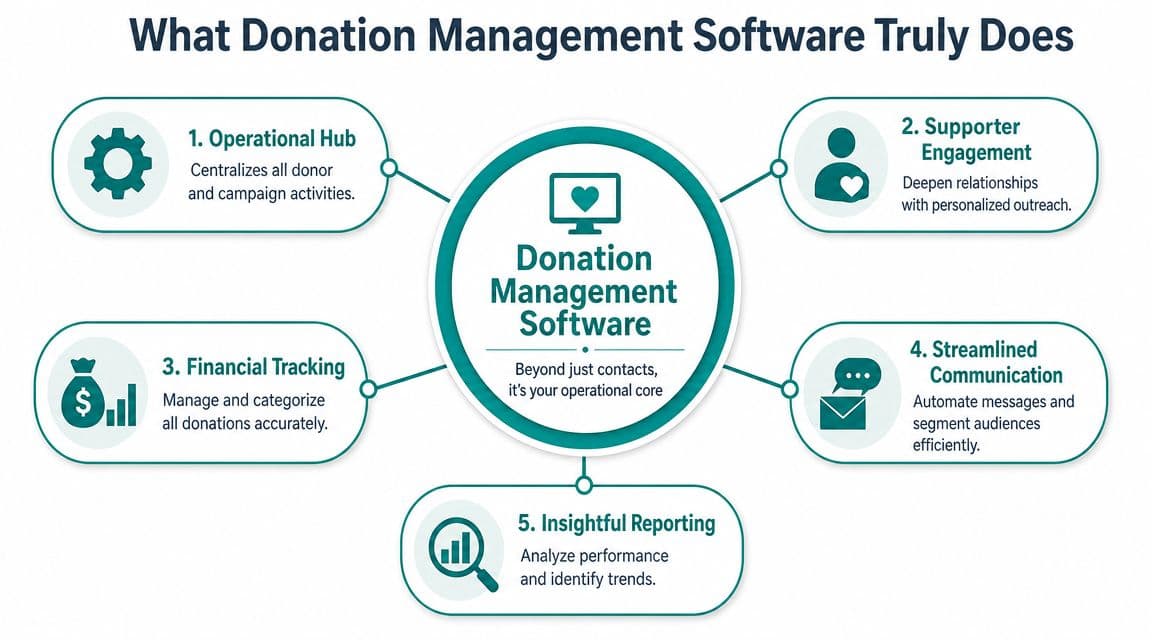
It's comparable to a central nervous system. If each arm and leg acts alone, the body still moves, but awkwardly. When donor records, gifts, emails, events, and volunteer activity connect, your organization responds faster and with more confidence.
It connects activity, not just names
A modern platform should help you see a supporter as a whole person. That means one record can reflect gift history, pledges, notes from calls, event attendance, volunteer involvement, campaign responses, and communication preferences.
That unified view changes your day-to-day work in practical ways:
- You stop asking where the latest information lives. Staff can look in one place instead of checking inboxes and spreadsheets.
- You respond with context. When a donor calls, your team can see the last gift, last event, and last conversation.
- You segment with purpose. Campaigns become more relevant because you're not emailing everyone the same message.
For teams that want a closer look at what a donor database should include, AlignMint's donor CRM overview shows the kind of connected donor record many nonprofits are trying to build.
It becomes operating infrastructure
This category has grown because nonprofits now expect these systems to do more than store contacts. As noted earlier, the market size and projected growth show that these tools are becoming standard infrastructure, not optional add-ons.
That matters because fundraising no longer stands alone. Donor communication affects receipts. Receipts affect finance. Finance affects board reporting. Board reporting affects planning.
When one gift touches four systems, the problem isn't staff discipline. The problem is system design.
A strong donation management platform gives you a single source of truth for supporters and gifts. That doesn't make your work easy overnight. It does make your work cleaner, more predictable, and far less dependent on heroic manual effort.
Core Capabilities Your Nonprofit Cannot Ignore
When people shop for software for donation management, they often compare feature lists. I think it's more useful to compare headaches. A good system should remove work your staff repeats every week.
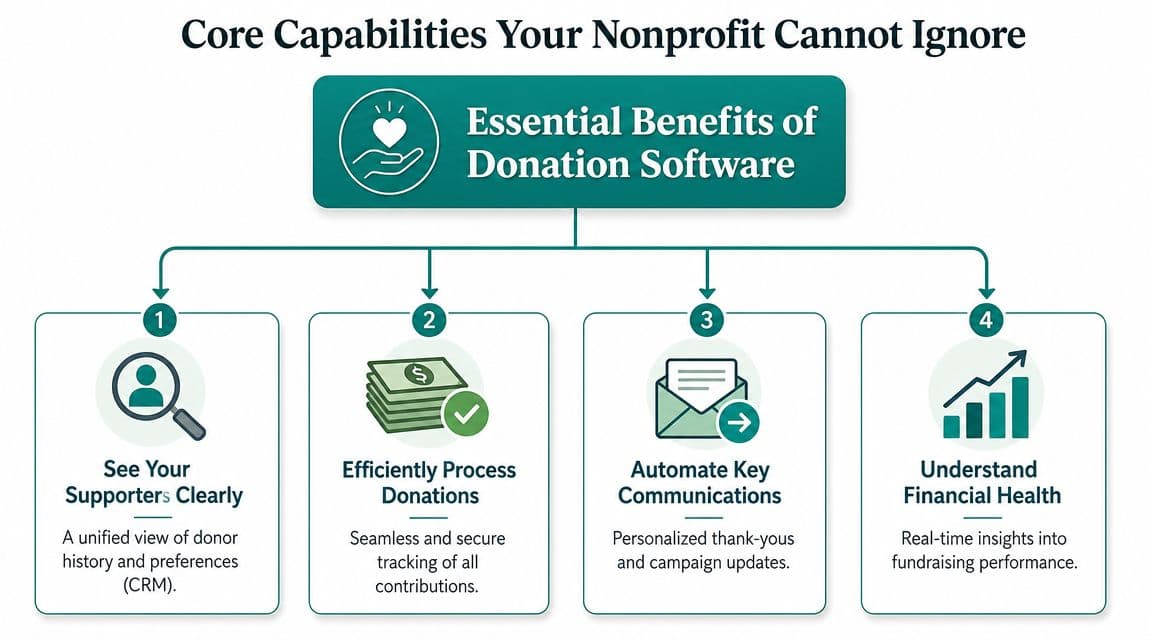
See your supporters clearly
Your first need is a donor record that makes sense. You should be able to open one profile and understand the relationship quickly. Who gave, when they gave, what campaign prompted it, whether they've volunteered, and what your team promised in follow-up.
If that record is weak, everything downstream gets fuzzy. Reports are less useful. Stewardship becomes generic. Staff confidence drops because nobody trusts the notes.
This is the baseline many teams look for in a dedicated donor management platform.
Process gifts without creating cleanup work
Gift entry isn't just about recording money received. It's about what happens next. Effective platforms ensure each gift flows directly into the donor record, which triggers immediate acknowledgment and accurate reporting, as described by DonorPerfect's donation and acknowledgment workflow.
That matters most for small teams. When gifts and donor records connect at the point of capture, you reduce re-entry and shorten the lag between donation, thank-you, and reporting.
Here are the capabilities I would not compromise on:
- Online giving capture: Gifts should post into the donor record automatically, not wait for batch cleanup later.
- Automatic acknowledgments: Your team shouldn't draft one-off receipts for routine gifts.
- Recurring gift handling: Monthly giving needs its own logic, not a workaround.
- Pledge tracking: Staff should be able to see what was promised, what arrived, and what still needs follow-up.
Keep communications tied to real activity
A lot of nonprofits have an email tool that isn't connected to donor history. That creates blind spots. You may send a year-end appeal to someone who just made a major restricted gift, or miss a chance to thank a volunteer who also donates regularly.
Better systems connect communication to behavior. Some also include built-in marketing tools so campaign lists, email activity, donation history, and response tracking stay together.
Practical rule: If your communications tool can't see giving history, your stewardship will rely on memory.
This is also where adjacent functions start to matter. Volunteer records, event participation, online giving pages, and team communication aren't extras when they affect how you build donor relationships. For many organizations, genuine time savings come when those parts share the same data instead of needing nightly exports.
The Critical Link to True Fund Accounting
This is the question I wish more software reviews asked: after the gift arrives, what happens to the money inside your books?
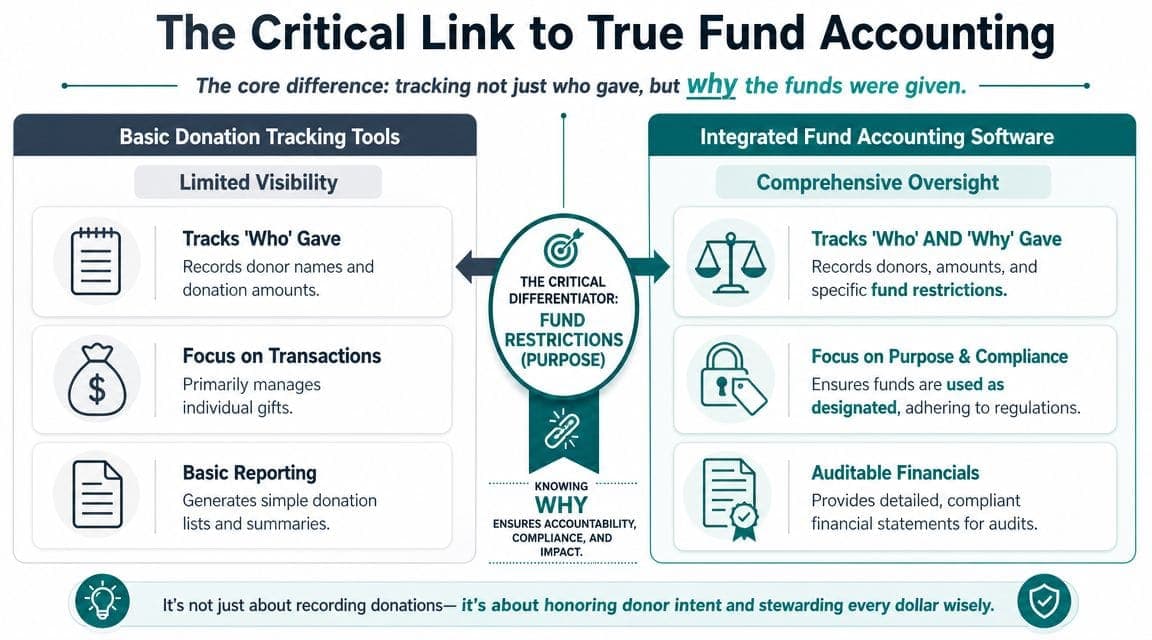
Many donation systems are good at tracking who gave. Far fewer help you track why they gave, meaning the restriction, purpose, grant condition, or program designation attached to that gift. If that information doesn't carry into your accounting records cleanly, your staff ends up doing translation work by hand.
Donor tracking is not the same as fund accounting
Smart directors often get tripped up, because the software demos often look similar. A CRM can show a donor, a gift amount, and a campaign. That doesn't mean it can produce the financial statements your board, auditor, or finance committee needs without spreadsheet repair.
Many reviews of donation tools focus on donor profiles, forms, and segmentation, but skip whether the software can produce audit-ready reports like Form 990 support or Statements of Functional Expenses without extra spreadsheet work, a gap noted in this overview of donor management software limitations.
That's not a small omission. It's where many teams lose control of their time.
Where disconnected systems break down
Let's be fair to the market. DonorPerfect is a respected donor CRM, and many nonprofits use it well for fundraising operations. The issue isn't that it's weak at donor management. The issue is that it typically sits beside a separate accounting system, which means your staff still has to reconcile between fundraising and finance.
The same caution applies anytime a nonprofit pairs a donor system with a general business accounting tool. QuickBooks can serve many organizations for basic bookkeeping, but classes are not the same as true fund accounting. You still need a clear way to model restricted gifts, grants, programs, and reporting requirements in a nonprofit-native structure.
Useful questions to ask in a demo:
- Restricted gifts: Can the system record and report designated revenue without side spreadsheets?
- Grant reporting: Can you track grant-related activity in the same environment as donor and accounting data?
- Board reporting: Can leadership see spendable balances by fund or program without waiting for custom exports?
- Audit prep: Can your team produce support for compliance tasks without rebuilding reports manually?
If compliance is on your mind, this checklist of fiduciary compliance steps is worth reviewing alongside your software search.
For a plain-language explanation of how nonprofit-specific accounting differs from business bookkeeping, this guide to fund accounting for nonprofits helps frame the difference.
The right question isn't "Can this track donations?" It's "Can this carry donor intent all the way into the financial statements?"
That is where unified systems start to earn their keep.
Evaluating Your Options A Buyer's Checklist
Most software decisions go wrong in one of two ways. Either the team buys the cheapest visible option and pays for it later in staff time, or they buy the most impressive demo and discover half the functions require extra modules, extra users, or extra cleanup.
A better approach is to score each option against what you do each month.
Ask about data movement before you ask about dashboards
Software integration depth is a real dividing line. Systems with open APIs and automated synchronization, including the kind of integrations described in this review of donor management software and integration depth, reduce duplicate records and reporting errors as organizations grow.
That may sound technical, but the effect is simple. When data moves cleanly between systems, staff spends less time correcting names, deposits, and mismatched reports.
Ask these questions early:
- Where does gift data enter first? If gifts start in one place and donor records update later, ask how long that takes.
- What has to be exported? Every recurring export usually points to a gap.
- Who gets charged? Per-user pricing can discourage adoption because staff share logins or stay out of the system.
- What costs extra? Support, texting, reports, and add-on modules can change the overall price quickly.
Compare total operational cost, not just license cost
The sticker price matters, but so does administrative drag. A cheaper setup can still be expensive if your team spends hours every week reconciling records across tools.
Here's a simple way to understand:
| Function | Piecemeal Stack (Example Costs/Year) | AlignMint All-in-One (Pro Plan) |
|---|---|---|
| Donor CRM | Separate subscription, often billed by feature or user | Included in one platform |
| Fund accounting | Separate accounting software | Included |
| Volunteer management | Separate tool or spreadsheet process | Included |
| Marketing emails and texts | Separate platform or add-on | Included |
| Event tools | Separate event registration software | Included |
| User access | Often billed per seat | Plan-based user allowances (1 on Free, up to 10 on Plus, up to 25 on Pro, and unlimited on Enterprise) |
That structure is why some nonprofits prefer an all-in-one path. AlignMint combines accounting, donor CRM, volunteers, events, and marketing in one platform, offers a free tier for nonprofits under $100K, and uses plan-based user allowances (1 on Free, up to 10 on Plus, up to 25 on Pro, and unlimited on Enterprise) rather than per-seat pricing. If pricing structure is one of your main evaluation points, review the AlignMint pricing page.
Watch for migration risk and staff adoption
Even good software fails if the switch is chaotic. Before signing, ask the vendor or your own team to map:
- Your current donor sources: Spreadsheets, online giving pages, accounting records, event lists.
- Your essential reports: Board packet, restricted fund report, receipting, grant tracking.
- Your core workflows: Gift entry, approvals, monthly close, donor thank-yous.
Don't measure return only in dollars. Measure it in fewer exports, fewer correction emails, and fewer late nights before board meetings.
That is usually the true return directors care about.
Seeing It in Action Nonprofit Use Cases
The easiest way to judge software for donation management is to picture ordinary weeks, not polished demos. Here are three situations where a unified system changes daily work.
A church handling designated giving
A church receives general tithes, building fund gifts, and support for a missions trip. The pastor wants to thank families promptly. The treasurer wants to know what is available to spend in each purpose area.
In a disconnected setup, donation records may sit in one tool while the bookkeeper rebuilds restrictions in another. In a unified setup, the gift designation follows the transaction through donor history and financial reporting, so stewardship and accountability stay connected.
A school managing a restricted grant
A school development office secures a grant for a student program. The head of school wants clear visibility into revenue and program spending, while the advancement team also wants to keep grant-related communication with the funder organized.
If fundraising and finance are split, staff often maintain a shadow spreadsheet just to stay oriented. A connected system reduces that side file because donor context, purpose restriction, and reporting sit closer together.
A fiscal sponsor reporting across projects
A fiscal sponsor may support multiple projects with different leaders, donors, and reporting expectations. One project needs a clean donor history. Another needs spending visibility. Leadership needs both project-level and consolidated reporting.
That kind of work becomes hard fast when each sponsored project lives in separate sheets or separate tools. Unified operations software can give each project its own clarity while preserving an organization-wide view.
If you're exploring other tools that support fundraising operations beyond donor tracking alone, this guide to nonprofit fundraising tools gives a broader landscape.
The value isn't just cleaner records. It's being able to answer a program leader, donor, or board member without opening three systems first.
Your Next Steps to Clarity and Confidence
You don't need to become a software expert to make a better decision here. You need a clear picture of where your current setup creates repeated work, repeated errors, or repeated uncertainty.
For many nonprofits, a key breakthrough comes when fundraising data and finance data stop living separate lives. That's how you get faster acknowledgments, cleaner reporting, and fewer last-minute reconciliations.
If your organization is small, a low-risk starting point matters. If your organization is growing, clarity matters even more. Either way, it helps to look for software that supports donor management and accounting together, especially if restricted funds, grants, volunteers, events, or marketing already touch the same staff team.
Two helpful next reads are this page on fund accounting features for nonprofits, plus these related posts on nonprofit reporting and choosing accounting software for nonprofits.
If you'd like to see whether AlignMint fits your organization, start with the free option if your nonprofit raises under $100K, or request a simple walkthrough. We built it to bring donor management, fund accounting, volunteers, events, marketing, and Minty into one place so you can spend less time reconciling systems and more time leading.
Ready to try AlignMint with your nonprofit?
Start free — set up donor tools, giving pages, and Minty. Upgrade when you need accounting.