

For related tools, see AlignMint features.
CRM Nonprofit Guide for Directors: What Matters in 2026
Quick Answer: CRM Nonprofit Guide for Directors: What Matters in 2026
CRM nonprofit software is your organization's shared record for donors, volunteers, events, and the money tied to each relationship, not just a contact list. The best fit connects fundraising activity to fund accounting so board reports, thank-yous, and restricted balances do not require exports and manual reconciliation.
You know the scene. The board packet is due, development has one set of numbers, finance has another, and your program team is keeping key details in spreadsheets no one fully trusts. By the time you reconcile gifts, restricted funds, event revenue, and volunteer activity, you've lost half a day and most of your patience.
That's why choosing a CRM nonprofit system isn't really about buying another database. It's about deciding whether your organization will keep stitching together reports, or finally run from one clear operating record.
Tired of Juggling Spreadsheets
The problem usually shows up right before a board meeting.
Your development director sends a donor report from one tool. Your bookkeeper pulls revenue from QuickBooks. Someone exports event registrations from another platform. Then you sit there comparing totals, asking which number is current and which report changed after the export.
That scramble wears people down. It also creates a quiet confidence problem. If your team spends too much time checking the numbers, you can't spend that time improving the programs behind the numbers.
Practical rule: If your staff has to export data just to answer routine questions, your system is creating work instead of removing it.
Most directors I talk with don't need more software promises. They've heard those before. They need fewer moving parts, cleaner reports, and a way to stop relying on one staff member who "knows where everything lives."
A common warning sign is this: donor records live in one place, accounting lives somewhere else, and volunteer or event data lives wherever it happened to land. That setup looks manageable at first. Then a grant report is due, a major donor asks for giving history, or the treasurer wants a restricted balance by fund.
What the mess usually looks like
- Donor history is incomplete because event attendance, emails, and gifts don't live in one record.
- Finance closes slowly because gift data has to be cleaned up before it can match the books.
- Staff create shadow systems in spreadsheets to track pledges, sponsorships, grants, or volunteer details.
- Board reporting gets tense because different departments are reading from different reports.
If that sounds familiar, you're not behind. You're operating the way many nonprofits grew up. A lot of teams started with spreadsheets, then added software one function at a time, and never got the whole picture back together.
The fix isn't another export. It's replacing scattered records with one operating system for the organization. If you're still living in spreadsheet limbo, this guide on moving beyond nonprofit spreadsheets is a useful starting point.
What a Nonprofit CRM Really Is
A nonprofit CRM is not just a better address book.
At its most practical, it's the place where your organization tracks relationships, money, and mission activity together. Industry guidance describes nonprofit CRM as an adaptation of customer relationship management for mission-driven organizations, with a centralized database for supporter and donation records that also tracks donations, engagement, events, and volunteer activity in one place, rather than acting like a sales tool built for pipelines and quotas, as outlined in Kindsight's overview of nonprofit CRM features.
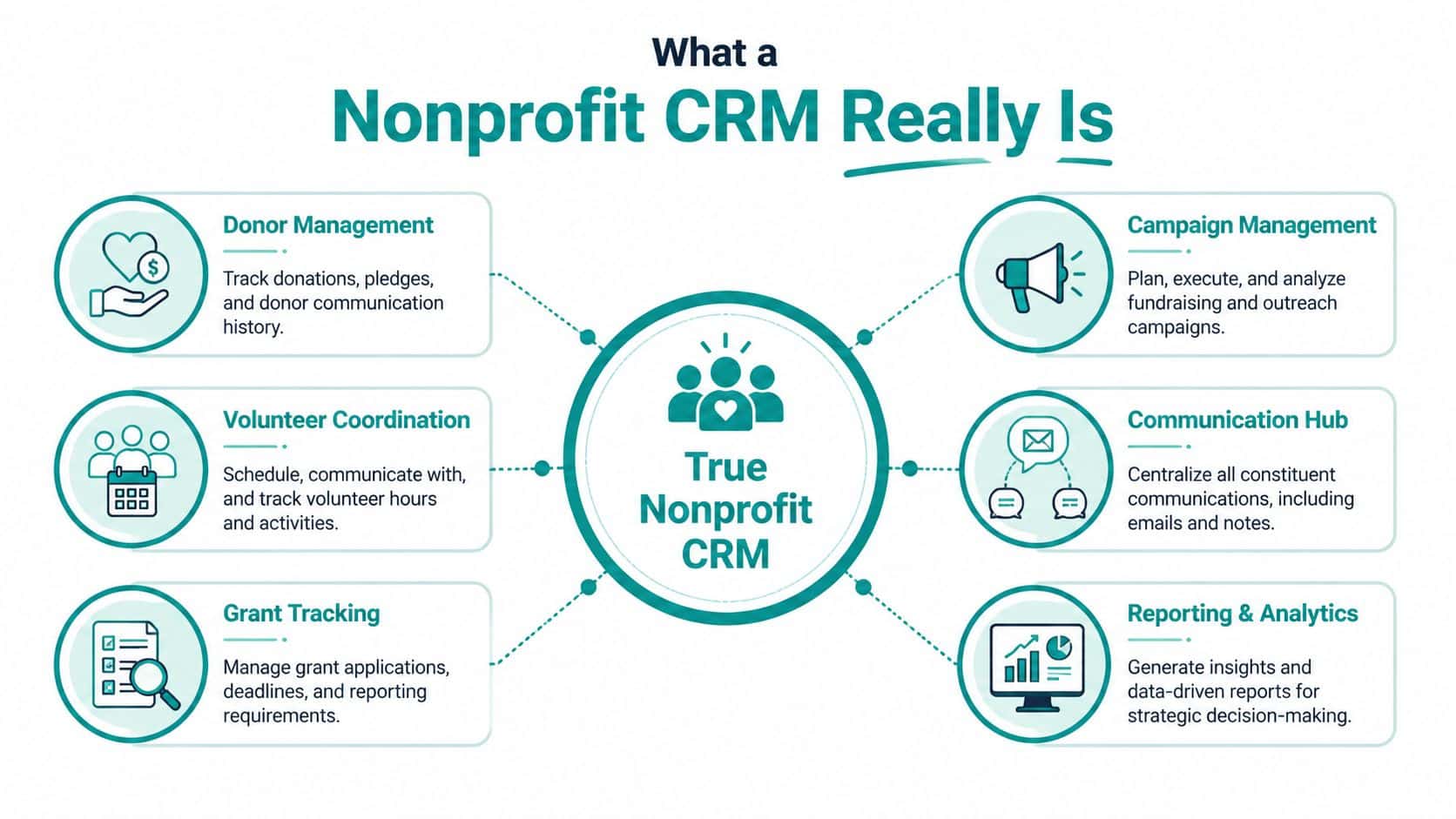
That distinction matters. A sales CRM asks, "Who is the prospect and where are they in the deal cycle?" A nonprofit CRM asks, "Who is this person to us, how have they engaged, what have they given, where have they served, and what should happen next?"
Think central nervous system, not contact list
The simplest way to understand CRM nonprofit software is to think of it as your organization's central nervous system. When it works, every department sees the same person and the same history.
If a donor attends an event, gives online, volunteers at a school program, and later joins a campaign appeal, those actions should connect to one record. If they don't, your staff has to reconstruct the relationship manually.
That's why many nonprofit guides now treat "CRM" and "donor management system" as overlapping terms. In practice, most leaders aren't looking for theory. They want one place to see the full story.
What a real nonprofit CRM should connect
A solid system should tie together a few core areas:
- People including donors, volunteers, members, board contacts, sponsors, and households
- Money including donations, pledges, recurring gifts, grants, fees, and campaign results
- Activity including events, emails, calls, notes, service history, and volunteer hours
- Reporting including board reports, fundraising views, acknowledgments, and operational summaries
The test is simple. Can your team answer a donor, finance, or board question without checking three systems first?
This is also where many articles miss the point. They describe nonprofit CRM as fundraising software with better notes. That's too narrow for a church managing giving and programs, a school tracking families and events, or a service nonprofit connecting participants, volunteers, and donors.
Where many systems fall short
Some platforms are strong at donor records but thin on accounting. Others are good at financial reporting but weak on relationship history. Some handle campaigns well but force volunteer management into another tool.
A director doesn't need a dozen disconnected specialists. A director needs one dependable record of what happened, who was involved, and how the money should be tracked.
When you view a nonprofit CRM that way, the buying decision changes. You're no longer shopping for a fundraising add-on. You're deciding how your whole operation will stay aligned.
Core Capabilities Your Mission Needs
The right CRM nonprofit platform should save time first. Features only matter if they reduce manual work, sharpen decisions, and make your numbers easier to trust.
Vendor guidance now treats automation, receipting, donor portals, scheduled outreach, and reporting as standard functions, and Salesforce reports nonprofit customers see 82% faster decision-making after implementation, according to DonorPerfect's summary of nonprofit CRM expectations. That number matters because it reflects a larger shift. CRM is no longer just a database. It's an operating layer for day-to-day ops.
Start with financial clarity
If your CRM and accounting don't agree, the rest of the system won't matter much.
For most directors, the first practical question is not "Can it send an email?" It's "Can I trust the balance by fund, grant, or program without rebuilding it in a spreadsheet?" That's why true fund accounting matters more than generic bookkeeping categories. You need to see restrictions, releases, and program allocations in a way that matches nonprofit reality.
That's also why many teams start their review with fund accounting software for nonprofits. If the accounting side is weak, your development reports will eventually drift from the books.
Then make donor records useful
A donor record should help your staff act, not just store history.
When one record shows giving, communications, event participation, and volunteer activity, your team can respond like they know the person. That changes stewardship. A board member can call with context. A development lead can see who gave, attended, and opened campaign messages. Finance can confirm what was received and receipted.
A practical place to compare these functions is nonprofit donor management software.
Field note: The best donor profile is the one your staff will actually open before making a call.
Automate the repetitive work
Manual acknowledgments and follow-up are where many teams gradually lose momentum.
A modern system should handle routine receipts, scheduled messages, reminders, and common reporting tasks. Not because automation is trendy, but because your staff shouldn't spend their best hours on work a system can do reliably.
This matters even more for small teams. If one staff member handles gifts, campaign follow-up, and board reporting, every repeated task has a cost.
Don't ignore volunteers, events, and communications
Many nonprofits buy a fundraising CRM, then realize they still need separate tools for volunteers, events, and outbound communications. That creates the same old problem under a newer logo.
For churches, schools, and community nonprofits, volunteer and participation data often matters as much as gift history. A parent who volunteers may become a donor. A volunteer may become a recurring giver. An event guest may later sponsor a program. If those records stay disconnected, your team misses the relationship pattern.
A built-in marketing suite also matters more than many directors expect. When email and text activity connects directly to constituent records, staff can see who responded without waiting on exports from another vendor.
AI should answer questions, not create more work
AI in nonprofit software is only useful if it reduces searching and report building.
If a tool can answer plain-language questions about your actual data, that helps a busy director. If it just generates generic text or adds another dashboard no one checks, it won't earn its place. AlignMint includes an AI assistant called Minty alongside accounting, donor records, volunteers, events, and marketing in one system. That matters mainly for one reason. It keeps staff inside the same operating record instead of sending them to more tools.
In practice, the strongest capability list is shorter than many vendors suggest. Get the finances right. Unify the constituent record. Automate routine work. Keep communications tied to real activity. Everything else is secondary.
How to Choose the Right Platform
The hardest choice isn't usually between good software and bad software. It's between different kinds of trade-offs.
Salesforce and Blackbaud can be powerful choices for large organizations with technical staff and complex requirements. DonorPerfect has a long history in donor management. Aplos is familiar to many smaller nonprofits and churches. These tools each serve a real segment of the market.
The issue is fit.
Independent nonprofit-tech coverage has pointed out that many organizations need more than donor tracking. They also need case management, service records, volunteer logistics, and one system that reduces tool sprawl and manual reconciliation, as discussed in this nonprofit CRM perspective from Maryland Nonprofits.
The real decision is operating model
If you stitch together a CRM, accounting software, event software, and email platform, you may get strong point tools. You also inherit the job of keeping them aligned.
If you choose an all-in-one platform, you may give up some specialized depth in one corner of the stack. In return, you can gain cleaner reporting, fewer exports, and less reconciliation.
That's usually the better trade for small and mid-sized nonprofits.
The best CRM for many nonprofits isn't the one with the longest feature list. It's the one that removes the most manual handoffs.
Here's a simple way to compare the approaches.
Comparing Nonprofit Platform Approaches
| Capability | The "Stitched Together" Way | The AlignMint Way (All-in-One) | The Enterprise Way (Blackbaud/Salesforce) |
|---|---|---|---|
| Donor and accounting connection | Syncs or exports between systems | Lives in one platform | Usually possible, often requires setup and admin care |
| Fund accounting | Often handled in separate accounting software | Native nonprofit fund accounting | Varies by configuration and connected products |
| Volunteer and event data | Usually separate tools | Included in the same platform | Often managed through additional products or custom setup |
| Marketing and outreach | Separate email or text vendor | Built in | Often available, sometimes through added modules or integrations |
| User access | Can become fragmented by tool | Plan-based user allowances (1 on Free, up to 10 on Plus, up to 25 on Pro, and unlimited on Enterprise) | Licensing and permission structures may be more complex |
| Best fit | Teams comfortable managing several systems | Small and mid-sized nonprofits seeking one operating record | Larger organizations with dedicated operations or technical staff |
Questions worth asking every vendor
Use these in demos. They cut through polished presentations fast.
- How does donor activity connect to the books when a gift is entered, changed, refunded, or restricted?
- Can finance and development see the same transaction history without exporting data?
- How are volunteers, events, and program records handled if your organization does more than fundraising?
- What happens when multiple staff need access and your team grows?
- Is pricing straightforward or does it change when you add users, modules, or support?
You should also look beyond CRM alone. These two related guides are worth reviewing while you evaluate options: nonprofit accounting software and fund accounting for nonprofits.
If you want a side-by-side vendor view, this comparison page can help frame the questions.
One more point matters for smaller organizations. If your nonprofit is under $100K in revenue, a free tier can change the buying decision because it lowers the risk of moving away from spreadsheets without adding another budget headache.
A Practical Implementation Checklist
Most CRM projects go sideways for human reasons, not technical ones.
Teams move too much bad data, skip internal decisions, or try to launch every module at once. A calmer approach works better. Clean the essentials, assign ownership, and roll out in stages your staff can absorb.
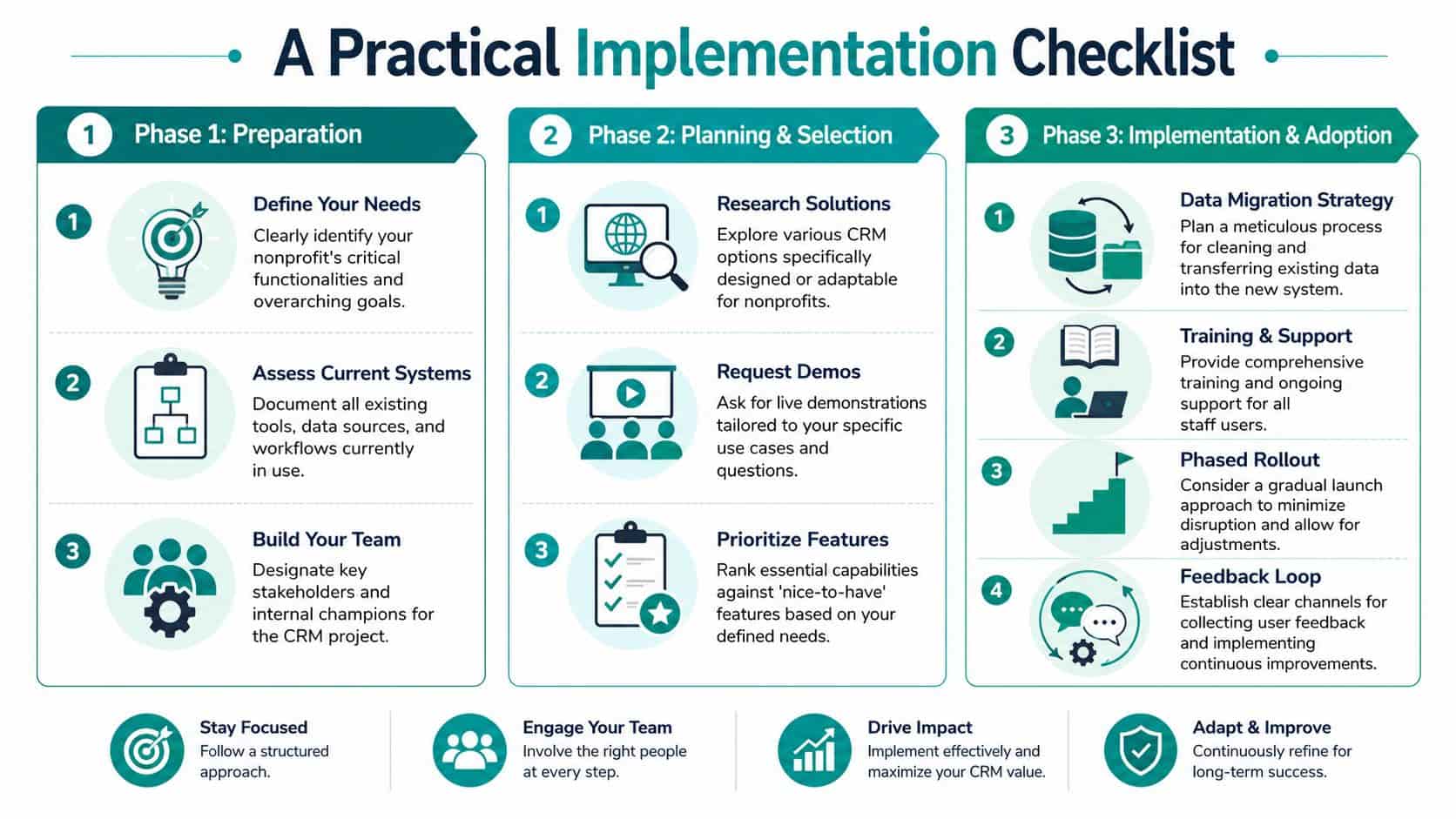
Phase 1 preparation
Start by deciding what deserves to come with you.
Old duplicates, abandoned contacts, and outdated custom fields don't become useful just because they move into a newer system. Keep what supports decisions, reporting, and relationships. Archive the rest.
A short prep list helps:
- Define the must-haves such as fund accounting, donor history, volunteer records, or grant tracking
- Map your current tools so you know where data lives today
- Choose one internal owner who can make decisions and keep momentum
Phase 2 planning and selection
Here, directors can save themselves months of frustration.
Ask vendors to show your real workflows. Don't settle for a polished tour that only shows campaign screens. Bring actual questions from finance, development, and operations. If you run sponsored projects, school programs, church ministries, or volunteer-heavy events, make them show those use cases.
One test that works: Ask the vendor to show how a gift moves from donation to acknowledgment to financial reporting.
You'll also want a practical migration plan. This nonprofit data migration checklist is a good reference for the prep work commonly overlooked.
Phase 3 implementation and adoption
Roll out the system in a sensible order.
Most organizations do better when they start with the functions that create immediate trust. Usually that means accounting and donor management first. Once those records are stable, add volunteer workflows, event management, or more advanced campaign activity.
Keep staff training simple and job-based. Show each person what they need for their daily work. Then create one feedback loop so issues get fixed quickly instead of turning into side spreadsheets again.
The goal isn't a perfect launch. It's a dependable first phase your team will use.
Your Path to Unified Operations
The point of a CRM nonprofit system isn't to give your team another login. It's to stop the slow drain caused by disconnected tools, duplicate entry, and reports no one fully trusts.
When one platform holds your donor history, accounting record, volunteer activity, event participation, and communications, the daily tone of the organization changes. Staff ask fewer reconciliation questions. Finance and development stop debating whose report is right. You walk into board meetings with more confidence because the numbers came from one place.
A unified platform won't solve every management problem. It will solve a lot of operational ones that have been stealing time from your mission.
If you want a closer look at that model, this guide on nonprofit CRM with accounting goes deeper on the connection between constituent records and financial clarity.
The right next step should feel manageable.
Watch a short product demo if you want to see how an all-in-one model works in practice. If your organization is small, start with a free tier and test the day-to-day fit. If you'd rather talk it through with a human, have a conversation with someone who understands nonprofit operations, not just software menus.
Your team doesn't need more complexity. It needs one trustworthy place to run operations.
If you want a calmer way to manage donors, accounting, volunteers, events, and marketing in one place, take a look at AlignMint. You can watch a short demo, explore the free tier for nonprofits under $100K, or schedule a low-pressure conversation with our team.
Ready to try AlignMint with your nonprofit?
Start free — set up donor tools, giving pages, and Minty. Upgrade when you need accounting.