

Year-end giving often leaves you with the same uneasy question. Did every donor get the right receipt, with the right wording, in time to protect their deduction and your records?
That stress usually comes from treating a non profit receipts donations template like a one-off document instead of part of your financial system. When the template, donor record, and accounting file all live in different places, your team ends up fixing mistakes by hand. There's a simpler way to do this.
Getting Your Donation Receipts Right Without the Headache
Late December is when this usually breaks down. Gifts arrive from your online form, a board member drops off checks from an event, someone forwards a stock transfer notice, and your office manager asks which letter version to send.
Most nonprofits don't struggle because they lack gratitude. They struggle because the process lives in email drafts, spreadsheets, and old Word files. One staff member knows the gala receipt language. Another knows how to handle in-kind gifts. If either person is out, the process stalls.
That's why the best receipt process starts with one plain rule. Your receipt should be easy for a donor to keep, easy for staff to send, and hard to get wrong. If your current setup depends on memory, it's too fragile.
A good starting point is to review a clear donation receipt documentation guide and compare it against what your team sends today. I'd also suggest looking at tools outside the nonprofit world when you need help standardizing legal-style language. A resource like this AI solution for legal professionals can be useful for drafting formal acknowledgment wording that still sounds human.
The real problem usually isn't the template itself. It's the manual process wrapped around it.
You want a receipt workflow that works when donations are quiet, and still works when year-end volume hits. That means fewer versions, clearer rules, and a method your whole team can follow without a lot of technical fuss.
If donation records and receipts keep drifting apart, start with donor management, then pair it with fund accounting so the gift record and finance record tell the same story.
The Anatomy of a Compliant Donation Receipt
A receipt usually fails in small, predictable ways. A staff member copies last year's gala language onto a standard gift acknowledgment. An online donor gets a clean email receipt, but the stock donor gets a one-off note with missing tax language. By March, someone is pulling records from three places and trying to confirm what was sent.
That is why receipt compliance should live in a system, not in a folder of templates. The template still matters, but the stronger control is a process that pulls the right wording from the gift record, stores the receipt with the transaction, and gives finance the same data development sees.
For any single contribution of $250 or more, the IRS requires a contemporaneous written acknowledgment. The receipt has one job. It must give the donor and your organization a clear, supportable record of the gift.
The required fields you should never skip
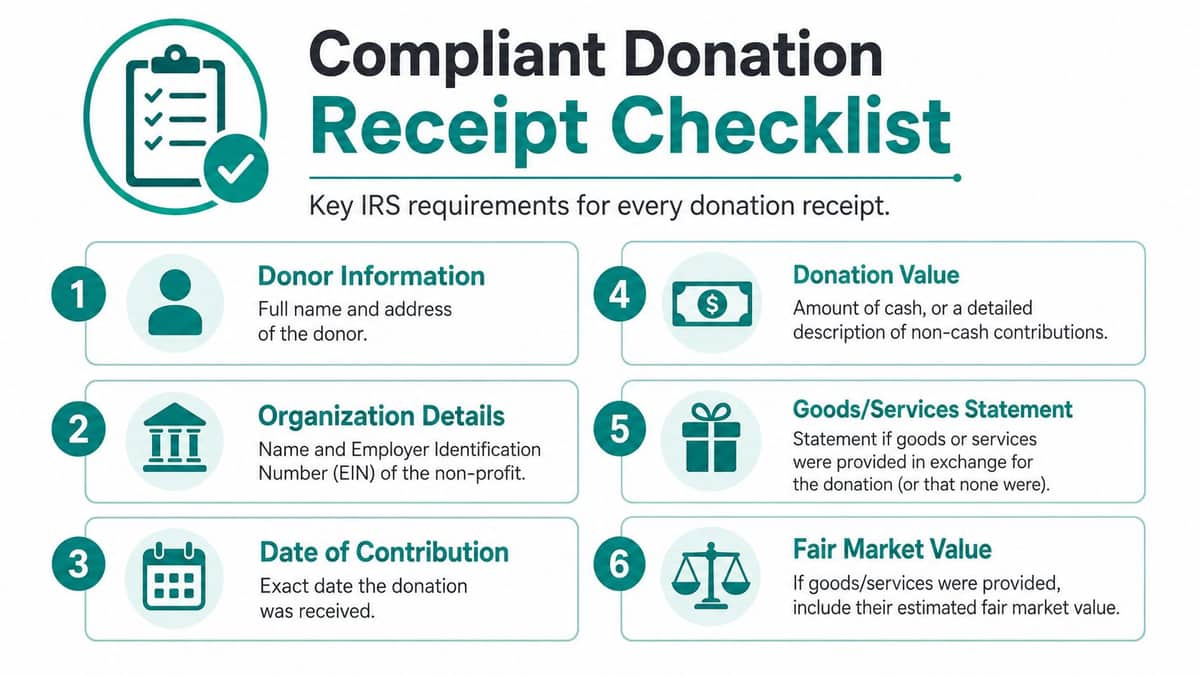
A compliant receipt should include these details every time:
- Organization identity. Use your organization's legal name. Many nonprofits also include the EIN because donors, accountants, and auditors often look for it.
- Donor identity. Include the donor's name. Mailing address is also helpful for record matching and year-end corrections.
- Contribution date. Use the date the gift was received, not the date the receipt was generated.
- Gift details. For cash, state the amount. For non-cash gifts, give a description only. Do not assign value.
- Goods or services disclosure. State whether the donor received anything in exchange for the contribution.
- Tax status details. Many organizations include 501(c)(3) language and federal tax ID to reduce follow-up questions.
These are basic fields, but the primary risk is inconsistency. I have seen nonprofits collect all of this information in the donor database, then leave half of it off the actual acknowledgment because the mail merge template was never updated. That creates extra work later for donor services, finance, and anyone closing the books.
A good donation acknowledgment letter template for nonprofit gift receipts can help standardize the wording, but it works best when it is tied to your CRM or fund accounting workflow instead of sitting as a standalone document.
The sentence that gets neglected most often
This line causes more trouble than it should:
No goods or services were provided in exchange for this donation.
Use that exact statement when it is true. Do not soften it. Do not rewrite it to sound more creative. Clear language prevents donor confusion and reduces the number of manual corrections your team has to make at tax time.
If your system can insert this statement automatically for standard cash gifts, do it. Staff should not have to remember which version applies.
What changes when goods or services were provided
Event tickets, dinner benefits, auction items, and member perks need different treatment. The receipt should reflect that the donor received something of value, and it should identify the deductible portion if applicable.
That means one generic receipt template is usually not enough. A practical setup includes separate logic for at least these gift types:
| Receipt type | What matters most |
|---|---|
| Standard cash gift | Amount, date, donor name, no goods/services statement |
| Recurring donation | Same compliance fields plus clear payment reference |
| Non-cash gift | Description only, no assigned value |
| Event or quid pro quo gift | Payment amount, benefit received, deductible portion |
The trade-off is simple. More template variations create more maintenance if you manage them by hand. An integrated receipting process solves that by using gift type, campaign, or transaction code to trigger the right language automatically.
What works in practice
Keep the receipt readable. Put the thank-you first, then the compliance details where they are easy to find. Long paragraphs and tiny footer language create mistakes because donors cannot tell what matters and staff stop reviewing the wording carefully.
The stronger approach is one approved receipt framework connected to your donation data. If a gift is entered correctly, the receipt should follow the same rules every time. That reduces spreadsheet tracking, limits one-off edits, and gives your finance team cleaner support for reconciliation and reporting.
Consistency matters more than clever wording. In receipt compliance, plain and accurate wins.
For related setup work, review donation management and year-end giving statements for nonprofits. Those two workflows usually expose the same data-quality problems before receipts do.
Sample Wording for Different Gift Types
A donor buys two gala tickets, sends a stock transfer the next week, then makes a year-end online gift. If your team uses one generic receipt for all three, someone will end up editing by hand, and that is where errors start.
The better approach is to set approved wording by gift type and let your donation system pull the right version automatically. That cuts down on one-off edits, keeps staff out of spreadsheets, and gives finance cleaner records to reconcile later.

A ready-made donation acknowledgment letter template can save time. It still needs rules behind it, so each gift type triggers the correct language without staff rewriting receipts on the fly.
Simple cash gift
For a standard donation, plain wording is usually the safest choice.
Dear [Donor Name], Thank you for your contribution to [Organization Name]. We received your gift on [Date] in the amount of [$Amount]. [Organization Name] is a 501(c)(3) nonprofit organization, Federal Tax ID [EIN]. No goods or services were provided in exchange for this donation. Please retain this letter for your tax records.
This works because it answers the questions a donor and auditor both ask. Who gave, how much, when, and whether anything was received in return.
Recurring monthly donation
Recurring receipts should document each payment, not the donor's overall commitment to your monthly program.
Use wording that keeps every receipt complete on its own:
- Identify the specific payment. “We received your recurring donation on [Date] in the amount of [$Amount].”
- Repeat the compliance statement each time. Donors lose emails. Each receipt should still make sense by itself.
- Include the same donor and organization details every time. Consistency makes reissues and audits much easier.
This is one place where automation pays off quickly. Once the recurring gift record is set up correctly, the system should issue the same approved receipt every month without staff touching it.
Pledge payment
Pledge receipts go wrong when staff acknowledge the full pledge amount instead of the payment received.
Use wording like this:
Dear [Donor Name], Thank you for your payment toward your pledge to [Organization Name]. We received your contribution on [Date] in the amount of [$Amount]. [Organization Name] is a 501(c)(3) nonprofit organization, Federal Tax ID [EIN]. No goods or services were provided in exchange for this donation. Please retain this acknowledgment for your records.
Keep the pledge balance in your donor database or fund accounting notes. Keep the receipt tied to cash received.
Non-cash gifts and in-kind contributions
For non-cash gifts, the receipt should describe what was donated and when your organization received it. It should not assign a dollar value. That valuation belongs with the donor and their tax advisor, not your staff.
A compliant non-cash receipt can read like this:
Dear [Donor Name], Thank you for your non-cash contribution to [Organization Name]. We received the following item(s) on [Date]: [Detailed Description of Item]. [Organization Name] is a 501(c)(3) nonprofit organization, Federal Tax ID [EIN]. No goods or services were provided in exchange for this donation. Please retain this letter for your records.
That missing dollar amount is not a gap. It is the correct treatment.
Examples of descriptions that hold up well:
- Vehicle donation. “One 2008 sedan, VIN ending in [XXXX]”
- Stock gift. “Ten shares of [Company Name] common stock”
- Office furniture. “Three metal filing cabinets and one conference table”
Examples that create cleanup work later:
- Too vague. “Household items”
- Too casual. “Some furniture from donor”
- Improper valuation. “Office chairs worth [$Amount]”
If your team receives in-kind gifts often, build the description fields into your gift entry process. Do not leave them in email threads or handwritten notes and expect receipting staff to reconstruct the details later.
Quid pro quo gifts and event payments
Event receipts need tighter wording because only part of the payment may be deductible. Your receipt should state the total amount paid, describe the goods or services provided, include their fair market value, and show the deductible amount.
Here is a clean version:
Dear [Donor Name], Thank you for your payment to attend [Event Name]. We received your payment of [$Total Payment] on [Date]. In exchange, you received goods or services with an estimated fair market value of [$Benefit Value]. The tax-deductible portion of your payment is [$Deductible Portion]. [Organization Name] is a 501(c)(3) nonprofit organization, Federal Tax ID [EIN]. Please retain this letter for your records.
Disconnected systems cause real trouble. If your events platform, donor database, and accounting records all hold different numbers, staff start fixing receipts manually. A connected setup lets the benefit value, deductible portion, and campaign coding flow through together, so the receipt matches the transaction and the books.
That is the larger goal. Good wording matters, but a reliable receipting process matters more.
Choosing Your Receipting Method Email vs Print
This choice is less about technology than donor fit. Some donors still want a printed letter on letterhead. Others expect an email receipt the moment they give.
If you pick only one method, you usually create friction for someone. The better approach is to decide based on donor preference, gift type, and your staff capacity.
Where print still earns its place
Printed letters can feel more personal, especially for older major donors, memorial gifts, and year-end summaries. They're also useful when a donor keeps paper tax files and wants a signed acknowledgment for their records.
Print has costs, though. Staff time rises fast when someone has to export data, merge letters, review each version, print, sign, fold, stuff, and mail. The larger issue isn't postage. It's interruption. Every manual step pulls someone away from program work, donor calls, or board prep.
A printed receipt is fine. A print-only process is where the burden starts.
Where email wins
Email is faster, easier to store, and easier to resend when a donor calls in January saying they can't find the original. It also works well for online giving pages, recurring gifts, school campaigns, church tithes, and event confirmations.
The weakness is familiar. Messages get buried, sent to spam, or overlooked in crowded inboxes. That doesn't make email unreliable. It means your system should keep a copy in the donor record and make reissue simple.
The practical comparison
| Method | Best fit | Main drawback |
|---|---|---|
| Major gifts, older donors, formal acknowledgments | More staff handling and slower turnaround | |
| Online gifts, recurring donations, fast confirmation | Easy to miss in a busy inbox | |
| Both options | Mixed donor base, stronger stewardship | Requires organized donor preferences |
If your team already sends newsletters or appeals by email, it helps when receipting sits close to that communication process. A platform with email campaign tools for nonprofits can keep your donor contact preferences and acknowledgment workflows from drifting into separate systems.
Blackbaud, Bloomerang, DonorPerfect, and Little Green Light each do parts of this well. Some are strong in donor records. Some are familiar to development teams. The gap many nonprofits feel is that receipting, communications, and accounting often still need extra handoffs.
That handoff is where mistakes creep in.
From Receipting to Reporting How to Connect Your Data
Friday afternoon, development says the gala brought in one total. Finance has another. The event manager has a spreadsheet with ticket sales, table sponsors, and paddle raises mixed together. Now someone has to reconstruct which payments were contributions, which were earned revenue, and which receipts need to be corrected.
That mess usually starts upstream.
A donation receipt is part of your accounting record from the moment it is issued. If your team sends receipts from one system, tracks donors in another, and posts revenue in a third, you create extra reconciliation work for every gift. The result is familiar. Staff re-enter the same transaction, restricted gifts get posted late or to the wrong bucket, and Form 990 prep turns into an audit of your exports instead of a review of your books.
The better approach is to stop treating the receipt as a document and start treating it as the first controlled data point in a connected system.
What the receipt should trigger automatically
Each issued receipt should flow into the records your team relies on later, without a manual cleanup step.
That includes:
- The donor record, including campaign, appeal, tribute, and communication preference details
- The fund or restriction record, so board-designated, restricted, and unrestricted gifts do not get mixed together
- Event and program tracking, especially when one payment includes both a charitable gift and a fee
- Year-end reporting support, so finance can trace revenue classifications back to the original transaction
The limitations of static templates become apparent. A Word document or saved email draft can produce compliant language, but it cannot classify the gift, update the donor history, and post the transaction logic your finance team needs. Staff end up carrying those details in side notes or spreadsheets, and that is exactly where errors creep in.
I have seen small teams spend more time fixing receipt data in January than they spent sending receipts all year.
Why the accounting setup matters
General accounting software can record deposits. Nonprofits need more than deposit tracking.
They need gift data that matches restrictions, fundraising activity, and reporting categories from the start. If you wait until month-end to decide whether a payment belongs in contributions, event revenue, deferred revenue, or a restricted fund, you are relying on memory. Memory is not a control.
The IRS instructions for Form 990 Part VIII make that distinction clear for fundraising events. If part of a ticket price reflects the fair value of the event benefit and part is a charitable contribution, those amounts need to be reported in different places. That split should happen when the gift is recorded, not months later after staff compare registration reports, merchant deposits, and acknowledgment emails.
A connected receipting system also makes annual filing easier for smaller organizations. Clean gift totals help you confirm filing thresholds and avoid the last-minute question every finance lead dreads: “Which number is the accurate gross receipts total?”
What connected data looks like in practice
A good process does not ask staff to export donor data, edit a spreadsheet, and hand the result to finance. It captures the gift once and carries the same transaction through acknowledgment, fund accounting, and reporting.
For example, an online event payment might need to store:
- the full amount paid
- the deductible amount
- the fair market value of goods or services
- the campaign or event name
- the fund designation
- the settlement date
- the donor's receipt record
If those fields live in one workflow, your team can answer donor questions, reconcile deposits, and prepare reports without rebuilding context. If they live in three systems and two spreadsheets, every exception becomes a staff project.
A practical way to evaluate your setup is to review a donation settlement report example. Look at whether the receipt, payment record, donor history, and accounting classification agree. If they do not, the problem is not your template. The problem is the gap between receipting and reporting.
For organizations running events, church giving, school fundraising, fiscal sponsorships, or grant-restricted programs, that gap gets expensive fast. The simpler path is an integrated system that issues the receipt, stores the compliance record, and sends clean data into fund accounting without asking staff to patch it together later.
Your Next Steps A Simple Compliance Checklist
Most receipt problems can be traced to one of three issues. The template is missing required language, staff are choosing the wrong version, or donation data never connects cleanly to reporting.
That's fixable. You don't need a bigger binder of examples. You need a short checklist your team can follow.
Review your current process this week
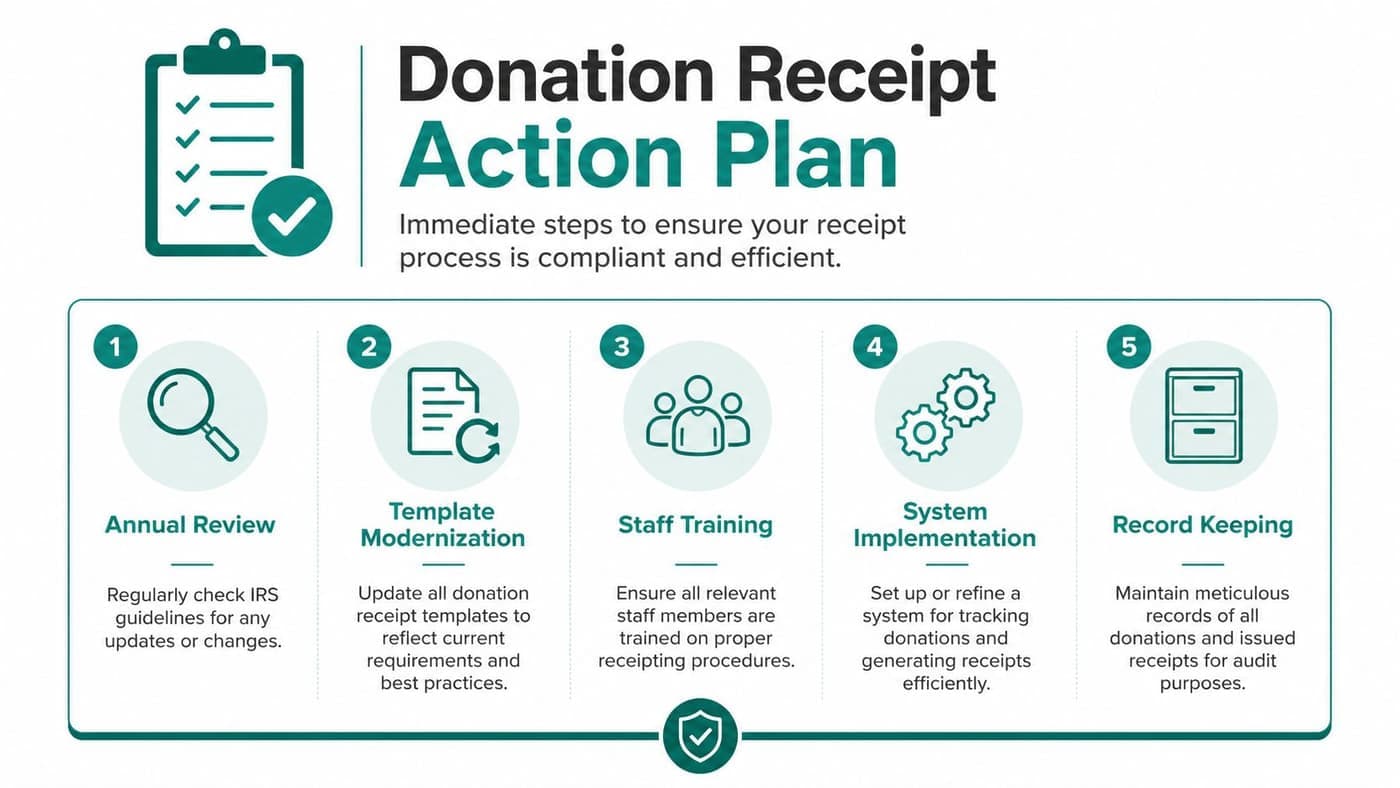
Start with a candid audit of what you already send.
- Pull every active receipt version. Include cash gifts, recurring donations, event payments, stock gifts, and in-kind donations.
- Check the compliance fields. Confirm the organization name, donor name, date, amount or item description, EIN, and exchange language appear where needed.
- Look for staff edits. Friendly rewrites often weaken the legal language.
- Test retrieval. Ask one team member to find and resend a donor receipt from earlier in the year. If that takes too long, your system is too dependent on memory.
A good companion resource is this Form 990 checklist for nonprofits, because receipting problems often show up again at filing time.
Simplify before you automate
Don't automate a messy process. Tighten the structure first.
Use fewer templates. Name them plainly. Create one owner for approval. Train staff and volunteers on when to use each version. If your organization has multiple programs, church giving streams, school funds, or sponsored projects, make sure the receipt process reflects those distinctions without forcing staff to improvise.
This is also where software decisions deserve clear eyes. Bloomerang, DonorPerfect, Network for Good, and Blackbaud all have strengths in fundraising and donor communications. QuickBooks remains common because many finance teams already know it. The issue isn't that these products are poor. It's that many nonprofits still end up patching together accounting, CRM, volunteers, events, marketing, and team communication across separate tools.
That patchwork is what creates spreadsheet chaos.
Keep the human thank-you. Remove the human retyping.
Choose relief, not just compliance
A non profit receipts donations template is necessary. It just isn't enough on its own. Complete relief is achieved when the receipt is triggered automatically, stored in the donor record, tied to true fund accounting, and ready for reporting without duplicate entry.
That kind of setup gives your team breathing room. It also makes life easier for nonprofits that manage volunteers, online giving pages, fiscal sponsorship structures, school fundraising, church donations, and multi-person teams that shouldn't be charged per seat just to access the same information.
If you're ready to stop chasing receipts across spreadsheets and disconnected tools, take a look at AlignMint. We built it as an all-in-one platform for nonprofit accounting, donor management, volunteers, events, marketing, team communication, online giving pages, and true fund accounting. You get clear user access by plan, a built-in marketing suite, Minty assistance, and a free tier for nonprofits under $100K in annual revenue.
Ready to try AlignMint with your nonprofit?
Start free — set up donor tools, giving pages, and Minty. Upgrade when you need accounting.