

Donation Accounting Software That Actually Works
Your donor software says a gift came in. Your accounting system says a deposit cleared. Your spreadsheet says half that money is restricted, and your development director says the pledge amount changed last week. If that sounds familiar, you don't need prettier donation forms. You need donation accounting software that keeps gifts, restrictions, reporting, and reconciliation in the same place.
I've seen too many nonprofits buy “donation software” that accepts money well and accounts for it poorly. The fix is simpler than vendors make it sound. You need a system that protects restricted funds inside the ledger, ties donor activity to finance records, and doesn't charge you extra every time another staff member needs access.
Quick Answer: Donation Accounting Software
Donation accounting software has to do more than take gifts. It should enforce fund restrictions in the ledger, keep donor records in sync with finance, and reconcile processor payouts without a side spreadsheet. Compare tools by those four tests, not by donation-page polish.
Start with best accounting software for nonprofits and fund accounting. For receipts, see donation receipt software.
The Daily Reality for Nonprofit Finance Leaders
Monday starts with four tabs open and one low-grade headache. Donation alerts hit one inbox. The donor CRM has gift notes and pledge history. QuickBooks has the bank feed. Grant tracking lives in a spreadsheet that somebody swears is current.
That setup works until it doesn't. The break usually shows up at month-end, board reporting, or audit prep, when your team has to prove that a restricted gift stayed restricted, a grant expense was allowable, and the deposit in the bank ties to the gifts in the donor system.
Where the friction actually lives
The daily pain isn't just extra clicking. It's the fact that each handoff creates room for mismatch.
- Gift data drifts: A donor updates a pledge in one system, but finance doesn't see it until export day.
- Restrictions get handled manually: Staff rely on memory, naming habits, or spreadsheet tabs instead of ledger controls.
- Reconciliation gets delayed: Processor payouts, bank deposits, and donor records don't line up cleanly.
- Audit trails weaken: You can see the end result, but not always who changed what, when, and why.
Practical rule: If your bookkeeper needs a spreadsheet to explain restricted balances, your system is already failing an important test.
A lot of leaders assume this is normal nonprofit complexity. Some of it is. But a surprising amount comes from buying separate tools that were never built to share a single financial truth.
The four things worth judging
When I look at donation accounting software now, I ignore long feature lists and focus on four decisions.
| Decision area | What to test | Why it matters |
|---|---|---|
| Fund accounting integrity | Can the system enforce restrictions at transaction entry? | This keeps restricted money from quietly covering unrelated costs. |
| Donor data unification | Do gifts, pledges, receipts, and finance records stay in sync? | This cuts rework and gives your team current donor information. |
| Total cost over time | What add-ons, users, migration work, and support costs show up later? | Cheap software often becomes expensive software with extra steps. |
| Migration risk | How much cleanup, remapping, and retraining will your team need? | A bad switch can disrupt close, fundraising, and staff confidence. |
Keep those four in front of you during every demo. They'll tell you more than polished sales language ever will.
What Donation Accounting Software Must Actually Do
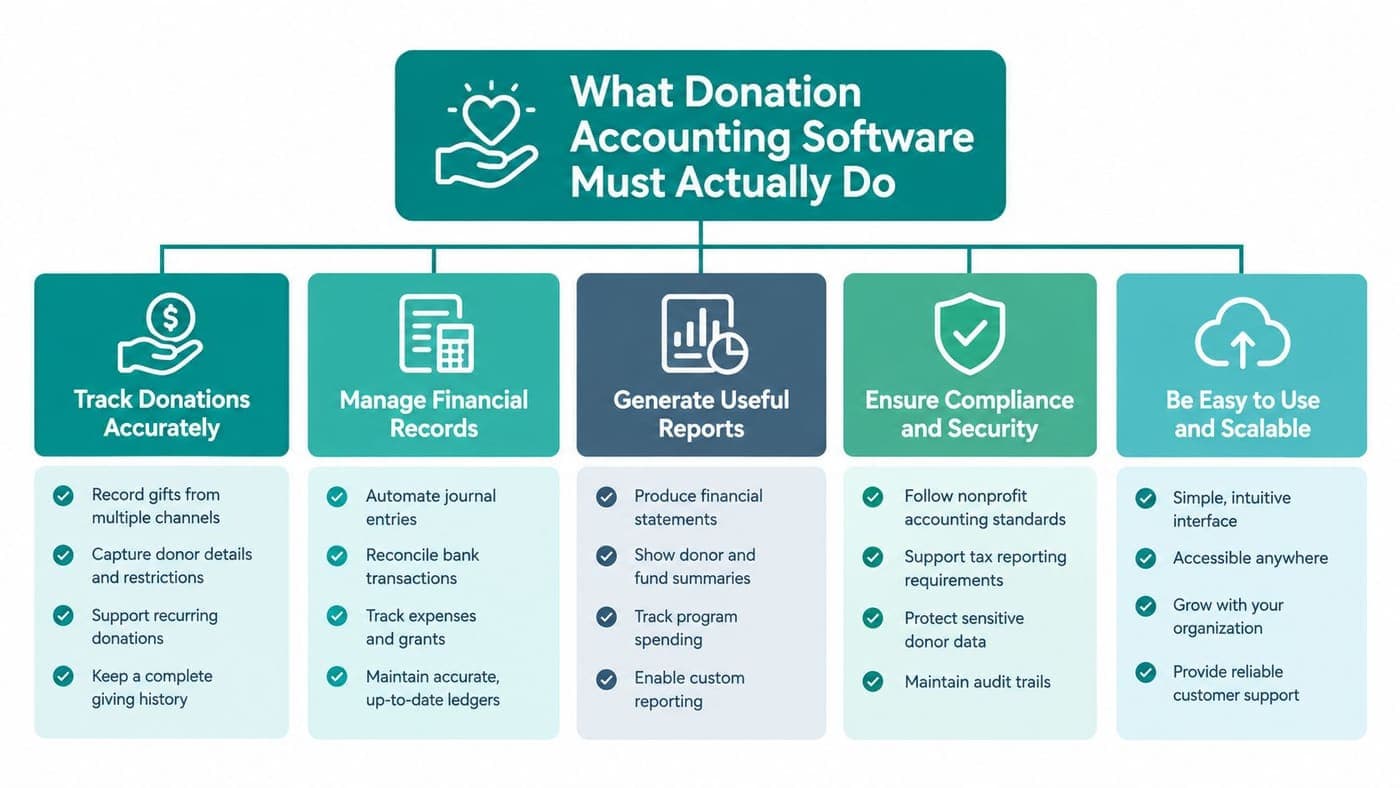
Most products in this category do one thing well. They help you accept donations. That's useful, but it's only the front door. Real donation accounting software has to carry that transaction all the way through restricted-fund accounting, donor records, receipts, and reconciliation.
This is the visual I'd keep in mind during vendor calls.
The four layers that matter
First, you need true fund accounting in the general ledger. Neutral guidance on nonprofit accounting software is clear that strong systems should handle true fund and grant accounting aligned with donor restrictions, automate bank reconciliation and expense allocation, and generate fund-specific income statements. Another 2026 guide says the technical test is mandatory fund assignment at transaction entry, native balance sheets by fund, grant budget-to-actual tracking, and Form 990 schedule mapping in the same system, as noted by Accounting Seed's nonprofit accounting software guidance.
Second, you need a donor CRM tied to the money, not sitting beside it. Gift history, communication logs, pledge details, and receipting should connect to the underlying ledger activity.
Third, you need IRS-ready receipting and acknowledgments that don't depend on mail merge heroics. That means gift records should already know the donor, amount, date, campaign, and restriction status.
Fourth, you need reconciliation that matches real life. Bank deposits rarely arrive as one tidy gift per line. You'll see processor batches, fees, timing differences, and recurring gifts that need to land correctly.
Shortcuts vendors hope you won't test
Some vendors show polished fundraising screens, then get thin once you ask accounting questions. Watch for these moves:
- Tags pretending to be funds: A label is not a fund ledger.
- Parallel databases: The CRM “talks to” accounting, but balances don't tie in real time.
- Receipt-first design: The platform shines at acknowledgments but gets shaky on grant and restriction reporting.
- Spreadsheet dependence: Staff export data to finish board reports, fund reporting, or Form 990 prep.
For smaller nonprofits, expert comparisons have positioned QuickBooks Online Plus as useful when class and location tracking are enough, while Aplos was rated for true fund accounting and Blackbaud Financial Edge NXT for complex grants, according to Get.Holdings' nonprofit accounting software comparison.
If you want one thing to inspect closely, inspect the fund model. That's the line between software that takes donations and software that accounts for them. For a closer look at what native restrictions should look like, review our fund accounting feature overview.
True Fund Accounting Versus QuickBooks Workarounds
Most nonprofit software decisions go wrong. Teams buy QuickBooks because it's familiar, then spend years building side processes around it. I understand why. QuickBooks is common, many accountants know it, and it can serve smaller nonprofits well when the work is simple.
But classes are not fund accounting. They are labels inside a business accounting system.
What true fund accounting changes
Fund accounting means the system tracks money by restriction, purpose, grant, or program in the ledger itself. Nonprofit finance teams need that because donor restrictions have to hold all the way from gift entry to reporting. Industry guidance keeps returning to the same point: the issue isn't whether software can accept donations, but whether it can preserve restricted balances, support release-from-restriction workflows, and keep board and audit reports aligned from the same ledger, as explained by ERP Research's review of nonprofit accounting software.
Take a restricted summer program grant. In a true fund-accounting system, that revenue sits in the correct fund from day one. Eligible expenses hit that same fund. The balance sheet shows what remains restricted. When restrictions are met, the release is recorded in a way your auditor can follow.
In QuickBooks, many teams simulate this with classes or locations. That can work for a while, but it depends on perfect staff discipline and careful report building.
Fund Accounting vs. QuickBooks Classes
| Capability | QuickBooks Classes | True Fund Accounting |
|---|---|---|
| Restriction control | Staff must classify correctly every time | Fund assignment is built into transaction structure |
| Balance sheet by fund | Limited and often workaround-heavy | Native fund-level balance sheets |
| Release from restriction | Usually manual journal logic | Built into nonprofit workflow |
| Grant budget tracking | Often separate or spreadsheet-based | Tracked with fund and grant records |
| Board and audit reporting | Custom report assembly | Fund reports generated from the ledger |
If your current setup can only show restricted activity on the income statement, but not restricted balances on the balance sheet, you don't have the control you think you do.
One more wrinkle matters. The IRS Form 990 requires a Statement of Functional Expenses that classifies spending by natural expense type and function, with the functional buckets of program services, management and general, and fundraising, according to NetSuite's nonprofit accounting and grants explainer. That's hard enough in a purpose-built nonprofit system. In QuickBooks, it usually adds another layer of coding discipline and report manipulation.
Churches feel this especially sharply because designated giving looks simple until leaders need fund-level clarity. If that's your situation, our piece on church fund accounting and why QuickBooks isn't enough is worth reading.
Comparing the Top Platforms Side by Side
Early in the search, I'd stop asking which platform has the most features. Ask which one handles your hardest transaction cleanly. A restricted gift, a recurring donor, a processor payout, and a grant expense will tell you more than fifty checklist items.
Quick read on the field
Aplos deserves a fair look if you want accounting and donor tools together. Blackbaud Financial Edge NXT makes sense for organizations with more complex grant and reporting demands. QuickBooks remains attractive because many bookkeepers already know it, and integrations are everywhere. The weakness is not that these tools are bad. The weakness is that some nonprofits stretch them past the point where workarounds stay manageable.
We built AlignMint for organizations that are tired of stitching together accounting, CRM, volunteers, events, team communication, online giving pages, and marketing in separate products. It includes true fund accounting, donor management, volunteer management, built-in marketing, Minty AI, plan-based access, and a free tier for nonprofits under $100K. That matters if you want one operating system rather than another stack of connectors.
Platform Capability Comparison
| Platform | True Fund Accounting | Donor CRM Integration | Receipting & Acknowledgment | Reconciliation & Grant Tracking |
|---|---|---|---|---|
| QuickBooks Online Plus | Limited, usually class/location workaround | Depends on outside apps | Usually handled through add-ons | Bank feeds are useful, grant tracking often needs extra process |
| Aplos | Strong for true fund accounting | Built-in donor tools | Built-in nonprofit workflows | Better fit than generic accounting for fund reporting |
| Blackbaud Financial Edge NXT | Strong for complex grants and nonprofit finance | Works best inside Blackbaud stack | Mature nonprofit capabilities | Strong for more complex finance teams |
| Donation-first apps | Often thin or separate from ledger | Often strong on donor-facing screens | Usually strong | Often weak once grant and ledger detail matter |
| All-in-one nonprofit platforms | Varies by product | Usually deeper because CRM and accounting share records | Usually native | Strong when ledger and donor records are unified |
What to ask in the live demo
Don't let vendors steer you toward the easy path. Bring your real use cases.
- Restricted gift test: Enter a donor-restricted contribution and ask for the fund-level balance sheet.
- Recurring donor test: Change a pledge or recurring amount and see whether finance records update clearly.
- Grant test: Post allowable and non-allowable expenses and ask how the system handles each.
- Receipting test: Trigger an acknowledgment and year-end giving statement from the same donor record.
- Reconciliation test: Match a processor payout with fees against gifts and the bank deposit.
My rule in demos: If the rep needs to explain away a missing workflow with “most clients export that,” assume your staff will own that pain forever.
The software market around nonprofits is large and still growing, which is one reason buyers see so many options. One estimate put the nonprofit accounting software market at $2.3 billion in 2025, projecting $4.8 billion by 2033 with 9.6% compound annual growth, and said cloud deployment accounted for 58.3% of revenue in 2025. The same report said small and medium nonprofits made up 64.2% of the installed base, which tracks with what most of us see in practice. You can review those projections in Dataintelo's nonprofit accounting software market report.
If you want a broader side-by-side view before booking demos, use our platform comparison page.
Pricing Models and the Real Cost of Ownership
This is the part vendors keep blurry on purpose. The monthly subscription is rarely the number. That number is what you'll spend after user fees, payment tools, donor CRM add-ons, implementation help, migration cleanup, and the extra admin time created by disconnected systems.
The pricing patterns I'd watch
You'll usually run into four pricing styles.
- Per-seat pricing: Fine at first, annoying later. As more finance staff, development staff, volunteer coordinators, or school and church admins need access, cost climbs.
- Donation-based fees: These look harmless until fundraising improves. Success becomes a software tax.
- Flat subscription tiers: Often easier to budget for, especially if core features are included.
- Quote-based enterprise pricing: Sometimes appropriate. Also a common place for hidden implementation costs to appear.
The hidden issue is not only cash. It's decision drag. Per-seat models make leaders ration access, which means staff share logins, wait for exports, or push work through one overburdened admin.
What honest cost review looks like
When I price software now, I ask vendors for a three-year view and write down each category separately.
- Subscription cost for the core accounting package.
- Extra modules for donor CRM, volunteer management, events, or marketing.
- User charges if finance, development, programs, and leadership all need access.
- Migration work including imports, cleanup, and chart-of-accounts mapping.
- Processing and banking workflow costs if online giving or payout reconciliation sits elsewhere.
- Training time for staff who have to learn new habits.
A separate market estimate put overall nonprofit software spending at $4.74 billion in 2025, rising to $9.48 billion by 2035, with accounting and financial management applications representing 9.8% of nonprofit software spending in 2025, or about $451 million. The same source also said purpose-built fund accounting was a $4.8 billion market in 2025, projected to reach $10.6 billion by 2034, and noted that more than 63% of nonprofits above $5 million in revenue had moved from generic accounting tools to specialized fund accounting solutions. That trend is laid out in Dataintelo's nonprofit software market analysis.
That doesn't mean every nonprofit needs enterprise software. It does mean many organizations eventually pay twice. Once for the “affordable” starter setup, then again for the switch they should've made earlier.
For a plain-English breakdown of what's included and where costs tend to hide, check our pricing page.
Matching the Right Tool to Your Nonprofit Type
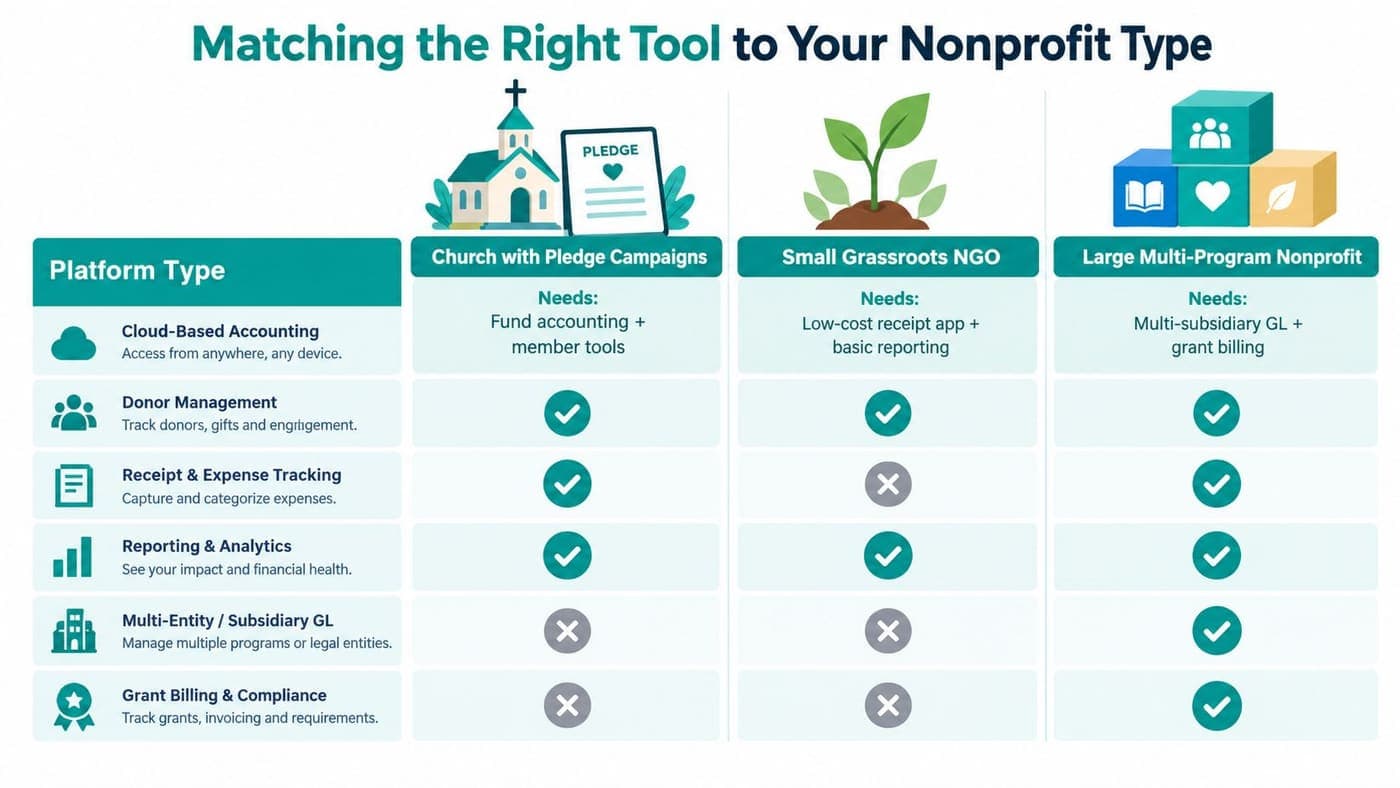
A church doesn't need the exact same software shape as a fiscal sponsor. A school doesn't need the exact same setup as a startup arts nonprofit. Many reviews become useless. They rank products generally when your real question is situational.
Churches and schools need clearer fit
Churches with designated giving and pledge campaigns need fund accounting plus simple member or donor tools. They usually don't need a giant enterprise CRM. They do need clean handling of restricted gifts, recurring giving, year-end statements, and board reporting.
Independent schools have a different headache. Tuition, donations, scholarships, events, and volunteers often touch the same families. That makes donor history, restricted scholarship funds, and communication records more important than many general tools admit.
Fiscal sponsors and smaller nonprofits
Fiscal sponsors need stronger accounting than almost anyone gives them credit for. In common sponsor-model reporting, sponsored-project money is generally carried on the sponsor's own books, and project assets, liabilities, revenue, and expenses are reported as part of the sponsor's financial statements and Form 990, as explained in Lars Co's discussion of fiscal sponsorship accounting models. If you sponsor projects, your software has to handle that structure cleanly.
Small startups can keep things lighter, but not careless. If you're under $500K in revenue, you probably don't need a sprawling enterprise suite. You do need a system that can grow past spreadsheets without trapping you in manual restriction tracking.
One feature to prioritize by organization type
- Churches: Prioritize designated and restricted fund reporting. Don't overspend on sales-style CRM complexity your team won't use.
- Schools: Prioritize family-linked donor records, scholarship restrictions, and event giving. Don't buy accounting-only software if advancement lives elsewhere.
- Fiscal sponsors: Prioritize fund segregation, project reporting, and inter-fund clarity. Don't settle for generic nonprofit templates.
- Small grassroots nonprofits: Prioritize simplicity, online giving pages, and current restricted balances. Don't buy enterprise features before you need them.
One area leaders often overlook is volunteer management. Good systems track more than names and hours. Real volunteer coordination often includes skills, availability, group assignments, background checks, and self-service time logging, which is why matching the right volunteer to the right role matters operationally, as described by AlignMint's volunteer and grant fund accounting article.
Migrating From QuickBooks or Spreadsheets
A platform switch is never painless. Anyone who tells you otherwise hasn't done one during payroll week. The good news is that most bad migrations fail for predictable reasons, not mysterious ones.
Start with discovery, not import
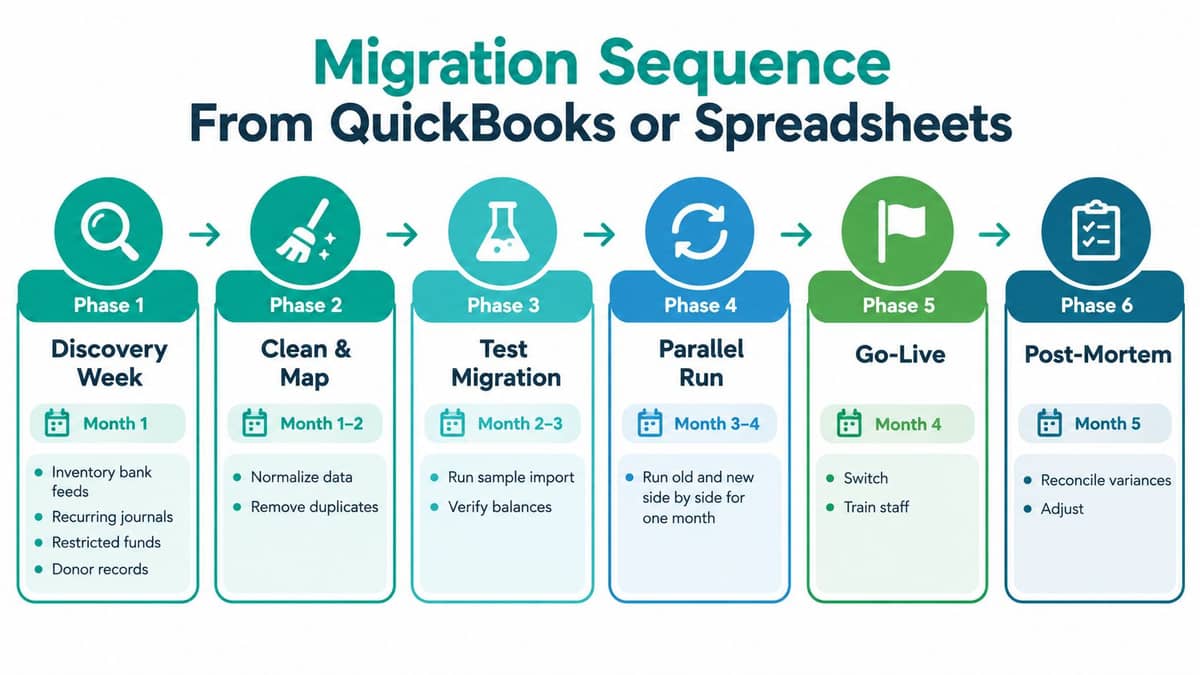
Your first week should be about inventory. List every bank feed, recurring journal, restricted fund, grant code, donor record, receivable, payable, and report your team uses. Then mark what won't map neatly.
The ugly items are usually obvious once you look. Split transactions. Class-based fund tracking. Hand-built pledge schedules. Old receivables nobody really expects to collect. If you migrate bad structure, you don't get a fresh start. You just move the clutter.
Clean before you move
This is the step people try to skip because it isn't fun.
- Standardize fund names: Decide what a fund, program, grant, and campaign are called, then stick to it.
- Write off stale items: Don't carry dead balances into a new system out of guilt.
- Clean donor records: Merge duplicates, fix missing names, and export a clean file.
- Review chart mapping: Boards and finance committees should understand how old categories map into the new structure.
Migrations usually fail for boring reasons. Teams rush the cleanup, reconnect bank feeds late, and go live in the middle of a fundraising push.
There's also an AI question hiding inside migration. Vendors love to talk about intelligent automation, but the issue is whether the software helps with transaction coding, donor data cleanup, reconciliation, and reporting in ways your staff can verify. One 2026 industry source said 82% of nonprofits now use AI while still struggling with disconnected donor databases, separate grant systems, and accounting software that does not talk to program tracking tools, according to Accounting Seed's 2026 nonprofit accounting trends article. That rings true. AI won't save a broken data flow by itself.
A sensible migration usually includes a short parallel run, then a controlled cutover before month-end. If you're moving from QuickBooks specifically, our QuickBooks nonprofit data migration guide gives you a practical sequence.
Questions to Ask Before You Sign Anything
Most nonprofit software demos are too polite. The rep shows online giving, a dashboard, maybe a pretty report, and everyone leaves with a good feeling. Good feelings are expensive. You need answers you can test.
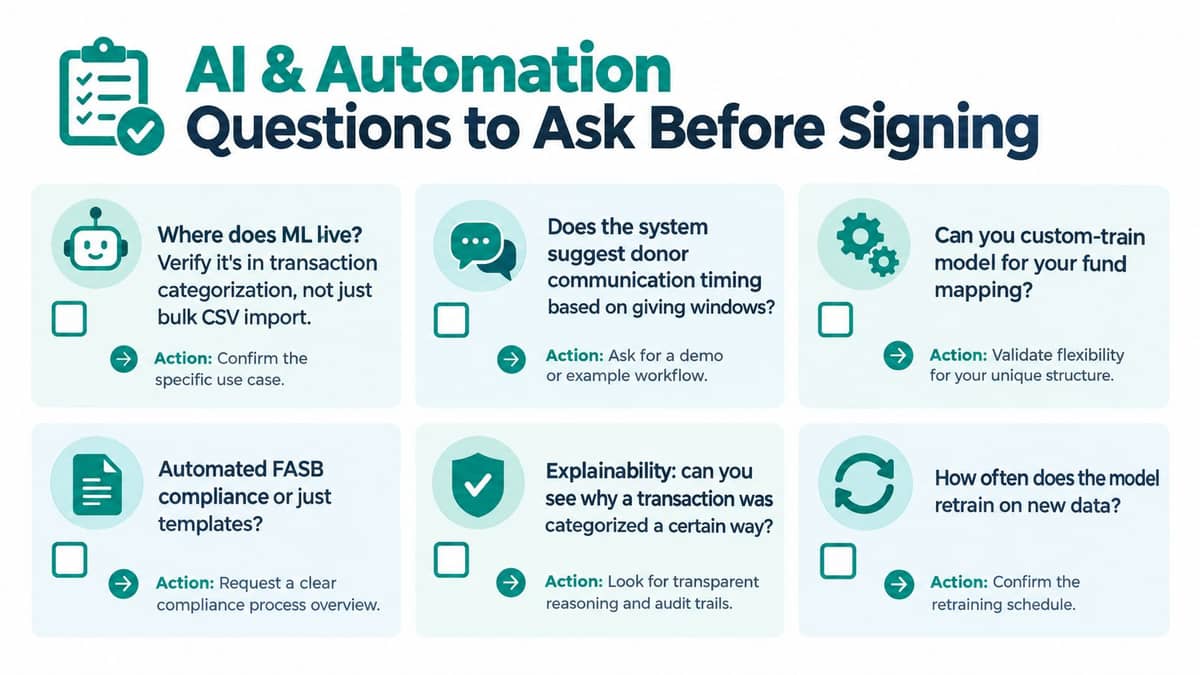
Ask the questions vendors hope you skip
Start with operations, not aesthetics.
- Can the system require fund assignment when a transaction is entered?
- Can it produce a fund-level balance sheet without export work?
- How does it handle release from restriction entries?
- Can it track grant budgets against actuals in the ledger?
- What happens when a processor payout bundles multiple gifts and fees?
Then ask the AI questions plainly. Where does the intelligence sit. In transaction categorization, donor communication suggestions, anomaly review, or just a chatbot layered on top. If the vendor can't show you using your own sample data, count that as a warning.
Don't forget compliance and ownership
Nonprofit accounting has compliance edges that many demos barely mention. Federal grant drawdowns, for example, can create real cash-management issues. Guidance discussed in nonprofit fund accounting coverage notes that reimbursement-style requests differ from cash management, and interest can become payable if federal drawdowns exceed actual cash needs by more than $500 for over one business day, as summarized by Ecosire's overview of nonprofit fund accounting. If your organization handles grants, your software should support that discipline.
Also ask contract questions that feel boring now and painful later.
- Data export rights: Can you get donor, accounting, and attachment data out in usable format?
- Historical records: What stays accessible if you leave?
- Price protection: Are renewal increases capped or completely open?
- Security documentation: Can they provide the controls your board or auditor will ask about?
- User limits: Will adding staff for finance, volunteers, marketing, or schools trigger more fees?
Run one restricted gift, one grant drawdown, and one year-end reclassification in the demo. If the vendor won't do that, you don't know enough to sign.
My three requirements are simple. Run a parallel test. Speak with a nonprofit near your size. Get the migration cost estimate in writing. Those answers tell you whether the platform works after the sales cycle ends.
If you want one platform that handles donation accounting software the way nonprofits work, AlignMint combines true fund accounting, donor CRM, volunteer management, events, online giving pages, team communication, marketing tools, and Minty AI in one system. It's built for organizations that are tired of reconciling across disconnected tools and want restricted funds, receipts, and reporting to stay aligned from the start.
Ready to see how AlignMint fits your workflow?
Schedule a free walkthrough — we will help you map donors, funds, and migration steps.