Non Profit App Guide: How to Choose One That Works
You know the feeling. It's 4:40 p.m., the board packet isn't done, a donor receipt is missing, and someone on your team is asking which spreadsheet has the volunteer list. A non profit app should end that scramble, not add another login to the pile.
For most small and mid-sized organizations, the problem isn't effort. It's tool sprawl, weak data handoffs, and software that looks fine in a demo but breaks down when you need clean receipts, restricted fund tracking, and board-ready reporting. The right answer is a system that keeps your money, people, and programs in one place.
Quick Answer: How to Choose a Non Profit App
A non profit app earns its keep when it cuts tool sprawl. Giving, donor records, restricted funds, volunteers, and board reports should share one record instead of three logins, so receipts and reconciliations do not depend on the same person updating the same data twice.
Start with all-in-one nonprofit management software and nonprofit software. For the finance core, see fund accounting.
The Tool Sprawl Problem Most Nonprofits Quietly Accept
You don't usually start with a mess. You start with a donation page, then add accounting, then a volunteer form, then email, then event registration, then texting. Before long, your staff is copying the same donor name into three systems and hoping nothing drifts before the board meeting.
That's not just annoying. It's where mistakes show up, especially when receipts, reconciliations, and event follow-up all depend on the same person updating the same data twice. For a sector this large, the stakes are real, since U.S. nonprofits numbered almost 1.49 million in 2022 and had annual expenses exceeding $2.46 trillion according to Statista's nonprofit organization data. The average single donation across U.S. NGOs was $807, which is exactly why tracking, receipting, and reporting can't be afterthoughts in your software stack.
What the hidden cost really looks like
Every extra tool creates an integration tax. You pay it in admin time, training, and the risk that one system says a donor gave while another says they didn't.
Practical rule: If a workflow needs exports to finish, it's already too fragmented for a small team.
That's why I'd rather have one connected system than a polished pile of point tools. If you want a deeper look at the operating side of that choice, the guide on nonprofit operations management is worth your time, because the software only works when the process does.
There's also a real use case distinction here. If you're looking at best faith based apps, church groups often need giving, events, and volunteer coordination in one flow, not separate tools with separate logins. The same logic applies to schools, fiscal sponsors, and lean nonprofits that can't afford admin bloat.
The point is simple. A good app doesn't just collect donations. It reduces reconciliation work, keeps records clean, and gives you one source of truth when someone asks a question you can't answer with guesswork.
What a Nonprofit App Actually Does
A nonprofit app is built for mission work, not for a generic company with a donate button bolted on. It should help you handle donations, volunteers, events, and reporting without forcing your staff to stitch the rest together by hand.
A front desk that already knows every donor, volunteer, program, and campaign. When the data model is built well, your team can see giving history, engagement signals, and event activity in one place instead of exporting spreadsheets to find patterns later. That matters because nonprofit apps are typically built around four operational primitives, donation management, volunteer coordination, event tracking, and reporting, according to TechAvidus.
What separates a real app from a generic CRM
A real nonprofit app doesn't just store contacts. It ties each contact to the actual work your organization does.
That means donor profiles, giving history, campaign activity, event attendance, and volunteer engagement live in one record. When those fields are connected, your staff can segment outreach, send the right receipt, and see who showed up without building a separate process around every program.
The difference shows up fast. Generic CRMs can be good at contacts, but they usually don't model restricted gifts, volunteer flows, or nonprofit reporting cleanly. That gap is exactly where small teams lose time.
A practical way to judge software is to ask one question. Can it tell the full story of a donor, a volunteer, or a campaign without leaving the app? If the answer is no, you're buying a partial fix, not a nonprofit operating system.
The best systems also make reporting easier for finance and leadership. When donor activity, event data, and fund accounting sit together, your staff isn't rebuilding the same story every month for board members, grantors, and auditors.
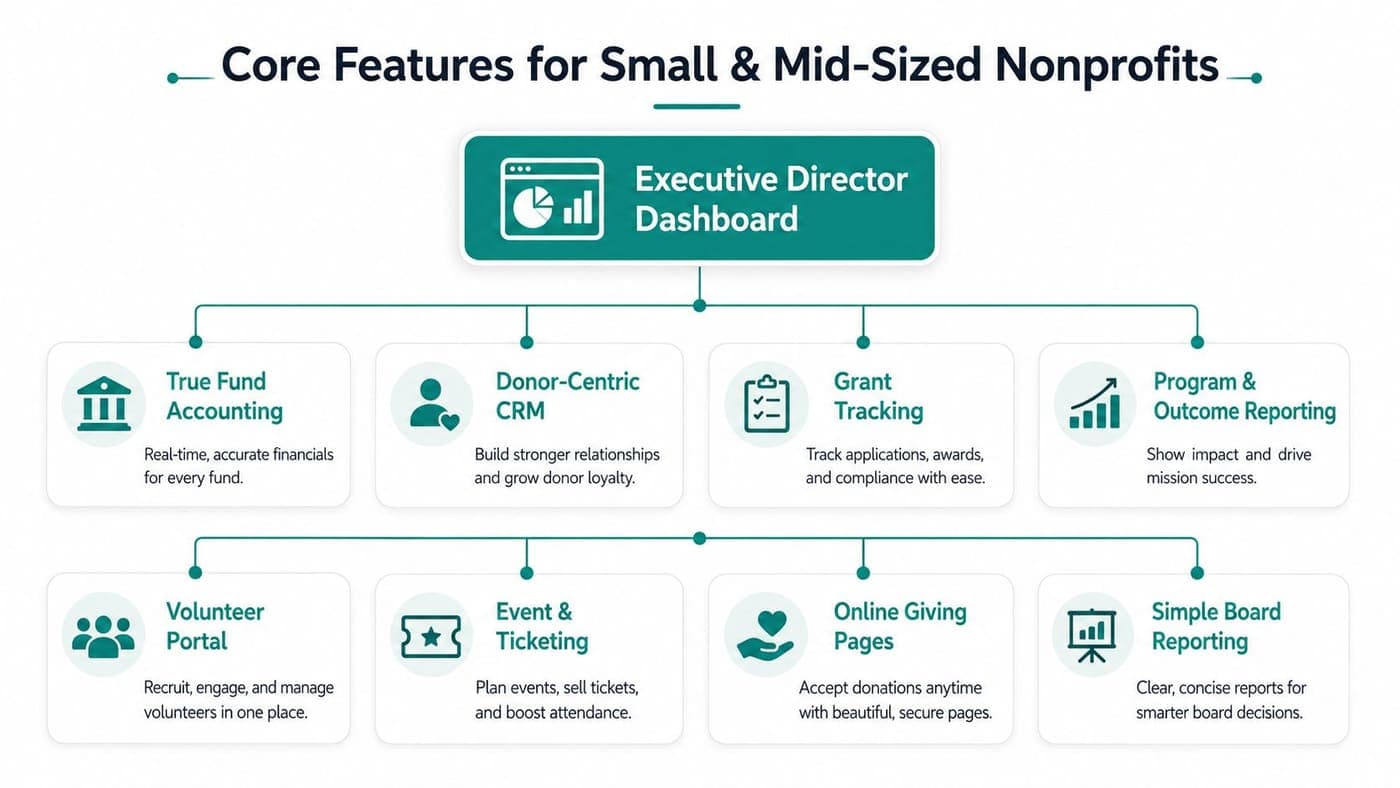
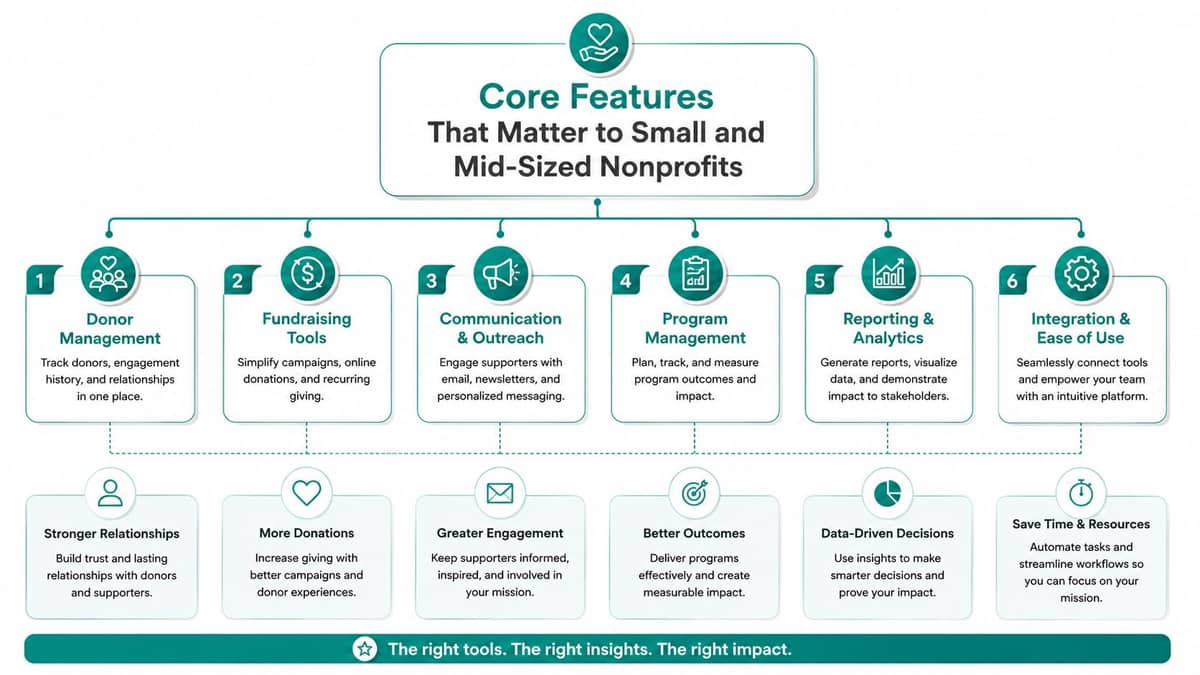
Core Features That Matter to Small and Mid-Sized Nonprofits
Start with the features that save real time, not the ones that look impressive in a demo. If the software can't clean up donor receipts, volunteer coordination, and board reporting, it's not helping enough.
True fund accounting
This is the one that matters most when your board asks for clean numbers. True fund accounting tracks restricted funds, grants, and programs natively, so you're not faking it with generic classes and locations.
That matters for Form 990 readiness and the Statement of Functional Expenses. If your accounting layer can't separate money by purpose, your finance team ends up doing cleanup work that should have been automatic from the start. In tools like AlignMint, fund accounting is built into the platform, not treated like a classroom exercise in QuickBooks.
Donor management with automatic receipting
Your donors need quick receipts and clear records. Your staff needs pledge tracking, donation history, and self-service access without chasing PDFs at the end of the month.
AlignMint's donor management feature page is a useful benchmark for what that should include, because donor data and finance data should live together. If they don't, your team will always be reconciling twice.
Volunteer management and communication
Volunteer no-shows usually come from weak reminders, poor role matching, or a signup process that takes too long. A decent app should handle schedules, hour logging, skills, and basic communication in the same place.
That's also where integrated messaging matters. If you need a separate texting tool just to remind people about Saturday setup, the app hasn't reduced work, it's shifted it.
The best volunteer system is the one your volunteers actually use without calling the office for help.
Events, giving pages, and AI support
Event ticketing should connect to the same donor record as your online giving pages. That lets you see who gave, who registered, and who showed up without three separate exports.
For online giving pages, if your current process still involves manual PDFs or clunky donation forms, a resource like reduce admin work with PDFWix may help you understand how much friction a lighter workflow can remove. But the bigger point is this, the giving page should match your brand, capture the right donor data, and feed your CRM directly.
Minty matters when someone asks a question you should be able to answer immediately. You don't want a board member waiting a week for a spreadsheet pull. You want fast answers from your own data.
plan-based access with no per-seat fees also matters more than vendors like to admit. Small teams have board members, finance staff, program leads, and volunteers who all need visibility. Charging per person punishes the very collaboration nonprofits need.
How Churches, Schools, and Fiscal Sponsors Use One App Differently
The same platform can solve very different problems, but only if it's built on one data model. Churches, schools, and fiscal sponsors don't need identical workflows, they need the same core system to adapt without extra tools.
At a mid-sized church, the giving page handles weekly donations and special campaigns, while event ticketing covers vacation Bible school and member gatherings. The volunteer portal keeps greeters, children's ministry teams, and setup crews organized without separate spreadsheets, so the staff isn't spending Sunday morning fixing signups.
At a small private school, tuition assistance needs to sit inside a restricted fund, not buried in a general ledger workaround. Parent volunteers can register for fundraising events in the same app, and board reporting stays clean enough to support a Statement of Functional Expenses without a last-minute cleanup sprint.
For a fiscal sponsor, the problem is sharper. Ten sponsored projects can each carry their own funds, grant drawdowns, and reporting obligations, and the sponsor still has to consolidate everything without copying data between systems. That's where one database matters more than one more dashboard.
The right platform respects those differences without fragmenting the operation. If you're comparing options for sponsorship work, the fiscal sponsors page shows why project-level accounting and consolidated oversight have to live together.
What each vertical needs most
| Vertical | What matters most | What breaks when tools are split |
|---|---|---|
| Church | Giving, events, volunteer coordination | Duplicate records and missed follow-up |
| School | Restricted funds, parent volunteers, board reporting | Tuition aid confusion and messy expense reporting |
| Fiscal sponsor | Separate project funds and consolidated reporting | Grant reporting errors and extra reconciliation |
The lesson is plain. Different ministries and programs need different workflows, but they all suffer when the finance record and the engagement record live apart.
All-in-One Platform or Best-of-Breed Tools
QuickBooks, Mailchimp, Eventbrite, and a volunteer tool can each do a job well. QuickBooks is familiar. Mailchimp has polished templates. Eventbrite handles large public events competently. I'm not dismissing any of them.
The problem is the stack, not the individual tool. Every extra system adds setup work, training, and data-sync risk, and that's where small nonprofits get worn down. For a useful framing of the trade-offs around connected systems, Klap's integration guide is a good reminder that integrations solve some problems while creating others.
A simple decision table
| Criterion | All-in-One Platform | Best-of-Breed Stack |
|---|---|---|
| Data accuracy | One donor record across finance and engagement | Data lives in silos |
| Staff time | Fewer logins, fewer handoffs | More admin work and duplicate entry |
| Reporting | Easier board and program reporting | More exports and cleanup |
| Volunteer and event flow | Connected to donor history | Usually separate |
| Budget clarity | Fewer hidden integration costs | More tools, more surprises |
If you want a side-by-side buying framework, our comparison page makes the logic easy to apply. The point isn't that every point solution is bad. The point is that small nonprofits usually lose more to integration tax than they gain from feature specialization.
For the right team, the better app is often the one with the fewest moving parts. That's especially true when restricted gifts, donor receipts, event attendance, and volunteer hours all need to point back to one record.
My rule after two software switches: if your bookkeeper and program lead both need separate tools to answer the same question, you're overbuying.
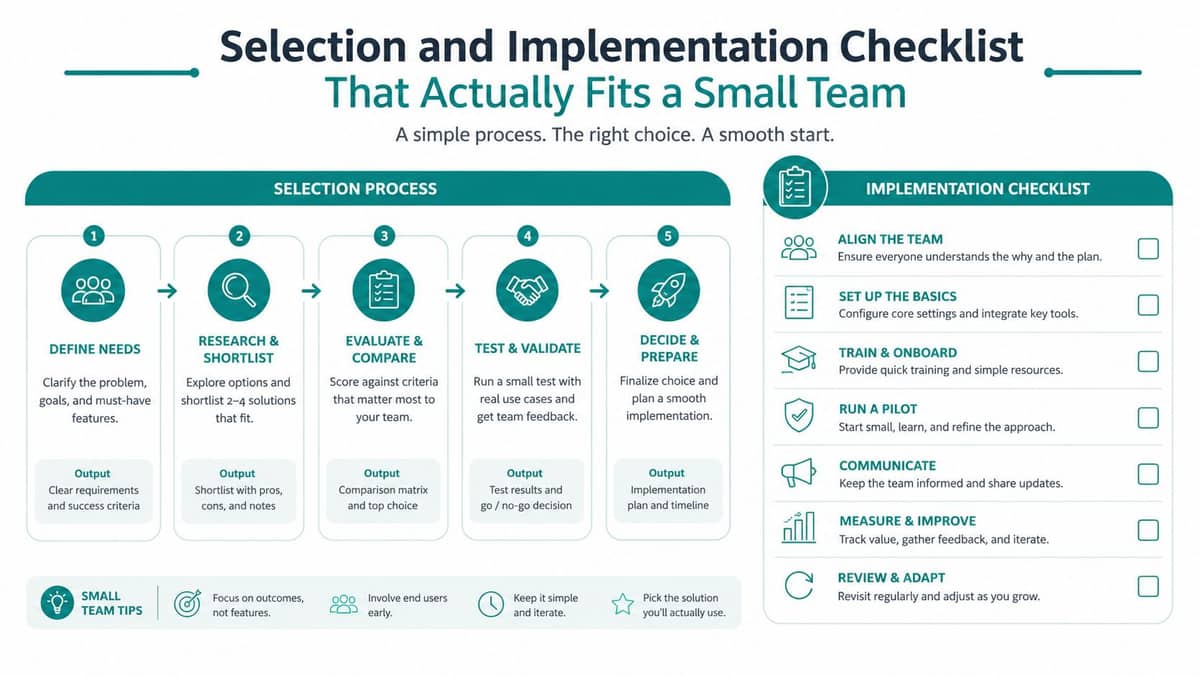
Selection and Implementation Checklist That Actually Fits a Small Team
Don't start by asking vendors for a full demo. Start by writing down the three outcomes you need in the next six months, then buy the software that supports those outcomes. That means cleaner board reports, recurring giving that's easier to manage, and volunteer hours that don't disappear into a clipboard.
A practical sequence
- Write the outcome first. Decide what success looks like in plain language, such as cleaner restricted-fund reporting or faster donor receipts.
- Match features to outcomes. If the goal is better board reporting, don't get distracted by flashy campaign tools you won't use.
- Shortlist two or three vendors. Run one real workflow in a 30-day trial, not a sandbox that hides the pain.
- Bring in your bookkeeper and one board member. If they can't understand the system, adoption will stall later.
- Roll out in phases. Start with giving pages and donor records, then add volunteers and events, then turn on fund accounting reports.
The phased model matters because it keeps risk low. Industry guidance from Chop Dawg also notes that annual maintenance, hosting, security updates, and OS compatibility often require an ongoing budget equal to about 10–15% of the original development cost. That's a hidden burden in custom builds, while it's usually baked into subscription pricing for a platform.
Keep the rollout narrow at first. One clean giving workflow is better than five half-working modules.
Making the Final Call and Getting Started
Choose the system that keeps your records intact when staff changes, board questions get hard, and grant reporting comes due. One platform is usually cheaper over time because it cuts the integration tax, and it protects donor trust by keeping restricted gifts, grants, and receipts in the same database.
That's where I'd pay attention to free tiers too. If your organization is still small, AlignMint offers a free tier for nonprofits raising up to $100K per year, which makes the switch easier to test without a big upfront commitment. You can review that on the pricing page.
The hardest part of switching software isn't the demo. It's the first month when you're trying to keep operations moving while cleaning up old habits. Bring your bookkeeper, bring one board member, and choose the tool that gives your team time back for the mission.
If you're comparing options for your nonprofit, take a look at AlignMint. It brings accounting, donor records, volunteers, events, and marketing into one system, so your team spends less time reconciling tools and more time serving your mission.
Ready to see how AlignMint fits your workflow?
Schedule a free walkthrough — we will help you map donors, funds, and migration steps.