

Grant Management Software for Foundations: A Buyer's Guide
At 7 p.m., a program officer is still reconciling a spreadsheet, searching email threads, and checking a paper folder before tomorrow's board meeting. Your foundation probably didn't choose that process deliberately, but it grew around urgent work. This guide explains how to choose grant management software for foundations that a small team can operate without a six-month implementation project.
Quick Answer: Grant Management Software for Foundations
Grant management software for foundations should let a small team track applications, awards, payments, restricted balances, and board reports without a six-month implementation. Choose the platform that makes remaining award amounts visible without exporting to a spreadsheet.
Compare best grant management software for nonprofits and grant management software. For the finance backbone, see fund accounting.
Why Foundations Are Rethinking Their Grant Software
Most foundation grant operations begin with sensible tools. Someone creates a spreadsheet for applications, a shared folder for documents, and an email label for grantee correspondence. Another person adds a payment tracker, then a board-report template. Over time, the process becomes institutional knowledge held by a few people.
That arrangement works until someone needs a complete answer quickly. Which grants still require reports? How much remains available in each restricted fund? Which payments are scheduled next? What outcomes did the board-funded programs deliver? Staff can answer these questions, but often only after searching several places and checking each other's work.
The pressure has changed. Foundations manage grant programs across social issues, economic development, education, healthcare, and environmental sustainability, while boards increasingly want outcome information alongside financial updates. The global grant management software market was estimated at USD 2.66 billion in 2024 and is projected to reach USD 6.19 billion by 2033, with a 10.0% compound annual growth rate from 2025 to 2033, according to Grand View Research's grant management software market analysis.
The software has become a strategic layer
That growth reflects more than enthusiasm for new technology. Government bodies, philanthropic foundations, and international development agencies need to manage more grant programs and more structured information. For a foundation, the implication is practical: grant administration now affects how quickly you review applications, make awards, schedule payments, and explain results.
A modern grants system should replace fragmented records with one reliable grant file. It should show the application, review history, award terms, payment schedule, documents, communications, deliverables, and outcomes without requiring staff to reconstruct the story manually.
The category has also matured. Grant applications represent 22.7% of the philanthropy management software market, about USD 0.73 billion in 2025, while foundations represent 28.6% of that market, according to the 2024 nonprofit software sector report. Those figures signal a specialized software class, not a minor feature attached to a donor database.
Before you schedule demos, read our grant management best practices and write down where your current process loses time. The right choice isn't the platform with the longest feature list. It's the platform your team can run consistently, with clean financial records and dependable reporting.
What Grant Management Software for Foundations Actually Does
Grant management software for foundations organizes the complete path from an applicant's first submission through the foundation's final outcome review. It gives every grantee a central record, so staff don't have to assemble information from separate spreadsheets, inboxes, folders, and accounting files.
Think of the system as a medical chart. A doctor can see the patient's history, current issue, previous treatment, and next appointment in one place. A foundation should be able to open a grantee record and see the application, review notes, award, payments, correspondence, reports, and results with the same clarity.
The grant lifecycle in plain English
The lifecycle usually includes these connected stages:
-
Application intake: Applicants complete customizable online forms and upload supporting documents. The system should capture required information consistently, rather than leaving staff to interpret differently formatted attachments.
-
Review and scoring: Staff, advisors, or committees use scoring rubrics and review tools. The platform should record scores, comments, conflicts, and recommendations while limiting access to appropriate reviewers.
-
Award decisions: Approved grants move into award records with terms, budgets, approval history, and required documentation. This step creates the reference point for everything that follows.
-
Payment scheduling: Staff record planned disbursements, payment conditions, drawdowns, and changes. Finance should be able to connect those transactions with the correct fund and program.
-
Follow-up tracking: The system monitors deadlines, reports, deliverables, communications, and outstanding documents. Reminders should come from the record, not from one employee's personal calendar.
-
Outcomes reporting: Foundation leaders review spending, activities, progress, and results across individual grants and the broader portfolio. Reporting should support board discussions and compliance work without requiring a separate data project.
A grants system is more than a CRM add-on
A generic CRM can store contacts and notes, but grants require structured stages, review logic, award terms, payment controls, reporting requirements, and audit history. A CRM with a grants add-on may work for a simple program, but it can become awkward when finance needs restricted-fund visibility or when multiple programs use different approval rules.
Ask vendors to demonstrate the complete path using one realistic grant. You should see an application become a review, a review become an award, an award generate payments, and a payment connect to reporting. For a practical reference point, compare the workflow expectations in the grant assistant documentation.
Application, review, award, payment, follow-up, outcomes. If your team manages any stage outside the central record, that gap will eventually appear in a board report or audit request.
Features That Matter Most for a Foundation Team
Start with the tasks your staff must complete, not the features a vendor wants to demonstrate. A small foundation needs fewer handoffs, clearer records, and dependable controls more than it needs a dazzling configuration environment.
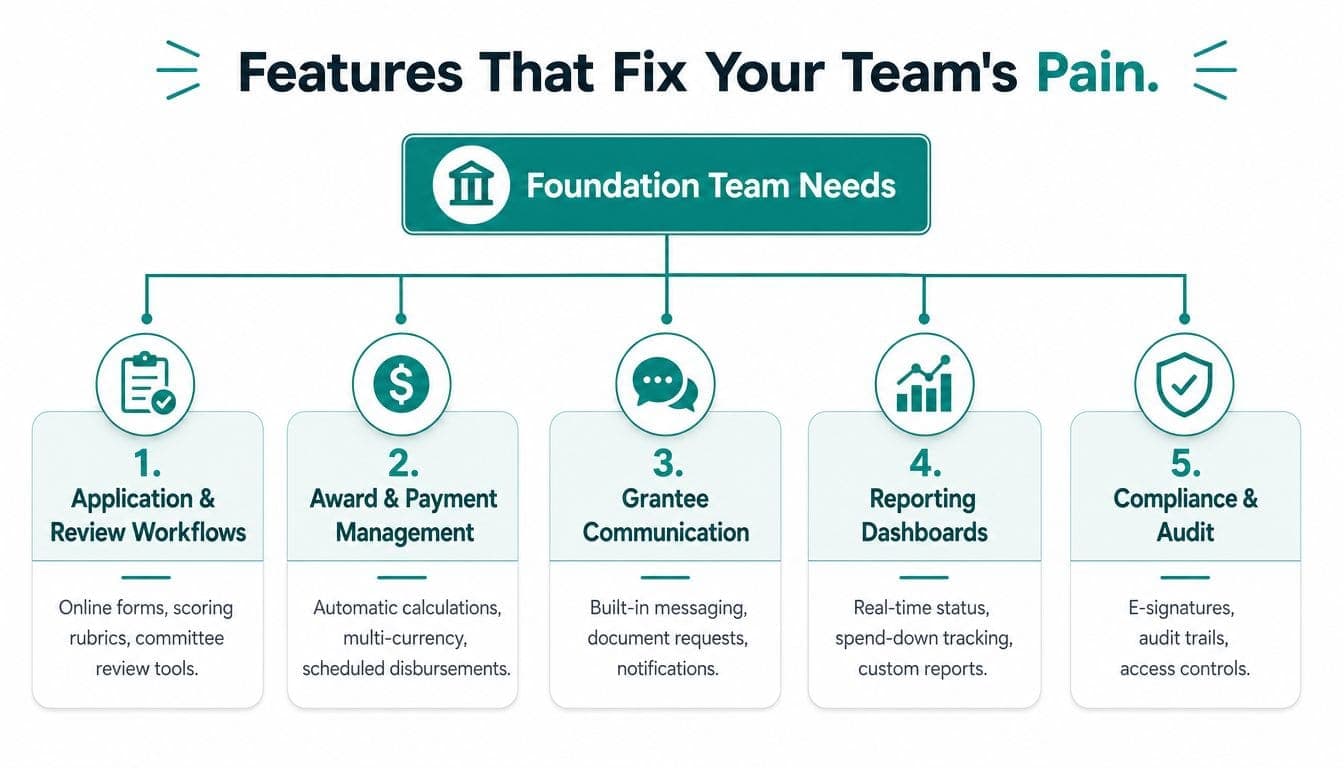
Application and review workflows
The outcome is a faster, fairer review process. Look for online forms, required fields, branching questions, scoring rubrics, committee review tools, approval routing, and applicant communications.
A platform should let you change a form or review stage without calling a consultant. Ask whether reviewers can work from a simple portal and whether the system records who viewed, scored, approved, or changed an application.
Grantee relationships and documents
The outcome is institutional memory. A grantee record should hold contact details, applications, agreements, reports, messages, and documents in chronological context.
This matters when a program officer leaves, a board member asks about a previous award, or a grantee submits a revised budget. Built-in messaging and document requests can reduce email chasing, but they only help if staff can find the history quickly.
Payment and grant accounting
The outcome is confidence that every dollar sits in the correct place. Look for scheduled payments, drawdown tracking, approval controls, budget monitoring, and restricted-fund accounting connected to each grant.
Nonprofits must distinguish donor-restricted and unrestricted net assets under ASU 2016-14, and a satisfied restriction requires a release-from-restrictions entry. The restricted funds accounting guidance from Intuit explains why those classifications belong in the operating system, not only in a year-end spreadsheet.
A true fund accounting structure should also support separate tracking until a time or purpose restriction is satisfied, as described in guidance on managing restricted funds. Many otherwise capable grant tools need a separate accounting system.
Reporting and outcomes
The outcome is a board packet you can prepare from current records. Prioritize dashboards for award status, spend-down, reporting deadlines, program activity, and outcome progress.
Advanced systems may calculate progress toward outcome goals from submitted reports, support portfolio-wide analysis, and assist with compliance workflows such as Form 990-PF and expenditure responsibility. The PEAK Grantmaking consumer guide identifies integrations, batch updates, business-intelligence reporting, and automated outcome calculations as important capabilities beyond basic workflow.
The IRS also requires Form 990 filers to report fundraising costs in Part IX, column D, labeled “Fundraising expenses,” according to the IRS Form 990 instructions. Your system should help finance separate fundraising, program, and management costs rather than forcing manual classification later.
Security and access
The outcome is controlled, defensible information. Require multi-factor authentication, role-based permissions, document controls, change histories, and audit trails.
Be skeptical of shiny features that don't reduce recurring work. A complex public portal, elaborate workflow builder, or advanced visualization may sound impressive, but it shouldn't outrank accurate payments, usable reports, and easy staff adoption.
Rule of thumb: If a feature doesn't save a program officer meaningful recurring time, it isn't essential for a small foundation.
For finance-led teams, true fund accounting features deserve priority over decorative dashboards. The accounting structure determines whether the grant record can support accurate drawdowns, restricted balances, and board reporting.
How the Leading Platforms Compare for Foundations
The leading platforms serve different operating models. Blackbaud brings depth for large institutions, Foundant has a strong reputation among family foundations, Fluxx offers flexibility, and SmartSimple is known for configuration across complex programs.
Those strengths come with tradeoffs. A platform designed for a large institution may require more administration than a small foundation can support. A highly configurable tool can fit unusual workflows, but configuration, training, and maintenance become part of your internal workload.
| Platform | Best Fit | Pricing Model | Fund Accounting | Implementation |
|---|---|---|---|---|
| Blackbaud Grantmaking | Large or established foundations, especially existing Blackbaud customers | Vendor quote | Often connected through the wider Blackbaud finance environment | Structured implementation, potentially substantial for smaller teams |
| Foundant GLM | Family, community, and private foundations seeking dedicated lifecycle management | Vendor quote | May connect with related accounting products or require a separate finance arrangement | Guided setup, with complexity depending on workflow and reporting needs |
| Fluxx Grantmaker | Foundations with complex, highly customized programs | Vendor quote | Confirm whether required fund accounting sits natively in the selected configuration | Configuration and integration planning can require significant effort |
| SmartSimple | Organizations needing broad configurability across grants and programs | Vendor quote | Confirm native accounting depth and the required finance connection | Strong configuration potential, with corresponding training demands |
| AlignMint | Small and mid-sized nonprofits and foundations seeking one operating system | Free tier for nonprofits under $100K, with other pricing based on the offering | True fund accounting with restricted funds, grants, and programs modeled natively | Designed to reduce separate systems and implementation burden |
Blackbaud is a sensible conversation for a foundation already invested in its broader fundraising and finance products. Foundant deserves consideration when a family foundation wants a focused grants environment with established foundation workflows. Fluxx fits organizations that need extensive flexibility, while SmartSimple suits teams with unusual program structures and the capacity to maintain them.
The important question isn't which name appears most often in a comparison article. It's whether your team can maintain the system after the implementation team leaves. Check pricing for users, modules, integrations, support, reporting, payment processing, and future configuration work. Per-seat fees can matter when board members, reviewers, finance staff, and program colleagues need access.
For a broader feature and workflow comparison, use AlignMint's comparison page as one reference point, then validate every current capability directly with vendors. The question I hear most often is simple: Can this replace our spreadsheets without creating a new integration project?
That question deserves more attention than a polished demo. Integration complexity, data-standardization gaps, and manual compliance work often determine whether a platform reduces administration.
The Hidden Cost Most Buyers Miss
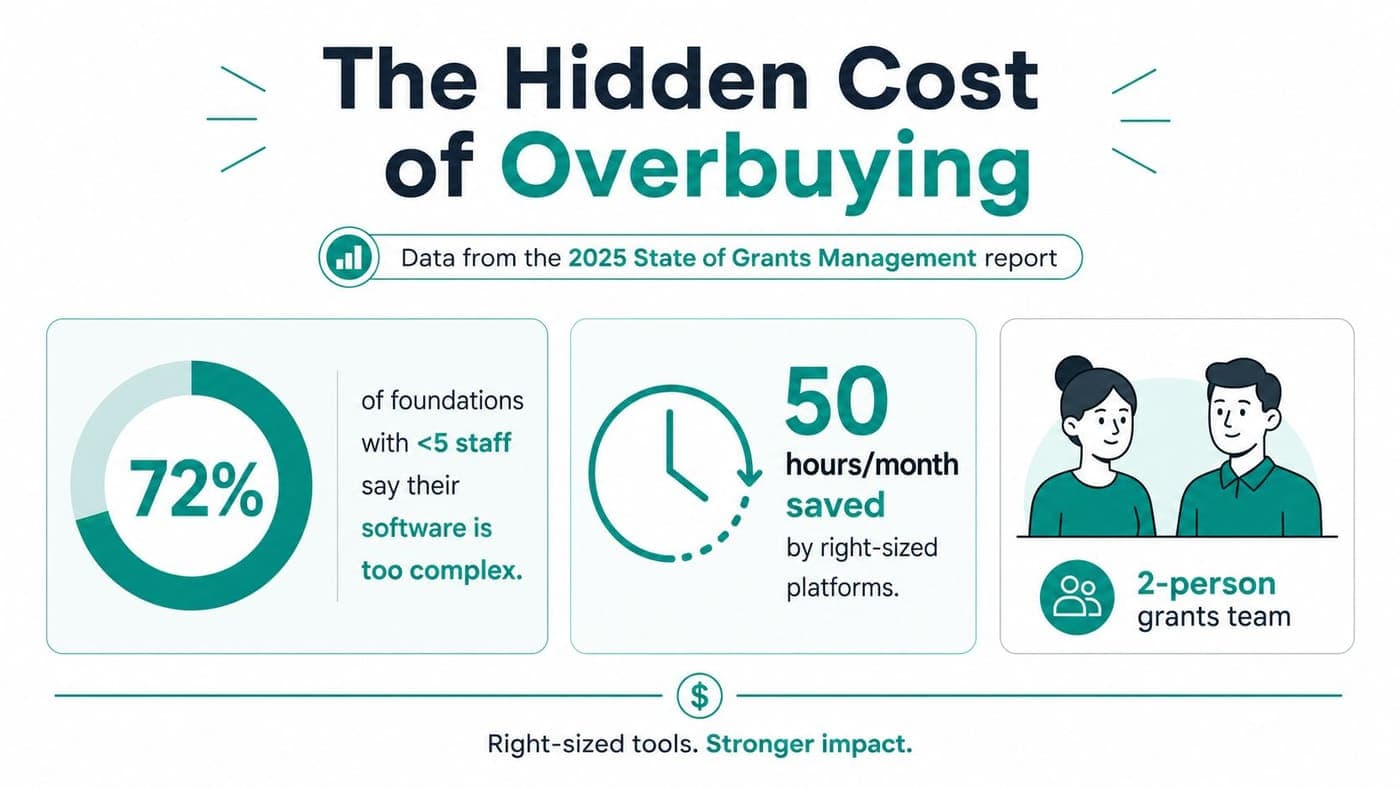
A foundation can buy a capable platform and still make staff work harder. If one to three people run grants, implementation and maintenance must fit around daily responsibilities, not become a second job.
The 2025 State of Grants Management and Technology Report found nearly 66% of respondents had grants teams of only 1–3 people, while 80% expressed interest in software, according to the report from Euna Solutions. A small team needs a system it can operate after implementation support ends.
The six-month trap
The sales demo goes well. The workflows look capable, the price seems reasonable, and configuration appears manageable. Then staff must clean old records, map fields, define approval rules, migrate documents, test reports, train reviewers, and explain new procedures to finance and leadership.
Consultant time may sit outside the subscription price. Each week spent configuring software is time taken from grant cycles, grantee support, and outcome updates.
The hidden costs usually include:
- Implementation hours: Staff must decide how to structure data, workflows, permissions, and reports.
- Consultant fees: Custom configuration and integrations can add professional-services expenses.
- Training time: Reviewers and occasional users need enough practice to complete their roles.
- Delayed grant cycles: An unfinished system can push applications, awards, or reports back into manual work.
- Maintenance work: Someone must own forms, permissions, templates, integrations, and data quality.
- Opportunity cost: Leadership attention shifts from grant strategy to software administration.
Choose for capacity, not aspiration
A small or mid-sized foundation should choose for the team it has now. For many foundations under $5 million in assets, a focused system with fund accounting included is more practical than a modular enterprise suite that requires an integrator. The goal is matching operating complexity to staff capacity, regardless of platform scale.
Integration deserves close scrutiny. One market study reports that 28% of funders cite integration complexity and 22% cite data-standardization gaps, while a 2025 industry report found 56% of grant-making organizations still struggle with compliance tracking because processes remain manual, as summarized in Global Growth Insights' market analysis.
Ask vendors to show accounting, CRM, reporting, and grant records working together. If the answer requires a future custom project, include that project in the budget, decision, and timeline. Review cost allocation guidance for nonprofits before deciding how your financial structure must work inside the new system.
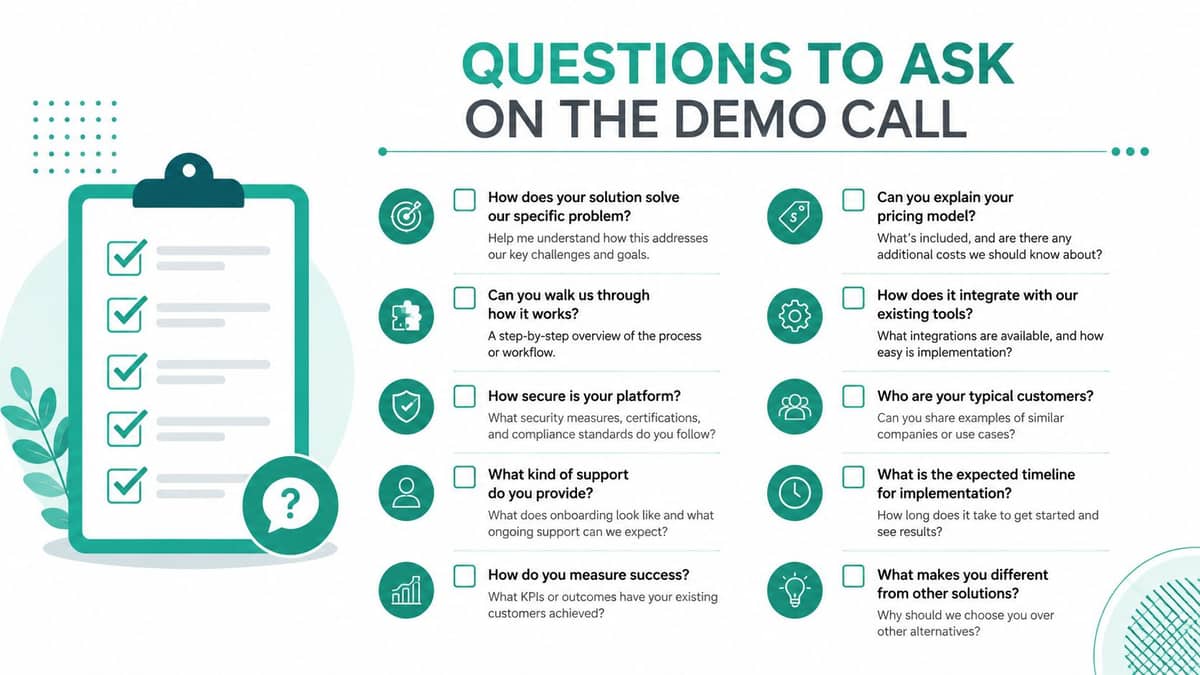
Questions to Ask on the Demo Call
Bring your real grant cycle to the demo. Don't ask a vendor to describe what the platform can do. Ask the vendor to perform the work while you watch.
Workflow questions
Use one recent application and ask:
- Can you show the applicant form, including required fields and document uploads?
- Can reviewers score applications independently and record comments?
- How does the system handle committee decisions, conflicts, and approvals?
- Can an approved application become an award without re-entering information?
- Where do payment schedules, reporting deadlines, and deliverables appear?
- Can staff send reminders and document requests from the grantee record?
- Can you show an award moving through a complete cycle, from intake to outcomes reporting?
The purpose is to expose handoffs. If the vendor jumps between modules or exports data for ordinary steps, your team may inherit manual work.
Data and finance questions
Finance needs more than a grant status dashboard. Ask:
- Does the grant record connect directly to the correct fund, program, and expense?
- Can we see restricted balances and remaining award amounts without exporting data?
- How are drawdowns, scheduled payments, reversals, and adjustments recorded?
- Can we map our chart of accounts without rebuilding it?
- Can the system produce board reports and compliance reports from the same records?
- What integrations already exist for accounting, CRM, banking, and document storage?
- Which data moves automatically, and which data requires a file upload or manual reconciliation?
A useful platform should make governed data flow visible. Don't accept “we integrate” as an answer until you see the fields, timing, error handling, and ownership.
Security and total-cost questions
Security questions should be specific:
- Is multi-factor authentication available for every user type?
- Can we set role-based permissions for staff, reviewers, board members, and grantees?
- Does the audit trail show changes to awards, payments, approvals, and reports?
- How are documents protected, retained, exported, and deleted?
- What happens when a staff member leaves?
- Which features, users, integrations, support services, and reports are included?
- What costs sit outside the subscription?
- Who handles configuration after launch?
Ask the vendor to record the demo with permission, and request written answers to anything they don't demonstrate. A confident presenter can explain a feature. A trustworthy vendor will show the actual workflow.
A one-afternoon implementation check
Before signing, confirm these four items:
- Data migration: Identify which applications, awards, payments, documents, and contacts must move.
- Chart of accounts mapping: Match grants, funds, programs, and expenses to your existing financial structure.
- User roles: Define access for staff, reviewers, finance, leadership, board members, and grantees.
- 30-day go-live plan: Choose one live workflow, test it with real records, train users, and set a date for retiring the spreadsheet.
Choose the platform that makes this checklist feel achievable. AlignMint combines accounting, CRM, volunteers, events, marketing, online giving, and team communication, with Minty available to answer questions about your organization's own data. Its free tier for nonprofits under $100K and plan-based access without per-seat fees make it a practical option to evaluate when your foundation wants fewer separate systems.
AlignMint gives foundations and nonprofit teams true fund accounting, grant tracking, donor management, volunteer tools, events, marketing, online giving pages, and team communication in one platform. Visit AlignMint to see whether your team can move from spreadsheet-heavy grant administration to a system you can operate confidently.
Ready to see how AlignMint fits your workflow?
Schedule a free walkthrough — we will help you map donors, funds, and migration steps.