

A $500 gift clears on Friday afternoon, the donor expects confirmation, and your bookkeeper still needs the gift assigned correctly by Monday. If those records live in separate payment, donor, and accounting systems, receipting becomes a reconciliation problem disguised as paperwork.
Donation receipt software should give donors compliant documentation, preserve an audit trail, and post each gift to the right fund without duplicate entry. This guide explains what to compare, where common tools leave manual gaps, and how an all-in-one platform such as AlignMint approaches the workflow.
Quick Answer: Donation Receipt Software
Donation receipt software should create the tax acknowledgment from the gift record, not from a processor confirmation. For a U.S. gift of $250 or more, donors generally need a contemporaneous written acknowledgment with date, amount, and goods-and-services language.
Start with donation receipts for nonprofits and donor management. For the product path, see donation receipts.
The Receipt That Protects Every Gift
The compliance clock starts when the contribution is received, not when someone finally remembers to prepare a letter. For U.S. monetary gifts, donors must retain a bank record or written communication from the charity, including gifts made by check, electronic funds transfer, card, or other monetary methods, under the IRS substantiation guidance.
A single contribution of $250 or more requires a contemporaneous written acknowledgment from the charity. The donor must receive it by the earlier of the tax filing date or the return due date, including extensions, as explained in IRS Publication 1771. Email qualifies as written communication, which makes electronic delivery a legitimate compliance channel rather than merely a convenience.
Start with the gift record
Your system should capture the organization name, donor name, contribution date, amount, and whether the donor received goods or services. If the gift involved a benefit, the acknowledgment needs the required disclosure and a good-faith estimate of that benefit's fair market value.
For gifts below the $250 threshold, donors can generally substantiate cash contributions with a bank record or written receipt. That doesn't make smaller gifts unimportant. A consistent receipt process protects donor confidence, supports year-end reporting, and prevents staff from deciding manually which gifts deserve documentation.
Practical rule: Treat every monetary gift as receiptable, then let the system apply the different acknowledgment rules automatically.
Manual processes fail without warning. A mail merge can omit a donor name, staff turnover can leave recurring gifts unacknowledged, and year-end summaries can arrive after donors need them. The bookkeeper may also see a payment without its campaign or restricted-fund context, forcing another round of research.
Purpose-built software connects the donor-facing acknowledgment to the internal record. It creates a timestamped document, sends it electronically, and preserves the transaction details needed for accounting review. That connective tissue matters because donor trust, tax documentation, and accurate books depend on the same underlying gift data.
What Donation Receipt Software Actually Does
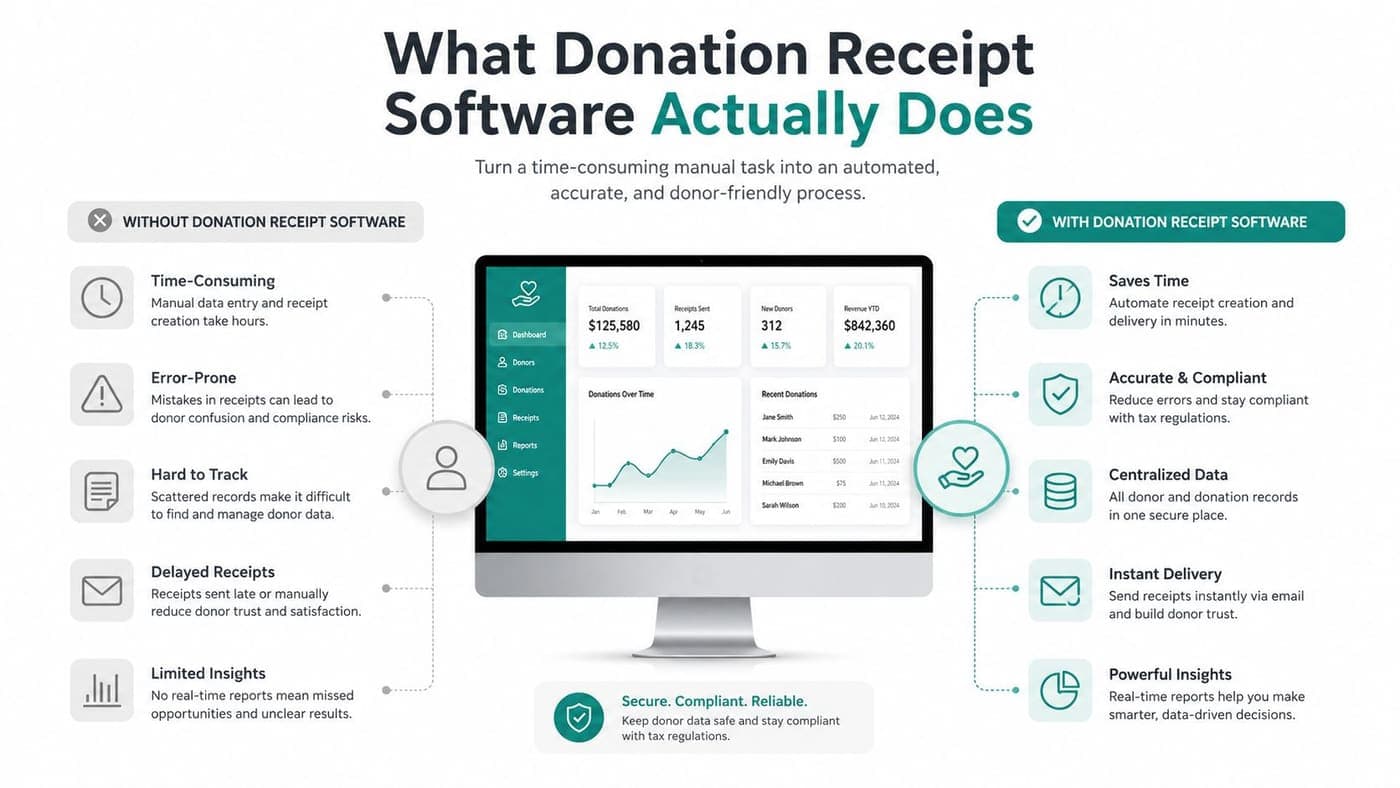
Donation receipt software issues a charitable contribution acknowledgment when a gift is recorded. It isn't just a branded email from Stripe, PayPal, or Square confirming that a payment succeeded.
A payment confirmation answers one question, whether money moved successfully. A tax-ready acknowledgment answers a different question, what charitable contribution the organization received and what the donor should retain for tax substantiation. Guidance on the distinction between payment confirmations and charitable acknowledgments appears in this donation receipt software overview.
A compliant record generally needs the organization name, donor name, contribution date, amount, and appropriate goods-or-services language. Non-cash gifts require different handling. For non-cash contributions over $500, donors generally need IRS Form 8283, while gifts over $5,000 generally require a qualified appraisal, according to IRS charitable contribution guidance.
The mechanics behind a reliable workflow
A capable system should capture gift details from donation forms, payment processors, imported files, and offline transactions. It should also distinguish recurring gifts from one-time contributions, identify duplicate donor records, and preserve the original transaction history.
Look for these working parts:
- Automatic generation: Create the acknowledgment when the gift posts, rather than waiting for a staff batch.
- Template controls: Maintain approved language for cash, in-kind, stock, event, and goods-or-services transactions.
- Delivery options: Send email receipts, support downloadable PDFs, and provide a donor portal for retrieval.
- Batch processing: Produce year-end statements without rebuilding each donor's history manually.
- Audit records: Preserve receipt status, delivery timing, edits, voids, reissues, and related gift data.
The key test is simple. Can your finance lead trace a receipt from donor record to campaign, fund, general ledger entry, and bank transaction? If the answer is no, the software is generating documents, but it isn't managing receipting.
Our donation receipts documentation describes the operational record a system should maintain. The receipt belongs in a reconciliation-ready ledger, not in an isolated inbox sent once and forgotten.
Core Capabilities Worth Comparing
A good comparison starts with the work your team must complete after a donor clicks “give.” Score each platform against compliance, donor records, accounting, and delivery. Don't let a polished template distract you from missing fund codes or weak reissue controls.
| Capability Area | Must-Have Features | Nice-to-Have Features |
|---|---|---|
| Receipting and compliance | IRS-compliant templates, contemporaneous records, substantiation logs, in-kind handling, void and reissue controls, exportable Form 8283 data | Branded layouts, impact language, signature blocks |
| Donor CRM | Unified household records, communication preferences, gift history, legal donor tracking, portal access | Relationship tags, advanced segmentation, custom stewardship prompts |
| Accounting integration | Fund accounting sync, GL coding, pledge tracking, restriction data, bank reconciliation, audit trail | Direct connections to additional accounting products |
| Delivery and accessibility | Email delivery, downloadable records, mobile-friendly access, receipt history | SMS delivery, multilingual templates, donor-selected preferences |
Receipting and compliance
IRS-compliant templates are essential. The system should use different fields for monetary and non-cash contributions, record whether goods or services were provided, and support the disclosure required for quid pro quo contributions over $75, as explained by the IRS substantiation and disclosure requirements.
In-kind and stock workflows deserve special attention. A receipt should describe the property received, while the donor handles valuation and any appraisal obligations. Exportable Form 8283 data gives your finance team a usable record instead of another spreadsheet request.
Donor records
A receipt has limited value if staff can't locate it later. Household relationships, legal donor identity, communication preferences, recurring gift history, and self-service retrieval should sit together.
Donor portals are especially useful for long-time supporters who need a prior receipt during tax preparation. They also reduce routine requests that otherwise pull an executive director, development officer, or bookkeeper away from mission work.
Accounting connection
Many fundraising tools stop short. A receipt should carry the campaign, restriction, fund, and pledge context needed for the general ledger. Without those dimensions, finance staff still reconcile donations by hand.
Fund accounting isn't the same as adding classes to a general-purpose accounting file. You need restricted balances, program distinctions, and grant or project context that remain attached to the gift as it moves through the books.
Delivery and access
Email should be the default for online gifts, but donors also need downloadable PDFs and a reliable history. SMS can be helpful for immediate confirmation, while multilingual templates and mobile access improve service for varied communities.
Prioritize controls and traceability first. Branding and text delivery are useful, but they can't compensate for missing acknowledgment language or unreliable fund coding.
How Leading Platforms Handle Receipting and Reconciliation
The major platforms make different tradeoffs, and your choice should reflect where your organization already spends time. DonorPerfect, Network for Good, Bloomerang, QuickBooks-connected tools, and AlignMint can all support fundraising operations, but they don't connect receipting and reconciliation in the same way.
| Platform | Tax-Ready Receipts | Recurring Gift Receipts | In-Kind and Stock Receipts | Fund Accounting Sync | Bank Reconciliation |
|---|---|---|---|---|---|
| DonorPerfect | Strong letter and acknowledgment tools | Available through configured workflows | Requires careful setup and gift-type handling | Often depends on integrations or exports | Typically requires connected accounting processes |
| Network for Good | Straightforward donor acknowledgments | Supports recurring giving workflows | May need additional handling for non-cash gifts | More limited for fund-specific accounting | Usually relies on connected financial tools |
| Bloomerang | Strong CRM-based acknowledgment workflows | Supports recurring donor records | Requires configuration for specialized gifts | CRM-first structure may separate accounting steps | Often depends on accounting integration |
| QuickBooks-integrated tools | Varies by fundraising product and template setup | Depends on the connected giving system | Requires explicit non-cash workflow support | Uses QuickBooks connections, not native nonprofit fund accounting | Strong when bank feeds and coding are maintained |
| AlignMint | Written acknowledgments tied to recorded gifts | Supports automatic receipt records for recurring gifts | Supports gift records that can capture non-cash details | Native fund accounting workflow | Direct bank-feed reconciliation |
Where the handoffs appear
DonorPerfect's plug-in model gives organizations flexibility and a familiar donor database. The tradeoff is that teams may need manual export steps between the fundraising record and accounting system, especially when fund coding or reconciliation requires additional review.
Network for Good is approachable for organizations that want basic online fundraising and donor communication. Its straightforward payment-oriented receipts can be useful for ordinary gifts, but in-kind and stock contributions need a more deliberate process than a standard transaction email.
Bloomerang's CRM-first design is valuable for donor retention, segmentation, and relationship history. The accounting handoff can occur later in the workflow, which means finance staff must confirm that every gift reached the right account and restriction.
QuickBooks-integrated tools can work well when your organization already has disciplined bookkeeping procedures. They don't automatically turn QuickBooks classes into true nonprofit fund accounting, so your finance lead should verify how restricted funds, pledges, and reconciliation are represented.
AlignMint places receipt templates, donor records, fund accounting, volunteer management, events, and marketing in one platform. It also includes a built-in marketing suite, online giving pages, Minty for questions about your recorded data, and plan-based access without per-seat fees. Its free nonprofit tier applies to organizations under $100K in annual fundraising, according to the AlignMint publisher information.
Finance test: Ask each vendor to demonstrate one gift moving from payment through acknowledgment, fund coding, ledger posting, and bank matching.
Review the bank reconciliation documentation during product evaluation. The important question isn't whether a vendor can produce a PDF. It's whether your team can prove that the PDF, donor record, ledger entry, and bank transaction describe the same gift.
Receipting in Real Nonprofit Workflows
The strongest systems earn their keep in ordinary moments, not during a software demonstration. Your team needs the right document when the gift arrives, and it needs to find that document later without reconstructing the transaction.
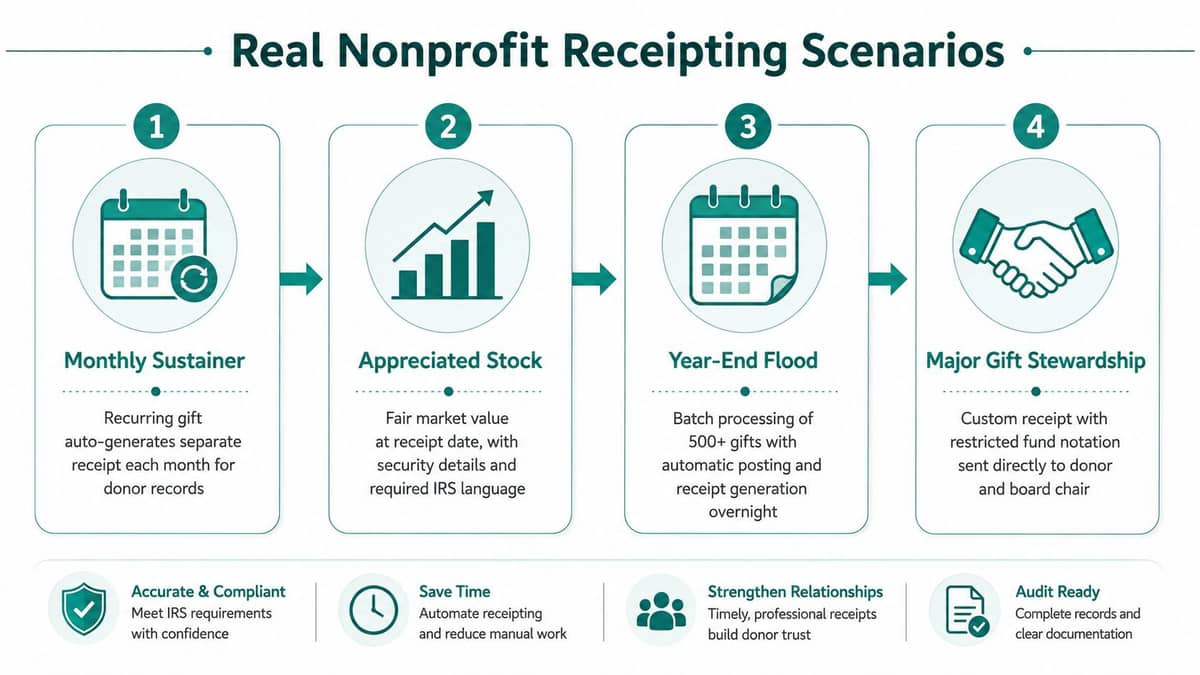
The monthly sustainer
A donor schedules a recurring card or ACH gift. Each recorded contribution should create its own receipt, with the date and amount for that installment, while the donor history preserves the full relationship.
That distinction matters when a supporter asks for documentation tied to a particular contribution. A single generic subscription confirmation doesn't replace a contribution acknowledgment for each recorded gift.
The appreciated stock donation
A board member transfers appreciated stock, and the organization needs to record the security details without casually assigning a tax value. The receipt should describe what the nonprofit received and preserve the transaction date for internal records.
The donor, not the nonprofit, generally determines the property value and handles applicable appraisal requirements. Your staff should avoid copying a market estimate into the charitable acknowledgment unless the workflow specifically distinguishes internal accounting information from donor tax documentation.
The year-end flood
December brings a rush of online, check, card, event, and offline gifts. A batch process should produce year-end statements from the actual donor history, while finance staff review exceptions instead of rebuilding every statement.
Organizations that publish fundraising pages or run crowdfunding campaigns can also benefit from the Fundl nonprofit crowdfunding guide, particularly when campaign activity creates multiple transaction sources. The receipt system still needs one controlled record for each contribution.
The missing receipt
A long-time supporter loses the original document and asks for a replacement. A donor portal should let the supporter retrieve or download the record, while the system marks the reissue rather than creating an unexplained duplicate.
AlignMint's recording donations documentation is useful when reviewing how recorded gifts should feed the acknowledgment process. Self-service retrieval reduces interruptions, but staff still need clear controls for corrections, voids, and reissued records.
Goods and services require careful language. If a donor pays more than $75 and receives something of value, the charity must disclose the benefit and provide a good-faith estimate of its fair market value. If nothing was provided, the receipt should say so clearly.
Connecting Receipts to Fund Accounting and Bank Feeds
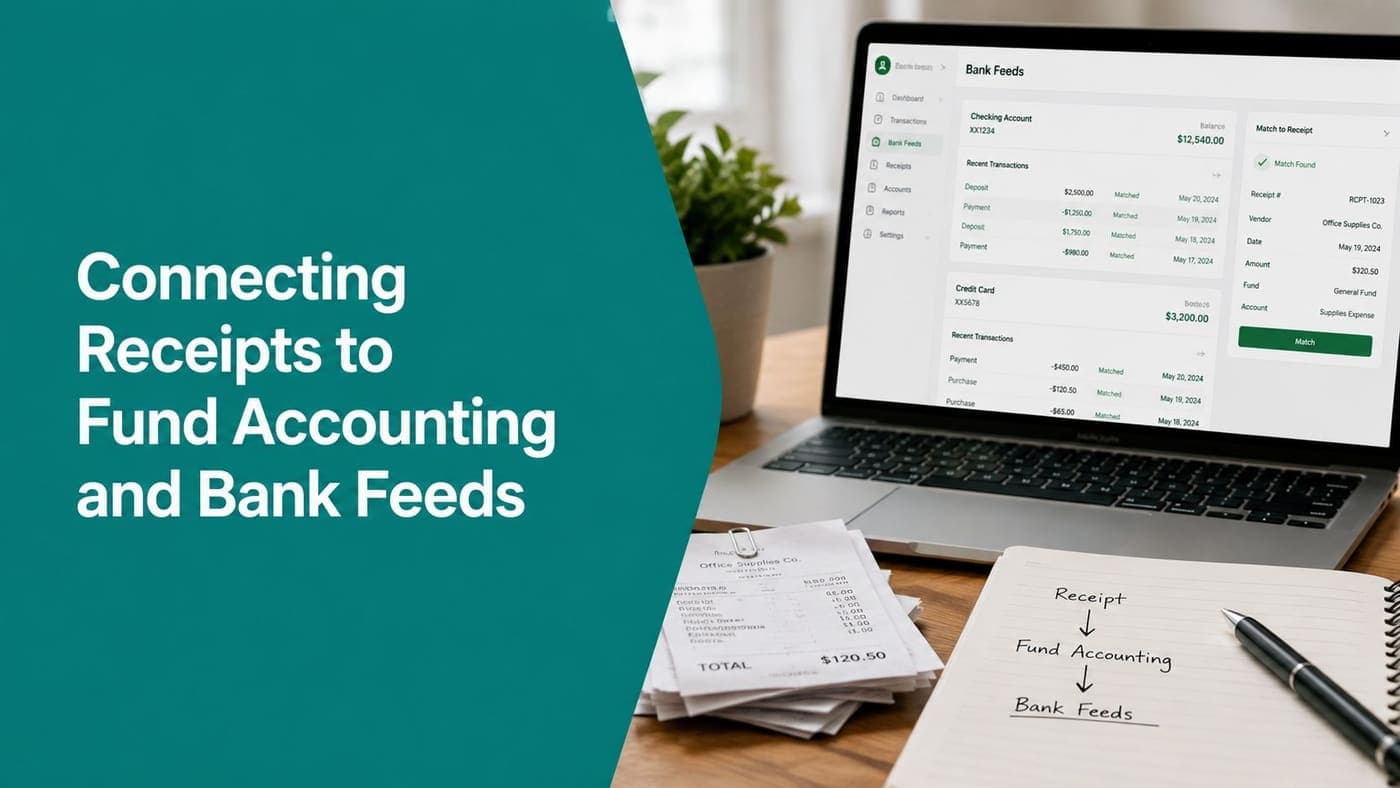
A donation should create three coordinated outcomes. The donor receives the appropriate acknowledgment, the general ledger receives a coded entry, and the bank feed receives a transaction match.
The data needs to travel together:
- Donor ID: Connects the transaction to the legal donor and giving history.
- Amount and date: Supports the acknowledgment and bank match.
- Restriction and fund: Places the contribution in the correct restricted or unrestricted bucket.
- Campaign: Preserves fundraising attribution without replacing the accounting fund.
- In-kind description: Records what the organization received without confusing description and valuation.
A practical implementation sequence
Start with the chart of accounts and fund structure, not the email template. Decide which fields distinguish programs, grants, campaigns, restrictions, and operating activity, then map those fields to the donation form and receipt record.
Next, define exception rules. A returned payment, refunded gift, anonymous contribution, stock transfer, or donor-advised fund payment shouldn't disappear into a generic queue. Assign an owner and document what changes in the donor record, receipt status, and ledger.
Finally, test the bank feed. Give a small real contribution, inspect the acknowledgment, confirm the fund posting, and match the bank transaction. Repeat with an offline gift and a non-cash record before opening the workflow to the full organization.
Teams evaluating specialist accounting options can review hosted fund accounting from Cloudvara for additional context. The important principle remains the same, receipting and bookkeeping should share controlled data rather than depend on recurring CSV imports.
AlignMint's fund accounting guidance for nonprofits explains the connection between restricted funds, reporting, and operational records. That connection also supports fiscal sponsors, churches, and schools managing multiple programs, grants, events, and volunteer activity inside one operating environment.
Spreadsheets create three versions of the same gift, the receipt, the donor record, and the books. Reconciliation becomes a monthly exercise in finding which version is wrong. A connected platform reduces that risk by keeping the transaction identity intact as it moves through each step.
Choosing the Right Receipting Setup for Your Organization
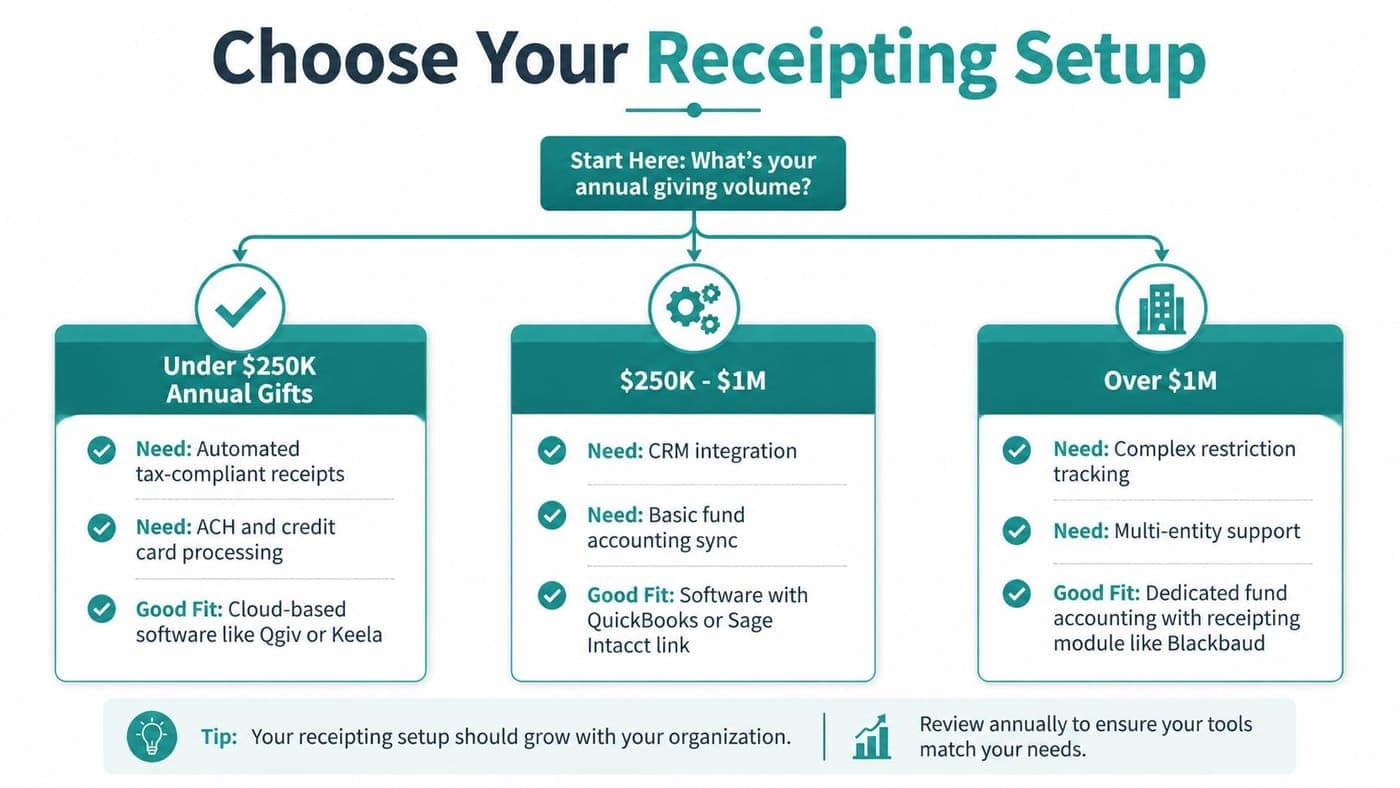
Choose by operational signal, not by the longest feature list. A small volunteer-led organization needs dependable automated receipts, card and ACH capture, and donor self-service. A larger nonprofit may need multiple entities, restricted-fund segmentation, approval chains, and an existing CRM connection.
Your shortlist should pass three filters:
- Compliance coverage: Confirm templates, contemporaneous recordkeeping, non-cash handling, goods-and-services disclosures, and year-end statements.
- Operational fit: Test recurring gifts, portal retrieval, refunds, offline transactions, duplicate records, and reissues.
- Bookkeeping alignment: Verify native journal entries, fund coding, bank-feed matching, pledge tracking, and audit history.
Match the system to the team
Smaller organizations should avoid buying a complex configuration their volunteers won't maintain. Mid-sized nonprofits should prioritize recurring gifts, pledges, donor history, and fund accounting in one workflow. Larger organizations should examine approval controls, entity structure, imports, and integration boundaries before committing.
Teams also need to budget for administration, training, data cleanup, and reporting ownership. This practical guide to tech budget planning for nonprofits can help frame the full cost beyond the subscription line.
Pilot the top two platforms with a real campaign. Ask your finance lead to trace transactions, ask a development staff member to reissue a receipt, and ask a donor-facing colleague to test the portal. Choose the system your team can operate consistently, not the one with the most impressive demonstration.
Use the AlignMint comparison page to evaluate whether an all-in-one approach fits your accounting, CRM, volunteer, event, marketing, and giving needs. The platform includes true fund accounting rather than QuickBooks classes, a built-in marketing suite, Minty, and plan-based access without per-seat fees.
AlignMint connects automatic donation acknowledgments with donor records, true fund accounting, and bank-feed reconciliation, so your team isn't matching the same gift across separate tools. Visit AlignMint to review the platform, check the free tier for nonprofits under $100K, and test whether it can give your organization a cleaner receipting workflow.
Ready to try AlignMint with your nonprofit?
Start free — set up donor tools, giving pages, and Minty. Upgrade when you need accounting.