

You're staring at a deposit that's smaller than the donations your team recorded. The processor deducted fees, the donor receipt sits in another system, and your accounting file doesn't clearly show which fund received each gift.
That confusion costs more than money. It consumes staff time, creates donor-service risks, and leaves executive directors uneasy when the board or auditor asks for a clean explanation. This guide gives you a practical way to evaluate nonprofit payment processing, from donor checkout through restricted funds, reconciliation, chargebacks, and Form 990 reporting. It's advice for gaining control, not a software sales pitch.
Quick Answer: Nonprofit Payment Processing
Nonprofit payment processing is the path from donor checkout to deposit, receipt, fund coding, and reconciliation. Compare card versus ACH fees, PCI handling, and whether net deposits still show the original gift and restriction.
Connect this to chargebacks and disputes and payment processing. For giving setup, see fundraising.
Why Payment Processing Confuses So Many Nonprofits
Most nonprofit directors didn't sign up to become payment specialists. Yet you're expected to understand card rates, ACH transfers, digital wallets, settlement reports, donor acknowledgments, and accounting entries, often while managing programs and fundraising at the same time.
The problem usually appears at month-end. A statement shows gross donations, processing fees, refunds, and deposits that don't match your bank activity at first glance. Your development records may show the donor's full gift, while finance sees only the net deposit. Your team then builds a spreadsheet to connect the two.
That gap creates three immediate worries:
- Program dollars: Every processing fee reduces the money available for restricted and unrestricted work.
- Donor trust: A delayed receipt or duplicate acknowledgment makes your organization look less careful than it is.
- Audit anxiety: Staff must prove where each gift came from, which fund received it, and how fees were recorded.
Your giving page is only the visible part of the process. The stronger setup connects online giving tools for nonprofits with donor records, fund accounting, receipts, and bank reconciliation.
You don't need every payment feature available. You need the right methods for your donors, clear pricing, reliable controls, and a direct path from payment to the books. That standard will help you compare Stripe, PayPal, event platforms, donation tools, and all-in-one nonprofit systems without getting distracted by polished demonstrations.
What Nonprofit Payment Processing Actually Means
Payment processing is the route money takes from a donor's card or bank account into your organization's account. Think of it as a road with tolls. A payment gateway securely captures the donor's payment details, while a payment processor communicates with banks and card networks to approve the transaction and move the funds.
You may never deal with those systems separately. Many nonprofit platforms combine the donation form, gateway, processor, receipts, and donor record in one workflow. The important question is what happens after the donor clicks “Give.”
Core concept: A payment system isn't complete until the money, donor record, receipt, and accounting entry agree.
Choose methods by donor situation
Cards work well when speed matters. Most donors recognize the process, and cards fit one-time gifts, event tickets, and urgent appeals. They're familiar, but their percentage-based fees become more noticeable as gift amounts rise.
ACH and eCheck protect more of a larger gift. ACH moves money from a donor's bank account rather than a card account. It generally suits major gifts and recurring donations, where a lower transaction cost can matter more than instant familiarity.
Digital wallets reduce typing on phones. Apple Pay, Google Pay, PayPal, and similar wallets let donors confirm payment using information already stored on their devices. They're especially useful when a donor arrives through a mobile campaign or text message.
In-person payments fit events and churches. A card reader or mobile payment option can help at a gala, school activity, worship gathering, or community event. Before choosing one, confirm that event transactions flow into the same donor and fund records as online gifts.
Recurring gifts create steadier planning. A monthly donor program can make revenue easier to anticipate and donor stewardship easier to organize. The payment method still matters, because failed renewals, expired cards, and disconnected records create avoidable follow-up work.
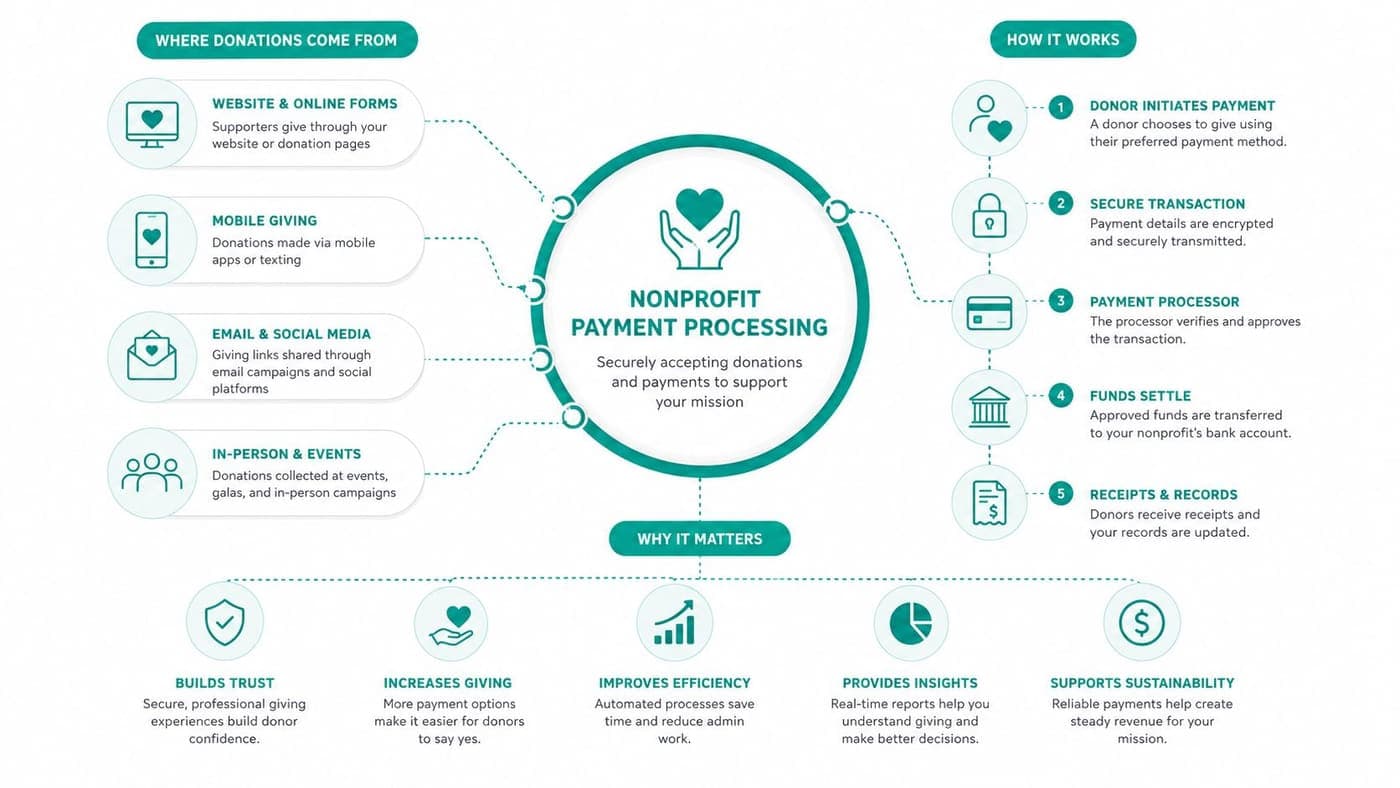
The right mix depends on your audience and gift type. A donor making a small mobile gift may prefer a wallet. A major donor may prefer ACH. A church may need both online giving and in-person collection. A school may need payments for donations, events, and program fees without scattering records across separate dashboards.
Processing Fees and Pricing Models Compared
Fees are where nonprofit payment processing becomes real budgeting. Online nonprofit card processing typically costs 2.2% to 3.5% per card donation, according to nonprofit payment processing fee guidance. At that range, an organization processing $500,000 in annual donations would spend about $11,000 to $17,500 in fees.
That burden falls hardest on small gifts. Under a 2.9% plus $0.30 pricing model, a $5 donation can lose nearly 9% to fees, while a $100 donation loses about 3.2%, based on the same nonprofit payment benchmark. Fixed fees matter because they take the same amount from a small gift as from a much larger one.
Pricing models in plain English
Flat-rate pricing charges a set percentage plus a fixed amount. It's simple and predictable, which helps small teams budget, but the fixed fee can hurt small recurring gifts.
Interchange-plus pricing separates the underlying card-network cost from the processor's markup. It can provide clearer detail and may suit organizations with more transaction volume, but statements require more attention.
Monthly-fee models charge a subscription alongside transaction costs. They may include broader features, support, or event tools. Compare the full cost, not just the advertised monthly amount.
| Payment Method | Typical Pricing | Best For |
|---|---|---|
| Card donation | 2.2% to 3.5% per donation | Fast, familiar one-time gifts |
| ACH or eCheck | 0.25 to 1.00 per transaction | Larger gifts and recurring donations |
| Stripe standard card rate | 2.9% + $0.30 | General online payments |
| Stripe approved 501(c)(3) rate | 2.2% + $0.30 | Eligible nonprofit card payments |
| PayPal confirmed-charity rate | 1.99% + $0.49 for domestic donations | Donors who prefer PayPal |
Stripe's strength is broad recognition and a published nonprofit discount. PayPal also has strong donor familiarity and a confirmed-charity rate. Their gap, for some organizations, is that a standalone processor may not connect payment data to fund accounting and donor stewardship without additional work. For event-specific needs, reviewing a resource such as Creventa's pricing for event platforms can help you compare event costs separately from donation processing.
ACH deserves deliberate placement. Guidance reports ACH pricing around 0.25 to 1.00 per transaction, compared with typical card pricing of 2.2% to 2.9% plus a fixed 0.30 fee. On a 1,000 donation, card fees would be roughly 22.30 to 29.30, while ACH fees would be about 0.25 to 1.00, as shown in ACH and card payment comparisons for nonprofits.
Start by requesting every available 501(c)(3) discount. Then make ACH easy to find for larger gifts and recurring commitments. Before signing, compare the full fee schedule in AlignMint's pricing information, including subscriptions, event charges, refunds, and user access.
Security, PCI Compliance, and Receipts You Must Get Right
Payment security protects donor confidence before it protects your balance sheet. PCI compliance means following rules for handling card information safely. You don't need to store card numbers or build your own security system. With a reputable processor, much of the technical burden sits with the vendor, but your team still has basic responsibilities.
Use a hosted or secure payment form, limit staff access, train employees not to copy card details into spreadsheets, and confirm that your processor explains its compliance responsibilities clearly. A vendor that can't answer those questions plainly isn't ready for your organization.
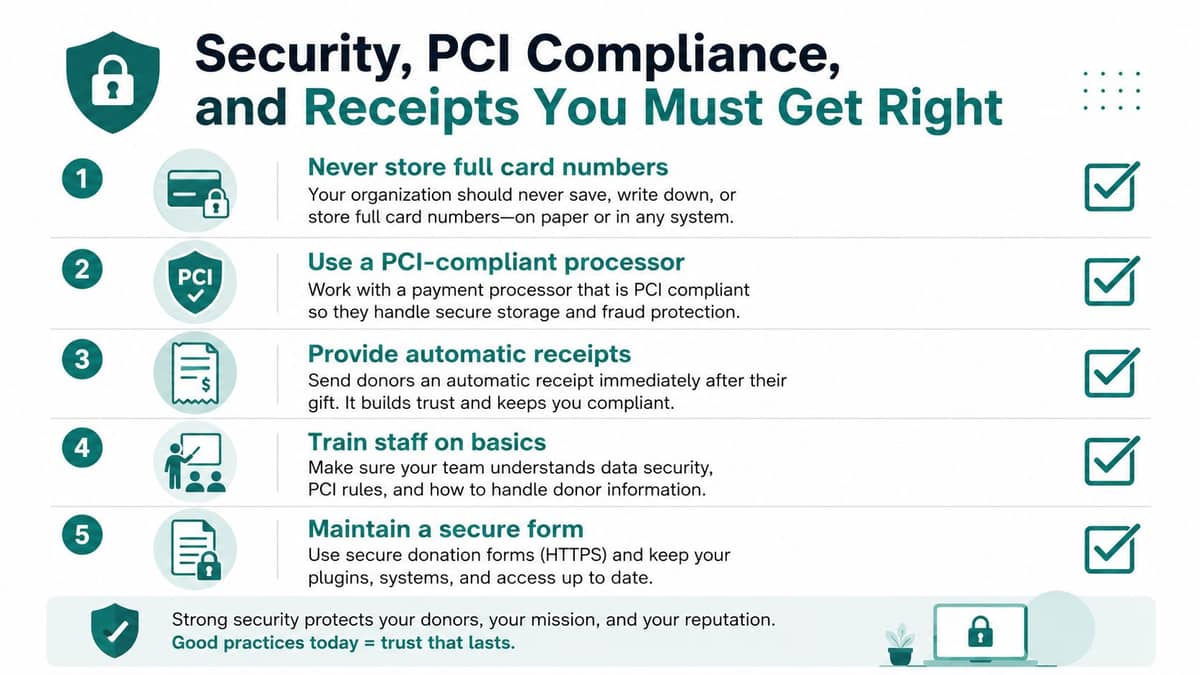
Keep this checklist close
- Protect card data: Never store full card numbers in email, spreadsheets, or local files.
- Confirm processor coverage: Ask which PCI tasks the processor handles and which remain yours.
- Secure the form: Use a reputable donation form with appropriate access controls.
- Train the team: Make sure employees and volunteers know what information they must never record.
- Send receipts promptly: Automate donation confirmations and retain acknowledgment records.
Chargebacks need honest attention. A chargeback occurs when a cardholder disputes a transaction through the card issuer. Your nonprofit may lose the original donation, pay a dispute fee, and spend staff time collecting evidence.
Typical chargeback fees fall between 25 and 75, while some support guidance describes a broader range of 15 to 100, according to chargeback management guidance for nonprofits. Repeated disputes can increase processing risk, raise future fees, or threaten merchant-account access. Assign someone to monitor disputes and respond quickly with transaction records, donor communications, and proof of authorization.
Receipts serve both compliance and relationship purposes. Your system should issue an accurate confirmation immediately, distinguish donations from event purchases, and support acknowledgment letters when tax rules require more detail. Keep the gift date, amount, donor information, designation, and any benefit received in an accessible record.
For a broader review of access controls and security practices, see nonprofit software security guidance. Donors don't expect perfection, but they do expect you to handle their information carefully.
How Payments Flow Into Fund Accounting and Form 990
The deposit is not the finish line. Your finance team still needs to reconcile the processor report to the bank, match each transaction to the right donor, record fees, and assign the gift to the correct fund.
Fund accounting tracks money according to donor restrictions, grants, programs, or other purposes. That differs from using classes in QuickBooks. A class can label activity, but true fund accounting treats each fund's purpose and available balance as part of the financial structure.
Follow the money after checkout
Suppose a donor gives money specifically for a building project. Your organization can't use that restricted gift for salaries because the general operating budget needs help. The payment record, donor communication, ledger entry, and later report must preserve the stated purpose.
The same principle applies to fiscal sponsorship. When a sponsor raises money for a specific project, the fiscal sponsorship agreement, donor communications, and Form 990 should make clear that the sponsor treats those project funds as restricted under the charitable trust doctrine, as explained in fiscal sponsorship and restricted project funds.
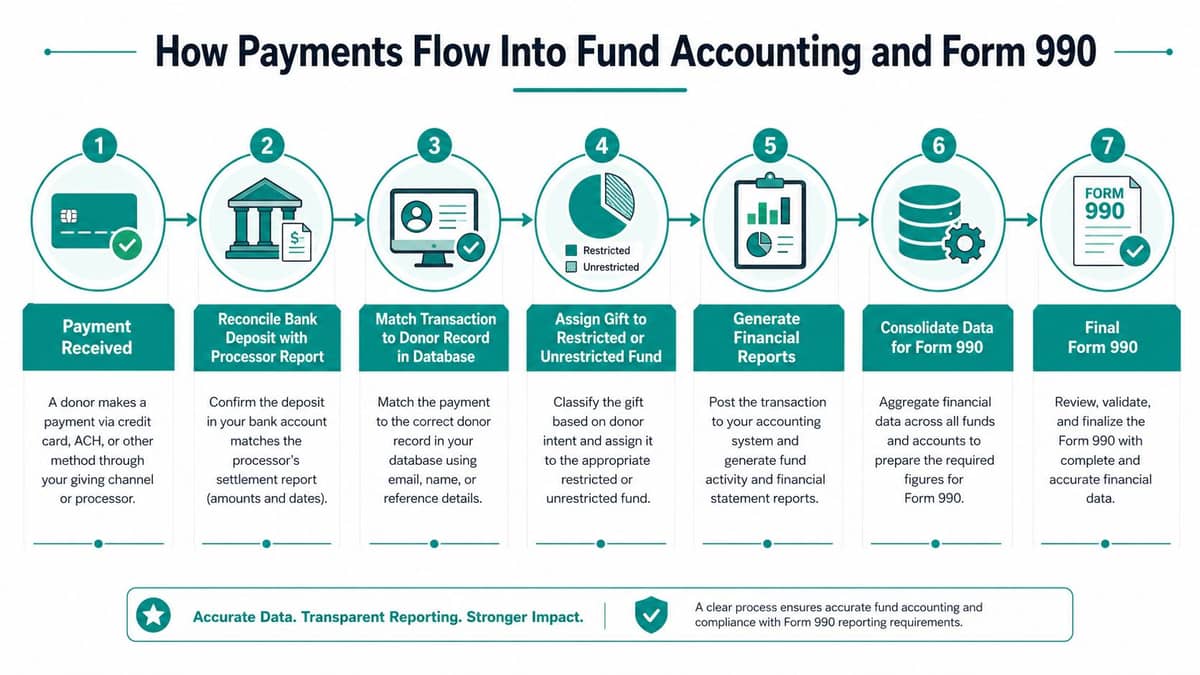
A disconnected setup forces your team to build bridges. Staff export payment data, clean names, separate fees, identify designations, update donor records, and post accounting entries. Those steps create opportunities for duplicate records, missed restrictions, and unexplained differences between fundraising reports and financial statements.
An integrated system should make the sequence visible:
- Payment arrives.
- The bank deposit is compared with the processor report.
- The transaction is matched to the donor record.
- The gift is assigned to a restricted or unrestricted fund.
- Processing fees are recorded correctly.
- Financial and donor reports update.
- The organization consolidates accurate data for Form 990.
AlignMint combines accounting, donor management, volunteers, events, and marketing in one platform. Its true fund accounting structure supports restricted balances and Form 990 reporting, while its donor records connect gifts with financial activity. You can also review this fund accounting guide for nonprofits before changing your chart of accounts or payment mappings.
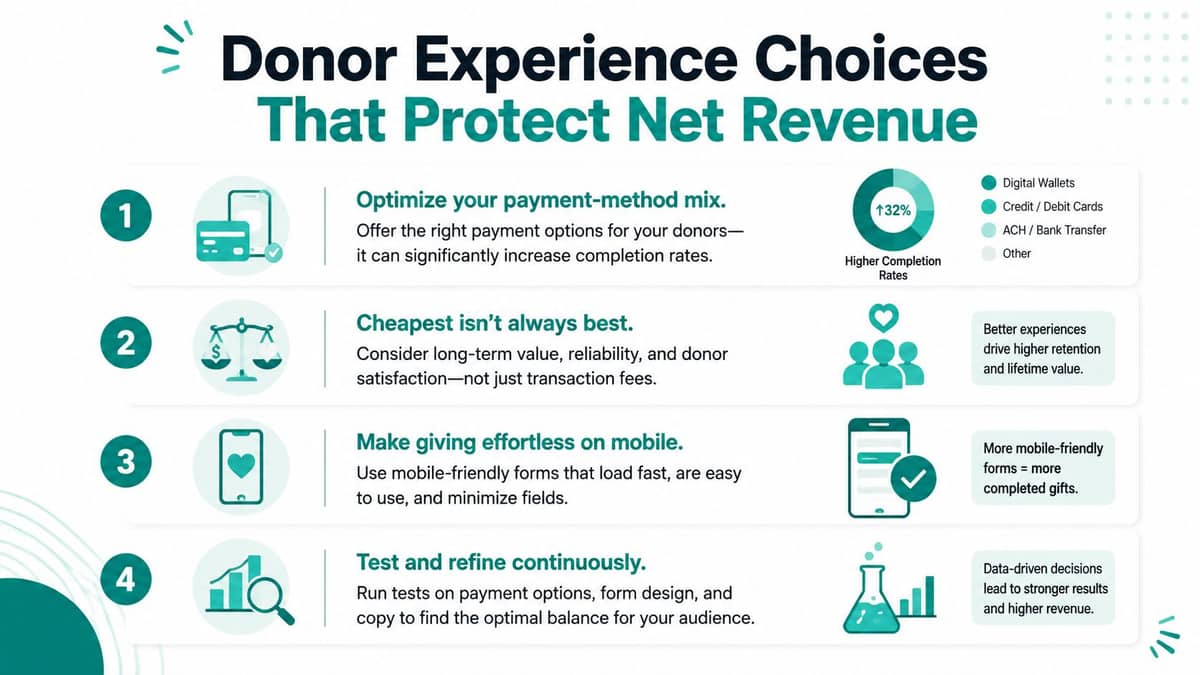
Donor Experience Choices That Protect Net Revenue
The cheapest payment method isn't automatically the best choice. A donor who can give quickly on a phone may complete a gift through a wallet, while a donor making a larger commitment may appreciate ACH. Your job is to reduce friction without creating a payment maze for staff.
Digital wallets now belong on the standard nonprofit checklist. Benchmarking found PayPal on 76% of nonprofit donation pages, Apple Pay on 47%, and Google Pay on 40%, according to nonprofit donation platform fee benchmarking. A separate 2025 payment-method analysis reported cards at 82.89% of donations on its platform, with 75% of Millennials and 71% of Gen Z using at least one wallet regularly. Stripe Link accounted for 63.19% of wallet donations among those organizations, according to nonprofit payment-method analysis.
Those figures don't tell you to add every wallet. They tell you to inspect your audience, devices, campaigns, and gift sizes.
Match the method to the moment
- Mobile campaign: Show Apple Pay, Google Pay, or another wallet prominently when donors arrive from a phone.
- Younger donor audience: Make wallet checkout visible, with minimal typing and no unnecessary account creation.
- Major gift: Offer ACH or bank transfer instructions, then connect the payment to the donor's record.
- Recurring gift: Present card and ACH choices, explain the schedule clearly, and make updating payment details easy.
- Event or church gathering: Support in-person payments, QR codes, and a receipt flow that identifies the event or program.
- Text appeal: Send donors to a mobile-first page with one clear action and wallet support.
Your giving page should show the organization's name, purpose, suggested amounts, fund designation, recurring option, and receipt expectations without clutter. Keep the form readable on a phone. Don't make donors hunt for the submit button or wonder whether their gift was accepted.
Established platforms deserve credit. PayPal offers familiar wallet behavior, and Classy provides fundraising-focused campaign experiences. Their strength is the donor-facing journey. The question is whether your finance team receives clean fund and donor data without another export or reconciliation project.
Read these online giving page best practices before redesigning your form. Then test one change at a time, such as wallet placement, recurring language, or suggested amounts. Track net revenue and recurring-gift behavior, not just completed checkouts. A method that converts well but creates poor retention or heavy back-office work may not serve your mission.
Your Evaluation Checklist and Implementation Roadmap
Choose a payment setup by asking what happens after the donor pays. A polished checkout is useful, but it shouldn't leave your team with scattered records and a monthly cleanup ritual.
Ask vendors these questions
- Nonprofit rates: Do you offer an approved 501(c)(3) discount, and what documentation is required?
- ACH support: Can donors choose bank payments for larger gifts and recurring commitments?
- Wallet support: Does checkout support the wallets your donors already use?
- Receipts: Are confirmations and acknowledgment records generated automatically?
- PCI handling: Which security responsibilities belong to your organization?
- Fund accounting: Can each gift post directly to the correct restricted or unrestricted fund?
- Reconciliation: Can staff match processor deposits, fees, refunds, and bank activity without spreadsheets?
- User access: Are there plan-based access, or will each staff member create another fee?
- Full price: What does the organization pay for subscriptions, events, refunds, support, and additional services?
A small team can make the change without disrupting fundraising.
- Audit the current setup: Review recent processor statements, deposits, refunds, and recurring gifts. Write down every manual handoff.
- Request nonprofit pricing: Ask Stripe, PayPal, and other shortlisted vendors to confirm nonprofit rates in writing.
- Pilot one page: Test a single campaign or recurring-gift page. Check receipts, donor records, fund assignments, and settlement reports.
- Connect finance and CRM: Don't expand until payment data reconciles cleanly with accounting and donor history.
- Train the team: Give finance, development, event, and volunteer leads clear roles for refunds, disputes, receipts, and access.
- Review monthly: Compare fees, net revenue, failed recurring gifts, chargebacks, and reconciliation time.
For organizations raising under $100K, AlignMint offers a free nonprofit tier. The platform includes true fund accounting, Minty for questions about your own data, and plan-based access without per-seat fees. That combination may suit a church, school, fiscal sponsor, or small nonprofit that needs payments connected to finance rather than another isolated checkout tool.
Your payment system should feed the mission, not drain it through avoidable fees, manual work, and unclear records.
AlignMint brings payments, donor management, true fund accounting, volunteers, events, and marketing into one workspace, with a free tier for nonprofits raising under $100K. Visit AlignMint to see how your team can connect donor gifts to restricted funds, reconciliation, and Form 990-ready reporting.
Ready to try AlignMint with your nonprofit?
Start free — set up donor tools, giving pages, and Minty. Upgrade when you need accounting.