

For related tools, see AlignMint features.
Expense Reimbursement Form Sample for Nonprofits (2026)
Quick Answer: Expense Reimbursement Form Sample for Nonprofits (2026)
A nonprofit expense reimbursement form sample should include requester details, line-item expenses, receipt confirmation, program or grant codes, and approval signoff. Generic templates miss fund and restricted-gift fields that nonprofits need for clean reporting. Related guides: expense reimbursement form and expense reimbursement.
You probably have a folder, inbox, or desk corner with receipts that should've been submitted last month. Someone bought program supplies, someone else drove to a donor meeting, and now your finance review depends on whether anyone can still find a readable receipt.
That kind of reimbursement process drains time twice. First when staff spend the money, and again when your team chases details later. A good expense reimbursement form sample fixes that by making expenses easier to submit, easier to approve, and easier to tie back to grants, restricted funds, and Form 990 reporting.
Bringing Order to Expense Reimbursements
Missing paperwork slows everything down. In practice, missing documentation is one of the top reasons for approval delays, and it creates backlogs where employees can wait weeks for repayment, as noted in SurveyMonkey's reimbursement form template guidance.
For a nonprofit, the problem isn't only staff frustration. A loose reimbursement process also weakens your fund accounting, makes grant reporting harder, and leaves your records messy when it's time to prepare year-end filings.
What works is a simple standard. Every request should include clear receipts, exact dates, a specific business purpose, correct totals, and submission inside your deadline. If you have staff who work across programs, schools, church ministries, events, or sponsored projects, that standard matters even more.
Practical rule: If an expense can't be tied to a purpose, a date, and a funding source, it shouldn't be approved yet.
If you support UK operations or have staff who need a broader policy reference, Receipt Router has a useful UK expense reimbursement guide that helps frame the policy side clearly.
Your Free Nonprofit Expense Reimbursement Form Sample
A standardized form saves time right away. It gives staff one place to enter the same required details every time, and it gives your approvers a consistent record to review.
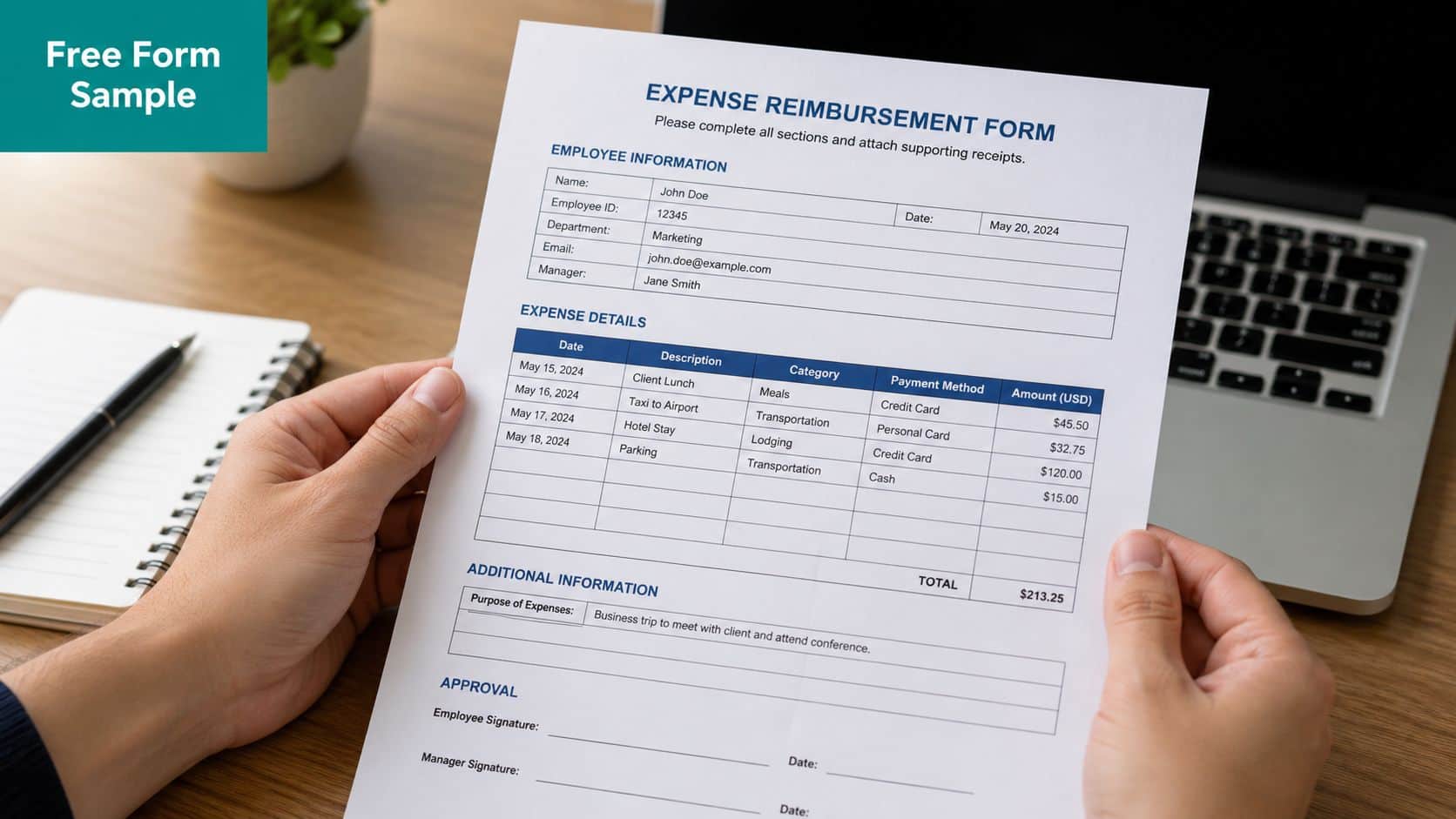
Generic templates usually stop at employee name, date, amount, and receipt. That's enough for a simple business reimbursement. It's not enough for a nonprofit that has restricted grants, donor-restricted funds, church or school programs, or fiscal sponsorship arrangements that require clean expense coding from the start.
A nonprofit-ready expense reimbursement form sample should include space for:
- Requester details so finance knows who incurred the cost and who to contact
- Expense period so submissions can be reviewed in the right reporting window
- Line-by-line entries for date, vendor, category, amount, and business purpose
- Program or fund coding so each cost lands in the right place
- Receipt confirmation so supporting documents stay tied to the request
- Approval signoff so managers and finance can document review
Download the nonprofit expense reimbursement form for a fill-in sheet with fund codes, a formula total, an advance offset, and approval lines. If you want a policy companion, this social club reimbursement policy template is a useful reference point for structuring rules and approvals.
The main value here is consistency. Once everyone uses the same form, your accounting stays cleaner, your donor reporting gets easier, and your team communication improves because people know exactly what's expected.
Anatomy of a Bulletproof Reimbursement Form
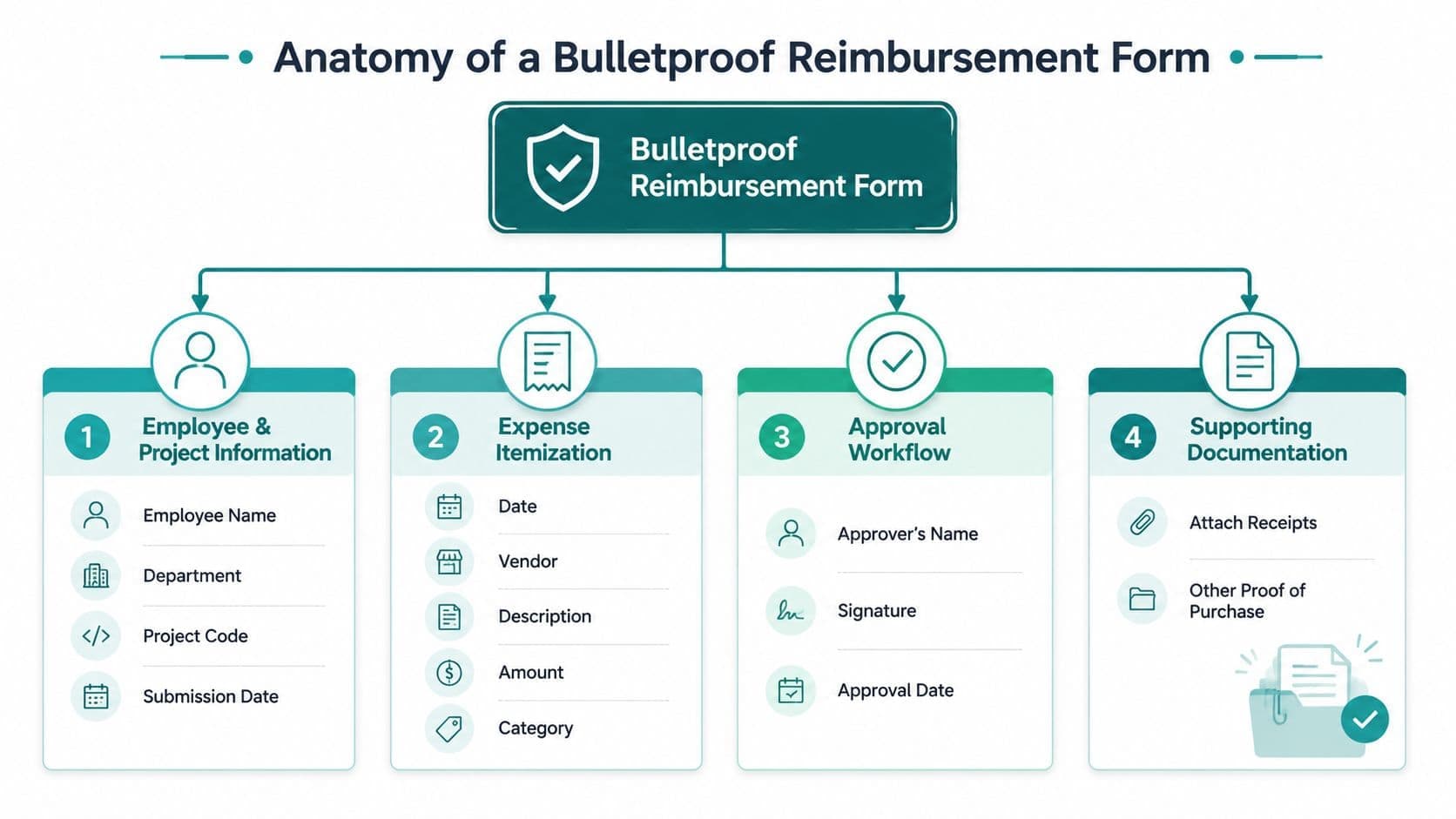
A strong form does more than collect numbers. It creates a clean record that supports bookkeeping, approval, grant coding, and eventual reporting on your Statement of Functional Expenses.
Most downloadable forms were built with a for-profit lens. That gap matters. Existing templates overwhelmingly focus on generic for-profit structures, neglecting the specific compliance and reporting needs of nonprofits. 68% of small nonprofits report that manual expense tracking leads to misclassified program costs, and fewer than 15% of downloadable templates include fields for "Program/Grant Code" or "Restricted Fund" designation, according to Vertex42's reimbursement form analysis.
The fields you need on page one
Start with the basics that identify the request clearly.
| Form area | What it should capture | Why it matters |
|---|---|---|
| Employee section | Name, department, contact details, employee ID if used | Keeps follow-up simple |
| Submission details | Submission date, expense period, manager name or submission ID | Helps close the right reporting period |
| Expense table | Date, vendor, description, category, amount | Gives finance a usable record |
| Approval area | Employee signature, manager approval, approval date | Creates accountability |
This structure matches how reimbursement forms are commonly built in practice. Standard forms often include employee information, an expense table, totals, and an approval section, with receipts stored alongside the record, as described by 123FormBuilder's reimbursement calculation form guide.
The nonprofit fields most templates miss
This is the section that changes your reporting quality.
Add fields for Program/Grant Code, Restricted Fund, and, if needed, project or sponsored program identifiers. Those fields connect spending to the right fund accounting record immediately. They also help your donor management and finance records stay aligned when a program expense relates to a campaign, event, or restricted gift.
A few examples make this concrete:
- After-school snacks should point to the youth program grant, not a general admin bucket.
- Fundraising event décor should be coded to development activity, not program services.
- Church retreat supplies may need to tie to a ministry fund rather than unrestricted operations.
- School transportation costs may belong to a specific student services program.
A reimbursement form should tell an outside reviewer what was purchased, why it was purchased, and which mission activity paid for it.
If you need a quick visual for why this matters, this business financial clarity illustration captures the difference between scattered paperwork and a clear financial picture.
For a practical reference on setup and approval flow, our reimbursements documentation shows how these fields fit into an actual process.
How to Fill Out the Form A Guide for Your Team
Staff follow forms better when the form matches day-to-day tasks. The easiest way to train your team is to walk through ordinary nonprofit situations, not abstract rules.
SmartReceipts describes a four-step methodology that starts with organizing legible receipts, then entering detailed employee data and expense period dates, followed by listing each purchase with its own business purpose and category before calculating totals. That structure supports 100% line-item receipt matching in the submission record, as outlined in its expense reimbursement form sample guide.
Example one with mileage and program coding
Sarah runs one of your community programs. She drove her own car to meet a partner organization. On the form, she enters the date of travel, identifies the trip clearly, and attaches any supporting note your policy requires.
Her line should read plainly. "Meeting with XYZ Partner for after-school program coordination" is far better than "travel" or "meeting." Then she enters the correct program or grant code so the reimbursement lands in the right fund.
That's the difference between a clean month-end close and a follow-up email chain.
- Date entered clearly so finance knows when the expense occurred
- Business purpose written in full so a reviewer understands mission connection
- Correct category selected such as mileage or travel
- Fund code assigned so the cost sits in the right program ledger
Example two with gala purchases and receipts
Tom is your development coordinator. He bought decorations and small supplies for the annual gala. Instead of one vague total, he should list each item from the receipt in a way that can be reviewed later.
That means vendor name, purchase date, amount, category, and a business purpose like "Gala supplies." He should also code the expense to the correct fundraising activity or event fund, not to general office expense.
Team habit worth enforcing: One receipt can contain several purchases, but each reimbursable purpose still needs to be clear on the form.
When teams struggle with receipts, mobile capture usually helps. This receipt scanning guide shows a practical way to keep supporting documents attached before they get lost in email or paper files.
What to tell your staff in plain English
Most reimbursement errors come from unclear wording, not bad intent. Give your team these simple instructions:
- Keep the receipt readable. If finance can't read it, they can't approve it.
- State the specific purpose. "Program supplies" is better than "supplies," but "art materials for youth workshop" is better still.
- Enter each expense where it belongs. Don't lump unrelated items together.
- Use the right fund code. If you don't know it, ask before submitting.
- Submit promptly. Old expenses are harder to verify and harder to code accurately.
With a little discipline, your team spends less time correcting forms, and your records stay useful for accounting, donor reporting, volunteer-supported events, and board review.
From Submission to Record Keeping A Checklist for Compliance
Approval is where your controls either hold or slip. As executive director, controller, or finance lead, you don't need a complicated process. You need one that your team can follow and that stands up when someone asks for backup months later.
A digital approval path helps more than most leaders expect. Formstack reports that adding a digital approval workflow to the form template improves the average reimbursement cycle time from 14 days to 3 days and increases employee satisfaction scores by 25%, because it removes manual bottlenecks, as described in its expense reimbursement process benchmark.
The six checks that matter most
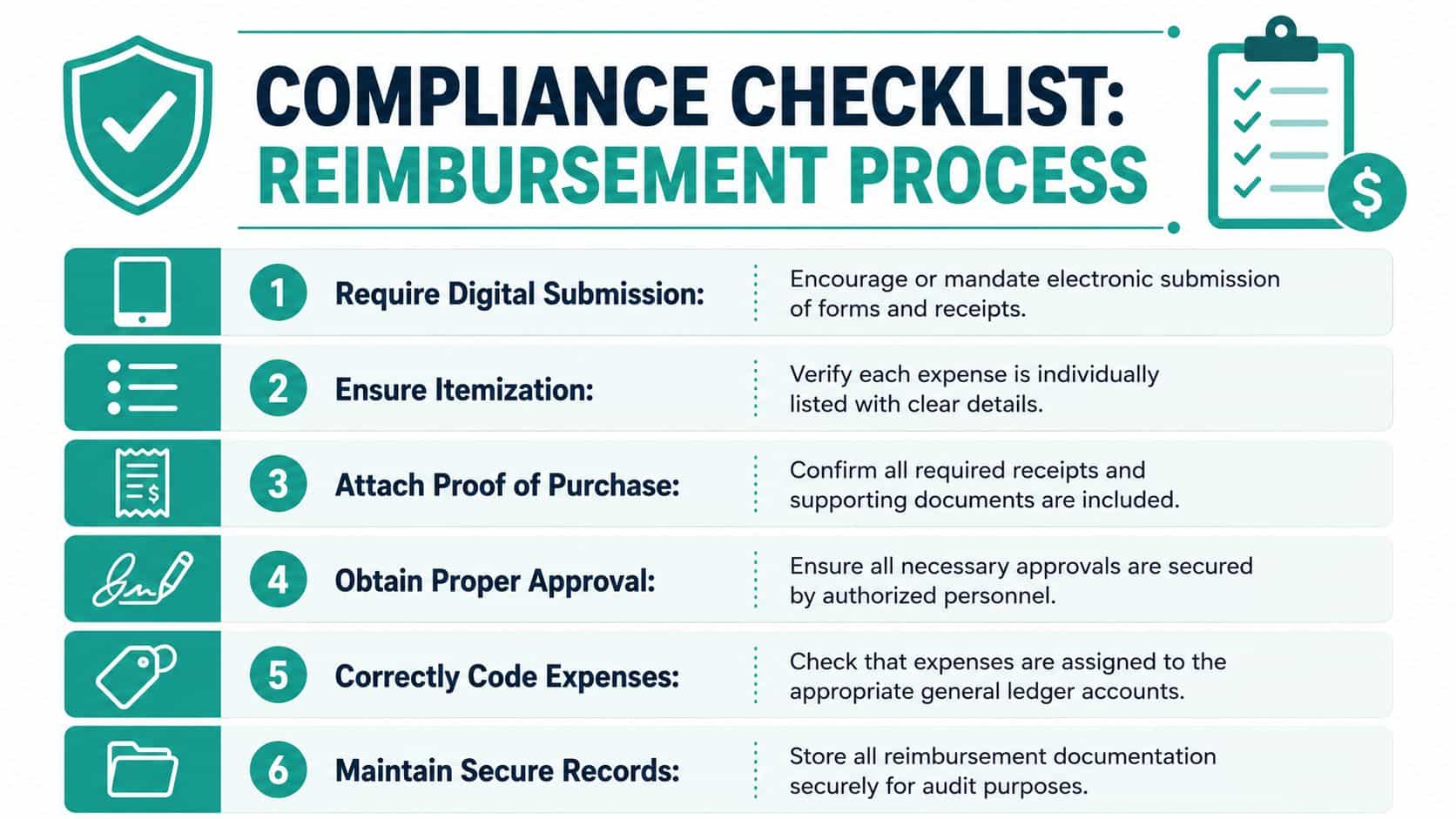
Use a short review checklist every time. It keeps approvals consistent even when several managers are involved.
- Confirm digital submission: Require the form and receipts in one digital record. That reduces lost paperwork and keeps the audit trail intact.
- Review itemization: Make sure each expense is listed separately with date, vendor, purpose, and amount.
- Check proof of purchase: Every reimbursable expense should have support attached when your policy requires it.
- Verify approvals: The request should route to the right supervisor or finance reviewer before payment.
- Inspect coding: Confirm the general ledger account, fund, grant, or program code is correct.
- Store records securely: Keep the form, approval, and receipt together in one retained file.
Why nonprofit coding changes the review step
For nonprofits, the approval question isn't only "Did this happen?" It's also "Was it charged to the right mission activity?" That matters when you prepare your Statement of Functional Expenses and your annual return.
Form 990 is required for nonprofits with gross receipts of $200,000 or more, or total assets of $500,000 or more, and it must be filed by the 15th day of the 5th month after the fiscal year ends, according to Xero's nonprofit accounting guide.
Filing requirements also vary by size. Organizations with annual revenue under $50,000 file Form 990-N, those between $50,000 and $200,000 may file Form 990-EZ, and those above $200,000 must file the full Form 990, as explained by The Charity CFO's nonprofit accounting standards overview.
That's why your review should always include two questions:
| Approval question | What you're checking |
|---|---|
| Is the expense supported | Receipt, date, amount, and business purpose are clear |
| Is the expense coded correctly | Fund, grant, department, or function matches the activity |
If the coding is wrong at reimbursement, it usually stays wrong until someone spends time fixing it later.
For a year-end governance reference, keep this Form 990 checklist handy during review season.
Where this touches the rest of your operations
Reimbursements don't live in isolation. They affect fund accounting, donor records, event margins, school and church program budgets, and fiscal sponsorship oversight. They also affect how your team communicates internally. A process that's too loose creates cleanup work across departments. A process that's too rigid gets ignored.
The middle ground is simple. Ask for complete information once, route it to the right person, then store it in a way your finance team can retrieve quickly.
Stop Chasing Receipts How AlignMint Simplifies Reimbursements
Even a well-designed manual form still depends on email threads, attachments, and someone remembering where a receipt went. That's why many teams move from a template to software once volume grows or grant tracking gets more demanding.

SurveyMonkey notes that missing documentation is one of the top reasons for approval delays, which is exactly the problem digital submission is meant to reduce. Instead of passing forms around manually, staff can submit expenses with receipts attached, and managers can review them in one place.
If you're comparing options, it's fair to say that QuickBooks is familiar and widely used, especially for general bookkeeping. But classes aren't the same as true fund accounting. Typeform, Formstack, SurveyMonkey, and Vertex42 can help you build or download forms, and they're useful for collecting information. They don't give you accounting, donor management, volunteer management, events, online giving pages, marketing tools, and team communication in one system.
That's the practical difference with expense tracking in AlignMint. It connects reimbursements to true fund accounting, donor and program records, volunteer and event activity, built-in marketing tools, and Minty for faster answers inside your data. It also includes plan-based user allowances (1 on Free, up to 10 on Plus, up to 25 on Pro, and unlimited on Enterprise), plus a free tier for nonprofits under $100K. For churches, schools, and fiscal sponsors, that matters because the people approving expenses often sit across several roles.
The main goal isn't fancy software. It's fewer loose receipts, cleaner approvals, and financial records you can trust.
If your reimbursement process still lives in spreadsheets, email, and paper receipts, it may be time to simplify it. AlignMint gives nonprofits one place for accounting, CRM, volunteers, events, marketing, online giving pages, team communication, and expense tracking, with true fund accounting built in from the start.
Ready to try AlignMint with your nonprofit?
Start free — set up donor tools, giving pages, and Minty. Upgrade when you need accounting.