

You probably know this drill. Your finance lead is tracking endowment activity in one spreadsheet, grant restrictions in another, and board reporting in a format that only makes sense after two cups of coffee. Then someone asks a simple question about what's available to spend, and your team starts reconciling tabs by hand.
That's exactly where investment accounting software should help. The right system gives you a clearer picture of investments, restricted funds, grant activity, and program spending without forcing your staff to become part-time spreadsheet mechanics.
The End of Spreadsheet Chaos
A familiar scene plays out in many nonprofits. Investment income lands in one report from a custodian, grant restrictions live in a spreadsheet, and the general ledger sits somewhere else. Your controller tries to tie them together before the finance committee packet goes out.
That setup works until it doesn't. One formula breaks, one tab gets copied wrong, or one restricted transfer gets posted late. Then your board sees numbers that need explaining instead of numbers they can trust.
The broader market is moving away from that model. The global Investment Accounting Software market is projected to grow from USD 3.70 billion in 2022 to USD 8.44 billion by 2030, a projected 16% annual growth rate, driven by tighter reporting demands and the need for real-time tracking, according to Report Prime's investment accounting software market summary.
That growth makes sense to me. Finance teams don't adopt specialized tools because they love software. They adopt them because too much is riding on accuracy, speed, and a clean audit trail.
What spreadsheet chaos actually costs you
The first cost is time. Your team spends hours reconciling reports that should agree automatically.
The second cost is confidence. When restricted balances and investment results live in separate places, leaders hesitate before approving spending or presenting results.
Practical rule: If your team exports data just to make sense of it, the system isn't doing its job.
Sometimes the first step isn't new software. It's cleaning up what you already have so your chart of accounts, fund records, and prior entries make sense again. If your books need that reset, this guide to cleanup bookkeeping services is a useful place to start.
You should also be honest about the source of the problem. In many nonprofits, spreadsheets become the bridge between systems that were never designed to work together. If that sounds familiar, this look at moving beyond spreadsheet-based nonprofit operations will feel uncomfortably accurate.
What better looks like
A better setup gives you one trusted record of investment activity and one trusted record of fund restrictions. It lets your staff answer practical questions fast.
- Can we spend this investment gain yet
- Did that grant reimbursement hit the right restricted fund
- What portion of this balance is board-designated versus donor-restricted
- Can we produce a clean board report without a manual weekend
That's the standard I'd hold any investment accounting software to. If it can't reduce manual reconciliation, it's just a more expensive spreadsheet.
Why Your Mission Needs Specialized Software
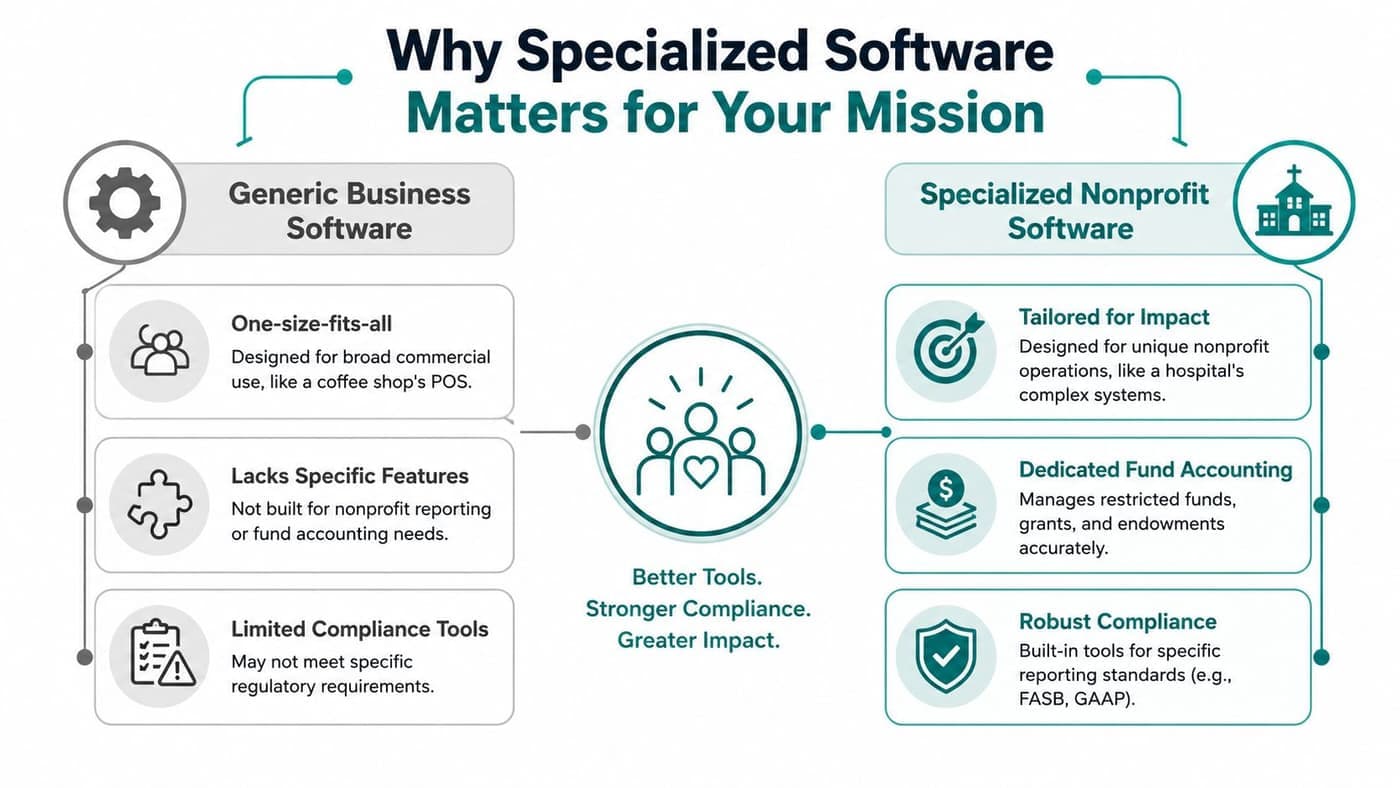
Generic business accounting software can be perfectly good software. It just isn't built for the way nonprofits operate.
A coffee shop needs sales, payroll, expenses, and maybe inventory. Your organization needs to honor donor restrictions, track grants by purpose, separate programs from administration, and often explain investment activity across multiple funds. Those are different jobs.
The Fund Accounting Software market was valued at USD 3.5 billion in 2023, with growth tied to reporting demands around restricted funds and grants, according to GM Insights' fund accounting software market analysis. That's not a fad. It reflects a basic truth. Nonprofits need accounting built for stewardship, not just bookkeeping.
Why classes and workarounds fall short
QuickBooks is familiar. That matters. Aplos is approachable. Blackbaud has deep name recognition. NetSuite is broad and capable. Those strengths are real.
But familiarity isn't the same thing as fit.
When a nonprofit uses generic accounting software with classes, tags, or location workarounds to imitate fund accounting, the burden shifts to staff judgment. Someone has to remember the rule. Someone has to build the report. Someone has to catch the exception.
That's fragile.
A true fund accounting structure records the restriction as part of the accounting logic itself. It doesn't ask your finance manager to remember which class combination means “scholarship funds restricted to middle school arts programming.”
If donor intent matters to your mission, your accounting structure should enforce it automatically.
For a deeper look at that distinction, this explanation of fund accounting for nonprofits gets to the heart of the issue.
You can also compare the broader requirements in our guide to nonprofit accounting software.
What specialized software changes
Specialized nonprofit software does three things generic tools often don't do well enough.
| Need | Generic business software | Specialized nonprofit software |
|---|---|---|
| Restricted fund tracking | Often handled with workarounds | Built directly into the ledger |
| Grant reporting | Usually assembled after the fact | Structured around funds, programs, and restrictions |
| Investment to mission reporting | Often split across tools | Can connect balances to board and program reporting |
That matters most when your organization has complexity that doesn't show up neatly on a profit-and-loss statement.
Consider these common nonprofit realities:
- Fiscal sponsorship: You may hold funds for multiple sponsored projects while producing consolidated reports.
- Church operations: You may track designated giving, missions funds, capital campaigns, and operating activity separately.
- School finance: You may need grants, scholarships, endowment activity, and events revenue connected to program reporting.
- Board oversight: Your treasurer wants a clean answer, not a spreadsheet explanation.
My recommendation
Don't buy software that asks your staff to simulate nonprofit accounting with patches. Buy software that treats restricted funds, grants, and program reporting as native requirements.
And don't evaluate accounting in isolation. If your donor records, online giving pages, volunteer activity, events, marketing, and team communication all live in separate tools, your staff will keep reconciling by hand. In my experience, that's where “good enough” systems start wasting the most time.
Core Features That Give You Financial Control
Financial control starts with visibility. You should be able to see what you own, what's restricted, what's spendable, and what needs review without exporting data into a side file.
That sounds basic. It isn't.
A major gap in many platforms is their inability to manage multi-entity fund structures with restricted grants, which leaves finance leaders reconciling disconnected tools for fiscal sponsorship and consolidated reporting, as discussed in UMB's perspective on fund accounting and investor reporting technology.
See your true position without waiting for month-end
The first thing good investment accounting software should give you is a current financial picture. Not a guess. Not a board packet assembled from three exports.
You need to see:
- Investment balances by fund
- Income, gains, and losses tied to the right entity or program
- Restricted and unrestricted positions separately
- Cash impact from investment activity
If your team can't answer those questions quickly, leadership decisions get slower and riskier.
Keep accounting and development from drifting apart
This is the part most software reviews skip. In nonprofits, investment reporting isn't just about securities and statements. It intersects with donor intent, grant restrictions, and campaign activity.
If your donor CRM is separate from your ledger, someone has to map gifts to funds, then map those funds back to reports. If your online giving pages feed one system and accounting lives in another, reconciliation becomes routine busywork.
The better approach is one connected operating system where accounting, donor management, volunteer management, events, team communication, and marketing live together. That doesn't just reduce data entry. It changes how quickly your staff can trust what they're looking at.
Don't settle for fake fund accounting
To be blunt: Classes are not fund accounting. Tags are not fund accounting. Spreadsheets bolted onto a general ledger are not fund accounting.
True fund accounting means the ledger itself understands funds, restrictions, grants, and programs. It means reports come from the structure, not from a clever export.
If you're comparing systems, this detailed look at fund accounting features for nonprofits is the kind of page I'd want every executive director to read before signing a contract.
The software should remember the rules so your staff doesn't have to.
Look beyond the ledger
A nonprofit's daily work doesn't stop at debits and credits. That's why I think investment accounting software is only part of the answer.
You should also ask whether the platform helps your staff manage the tasks around the money:
- Donor management: Can you connect gifts, pledges, receipting, and restrictions without duplicate entry?
- Volunteer management: Can you track people, hours, schedules, and roles in the same place your programs operate?
- Marketing tools: Can your team send campaigns and connect results back to fundraising activity?
- Online giving pages: Can you create donation pages without another vendor and another sync problem?
- AI support: Can a real assistant answer questions about your own data instead of forcing another export?
Those aren't extras. In a small or mid-sized nonprofit, they're operational necessities.
I'd also encourage finance leaders to study the broader field of automated bookkeeping software options so they can separate true automation from simple data entry shortcuts. The distinction matters when you're evaluating long-term fit.
Features I'd put on the must-have list
Not every nonprofit needs the same screens. Most need the same outcomes.
-
Restricted fund logic built into the ledger Your team shouldn't have to create side schedules to prove compliance.
-
Grant and program tracking You need reporting that mirrors how funders and boards ask questions.
-
Multi-entity support This matters for fiscal sponsors, affiliated programs, churches with separate ministries, and schools with distinct funds.
-
Integrated donor records If a gift enters one system and accounting starts in another, errors creep in.
-
Unlimited staff access without punishing seat fees Finance shouldn't become a bottleneck because only a few people can log in.
-
Built-in marketing and communication tools Development, finance, and program leaders work better when they're looking at the same records.
-
An AI assistant grounded in your real data A tool like Minty should help your team answer practical questions quickly, not generate vague summaries.
Meeting Compliance Obligations with Confidence
Compliance gets easier when your accounting structure matches nonprofit rules. It gets harder when your staff has to translate business software into nonprofit reporting after the fact.
That's why software choice matters so much. Good systems don't just store transactions. They help you produce the reports your board, auditor, and funders require.

Get net asset reporting right from the start
Under FASB ASC Topic 958, nonprofits must classify net assets into exactly two categories: “with donor restrictions” and “without donor restrictions.” That structure is mandatory and shapes the Statement of Financial Position, as explained in this overview of nonprofit fund accounting under ASC 958.
That requirement sounds simple until your organization has scholarships, capital gifts, board-designated reserves, investment income, and grant reimbursements moving at once.
If your software doesn't model those distinctions cleanly, your staff ends up fixing reports manually.
Produce the Statement of Functional Expenses without the scramble
The Statement of Functional Expenses is where many teams lose time. It requires costs to be tracked by natural category and functional category at the same time. In plain terms, one salary may need to be split across program services, management and general, and fundraising.
That report is unique to nonprofit accounting. A generic system rarely makes it easy.
Board-level advice: If a required report depends on spreadsheet allocations outside the ledger, you're carrying preventable risk.
Software should support that reporting structure from the beginning. It should also help with Form 990 preparation, because the same discipline shows up there. If your team wants a practical example of how that reporting can be organized, this guide to a Form 990 builder for nonprofits is worth reviewing.
Donor intent is an accounting issue
This point often gets buried under compliance language, but it's really about trust. Nonprofits must record gifts according to donor intent and maintain an auditable trail showing those restrictions were honored.
That means your accounting system needs to do more than track totals. It needs to preserve the logic behind each restricted dollar.
Here's the simplest test I know:
- If a donor gave to scholarships, can your team prove those funds stayed there
- If a grant reimburses program costs, can you show the drawdown path clearly
- If investment income belongs to a restricted endowment, can your reports show that without hand edits
If the answer is “usually,” the system is too weak.
For leaders who want a plain-English refresher on the broader idea, this article on business compliance programs gives a useful framework, even though nonprofit reporting has its own requirements.
A Practical Checklist for Evaluating Software
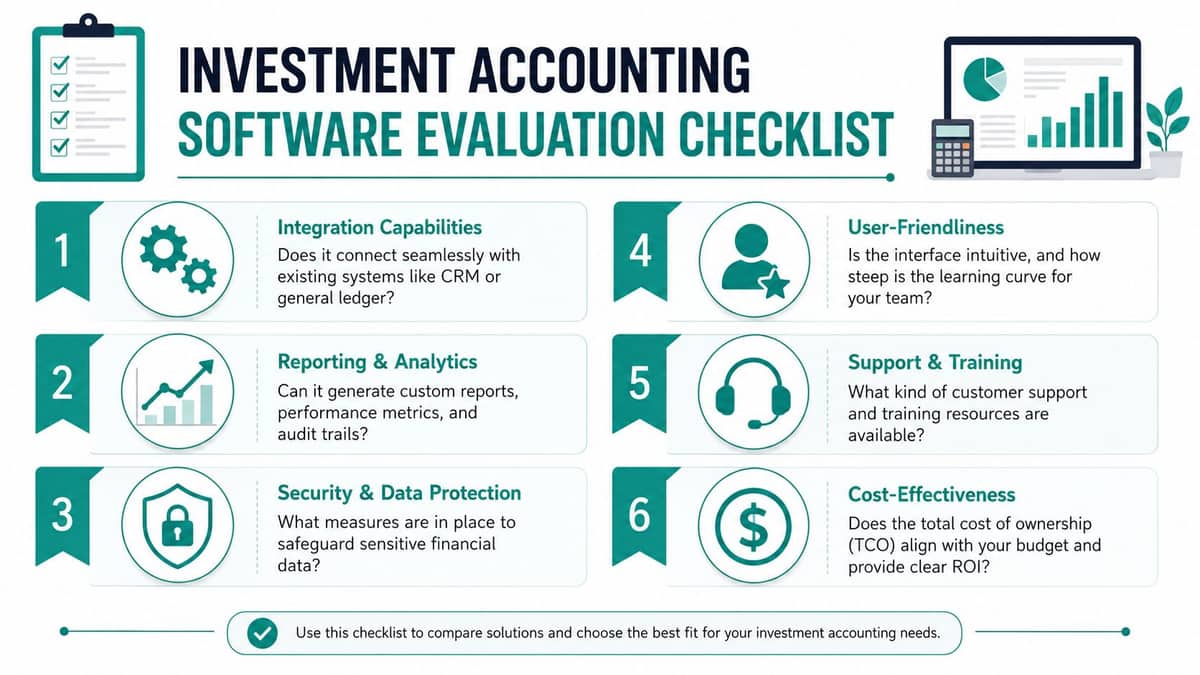
Software demos are designed to make everything look easy. Your job is to ask the questions that reveal whether the system fits nonprofit reality.
I'd keep the conversation grounded in actual work. Don't ask whether a platform is modern. Ask whether it can track your restricted scholarship fund, your annual gala revenue, your volunteer-driven programs, and your grant reporting without side spreadsheets.
The questions I'd ask every vendor
-
Show me restricted funds in the live ledger Don't accept a verbal yes. Ask for a live walkthrough of donor-restricted and unrestricted balances.
-
Show me grants and programs without exports If grant tracking requires another tool, you've found tomorrow's reconciliation problem.
-
Show me multi-entity reporting This matters for fiscal sponsorship, affiliated ministries, foundations, and schools with distinct operating units.
-
Show me the donor record tied to the accounting record Gifts, pledges, receipts, and fund balances should connect cleanly.
-
Show me the Statement of Functional Expenses If they can't demonstrate it easily, your staff will build it manually.
-
Show me what non-finance staff can see and do Development, program, volunteer, and executive staff often need access. Seat-based pricing can punish collaboration.
Compare products by philosophy, not just screens
Blackbaud often appeals to larger organizations that want an established nonprofit name. NetSuite can make sense for groups with broad operational complexity. Aplos is attractive for smaller teams that want a simpler setup. QuickBooks remains common because many bookkeepers already know it.
Those are valid reasons to look at each one.
Still, I'd focus less on logos and more on architecture. Is the system built around nonprofit funds and restrictions, or are those features layered on top? Does it combine accounting with donor management, volunteer management, events, online giving pages, marketing, and team communication, or does it depend on separate subscriptions and syncing?
That difference shapes staff workload every week.
Watch the pricing model carefully
A low starting price can hide a costly structure. Per-user fees add up fast when your finance office, executive team, development staff, volunteer coordinator, school office, or church administrator all need access.
I prefer platforms that make it practical for finance, program, and board users to work from the same records because that matches how nonprofits operate. I also think a free tier for nonprofits under $100K is the right kind of offer. It lets smaller organizations build good habits early instead of waiting until cleanup becomes painful.
Ask for the total cost of ownership, not just the monthly fee. Include extra users, separate modules, reporting tools, and migration help.
A short scoring tool
| Evaluation area | What a strong answer sounds like |
|---|---|
| Fund accounting | Funds, restrictions, grants, and programs are native in the ledger |
| Investment reporting | Balances and activity can be viewed without side reconciliations |
| Donor and finance connection | Gifts and accounting records stay linked |
| Operational breadth | Volunteers, events, giving pages, and marketing are included or tightly connected |
| AI intelligence | The assistant answers questions from your own data |
| Pricing | Clear, simple, and not inflated by seat counts |
Making the Switch and Your Next Steps
The hardest part of changing systems usually isn't the software. It's the fear of disruption.
That fear is reasonable. Your finance data holds years of donor history, grants, restrictions, campaigns, events, and audit decisions. Nobody wants a messy transition. But staying in a weak setup has a cost too, and many teams pay it every month in manual work.
Start with data reality, not wishful thinking
Before you move anything, clean up your structure. Confirm your chart of accounts, fund list, grant names, donor records, and opening balances.
Then decide what matters most on day one. Some teams need restricted fund accuracy first. Others need donor history, online giving pages, or volunteer records ready early because those functions touch daily operations.
If your staff wants a practical reference for preparing records, this guide to importing nonprofit data is a sensible starting point.
Involve the people who run the process
Don't make software selection a finance-only project. Your development lead, volunteer coordinator, program director, school office manager, or church administrator will expose workflow problems that a demo can hide.
I'd also recommend one simple rule. Ask each department to name the spreadsheet they'd be happiest to retire. That answer usually reveals where the new system needs to deliver value first.
Keep your standards high
A good transition should leave you with fewer tools, fewer exports, fewer login barriers, and cleaner reporting. It should also leave your team more willing to use the system because day-to-day use feels simpler, not heavier.
If a vendor can't show true fund accounting, integrated donor management, volunteer tools, event support, online giving pages, built-in marketing, AI intelligence, and practical team communication in one place, keep looking. Nonprofits already do enough patching in their programs. They shouldn't have to patch their operations too.
If you want one platform that brings together accounting, CRM, volunteers, events, marketing, online giving, and AI support, take a close look at AlignMint. We built it for nonprofits that need true fund accounting, not class-based workarounds, with unlimited users, no per-seat fees, and a free tier for organizations under $100K. If you're ready to replace disconnected tools with one practical system, start with a walkthrough and see how your grants, restricted funds, donor records, and reports can finally live in one place.
Ready to see how AlignMint fits your workflow?
Schedule a free walkthrough — we will help you map donors, funds, and migration steps.