


For related tools, see AlignMint features.
Your Nonprofit Reimbursement Expense Form Guide
Quick Answer: Your Nonprofit Reimbursement Expense Form Guide
A reimbursement expense form gives staff, volunteers, and board members one place to submit the receipt, business purpose, amount, fund code, approval path, and payment details. For nonprofits, the fund and grant fields are what keep the form audit-ready. Related guides: expense reimbursement form and reimbursement of expense.
A reimbursement request lands in your inbox late Friday. The receipt is blurry, the purpose line says "supplies," and no one can tell whether it belongs to a youth grant, general operations, or a donor-restricted program. That's how small paperwork problems turn into board-level stress.
A good reimbursement expense form fixes that. It gives your team one clear path for submitting expenses, and it gives you the documentation, coding, and approval trail you need to protect restricted funds and keep reporting clean.
Bring Clarity to Your Expense Process
Messy reimbursement habits create more than annoyance. They cloud your fund balances, slow month-end close, and force your finance staff to chase details long after the purchase is made.
A clear reimbursement expense form creates order at the front end. Instead of asking your bookkeeper to decode receipts and emails, you ask staff to submit the same required information every time. That one shift gives you cleaner records, better grant tracking, and fewer surprises before audit season.
If your organization handles travel, meals, hosting, or supply purchases, your process also needs categories and timing rules that people can follow. Some institutions spell this out tightly. For example, UC policy requires expense reimbursement reports within 60 days after the end of the trip or expense event, requires receipts for any individual expense of $75 or more, and treats missed deadlines as imputed income subject to tax withholding for employees under policy effective on or after September 1, 2025, as described in UC reimbursement guidance.
Practical rule: If staff can't tell what to submit, when to submit it, and which fund to charge, the form is too loose.
Keep the form simple, but make the rules visible. A short internal guide such as our reimbursement documentation overview works better than a long policy no one reads.
The Essential Fields for Your Expense Form
The best reimbursement forms don't try to be clever. They collect the same core details every time, so your team submits complete information the first time.
A standard expense reimbursement form should collect the employee's name, expense date, category such as travel, meals, or supplies, amount, and justification. For project-based expenses, including project codes enables accurate accounting and auditing, as outlined in Jotform's expense reimbursement intake guidance.
Start with the non-negotiables
These fields belong on every form, whether you use a shared form, a portal, or a simple internal system.
- Employee or requester name helps finance confirm who paid and who should be reimbursed.
- Submission date shows when the request entered your process.
- Expense date matters for monthly close, grant periods, and budget review.
- Expense category keeps coding consistent across travel, meals, supplies, events, and other costs.
- Amount paid should be entered for each line item, not buried in one total.
- Business purpose or justification explains why the purchase served the mission.
- Receipt upload gives you support for review, audit, and payment approval.
If the purchase relates to a trip, add travel dates, destination, and transportation details. If it supports a specific program, campaign, school, church activity, volunteer effort, or sponsored project, add a project code field.
Add the details that prevent follow-up
Most reimbursement delays happen because the form leaves too much unsaid. A line that says "lunch" or "materials" forces someone else to investigate later.
Use plain prompts such as:
| Field | Why it matters |
|---|---|
| Vendor or merchant | Helps confirm what was bought |
| Description | Distinguishes program costs from general overhead |
| Program or project code | Ties spending to the right activity |
| Receipt file upload | Supports documentation standards |
| Payment method | Clarifies whether staff used personal funds |
The more precise the form is, the less interpretation your finance team has to do later.
Digital forms have another advantage. They keep intake data in one place, where it can be filtered, searched, and exported for reporting, which is one reason many organizations move away from email-based reimbursement requests.
Keep recurring entries easier
If the same staff members submit mileage, program purchases, or event expenses regularly, pre-filled fields help. Repeating location, department, or recurring project information can reduce data-entry mistakes without making the form harder to use.
For teams building policy and form language at the same time, a sample like this social club reimbursement policy template can help you clarify what belongs on the form and what belongs in policy.
Connecting Expenses to Grants and Restricted Funds
Nonprofit reimbursement distinguishes itself from generic business advice. Your staff member didn't just buy supplies. They may have bought supplies for a restricted literacy grant, a church food pantry fund, a school arts program, or a fiscally sponsored project with its own reporting duties.
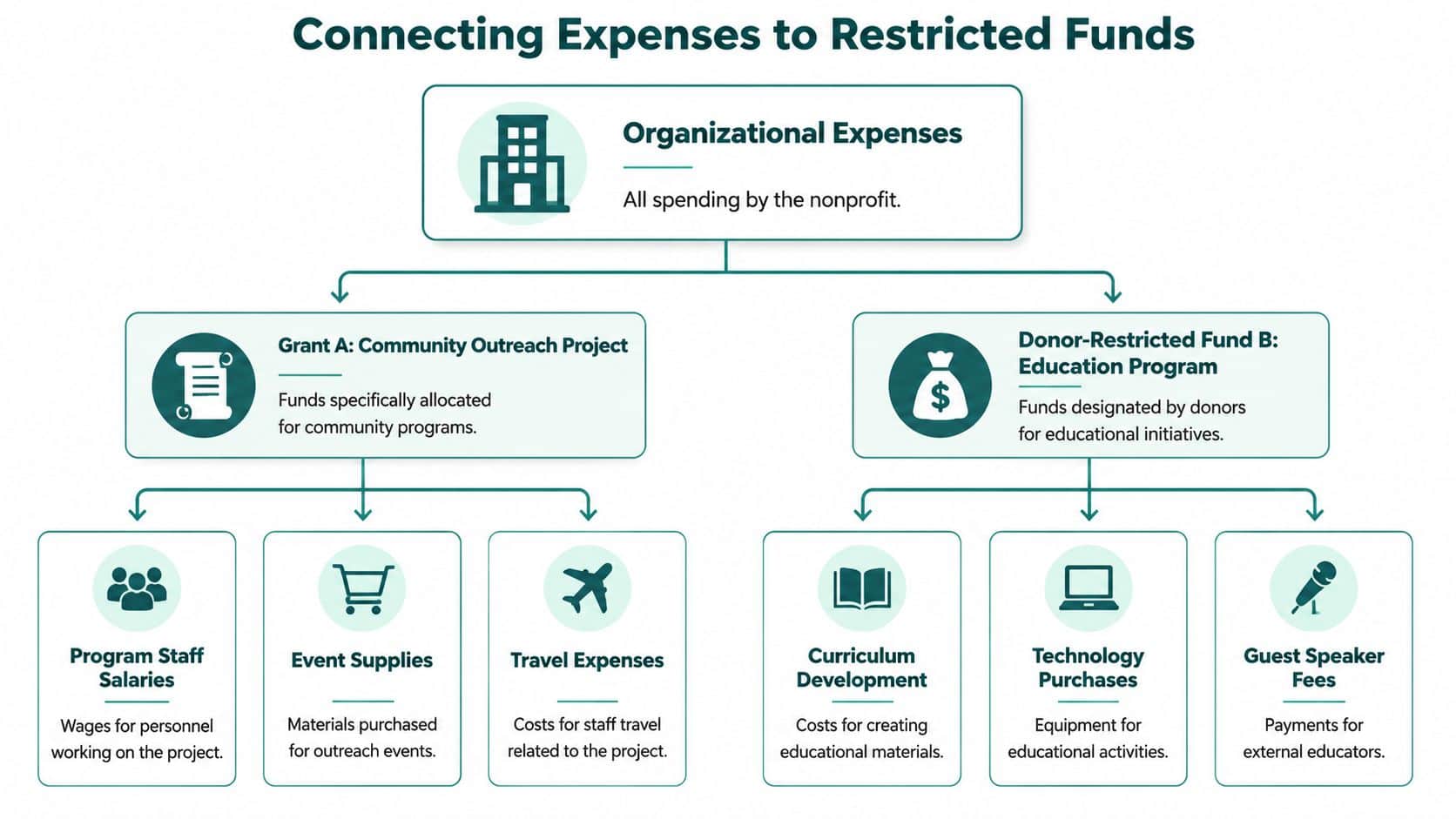
A reimbursement expense form should reflect that reality directly. Add a required Fund or Grant field, and make it specific enough that staff can choose the correct source at the moment they submit the expense.
Why this matters more in nonprofits
Restricted funds are donations earmarked by donors for specific purposes, programs, or time periods, creating legally binding conditions that nonprofits must honor, as explained in Pacific ABS's overview of restricted funds.
Generic templates often miss this entirely. Standard reimbursement guides often ignore how nonprofits must code expenses to restricted funds. That gap matters because 71% of small nonprofits now manage 3+ restricted funds, yet 89% of expense form templates lack fund-coding fields, according to Smart Receipts' discussion of reimbursement forms.
That omission creates real cleanup work. Your finance team has to stop, interpret intent, and move the expense after the fact. That's inefficient, and it also weakens your audit trail.
What to add to the form
For nonprofit use, these fields deserve their own place instead of being squeezed into a notes box:
- Fund or grant code for the exact restricted fund, grant, or unrestricted operating bucket
- Program name when one fund supports several activities
- Restriction check that confirms the purchase fits donor or grant purpose
- Project code for sponsored projects, events, or fiscal sponsorship sub-entities
- Functional category if you track program, management, and fundraising costs separately
Nonprofits must track restricted revenue separately from unrestricted revenue and review expenses monthly to align spending with related grants or donor restrictions, as described in Lutz's nonprofit fund accounting guidance.
If your form doesn't ask where the money should come from, your team will guess later. That's where compliance starts slipping.
A lot of organizations try to patch this with QuickBooks classes. QuickBooks is familiar, and for some teams it's a reasonable starting point. But classes are still a workaround. They don't replace true fund accounting when you need clean reporting by restriction, grant, program, and project.
If you're tightening controls around reimbursements, budgeting, and reporting, it also helps to understand the broader tax and compliance picture. This practical guide to managing non-profit taxes gives useful context for leaders who want fewer surprises.
For day-to-day operations, a simple internal reference such as our restricted funds documentation can help staff choose the right fund before the request ever reaches finance.
Your Approval and Documentation Workflow
A form by itself won't save you. The process around it determines whether expenses move cleanly from staff purchase to approved reimbursement.
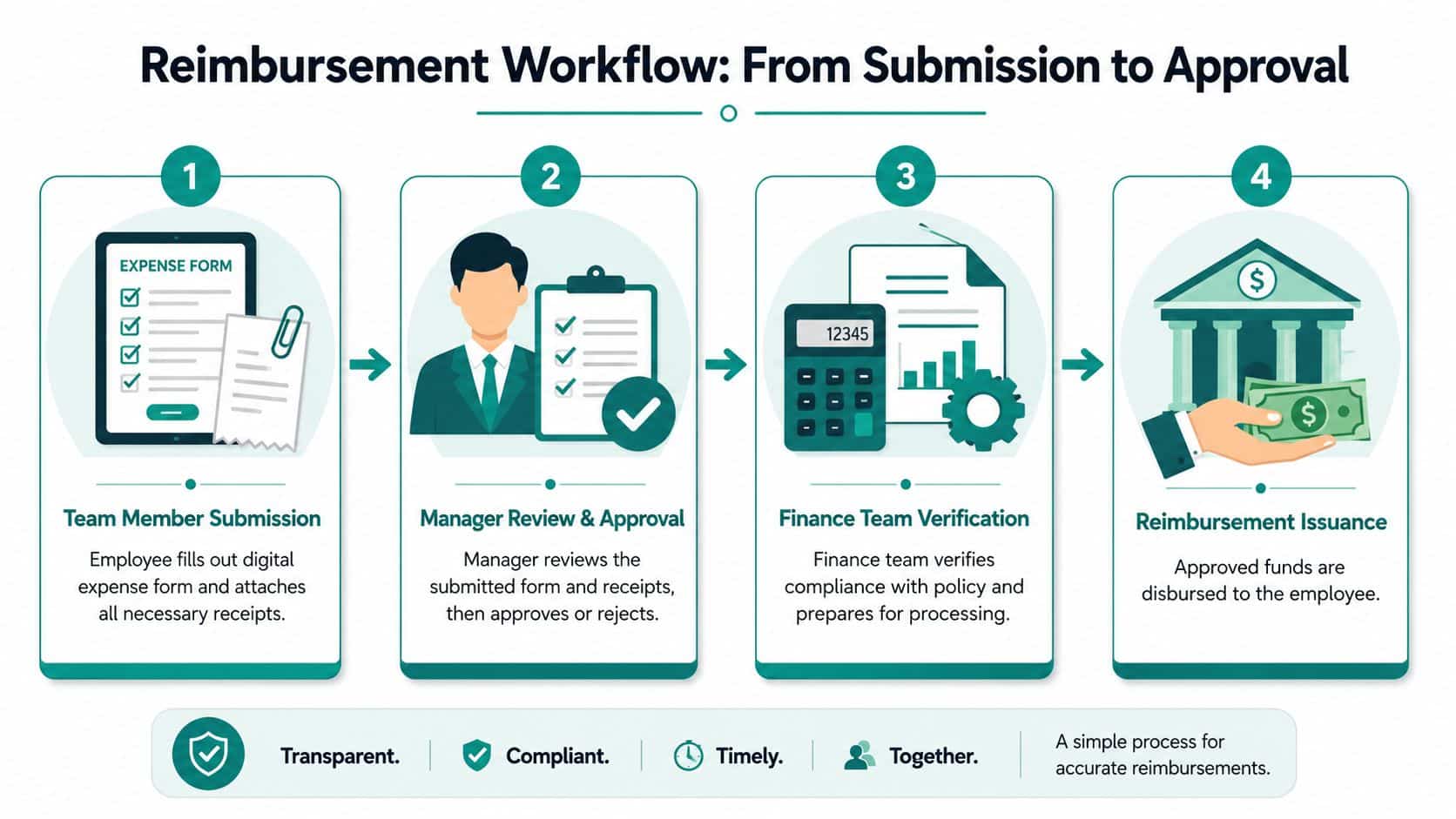
The strongest approach is simple enough to repeat every time. Policy sets the rules. A standard digital form collects the right information. Training shows staff how to complete it correctly.
A workflow that works
This sequence is dependable and easy to explain to busy staff:
- Team member submits the form with each expense line, purpose, and receipt attached.
- Direct manager reviews it for reasonableness, mission fit, and correct coding.
- Finance performs final review for policy compliance, documentation, and payment release.
That structure mirrors a proven framework. A three-step approach of policy, standardized digital forms, and training is essential. Integrating a two-level approval workflow with manager review and finance review, plus auto-approval for small amounts, can accelerate processing by 65% while maintaining 98% compliance, according to Payday Payroll's reimbursement workflow guidance.
Where teams usually get stuck
Approval delays usually come from one of three problems. The manager doesn't know what to review. Finance receives incomplete backup. Or the policy exists, but staff were never trained on it.
A short walkthrough during staff meetings solves a lot. Show one completed example for travel, one for program supplies, and one for donor or event-related hosting. People learn faster from examples than from policy PDFs.
A reimbursement process should protect the organization without making honest staff feel suspected.
If you want less paper shuffling, make receipt uploads part of submission instead of a separate step. A simple guide to digital receipt scanning can help staff understand what "complete documentation" means.
Keep the approval standard consistent
Set one review question for managers: "Does this expense fit the program, fund, and purpose stated?" Set one review question for finance: "Does the documentation support reimbursement under policy?"
That split keeps your process fair. Managers review context. Finance reviews compliance. Staff know who decides what, and you avoid endless back-and-forth.
How to Avoid Common Reimbursement Mistakes
Most reimbursement problems are predictable. The same errors show up again and again, especially when organizations rely on paper forms, email attachments, or unclear policies.
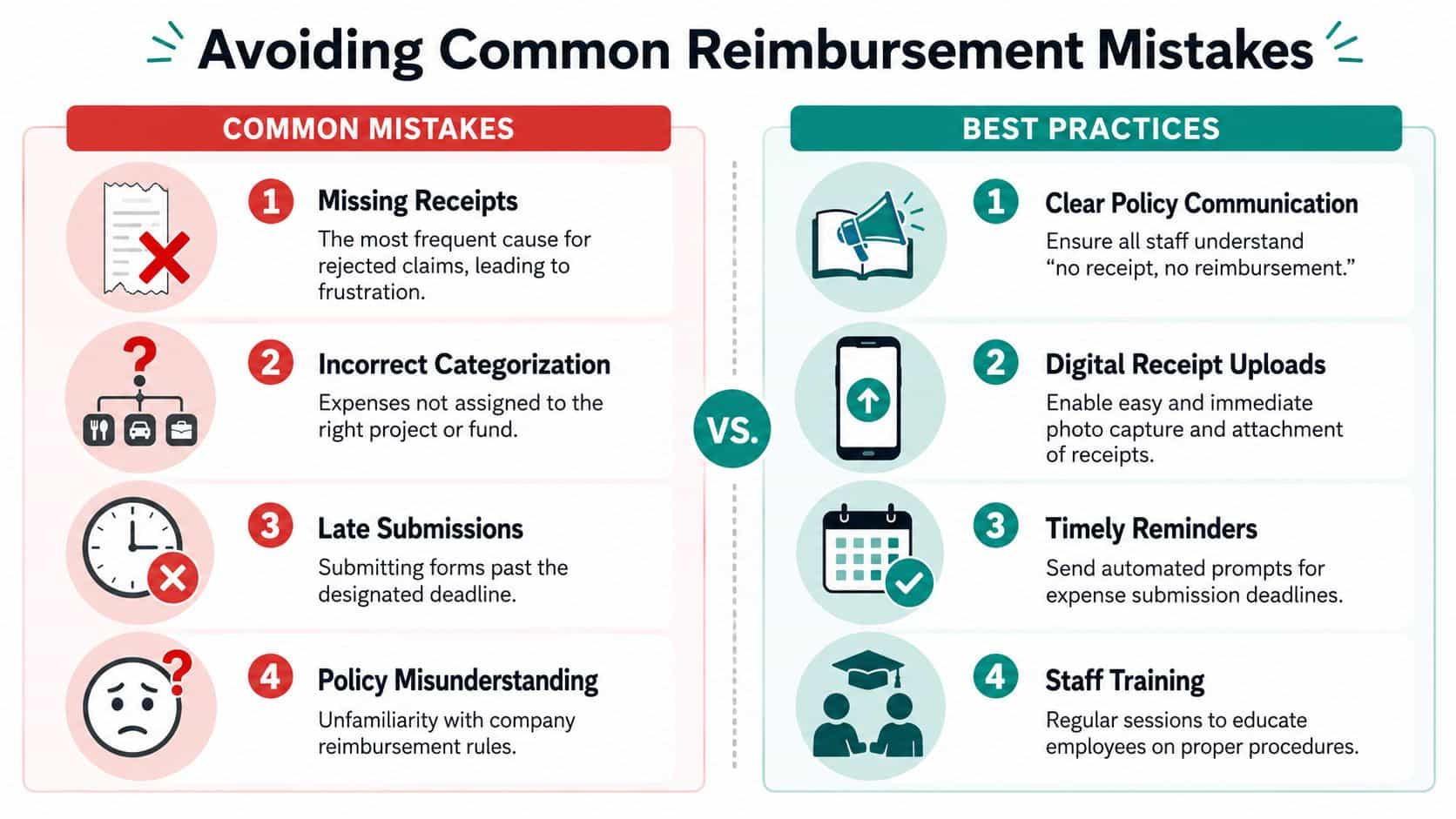
The good news is that these problems are preventable if your form and policy work together.
The three mistakes that cause the most trouble
Common pitfalls include missing receipt substantiation, which leads to 32% of rejected claims, ambiguous expense categorization, which causes 28% of approval delays, and a lack of digital receipt scanning. Forms with automated workflows and digital uploads can cut processing time from 14 days to 4, according to Concur's policy best practices article.
Those numbers line up with what many nonprofit leaders see in practice. Not fraud. Not bad intent. Just incomplete paperwork submitted too late and with too little context.
What to do instead
Use policy language your team can understand quickly:
- Require itemized receipts when receipts are expected under your policy.
- Reject vague descriptions such as "meal" or "supplies" without a business purpose.
- Ask for fund and project coding at submission instead of fixing it later.
- Set a firm deadline so expense data stays current.
- Train new staff and managers with a few realistic examples.
Here's a simple comparison that helps in policy discussions:
| Common mistake | Better practice |
|---|---|
| Receipt missing | Ask for receipt upload at submission |
| Description too vague | Require business purpose in plain language |
| Wrong category | Use dropdown categories instead of free text |
| Submission too late | Set a clear reimbursement deadline |
| Staff confusion | Review examples during training |
Handle lost receipts the right way
Many policies are too rigid here. They say "no receipt, no reimbursement" and stop there, even when the expense was legitimate.
The better approach is to keep a standard rule, then allow a documented exception path. Staff should know that missing receipts are not routine, but they also shouldn't assume a valid expense is automatically dead if a paper receipt disappeared.
Good controls don't mean punishing honest mistakes. They mean documenting exceptions in a way an auditor can follow.
That balance matters in volunteer-heavy organizations, churches, schools, and fiscally sponsored programs, where people often spend personally and submit later.
Gain Confidence in Your Financial Oversight
Expense reimbursement shouldn't feel like detective work. When the form is clear, the coding is accurate, and approvals follow a repeatable path, you get something every executive director wants. Confidence in the numbers.
That confidence matters beyond reimbursement. It affects donor reporting, grant tracking, budget reviews, board communication, volunteer-supported programs, and how quickly your team can answer routine questions without digging through spreadsheets.
The policy detail many nonprofits miss
Lost receipts are a good example. The IRS explicitly allows expense reconstruction using bank statements and a written explanation of the business purpose if a receipt is lost, yet many nonprofit policies incorrectly block these valid claims, as explained in Otto the Agent's discussion of rejection reasons and fixes.
That doesn't mean every undocumented expense should pass. It means your policy should tell staff what acceptable reconstruction looks like, who approves it, and when it's allowed. That protects fairness without weakening controls.
Why connected systems help
This is also where disconnected tools start to wear people down. One system holds accounting. Another tracks donors. A third manages volunteers or events. Marketing sits elsewhere. Team communication happens in email, and no one sees the full picture.
Executive directors usually don't need more software. They need fewer disconnected processes.
That's why many nonprofit leaders are moving toward all-in-one platforms that combine accounting, CRM, volunteer management, events, online giving pages, marketing tools, AI support, and team communication in one place. For churches, schools, and fiscal sponsors, that matters even more because staff often wear several hats and don't have time to re-enter the same information.
If you're reviewing how reimbursement connects to broader reporting, this guide to nonprofit financial reporting is a good next step.
A well-built system should support true fund accounting instead of class-based workarounds. It should also support donor management, volunteer records, and marketing without seat-based penalties for adding staff. For smaller nonprofits, pricing matters too. A free tier can remove the hesitation to put cleaner controls in place early. AI help can also make a difference, especially when it answers questions in plain language instead of sending staff into another training manual.
If you want one place to manage reimbursement, fund accounting, donor records, volunteers, events, online giving pages, marketing, team communication, and AI support, take a look at AlignMint. We built it for nonprofits that need true fund accounting, plan-based user allowances (1 on Free, up to 10 on Plus, up to 25 on Pro, and unlimited on Enterprise), and a practical path forward that doesn't force you to stitch together separate systems.
Ready to try AlignMint with your nonprofit?
Start free — set up donor tools, giving pages, and Minty. Upgrade when you need accounting.