

For related tools, see AlignMint features.
Nonprofit Reimbursement of Expense: Simplify & Comply
Quick Answer: Nonprofit Reimbursement of Expense: Simplify & Comply
A nonprofit reimbursement of expense process should prove three things before payment: the expense served your mission, the requester documented it on time, and the right fund or grant carries the cost. That keeps ordinary reimbursements from becoming payroll, audit, or grant-reporting problems. Related guides: expense reimbursement and reimbursement expense.
If you're handling reimbursements through email threads, a shared spreadsheet, and a folder full of photos of receipts, you're not alone. That setup works until it doesn't. One late submission, one missing business purpose, or one expense charged to the wrong fund can create tax trouble, grant reporting headaches, and a finance trail nobody trusts.
A better reimbursement of expense process doesn't have to be fancy. It has to be clear, documented, and easy for busy staff and volunteers to follow.
Moving Beyond the Reimbursement Spreadsheet Mess
Most small nonprofits start the same way. A staff member buys supplies with a personal card, emails a receipt, and someone adds a line to a spreadsheet. The executive director approves it when they get a minute, and finance tries to remember which grant or program should absorb the cost.
That system feels simple because everybody knows it. It also creates quiet friction. Receipts get buried in inboxes, approvals happen inconsistently, and month-end turns into detective work.
I've seen the pattern often. The issue usually isn't bad intent. It's that nobody designed a workflow. People built a habit instead.
What the mess looks like in practice
A common week looks like this:
- Receipts arrive in three places: email, text messages, and paper copies dropped on a desk.
- Approvals depend on memory: one manager wants a form, another says email is fine.
- Coding happens late: finance assigns funds and accounts after the purchase, often without enough context.
- Questions repeat constantly: was this meal program-related, donor cultivation, or general operations?
When your records live in spreadsheets, every exception becomes manual work. That's why many teams eventually start looking at moving beyond nonprofit spreadsheets, especially once reimbursements touch grants, restricted funds, volunteers, and events.
The real cost of a messy reimbursement process isn't only time. It's uncertainty in your books.
Why this matters more than it seems
A reimbursement of expense process sits at the intersection of payroll tax, fund accounting, donor restrictions, and internal controls. If any one part is weak, the whole chain becomes harder to defend.
That matters whether you're running a food pantry, a church, a school program, or a fiscal sponsorship model. Your staff need clear rules. Your board needs confidence. Your finance records need to match what happened.
The good news is that this is fixable. You don't need a bigger finance team first. You need a policy, a workflow, and a system that matches the way your nonprofit operates.
Accountable vs Non-Accountable Plans Explained
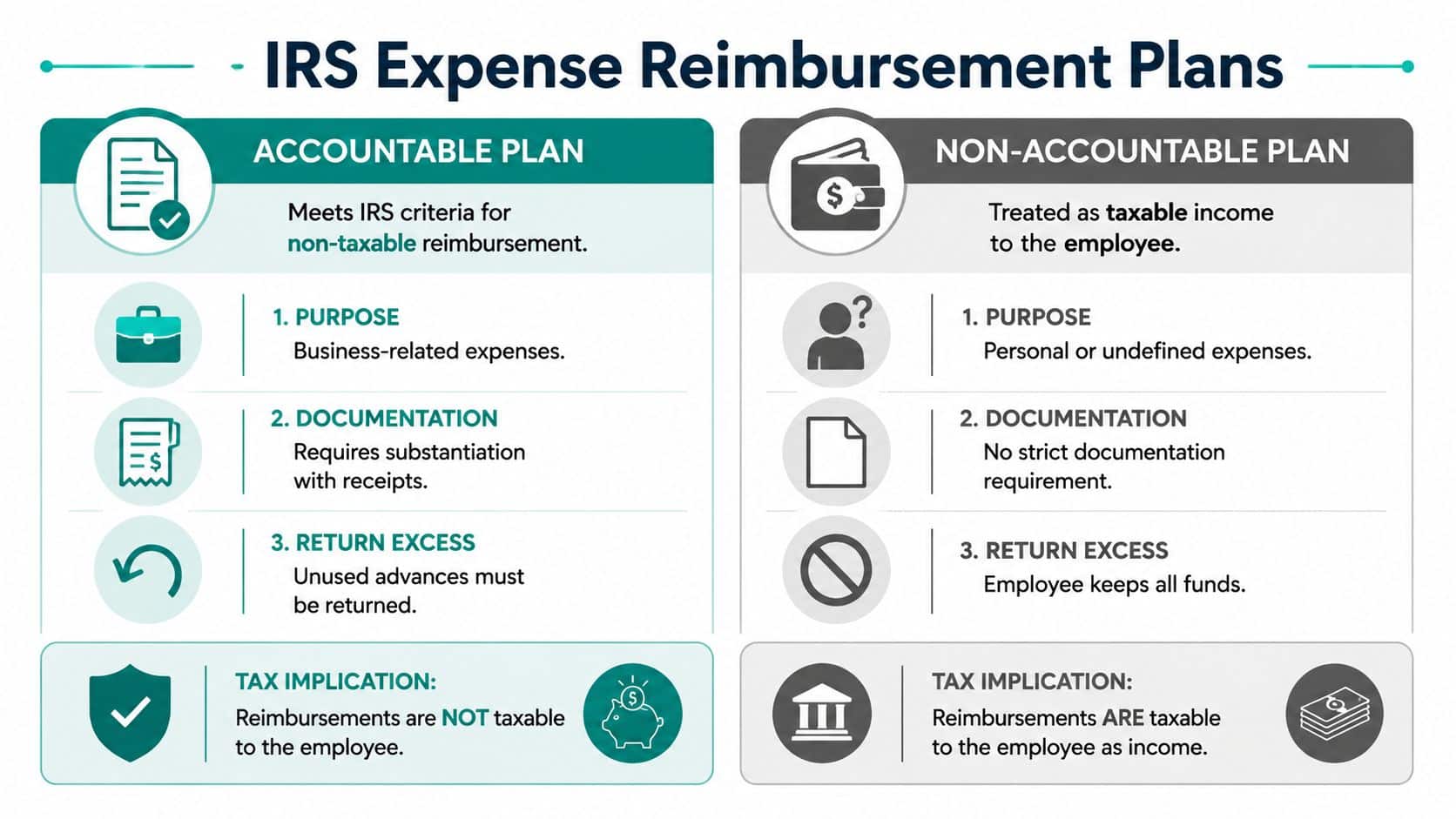
If you remember one IRS concept, remember this one. A reimbursement is either paid under an accountable plan or it isn't. That difference determines whether the payment stays a reimbursement or becomes taxable wages to the employee.
Under IRS rules, a reimbursement can be excluded from gross income only if it is paid under an accountable plan with three conditions: it has a business connection, the employee substantiates it within a reasonable period that is typically 60 days, and the employee returns any excess reimbursement. That's outlined in this overview of IRS reimbursement rules and accountable plans.
A simple way to remember the three tests
Think of an accountable plan like checking out a library book.
- Business connection: the book has to belong to the library. In reimbursement terms, the expense must be for your nonprofit's business.
- Timely substantiation: you have to show what you borrowed and when. For reimbursements, that means receipts and details submitted within the required period.
- Return excess: if you borrowed too much, you give it back. If an employee received an advance beyond actual business cost, they return the extra amount.
Miss one of those, and the reimbursement starts looking like compensation.
What changes when the plan fails
A non-accountable plan isn't just a weaker version of the same thing. It changes the tax treatment. The payment is treated as wages to the employee, and that creates withholding and reporting consequences.
That's why a loose practice like "send me the receipt when you can" is dangerous. It sounds friendly, but it can push ordinary reimbursements into taxable territory if your team doesn't document business purpose, timing, and excess returns consistently.
Practical rule: If you wouldn't feel comfortable showing the record to payroll, your plan probably isn't tight enough.
For leaders who want a plain-English workflow tied to real entries and approvals, this nonprofit reimbursement documentation guide is a useful next reference. If you also want a broader tax-side habit for keeping expenses organized before they ever hit reimbursement, Allied Tax Advisors has a practical small business expense tracking guide.
Why this matters for fund accounting too
This isn't only a payroll issue. Once reimbursements flow through grants, restricted funds, church ministries, or school programs, bad reimbursement design spills into financial reporting. A reimbursement that lacks proper support is harder to code correctly, harder to explain to auditors, and harder to connect to donor intent.
That is where true fund accounting helps. Unlike general bookkeeping tools that rely on classes as a workaround, a fund-based structure lets you tie the expense to the right purpose from the start.
Creating Your Nonprofit Expense Reimbursement Policy
A written policy saves time because it answers routine questions before they become exceptions. It also protects you when a board member, auditor, or staff person asks why one claim was paid and another was denied.
This matters even more in smaller nonprofits. According to Kent State's summary of accountable plan issues, 68% of organizations under $500K in annual revenue report that staff reimbursements are incorrectly classified as taxable wages because they miss one or more accountable plan rules. That makes a clear policy more than paperwork. It's a control step with real tax consequences, as noted in this discussion of accountable versus non-accountable reimbursement plans.
The policy items you actually need
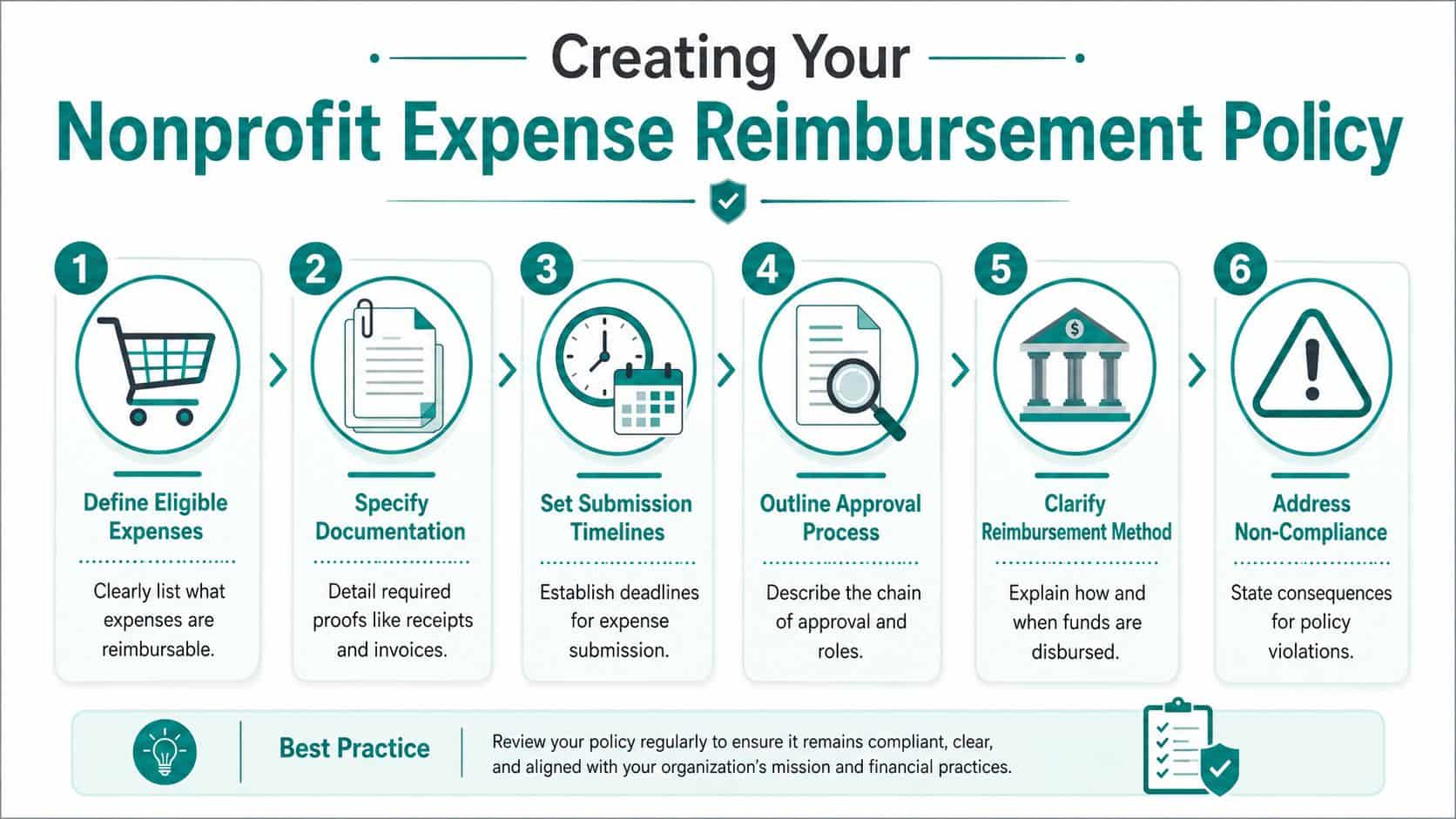
You don't need a long manual. You need a few rules nobody can misunderstand.
-
Define reimbursable expenses clearly State what counts as a business expense in your setting. Include examples relevant to your nonprofit, such as program supplies, approved travel, volunteer event purchases, church ministry costs, or school-related materials.
-
Set one submission deadline Use a firm deadline that aligns with accountable plan requirements. If your team waits too long, the tax treatment can change.
-
State what documentation is required Ask for the receipt, the vendor, the date, the amount, and the business purpose. If grant funds are involved, require the program or grant name too.
-
Name the approval path Staff should know who approves first, who reviews second, and when finance steps in.
-
Explain how payment happens Tell people whether reimbursements are paid by ACH, check, or through another approved method, and when payment runs usually occur.
Sample policy language you can adapt
You can keep the language simple:
Employees and authorized volunteers must submit reimbursement requests for approved business expenses within 60 days of the date paid or incurred. Each request must include the expense date, vendor, amount, business purpose, and supporting documentation.
Reimbursement requests that do not include required documentation, approval, or fund designation may be delayed or denied until corrected. Any excess advance must be returned promptly according to organizational policy.
A template can save time if you don't want to draft from scratch. This reimbursement policy template for nonprofit and club settings gives you a starting point you can tailor to your board and finance practices.
What good policy writing avoids
The weakest policies use soft language. They say receipts are "preferred," deadlines are "encouraged," and exceptions are handled "as needed." That invites inconsistency.
A stronger policy does three things well:
- It removes guesswork: staff know what's allowed before they spend.
- It supports fair enforcement: everyone follows the same rules.
- It creates an audit trail: finance can show why each reimbursement was approved.
If your nonprofit also manages donor records, volunteer activity, event spending, and outreach in different systems, keep the policy short enough that people will follow it. Long policies are often ignored. Clear ones get used.
Mastering Documentation and Grant Compliance
Documentation is where many reimbursement processes break down. The usual advice is "save your receipts," but that isn't specific enough when you're trying to protect tax treatment and satisfy grant terms.
The IRS rule that causes the most confusion is the $75 receipt rule. For non-lodging expenses under $75, the de minimis rule may allow an exception to receipt requirements, but stronger documentation is still required for higher amounts, and reimbursements must be substantiated within a reasonable period that is typically 60 days to remain tax-exempt, as summarized in this review of expense reimbursement documentation rules.
What adequate substantiation looks like
Even when a receipt exception may exist, a clean record should still answer basic questions:
| Record element | What finance needs to see |
|---|---|
| Expense date | When the cost was paid or incurred |
| Vendor | Who was paid |
| Amount | Total cost claimed |
| Business purpose | Why the expense supported the mission |
| Funding source | Which fund, grant, or program should absorb it |
| Approval | Who authorized the reimbursement |
That record matters because IRS acceptability and grant acceptability are not always the same thing. A grantor may expect more detail than the minimum tax rule requires.
Where nonprofits get tripped up
Restricted funding creates extra pressure. If a staff member buys supplies for a youth program and a community event in one transaction, finance has to allocate the reimbursement correctly. If the staff person doesn't explain the split clearly, you end up guessing later.
That guesswork is what causes weak grant reporting.
- Restricted funds need traceability: every reimbursed cost should tie back to the donor restriction or grant budget.
- Program coding should happen early: not after payment, when context is gone.
- Shared purchases need support: if one receipt covers multiple activities, note the allocation logic at submission.
For nonprofits managing awards and restricted support, this practical article on grant management best practices is worth keeping nearby.
Grant compliance usually doesn't fail because the spending was improper. It fails because the record doesn't prove what the spending was for.
Best practice versus minimum rule
Finance leaders often ask whether they should rely on the under-$75 exception. My advice is simple. Treat it as an exception, not your standard.
Best practice is to require documentation whenever you reasonably can, especially when expenses touch grants, donor-restricted activity, church funds, school programs, or fiscal sponsorship. A stricter internal standard usually makes month-end easier, not harder.
A Simple Step-by-Step Reimbursement Workflow
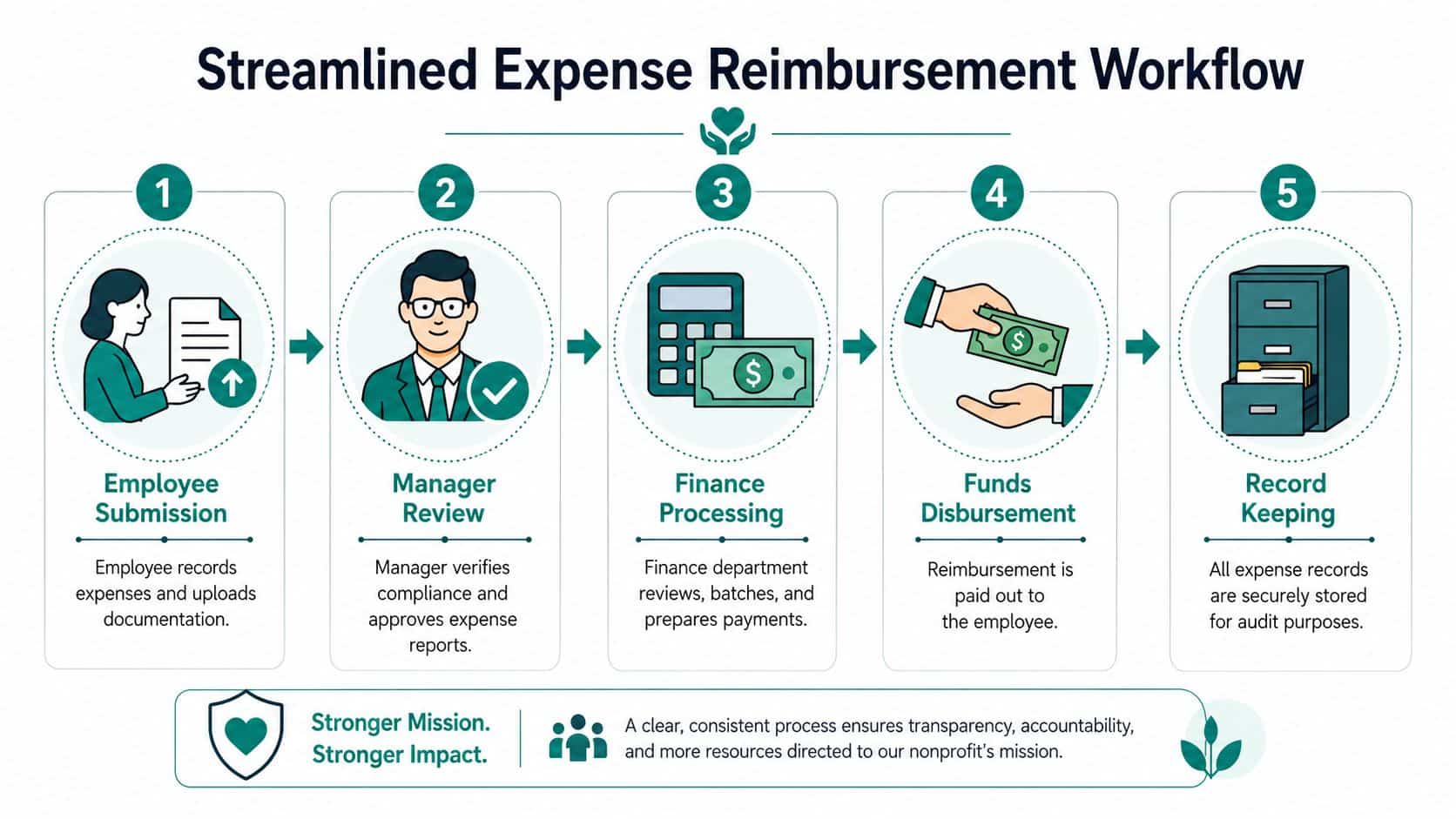
A workable reimbursement of expense process should be boring. People submit the same way every time, managers review the same questions every time, and finance books the expense the same way every time.
When that doesn't happen, delays pile up in approval and review. Industry guidance puts the median cycle time from expense to payment at under 14 days, and notes that 40% of total cycle time is often consumed by manager review and finance verification, according to this benchmark on expense reimbursement workflow timing.
The five steps that work
1. Submission
The employee or approved volunteer submits one record with the receipt, amount, vendor, date, business purpose, and fund or program. If a purchase must be split across funds, they note that at the start.
Manual systems already begin to wobble at this stage. If staff send information by email and text, finance has to rebuild the record later.
2. Manager review
The first reviewer checks mission relevance and policy compliance. They don't need to be the accountant. They need to know whether the expense was authorized, reasonable, and charged to the right activity.
3. Finance review
Finance checks documentation, account coding, fund assignment, and any special grant restrictions. If something is missing, the request goes back before payment, not after.
4. Payment
Once approved, reimbursement is paid through the method your policy allows. The key is consistency. Staff shouldn't wonder each month whether they will be paid by check, ACH, or through a payroll workaround.
5. Bookkeeping entry
The final step is often treated like an afterthought. It shouldn't be. In this final stage, the reimbursement hits the ledger, the fund balance updates, and the audit trail becomes permanent.
Manual workflow versus integrated workflow
QuickBooks is familiar, and many nonprofits use it for understandable reasons. But classes are still a workaround when you need true fund accounting, restricted fund tracking, donor-linked reporting, volunteer activity context, and cleaner Form 990 support.
A comparison helps:
| Workflow choice | What usually happens |
|---|---|
| Email plus spreadsheet | Approvals and coding happen separately, with repeated follow-up |
| QuickBooks plus classes | The bookkeeping can work, but staff often track context outside the ledger |
| Integrated nonprofit system | Submission, approval, coding, and reporting stay tied together |
Field note: If finance has to ask, "What was this for?" after the reimbursement is approved, the workflow is broken.
The strongest setups connect accounting to the rest of nonprofit operations. If your team also manages donor records, volunteer schedules, events, online giving pages, marketing communications, and internal team communication, fragmented reimbursement data creates extra cleanup everywhere else too.
Avoiding Common and Costly Reimbursement Pitfalls
Most reimbursement problems aren't dramatic. They're repetitive. A late receipt here, an undocumented exception there, and a policy nobody enforces the same way twice.
That drift creates real exposure. The Association of Certified Fraud Examiners reports that expense reimbursement schemes have a median loss of $30,000 per incident and often continue for an average of 24 months before discovery, as cited in this overview of fraud risk in employee expense reimbursements.
Pitfall one: inconsistent enforcement
Problem: one manager requires itemized support and another approves based on a credit card screenshot.
Solution: create one standard review checklist and require every approver to use it. Consistency is an internal control, not just a courtesy.
Pitfall two: late submissions
Problem: staff hold receipts until month-end, quarter-end, or longer, then send a stack all at once.
Solution: tie your policy to a firm submission deadline and enforce it. If you make exceptions, document who approved them and why. Don't quietly process late claims as if nothing happened.
Pitfall three: restricted and unrestricted costs get mixed
Problem: one purchase supports multiple activities, but the reimbursement gets posted to a single general expense line.
Solution: require the submitter to identify the split at entry. Finance can refine it, but they shouldn't have to guess the program intent after the fact.
Pitfall four: weak separation of duties
Problem: the same person spends, approves, and records the reimbursement.
Solution: even a small nonprofit can divide responsibility. One person submits, another approves, and finance records payment. In a very small team, involve a board treasurer or executive reviewer when needed.
When a reimbursement process depends on trust alone, it eventually fails the people who are trying to do the right thing.
Pitfall five: outside rules get overlooked
Some nonprofits oversee sponsored projects, trustee-like responsibilities, or special-purpose funds where expense charging rules are narrower than ordinary staff reimbursement. In those cases, it helps to review adjacent guidance on what fiduciaries can and cannot charge. For a legal example in the trust context, this article on trustee expenses under Texas law shows how quickly expense questions become governance questions.
The pattern behind most mistakes
The common thread is fragmented information. Policy sits in one document, approvals happen in email, coding happens in accounting, and grant support sits somewhere else.
That makes reimbursement harder than it needs to be. It also makes donor reporting, volunteer reimbursements, church ministry oversight, school program tracking, and fiscal sponsorship reporting harder than they need to be.
Unify Approvals Tracking and Reporting in One Place
A connected system reduces the handoffs that create most reimbursement errors. When submission, approval, fund coding, and recordkeeping live together, finance doesn't have to reconstruct what happened after the fact.
That's where an all-in-one approach is useful for nonprofits that already need more than accounting. If your team is managing fund accounting, donor management, volunteer management, events, online giving pages, marketing, and internal team communication, it helps when reimbursement records sit inside the same operating system instead of another side spreadsheet.
What a unified setup fixes
A strong nonprofit platform should do a few practical things well:
- Connect reimbursement to true fund accounting: expenses post to the correct restricted fund, grant, or program without class-based workarounds.
- Keep approvals inside the record: finance can see who approved what and when.
- Support the whole team: plan-based user allowances (1 on Free, up to 10 on Plus, up to 25 on Pro, and unlimited on Enterprise) matter when staff, bookkeepers, ministry leaders, school administrators, or key volunteers all touch the process.
- Keep reporting close to operations: reimbursements should flow naturally into financial reports, donor reporting, and internal review.
For teams that have outgrown spreadsheets but don't want a pile of disconnected software, the accounting work queue in AlignMint shows what this can look like in practice. AlignMint combines accounting, CRM, volunteers, events, and a built-in marketing suite in one place, with true fund accounting, plan-based user allowances (1 on Free, up to 10 on Plus, up to 25 on Pro, and unlimited on Enterprise), a free tier for nonprofits under $100K, and Minty for questions about your live data.
Why this matters beyond finance
This isn't just about paying staff back faster. A unified record improves how your organization operates across departments.
Your development team can understand program spending without waiting for exports. Your volunteer coordinators can track approved expenses with the right context. Church and school leaders can see activity by ministry or program. Fiscal sponsors can keep cleaner boundaries between sponsored projects. Marketing teams can plan campaigns and online giving pages with more confidence because finance data isn't trapped in another silo.
QuickBooks, SAP Concur, and Expensify each have strengths in their own lanes. The gap for many nonprofits is that they often still need other tools for donor management, volunteer activity, grant tracking, and fund-specific reporting. That's where integration matters.
If you're ready to replace reimbursement confusion with a process your staff can follow, take a look at AlignMint. You can see how reimbursements connect to fund accounting, donor management, volunteer tracking, church and school workflows, online giving pages, marketing, and team communication in one system, and nonprofits under $100K can start on the free tier.
Ready to try AlignMint with your nonprofit?
Start free — set up donor tools, giving pages, and Minty. Upgrade when you need accounting.