

Best Church Accounting Software Guide (2026)
Church finance often breaks down in the same place. The books live in one system, donations in another, volunteers somewhere else, and the board packet still comes together by hand.
If that sounds familiar, you are not behind. You are dealing with a tool problem, not a competence problem. The best accounting software for churches gives you clear fund balances, cleaner reports, and less reconciliation work across the week.
If you want the AlignMint product view of this workflow, start with the church fund accounting hub—the canonical page for fund accounting software for churches—and the broader church software page.
Quick Answer: How to Compare Church Accounting Software
Pricing as of May 2026. Check vendor websites for current pricing.
Comparison data as of May 2026. Features and pricing may change.
The best church accounting software depends on how your church handles designated gifts, monthly bookkeeping, board reports, and giving records. A good shortlist should include true fund accounting, donation and expense tracking, bank reconciliation, giving statements, and reports a finance committee can read without an export.
If you are comparing top rated church accounting software providers in 2026, do not start with the longest feature list. Start with the monthly workflow: gifts come in, deposits clear, bills and reimbursements are coded, restricted funds stay protected, and the board gets a clean report. The software that makes that loop easiest is usually the best fit.
For many churches, the strongest choice is not just an accounting ledger. It is software that connects donations, expenses, fund balances, giving statements, and reporting so the treasurer does not have to rebuild the story every month. Small churches should also read church accounting software for small churches; teams tracking weekly gifts can start with how to track tithes and offerings. Multi-site ministries should see multi-campus church accounting for consolidated reporting across locations.
Small church vs growing church fit
| Church size | Best fit | Why |
|---|---|---|
| Small church (under ~150 weekly attendance) | Simple fund accounting, low admin overhead, free or low-cost tier | Treasurers often volunteer; the system should handle tithes, designated gifts, and basic reports without a finance team |
| Growing church (150+ attendance, multiple ministries or campuses) | Connected giving, donor records, multi-fund reporting, and room to add staff | Finance handoffs multiply as ministries, restricted campaigns, and campuses grow |
| Comparison area | What to look for |
|---|---|
| Fund accounting | Restricted, designated, and unrestricted money stay separated by purpose. |
| Giving connection | Online gifts, checks, receipts, and donor records connect to accounting. |
| Monthly bookkeeping | Bank reconciliation, expense entry, and reporting feel repeatable for staff. |
| Board reporting | Leaders can see fund balances, budget vs. actual, and giving trends clearly. |
| Multi-campus support | Campuses or ministries can be separated while leadership sees consolidated reports. |
| Pricing | Total cost includes users, setup, giving tools, reports, and add-ons. |
What Accounting Software Is Good for Churches?
Good church accounting software is not just a cheaper ledger. It should fit the way churches receive gifts, protect designations, approve expenses, and explain money to pastors, elders, treasurers, and finance committees. If the church has to keep a spreadsheet beside the software to explain restricted balances, the software is not carrying enough of the workflow.
| Search intent | Strong answer | Red flag |
|---|---|---|
| Small church accounting software | Low-admin fund accounting with giving statements and simple monthly reports. | The volunteer treasurer has to rebuild fund balances outside the system. |
| Free church accounting software | A free tier that still includes real donation and fund tracking. | A free trial that becomes expensive before the church has clean data. |
| QuickBooks for churches | Can work for basic books when a skilled treasurer manages classes carefully. | Designated gifts, donor statements, and ministry reports require repeated manual cleanup. |
| Church donation and expense software | Gifts, deposits, reimbursements, bills, and reports stay connected. | Donations and accounting live in separate exports with no trusted monthly close. |
Best Church Accounting Software for Donations and Expenses
If your search is focused on donations and expenses, compare each system by how well it handles the full path from gift to report. A donor gives to the building fund. A ministry leader submits a reimbursement. A credit card charge clears. A restricted balance changes. Your software should keep those pieces connected without asking staff to reconcile them by hand.
| Workflow | Strong software should show | Weak software usually requires |
|---|---|---|
| Donations | Donor, designation, receipt, deposit, and fund posting in one flow. | Exporting gifts from a giving tool and matching them to deposits later. |
| Expenses | Bills, reimbursements, card charges, and approvals coded to the right ministry or fund. | A separate approval tool plus manual coding cleanup in accounting. |
| Monthly reports | Fund balances, budget vs. actual, giving trends, and open reconciliation items. | A spreadsheet bridge between finance, giving, and leadership reports. |
| Year-end giving | Contribution statements tied to the same records used for deposits. | Rechecking donor totals against the accounting system in January. |
This is where church-specific software earns its keep. If a provider says it handles donations, ask whether those gifts also update donor records, receipts, deposits, restricted funds, and board reports. If a provider says it handles expenses, ask whether ministry spending changes fund balances in a way leaders can understand.
Best Church Accounting Software for Monthly Bookkeeping
For monthly bookkeeping, the best church accounting software is the system that keeps the books current without making staff reconcile three different apps. It should connect giving, deposits, expenses, approvals, bank reconciliation, and fund reports in one repeatable close process.
| Monthly bookkeeping step | What strong software should do | Why it matters |
|---|---|---|
| Record gifts | Capture checks, online gifts, tithes, offerings, and designated donations with donor records attached. | Contribution records and deposits agree before month-end. |
| Code expenses | Route bills, reimbursements, card charges, and ministry spending to the right fund or department. | Reports show where money went without cleanup spreadsheets. |
| Reconcile bank activity | Match deposits and payments against the bank feed or statement. | The treasurer can close the month with fewer unresolved items. |
| Review restricted funds | Show spendable balances by fund, ministry, campus, or campaign. | Leaders avoid using restricted money for the wrong purpose. |
| Prepare reports | Produce budget vs. actual, statement of activity, balance sheet, and fund balance views. | The board gets decision-ready numbers, not raw transactions. |
This is also where church donation software and church accounting software should meet. If gifts are collected in one place and reports are built somewhere else, ask each vendor to show the handoff from gift to deposit to fund balance before you buy.
Best Church Accounting Software by Use Case
The "best" option changes by church size and workflow. A small church with one treasurer needs low admin overhead. A multi-campus church needs consolidated reporting. A church with active designated giving needs fund accounting before almost anything else.
| Church situation | Best-fit software pattern | What to check first |
|---|---|---|
| Small church with simple books | Low-cost accounting plus clear giving records | Can the treasurer issue statements and track designated gifts without extra spreadsheets? |
| Church with many restricted funds | True fund accounting software | Can leaders see balances by fund, ministry, and campaign at any time? |
| Church comparing Planning Center, Realm, or ChurchTrac | Church management plus accounting review | Does the system actually produce financial statements, or does it still need a separate ledger? |
| Multi-campus or multi-site church | Platform with campus-level activity and consolidated reports | Can campuses stay separated while leadership sees one trusted view? |
| Church tired of separate tools | All-in-one church finance and operations platform | Do giving, donors, events, volunteers, and accounting share data automatically? |
Before you schedule demos, write down the five reports your board asks for most often. Then ask each provider to show those reports using donations, expenses, and restricted funds together. That test reveals more than a long feature checklist.
Quick Checklist: Church Finance Software for Donations and Expenses
If you are asking what accounting software is good for churches, start with the weekly finance workflow. A church system should make donations, expenses, giving statements, fund balances, and board reports easier to trust.
| Church finance need | What to compare |
|---|---|
| Donations | Online gifts, checks, tithes, offerings, donor records, and receipts stay connected. |
| Expenses | Bills, reimbursements, card spending, and approvals post to the right ministry or fund. |
| Fund accounting | Building funds, missions, benevolence, youth trips, and designated gifts stay separated. |
| Giving statements | Members can receive clear annual statements without year-end spreadsheet cleanup. |
| Multi-campus reporting | Local campus activity stays visible while leadership sees consolidated reports. |
| Board reports | Fund balances, budget vs. actual, and giving trends are readable for non-accountants. |
Best Payroll Software for Churches (2026)
Payroll is often the hidden line item in a church software search. The best payroll setup for churches in 2026 is the one that posts wages, tax withholdings, housing allowance, and benefits to the right funds without a second close process.
| Payroll question | What to compare |
|---|---|
| Included or integrated? | Is payroll native, or does the church export hours to a third party? |
| Clergy housing | Can housing allowance post correctly for ministers without manual journals? |
| Fund allocation | Do salary costs split across general, youth, school, or campus funds automatically? |
| Tax filings | Who files W-2s and 941s—the vendor, your accountant, or in-house staff? |
| Total cost | Add per-employee fees, year-end forms, and any integration subscription. |
Churches comparing best payroll software for churches 2026 should demo one pay cycle end to end: time entry, approval, fund posting, and the board report that shows payroll by ministry. If payroll lives outside your giving and fund accounting system, expect extra reconciliation every month.
Why Your Church Needs More Than Just QuickBooks
Monday starts with a simple request from a board member. They want to know how much remains in the youth retreat fund before approving a deposit. Your team knows the answer is somewhere between QuickBooks, the giving platform, and a spreadsheet that tracks designated gifts. The question is simple. The process for answering it is not.
That friction is the true cost of using a fragmented stack.
QuickBooks can handle general bookkeeping. Many churches begin there because it is familiar and flexible. The trouble starts when the church has to connect accounting with online giving, donor records, events, and ministry activity across separate tools. Staff end up doing the digital version of carrying water in buckets between rooms. It gets done, but it takes more time, creates more chances for error, and leaves everyone less confident in the final report.
Church finances also ask different questions than a typical business system is built to answer. A business often centers its reporting on profit, expense control, and cash flow. A church also needs to show whether designated gifts stayed designated, whether leaders can see balances by purpose, and whether donor records match what reached the ledger.
Here is where the gap shows up in daily operations:
- Restricted gifts need to stay tied to their purpose
- Finance staff need current balances by fund without side calculations
- Giving records and accounting entries need to match without rekeying
- Leaders need reports they can trust without a trail of manual explanations
A general ledger can be stretched to support some of this. Many churches do exactly that for a season. But stretching a business tool into a ministry system usually means adding extra steps around the software. One tool tracks donations. Another holds member data. A third handles events or communications. Then someone on staff becomes the human bridge among all three.
Consequently, many church leaders feel like translators. A designated gift gets labeled one way in the donor system, posted another way in accounting, and clarified again in a board report. The true expense is not just subscription fees. It is payroll hours, delayed decisions, duplicated data entry, and the quiet risk that two systems disagree when a donor or elder asks for clarity.
A better setup brings those functions together so the finance office is not constantly reconciling ministry activity after the fact. If you want a closer look at the operational side of that problem, church fund accounting and why QuickBooks isn't enough explains where general-purpose tools tend to create extra work for churches. For a broader complete guide to fund accounting for churches, that resource is also useful.
Practical takeaway: If your team needs spreadsheets to explain what your software should already show, the problem is no longer bookkeeping alone. It is the cost of stitching together tools that were never built to work as one system.
The right platform brings a calmer kind of control. Accounting, giving, and member information stay connected, so your team spends less time proving the numbers and more time using them.
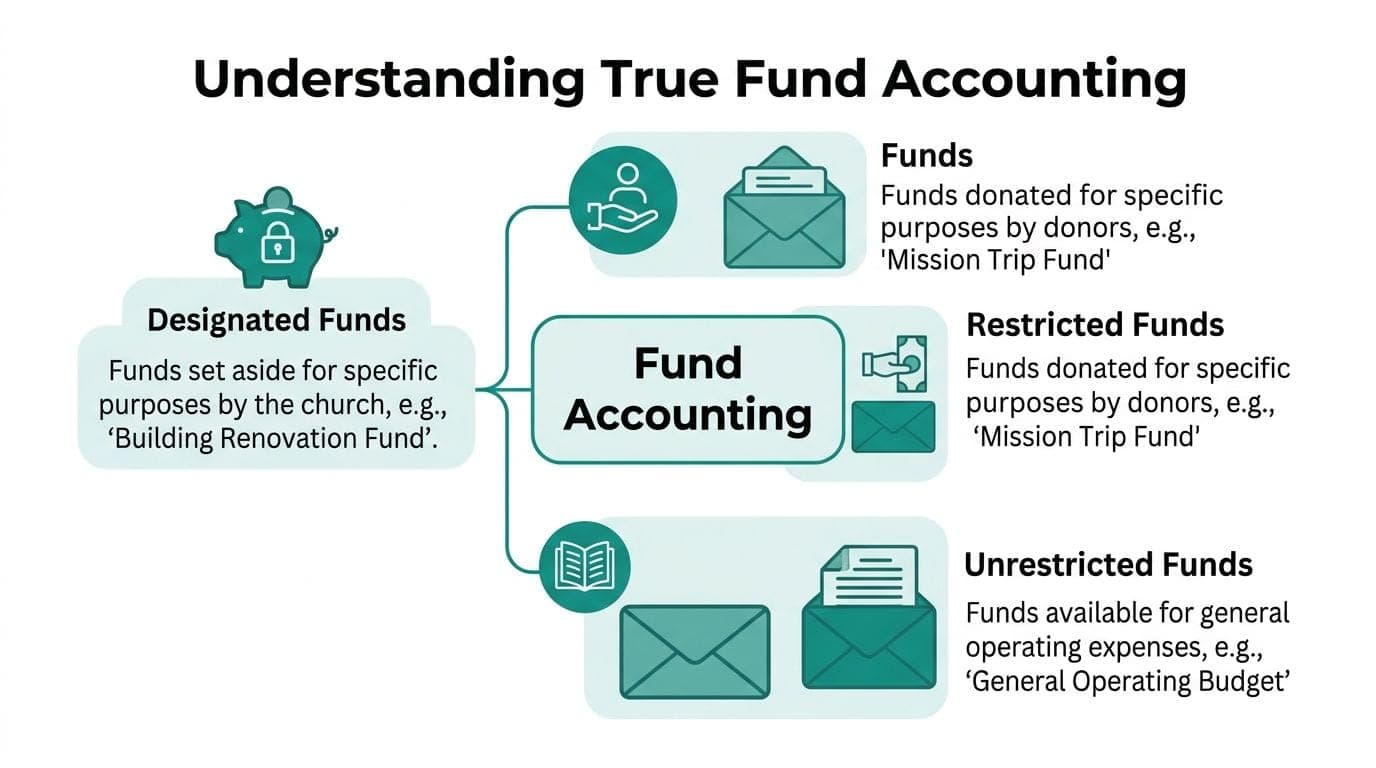
Understanding True Fund Accounting
Church leaders hear the phrase fund accounting often. Many still are not sure what it means in daily practice.
The simplest way to think about it is this. Fund accounting creates digital envelopes for different purposes. One envelope holds general operating money. Another holds missions giving. Another holds a building fund. The money stays separated inside the system, not just labeled after the fact.
The envelope idea makes the difference clear
If a member gives to a mission trip, that money should not drift into payroll or utilities.
With true fund accounting, the system keeps that mission money distinct from the beginning. You do not need memory, sticky notes, or a separate spreadsheet to protect it.
That matters for stewardship as much as bookkeeping. Donors gave with intent. Leaders need confidence that the church can prove those funds were handled properly.
Aplos is often mentioned here because it was built by a CPA and executive pastor for faith-based organizations. According to Kleer’s review of church accounting tools, fund accounting is a cornerstone requirement for church software, and Aplos automates fund tracking without the manual workarounds common in QuickBooks. The same review says this can reduce audit risks by 40-60% and that users report 50% faster month-end closes.
Why classes are not the same thing
QuickBooks users often rely on classes or tags as a workaround. That can help organize reporting, but it is not the same as a system built around funds.
Classes are more like writing labels on envelopes after all the cash has already been tossed into one drawer. You can sort later, but the structure did not protect the money at the start.
True fund accounting begins with the rule that certain dollars belong to certain purposes. That shape affects reporting, approvals, balances, and how your finance team thinks about spending.
If you want a broader nonprofit explanation without heavy jargon, this complete guide to fund accounting for churches walks through the concept clearly.
What this looks like in daily practice
A church usually needs to separate at least three kinds of money:
- Restricted funds that donors gave for a specific purpose
- Designated funds that leaders set aside internally for a purpose
- Unrestricted funds that cover normal operations
When software handles those categories natively, your reports become more trustworthy. Your board can see balances by purpose. Your staff can avoid accidental overspending. Your treasurer spends less time defending numbers that should have been obvious.
For a nonprofit-focused explanation of the accounting side, AlignMint’s article on fund accounting for nonprofits gives a practical overview.
Key idea: Good church accounting software does not just record transactions. It protects the story behind the money.
The Essential Features for Church Financial Management
A church can limp along with basic bookkeeping software for a while. The trouble starts when leaders need answers, not just entries.
The right system should reduce routine work and make your financial picture easier to trust. When you evaluate the best accounting software for churches, I would focus on outcomes first.
Clear restricted fund control
You need to know what money is available, what money is spoken for, and what money should never be touched for general expenses.
This is the first screen I would test in any demo. Can the system show restricted balances without manual cleanup. Can it track grants, designated gifts, and ministry programs in a way your finance committee can follow.
If the answer depends on exporting to Excel, keep looking.
Donor records that talk to accounting
Many churches keep donations in one system and accounting in another. That setup works until reconciliation day.
When giving records and the ledger are disconnected, staff compare reports line by line. That slows month-end close, creates avoidable mistakes, and makes donor questions harder to answer.
A connected donor database helps in plain ways:
- Gift history stays readable when a member asks about past giving
- Receipting gets simpler because the data already lives with the transaction
- Restricted gifts post correctly without re-entry
- Pledges become useful for budgeting, not just development tracking
If you are evaluating this category, look closely at a system with a built-in donor database rather than another bolt-on. AlignMint’s donor management tools show what that connected model looks like inside one platform.
Reports your board can use
A report is only helpful if a non-accountant can understand it quickly.
For churches, that usually means the software should produce clean financial statements by fund, show budget versus actuals, and make it easy to answer follow-up questions. Board members do not want a pile of transactions. They want confidence.
I also look for whether the software can support the kinds of reports churches often need around restricted balances, program spending, and functional expense views. Good software shortens the distance between a question and an answer.
Tip: Before choosing any platform, write down the five questions your board asks most often. Then ask each vendor to show where those answers live.
AI that reduces hunting
AI can be overhyped. Still, some uses are helpful.
According to RecordsKeeper’s review of church accounting software, AI-enhanced automation can generate detailed financial reports and dynamic dashboards. The same source notes that plain-English assistants can answer finance questions and that automated transaction matching can accelerate payment collection by an average of 5 days.
For a time-poor director, that matters less as a novelty and more as relief. You want fewer clicks, fewer exports, and fewer moments where only one staff member knows how to find the answer.
Volunteer and operational visibility
Church administration rarely stops at accounting.
The finance office often needs to know which event generated income, which ministry used volunteer hours, and which campaign drove giving. If volunteers, events, fundraising, and accounting all sit in different systems, you pay a hidden tax in staff time.
A useful church platform should help you connect:
- Events and ticketing with deposits and reconciliation
- Volunteer activity with ministry planning
- Online giving pages with donor records
- Team communication with actual campaigns and follow-up
That is where many software comparisons fall short. They compare ledger features only, even though daily church administration crosses departments.
Security and practical access
Churches often rely on a mix of staff, volunteers, and outside bookkeepers.
That means permissions matter. The finance chair may need reports but not donor edits. A volunteer may need contribution entry but not payroll visibility. A campus pastor may need local ministry balances without seeing everything.
The right software should make those boundaries simple. If access rules feel confusing in the demo, they will feel worse in real life.
A church and school lens when needed
Some ministries operate more than one function under one roof. A church may also run a school, preschool, or after-school program.
That raises the stakes. You need a system that can keep programs distinct while still giving leadership one coherent picture. The software does not need to be flashy. It needs to be orderly.
When these pieces live together, finance gets quieter. That is usually the best sign you chose well.
A Practical Comparison of Leading Software Options
Monday morning often starts the same way. The bookkeeper is matching last weekend’s gifts, someone in ministry ops is exporting event payments from another tool, and a staff member is checking whether the donor list in the CRM matches the names in the giving platform. Nothing is broken. But the process is scattered, and scattered processes get expensive.
That is the lens I would use for any software comparison. Do not ask only, “Which ledger is strongest?” Ask, “How many systems will my team need to keep in sync every week?”
Church accounting software at a glance 2026
| Software | Best For | True Fund Accounting | All-in-One Platform | Starting Price |
|---|---|---|---|---|
| QuickBooks Online | Churches comfortable adapting general accounting software | No native church-specific fund model | No | $30/user/month |
| Aplos | Churches wanting purpose-built fund accounting | Yes | Partial | Not listed here |
| Xero | Small churches wanting a low-cost entry point | No native church-specific fund model | No | $3.75/month |
| Wave | Very small churches needing basic bookkeeping | No | No | Freemium option available |
| ChurchTrac | Churches wanting basic church management and simple finance tools | Basic church-oriented support | Partial | Not listed here |
| Shelby | Larger or multi-campus ministries | Church-focused | Partial | Not listed here |
| ParishSOFT | Catholic parishes and larger church organizations | Church-focused | Partial | Not listed here |
| Tithe.ly | Churches wanting giving-first software with a church app | No | Partial | Not listed here |
| Pushpay | Mid-to-large churches prioritizing mobile giving | No | Partial | Not listed here |
| AlignMint | Churches wanting one system for finance and operations | Yes | Yes | Not listed here |
QuickBooks Online works well for accounting, but churches often add other tools around it
QuickBooks earns its place on many shortlists. Accountants know it. Bookkeepers can usually get started without much retraining. If your church mainly needs general bookkeeping and standard financial statements, it can be a practical fit.
The strain usually shows up later.
Restricted gifts, donor records, events, contribution statements, volunteer activity, and ministry-specific reporting often live outside QuickBooks. That means your team builds a process around the software. One system collects money, another tracks people, another manages events, and finance becomes the department that ties the knot at month-end.
QuickBooks can still be the right choice. You just need to count the cost of the extra stitching.
Aplos fits churches that want accounting built around funds first
Aplos makes more sense for churches that feel the pain in fund tracking before they feel it anywhere else. It was built for organizations that need cleaner separation between designated money, general operations, and reporting by fund.
That matters because fund accounting works like labeled envelopes inside one church wallet. The money still belongs to the church, but leadership needs to see which dollars were set aside for which purpose. A general business tool can imitate that with enough setup. A church-focused system starts closer to how ministry money is used.
If your finance office is asking for better fund visibility, Aplos deserves a close look. If your bigger issue is the handoff between giving, communications, events, and accounting, fund-based bookkeeping alone may not solve the daily friction.
The subscription price is only part of the cost
I have seen churches save money on software and lose it again in labor.
A lower monthly bill can look wise until someone is exporting donation batches, correcting duplicate donor records, chasing event deposits, and rebuilding reports in spreadsheets for the board packet. None of those tasks appear on a pricing page. They still show up in payroll.
This is the hidden tax of a fragmented tech stack. Each separate tool may be good at its own job. Together, they can create extra reconciliation, duplicate data entry, and uncertainty about which report is current.
That is why the better question is often operational, not just financial. How many hours does your team spend keeping systems aligned?
How an all-in-one approach changes the equation
An all-in-one platform helps most when your church is tired of handoffs.
If accounting, giving, member records, volunteer coordination, and events live together, your team spends less time acting like an air traffic controller between systems. A gift can connect to the donor record. An event payment can land in the right financial flow. A ministry leader can see activity without asking finance to rebuild the story from three exports.
That is the practical appeal of AlignMint in this comparison. Its role here is not “another accounting tool.” It represents the category of church software that tries to reduce operational drag by keeping finance, fundraising, and people data in one place.
If you want to compare that model more closely, this guide to fund accounting software for nonprofits helps clarify the trade-offs, and these data import setup instructions for bringing records into AlignMint show what consolidation can look like in practice.
How I would narrow the list
I would sort these options by where your staff feels friction most often.
If your church mainly needs bookkeeping, QuickBooks, Xero, or Wave may cover the basics. If your biggest concern is cleaner fund tracking and church-specific reporting, Aplos or another church-focused finance product may be the better fit. If your recurring problem is the operational cost of using separate systems for donations, events, communications, and accounting, an all-in-one platform should move much higher on your list.
The goal is not to buy the software with the longest feature page. The goal is to remove repeat work.
If your current systems are already creating migration headaches, a partner that specializes in efficient data migration can help you consolidate without carrying every old mess into the new setup.
How to Plan Your Move to New Software
Switching systems can feel heavier than it is. Most of the stress comes from not knowing what must move, what can wait, and who should own the process.
A calm transition starts with one decision. Pick a point person.
That person does not need to be your most technical staff member. They need to be organized, trusted, and able to gather answers from finance, ministry leaders, and whoever handles donations.
Start with the records you need
Do not move everything just because it exists.
Most churches need a focused set of information first:
- Current chart of accounts that reflects how you operate now
- Open balances and fund balances that leadership can verify
- Active donor records with current giving history
- Vendor and bill information needed for ongoing operations
- Essential reports your board expects each month
That smaller scope reduces confusion. You can archive older material separately if the new system allows historical reference in another form.
Clean before you carry
Migration is the wrong time to bring over duplicate donors, outdated funds, or unclear naming.
Take one pass through your current records and fix obvious clutter. Merge duplicate contacts. Retire unused funds. Standardize ministry names. These are boring tasks, but they pay off quickly.
If your team wants a plain-language overview of what a thoughtful migration process looks like, this guide to efficient data migration is helpful background.
Give your team a short runway
Software changes fail when leaders expect instant comfort.
Set a modest timeline. Let finance staff practice common tasks first. Show ministry leaders only what they need. Keep the first month simple, with familiar reports and a small number of new habits.
I also recommend documenting three core workflows on one page each:
- How gifts are entered and reviewed
- How bills are approved and paid
- How board reports are generated
That gives volunteers and staff a common reference point.
Choose software you can stay with
Many churches switch too late, then switch again too soon.
According to ZipBooks’ article on free church accounting software, 52% of churches outgrow their basic software within 2 years due to weak support for restricted funds or program tracking. The same source argues that choosing a system with a free or low-cost entry tier that expands with you can reduce that churn.
That is wise counsel. The ultimate goal is not just a successful move. It is avoiding another move.
For practical file prep and import steps, AlignMint’s documentation on importing data gives a useful picture of the information teams usually gather before a transition.
A steady rule: Move to the system you expect to need in a few years, not just the one that feels easiest this month.
Your Next Steps to Financial Clarity
Most churches do not need more software. They need fewer gaps.
The best accounting software for churches gives you confidence that restricted money is protected, donor records match the books, and leadership can see the truth without waiting for a spreadsheet rescue.
A practical next step is to make a short checklist. Write down the essential features for your church. Fund accounting usually belongs at the top. Connected donor records, clear board reporting, and fewer disconnected tools usually follow close behind.
Then evaluate your current setup. If your team spends too much time reconciling between systems, that is not a small irritation. It is a signal that your structure is costing you time and trust.
Finally, look at options with the least operational drag. If you want a nonprofit-focused refresher before deciding, this guide to fund accounting for nonprofits is a helpful place to keep learning.
The right move should make your week quieter. That is usually how you know it is the right one.
Frequently Asked Questions About Church Accounting Software
A finance committee meeting often reveals the underlying problem. Giving lives in one system, accounting lives in another, payroll sits somewhere else, and staff keep a backup spreadsheet because no one fully trusts the handoff between tools. The question usually sounds like software selection. The true issue is operational drag.
Can a church use general accounting software and still be fine
Yes, for a while.
A small church with straightforward finances can often get by with general accounting software in the early stages. The strain usually shows up later, when designated gifts, donor records, payroll details, and ministry reporting start living in separate places.
General software can handle transactions. Church finance asks for more than transaction tracking. It asks you to separate restricted money clearly, connect giving to the books, and explain the numbers to staff, board members, and volunteers without building a second system in spreadsheets.
That is why the better question is practical. How much staff time are you spending stitching tools together, checking exports, and correcting small mismatches before they become trust problems?
What should a church look for first
Start with how the church receives and uses money.
If the system cannot separate restricted and unrestricted funds cleanly, everything after that gets harder. Board reports take longer. Year-end questions multiply. Designated gifts become something your team has to remember instead of something the software helps enforce.
After that, look at donor management, reporting, bank reconciliation, and whether the system reduces duplicate entry across departments.
A helpful comparison is this. Good software should work like a well-labeled storage room. Each dollar has a clear place, each record is easy to find, and no one has to guess what belongs where.
Do churches need all-in-one software
Some do. Some do not.
If your church already has a small set of tools that share data cleanly and your team is not spending much time reconciling between systems, a focused accounting product may be enough.
But many churches are not dealing with one bad tool. They are dealing with five decent tools that do not speak the same language. That creates hidden costs. Staff spend hours importing and exporting data. Donation records and accounting records drift apart. Event payments, member records, and contribution statements require manual checking.
An all-in-one platform can reduce that friction because accounting, fundraising, and member management pull from the same core records. Fewer handoffs usually means fewer mistakes and a calmer month-end close.
What about payroll
Payroll often becomes the deciding factor.
Some systems include payroll. Others connect to outside providers. Either model can work if the setup is clear from the start and your team knows exactly who handles tax filings, pay runs, and year-end forms.
Churches should also ask about clergy housing allowances, benefits, and any added complexity from a school or preschool. Payroll problems are rarely caused by one bad setting. They usually come from unclear ownership between systems.
Is cloud software safe enough for church finances
Yes, if the vendor can explain its controls clearly.
Churches store sensitive donor information, giving history, bank details, and staff payroll data. A cloud system should provide role-based permissions, audit trails, and clear security policies. Staff should only see what they need to do their jobs. Volunteers should not have broad access because it is convenient.
Ask direct questions. Who can view donor giving? Who can edit bank information? What happens if a staff member leaves tomorrow? Clear answers matter more than polished sales language.
Can one system handle both a church and a school
Often, yes.
A church and school setup needs separation and visibility at the same time. You need to track each activity accurately without blending them into one blurry set of numbers. Fund accounting works like having separate envelopes inside one larger file drawer. Leadership can review the whole ministry, while each program still keeps its own boundaries.
The same idea applies to multi-campus churches and related ministries. The software should let you report by entity, campus, or program without forcing your team to rebuild those reports by hand every month.
What if our church is very small
Small churches usually feel this pressure first because one person may be wearing three hats.
That makes efficiency even more important. A smaller church does not need a complicated system, but it does need a system that handles designated gifts correctly and does not create extra admin work through disconnected tools. Choosing something that fits now and still supports growth later can save you from a painful cleanup project in two years.
Simple is good. Simple and fragmented is expensive.
How do I switch church accounting software without losing data
Start by exporting your chart of accounts, giving history, and donor records from the current system. Time your switch after a major close (month-end or year-end) so your opening balances are clean. Use the nonprofit data migration hub and migration checklist to track each step. Most transitions take two to four weeks with a short parallel-run period.
Can I move from Realm or Planning Center to an all-in-one system
Yes. Realm giving, member, and group data exports as CSV. Planning Center Giving exports donation records, but Planning Center does not include accounting — so you are adding a capability, not replacing one. See AlignMint vs Realm and AlignMint vs Planning Center for side-by-side feature comparisons.
What about moving from ChurchTrac
ChurchTrac exports member, contribution, and group records. Because ChurchTrac uses single-entry bookkeeping, your transition to a double-entry fund accounting system will involve setting up a proper chart of accounts and opening fund balances. See AlignMint vs ChurchTrac for a detailed comparison.
Related:
- Church accounting software for small churches - Monthly bookkeeping checklist and fund accounting basics
- Free church accounting software options - Budget-first comparison for small churches
- Church fund accounting: why QuickBooks isn't enough - Classes vs true funds
- Fund accounting software for nonprofits - Compare approaches before you buy
- Fund accounting - How AlignMint handles funds and restricted gifts
Frequently Asked Questions
Ready to try AlignMint with your nonprofit?
Start free — set up donor tools, giving pages, and Minty. Upgrade when you need accounting.