

What Is Online Giving
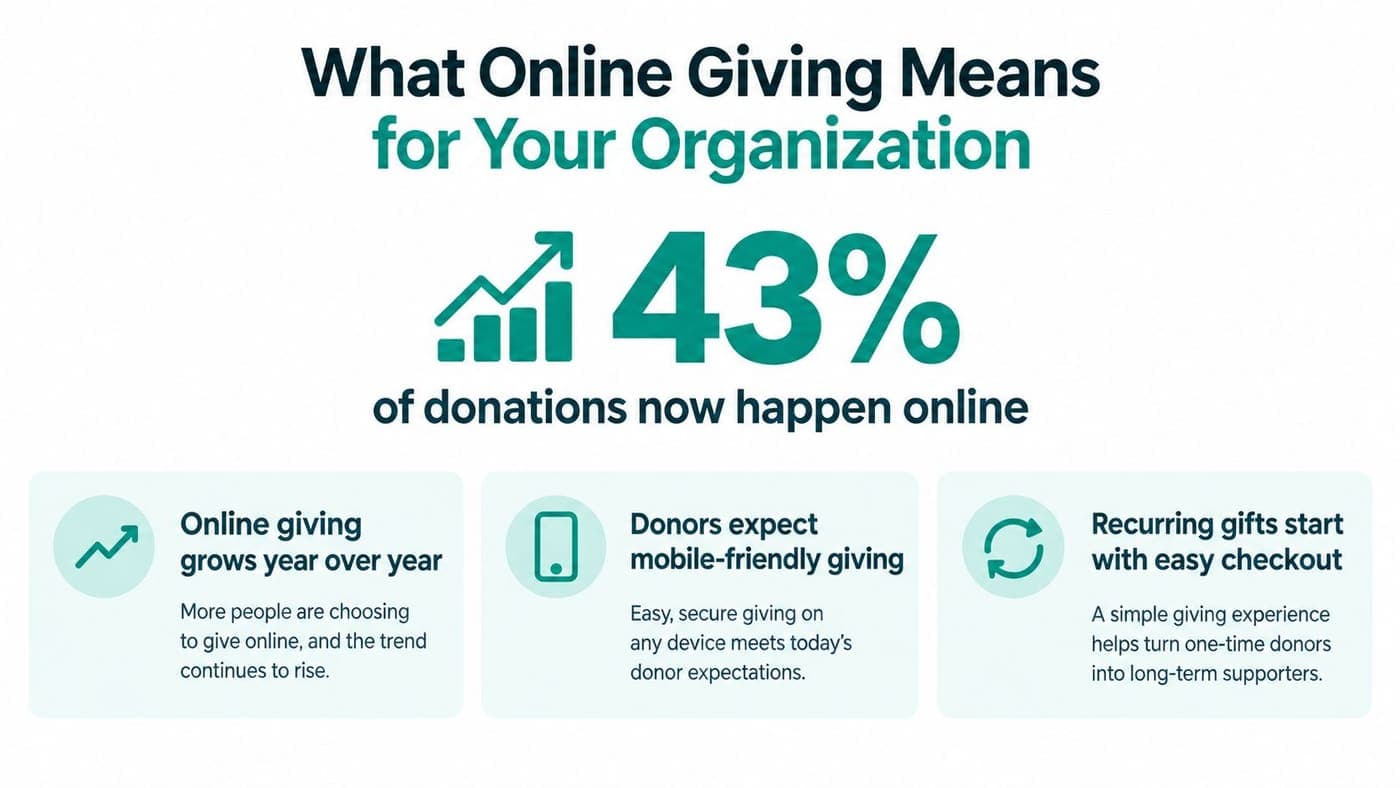
Online donations made up 43% of total nonprofit revenue in 2026, compared with 35% in 2019, showing how quickly giving has moved online. Online giving is the process of inviting, receiving, recording, and thanking donors through digital tools rather than relying only on checks, cash, or in-person payments.
You may be facing that shift right now. Your website has a donation button, your board wants cleaner reports, and donors ask whether they can give from a phone or schedule a recurring gift. The important question isn't whether online giving exists, but how its fees, payment choices, mobile experience, and seasonal patterns affect the money your mission receives.
Quick Answer: Online Giving
Online giving is the full path from a digital ask to a recorded gift: the page, the payment, the fund, the receipt, and the follow-up. A donate button that never reaches the ledger only solves the first step.
Start with nonprofit payment processing and donation pages. For the page itself, see nonprofit donation page best practices.
What Online Giving Means for Your Organization
Online giving is more than a donation form. It includes the page where a supporter chooses an amount, the payment service that approves the transaction, the records your team maintains, and the communication that follows. A donor might give through your website, a campaign email, a text message, or a branded page shared on social media.
The growth is substantial. Online donations represented 43% of nonprofit revenue in 2026, up from 35% in 2019, an 8-point rise over seven years according to this nonprofit fundraising benchmark. For your organization, that means digital giving belongs in the same operational conversation as budgeting, receipting, donor stewardship, and fund accounting.
The practical definition
Suppose a supporter reads your year-end appeal during a train ride. She opens the link on her phone, selects the food program fund, chooses a recurring gift, pays with a digital wallet, and receives an email receipt. Your team then needs that gift connected to the right donor record, fund, bank settlement, and follow-up message.
That entire chain is online giving. A button that sends money to a general account, without identifying the donor or destination fund, solves only one small part of the job.
Practical rule: Judge an online giving system by what happens after the donor clicks “Give,” not only by how attractive the page looks.
Why the definition matters
A digital gift can affect several departments at once:
- Finance needs accurate fund allocation, settlement records, and reconciliation.
- Fundraising needs donor history, recurring gift management, and timely acknowledgments.
- Programs need visibility into restricted gifts and campaign results.
- Leadership needs reliable information for cash-flow planning and board reporting.
Churches may need separate designations for missions, operations, or building projects. Schools may need gifts directed toward scholarships, athletics, or classroom programs. Fiscal sponsors need clear records for each sponsored project, not one blended donation balance.
That's why replacing a check with a card payment isn't the whole transition. Your organization is changing how money enters the institution, how people experience generosity, and how your staff protects trust.
How Online Giving Works Behind the Scenes
A completed online gift usually passes through three connected layers. Understanding them makes vendor conversations less confusing, because you can ask which system handles each responsibility.
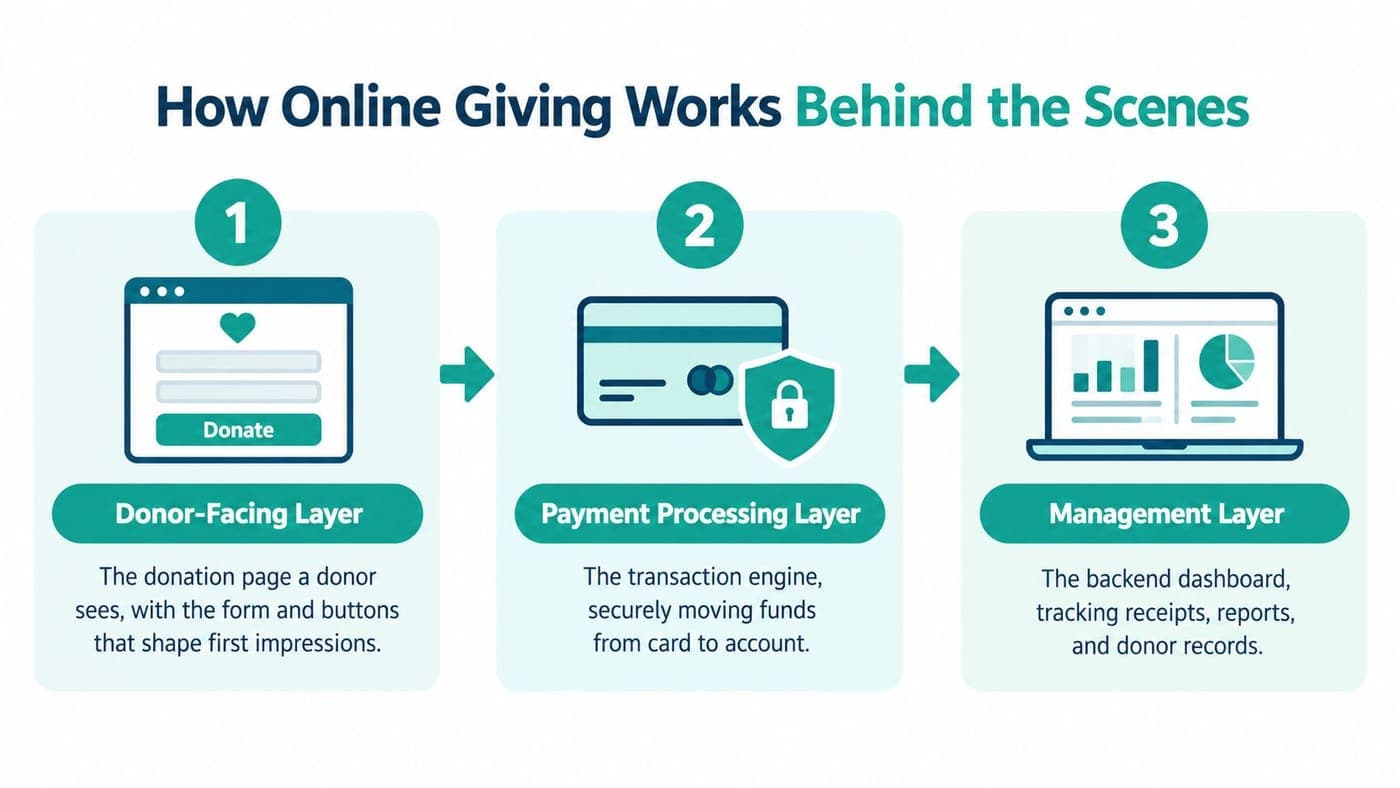
The donor-facing layer
This is the page your supporter sees. It should explain the purpose of the appeal, display your organization's identity, make the amount easy to enter, and reduce unnecessary questions.
The page may also offer fund selection, one-time or recurring giving, card payments, bank transfers, and digital wallets. Each choice affects how quickly a donor completes the gift and whether the information you receive is useful later.
A mobile donor shouldn't need to pinch, zoom, or search through a long form. A desktop donor may want more context, while a phone user may need a short path from appeal to payment.
The payment-processing layer
After the donor submits the form, a payment processor checks and authorizes the transaction. It handles sensitive payment details and communicates with the donor's bank or card network.
The processor also creates the fee structure that affects your net proceeds. A platform may advertise no subscription fee, but payment processing still has a cost whenever a card or bank transaction moves through the system.
You should confirm when funds settle, how failed payments are reported, whether refunds are visible in your records, and how disputed transactions are handled. Those details matter during reconciliation, especially when several campaigns or restricted funds are active.
The management layer
The management system connects the gift to your operational records. It can identify the donor, assign the chosen fund, issue a receipt, track recurring commitments, and prepare reports for finance and fundraising.
For a gift to be useful, the amount and destination must reach the right ledger and donor profile without repeated manual entry. A platform with integrated payment capabilities can connect the donor experience with those internal processes.
Before choosing a provider, ask for a complete transaction walkthrough. You should see the donor page, processor record, settlement report, receipt, fund entry, and donor history as one connected journey.
The Real Cost of Accepting Online Donations
Online giving has two separate cost layers. The first is a platform fee, if the provider charges one. The second is the payment-processing fee charged for moving the money.
A public review reports nonprofit Stripe pricing at approximately 2.2% plus $0.30 per transaction, while PayPal charity pricing is approximately 1.99% plus $0.49. These figures can vary by arrangement, so review the current agreement before making a decision, and consult the nonprofit payment processing guide when comparing providers.
Why smaller gifts feel the fee more
The percentage applies to the gift amount, but the fixed charge stays the same. That means a $0.30 or $0.49 transaction fee consumes a larger share of a small donation than a larger one.
Using the cited rates, the comparison looks like this:
| Payment Method | Platform Fee | Processing Fee | Effective Cost on $50 Gift | Effective Cost on $25 Gift |
|---|---|---|---|---|
| Stripe nonprofit rate | Not specified | 2.2% + $0.30 | $1.40 | $0.85 |
| PayPal charity rate | Not specified | 1.99% + $0.49 | $1.49 | $0.99 |
The table shows processing cost only. It doesn't include a separate platform charge, donor-covered fee, refund cost, or other contractual expense.
Decisions that protect net revenue
You don't need to push donors toward larger gifts in an uncomfortable way. You can make choices that improve the economics while respecting donor preference:
- Offer recurring giving: A supporter can schedule manageable contributions, reducing the need for repeated appeals.
- Present clear suggested amounts: Thoughtful defaults can help donors choose without guessing.
- Provide bank payment options: Some donors prefer direct bank payments, and the fee structure may differ from card processing.
- Review platform charges separately: “Free” often means no subscription fee, not no transaction cost.
- Reconcile by fund: Correct allocation prevents finance staff from spending time repairing avoidable errors.
Recurring gifts can also support more predictable planning. One nonprofit statistics summary reports that 31% of online fundraising revenue comes from recurring gifts, with an average monthly recurring gift of about $25. Those figures appear in Zeffy's nonprofit statistics summary, and they illustrate why a modest scheduled gift can matter over time.
Key Features That Strengthen Your Donor Experience
The best online giving experience reduces uncertainty for the donor and administrative effort for your team. A supporter should know where the gift is going, how the payment worked, and what happens next.
Mobile design deserves particular attention. Mobile revenue grew 48% in 2025, while overall online revenue grew 15%, according to NonProfit PRO's digital giving benchmark coverage. That difference suggests you shouldn't judge your donation page from a desktop computer alone.
Start with the donor's device
Open your page on a phone and test it as if you were unfamiliar with your organization. Check whether the form loads quickly, whether the amount buttons are easy to tap, and whether payment options appear without excessive scrolling.
Digital wallets can shorten the payment process for people who don't want to type card details. PayPal, Google Pay, Apple Pay, and Venmo are commonly offered across donation pages, though availability depends on the provider and account setup.
Your online donation page tools should support clear branding, recurring options, and a focused path to completion. The page should also work for donors who prefer a desktop browser or a bank transfer.
Make recurring giving understandable
Recurring giving works best when the donor can see the schedule clearly. Show whether the gift repeats monthly, how the donor changes or cancels it, and where the confirmation will arrive.
Don't hide recurring options behind complicated language. A simple choice between one-time and recurring giving lets the supporter decide without feeling pressured.
Connect trust with administration
An immediate receipt reassures the donor that the transaction succeeded. Your team also benefits when that receipt records the legal organization name, gift date, amount, tax status, and whether the donor received goods or services.
For U.S. charitable gifts over $250, the charity must provide a formal receipt, and IRS guidance allows a written communication such as a receipt, letter, or email. The New York Attorney General's charitable giving guidance explains the importance of using a secure HTTPS website and verifying that the site belongs to the intended charity.
Your platform should also preserve the fund designation and donor history. That connection supports true fund accounting, not merely a list of payments. It helps you answer practical questions about restricted balances, campaign performance, and donor stewardship without rebuilding the records manually.
Comparing Optimized and Basic Donor Journeys
A basic donation journey can still accept money. The difference appears in the moments before and after payment, when donors decide whether to continue, trust the process, and give again.

The basic journey
A supporter receives an email about your food pantry and clicks a generic donation link. The page has your organization's name but little explanation, a long form, one payment method, and no clear way to choose the relevant program.
The donor enters information on a phone, encounters a field that doesn't fit the screen, and wonders whether the gift went through. A receipt arrives later, but it doesn't identify the program clearly, so your finance team must interpret the gift during reconciliation.
This journey may succeed when the donor is highly motivated. It places most of the work on the donor, however, and creates more opportunities for confusion.
The considered journey
A different supporter opens a branded appeal on a phone. The page explains the immediate purpose, offers clear suggested amounts, shows a choice between one-time and recurring giving, and lets the donor direct the gift to a named fund.
The donor chooses a payment method already stored on the device. An immediate receipt confirms the transaction, identifies the organization, records the destination fund, and provides a contact point for questions.
The difference isn't decoration. It's the removal of friction and uncertainty.
| Donor moment | Basic journey | Considered journey |
|---|---|---|
| Appeal context | General request | Specific program and purpose |
| Payment experience | Limited or lengthy form | Mobile-friendly choices |
| Fund direction | Unclear or unavailable | Named fund selection |
| Confirmation | Delayed or incomplete | Immediate, informative receipt |
| Follow-up | Same message for everyone | Donor history informs communication |
Use the nonprofit donation page best practices to review your own page as a donor would. Ask a board member or volunteer to complete a test gift without assistance, then record every question or hesitation.
The operational difference
The optimized journey also helps staff. When the donor selects the correct fund and the system stores the transaction against the right record, finance doesn't need to investigate every ambiguous payment.
Marketing can send a relevant thank-you message. Fundraising can identify recurring supporters. Program leaders can see whether a campaign is attracting designated gifts, provided your reporting structure is designed correctly.
No platform can replace a clear mission or a credible appeal. It can, however, prevent a committed supporter from abandoning a gift because the process feels confusing or untrustworthy.
Choosing the Right Platform for Your Nonprofit
Choose a platform based on the work your team must complete after a donor gives. A payment processor may handle transactions well, while a fundraising tool may communicate effectively, but you need to understand what happens between those systems.
Start with the financial foundation. If your organization manages restricted funds, grants, programs, or fiscal sponsorships, ask whether the platform provides true fund accounting rather than merely using QuickBooks classes as a workaround.
Questions worth asking
- Fund accounting: Can finance see restricted balances, grant activity, and program costs without rebuilding reports?
- Donor management: Does the donor record connect gifts, pledges, receipts, and communications?
- Volunteer management: Can staff track skills, availability, groups, background checks, and hours?
- Marketing: Are email, text campaigns, events, ticketing, and donation pages connected?
- Team communication: Can staff share accurate information without exporting files between tools?
- Pricing: Is there a free tier for nonprofits under $100K, and are users charged separately?
- Intelligence: Can an AI assistant answer questions from your actual organizational data?
Churches and schools may need different fund structures, event workflows, and communication patterns than a community nonprofit. Fiscal sponsors need project-level reporting, while executive directors often need a concise view of cash, donors, volunteers, and campaigns.
For a broader comparison, review this guide to online donation software. Look for a system that brings accounting, CRM, volunteers, events, and marketing together without forcing your team to become software administrators.
AlignMint combines true fund accounting, donor and volunteer management, online giving pages, events, marketing tools, Minty AI, fiscal sponsorship support, and team communication in one platform. It offers a free tier for nonprofits under $100K and plan-based access without per-seat fees, so you can compare its structure with the separate tools you use today.
If online giving has become part of your revenue, AlignMint can connect donation pages, fund accounting, donor records, volunteers, events, marketing, and team communication in one workspace. Review the platform at AlignMint, then map its features against your current fees, manual reconciliation, and donor follow-up process.
Ready to try AlignMint with your nonprofit?
Start free — set up donor tools, giving pages, and Minty. Upgrade when you need accounting.