
Best Event Ticketing System for Nonprofits Compared
You're three days from the annual benefit, tickets are moving, and your finance lead is already asking where the revenue belongs. Meanwhile, volunteers need a clean guest list, development wants donor follow-up, and your marketing staff are copying information between systems.
The best event ticketing system for a nonprofit isn't necessarily the one with the lowest advertised fee. It's the one that protects net proceeds, reduces staff time, respects donor intent, and gives guests an easy buying experience. This guide compares the leading options, explains the true cost of ticketing, and gives you a practical recommendation by nonprofit size and type.
Quick Answer: Best Event Ticketing System for Nonprofits
The best event ticketing system for a nonprofit is the one that protects net proceeds and posts tickets, donations, and restricted revenue to the right fund and donor record. Compare fee math, staff work after checkout, and whether finance, development, and volunteers can work from the same event.
Compare event ticketing software for nonprofits with events. For day-of operations, see ticket management.
Introduction That Promises a Clear Answer
Choosing ticketing software can feel like choosing another responsibility your team doesn't have time to manage. One platform sells tickets well, another handles email, a third stores donor records, and your accounting system sits separately, waiting for someone to reconcile everything later.
That arrangement may look affordable during planning. It becomes expensive when staff manually export attendance, update donor records, assign revenue to funds, answer payment questions, and prepare reports after the event. The ticket checkout works, but the organization carries the administrative burden.
The online event ticketing market has been estimated at USD 55.40 billion in 2022, with a projection of USD 89.44 billion by 2030, representing a 6.0% CAGR from 2023 through 2030, according to Grand View Research's online event ticketing market analysis. A separate forecast places the broader global event ticketing market at USD 56.3 billion in 2023 and USD 82.5 billion by 2027, also cited in that analysis.
Those figures matter because your attendees already expect fast mobile checkout, reliable payment confirmation, digital tickets, and self-service support. Your team needs the same level of reliability behind the scenes, but with nonprofit requirements added.
The decision standard that matters
I judge ticketing systems using three questions:
- What reaches your mission? Look at net proceeds after platform and processing fees.
- How much work remains? Count manual reconciliation, donor entry, volunteer coordination, and follow-up.
- What happens after checkout? The system should support fundraising, reporting, communication, and event recovery.
An inexpensive checkout tool can still cost more if it forces your staff to buy separate donor, accounting, volunteer, and marketing software. A more integrated system can produce better value even when its ticket fee isn't the lowest headline number.
Practical rule: Calculate the cost of the entire event workflow, not just the price shown beside “ticketing.”
You'll finish this guide with a clear fit-based recommendation. Eventbrite, Bloomerang, Neon One, and OneCause each have legitimate strengths, while an all-in-one platform such as AlignMint fits organizations that want ticketing connected to fund accounting, CRM, volunteers, marketing, and giving.
What the Best Event Ticketing System Does for Nonprofits
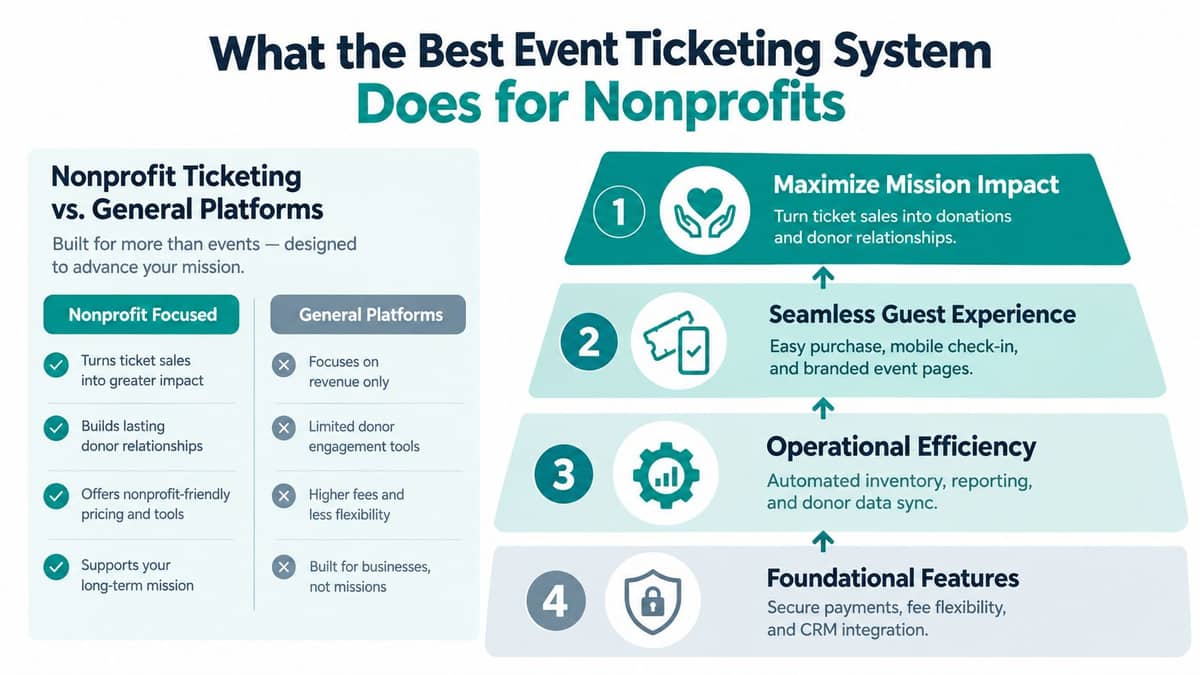
A nonprofit ticketing system should turn attendance into useful relationships and clean financial records. A general event platform may stop after payment confirmation, but your work continues through check-in, receipting, reconciliation, donor follow-up, volunteer coordination, and reporting.
Start with the guest experience
Your guests should find the event page quickly, understand ticket choices, and complete checkout from a phone without confusion. Use branded pages, clear ticket descriptions, promo codes, secure payment processing, and immediate confirmation.
QR check-in should also work for volunteers who aren't technology specialists. If you're comparing scanning options, this guide to the best QR code for event check-in offers useful practical context.
Refunds and exchanges deserve equal attention. Weather, illness, venue changes, and safety concerns can force a nonprofit to adjust plans, so your system should let authorized staff update ticket status and communicate changes without rebuilding the event.
Connect money to purpose
Ticket revenue may support a general program, a restricted campaign, a scholarship, a school activity, or a church ministry. The system should preserve those distinctions rather than leaving finance staff to reconstruct them from spreadsheets.
The IRS Form 990 reports net assets without donor restrictions on Part X, line 27, and net assets with donor restrictions on line 28, as explained in this overview of restricted-fund nonprofit accounting. Your event reports should make the same distinctions visible before the numbers reach the financial statements.
Look for a system that connects ticket purchases, donations, refunds, payment records, and fund assignments. AlignMint's events and ticketing feature brings registration, tickets, check-in, attendance, and event revenue into one workflow.
Give staff one operating picture
Your development team needs donor history. Your volunteer coordinator needs assignments and attendance. Your finance team needs reconciled revenue. Your marketing team needs a usable audience for reminders and follow-up.
The essential capabilities include:
- Mobile checkout: Let guests purchase without needing a computer.
- Capacity controls: Prevent overselling and show accurate availability.
- Flexible pricing: Support standard tickets, sponsorships, complimentary admissions, and promo codes.
- Donation flows: Let supporters add a gift without creating a second confusing transaction.
- Reporting: Separate ticket income, donations, refunds, and restricted purposes.
- Communication: Send confirmations, reminders, updates, and follow-up messages from connected records.
A ticketing system that meets these needs does more than admit people. It helps your organization preserve relationships, protect financial accuracy, and spend less time repairing disconnected data.
How Leading Nonprofit Ticketing Platforms Compare
The strongest nonprofit options differ in emphasis. Eventbrite is known for quick setup and public event discovery. Bloomerang, Neon One, and OneCause place more attention on fundraising operations and donor relationships, though the depth of their ticketing and accounting workflows varies.
Independent benchmark-style comparisons score nonprofit platforms across feature depth, ease of use, and value. One 2026 review gave Bloomerang 9.1 out of 10, Eventbrite 8.8, Neon One 8.5, and OneCause 8.2, using a ten-point scale in its nonprofit ticketing software comparison.
| Platform | Feature Depth Score | Ease of Use | Value and Fee Model | Best For |
|---|---|---|---|---|
| Bloomerang | 9.1/10 | Strong for nonprofit teams | Review-based value score, confirm current ticket and processing terms | Organizations prioritizing donor engagement |
| Eventbrite | 8.8/10 | Fast event setup | Paid tickets use percentage, fixed, and processing fees | Public events needing marketplace discovery |
| Neon One | 8.5/10 | Designed for nonprofit workflows | Review-based value score, confirm current package and fees | Teams seeking fundraising and constituent tools |
| OneCause | 8.2/10 | Fundraising-oriented | Confirm event, auction, and processing terms | Fundraising events and campaigns |
| AlignMint | Not included in that benchmark | All-in-one nonprofit workflow | Free tier for nonprofits under $100K, with included operations features | Teams wanting accounting, CRM, volunteers, events, and marketing together |
Where each platform fits
Eventbrite earns its place when you need a public event page and built-in discovery. Its marketplace can help organizations reach people who are already searching for events, and its setup is familiar to many attendees. The tradeoff is that your nonprofit may need separate systems for donor records, fund accounting, volunteer management, and fundraising follow-up.
Bloomerang is a sensible choice when donor engagement sits at the center of your work. Its nonprofit orientation can be valuable for teams that want fundraising context around event participation. Confirm whether its event, accounting, volunteer, and marketing workflows match your specific operating model.
Neon One suits organizations looking for a broader nonprofit management environment. It can be worth considering when donor data and fundraising activities need more attention than public event discovery. Review the exact ticketing, payment, reporting, and integration details before committing.
OneCause is particularly relevant for fundraising-centered events. Its focus can help teams running auctions, campaigns, and donor experiences, but you should test how well it handles everyday events, restricted funds, volunteer operations, and ongoing marketing.
Choose based on the work after the sale. The strongest ticketing brand isn't automatically the strongest nonprofit operations system.
AlignMint belongs in the comparison when your priority is reducing the number of systems your team maintains. It combines accounting, CRM, volunteers, events, marketing, and giving, with plan-based access and no per-seat fees. You can also review the broader differences in this nonprofit software comparison.
Guest access deserves attention too. If your venue needs low-friction entry beyond ticket scanning, research options such as passwordless access for venues alongside your ticketing requirements.
True Cost of Ticketing and What It Means for Net Proceeds
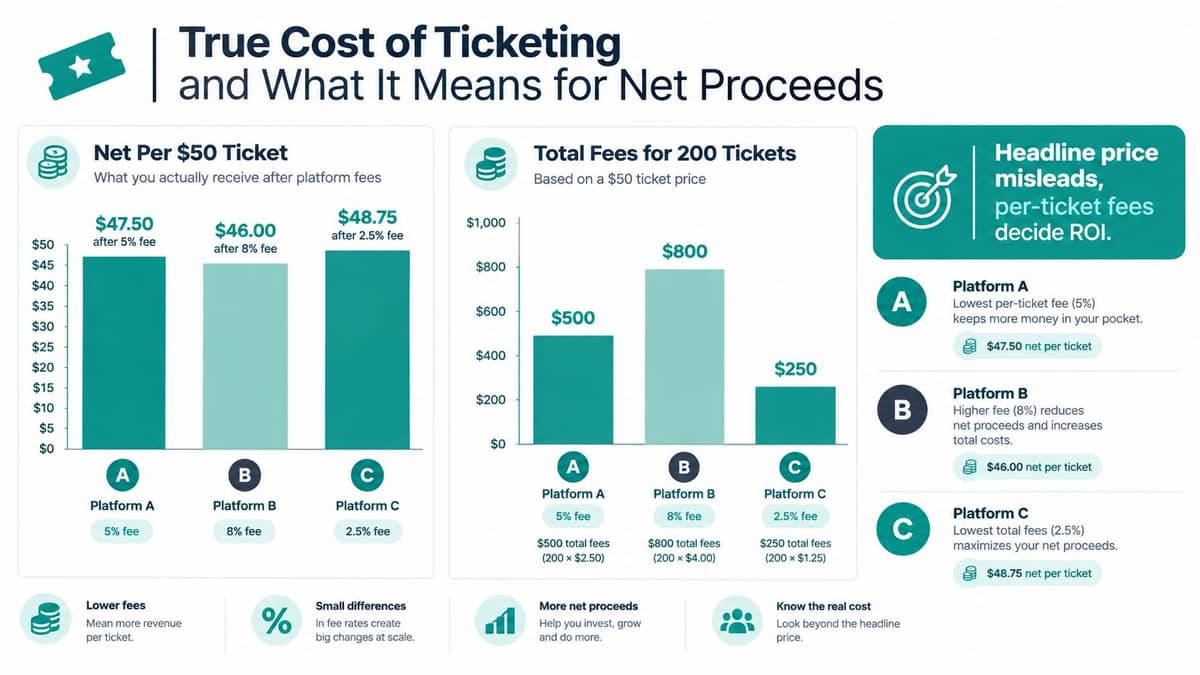
The cheapest-looking ticketing platform can reduce your event's financial return. Your calculation should include the platform fee, fixed per-ticket charge, payment processing, donation handling, refunds, add-ons, and the staff time required to move data into other systems.
One nonprofit comparison found total fees on a $25 ticket of $1.89 for TicketPeak, $2.00 for Ludus, and $2.01 for Arts People, as reported in this event registration system comparison. Another review noted that competing platforms often charge at least $225 in fees on a $10,000 event, which shows why the fee model matters at event level.
Use the full checkout equation
For each ticket, calculate:
Ticket price + donor gift = gross checkout amount
Then subtract:
Platform fee + payment processing + optional service charges = net proceeds
Run that equation separately for tickets and donations. A donor gift may have different handling from an admission charge, and some platforms fund a 0% platform-fee model through tips or low flat fees, as described in this nonprofit ticketing software fee comparison.
Eventbrite's U.S. paid-ticket pricing is listed as 3.7% plus $1.79 per ticket, with 2.9% processing, in that same comparison. Fixed fees matter especially when ticket prices are modest, because the fixed charge consumes more of each sale.
The provided chart illustrates the principle with a $50 ticket: one example leaves $47.50 after a 5% fee, another leaves $46.00 after an 8% fee, and another leaves $48.75 after a 2.5% fee. For 200 tickets at $50, the illustrated total fees are $500, $800, and $250, respectively.
Include staff cost in your decision
A standalone checkout tool may appear cheaper, but your team could still need to:
- Reconcile payments: Match deposits, refunds, and fees manually.
- Update donor records: Move ticket buyers into the CRM.
- Assign funds: Separate restricted and unrestricted event revenue.
- Coordinate volunteers: Export names, shifts, and attendance.
- Send follow-up: Build a separate audience for reminders and appeals.
That work has a cost even when no invoice appears. Compare total net proceeds after fees and staff effort, then check whether donations, CRM, fund accounting, and marketing are included.
You can review AlignMint's current package structure and included features on the AlignMint pricing page. Ask every vendor for a written estimate using your real ticket prices, expected donation mix, refunds, and payment method.
Security Reliability and Integrations That Save Staff Time
Security matters because a ticket transaction carries more than money. It may include a donor's contact information, attendance history, payment confirmation, and the purpose attached to a gift.
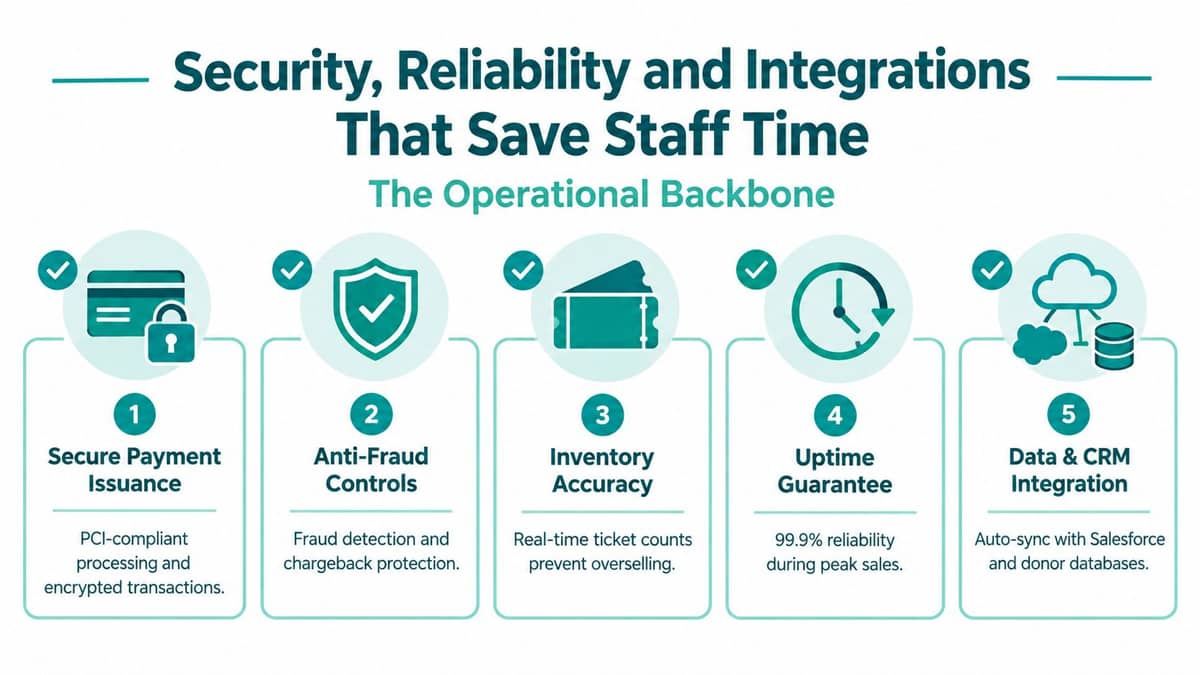
A reliable system also prevents operational embarrassment. Accurate inventory keeps your team from overselling, secure issuance reduces counterfeit risk, and dependable check-in protects the guest experience at the door.
Ask direct vendor questions
Do not settle for broad assurances. Ask how the platform handles:
- Payment security: Does the payment processor support PCI-compliant processing and encrypted transactions?
- Fraud prevention: What controls identify suspicious purchases, duplicate tickets, and chargebacks?
- Inventory accuracy: Do ticket counts update in real time across online and staff-assisted sales?
- Service reliability: What uptime commitment applies during your busiest sales period?
- Data protection: How are donor records isolated, exported, backed up, and deleted?
- Reconciliation: Can finance match deposits, fees, refunds, and funds without manual reconstruction?
The event ticketing infrastructure itself has become a high-scrutiny category. Industry data cited in 2026 reports over 2.4 billion tickets sold worldwide annually, a USD 26.8 billion global secondary resale market, and average resale markups of 124% over face value, as summarized by VoxBooster's 2026 event ticketing statistics. Those figures explain why secure issuance, anti-bot controls, and accurate inventory are foundational requirements rather than optional extras.
Integrations should remove work
The most useful integration isn't the one with the longest list of logos. It's the connection that eliminates a task your staff currently performs by hand.
Ticket sales should update donor profiles. Donations should reach the correct fund. Attendance should remain available for stewardship and program reporting. Volunteer assignments should connect with the event roster, while email and text tools should use the same audience records.
Nonprofits must report net assets with and without donor restrictions separately on Form 990, as described earlier. Churches also need clear distinctions, because donor-designated gifts and solicited campaigns are generally restricted, while offerings, tithes, and program fees are generally unrestricted, according to this church fund-management guidance.
For a deeper review of encryption, isolation, permissions, and operational safeguards, see AlignMint's nonprofit software security guide.
Which System Fits Your Nonprofit Size and Type
The right choice depends on how your organization works, not how impressive a vendor's feature page looks. A small nonprofit with one annual benefit has different needs from a fiscal sponsor managing several projects and reporting structures.

Small nonprofits under $100K
If your organization raises less than $100K, start with predictable total cost and low administrative burden. A free tier can preserve cash for programs, while plan-based access lets your board members, volunteers, finance staff, and event team work without per-seat charges.
Eventbrite can work well when public discovery and quick setup matter most. AlignMint offers a free nonprofit tier under $100K, with ticketing connected to donor management, fund accounting, volunteers, marketing, and giving.
Don't choose based on free software alone. Confirm payment processing, donation handling, reporting, and the staff work required after the event.
Growing organizations with several programs
A growing nonprofit usually needs more than a ticket counter. You may have recurring events, program-specific funds, volunteer shifts, sponsor benefits, donor segmentation, and multiple staff members working at once.
An integrated system often beats a collection of inexpensive tools. Bloomerang and Neon One deserve consideration when donor engagement and fundraising operations lead the decision. OneCause is worth reviewing when auctions and fundraising events are central to your calendar.
Your finance lead should test fund reports using real restrictions and grant activity. Your development lead should test donor history, receipts, pledges, and event follow-up. Your volunteer coordinator should test assignments and check-in without waiting for an export.
Churches and schools
Churches need ticketing connected to ministry programs, designated gifts, general offerings, and volunteer service. Since restricted gifts can't be used outside the donor's stated purpose, reports should distinguish designated campaign revenue from unrestricted program income.
Schools often need event registration tied to families, activities, grants, volunteers, and communication. A general marketplace may sell admissions efficiently, but it may not provide the fund structure or constituent history your school office needs.
Ask whether the system can create branded online giving pages, accept event-related donations, send targeted messages, and keep accounting records clear for finance review.
Fiscal sponsors
Fiscal sponsors need project-level visibility. Sponsored projects commonly require separate accounts or sub-accounts, no commingling of funds, and source documentation such as invoices, payroll records, timekeeping, and procurement files, as outlined in this fiscal sponsorship framework.
A ticketing system should therefore identify the sponsored project at checkout and carry that designation through deposits, refunds, reports, and reimbursements. If it can't, your finance team will spend time rebuilding the audit trail.
Our Recommendation and Your Next Steps with AlignMint
My recommendation is straightforward. Choose a platform that treats ticketing as part of nonprofit operations, not as an isolated checkout widget.
Eventbrite is a strong choice for public discovery and quick launch. Bloomerang, Neon One, and OneCause can make sense when donor engagement or fundraising events drive your selection. For organizations that want accounting, CRM, volunteers, events, marketing, and giving in one operating environment, AlignMint is a practical option to evaluate.
Its nonprofit workflow includes true fund accounting, not merely QuickBooks classes, along with donor management, volunteer management, online giving pages, event registration, secure payments, promo codes, attendance, and QR check-in. The built-in marketing suite supports email and text campaigns, while Minty AI helps staff find answers from their actual organizational data without exporting reports.
Use this short buying checklist
- Calculate net proceeds: Include platform fees, processing, donation costs, refunds, and staff work.
- Test restricted funds: Confirm event revenue and gifts reach the correct fund.
- Run a donor journey: Buy a ticket, add a donation, issue a receipt, and send follow-up.
- Invite the whole team: Verify plan-based access and permissions without per-seat fees.
- Simulate event day: Scan tickets, update attendance, handle a refund, and export reports.
- Review the free tier: Organizations under $100K should confirm what remains included as needs grow.
Take the platform through a real event scenario before signing. If finance, development, volunteers, and marketing can all complete their work without rebuilding data, you've found a better measure of value than a low headline fee.
AlignMint brings ticketing, true fund accounting, donor records, volunteers, marketing, and online giving into one nonprofit platform, with a free tier for organizations under $100K. Visit AlignMint to review the platform and see whether it can reduce your event costs and staff workload.
Ready to see how AlignMint fits your workflow?
Schedule a free walkthrough — we will help you map donors, funds, and migration steps.