

For related tools, see fund accounting for churches and AlignMint for churches.
Church Financial Reporting: A Leader's Guide
Quick Answer: Church Financial Reporting: A Clear Guide for Leaders
Church financial reporting should show restricted and unrestricted balances separately through true fund accounting-not QuickBooks classes. Leaders need a Statement of Financial Position, Activities, Cash Flows, and Functional Expenses, plus internal controls that tie gifts to the correct fund from entry through board review.
You're probably looking at a budget report, a giving summary, and a bank balance that don't quite tell the same story. That's where church financial reporting gets frustrating. The good news is that the right reporting rhythm, paired with the right accounting structure, can give you clear answers, protect donor trust, and make board conversations much easier.
Why Church Financial Reporting Matters More Than Ever
It usually shows up on a Tuesday afternoon. A board member asks whether the church can use "extra" cash for a pressing need. Then someone else asks if part of that balance came from the building campaign or a designated missions gift. If your reports come from a mix of spreadsheets and business accounting exports, the room gets quiet fast.
That moment is why church financial reporting matters.
Churches answer to more than a budget. They answer to donors, elders, staff, and the congregation members who gave with a specific purpose in mind. Clear reports help leadership confirm what money is available, what money is restricted, and what decisions are safe to make without cleaning up mistakes later.
Good reporting also protects trust in ordinary moments, not only during an audit or an annual meeting. A family that gave to the youth fundraiser wants to know those dollars stayed with student ministry. A donor who contributed to a building project wants a clear explanation if the project scope changes or the appeal brings in more than expected. Straight answers matter.
The compliance side matters too. The Evangelical Council for Financial Accountability's guidance on church financial accountability makes the point plainly. Churches benefit from financial practices that document stewardship, support oversight, and reduce the risk of misusing designated funds. In practice, that means reports cannot be vague. They need to tie back to source transactions and show restrictions clearly.
This is also where software earns its keep. I understand the skepticism. Many church leaders have been promised a better system and ended up with one more login and one more report to reconcile. The right church finance system does the opposite. It tags gifts by fund at entry, keeps those balances separate in reporting, and lets you pull board-ready statements without rebuilding them in Excel.
That connection between the why and the how matters. Compliance and trust are not abstract goals. They depend on very specific tools and habits. Fund-based reporting, approval trails, budget-to-actual views by ministry, and clean donor restriction tracking prevent the common errors that create hard conversations later.
If you want to see how a church-focused platform is built around those day-to-day needs, church financial management tools designed for ministry teams offer a practical starting point.
For a lot of churches, the win is simple. You can answer financial questions quickly, accurately, and with confidence.
The Cornerstone of Church Finance True Fund Accounting
A pastor approves a last-minute payment for camp scholarships. The bookkeeper has cash in the bank, so the check goes out. Two weeks later, someone realizes part of that cash came from the building fund. The bank balance was accurate. The reporting was not.
That is the problem true fund accounting solves.
Restricted and unrestricted money are not the same
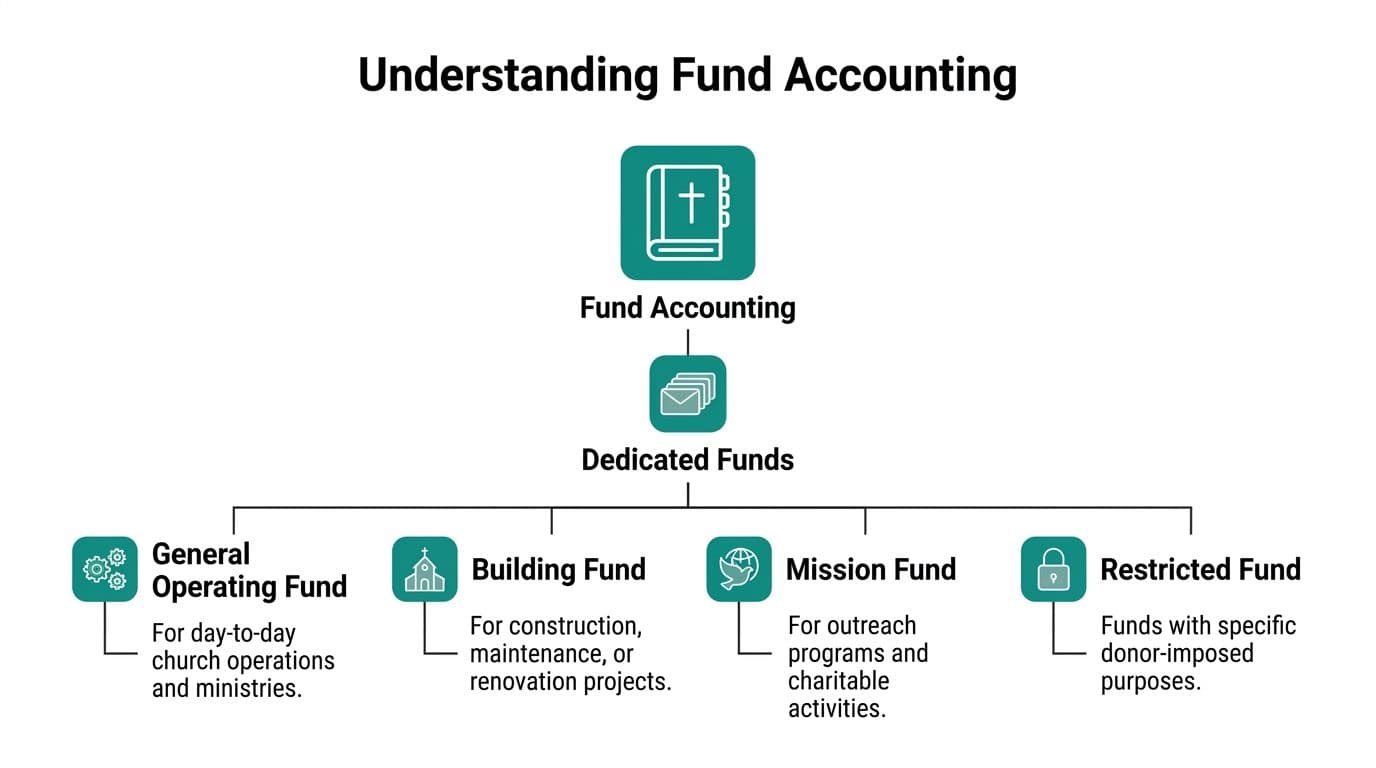
Churches do not report all giving as one pool of money. Under nonprofit accounting rules, net assets fall into two categories: with donor restrictions and without donor restrictions. NetSuite's nonprofit accounting summary explains that FASB ASC 958 uses this two-category model.
In practice, that means a gift for missions, a capital campaign, or a benevolence fund stays tied to that purpose until the church uses it properly. General offerings can support ongoing operations. Restricted gifts cannot be repurposed because cash is tight or another need feels more urgent.
Boards usually understand this in principle. Trouble starts in the daily work. Deposits get combined. Staff code transactions differently. Someone fixes a posting with a journal entry at month-end and assumes the class tag will keep everything straight.
Why QuickBooks classes are not true fund accounting
QuickBooks can handle many bookkeeping tasks well. I have seen churches keep decent records in it for years. But classes and tags do not create separate accounting entities.
With true fund accounting, each fund carries its own balance. You are not just labeling revenue and expense lines. You are tracking what belongs in that fund, what obligations sit against it, and what remains available to spend. This discussion of true fund accounting lays out that distinction clearly.
That difference matters when real transactions get messy. A missions trip deposit may include parent payments, church support, and designated gifts in one batch. A class-based setup can record that deposit, but it often depends on careful manual coding and follow-up reconciliation. A fund-based system keeps the restriction attached from entry through reporting, which makes it much harder to spend the wrong dollars by accident.
Good software helps here in very concrete ways. It records gifts by fund at entry, blocks invalid postings, shows available balances by restriction, and produces statements that match the underlying ledger. That is where trust gets built. Not from cleaner terminology, but from fewer preventable mistakes.
Where churches get into trouble
The risky moments are ordinary ones. A donor changes the purpose of a gift after it was recorded. A pledge is booked in one period and paid in another. A shared expense needs to be allocated across ministries and one restricted fund.
Manual systems can handle those situations. They just handle them inconsistently, especially when one person knows the history and everyone else is working from notes in a spreadsheet.
I usually use one test with church leaders. If someone asks, "How much is still available in the youth missions fund right now?" the answer should come from your system, not from a staff member rebuilding the trail in Excel.
If you want the accounting mechanics behind that setup, this fund accounting guide for nonprofits gives a clear explanation finance teams can use. For readers who want a broader reporting refresher, this practical UK guide to financial statements is also useful.
A church can have money in the bank and still be out of compliance with donor intent. True fund accounting closes that gap by connecting the rule to the workflow.
Your Key Financial Reports Explained
Church leaders don't need more reports. They need reports that answer the right questions. Most of the confusion around church financial reporting comes from getting stacks of statements with no clear sense of what each one is supposed to tell you.
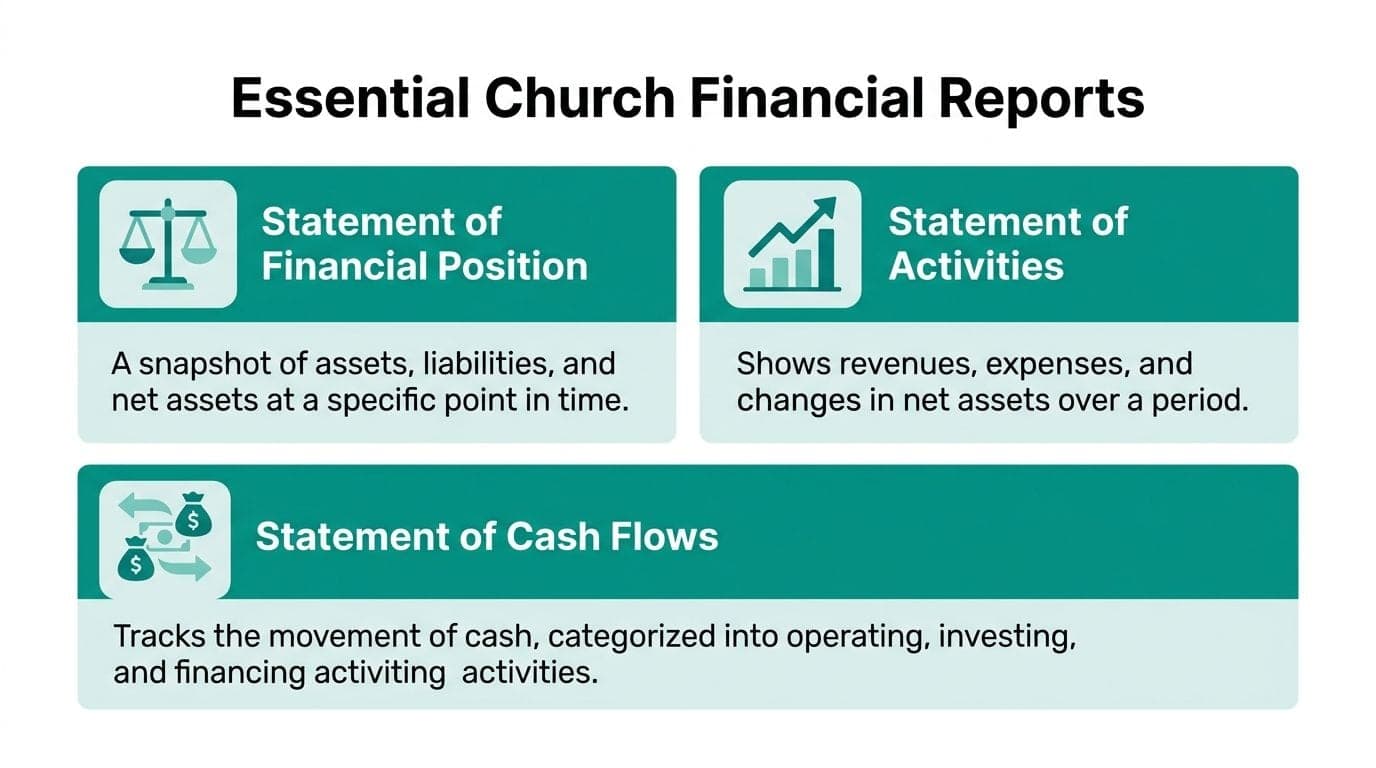
This visual gives the basic map.
Statement of Financial Position
This is your balance sheet. It answers one board-level question: What do we own, what do we owe, and what do we have left?
It gives a snapshot on a specific date. Cash, receivables, property, debt, payables, and net assets all show up here. If your church has healthy reserves but heavy liabilities, this report shows that tension quickly.
For churches, the net asset section matters a lot. GAAP requires strict net asset classification separating assets with donor restrictions from without donor restrictions, driving mandatory functional expense reporting that allocates costs to program services, management, and fundraising, as explained in Your Part-Time Controller's church accounting guide.
Statement of Activities
This is the report most leaders think of first. It answers: Are we operating with a surplus or a deficit?
It shows revenue, expenses, and changes in net assets over a period. If giving was strong but expenses also climbed, this report tells you whether ministry operations stayed ahead or fell behind. It also shows whether changes came from restricted or unrestricted activity.
A useful habit is to read this report alongside your budget, not in isolation. Otherwise you'll know what happened, but not whether it matched what leadership approved.
Statement of Cash Flows
This report answers: Do we have enough cash to meet our obligations?
That sounds obvious, but churches often confuse reported revenue with spendable cash. A pledge can show up in one period while the actual money lands later. The cash flow statement helps you separate accounting performance from day-to-day liquidity.
If your finance team needs a broader refresher on how these reports fit together, this practical UK guide to financial statements is a helpful outside resource because it explains the statements in plain language, not just accounting terms.
Statement of Functional Expenses
This one is often overlooked until a lender, grantor, or auditor asks for it. It answers: How are we investing resources into mission work versus administration and fundraising?
Churches don't only need to know how much they spent. They need to know why they spent it. Functional expense reporting organizes costs by purpose, so leadership can see how spending supports programs, administration, and fundraising activity.
A simple summary looks like this:
| Report | Main question it answers | Why it matters |
|---|---|---|
| Statement of Financial Position | What's our financial position today? | Shows stability and obligations |
| Statement of Activities | Did operations produce a surplus or deficit? | Guides budgeting and oversight |
| Statement of Cash Flows | Is cash moving in time to cover needs? | Protects liquidity |
| Statement of Functional Expenses | Where did mission-related spending go? | Improves transparency |
If you want a practical walkthrough of how these reports appear inside a reporting dashboard, this reports overview shows the kind of structure that makes board review much easier.
Navigating the IRS Landscape and Form 990
A board member asks for the last three years of financials before approving a building loan discussion. A foundation wants proof that designated outreach gifts were spent as promised. Your church may never file Form 990, but those requests still land on your desk, and they usually arrive with a deadline.
That is why Form 990 matters to churches even when the form itself does not. The IRS generally exempts churches from filing it, yet the discipline behind it still solves real problems. Clear classifications, documented compensation, related-party review, and consistent year-end reporting help a church answer hard questions before they turn into trust issues.
The IRS explains the exemption rules for churches in its guidance for tax-exempt organizations, but exemption should never be treated as permission to keep loose records. Lenders, grantmakers, denominational offices, and outside auditors often expect the same level of order they would see from another nonprofit.
Why 990-style discipline is worth adopting
Form 990 asks organizations to show more than totals. It pushes leaders to document governance, compensation practices, significant transactions, and how resources support the mission. Churches benefit from that same habit because it reduces guesswork and shortens the scramble when someone asks for support behind the numbers.
In practice, that means your system needs to do more than store transactions.
It should track donor restrictions separately from operating funds, keep vendor and reimbursement records attached to each entry, and produce board-ready reports without rebuilding spreadsheets by hand. If software cannot show who approved a payment, where a restricted gift was posted, or how a pastor's housing allowance was recorded, the church is still relying on memory. Memory fails at the worst time.
I have seen this play out in ordinary situations. A church receives a benevolence gift, posts it to general income by mistake, then spends it on routine expenses. No fraud. Just a coding error. An integrated accounting system with fund restrictions, approval workflows, and audit trails catches that early. The same setup also helps staff work through security questions tied to online records and donor data. Good financial order and good data handling belong together, which is why teams reviewing systems often end up asking broader questions about choosing privacy software for businesses as well.
What to be ready to produce
Strong reporting discipline usually comes down to four things:
- Consistent year-end financial statements that tie back to the general ledger
- Restricted fund tracking so designated gifts are not absorbed into general operations
- Documented approvals and source records for payroll, reimbursements, and major purchases
- Clean exports and report templates that can be shared with boards, lenders, and grant funders quickly
Voluntary transparency pays off during leadership transitions too. A new treasurer should inherit organized records, not a desktop folder called "final final budget."
If your team wants a practical starting point, this Form 990 readiness checklist for church financial records is useful even if you never submit the form.
The standard is straightforward. Be ready to show how money came in, where it went, who approved it, and which dollars were restricted from the start.
Building Trust with Strong Internal Controls
Sunday ends. The offerings are counted in a back office, a staff member submits a reimbursement by text, and the bookkeeper is trying to close the month before the board packet goes out. Trust can get strained in that kind of routine week, not because anyone is dishonest, but because loose processes leave too much room for avoidable errors.
As noted earlier, strong giving seasons create more opportunities for confusion. More gifts, more expense activity, and more hands touching the process all raise the chance that a restricted donation gets posted to the wrong fund, a receipt goes missing, or a payment is approved without enough backup.
Start with the moments where mistakes actually happen
In my experience, the weak points are rarely exotic. They show up in ordinary routines. Cash counted by one tired volunteer after service. A ministry leader using a debit card for a last-minute purchase. A reimbursement approved quickly because the senior pastor is traveling and everyone wants to keep things moving.
Good controls put guardrails around those moments.
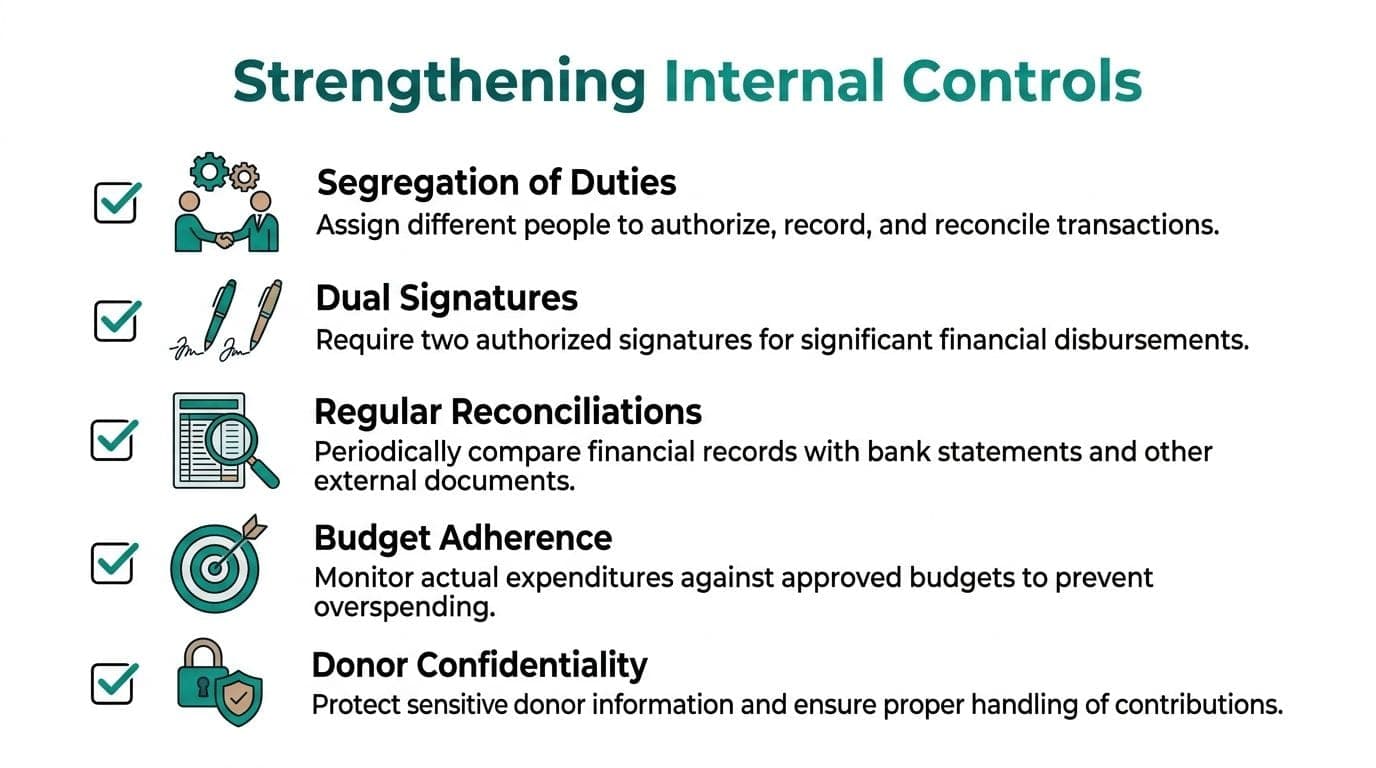
Use two unrelated people to count offerings, and document the count before the deposit leaves the building. Separate spending authority from bookkeeping so the person approving a purchase is not also posting it. Reconcile bank and credit card accounts every month, then have someone who did not prepare the reconciliation review it. Require receipts and a clear ministry purpose for reimbursements, card charges, and special payments. Review budget-to-actual results early enough to ask questions while the details are still fresh.
That last step matters more than many churches realize. A clean expense review process usually depends on a consistent record of outgoing payments, which is why a practical reference on cash disbursement journals can help teams tighten both documentation and review.
The why and the how have to connect
Boards and donors care about compliance and trust. Staff care about getting things done without another spreadsheet, another email chain, and another Friday scramble. Strong controls have to serve both.
That is where software can earn its keep. Approval workflows keep reimbursements and bills from skipping review. User permissions limit who can change vendors, post entries, or see donor details. Attached receipts keep support with the transaction instead of buried in someone's inbox. Audit trails show who approved, edited, or voided something, which ends a lot of guesswork during board reviews and annual audits. Fund-based coding helps stop restricted gifts from drifting into general operations by mistake.
None of that replaces judgment. It reduces the number of places routine work can go sideways.
Protect donor information with the same discipline
Internal control also covers privacy. Churches hold bank details, giving history, addresses, and pastoral notes tied to generosity records. If access is too broad or documents are stored casually, the risk is not only fraud. It is also the quiet loss of confidence that follows a preventable data mistake.
If your team is reviewing policies and tools around confidential records, this guide on choosing privacy software for businesses offers a useful framework for comparing options.
Boring is the goal
The best control environment feels routine. Volunteers know the counting procedure. Staff know who can approve spending. Treasurers know when reconciliations are due and what they should review.
If a process depends on one trusted person remembering every step, the church has a personnel risk, not a control.
Small churches can do this well. They do not need a large finance department. They need a few written procedures, clear ownership, and a system that makes the right steps easier to follow than the wrong ones.
How All-in-One Software Creates Clarity
Most skepticism about church software is earned. Leaders have sat through too many demos that promise relief and deliver another login, another export, and another monthly workaround. The actual test is simple. Does the system reduce manual handoffs and prevent common errors?
That's where an all-in-one setup can help.
One record instead of five disconnected ones
When accounting, donor records, events, volunteer schedules, and communications live in separate systems, your team spends time reconciling software instead of reconciling accounts. One gift might appear in the giving tool, another in the CRM, and a third in the accounting file days later.
An all-in-one platform solves a very practical problem. It gives you one source of truth. A donation entered through an online giving page can flow into the donor record, post to the correct fund, trigger a receipt, and appear in the reporting set without manual re-entry.
That matters for more than convenience. It lowers the odds of posting a restricted gift to the wrong place, forgetting a pledge update, or emailing a donor from an out-of-date list.
The bridge between GAAP and daily operations
External reporting and internal management don't always run on the same timeline. GAAP mandates accrual accounting for external reporting, which creates real differences from cash-basis internal budgets. A multi-year grant pledged in 2025 is recorded as revenue in 2025 even if cash is received in 2026, as described in Cerini & Associates' explanation of GAAP versus internal reporting.
That's exactly the kind of issue generic systems handle poorly. Leaders look at one report showing revenue, another showing low cash, and conclude something must be broken. What's missing is a clean bridge between pledge-based accounting and cash management.
A modern platform should make that bridge visible. You should be able to see accrual-based statements for compliance and donor reporting, while still reviewing cash-based reality for operations.
The features that actually relieve pressure
Software either helps or gets in the way. For church leaders, these are the features that tend to matter most:
- True fund accounting so restricted, unrestricted, grant, and program balances stay distinct
- Donor management tied to finance so giving history, pledges, receipting, and accounting stay aligned
- Volunteer management that keeps schedules, background checks, and hours in one place
- Online giving pages that code gifts correctly at the point of receipt
- A built-in marketing suite for email, text, and campaign communication without exporting donor lists
- Team communication tools so finance, ministry, and development staff aren't working from different records
- AI intelligence that lets staff ask plain-English questions instead of digging through reports
- Support for fiscal sponsorship and church-school structures where multiple funds or programs need separate visibility under one organization
Some churches still prefer QuickBooks for familiarity, and some use Aplos, Realm, Breeze, ACS Technologies, or Blackbaud because they already cover part of the workflow. Those tools each have strengths. The gap usually appears between systems. Accounting is in one place, donor records in another, volunteers somewhere else, and reporting depends on staff stitching it all together.
That's why the all-in-one model keeps gaining traction. It doesn't impress people because it's new. It helps because it removes duplicate work and makes the reports easier to trust.
Answering Your Top Financial Questions
How should we handle non-cash gifts like stock or cryptocurrency
A member transfers appreciated stock on Friday. The finance office sees the notification on Monday. By Tuesday, someone asks whether the gift should hit the general fund, missions, or a building campaign. That is where churches get into trouble. The gift is real, but the paper trail is often thin unless the process is clear.
Record non-cash gifts separately from cash receipts and document the fair market value on the date received. Keep the donor's transfer record, the valuation support, the gift date, any board-approved acceptance steps, and the details of what happened next if the asset was sold. The donor is responsible for the value claimed on their tax return in some situations, but the church still needs accurate books and clean acknowledgments.
Good software helps here in specific ways. The gift record should allow asset type, date received, restrictions, attached documentation, and the eventual sale entry without staff building side spreadsheets to connect the dots. That protects compliance and saves time when questions come up months later.
What's the difference between a compilation, a review, and an audit
A compilation prepares financial statements from information management provides. A review adds inquiry and analytical procedures. An audit includes testing, internal control consideration, and an auditor's opinion on whether the statements are presented fairly in line with the reporting framework. The AICPA's audit and assurance guidance lays out those differences clearly.
The right level depends on who relies on your statements. A small church with straightforward operations may use internally prepared reports plus an outside compilation. A lender, denomination, grantmaker, or large donor may ask for a review or audit instead. I have seen churches assume a compilation would be enough, then scramble when a grant application required reviewed statements. Ask early. Deadlines get expensive when outside accountants are booked.
An integrated system makes each option easier because the records are already organized. Clean fund balances, consistent coding, attached support, and a month-end close checklist reduce the back-and-forth with your CPA and lower the odds of year-end surprises.
We're a small church. Can we just use a spreadsheet
Yes, for a season.
The critical question is whether the spreadsheet still protects donor intent when one volunteer is out sick, a new treasurer takes over, or online gifts start landing in several categories at once. Spreadsheets can track balances. They do a poor job of enforcing process.
The breaking point usually is not size alone. It is complexity. Restricted gifts, designated projects, payroll allocations, church-school activity, grants, and donor receipts create enough moving pieces that one wrong formula or copied tab can misstate a fund balance without anyone noticing.
Software earns its keep when it prevents ordinary mistakes. A proper church system can require each gift to be coded to the right fund, keep donor records tied to the accounting entry, store the support behind unusual transactions, and produce board-ready reports without rekeying totals. That is the practical relief many finance teams are looking for. Less patchwork, fewer corrections, and reports you can hand to elders with confidence.
If your team is ready to replace scattered tools with one system built for nonprofit reality, take a look at AlignMint. We bring together accounting, donor management, volunteers, events, marketing, online giving pages, team communication, fiscal sponsorship support, and Minty in one place. For nonprofits under $100K, we offer a free tier so the whole team can work from the same operational information.
Ready to try AlignMint with your nonprofit?
Start free — set up donor tools, giving pages, and Minty. Upgrade when you need accounting.