

The deadline is on the calendar, but your Form 990 reporting still feels uncomfortably far away. Then March arrives, and you're sorting auction receipts, restricted grants, payroll allocations, and old spreadsheets while your board waits for a clean draft.
The reliable answer isn't another checklist. Treat Form 990 as your annual close process, with fund accounting, transaction rules, reconciliations, and review controls built throughout the year. That approach makes the return easier to prepare, easier to defend, and less likely to expose avoidable errors.
Quick Answer: Form 990 Reporting
Form 990 reporting starts with the right form for your receipts, assets, and organization type. Map the ledger to the return before year-end so schedules, restrictions, and deadlines are already documented.
Start with fund accounting and the Form 990-EZ guide. For the statements behind the return, see nonprofit financial reporting.
Which Form 990 You Actually File
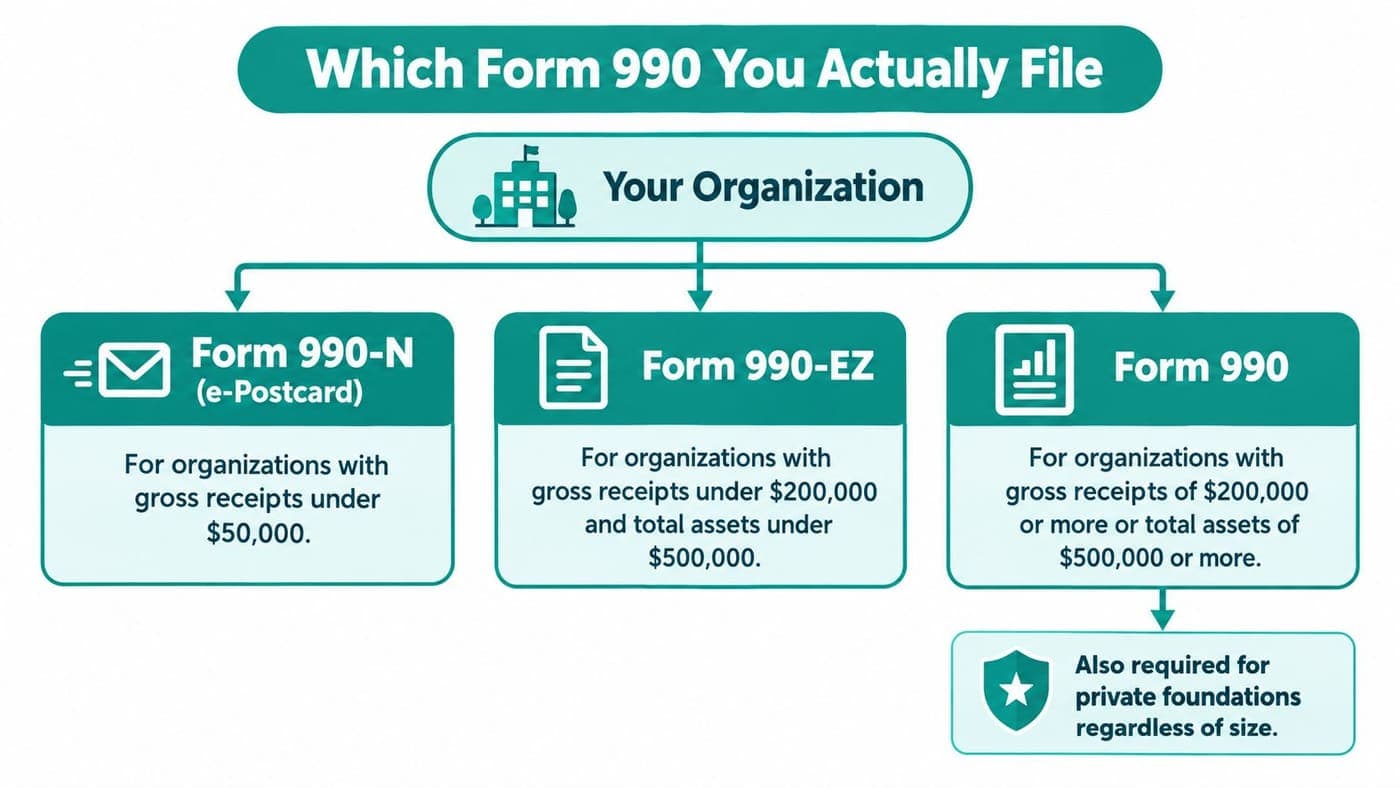
The first filing mistake happens before anyone opens the form. Leaders assume they need the full Form 990, or they choose a shorter return without checking the organization's receipts, assets, and legal category.
Start with the organization's classification and accounting records. Organizations with gross receipts normally $50,000 or less may generally submit Form 990-N electronically. Larger organizations generally file Form 990-EZ or the full Form 990. The full return is generally required when gross receipts reach $200,000 or more, or total assets reach $500,000 or more, according to the IRS Form 990 filing guidance.
Check the category before the size
Revenue thresholds don't answer every question. Churches, certain church-affiliated organizations, and other specifically excepted categories generally don't file an annual Form 990. Some church-related schools below college level may also fall within an exception, depending on their legal and organizational status.
Private foundations follow their own reporting path. Don't assume a low-revenue foundation can use Form 990-N because its receipts are modest. Confirm the category with your tax adviser or the IRS rules before preparing the wrong return.
Watch for the transition point
Growth creates a reporting obligation, but it also creates a systems problem. A nonprofit moving from Form 990-N or Form 990-EZ to the full return needs clean records for revenue, assets, restricted funds, compensation, related organizations, and governance.
Write down your filing decision before year-end. Include the receipts figure, total assets, legal category, fiscal year, and responsible reviewer. This simple record gives your finance committee a clear basis for the form selected.
If your staff still works from scanned documents, a practical guide for filling flat scans can help with temporary document workflows. It won't replace accounting controls, but it can reduce avoidable document handling errors.
Keep the basic filing consequences visible. Missing required annual filings or notices for three consecutive years causes automatic revocation of federal tax-exempt status, as the IRS explains in its Form 990 overview. That consequence is far more serious than a late task on someone's calendar.
Your Filing Calendar and Key Deadlines
A filing deadline works only when it drives earlier decisions. If you wait for the legal due date to start closing the books, you've already surrendered the time needed for corrections, schedule preparation, and board review.
For a calendar-year organization, Form 990 is generally due May 15, the 15th day of the fifth month after the accounting period ends. The same rule applies to other fiscal years, with the date changing according to the accounting-period end. The IRS now requires electronic filing for current Form 990 returns, so paper preparation can't be your final submission plan, as stated in the IRS Form 990 instructions.
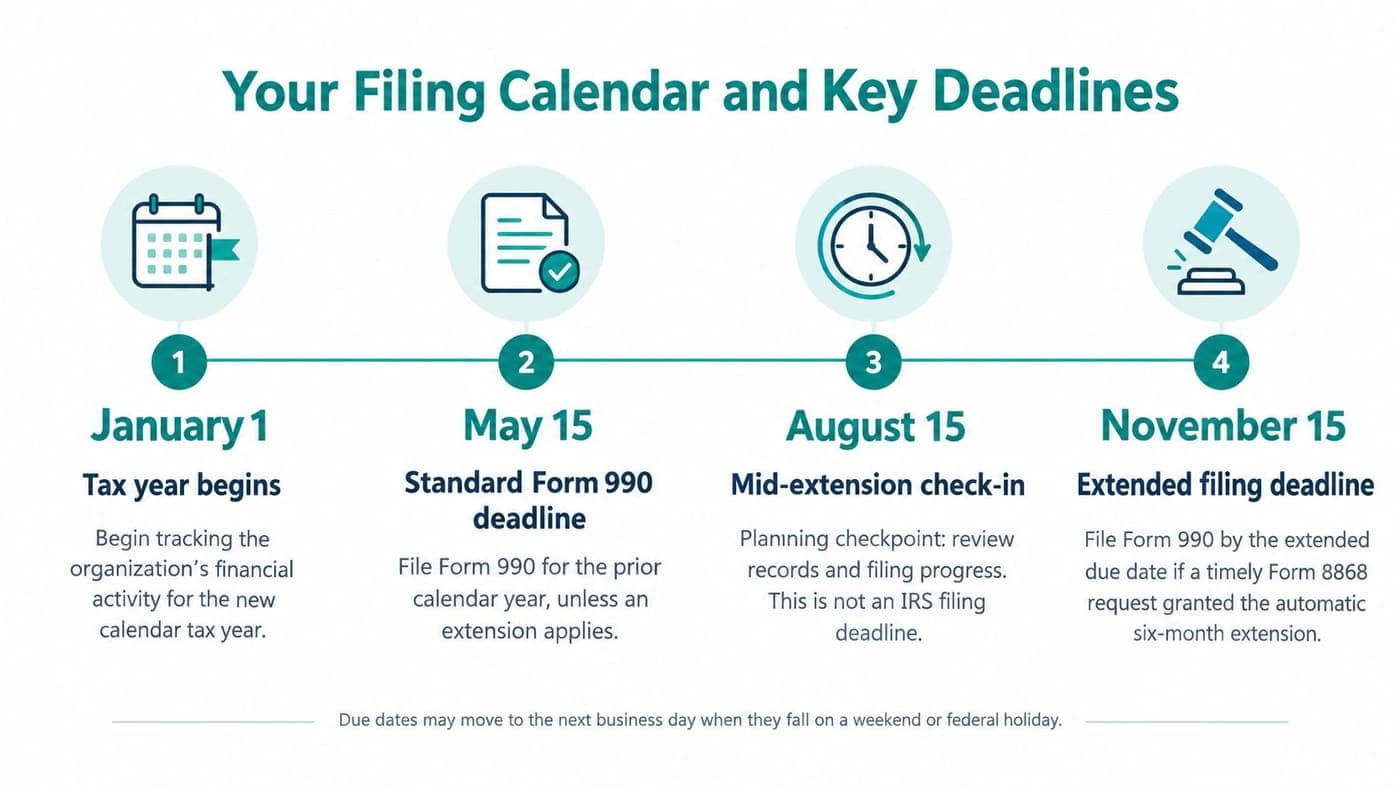
Work backward from submission
Set internal dates before the IRS date. Your calendar should include these checkpoints:
- Close the accounting period. Post final payroll, record accruals, reconcile bank and investment accounts, and resolve uncleared transactions.
- Confirm the filing version. Review receipts, assets, legal category, and any change from the prior year.
- Complete allocations. Finish functional expense assignments while supporting evidence is still available.
- Prepare schedules. Identify required attachments from actual activities, transactions, compensation, donors, and relationships.
- Run an executive review. Check unusual balances, restricted funds, event revenue, grants, and compensation before the board sees the draft.
- Obtain board review and submit electronically. Keep evidence of review, approval, and the final filed return.
An extension gives you more time, but it doesn't give you permission to delay the close. Treat extension status as a tracked control with a named owner and a documented submission date.
Build a reasonable-cause file when necessary
If a late return requires a reasonable-cause explanation, prepare it with the filing rather than adding a vague note afterward. Keep the explanation factual, identify the circumstances, and include the extension information when applicable.
Practical rule: An extension protects your calendar only when someone confirms it was requested, approved, and reflected in the work plan.
Your calendar should connect the accounting-period end, close checklist, schedule review, board meeting, extension status, and electronic filing confirmation. A single May reminder isn't a process.
Mapping Your General Ledger to the Form
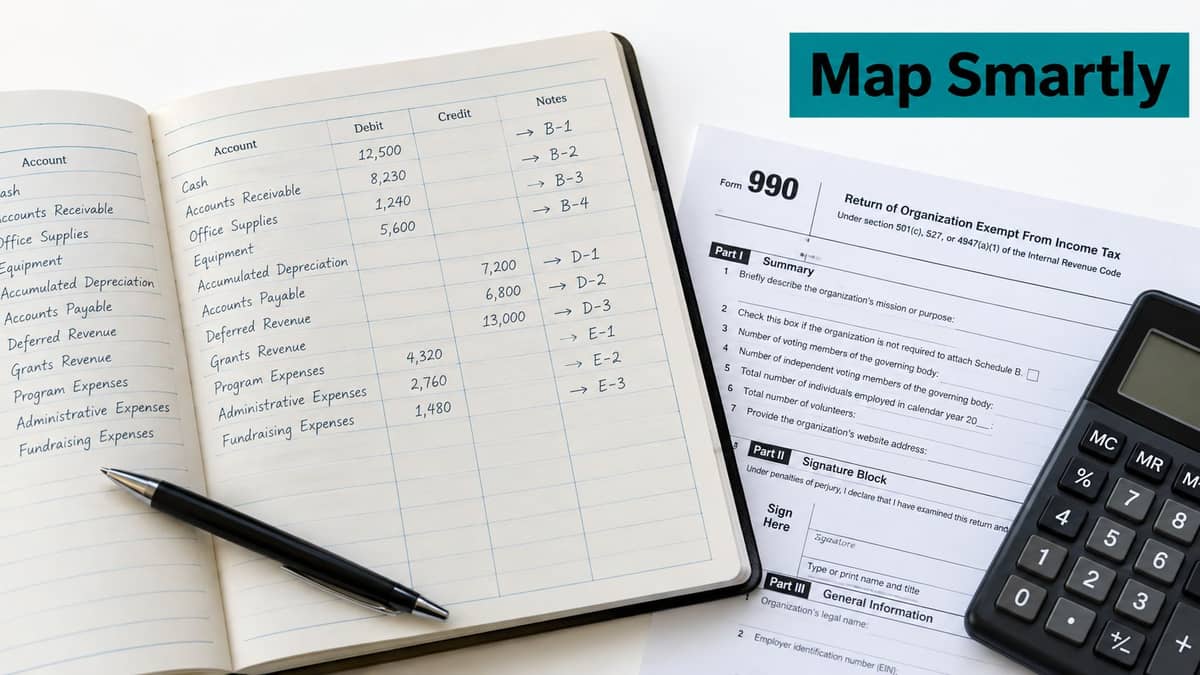
A clean Form 990 starts with a chart of accounts that reflects nonprofit reality. If your ledger only shows departments, projects, or QuickBooks classes, you still may not have the functional and fund detail the return requires.
The Statement of Functional Expenses divides expenses among program services, management and general, and fundraising. Section 501(c)(3) and 501(c)(4) organizations generally complete all columns in Part IX, while other organizations generally complete only the total-expenses column. The IRS Form 990 instructions require allocations supported by accounting records and a reasonable, consistently applied method.
Use a six-step close
Start in the ledger and move toward the form.
- Reconcile total expenses. Tie Part IX expenses to the trial balance and final financial statements.
- Map accounts to lines. Assign every expense account to the correct IRS Part IX line.
- Identify direct costs. Put costs directly tied to programs, administration, or fundraising in the right function.
- Allocate shared costs. Use documented drivers such as headcount, time records, square footage, or transaction volume.
- Separate grants and allocations. Keep grant awards and pass-through amounts distinct from ordinary operating expenses.
- Verify the total. Confirm Part IX line 25 agrees with the expense total reported elsewhere.
The allocation method matters more than the software label. Payroll may need time records, occupancy may follow square footage, and technology may need a reasonable usage driver. Use the same method every year and keep the supporting calculation with the close file. If your chart of accounts is too broad, a nonprofit chart of accounts template can help you rebuild it around programs, people, facilities, and fundraising activity before the next close.
Don't let fundraising disappear
An Urban Institute study found that roughly half of Forms 990 reported zero fundraising costs, and case studies of two organizations reporting zero found the figure was wrong. Government-grant acquisition costs were often misclassified as well, according to Urban Institute research on Form 990 fundraising expense reporting.
That should make you suspicious of a zero fundraising line, not proud of it. Staff time spent preparing appeals, managing donor communications, writing grant applications, or running events may belong in fundraising, even when the work feels routine. If those costs stay buried in admin or program accounts, the filing will look cleaner than the books and the close will take longer next year.
Identifying the Schedules You Need to Attach
Schedules aren't decorations added at the end. They explain relationships and activities that the core return can't show by itself, so the right question is what your organization did during the year.
Start with a schedule inventory based on transactions and governance facts. Then assign one person to confirm each trigger against the current IRS instructions and the return-preparation software.
Match schedules to real activities
| Schedule | Review question |
|---|---|
| Schedule A | Does the organization need to support its public charity status? |
| Schedule B | Do donor reporting rules apply based on contributions received and donor information? |
| Schedule G | Did specified fundraising-event amounts exceed the applicable threshold, or did professional fundraisers participate? |
| Schedule J | Do executive compensation arrangements require additional reporting? |
| Schedule L | Were interested-person transactions, loans, grants, or business dealings present? |
| Schedule O | Does the return need explanations for specific answers or unusual figures? |
| Schedule R | Does the organization have related organizations or controlled entities to disclose? |
The most frequently missed schedule is often the one connected to a transaction someone considered ordinary. A related organization may look like a friendly partner, a fundraising contractor may be treated as a vendor, and an interested-person transaction may never receive a formal label inside the accounting system.
Pay attention to special operating models
Fiscal sponsors need records that distinguish the sponsor's own programs from sponsored projects. Consolidated reporting may be appropriate for the organization, but project-level restrictions, agreements, fees, grants, and disbursements still need clear support.
Churches and church-affiliated schools should confirm whether an exception applies rather than treating every religious organization alike. Schools also need disciplined fund tracking when grants, tuition, restricted gifts, and activities share staff or facilities.
Unrelated business activity creates another review point. Keep the distinction clear between an exempt program and revenue that may require separate reporting, then review the unrelated business income guide alongside professional advice.
If your accounting team needs outside support, a Wisely financial services overview may help you compare the kind of accounting assistance available. Choose an adviser who understands nonprofit schedules, not just general bookkeeping.
Handling Mixed-Purpose Revenue the Right Way
The most expensive Form 990 mistakes often begin with a single deposit. An event payment arrives, the bookkeeper records one revenue category, and everyone discovers months later that the payment contained a benefit, a contribution, processing costs, restrictions, or sales activity.
The IRS gives a clear example. A $250 fundraising-event payment may need to be split into $100 of gross event income and $150 of contribution, as explained in the IRS annual reporting FAQ. The economic substance of the transaction determines the treatment, not the fact that one check or card payment hit the bank.
Write the rule before the event
For each event, decide how your system will record the following:
- Auction purchases: Separate the value of goods or benefits from the deductible contribution.
- Ticketed events: Record the exchange component and contribution component separately when the payment includes both.
- Sponsorships: Review what the sponsor receives. Recognition benefits, advertising, tickets, and promotional rights can affect classification.
- Merchandise: Keep inventory sales distinct from program-service revenue.
- Grants: Track grant revenue, restrictions, program costs, and any grant-acquisition work separately.
- Processing fees: Reconcile gross receipts, fees, refunds, and net deposits instead of recording only the bank amount.
Revenue reported on Part VIII lines 2 and 11 requires business codes, whether or not the activity relates to the organization's exempt purpose. That requirement makes a transaction-level revenue map more useful than a year-end guess.
Reconcile the event, not just the deposit
Create an event worksheet that lists tickets sold, auction proceeds, sponsorships, merchandise, contributions, refunds, processing fees, and deposits. Reconcile that worksheet to the general ledger and retain the benefit valuation or allocation judgment supporting each split.
The IRS FAQ also states that exceeding $15,000 on specified fundraising-event lines can trigger Part I of Schedule G and additional reporting about professional fundraisers. Monitor the threshold during the year, not after the return preparer asks about it.
The right question isn't “Which line number do I memorize?” It's “What did the donor or customer receive, and how did we preserve that answer in our records?”
Use a documented revenue reconciliation workflow for events, sponsorships, and bundled payments. Churches, schools, and fiscal sponsors should apply the same discipline, even when their event names and revenue streams differ.
Avoiding the Mistakes That Trigger Penalties
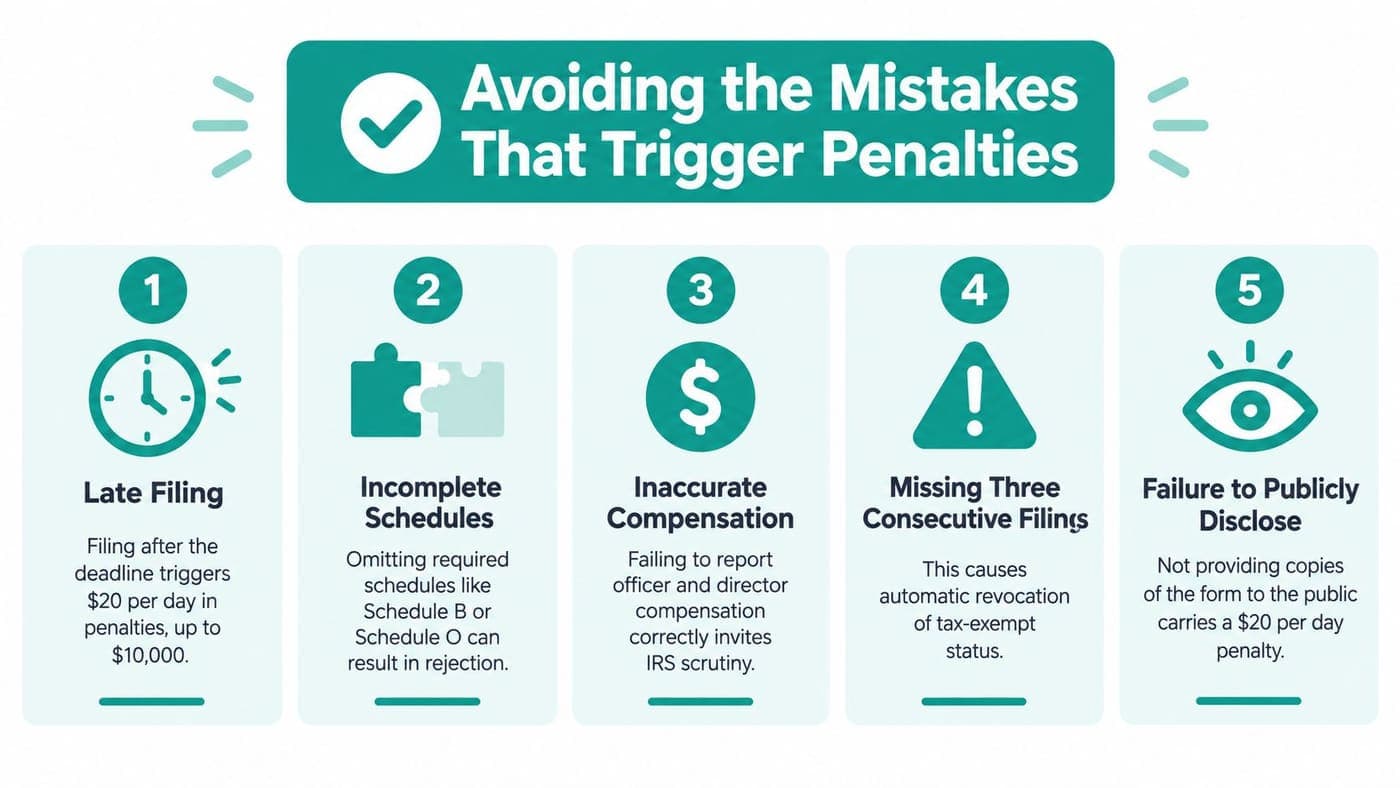
Late filing is only one failure. Incomplete schedules, inconsistent compensation, unsupported allocations, and missing explanations can make a timely return just as difficult to defend.
For a full Form 990, the IRS can impose a late-filing penalty of $25 per day, capped at the lesser of $13,000 or 5% of gross receipts, absent reasonable cause. Incomplete or incorrect information can trigger a $10-per-day penalty after IRS notice, capped at $6,500 per return, according to the National Council of Nonprofits filing guidance.
Run the review in this order
- Confirm the return. Verify the filing version, accounting period, deadline, and extension status.
- Tie the numbers. Reconcile revenue, expenses, assets, liabilities, and compensation schedules to the final ledger.
- Validate schedules. Confirm each required schedule is attached, complete, and consistent with the core form.
- Cross-check people and entities. Compare officers, key employees, related organizations, and transactions across all relevant sections.
- Document approval. Obtain full-board review and retain the evidence with the filed return.
The board should review the return before submission, not after the accountant files it. Directors don't need to recalculate every allocation, but they should ask whether the figures reflect the organization's activities and whether unusual items have written support.
How the Right Software Removes the Pain
Form 990 reporting tests whether your accounting system understands nonprofit work or merely stores transactions. If restricted funds, programs, grants, donors, volunteers, and events live in separate tools, your staff becomes the bridge between them.
Aplos has real strengths in nonprofit fund accounting and reporting for organizations that want a focused nonprofit platform. Blackbaud Financial Edge is built for organizations with larger finance operations and detailed reporting needs. QuickBooks remains familiar and useful for many organizations, but classes aren't the same as true fund accounting. Teams often create spreadsheet bridges each March because the ledger doesn't preserve restrictions, programs, and functional detail in the needed structure.
Buy the structure, not the promise
Your system should help you answer these questions without rebuilding the year:
- Which restricted funds remain available, and for which purpose?
- Which expenses belong to programs, administration, or fundraising?
- Which donor, grant, event, and bank records support each balance?
- Which transactions need review before they reach the return?
- Can the board see the same figures the preparer will use?
AlignMint combines fund accounting, donor management, volunteers, events, marketing, and team communication in one platform. Its fund accounting model tracks restricted funds, grants, and programs natively, while its donor-connected CRM links giving and finance records. Minty AI can answer questions about your organization's own data, but staff still need to verify judgments and classifications.
The platform includes online giving pages, event and ticketing tools, email and text campaigns, volunteer records, and plan-based access without per-seat fees. Its free tier is available to nonprofits raising up to $100K per year, so smaller organizations can assess the workflow without committing to a large software purchase.
For the actual return, the Form 990 Builder maps accounts to relevant Form 990 parts, creates worksheets, supports documented overrides, and exports PDF fills for preparers. Software won't decide whether an auction payment contains a contribution or whether an allocation method is reasonable. It can, however, preserve the evidence and make the review visible.
Start by comparing your current close process to the records your return requires. If your team still depends on disconnected spreadsheets, see whether AlignMint can bring fund accounting, donor records, event revenue, and Form 990 preparation into one workflow, then schedule a practical review with your finance lead.
Ready to try AlignMint with your nonprofit?
Start free — set up donor tools, giving pages, and Minty. Upgrade when you need accounting.