

For related tools, see donor management, nonprofit CRM software, and CRM software for nonprofit teams.
Nonprofit CRM: A Practical Guide for Leaders
Quick Answer: Nonprofit CRM: A Practical Guide for Leaders
A nonprofit CRM is a working history of each supporter (gifts, volunteer hours, event attendance, pledges, and communication) linked to the funds and restrictions finance needs. One trusted record beats three exports when the board asks who is engaged, what is restricted, and what follow-up is overdue.
If you're shopping for a nonprofit CRM, you're probably already paying a hidden tax in staff time. Donor notes sit in one tool, volunteer lists live somewhere else, and your accounting records tell a different story from your fundraising reports.
A good nonprofit CRM fixes that. The right one gives you one place to see relationships, revenue, restrictions, and next steps, without forcing your team to become software specialists.
Is Your Data Working Against You
Most nonprofit leaders don't wake up wanting new software. They wake up wanting clean reports, fewer staff workarounds, and confidence that the numbers match.
You know the pattern. Development pulls a donor list from one system. Programs keep event attendance in a spreadsheet. Finance closes the month in accounting software that doesn't reflect pledge activity or campaign context. Then someone asks for a board report by fund, donor segment, or event outcome, and the team spends half a day reconciling records by hand.
That kind of friction isn't just annoying. It changes how you lead. When your data is scattered, planning gets cautious, follow-up gets delayed, and staff stop trusting dashboards.
The category has grown because this problem is no longer treated as optional back-office cleanup. The nonprofit CRM market was estimated at USD 4.406 billion in 2024 and is projected to reach USD 10.14 billion by 2035, with a projected 7.87% CAGR from 2025 to 2035, according to Market Research Future's nonprofit CRM platform market report.
You don't need more data. You need fewer places where it can go wrong.
Before you switch systems, it's worth cleaning up what you already have. A practical starting point is this nonprofit data migration checklist, especially if donor records, household names, and fund labels have drifted over time.
A nonprofit CRM is valuable when it changes your operating rhythm. Instead of asking, "Which file has the latest version," your team can ask, "What should we do next with this donor, this grant, or this event?"
What a Nonprofit CRM Really Is
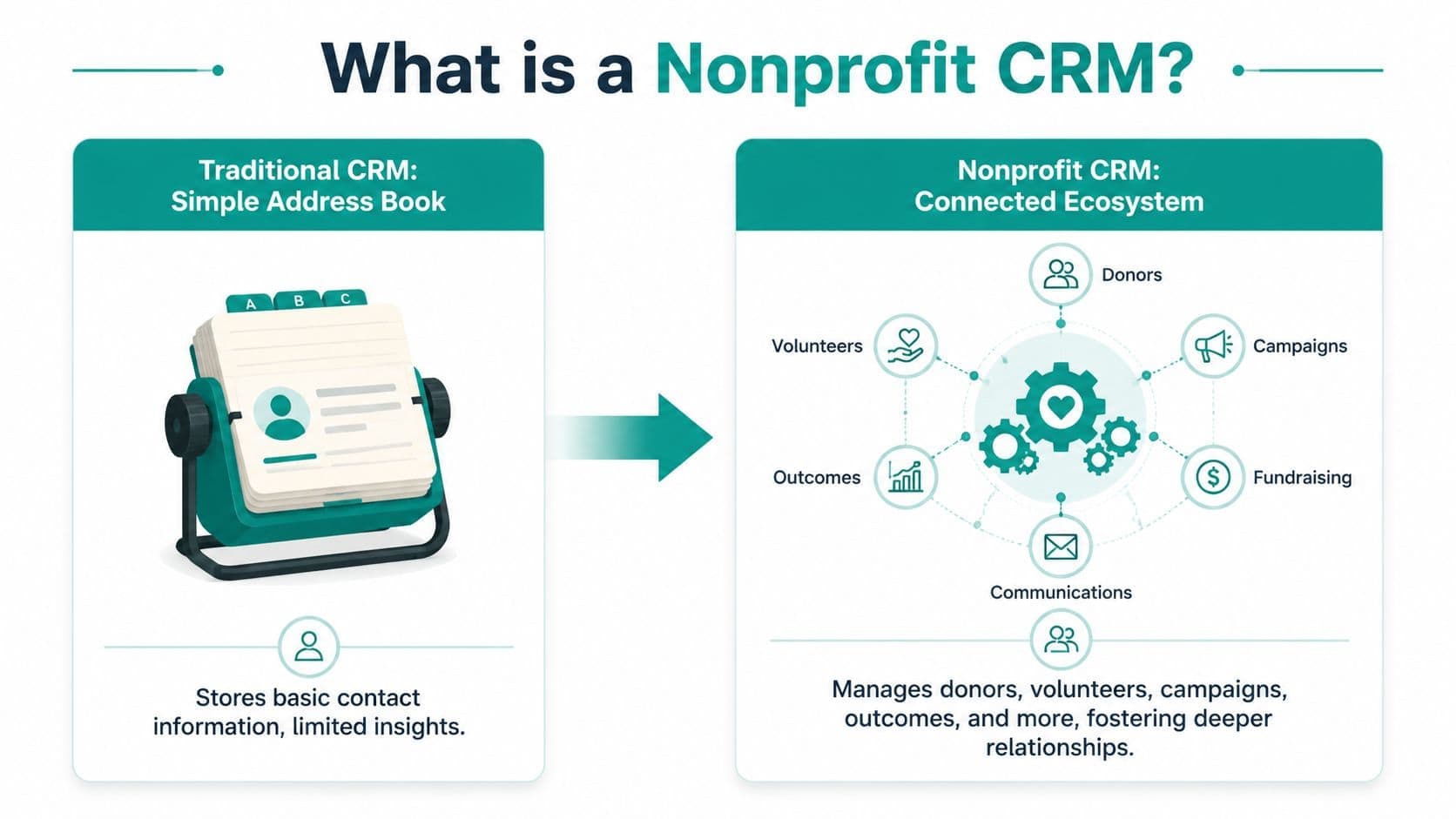
A simple contact database is an address book. A nonprofit CRM is a working history of your relationship with each supporter.
That difference matters. An address book tells you who someone is. A nonprofit CRM tells you what they've done with your organization, what they've received from you, how they prefer to hear from you, whether they volunteered, whether they attended an event, and what money or promises are tied to that relationship.
Think beyond names and email addresses
A weak system stores contact details. A useful one stores context.
That means one constituent record can show gifts, volunteer activity, event attendance, notes from calls, pledge status, communication preferences, and financial ties that matter later. If a board member asks whether a donor is engaged beyond giving, your staff shouldn't need three tabs and two exports to answer.
If you want a plain-language definition before going deeper, this donor CRM glossary entry is a helpful reference.
The real goal is one trusted record
The phrase you'll hear often is single source of truth. That's software language, but the idea is simple. Your team should stop debating which report is correct.
When the system is set up well, fundraising, volunteer coordination, event tracking, and finance all point back to the same person or household. That gives you better follow-up and fewer mistakes. It also lowers the risk of sending the wrong message to the wrong supporter.
Practical rule: If staff still keep shadow spreadsheets after a CRM launch, the system isn't doing enough of the real jobs.
A nonprofit CRM should support relationships, not just record transactions. That's the difference between a digital filing cabinet and a system your staff will rely on.
Key Features That Solve Your Biggest Problems
The best features aren't the flashy ones. They're the ones that remove recurring friction from your week.
See a full supporter history in one place
When staff can open one record and see gifts, notes, event attendance, volunteer activity, and communications, follow-up gets easier. You stop asking supporters to repeat themselves. You also stop missing obvious cues, like a donor who hasn't given recently but still shows up at every event.
A strong system should connect that history directly inside your donor management tools, so the fundraising team isn't working from partial records.
Stop re-entering the same information
Manual entry is where good intentions go to die. Teams copy event registrations into email lists, retype donor details into accounting records, and paste campaign notes into staff documents.
Kindsight notes that a nonprofit CRM must unify donor, volunteer, event, and accounting data into a single constituent record because real-time integration reduces manual re-entry and supports more accurate segmentation and retention analysis, as described in Kindsight's guide to nonprofit CRM features.
That isn't a technical luxury. It's the difference between spending Friday afternoon cleaning records and spending it calling donors.
Match fundraising with finance
At this stage, many systems start to thin out. A platform can look polished on the fundraising side and still leave finance doing extra work.
What matters is whether a gift tied to a restricted purpose can be seen clearly in both donor history and accounting records. If your team has to export fundraising data, recode it elsewhere, and then rebuild reports manually, you don't have one system. You have two systems pretending to cooperate.
A finance-ready setup should help you answer questions like these without side spreadsheets:
- Restricted gift visibility whether a donation is limited to a program, project, or purpose
- Grant tracking whether deadlines, balances, and reporting lines can be monitored alongside donor revenue
- Audit preparation whether staff can trace transactions back to supporting records without rebuilding the trail
Communicate without another separate tool
A lot of nonprofit teams buy a CRM, then keep using a separate email platform, separate text tool, and separate event system. Sometimes that's fine. Often it just creates another layer to manage.
Built-in marketing tools can help when they use the same constituent record as fundraising and finance. Your staff can segment by giving history, event attendance, volunteer activity, or fund interest, then send the right message without exporting lists back and forth.
For teams reviewing stewardship strategy, these donor stewardship best practices are a useful companion to CRM planning because they focus on what supporters experience after the gift.
Let staff ask better questions
AI matters when it reduces clicks, not when it creates more noise. If a system includes an assistant such as Minty, the value is simple. Staff should be able to ask plain questions about donor activity, fund balances, or campaign results and get usable answers from actual records.
That kind of help is most useful for small teams and executive directors who don't want to memorize report builders.
One example in this category is AlignMint. It combines accounting, CRM, volunteers, events, marketing, and an AI assistant in one platform, with plan-based user allowances (1 on Free, up to 10 on Plus, up to 25 on Pro, and unlimited on Enterprise), which can matter when multiple staff and board-facing roles need access.
If finance is part of your CRM decision, it's worth reading this deeper guide on nonprofit accounting software.
How to Choose the Right Platform for Your Nonprofit
Software demos are designed to make every platform look tidy. Selection gets easier when you ignore the polished tour and ask what daily work will still happen outside the system.
Start with cost over time, not monthly price
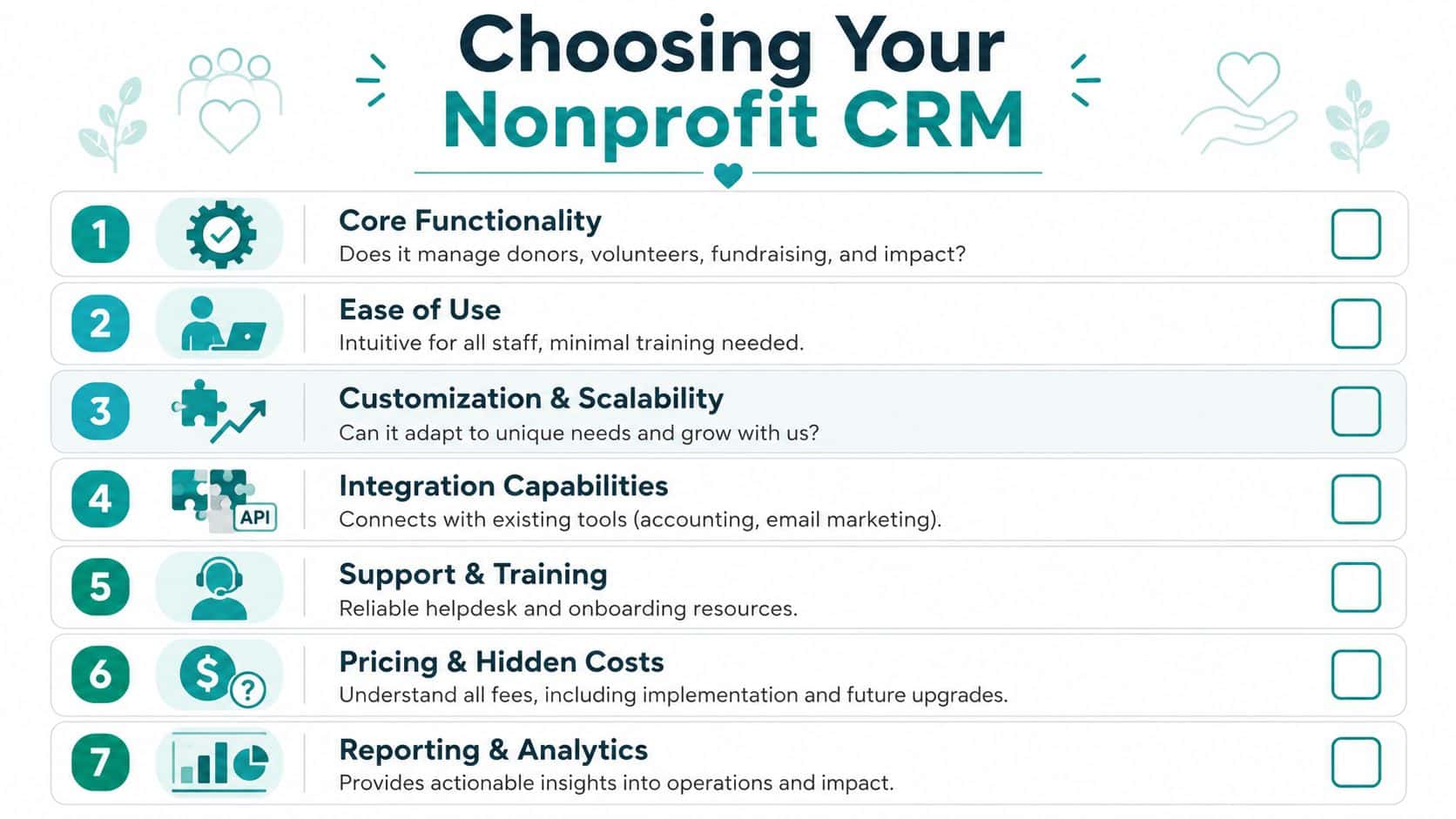
The monthly subscription is rarely the actual figure that shapes your decision. DonorDock points out that buyer guides often miss the true total cost of ownership, including per-user fees, contact overages, implementation, support, and add-ons, in its discussion of nonprofit CRM pricing and hidden costs.
That matters because many nonprofits don't stay the same size. More staff need access. More contacts enter the database. More reporting needs show up after the first board cycle, not before.
Here are the questions I would ask in every demo:
- What changes the price later Ask whether cost rises with users, contacts, features, storage, support level, or reporting modules.
- What is included on day one Confirm whether implementation, migration help, email tools, forms, events, and support are part of the base package.
- What requires an add-on Ask specifically about receipts, online giving pages, volunteer tracking, grant tracking, and advanced reporting.
- Who needs a paid seat Per-user pricing can become expensive for finance, development, volunteer staff, leadership, and outside bookkeepers.
A predictable model helps. So does avoiding a setup that penalizes growth.
Know the difference between contact management and finance-ready operations
Many platforms are good at donor records. Fewer are built for restricted funds, grant drawdowns, and program-level reporting.
That's the divide that often gets missed in CRM buying conversations. A fundraising team may be satisfied while finance keeps exporting data and patching the gaps manually.
If you need board confidence, lender confidence, or audit confidence, don't stop at donor screens. Look at the accounting structure underneath.
A few examples help clarify the trade-offs:
| Platform | Strength to recognize | Question to ask |
|---|---|---|
| Bloomerang | Well known for fundraising workflows and donor retention focus | How much finance work still lives outside the CRM |
| Blackbaud | Established option with broad nonprofit presence | What ongoing administration, contract structure, and support costs look like |
| Salesforce | Very flexible for organizations with technical capacity | Who will configure and maintain it over time |
| Aplos | Stronger accounting orientation for some nonprofits | Whether CRM, marketing, and cross-team visibility are integrated enough for your needs |
This isn't about declaring winners and losers. It's about fit. A church, school, or fiscal sponsor often needs a different level of financial structure than an organization focused mostly on annual giving.
Test fund accounting claims carefully
Some products say they support nonprofit accounting when they mainly offer categories, tags, or classes. That may be enough for some organizations. It isn't enough for all.
A finance-ready system should let you track restricted funds natively, report by program and grant, and see balances without relying on manual reconciliation between disconnected tools. If a vendor answers these questions vaguely, keep pressing.
Ask them to show you:
- A restricted gift from entry to report
- A grant drawdown tied to the correct fund or program
- A report that finance and development would both trust
- How corrections are handled without breaking the record trail
For a side-by-side review process, use this software comparison page. It helps frame the questions that matter before you get attached to a polished demo.
If your decision hinges on finance structure, this guide on fund accounting for nonprofits is worth reading before you sign anything.
See It in Action With Real Examples
The easiest way to judge a nonprofit CRM is to picture Monday morning in your own office. Not the demo account. Your actual office.

A church trying to connect giving, people, and ministry
A church often needs to see family giving, volunteer roles, event participation, and targeted communication in one place. The practical question isn't whether the system can store names. It's whether staff can understand household involvement without asking three different people.
A finance-grade setup also matters here. Insycle notes that many all-in-one CRMs aren't designed for compliance-heavy workflows, and that finance-grade systems matter for schools, churches, and fiscal sponsors managing restricted funds, grant drawdowns, and program-level reporting without manual workarounds, as discussed in Insycle's nonprofit data management article.
That means a building fund campaign should not disappear into general reporting. Staff should be able to see the donor relationship and the restricted balance clearly.
A school balancing grants, events, and parent engagement
A school might need to manage gala ticketing, parent volunteer hours, annual fund outreach, and grant-funded programs at the same time. In a weak system, those activities create separate records that don't line up later.
In a better one, the advancement director can see that a family bought event tickets, volunteered at the auction, gave to the annual fund, and has ties to a restricted scholarship effort. Finance can then report on the scholarship activity without rebuilding the story from scratch.
A fiscal sponsor managing many moving parts
Fiscal sponsors have a different headache. They aren't tracking one mission stream. They're managing multiple sponsored projects under one umbrella, each with its own restrictions, reporting needs, and stakeholders.
That setup breaks simpler CRMs quickly. A finance-ready platform should help the sponsor see project-level balances, donor intent, grant activity, and communications while preserving one coherent set of records. If staff still need separate ledgers and separate donor lists for each project, the software isn't doing the hard part.
The right system doesn't just store activity. It lets each team see the same reality from its own angle.
Making the Switch Without the Headaches
The fear is understandable. Even a needed change can feel risky when your current system, however clumsy, is at least familiar.
A smoother transition starts by lowering the ambition of the first phase. Don't try to redesign every workflow in the same month.
Clean first, migrate second
Bad data doesn't improve when you move it. It just becomes bad data in a new place.
Start with practical cleanup. Remove duplicate records. Standardize household naming. Decide how you'll label funds, appeals, campaigns, and programs. Make sure your team agrees on the basic definitions before import day.
If you're preparing files now, this guide to importing nonprofit data gives a useful picture of how to structure records before migration.
Use a pilot group
Pick a few people who represent the roles that matter most. Usually that means one person from fundraising, one from finance, and one operational user who handles events, volunteers, or communications.
Have them test real tasks:
- Enter a gift and confirm the receipt, donor record, and accounting treatment all make sense
- Run a board-style report and check whether finance and development both trust the result
- Send one targeted message to a defined group and verify that replies and follow-up remain visible
- Correct an error and make sure the fix doesn't create new confusion later
This kind of pilot shows you where training is needed before the full rollout.
Expect adjustment, not perfection
Staff won't love every change on day one. That's normal. What you want is a system that becomes easier after the first few weeks, not one that keeps needing extra workarounds.
A successful switch isn't the one with zero hiccups. It's the one where old problems stop repeating.
One platform can make the move simpler when it replaces several disconnected tools at once. Then you're not spending months trying to keep five separate products in sync while teaching staff a new process.
Your Next Step Toward Total Clarity
A nonprofit CRM should give you back control of the basics. You should be able to trust your records, answer board questions faster, and spend less time chasing mismatched data across departments.
For many organizations, the decision isn't whether to get a CRM. It's whether to keep living with a contact list on the front end and manual finance work on the back end. That's where software starts costing more in staff time than it saves.
If you're comparing options, keep your eye on two things. First, what it will cost over time. Second, whether it supports real fund accounting or only stores fundraising activity neatly.
If finance readiness is part of the decision, review the fund accounting feature page before you choose a platform. It will help you separate simple donor databases from systems that can support the full work of your organization.
If you want one system for accounting, donor management, volunteers, events, marketing, and team visibility, take a look at AlignMint. Nonprofits raising under $100K can start on the free tier, and larger organizations can book a demo to see whether the platform fits their reporting, fundraising, and fund accounting needs.
Ready to try AlignMint with your nonprofit?
Start free — set up donor tools, giving pages, and Minty. Upgrade when you need accounting.