Quick Answer: Crowd Fundraising for Nonprofits
Running a successful crowd fundraiser can bring in new donors and fire up your community for a specific goal. Learn how to plan, launch, and manage a crowd
For related tools, see nonprofit fundraising software and donor management. Running a successful crowd fundraiser can bring in new donors and fire up your community for a specific goal. It's more than a one-time campaign. It is a way to build a wider, more engaged base of support for your mission. With the right approach, organizations of all sizes, including churches and schools, can get started and see great results.
Why Crowd Fundraising is a Game-Changer
As a nonprofit leader, you constantly look for effective ways to fuel your mission. You may have seen crowd fundraising online and wondered if it's a serious strategy or just a trend. For many of us, it has become an essential part of our fundraising for some very good reasons.
This is not about chasing small, random online donations. This method helps you tell a focused story and rally your core supporters. It also pulls in new people who care about the specific cause you are championing.
Expand Your Donor Base
You can reach people far beyond your existing email list. This is one of the biggest benefits of crowd fundraising. When your supporters share the campaign, your mission gets introduced to a whole new audience.
This digital word-of-mouth is very effective. It turns your loyal supporters into active fundraisers, multiplying your reach without extra marketing cost.
Think about it: a board member shares your campaign to fund a new community playground, and their friends chip in. Those new donors may have never found you otherwise. Our platform helps you turn first-time givers into lifelong partners with our donor management features.
Connect Fundraising to Your Financials
You can finally stop worrying about disconnected data. When you run a successful campaign on a platform like GoFundMe, you are left with a messy spreadsheet. You then have to manually enter that data into your accounting software and CRM.
This manual process is time-consuming and leads to errors, especially with restricted funds. An all-in-one system solves this problem. When a donation comes in through an AlignMint campaign page, the system can automatically:
- Create or update a donor profile in your CRM.
- Record the revenue in your true fund accounting system.
- Assign the donation to the correct restricted fund.
- Send an automated tax receipt to the donor.
This saves hours of administrative work and keeps your financial reports accurate. You can learn more in our guide to fund accounting for nonprofits. The market for these tools is growing quickly. This growth allows platforms like ours to connect fundraising, accounting, and volunteer management. You can see the data in this non-profit crowdfunding platform market analysis, and learn more about building support in our post on social media fundraising ideas.
A successful campaign starts long before you ask for the first dollar.
For a busy director, a clear plan prevents a stressful scramble. This is not about a complicated document that no one will read. It is about making a few smart decisions that guide your work.
Set a Tangible, Mission-Focused Goal
Your donors connect with impact, not numbers on a balance sheet. You can create a more powerful appeal by framing your goal around a specific, tangible outcome. That is what people give to.
For example, a goal of "funding 100 after-school tutoring sessions" is more compelling than a generic dollar amount. A school might aim to "purchase 30 new laptops for the computer lab." This gives your community something real to rally behind.
A great fundraising goal is specific, measurable, and emotional. It tells a small story and gives supporters a clear picture of the change they can create.
This clarity becomes the backbone of your campaign message. Every email and social post should tie directly back to achieving that outcome.
Define Your Audience and Message
With your goal set, you need to know who you are talking to. Your campaign will be ignited by your core supporters. These are the people already in your world.
You can gain an advantage by looking at your data. If your donor management system is connected to your volunteer records, you can easily find key groups. These include past donors, active volunteers, and recent event attendees.
Once you know your audience, you can write a simple, heartfelt message. You do not need fancy marketing copy. Just be direct and honest about the need and the impact.
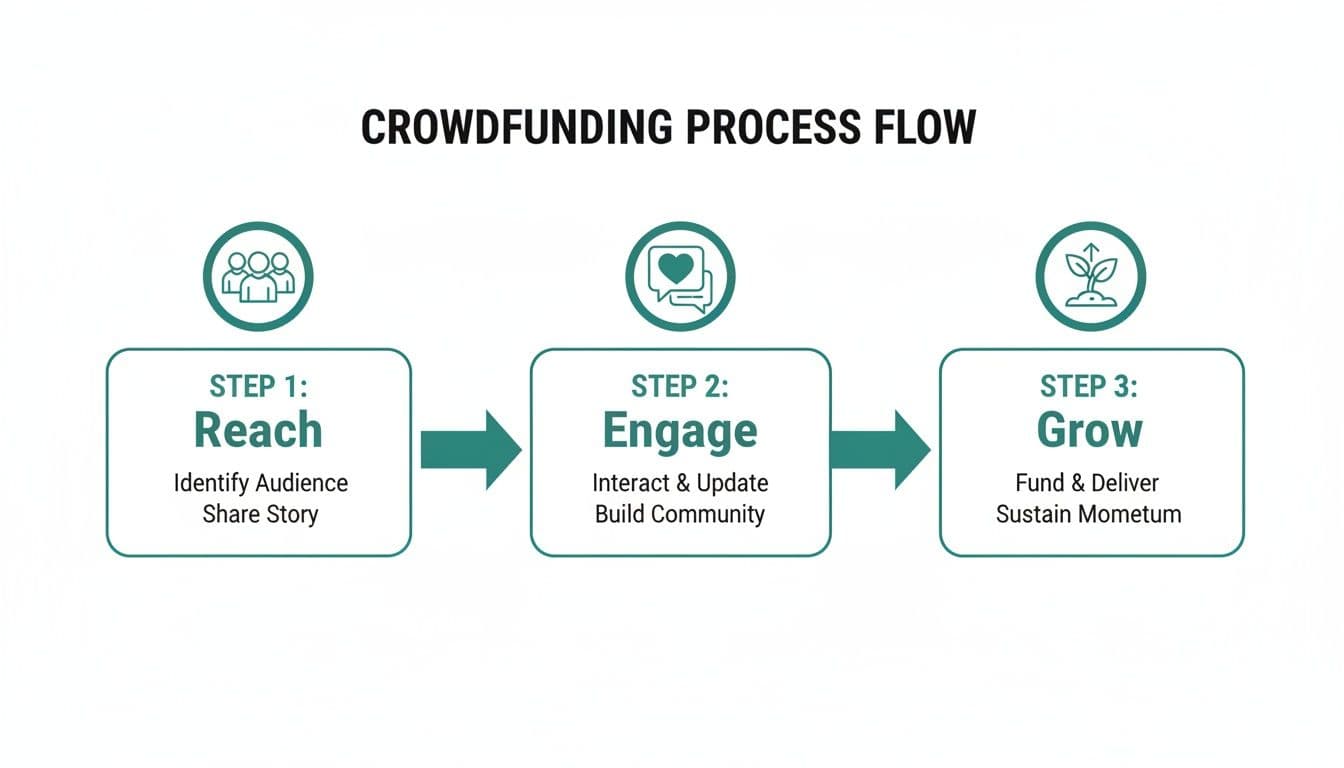
You start with your core community (Reach). Then you share a clear message that connects (Engage), and watch it lead to campaign growth.
Build a Practical Timeline
You can stay on track with a simple timeline. A well-paced campaign respects your donors' attention and your own time. Most successful campaigns we see follow a straightforward structure over 4-6 weeks.
-
Pre-Launch (1-2 Weeks): Send a "heads-up" email to your board and most dedicated supporters. This is also your time to finalize the donation page and prepare initial communications.
-
Live Campaign (2-3 Weeks): This is when you actively ask for donations. Send a launch announcement, followed by regular updates on your progress.
-
Post-Campaign (1 Week): The campaign isn't over when you hit your goal. This phase is about gratitude. Send prompt thank-you messages and share the final results.
This preparation is the foundation for a strong crowd fundraising for nonprofits strategy. It makes mobilizing your community much easier.
Choosing the Right Fundraising Platform
The technology you choose can be your greatest asset or your biggest headache. As a director, you need tools that just work. You do not need another system that adds hours of manual labor to your day.
Your choice comes down to two paths. You can use a standalone tool or an all-in-one platform. They create very different workloads for you and your team.
Standalone vs. All-in-One Systems
Popular standalone platforms like Kickstarter or GoFundMe are great for visibility. They are well-known, making it easy to launch a campaign. While they are good at what they do, they create a large operational gap.
These tools are completely disconnected from your other nonprofit systems. When the campaign ends, you are left with a spreadsheet of donor names. That data has to be manually entered into your accounting software and your donor database.
An all-in-one platform, on the other hand, connects fundraising directly into your accounting and donor management. When a supporter gives, the system instantly updates their giving history, records the income, and marks it for the correct fund. This single step removes all that manual data entry and saves you time.
Comparing Your Options
You can make a clearer choice by seeing how the daily workflow changes. A standalone tool solves one problem - collecting money online. But it creates several new ones around data management.
Here is a practical look at what happens after a single donation.
Platform Comparison: Standalone vs. All-in-One
| Task | Standalone Platform (e.g., GoFundMe, Kickstarter) | All-in-One Platform (e.g., AlignMint) |
|---|---|---|
| Donation Processing | A donation is made and captured on the platform. | A donation is made through an integrated giving page. |
| Donor Record | You must manually export a list and import or create a record in your separate CRM. | The donor's profile is automatically created or updated in the built-in CRM. |
| Accounting Entry | You have to manually enter the transaction into your separate accounting software (like QuickBooks). | The transaction is automatically recorded in the built-in fund accounting system. |
| Fund Designation | Funds are batched, requiring you to manually sort and designate them as restricted. | The donation is automatically assigned to the correct restricted fund based on the campaign. |
| Receipting | The platform sends a generic receipt; you may need to send a separate one for tax purposes. | An official, branded tax receipt is automatically generated and sent to the donor. |
The comparison shows the core value of an all-in-one system. You enter it once, and the data flows everywhere it needs to go.
Key Features to Look For
When evaluating any platform for crowd fundraising for nonprofits, focus on features that solve your daily challenges. You need practical tools, not confusing bells and whistles.
Here are a few non-negotiables:
- A Simple Donation Page Builder: You can get a professional, branded donation page up in minutes with our online giving pages. You will not need to ask a web developer for help.
- Built-in Marketing Suite: You can save time by sending emails and texts to supporters from the same platform. Our built-in marketing suite keeps all your communication in one place.
- True Fund Accounting: You can properly track restricted funds with a system built for it. A system that uses "classes" (like QuickBooks) is a workaround, not a real solution for nonprofits.
The goal is to find a single system that handles the entire donor journey. It should cover everything from the donation to the final financial report.
At AlignMint, we built our platform to solve these exact problems. We offer a free tier for nonprofits under $100K in revenue. Every account includes plan-based user allowances (1 on Free, up to 10 on Plus, up to 25 on Pro, and unlimited on Enterprise), so your entire team can collaborate. For more helpful tips, check our guide on choosing the best online donation software.
Mobilizing Your Community and Volunteers

Your most powerful fundraising assets are the people who already show up for you. They are your dedicated volunteers, board members, and most loyal donors. A successful campaign gives these champions an easy way to share their passion.
This is not about turning them into expert fundraisers overnight. It is about giving them simple tools so they feel confident spreading the word.
Equip Your Champions for Success
You can greatly expand your campaign's reach by creating ready-to-use materials. This makes it simple for supporters to share. You only need a small "toolkit" with copy-and-paste text for emails and social media.
For example, a simple email template can work wonders:
Subject: Join me in supporting [Your Nonprofit's Name]
Hi [Friend's Name],
I'm supporting a fundraising campaign for [Your Nonprofit's Name]. They're raising funds to [Specific Campaign Goal, e.g., provide 500 warm meals this winter].
Would you consider joining me with a small donation? You can learn more and give here: [Link to Campaign Page]
Thanks so much.
Best, [Supporter's Name]
This approach makes asking feel less intimidating and more personal. You can find more ideas in our post on social media fundraising ideas.
Harnessing Peer-to-Peer Fundraising
You can take this a step further by letting supporters create their own mini-fundraising pages. This is known as peer-to-peer fundraising. Each supporter gets their own page with their personal story that links to your main campaign.
This transforms your most passionate supporters into active fundraisers. It allows them to set their own small goal, which adds friendly competition. When friends see their progress, they are more likely to contribute.
Connect Your Volunteer and Donor Data
You can be more strategic by identifying your most engaged community members. This is where an all-in-one system provides a great advantage. When your volunteer management is connected to your donor CRM, you can instantly see who to ask.
You can create a group of volunteers who have logged more than 20 hours this year. Then you can send them a personal invitation to become campaign champions. These individuals are often your most effective advocates.
With AlignMint, this is simple. All your data lives in one place. Plan-based user allowances support 10 users on Plus, 25 on Pro, and unlimited users on Enterprise, so you can choose access that fits your team.
The money from your campaign is in the bank. Now comes the part many leaders dread: managing the funds correctly and reporting back. This is where disconnected systems can turn a win into a nightmare.
This is especially true for crowd fundraising, where you might have hundreds of small donations for one purpose. If your platforms are separate, you are stuck manually reconciling every transaction. It is slow, tedious, and can risk donor trust.
From Donation to Report in a Single System
You can transform this messy process into a simple, automated workflow. An all-in-one platform connects the donation directly to your financial records. It ensures every dollar is accounted for from the start.
Imagine a supporter donates to your campaign to buy new laptops. In a unified system like AlignMint, the following happens automatically:
- The donation is instantly recorded in your accounting ledger.
- The funds are assigned to the "New Laptops" restricted fund.
- A personalized, official tax receipt is sent to the donor immediately.
- The donor's profile is updated with their new giving history in your CRM.
This automation means you can see your campaign's real-time financial health with one click. You always have an accurate view of how much you have raised.
True Fund Accounting Makes All the Difference
You can maintain compliance and build trust with a proper accounting setup. When you run a campaign for a specific purpose, you create a restricted fund. You have a legal and ethical obligation to use that money only for its intended purpose.
This is where the difference between true fund accounting and common workarounds matters. Many nonprofits use business software like QuickBooks, which uses "classes" to track restricted money. This is a patch, not a real solution for nonprofits.
With true fund accounting, each restricted fund operates like its own mini set of books. This structure makes it impossible to accidentally spend restricted funds on general operating expenses. It provides a powerful safeguard for your organization.
When your board asks how much is left in a project fund, you can give them an exact number in seconds. For a deeper dive, you can learn more about how true fund accounting works for nonprofits in our detailed guide.
Effortless Reporting for Your Board and the IRS
You can save weeks of painful reconciliation by keeping all your data in one place. Preparing financial reports is one of the most time-consuming tasks for any director. An all-in-one platform solves this by generating critical reports in just a few clicks.
Key reports that become simple to create:
- Statement of Financial Position: See a clear snapshot of your assets and liabilities, including restricted fund balances.
- Statement of Activities: Track revenue and expenses by program, fund, or campaign.
- Campaign-Specific Reports: Instantly pull a report showing total donations, number of donors, and average gift size.
This ability to generate accurate reports shows you have a firm grasp on the organization's finances. More importantly, it frees up your time to focus on your mission.
Turning New Donors into Lifelong Supporters
Hitting your campaign goal is great, but the most important part is just beginning. This is your best opportunity to build real relationships with new supporters. The real goal is to turn that initial gift into a long-term connection.
It all starts with a prompt, personal thank you. A thoughtful message makes them feel seen and appreciated. This lays a strong foundation for your future relationship.
Show Donors Their Impact
You can build trust by showing donors their gift made a real difference. You asked them to help achieve a specific goal. Now it is essential to report back on the results.
If you raised money for new laptops, send a picture of students unboxing them. If you funded a community garden, share photos of the first harvest. This visual proof is more powerful than just stating a number.
Our platform makes this simple. The built-in marketing suite lets you send a follow-up email or text to all campaign donors. This small gesture has a huge impact on donor retention.
Nurture New Relationships Thoughtfully
You can build a real relationship now that these new donors are in your system. This is where having your donor data in one place is a game-changer. You can easily separate these new givers from your long-time supporters.
The weeks after a campaign are a golden hour. This is your chance to invite new supporters deeper into your world before their excitement fades.
A unified platform gives you the full picture. With an integrated donor management (CRM) system, you can:
- Segment New Donors: Instantly create a list of all first-time donors from this campaign.
- Invite Further Engagement: Send a targeted email inviting them to your next virtual town hall or volunteer day.
- Suggest Next Steps: Gently introduce them to your monthly giving program.
This targeted approach feels personal, not generic. It shows you recognize them as new members of your community. For more on this, check our tips on building a loyal donor base through social media fundraising ideas.
Use Smart Insights to Guide Your Outreach
You can get a helping hand from modern tools like our AI intelligence. Personally following up with hundreds of new donors can feel overwhelming. Our AI assistant, Minty, can analyze giving patterns from your campaign to spot opportunities.
For instance, Minty might notice that a group of new donors all live in a specific neighborhood. It can then suggest sending a personalized message to that group. This makes your outreach more relevant and effective.
This saves you hours of manual analysis. It helps you spot connection points you might have missed. Your success in crowd fundraising for nonprofits is measured by the relationships you build.
Ready to manage your fundraising, donors, and accounting all in one place? See how AlignMint helps you raise more and simplify your work. Explore our features at getalignmint.org.
More fundraising guides: Fundraising ideas hub · Online fundraising ideas · Easy ideas for small groups · Nonprofit fundraising tools
Frequently Asked Questions
Ready to try AlignMint with your nonprofit?
Start free — set up donor tools, giving pages, and Minty. Upgrade when you need accounting.