

Text Message Fundraising Playbook 2026
You're watching email engagement soften while your board asks whether mobile giving should become a larger part of your fundraising plan. Text message fundraising can create faster donor action, but only when consent, segmentation, donation pages, CRM records, and fund accounting work together.
The first campaign often feels easy. The harder work begins afterward, when donors receive repeated appeals and your team must protect trust while maintaining revenue. This practical playbook focuses on the operating discipline that keeps SMS useful beyond the first successful appeal.
Quick Answer: Text Message Fundraising
Text message fundraising works when consent, segments, a mobile donation page, and the donor record stay connected. Treat SMS as a relationship channel with opt-out handling, not a one-time blast that never posts the gift.
Compare fundraising with nonprofit email and text marketing platforms. For campaign setup, see SMS campaigns.
Why Text Message Fundraising Deserves Your Attention Now
A donor sees an appeal while standing in line, taps a mobile link, and gives before the email version is opened. That speed explains why text message fundraising deserves a place in the channel plan. It also creates operational work that becomes more visible after the first year, when repeated appeals can reduce response and donor trust.
Text fundraising has moved beyond the novelty of the American Red Cross Haiti relief campaign in 2010, when supporters were asked to text “Haiti” to give $10. The campaign showed how a simple SMS prompt could mobilize emergency giving. Later nonprofit use established texting as a recurring fundraising and engagement channel. An industry analysis of nonprofit text messaging trends from 2024 reviewed more than 200 million nonprofit text messages sent by 15 organizations in 2023, identifying 162,000 donations and $5.4 million raised through texting. (an analysis of nonprofit text messaging trends from 2024)
Text can also win attention faster than email. One published benchmark reports an SMS open rate of 98% versus 20% for email, while nonprofit and charity benchmarks report average response rates between 18% and 28%. (SMS fundraising benchmark) (nonprofit SMS benchmarks)
SMS vs. Email Channel Performance Snapshot
| Metric | SMS | |
|---|---|---|
| Reported open rate | 98% | 20% |
| Average nonprofit response rate | 18% to 28% | Not provided in the verified benchmark |
| Typical donor experience | Immediate mobile prompt | Longer consideration path |
These figures describe attention, not dependable revenue. A message still fails when consent is unclear, the donation page is awkward on a phone, or every donor receives the same appeal. Mature programs need segments based on giving history, engagement, and consent status. They also need CRM fields that record the opt-in source, campaign response, and opt-out event.
An industry report found that nonprofits sent an average of 46 texts per year, combining fundraising and engagement messages. That volume supports an ongoing communication plan, but it also explains why performance can weaken in the second year without suppression rules and message variation. Teams comparing tools can start with comparing nonprofit email and text marketing platforms, then confirm that the selected system passes consent and response data back to the CRM. (2024 nonprofit text messaging report)
Practical rule: Treat texting as a donor relationship channel that happens to produce gifts, not as a donation button with a phone number.
Build the consent record, connect the data, and review declining response before increasing send volume. Smaller teams can manage this with a few clear segments, reliable CRM fields, and a monthly campaign review.
Building a Compliant Opt-In Foundation
Compliance starts before the first message. Your organization needs to know who consented, what they consented to receive, when they consented, and how they can revoke that permission.
The TCPA doesn't broadly exempt nonprofits from its requirements. Fundraising, donation, advocacy, and event promotion texts are generally treated as marketing or solicitation. Purely informational messages may qualify for a lower consent standard only when they contain no promotional content. Adding a call to action such as “donate” or “give” can move the message into marketing territory, where prior express written consent becomes important. (practical nonprofit TCPA guidance)
Create a consent record your team can defend
Your opt-in form should identify your organization and explain the program in ordinary language. It should state the expected message frequency, include “message and data rates may apply,” and link to your terms and privacy policy.
A practical form might read:
By checking this box, I agree to receive recurring text messages from [Organization Name] about fundraising, program updates, events, and volunteer opportunities. Message frequency varies. Message and data rates may apply. Reply STOP to opt out and HELP for help. Consent isn't required to donate. View the Terms and Privacy Policy.
Keep the checkbox empty by default. A donor who gives through an event form has consented to donate, not automatically to receive promotional texts. A purchased contact list gives you names and numbers, not permission.
Double opt-in adds another useful confirmation step. After someone submits the form, send a confirmation asking them to reply with an affirmative response before adding them to recurring campaigns. Preserve the form version, timestamp, source page, phone number, confirmation event, and opt-out history in a record your team can retrieve.
Use a prelaunch compliance checklist
Before sending a campaign, ask your legal or operations reviewer to confirm:
- Consent category: Does each recipient have documented permission appropriate to the message?
- Message purpose: Is the text informational, promotional, or a combination that should receive promotional treatment?
- Required language: Does the enrollment flow include frequency, rates language, STOP, HELP, terms, and privacy information?
- Suppression list: Has your team removed every number that previously opted out?
- Audit trail: Can you show when, where, and how each recipient subscribed?
- Vendor controls: Does the sending platform enforce opt-in status and prevent duplicate sends?
- Revocation handling: Does your process honor STOP requests within the applicable period?
Current compliance guidance says organizations should honor revocations within no more than ten business days under the FCC rule described there. (SMS opt-in and opt-out requirements)
The operational lesson is straightforward. A clean list is not merely a marketing asset. It's evidence that your organization respects donor choice.
Crafting Messages That Convert Without Feeling Pushy
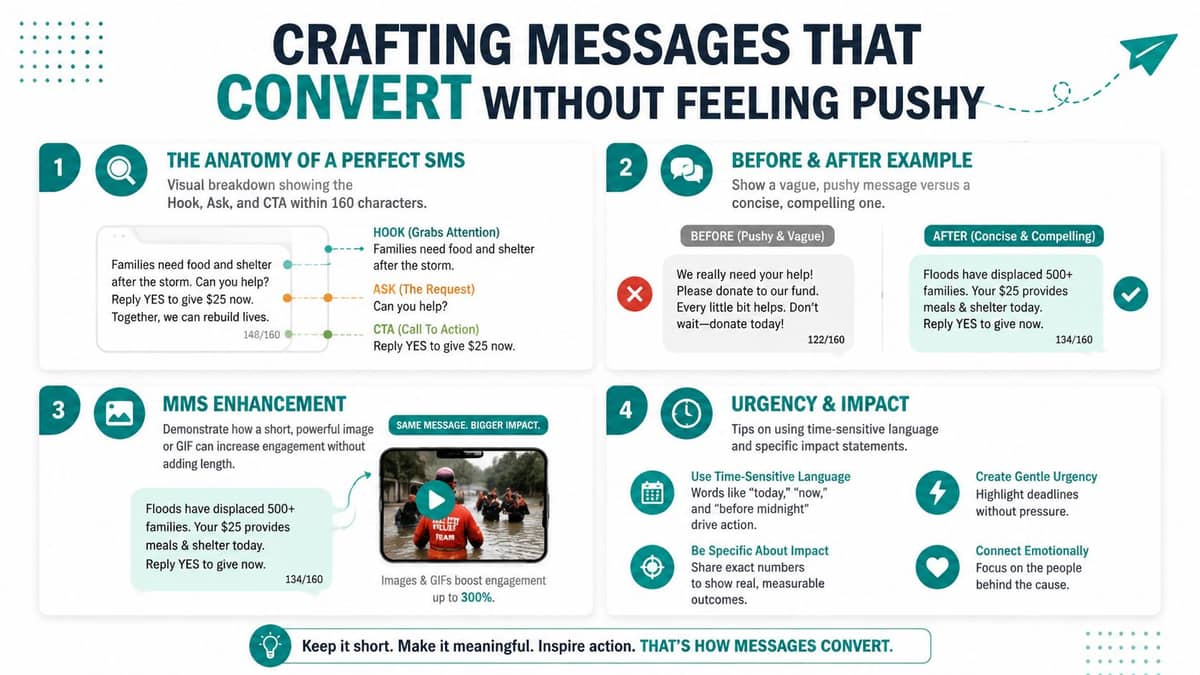
A strong fundraising text gives the reader one reason to care and one action to take. It doesn't copy an email paragraph into a small screen.
Start with four elements: a relevant hook, a personal connection, a specific impact statement, and one donation link. The hook might be a time-sensitive need or a meaningful update. The personal connection could reference a donor's past support, volunteer involvement, or relationship with a program. The impact statement should explain what the gift helps accomplish without promising an outcome you can't support.
Before and after
Weak version: “Our organization needs your support for our emergency relief efforts. Please consider donating today to help us continue this important work. Click here to learn more and give.”
It sounds polite, but the donor must sort through a general mission statement before finding the action.
Stronger version: “Maria, families need emergency supplies today. Give to our relief fund: [link]. Reply STOP to opt out.”
The second message is clearer because it names the need, keeps the ask singular, and makes the next step obvious. Keep the tone human. A short message can still sound like your organization rather than a payment processor.
Avoid stacking requests. “Donate, register, volunteer, share, and read our update” gives the recipient too many decisions. Send separate messages when the purposes differ, and reserve each text for the action most important to that audience.
Three adaptable templates
Emergency appeal
“[Name], [specific emergency] is affecting [community]. Your gift helps provide [specific support]. Give here: [link]. Reply STOP to opt out.”
Recurring donor upgrade
“[Name], your monthly support keeps [program] steady. Would you consider increasing your recurring gift to [amount]? [link]. Reply STOP to opt out.”
Year-end campaign
“[Name], your support helped [specific outcome] this year. Make a year-end gift for [program] before [deadline]: [link]. Reply STOP to opt out.”
Only use personalization your CRM can populate accurately. A wrong name or outdated program reference damages confidence faster than a generic message.
Plan timing around donor boundaries
Your sending calendar should respect the audience's daily routines and your organization's relationship with them. Avoid sending during quiet hours, and choose a consistent window your team can monitor for replies, payment issues, and STOP requests.
Use a simple campaign arc. An initial message explains the need, a follow-up reports progress or answers a common question, and a final message communicates a real deadline. Add a thank-you message after the campaign, but don't turn gratitude into another ask.
Message testing should start with the parts most likely to affect comprehension, including the headline or opening line. A practical guide to A/B test your headlines can help your team compare alternatives without changing several variables at once.
Connecting Texts to Donation Pages and Your CRM
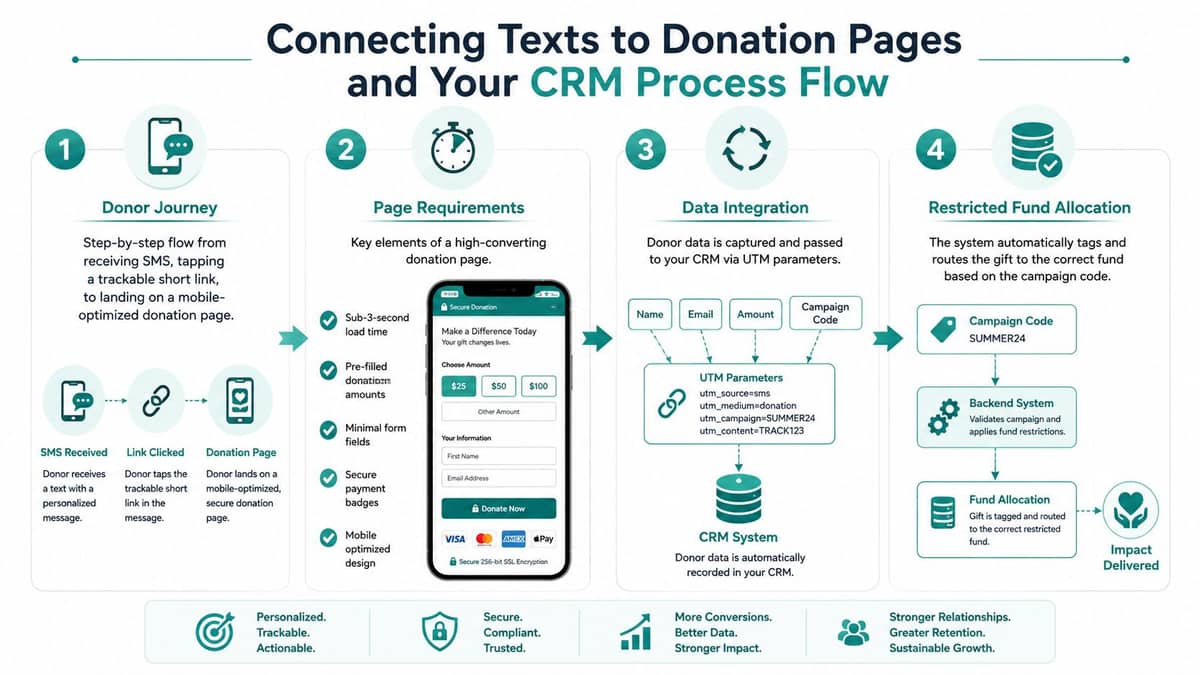
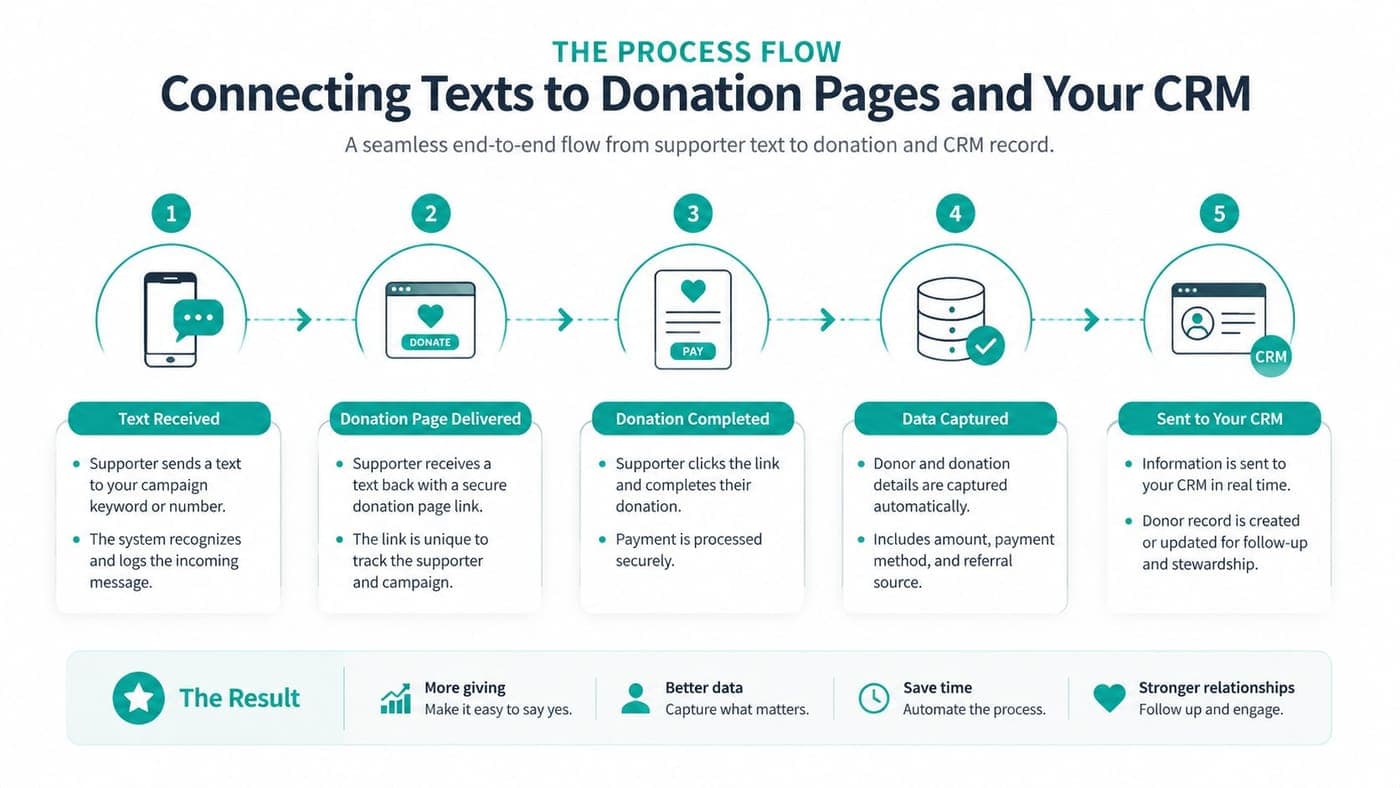
The donor's experience shouldn't stop at the click. A text campaign is working properly only when the gift reaches a fast donation page, the donor record captures the source, and the accounting system assigns the intended fund.
Begin with the mobile page
A donor should see the campaign promise immediately after tapping. Use a mobile-optimized page with a sub-3-second load time, pre-filled gift amounts based on prior giving where appropriate, minimal form fields, and one-tap payment options such as Apple Pay and Google Pay. These requirements reduce friction, but they don't replace clear fund language or a visible receipt process.
Keep one campaign link in the message. The destination should match the promise in the text, whether that means emergency relief, a school program, a church ministry, or a sponsored project. A donor shouldn't have to search your website for the correct form.
Pass useful data into the CRM
The link should carry a campaign identifier through UTM parameters or equivalent tracking fields. Your donation form should pass the donor's name, email, gift amount, campaign code, SMS source, and consent status back into the donor record.
That information gives your team future options. You can distinguish a donor who gave through an emergency text from one who arrived through an event email. You can identify gift tiers, previous engagement, and campaign affinity without asking the donor to repeat their history.
Operational insight: The click is a marketing event, the gift is a financial event, and the donor record must connect both.
Protect restricted funds
Fund accounting adds a control that basic fundraising reports often miss. Each text-driven gift needs a campaign code that maps to the correct restricted fund, program, grant, or general operating designation before money is posted.
If the campaign code is missing, your finance team may need to investigate gifts manually. That creates delays and increases the chance that restricted dollars land in the wrong bucket. Test the accounting handoff with gifts for each relevant designation before the campaign goes live.
AlignMint can map SMS opt-in status to a custom donor field, connect fundraising records with true fund accounting, and support automated workflows for a thank-you text and email receipt after a completed gift. Its broader platform combines accounting, CRM, volunteers, events, and marketing, with plan-based access and a free nonprofit tier for organizations under $100K in annual fundraising. (AlignMint donation pages documentation)
Test the complete loop
Run a small internal test and verify:
- Message delivery: The intended segment receives one message.
- Link behavior: The link opens the correct mobile page.
- Payment flow: The available payment methods work on common phones.
- CRM capture: Source, campaign, donor, and consent fields populate correctly.
- Fund assignment: The gift posts to the designated fund.
- Receipting: The donor receives the expected confirmation.
- Suppression: A STOP response removes the test number from future sends.
Measuring What Matters and Avoiding the Second-Year Slump
The most useful benchmark isn't the launch-day result. It's whether your program still earns attention after donors have seen several campaigns.
The 2025 nonprofit texting report found fundraising texts produced $4.38 returned per $1 spent overall. Yet newer programs outperformed mature programs across several measures. New programs recorded a 1.60% click-through rate versus 0.64% for mature programs, a 0.35% donation conversion rate versus 0.10%, and $7.52 ROI versus $2.89. (2025 nonprofit text messaging report)
Those differences point to list fatigue, repeated appeals, weak segmentation, and insufficient testing. The answer isn't automatically sending more messages. It's sending fewer, more relevant messages to better-defined groups.
SMS fundraising KPI benchmarks
| KPI | Year 1 benchmark | Year 2, no segmentation | Year 2, with segmentation |
|---|---|---|---|
| Click-through rate | 1.60% | 0.64% | Not provided |
| Donation conversion rate | 0.35% | 0.10% | Not provided |
| ROI | $7.52 | $2.89 | Not provided |
The report supplies benchmarks for newer and mature programs, but it doesn't provide a verified “with segmentation” benchmark. Don't fill that blank with an invented target. Use your own baseline and watch the direction over time.
Build a monthly dashboard
Track opt-in rate, click-through rate, gift completion rate, average gift size, revenue per message sent, and unsubscribe rate. Review results by campaign, audience segment, and source rather than looking only at the account-wide average.
Segment by recency, frequency, monetary value, and campaign affinity. A recent donor may need an impact update rather than another ask. A high-value donor may deserve fewer, more personal messages. A lapsed donor may respond better to a re-engagement sequence that begins with what their earlier support accomplished.
Use a quarterly cadence
A simple quarter might include:
- Appeals: Send targeted donation requests tied to a real need.
- Impact updates: Show what prior support made possible without asking for money.
- Non-ask touchpoints: Share volunteer opportunities, event details, or mission news.
- Re-engagement: Invite inactive subscribers to remain connected or update preferences.
- Gratitude: Thank donors after gifts and report progress after campaigns.
Review timing, message length, emoji use, and CTA wording as separate tests. Start with clarity and relevance, then examine send time and tone. Change one meaningful variable at a time so your team can understand what caused the result. For broader donor relationship planning, use these nonprofit donor retention strategies as a companion to your SMS review.
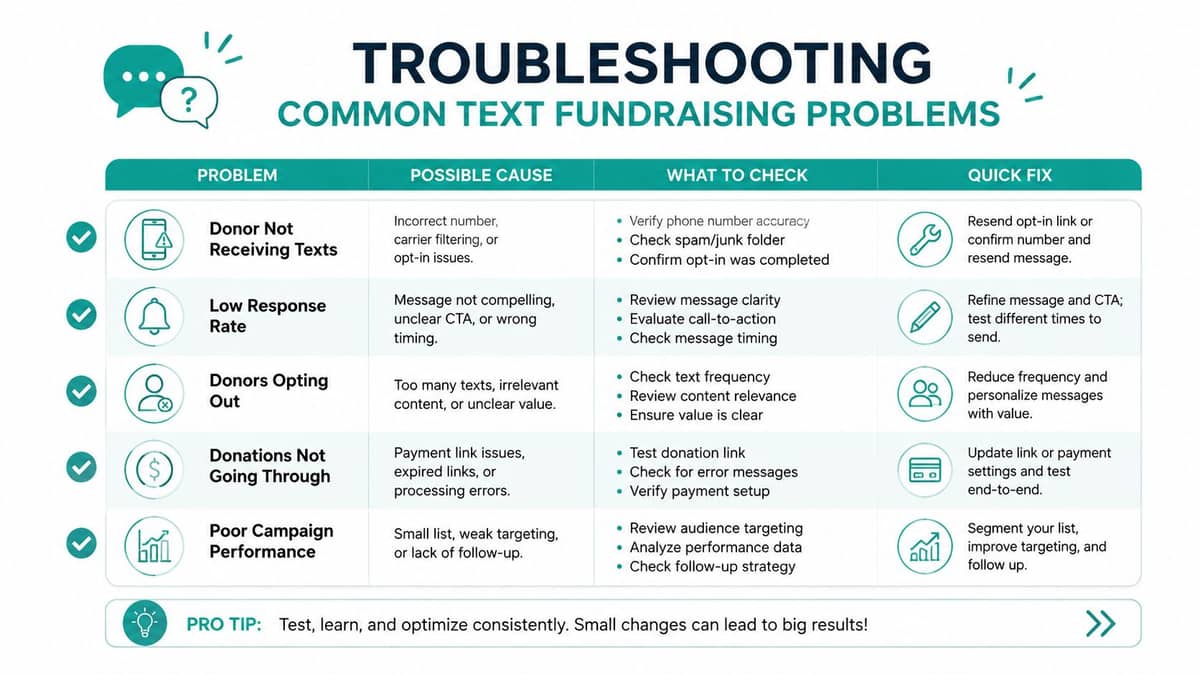
Troubleshooting Common Text Fundraising Problems
Most SMS problems leave clues before they become expensive. Your monthly review should examine consent, delivery, engagement, and accounting together.
Low opt-in rates
First inspect placement. If the checkbox is buried below a long donation form, move it closer to the phone field and explain the benefit. If the language sounds like legal boilerplate, replace it with a plain description of the updates donors will receive. If supporters see no value, offer a clear reason to subscribe, such as timely program updates, event reminders, or emergency alerts.
Try direct language: “Receive occasional texts about how your support helps, urgent needs, and ways to participate.” Keep the required consent details nearby, but don't hide the purpose.
Carrier filtering
Register the sending program through the appropriate 10DLC process, maintain consistent sending volumes, and avoid language that resembles spam. Phrases such as “free money,” excessive punctuation, and exaggerated promises can increase filtering risk. Review failed delivery patterns by carrier instead of assuming every undelivered message reflects donor disinterest.
Donor fatigue
Watch for rising unsubscribes and declining clicks across consecutive sends. When engagement weakens, pause donation asks for thirty days and send only useful impact content, program updates, or clear preference reminders.
After the pause, return with one well-segmented message. Don't restart with a broad appeal to everyone who remained subscribed.
Compliance missteps
Common failures include texting without express consent, omitting opt-out language from initial messages, and failing to honor STOP requests within the required window. Keep a suppression list, review every campaign before scheduling, and make one person accountable for consent records.
Use this monthly diagnostic:
- Consent audit: Confirm the source and timestamp for new subscribers.
- Content audit: Classify each message as informational, promotional, or both.
- Delivery audit: Review filtering and failed delivery patterns.
- Fatigue audit: Compare clicks, gifts, and unsubscribes by segment.
- Fund audit: Confirm campaign codes reached the intended restricted funds.
- Suppression audit: Test STOP handling and remove opted-out numbers.
The SMS campaign documentation can help your team review campaign setup, opt-in enforcement, and audience controls before sending.
If you want to connect compliant text campaigns with donor records, volunteers, events, marketing, and true fund accounting, visit AlignMint to see how the all-in-one platform can support your operating workflow. You can also review the free tier for nonprofits under $100K and decide whether one shared system fits your team better than several disconnected tools.
Ready to try AlignMint with your nonprofit?
Start free — set up donor tools, giving pages, and Minty. Upgrade when you need accounting.