

Nonprofit Accounting Best Practices for Fund Management
You're closing the month with three spreadsheets open, a grant deadline approaching, and a board asking whether restricted money remains available. The accounting may be technically complete, yet you still can't answer simple questions without checking several files.
Nonprofit accounting best practices give you a calmer path. With true fund accounting, documented controls, consistent expense allocation, and a practical monthly close, you can protect donor intent and prepare cleaner reports without building a system only one person understands.
Quick Answer: Nonprofit Accounting Best Practices
Nonprofit accounting best practices keep restricted money, grant codes, and functional expenses in the same ledger. Document the controls a small team can actually follow, then close the month from that record instead of rebuilding the story in spreadsheets.
Start with nonprofit accounting and fund accounting. For restrictions, see restricted fund accounting.
Introduction
A grant report is due Friday, but the grant budget is in a spreadsheet, donations are recorded in another system, and the bank feed shows only cash movement. By month-end, someone must rebuild the story for the board.
The problem becomes visible when a restricted balance does not match the available records, or when an auditor asks how a shared salary was assigned to a program. Payroll, donor questions, grant deadlines, and Form 990 preparation can then compete for the same limited staff time.
A practical solution is a repeatable monthly workflow that works like a checklist for the books. Record fund and grant codes when transactions enter, retain support for each restriction, document shared-cost allocations, reconcile grant balances, and review key controls before reports are issued. These steps reduce the need to search across disconnected files.
AlignMint's nonprofit accounting platform is one option for bringing this work into a connected system. The goal is a monthly close where restricted balances, grant codes, and functional allocations are already reconciled before the board packet is built. That gives staff a reliable record to use for reporting, questions, and compliance.
Understanding Fund Accounting Concepts
True fund accounting answers a question ordinary bookkeeping often leaves unclear: which resources can we spend, and for what purpose?
Think of your organization's money as labeled jars. One jar holds unrestricted operating funds. Another holds a grant for a named program. A third holds a donor contribution reserved for a particular activity. The cash may sit in the same bank account, but the accounting records must preserve each label.
Nonprofit accounting best practice is to track restricted contributions separately until donor conditions are satisfied. When the restriction is met, the amount is reclassified from restricted to unrestricted net assets instead of being treated as ordinary operating revenue, as explained in this fund accounting guidance.
Why classes aren't the whole answer
QuickBooks classes can help organize reports, and many nonprofits appreciate QuickBooks for its familiarity, broad adoption, and accessible bookkeeping workflows. The gap appears when classes become a substitute for true fund accounting.
A class may describe a transaction after someone records it. It may not independently preserve the donor restriction, grant condition, release policy, supporting documents, and remaining balance in one connected structure. That leaves staff comparing class reports with spreadsheets and making month-end judgments.
With true fund accounting, each fund or project carries its own financial identity. You can see income, expenses, transfers, available balances, and unreleased restrictions without rebuilding the picture manually.
Use a separate fund or project code for every meaningful restriction. Don't create a new code for every minor reporting preference, because excessive detail can make your chart of accounts fragile and difficult to maintain.
Practical rule: If you can't explain why a balance is available, restricted, or released, the coding structure needs attention.
The monthly benefit
Real-time restricted balances improve three conversations. You can answer donors about intended use, give the board a clearer view of available operating resources, and identify compliance concerns before reporting deadlines.
A clean system also supports fiscal sponsors managing several sponsored projects. Each project can retain its own activity while leadership reviews consolidated information, provided the underlying codes and documentation remain consistent.
The same logic helps churches, schools, and volunteer-led organizations. A church may need separate visibility for ministry programs, a school may track awards by project, and a fiscal sponsor may need reports for each sponsored initiative.
Read how fund accounting works for nonprofits when you're ready to compare fund structures and reporting approaches in more detail. The foundation is simple: preserve the label, document the rule, and reconcile the balance regularly.
Implementing Strong Internal Controls
Internal controls work best when they fit the way your team already operates. A two-person nonprofit doesn't need to copy a large institution's hierarchy, but it does need clear approvals, restricted access, and independent review.
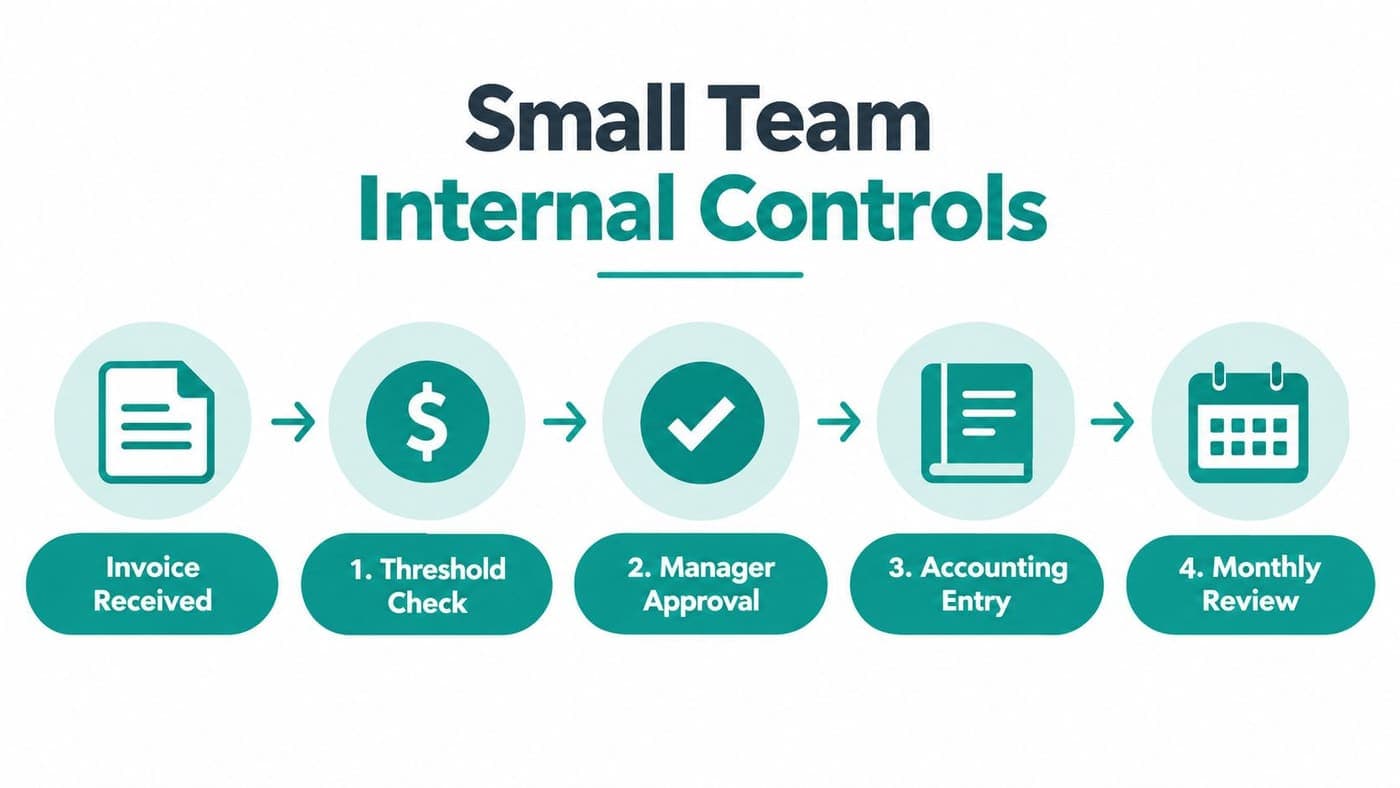
Start by writing who may request, approve, record, and reconcile each transaction. If one employee performs several duties, assign the board treasurer or another independent board member to review the records.
Build a small-team control routine
Set approval thresholds that match your budget and risk. The exact amounts should come from your board-approved policy, not from a generic template. Require documented approval before payment, and require a second review for unusual vendors, electronic transfers, credit-card charges, and transactions involving senior staff.
Then separate system access by role. A program manager may submit an expense and view a project balance without changing the chart of accounts. A bookkeeper may enter transactions without approving their own payment. A board reviewer should have access to reports and reconciliation evidence.
Modern nonprofit checklists pair accounting controls with system controls, including role-based access, approval thresholds, and audit trails in secure financial systems, particularly for small staff teams, as described by QuickBooks' nonprofit accounting guidance.
Document the decisions people repeat
Your written procedures should cover invoice review, reimbursement, credit cards, bank access, expense allocation, grant coding, and month-end review. Keep the language practical. Staff should know what to do when an invoice covers two programs or when a donor changes a restriction.
Expense allocation deserves special attention. Direct costs should be coded to the program or fund when incurred. Shared costs should follow a documented basis, such as time tracking, square footage, or headcount, rather than a convenient guess.
Schedule a board-member monthly review when full segregation isn't possible. That review should include bank statements, investment records, credit-card activity, unusual transactions, reconciliations, and unresolved exceptions.
For a deeper operational checklist, review nonprofit internal controls. If you're strengthening duties around cash handling, this resource on how to protect against cash leaks offers useful context on segregation principles.
Make controls part of the workflow
Controls shouldn't depend on memory. Add approval fields to payment requests, require fund and project codes before posting, attach invoices to transactions, and create a monthly exception list for missing documents.
At close, someone other than the person entering transactions should review the reconciliation. That small pause catches duplicate payments, unexplained transfers, incorrect fund codes, and expenses that lack evidence.
The outcome is more important than complexity. A short, documented process that your team follows every month provides better protection than a policy nobody consults.
Managing Restricted Funds and Grants
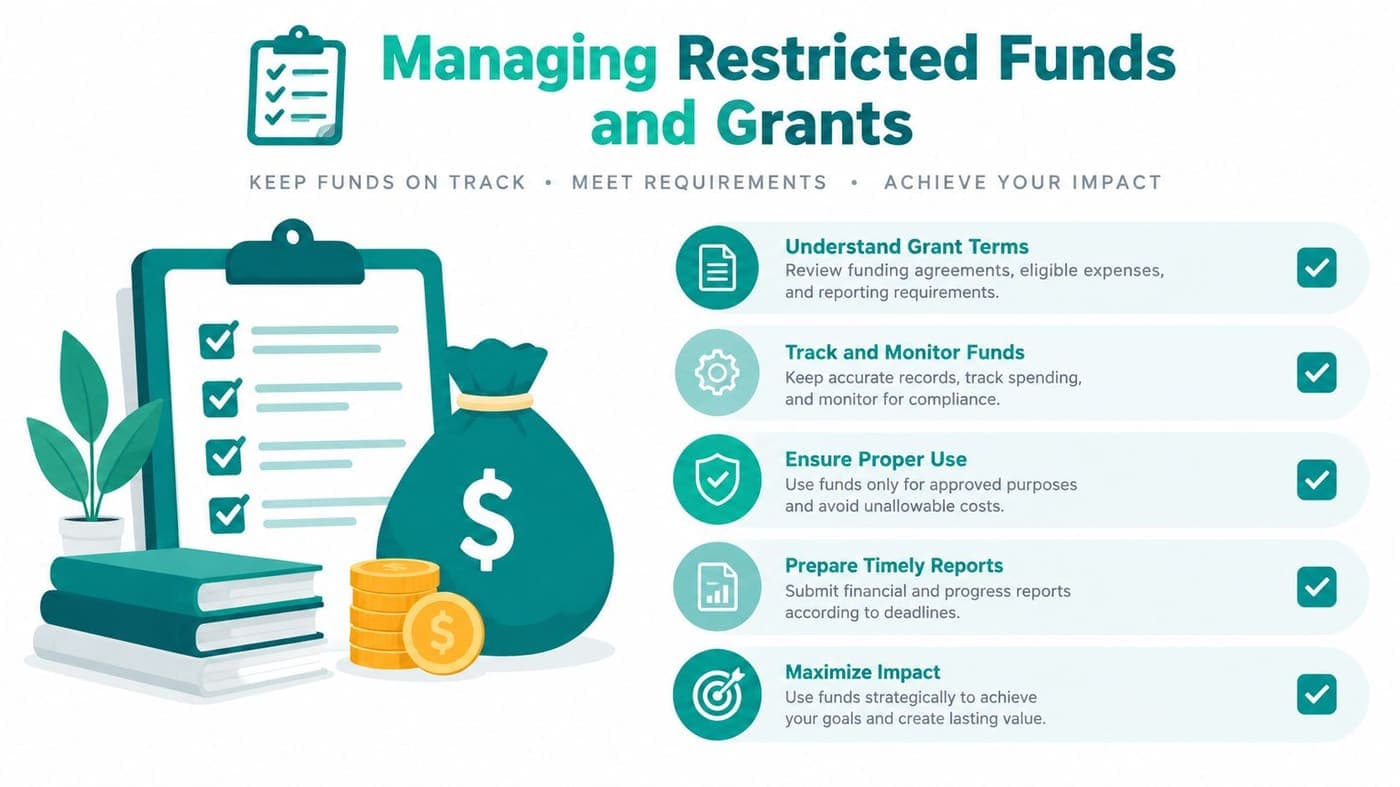
Grant control begins before the first expense. Read the award agreement, identify every restriction, and translate the requirements into codes your staff can use without interpretation.
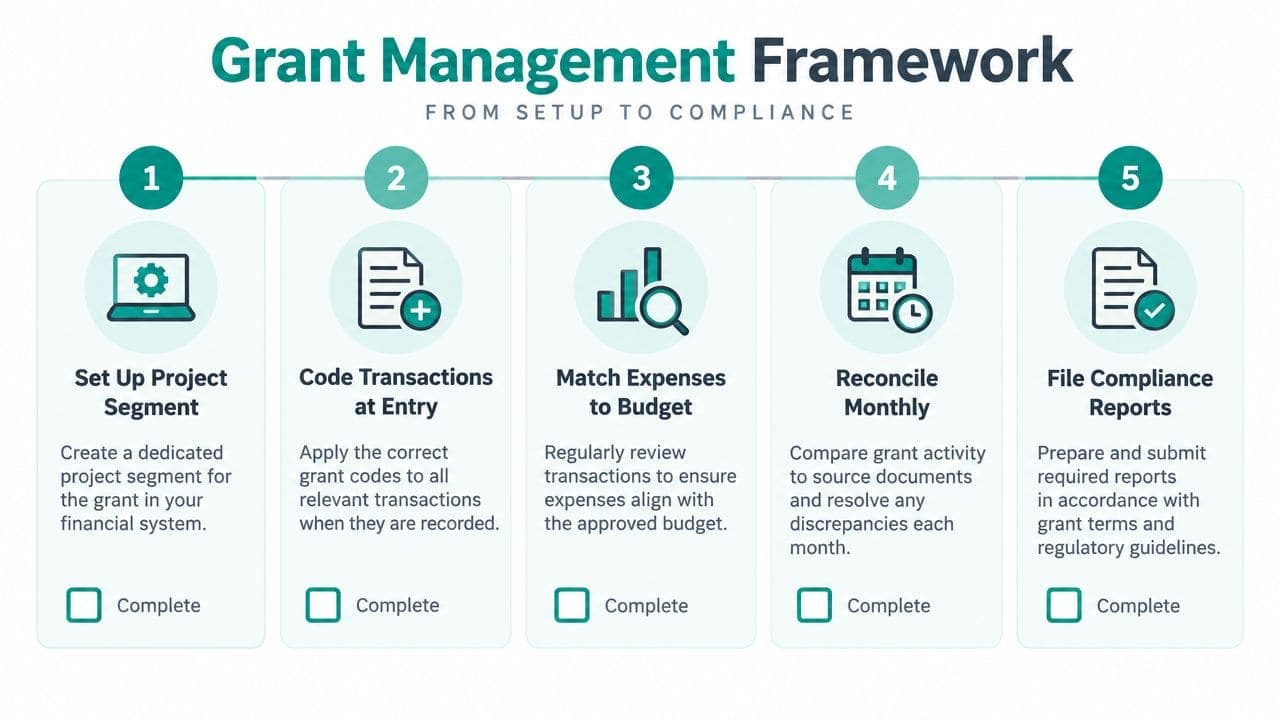
Create a separate fund or project segment for each award. Record the approved budget categories in the accounting system, then require every transaction to carry the correct project, natural account, and functional category.
A strong framework uses transaction-level coding and monthly reconciliation among the general ledger, grant budget, and source documentation. The EPA nonprofit grant guide also emphasizes written procedures, supporting records, and controls that reduce compliance failures.
Set up the award clearly
Store the grant agreement, budget, reporting schedule, payment terms, and restriction language with the project record. Attach invoices, receipts, timesheets, contracts, and approval evidence to each related transaction.
Match ledger categories to the approved budget. If the funder approves personnel, supplies, and contracted services separately, your internal codes should make those categories visible without forcing staff to reconcile a second spreadsheet.
Use the same structure for donor-restricted gifts. A donor's written condition should connect to the fund, purpose, expected release event, and responsible program lead.
Run the close as a checklist
A practical monthly close can follow this sequence:
- Confirm completeness: Review bank activity, payroll allocations, credit-card charges, invoices, and interfund entries.
- Check the grant budget: Compare posted expenses with the approved categories and investigate unusual variances.
- Verify source documents: Confirm that each material transaction includes its invoice, receipt, timesheet, contract, and approval.
- Review restrictions: Check whether spending satisfied a donor or grant condition and whether a release entry is appropriate.
- Reconcile balances: Tie the ledger to grant records, development records, and supporting schedules.
- Record exceptions: Assign an owner and due date for every unresolved item before closing the period.
Release-from-restriction entries should follow a written policy. When the qualifying activity occurs, reclassify the amount properly instead of letting restricted balances remain indefinitely.
For a fuller treatment of this workflow, see restricted fund accounting. Benefits and staffing costs often affect grant budgets together, so teams may also need to find nonprofit health benefits while planning personnel expenses.
Keep the structure maintainable
More codes don't automatically produce better information. Use multidimensional coding for fund, project, department, natural account, and function, then keep definitions in a short coding guide.
Program leaders should review their project balances before requesting new spending. Finance staff should reconcile development and accounting records monthly, especially when donations, pledges, grant drawdowns, and releases move through different workflows.
That discipline gives auditors a trail they can follow and gives you a report you can trust. It also prevents one knowledgeable employee from becoming the only person who understands the organization's restrictions.
Streamlining Form 990 and Expense Reporting
Form 990 reporting becomes easier when functional classification happens during the transaction, not during tax preparation. Your system should preserve both what the expense is and why your organization incurred it.
Under IRS rules, 501(c)(3) organizations must complete a Statement of Functional Expenses, allocating every cost to program, management and general, or fundraising categories using a documented basis, as shown in the IRS Form 990 instructions and return.
The full Form 990 requires the Statement of Functional Expenses for applicable 501(c)(3) and 501(c)(4) organizations filing the full return, with all columns completed. Modern nonprofit accounting therefore needs function-by-nature reporting as a baseline, not as an optional enhancement.
Code expenses at the source
Natural classification describes the expense itself, such as salaries, rent, supplies, or professional services. Functional classification describes the activity supported, including program services, management and general, or fundraising.
Direct program supplies usually have a clear function. Shared salaries, rent, technology, and occupancy costs require an allocation basis that you document and apply consistently.
Set allocation percentages at the beginning of the year using prior-period information, update them when operations change, and review them quarterly. Time studies, square footage, and FTE-based headcount can provide evidence for those decisions.
At close, reconcile functional totals to natural totals. The total functional expenses must equal total natural expenses, or the report will not provide a reliable picture.
Use a reporting calendar
| Task | Deadline |
|---|---|
| Confirm fund and function coding | Before monthly close |
| Review allocation assumptions | Quarterly |
| Reconcile functional and natural expenses | Each month-end |
| Prepare Statement of Functional Expenses support | Before Form 990 preparation |
| Review Form 990 data with leadership and the board | Before filing |
| Complete the applicable Form 990 return | According to the organization's IRS filing requirement |
The calendar's value is not the dates alone. It assigns ownership before the work becomes urgent. A program director can validate time allocations, the bookkeeper can resolve missing codes, and the board can review unusual trends with context.
Use the Form 990 checklist to organize supporting schedules and questions for your preparer. If your organization qualifies for public charity status under section 509(a)(2), remember that the public support calculation has its own requirements. More than 33 1/3% of support normally must come from qualifying gifts, grants, contributions, membership fees, and gross receipts, while no more than 33 1/3% may come from investment income and unrelated business income, according to the IRS Schedule A instructions.
The IRS also provides a facts-and-circumstances route when public support is more than 10% but less than 33 1/3% of total support, if the organization can show that it normally receives substantial public or government support, as described in the IRS public support guidance.
Leveraging Technology for Compliance
Software should reduce the number of times your team re-enters the same fact. It shouldn't ask you to become a systems administrator before you can reconcile a bank account.
QuickBooks remains familiar and offers broad bookkeeping support, which makes it a reasonable starting point for many organizations. The question is whether classes, add-ons, and connected tools preserve restricted funds, grant conditions, donor records, volunteer activity, and functional allocations in a way your team can review.
Connect the records that already belong together
An all-in-one nonprofit platform can connect a gift record to the donor, fund, receipt, bank transaction, and general ledger entry. That connection reduces duplicate entry and gives development and finance staff a shared view.
Volunteer management matters too. Volunteer hours, skills, availability, background checks, groups, and self-service entries can support program records when those activities affect grant reporting or internal planning.
Online giving pages should capture the intended fund at the moment of donation. Events, ticketing, secure payments, promo codes, email campaigns, text campaigns, and personalized video appeals can then feed the same donor and financial records instead of creating separate reconciliation projects.
A built-in marketing suite also helps your team connect outreach with giving activity. That doesn't replace thoughtful fundraising strategy, but it can reduce the administrative handoffs that create mismatched records.
Choose controls over decoration
Look for role-based permissions, approval workflows, document storage, audit trails, bank-feed reconciliation, and reports that drill into source transactions. Ask whether the system supports separate funds, projects, grants, programs, and functional categories natively.
The operational gap is often not knowing that restricted funds must be tracked. It's closing the books monthly without spreadsheet workarounds. Practitioner guidance notes that modern platforms can automate multidimensional coding and monthly reconciliations, as discussed in this nonprofit accounting operations resource.
AlignMint combines accounting, donor management, volunteers, events, marketing, and online giving in one platform. Its stated features include true fund accounting, plan-based access without per-seat fees, a free tier for nonprofits raising up to $100K per year, a built-in marketing suite, and Minty AI, which answers questions using your organization's financial data.
Minty AI should support review, not replace judgment. You still need documented policies, human approvals, and an independent review of important financial records.
For compliance-focused workflows, explore nonprofit tax compliance tools. Compare AlignMint with QuickBooks, Blackbaud, Sage Intacct, and other platforms by testing your actual month-end process, not by counting feature names.

Real World Workflows in Action
A responsible guide can't promise that every church or school will cut close time, secure repeat funding, or achieve a particular reporting result. Those outcomes depend on staffing, transaction volume, grant terms, and the quality of the underlying records.
What you can do is test the workflow against two realistic operating situations.
A church with several ministry funds
Before changing its process, a church may keep donation exports, bank activity, ministry budgets, and volunteer schedules in separate files. The finance volunteer then matches transactions manually, asks staff about unclear purchases, and prepares a board packet from figures that may already be outdated.
A better monthly routine gives each ministry fund a defined code. Donors select the intended purpose through an online giving page, the finance reviewer checks the bank feed, staff attach receipts, and the board reviews exceptions rather than every transaction.
A donor self-service portal can help supporters review giving records and update information without asking the church office to re-enter routine details. The church still needs human oversight, but the staff conversation changes from “Which spreadsheet is correct?” to “Why does this balance differ from the approved budget?”
A school program with grant-funded activity
A school program may receive an award tied to approved personnel, supplies, and contracted services. Without project coding, staff can spend appropriately yet struggle to prove which expenses belong to the award.
A controlled workflow assigns the award its own project segment, matches each expense to the grant budget, attaches the source document, and reconciles activity monthly. Program staff review the operational facts, while finance staff confirm the accounting treatment and reporting trail.
That structure also helps when the organization manages volunteers, events, tuition-related activity, or donor-funded initiatives alongside grants. Each stream can retain its own purpose while leadership reviews the overall financial position.
The lesson from both situations is practical. A reliable close depends less on heroic cleanup and more on decisions made when transactions enter the system. A platform can shorten handoffs, but it can't decide whether a donor restriction has been satisfied or whether an allocation basis remains reasonable.
Conclusion and Next Steps
Strong nonprofit accounting gives your team answers before questions become urgent. During the month, staff should be able to see restricted balances, available operating funds, shared-cost allocations, budget differences, and missing documentation without rebuilding the picture in separate spreadsheets.
A practical close starts when each transaction enters the system. Assign one fund or grant code to each restriction, attach the invoice or other source document, and record the allocation basis while the details are available. At month-end, reconcile activity to the bank, budget, and grant records. An independent reviewer then signs off on exceptions and unresolved items.
Functional expense reporting also becomes easier when costs receive consistent classifications from the start. For 501(c)(3) organizations required to complete the Statement of Functional Expenses, that workflow supports Form 990 preparation and financial statement reporting.
Small teams can apply meaningful controls without creating an elaborate bureaucracy. Set approval thresholds, limit system access by role, require multifactor authentication, retain documents with transactions, and assign review duties to someone who did not enter the activity.
Technology should support this routine. An all-in-one platform can connect accounting, CRM, volunteer management, events, marketing, online giving, and team communication. AlignMint offers true fund accounting, plan-based access without per-seat fees, a free tier for nonprofits under $100K, and Minty AI for questions about an organization's own records.
Begin with the next monthly close. Map the current spreadsheets, define the codes, document who reviews reconciliations, and test whether the accounting system preserves the audit trail without adding manual work. The same approach fits a church, school, fiscal sponsor, or growing community nonprofit.
AlignMint combines accounting, fund accounting, donor management, volunteers, events, marketing, online giving, and team communication in one nonprofit platform. Visit AlignMint to explore the free tier, review Minty AI's financial question features, and schedule a demonstration focused on the monthly close workflow.
Ready to try AlignMint with your nonprofit?
Start free — set up donor tools, giving pages, and Minty. Upgrade when you need accounting.