

A volunteer bookkeeper leaves, a grant deadline arrives, and your board discovers that nobody can explain why the restricted fund balance doesn't match the ledger. You're left defending ordinary decisions as if they were misconduct, while staff wonder whether programs must pause.
Nonprofit internal controls prevent that scramble. They protect donor intent, cash, records, volunteers, and your credibility by making financial responsibility visible before an error becomes a crisis.
Quick Answer: Nonprofit Internal Controls
Nonprofit internal controls are the approvals, access rules, and reviews that show who can receive, record, spend, and reconcile money. Written separation of duties—and a documented backup when the team is too small for perfect separation—keeps trust from depending on one person.
Start with nonprofit treasurer responsibilities and restricted fund accounting. For the ledger, see fund accounting.
What Nonprofit Internal Controls Are and Why Your Mission Depends on Them
Nonprofit internal controls are the procedures, approvals, reviews, and access rules that guide how your organization receives, records, spends, and reports money. They also protect noncash assets, donor information, grant documentation, and the reputation your mission depends on.
A control isn't an accusation against your bookkeeper or a long-serving volunteer. It's a practical safeguard that lets good people work without carrying impossible responsibility alone. I learned that distinction after two audits and a near-miss fraud situation. Trust mattered, but trust without verification left the organization exposed.
The five-part framework
Use five questions to organize your controls:
- Control environment: Does leadership model accountability, written policies, and ethical conduct?
- Risk assessment: Have you identified where money, approvals, data, and restricted obligations could fail?
- Control activities: Who approves, records, handles, reconciles, and reviews each transaction?
- Information and communication: Can the right people find accurate records and understand exceptions?
- Monitoring: Does someone test whether controls operate consistently, then document corrective action?
The audit risk assessment process from Lighthouse Consultants offers useful context for turning broad concerns into specific risks, owners, and review procedures. You don't need a large finance department to apply that discipline. You need a written map of who touches each process and what evidence proves completion.
Protect the mission first
Your board should know which controls protect operating cash, restricted funds, payroll, grants, and donor records. The nonprofit treasurer responsibilities guide can help clarify the board's oversight role without turning directors into daily bookkeepers.
At minimum, your policies should answer who can approve spending, who can release payments, who reconciles accounts, and who reviews the reconciliation. They should also explain what happens when your team is too small for perfect separation.
The sections ahead focus on the boundaries where controls usually break down: restricted funds, grants, fiscal sponsorship, remote access, volunteers, and software permissions. Those are the places where a policy can exist on paper while the actual workflow undermines it.
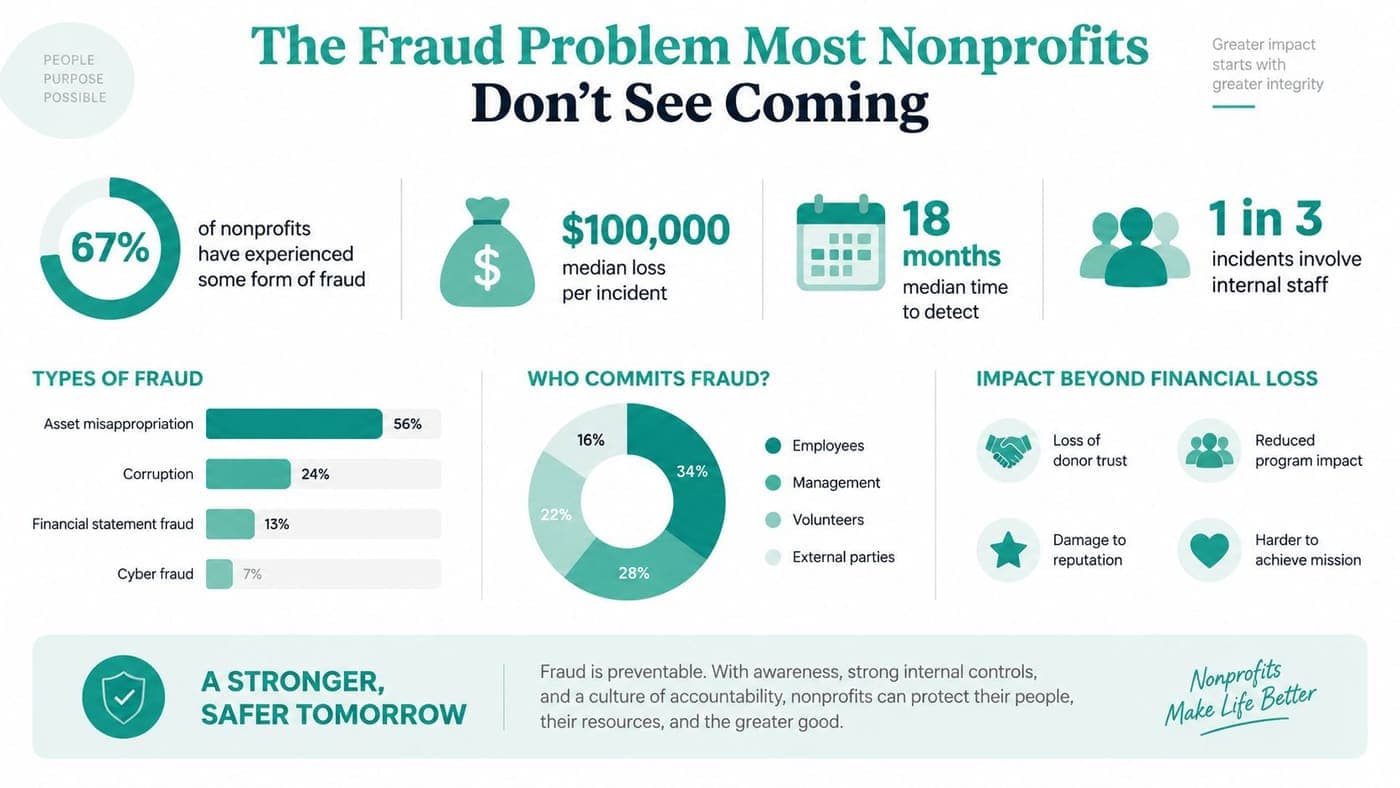
The Fraud Problem Most Nonprofits Don't See Coming
The most dangerous fraud scenario usually involves a person nobody wanted to question. A long-serving employee or trusted volunteer knows the routines, understands the gaps, and can make a small exception look ordinary.
The ACFE's 2020 fraud summary for nonprofits found that nonprofits used core controls less often than other organizations. Only 21% used surprise audits, compared with 40% of other organizations. Only 24% conducted formal fraud risk assessments, compared with 43%, while 44% had management review of internal controls, compared with 68%. Internal audit departments existed in 57% of nonprofits, compared with 76% of other organizations.
The weakness is usually ordinary
The same ACFE summary identified lack of internal controls as the leading control weakness in nonprofit fraud cases, at 35%. Lack of management review followed at 19%, and override of existing controls accounted for 14%. Those figures point to systemic exposure, not a few isolated bad actors.
A missing review can enable check tampering when the person writing checks also receives unopened bank statements. A weak vendor process can support a billing scheme when one person creates vendors, approves invoices, and releases payment. Skimming thrives when cash receipts aren't counted by two people and deposits aren't matched to records.
Payroll ghost employees become possible when nobody independently reviews the payroll register against current staff. In each example, the fraud depends less on advanced technology than on an ordinary workflow with no independent question.
Practical rule: If one person can initiate, approve, handle, record, and conceal a transaction, you have a control problem.
A 2025 peer-reviewed study analyzed 274,352 organizations that filed Form 990 and found that 640 reported fraud. It also found that stronger governance policies and financial audit systems were significantly associated with lower reported asset misappropriation, as reported in the peer-reviewed nonprofit fraud and governance study.
The historical losses are sobering. Earlier research covering 58 nonprofit fraud cases found losses ranging from $200 to $17 million, with a median loss of $100,000 and nearly $30 million in total losses across the cases, according to that same study.
You may face a frozen bank account, donor refund demands, board resignations, corrective audit findings, or a grant review. Even when nobody intended harm, the executive director still has to explain why basic oversight failed. The nonprofit software security guide is a useful companion for reviewing the systems that hold financial and donor data.
The Five Core Controls Every Nonprofit Needs
Riverbend Youth Services has five people: an executive director, an office manager, a bookkeeper, a development director, and a part-time volunteer. That resembles many organizations I've worked with. Perfect segregation of duties isn't possible, so Riverbend uses compensating controls instead of pretending the staffing structure is larger than it is.
Start with responsibility, not job titles
The bookkeeper records transactions and prepares reconciliations. The office manager handles routine purchases under a written threshold. The executive director approves larger expenses, while the board finance committee reviews reports and reconciliations. The development director records gift documentation but doesn't approve program spending.
The volunteer counts event cash with the office manager, signs the count sheet, and never makes the deposit alone. A monthly maker-checker review gives another person evidence to question unusual entries.
| Transaction Amount | Approver | Secondary Review | Required Documentation |
|---|---|---|---|
| Under $500 | Office manager | Executive director reviews monthly report | Receipt, purpose, budget code |
| $500 to $2,500 | Executive director | Finance committee reviews monthly report | Receipt, approval, budget code |
| Above $2,500 | Board approval | Finance committee confirms minutes | Written request, quotes or rationale, minutes |
Five controls to put in writing
- Segregation of duties: No person should authorize, handle, and record the same transaction. Pair separate roles with independent bank reconciliations and review of sequentially numbered checks or invoices, as recommended in this nonprofit fraud prevention guidance.
- Authorization limits: Set thresholds by amount and expense type. A policy that says “management approval” isn't enough when staff need to know who can approve a vendor, payroll adjustment, reimbursement, or grant expense.
- Monthly reconciliations: Riverbend reconciles the bank account, credit card, payroll register, and grant schedules each month. The bookkeeper prepares them, the executive director reviews supporting items, and the finance committee signs off.
- Restricted fund accounting: Each restricted gift and grant maps to its own fund or program. Riverbend reviews available balances before approving expenses, rather than correcting coding after money has already moved.
- Access management: Give users only the permissions their jobs require. Riverbend uses role-based access, MFA, an audit trail, and a terminated-employee deprovisioning checklist.
Document the reviewer's initials, date, questions, and resolution. A control without evidence becomes a memory, and memories don't satisfy an auditor or protect a board.
Restricted Funds, Grants, and Fiscal Sponsorship Controls
A nonprofit can spend the wrong money without anyone intending fraud. I've seen teams approve a routine overhead invoice against a restricted program because the fund code looked similar, the grant schedule lived in another spreadsheet, and nobody reviewed the variance until a grantor asked questions.
The result is predictable. Staff scramble to reconstruct the transaction, the board loses confidence, and the organization must explain why donor intent wasn't visible at the point of purchase. The fix isn't another reminder to “be careful.” It's a connected control pattern.
Catch the error where it starts
Use five controls:
- Strict fund coding at entry: Require a fund, program, grant, and restriction code before posting.
- Restriction flags: Configure the accounting system to identify expenses that don't match permitted activity.
- Monthly variance reports: Compare restricted activity with approved budgets and available balances.
- Board approval for reclassification: Don't move an encumbrance from restricted to unrestricted without written approval.
- Quarterly grant reconciliation: Tie grant-specific sub-accounts and schedules back to the general ledger.
Your accounting system should document each restriction, map every transaction to the correct fund or program, and reconcile subledgers to the general ledger monthly. The monthly close should also cover restricted balances, grant activity, interfund entries, payroll allocations, and releases from restriction, as described in this nonprofit accounting guide.
Fiscal sponsorship needs stricter boundaries
Fiscal sponsors face an added risk because several projects may share staff, banking infrastructure, and reporting processes. Guidance for fiscal sponsorship identifies five practical controls: written sponsorship agreements, separate fund accounting for each project, documented sponsor fee calculations, Form 990-ready reporting, and strict data isolation between sponsored organizations. Each sponsored organization's funds should have independent tracking through its own chart of accounts, with donor restrictions honored per organization rather than commingled. See this fiscal sponsor compliance checklist for a useful control model.
The same discipline applies to schools, churches, and multi-program nonprofits. A pooled bank account doesn't justify pooled accountability. Your ledger, approval workflow, donor records, and reports must show whose money it is and why it moved.
For a deeper treatment of fund classes, releases, and reporting, review this guide to restricted fund accounting. Smaller organizations can enforce fund-specific controls when coding rules, review ownership, and documentation live in one repeatable process.
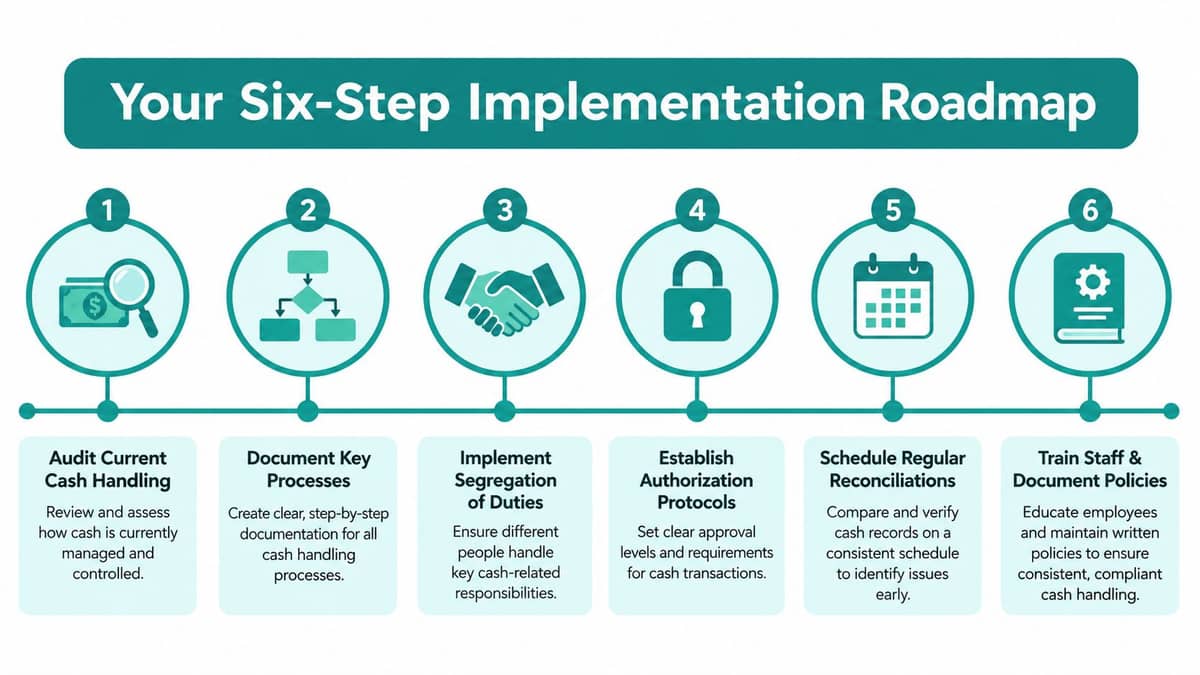
Your Six-Step Implementation Roadmap
A near-miss fraud exposed a simple truth: controls fail at handoffs. Build this roadmap around visibility, named ownership, and evidence. Do not buy software before you know which approvals, fund restrictions, and access points need control.
Complete these steps in this order
1. Audit cash handling in one week. List everyone who receives, counts, deposits, approves, records, or reconciles money. Cover checks, online gifts, event cash, cards, reimbursements, and payroll changes.
2. Map authorization limits over the next two weeks. Set thresholds for each transaction type and amount. Name the approver, second reviewer, required documents, and backup for absences.
3. Establish the reconciliation calendar. Schedule monthly reviews for bank, card, payroll, and grant accounts. Separate preparation from review whenever staffing allows, and record unresolved items.
4. Enforce segregation of duties. Small teams can rotate deposit counts, require dual approvals, and assign the board finance committee an independent review. Document these compensating controls. Informal trust is not a control.
5. Track restricted funds by purpose. Maintain a fund list, record every restriction, map grants to programs, and check the available balance before approving an expense. Apply the same discipline to fiscal sponsorships, where each project needs distinct coding, reporting, and donor records.
6. Build a documentation library. Store policies, approvals, reconciliations, grant agreements, access reviews, and exception logs where the board and auditors can retrieve them.
Keep the cadence manageable
Your first review should expose gaps, not create a polished binder. Write policies after seeing how work moves. Make reconciliations and access checks recurring monthly or quarterly tasks.
For every control, record the owner, backup, frequency, evidence, and escalation path. The AlignMint getting started documentation can help organize implementation tasks without requiring nontechnical staff to design a system from scratch.
Review the roadmap with the board chair and bookkeeper. A board member who understands the sequence can keep controls from being postponed when program deadlines take priority. Small nonprofits do not need a finance department to enforce fund-specific controls. They need clear coding rules, independent review, and records that show whose money moved, why it moved, and who approved it.
Manual Controls vs Basic Software vs an All-in-One Platform
A spreadsheet can protect a small nonprofit, but only if someone reviews it and challenges missing evidence. Use locked files, consistent naming, documented approvals, and separate reviewers. The system starts to fail when grants, volunteers, events, donor communications, and remote staff maintain disconnected records.
QuickBooks suits organizations with straightforward accounting needs. Its class structure can organize activity, while complex grant coding and restricted-fund reporting may require add-ons, workarounds, or careful configuration. Review this MyOfficeOps accounting software guide before choosing a basic tool.
Aplos and Blackbaud provide nonprofit-focused features for particular fundraising, accounting, or reporting needs. Compare platforms by asking whether your team can enforce approvals, access limits, reconciliations, and fund restrictions during routine work. An all-in-one nonprofit management software comparison can help clarify how connected systems handle those requirements.
| Control Area | Manual Process | Basic Software | All-in-One Platform |
|---|---|---|---|
| Segregation of duties | Spreadsheets and separate reviewers | Permissions often need configuration | Role-based workflows can connect approvals and records |
| Authorization workflows | Email, paper forms, and signatures | Some approval tools, often with customization | Approvals can attach directly to expenses and transactions |
| Bank reconciliation | Statements matched by hand | Bank feeds reduce entry work | Bank feeds, exception queues, and related fund data share one record |
| Restricted fund management | Separate spreadsheets and manual coding | Classes or projects may help, with limitations | Funds, grants, programs, and restrictions can be modeled together |
| Audit readiness | Folders, binders, and review logs | Reports require exports and assembly | Reports and audit trails can be generated from connected records |
Choose enforceability over appearance
Manual controls cost less, but they rely heavily on memory and follow-through. Basic software reduces duplicate entry while leaving donor, volunteer, event, and accounting records in separate systems. An all-in-one platform can reduce handoffs and connect records, but policies and human review still determine whether controls work.
AlignMint combines accounting, CRM, volunteers, events, and marketing. Its stated product details include true fund accounting rather than QuickBooks classes, role-based access, approval workflows, grant and restricted-fund tracking, and Minty for questions about organizational data. The product also states that it offers plan-based access without per-seat fees and a free tier for nonprofits under $100K.
Choose software that records who approved an expense, limits access by role, reports balances by fund, and preserves evidence for board review. For restricted grants, fiscal sponsorships, and volunteer-led workflows, test the exact approval and coding path before committing. A polished dashboard cannot compensate for controls your team cannot enforce daily.
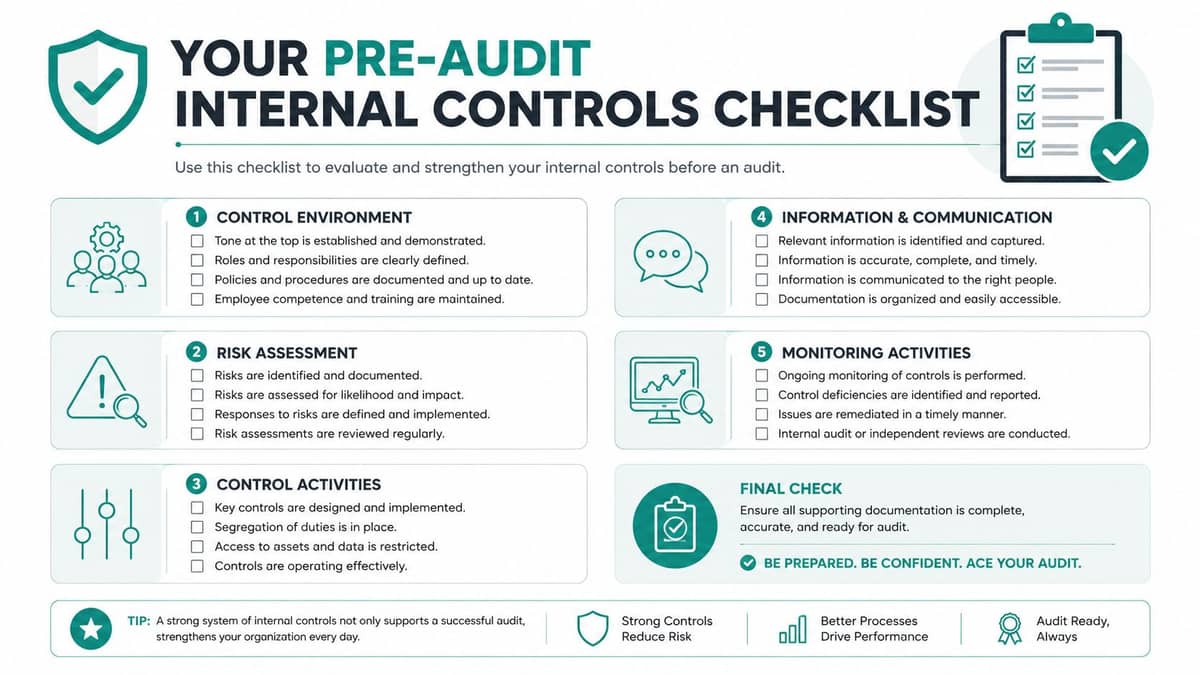
Your Pre-Audit Internal Controls Checklist
Begin 90 days before fieldwork. Use this checklist as working evidence for your bookkeeper, control owners, and board reviewer. Assign one owner to each item, set a due date, and keep support in one labeled location. Do not wait for the auditor to identify a gap.
Segregation and authorization
- Transaction ownership: Verify that no one person initiates, approves, records, and reconciles the same transaction. If staffing prevents full separation, document the independent board or executive review that compensates for it.
- Approval evidence: Save electronic approvals, signatures, sign-off initials, and backup-approver records with the transaction.
- Thresholds: Compare the current spending matrix with board-approved policy. Flag outdated limits before testing begins.
- Reimbursements: Match every reimbursement to a receipt, business purpose, and required prior approval.
Reconciliations and payroll
- Bank accounts: Confirm every reconciliation was prepared and independently reviewed within 30 days.
- Credit cards: Match statements to receipts, users, business purposes, and reviewer initials.
- Payroll register: Compare employees, pay rates, timesheets, and program or grant allocations with approved records.
- Exception log: Record unexplained items, corrective action, resolution dates, and the person who approved each correction.
Restricted funds and access
- Grant mapping: Trace each grant expense from its source document to the authorized program, fund, and ledger entry. Check fiscal-sponsorship transactions against the written agreement.
- Restriction releases: Confirm every release has supporting documentation and appropriate approval.
- Subledger tie-out: Reconcile restricted balances, grant schedules, interfund entries, payroll allocations, and releases. Investigate differences before fieldwork.
- User access: Review role permissions, MFA status, audit logs, and terminated-user removal. Include hybrid staff and volunteers, not only employees.
- Volunteer clearance: Confirm required background checks and clearances before volunteers access money, systems, or sensitive records.
Auditors usually focus on missing support, stale permissions, unexplained reconciliations, and transactions that bypass approval. Record each gap, its owner, and the corrective action. A documented correction gives the board and auditor a clear trail, while a quiet spreadsheet change does not.
Bringing It All Together and Your Next Step
Your first week should produce evidence, not another policy document. Assign one person to lead the review, one independent reviewer, and one board contact who receives unresolved issues. Set a firm deadline for corrections and record the reason whenever work cannot be completed on time.
Start with a bank-statement exercise. Pull the last three months of statements, then create columns for statement date, transaction description, amount, ledger account, fund or grant, supporting document, approval, reviewer, and open question. Match every item, mark exceptions without guessing, and retain the statement, source document, and resolution in the same folder. This exercise exposes missing receipts, unclear fund coding, duplicate payments, and approvals that occurred after the money moved.
Use a simple priority test for limited capacity. Fix controls first where one person can request, approve, pay, and record a transaction. Next address restricted or grant-funded activity, because an error can violate a donor promise even when the total cash balance appears correct. Then address access held by former staff, contractors, hybrid workers, and volunteers. Document lower-priority work rather than letting it disappear.
Give the board a one-page monthly view: unresolved exceptions, overdue corrections, unusual transactions, restricted-fund variances, and access changes. The board should challenge patterns and confirm that management assigned ownership, not perform bookkeeping.
Controls protect donor dollars when people can follow them under pressure. Keep the workflow visible, retain the evidence, and test it before an auditor does.
AlignMint brings accounting, true fund accounting, donor management, volunteers, events, marketing, approvals, and team communication into one platform, with Minty helping you review your real data. Visit AlignMint to see whether its free tier for nonprofits under $100K and unlimited-user model fit your control needs.
Ready to try AlignMint with your nonprofit?
Start free — set up donor tools, giving pages, and Minty. Upgrade when you need accounting.