

How to Close Nonprofit Revenue Accounts
A grant drawdown is still pending, two pledge campaigns are mid-flight, and the board packet is due Monday morning. You may know the textbook entry, but nonprofit revenue close becomes difficult when every dollar must land in the right fund and support the right filing.
This guide explains how to close revenue accounts without creating a spreadsheet rescue mission. You'll learn how to confirm recognition, allocate restricted and unrestricted revenue, post the entries, reconcile the results, and connect the close to Form 990 and board reporting.
Quick Answer: Closing Revenue Accounts
Close nonprofit revenue accounts only after you confirm which amounts belong in the period and which fund class they serve. Debit each temporary revenue account into a fund-specific summary, then move that summary into the matching net asset class.
Start with restricted vs unrestricted funds and fund accounting. For the ledger view, see nonprofit accounting.
Why Nonprofit Revenue Close Is Different
For a for-profit business, the standard closing entry transfers revenue balances to Income Summary, then moves the resulting income or loss to retained earnings. Revenue accounts reset to zero so the next accounting period starts cleanly, while permanent balance-sheet accounts remain open. The traditional process is described in this nonprofit fund accounting guide, but the nonprofit application requires more judgment.
Your ledger may contain contributions, grants, program fees, special events, investment income, and net assets released from restriction at the same time. Those categories don't carry identical recognition rules, and they don't necessarily belong to the same net asset class. A donor-restricted grant can't be blended with unrestricted program income because both happen to carry credit balances.
Three jobs happen before the entry
A sound nonprofit close performs three related jobs:
- Confirm recognition. Decide whether the organization earned or received revenue during the period, rather than recording an amount merely because cash arrived or an agreement was signed.
- Allocate the result. Separate amounts into net assets without donor restrictions and net assets with donor restrictions, including purpose or time restrictions.
- Close to the right destination. Transfer temporary revenue balances through revenue summaries and ultimately into the appropriate net asset accounts, rather than treating everything like retained earnings.
Timing creates most of the trouble. A grant award may be signed before conditions are satisfied, a pledge may be conditional, and a program fee may represent an exchange transaction with performance obligations. Deferred revenue and accrued revenue are balance-sheet balances, not temporary revenue accounts to close just because the period ended. Accounting guidance on closing entries distinguishes temporary revenue accounts from permanent accounts that carry forward.
Practical rule: Never draft a closing entry until you can explain why each revenue balance belongs in the current period and fund class.
The consequences reach beyond the general ledger
A misclassified contribution can distort the revenue section of Form 990, obscure the amount available for general operations, and create confusion in board reports. It can also affect functional expense allocations when restricted program funding supports specific activities. Auditors may then request reclassifications, supporting schedules, and explanations that should have been settled during close.
The close therefore isn't just a mechanical reset. It is the point where recognition, donor intent, fund accounting, and reporting discipline meet. If those decisions are incomplete, the journal entry only hides the unresolved work until someone has to unwind it.
Get Recognition and Fund Allocation Right First
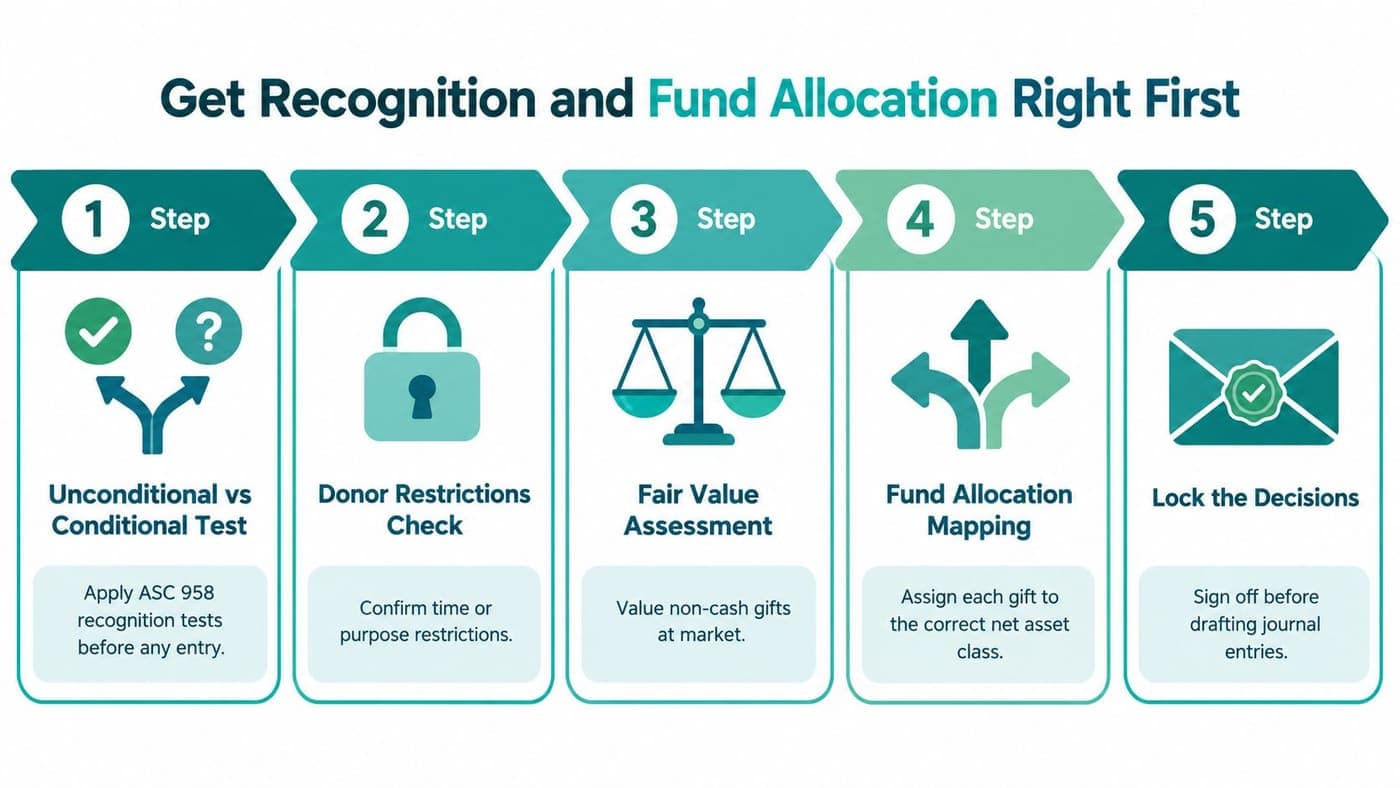
The most important closing entry is the one you don't post until the underlying decisions are complete. Start with the revenue population, then test recognition and allocation before preparing any debit or credit.
Test the nature of the transaction
Apply the ASC 958 recognition tests to distinguish unconditional contributions from conditional contributions. An unconditional promise generally enters the contribution analysis when the promise is made and measurable, subject to the applicable accounting treatment. A conditional promise requires a barrier and a right of return or release before contribution revenue is recognized.
Then ask whether the transaction is a contribution or an exchange. A grant supporting a community program may be a contribution, while a contract requiring specified services for a customer may represent exchange revenue. Don't let the funding source decide the accounting conclusion. Read the agreement, identify the promises, and document the judgment.
Noncash support needs the same care. Contributed goods, services, and facilities may require recognition when they meet the applicable criteria, with valuation supported by available evidence. A volunteer's unpaid time isn't automatically revenue, while specialized contributed services may require a closer review.
Map restrictions before you allocate
Separate donor-stipulated restrictions from board-designated amounts. A donor may restrict a gift to a named program, building project, or future period. The board may designate unrestricted reserves for a purpose, but that designation doesn't create a donor restriction and shouldn't be presented as one.
For a multi-purpose grant, read the award terms and map each permitted activity to the appropriate fund. If one award supports several programs, establish a documented allocation basis before close. The same discipline applies to agency transactions, where your organization may be holding resources for another party rather than recognizing them as its own revenue.
Record the timing of releases as carefully as the original restriction. When a purpose is satisfied or a time restriction expires, reclassify the related net assets between with and without donor restrictions. Don't treat that release as new donor revenue. It changes the classification of resources already recognized.
Lock the decisions in writing
Your pre-close file should identify the agreement, recognition conclusion, restriction language, allocation basis, release date, and reviewer. Include unresolved items in a visible exception log instead of burying them in a journal-entry description.
A closing entry without these judgments is only a forced reconciliation later. If recognition, allocation, or release decisions remain pending, the period isn't ready to close. For issues involving deferred balances, keep the supporting schedule distinct from temporary revenue accounts, as explained in this guide to deferred revenue.
Draft the Closing Journal Entries Step by Step
Once recognition and fund allocation are approved, the journal entries become straightforward. The standard accounting logic still applies, but nonprofit organizations need fund-specific summaries and net asset destinations.
Begin by closing each temporary revenue account, such as contributions, grants, program fees, special events, and investment income, into the appropriate fund-group-specific revenue summary account. Debit each revenue account for its credit balance, then credit the related summary account. This resets the revenue account without losing the fund classification.
For illustration, assume the adjusted ledger contains $120,000 of unrestricted contributions, $80,000 of contributions with donor restrictions, $25,000 of program fees, and $10,000 of special events revenue. Assume it also contains a $40,000 release from restriction already determined to be appropriate for the period. These amounts are a worked example, not a benchmark or expected nonprofit result.
Sample Closing Journal Entries by Net Asset Class
| Step / Entry | Debit | Credit | Net Asset Class |
|---|---|---|---|
| Close unrestricted contributions | Contributions, $120,000 | Unrestricted revenue summary, $120,000 | Without donor restrictions |
| Close restricted contributions | Contributions, $80,000 | Restricted revenue summary, $80,000 | With donor restrictions |
| Close program fees | Program fee revenue, $25,000 | Unrestricted revenue summary, $25,000 | Without donor restrictions |
| Close special events revenue | Special events revenue, $10,000 | Unrestricted revenue summary, $10,000 | Without donor restrictions |
| Close unrestricted revenue summary | Unrestricted revenue summary, $155,000 | Net assets without donor restrictions, $155,000 | Without donor restrictions |
| Close restricted revenue summary | Restricted revenue summary, $80,000 | Net assets with donor restrictions, $80,000 | With donor restrictions |
| Record release from restriction | Net assets with donor restrictions, $40,000 | Net assets without donor restrictions, $40,000 | Reclassified between classes |
The unrestricted summary in this example is $155,000, consisting of unrestricted contributions, program fees, and special events revenue. The restricted summary is $80,000, while the release is a reclassification between net asset classes rather than an additional contribution.
After posting, inspect every temporary revenue account. Each should have a zero balance, while the net asset accounts should show the cumulative effect of the period's activity. Income Summary may still be used as an intermediate account, but the final destination for nonprofit activity is the appropriate net asset class, not retained earnings.
Handle the exceptions deliberately
Interfund transfers require separate treatment from revenue. A transfer between funds may move resources without creating new revenue, so don't close it through a revenue account unless the underlying transaction supports that conclusion. In-kind revenue passthroughs also need a clear view of whether your organization is the principal recipient or merely passing resources to another party.
Allocated functional support deserves a documented basis. If shared staff, facilities, or marketing support are allocated to programs, record the allocation separately from the revenue close. This keeps the revenue classification understandable and gives the functional expense schedule a defensible trail.
Many accounting systems can generate closing entries from account rules. That saves posting time, but it doesn't replace review. The close manager must intervene when a restricted amount has been coded to a general fund, a grant spans multiple programs, or the system's default destination doesn't match the approved fund mapping.
For readers who want a broader explanation of journal mechanics, this guide to cleaner small business books offers useful background. Your nonprofit close still needs its own fund logic, especially when the ledger supports fiscal sponsorship, multiple entities, or restricted projects. Keep the approved entry support with the close file and follow your organization's journal entry documentation guidance.
Reconcile and Verify Before You Lock the Period
A posted entry can balance perfectly and still be wrong. Reconciliation is the safety net that confirms the entry reflects the underlying activity, not merely equal debits and credits.
Start with the revenue account and its subsidiary ledger. Compare the general ledger to grants receivable, pledges, ticket sales, and program fee records. Investigate missing invoices, unapplied receipts, duplicate donor records, and revenue posted to a general fund when the supporting agreement identifies a restricted purpose.
Use a defined control sequence
Work through the close in an order that exposes errors early:
- Tie revenue to support: Confirm each revenue account agrees to its relevant subsidiary ledger and approved schedule.
- Prove the fund split: Add all restricted and unrestricted allocations back to total revenue, then investigate any rounding residue or unexplained difference.
- Trace restricted gifts: Select support for restricted gifts and compare the ledger coding to the donor acknowledgment, grant letter, or other governing document.
- Match cash activity: Tie bank deposits, credit card batches, and ACH receipts to the general ledger, including timing differences still in transit.
- Review balance-sheet companions: Reconcile deferred revenue, releases from restriction, and net asset reclassifications to their supporting schedules.
The restricted-gift test matters because coding can drift after the original receipt. A donor acknowledgment may describe a purpose that wasn't carried into the deposit batch, or a grant letter may define a time restriction that the ledger doesn't show clearly.
A balanced trial balance proves arithmetic, not classification.
Document variances above your organization's approved threshold and investigate them in writing. The explanation should identify the difference, the cause, the correcting action, and the person who approved the resolution. Retain bank support, donor documentation, subledger exports, schedules, and journal approvals together.
Don't lock the period when one person has prepared the reconciliation but nobody independent has reviewed it. Require a finance lead and an independent reviewer to sign the reconciliation log. A clear revenue reconciliation workflow can help assign each tie-out, exception, and approval without relying on memory.
Connect the Close to Form 990 and Board Reports
A good close leaves a reporting trail. Each final revenue balance should have a known downstream consumer, so the team isn't rebuilding classifications during tax preparation or the board meeting.
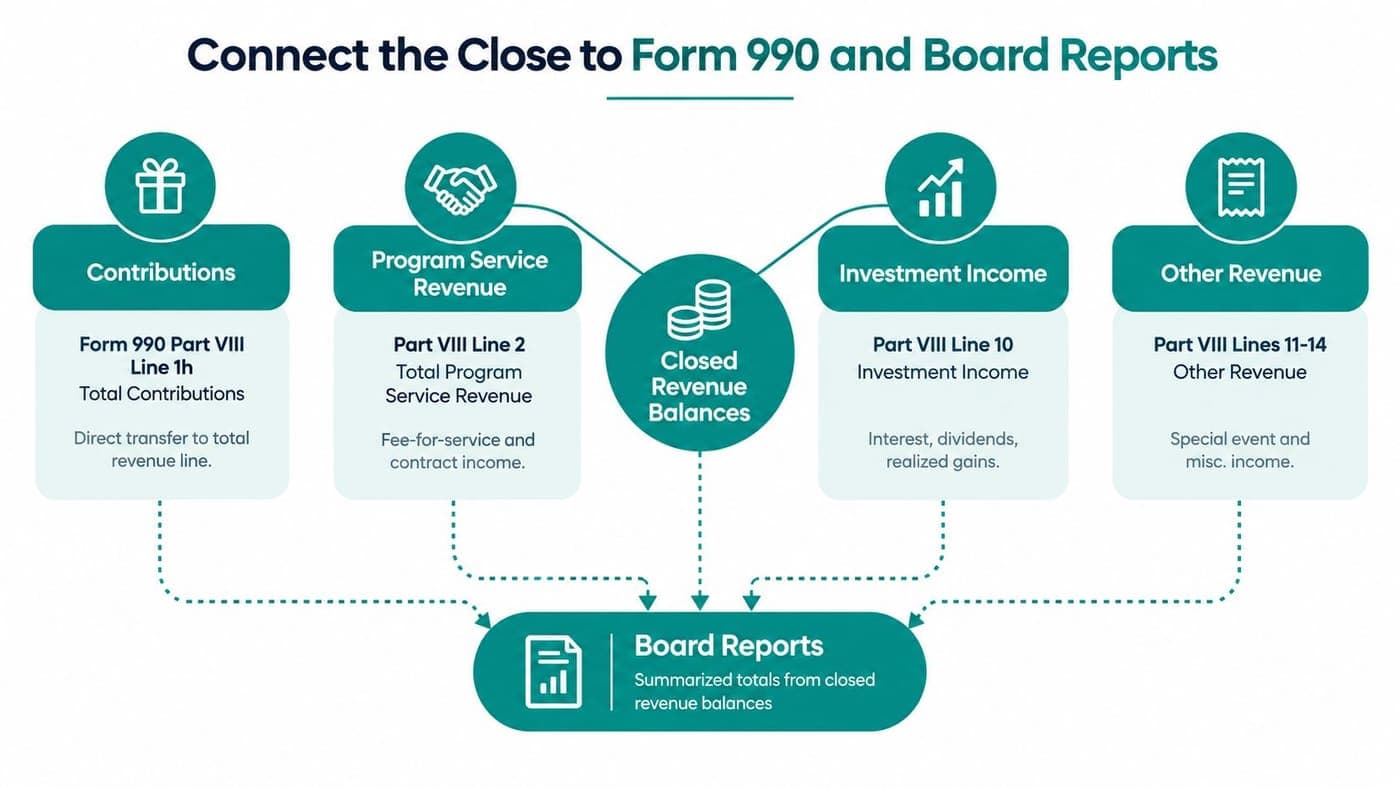
Map contributions to Form 990 Part VIII, including the total contributions line. Map program fees and contract income to program service revenue, investment returns to investment income, and special events or miscellaneous receipts to the relevant other-revenue lines. The mapping should reflect the organization's approved tax-reporting process and should preserve the distinction between revenue categories established during close.
Build the reporting bridge
The same closed balances feed several reports:
- Form 990 Part VIII: Contributions, program service revenue, investment income, and other revenue.
- Form 990 Part IX: Functional reporting that depends on consistent classification of program, management, and fundraising activity.
- Financial statements: Restricted and unrestricted net asset roll-forwards, including releases from restriction.
- Statement of Functional Expenses: Allocations supported by documented program and administrative assignments.
- Disclosure schedules: Donor disclosures, related-party information, and other supporting details required by the filing and audit process.
Don't assume the Form 990 will mirror the books without adjustment. Accrual-basis financial statements and a cash-oriented tax filing may present timing differences. Document those differences in a reconciliation schedule, including the reason for the adjustment and the period in which the underlying activity belongs.
The same mapping should support audited statements. Auditors need to trace revenue from the general ledger to support, from support to classification, and from classification to the financial statements. A stable mapping reduces repeated questions and keeps the board packet consistent with the records.
Give trustees the decision view
Your board doesn't need a journal-entry dump. Give trustees a one-page revenue summary showing budget versus actual, the status of restricted resources, major variances, and a short narrative explaining what changed.
That narrative should answer practical questions. Did a grant arrive late? Were program fees below plan because an event moved? Are restricted funds available for current operations, or must they remain tied to a stated purpose? Clear answers help trustees govern without asking staff to translate the ledger during the meeting.
For organizations preparing their filing inside an accounting workflow, a documented Form 990 builder process can keep the mapping visible. The tool matters less than the control. Your team should know exactly how each closed balance reaches the filing and board report.
Closing Week Checklist and Tips From the Trenches
A calm close starts before the first journal entry. Hand the controller a written schedule with an owner, time estimate, supporting record, and approval point for every task.
Monday and Tuesday
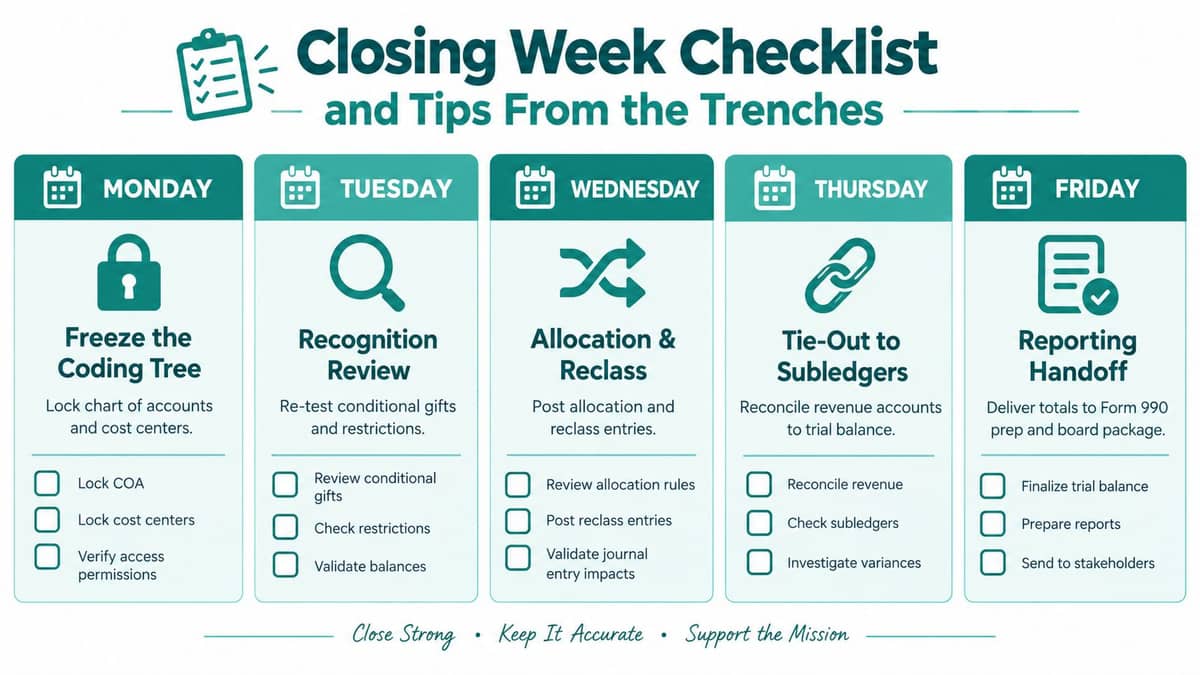
Monday, freeze the coding tree. Reserve the morning for locking the chart of accounts, fund codes, programs, and cost centers. The controller should approve changes, while the finance administrator identifies open batches and late receipts.
By the afternoon, finish the transaction cut-off review. Ask program leaders whether services, events, grant activity, and donor receipts belong in the closing period. Keep the exception list short and assign each unresolved item to a named person.
Tuesday, complete recognition review. Re-test conditional gifts, pledges, grant barriers, exchange transactions, and contributed support. The accounting lead should update the recognition memo and mark each item as approved, deferred, or escalated.
Wednesday through Friday
Wednesday, complete allocation and reclassification. Assign multi-purpose awards, donor restrictions, board designations, releases, and interfund activity. The finance lead prepares the draft entries, and the program owner confirms that the allocation reflects actual restrictions and activity.
Thursday, tie out the subledgers. Reconcile grants receivable, pledges, ticket sales, program fees, deposits, card batches, and ACH receipts. A reviewer checks the fund split, deferred revenue schedule, release schedule, and net asset roll-forward.
Friday, complete reporting handoff. Obtain finance lead and independent reviewer sign-off, lock the period, and produce the Form 990 mapping and board package. Leave enough time to explain variances in plain language rather than sending trustees a raw export.
Habits that prevent the fire drill
Keep a rolling close binder with donor-intent memos, grant letters, release approvals, allocation decisions, and recurring reconciliation support. Leave grant releases out of vague manual adjustments. Record the reason, fund, restriction, supporting document, and approver for every reclassification.
Run the Form 990 mapping before the period lock, not after the annual filing work begins. Give the final numbers a rest before review, then ask someone who didn't prepare the entries to challenge unusual movements and unsupported classifications.
The best close calendar is built from last year's exceptions, not last year's optimism.
After reports go out, hold a short debrief. Record which agreements arrived late, which subledgers failed to tie, which approvals took too long, and which coding rules caused confusion. Feed those lessons into next year's calendar, training notes, and system configuration.
When you need a clearer way to connect fund accounting, donor records, restricted revenue, and reporting, AlignMint brings those nonprofit workflows into one platform. It includes true fund accounting, donor and volunteer management, fiscal sponsorship support, online giving, marketing, team communication, and Minty AI assistance, with plan-based access and a free tier for nonprofits under $100K.
Ready to try AlignMint with your nonprofit?
Start free — set up donor tools, giving pages, and Minty. Upgrade when you need accounting.