Data Management for Nonprofits Explained
Almost 92% of nonprofit respondents make data available to staff through cloud-hosted databases, and almost 90% have staff enter data directly into their systems. Yet only 31% have a custom data policy with regular review or training, or one clearly explained to all staff.
Data management for nonprofits is the backbone of a healthy organization. It helps ensure every dollar, grant requirement, donor relationship, and volunteer hour supports your mission rather than disappearing into disconnected files. If you're balancing spreadsheets, grant records, event lists, and finance reports, a unified approach can turn scattered information into practical decisions.
Quick Answer: Nonprofit Data Management
Data management for nonprofits means one dependable record for each donor, grant, volunteer, and fund, plus shared definitions and a named owner. Broader access without those rules spreads inconsistent information faster.
Start with nonprofit CRM and donor management. For restricted balances, see fund accounting.
The Reality of Modern Nonprofit Data
You arrive at the office ready to review fundraising progress. Instead, you search through a donor spreadsheet, ask a program manager for volunteer hours, and wait for finance to confirm grant balances. Meanwhile, your board packet deadline moves closer.
This situation is common because nonprofit information grows in separate places. Giving history may sit in a CRM, grant details in accounting software, event attendance in a registration tool, and important context in someone's inbox. Each record may be accurate on its own, but nobody can easily see the whole relationship.

Access has improved faster than governance
The sector has made real progress in digital access. The 2025 NTEN Data Empowerment survey found that almost 92% of nonprofit respondents make data available to staff through cloud-hosted databases with online access. Almost 90% also have staff directly entering data into their systems.
That convenience creates a new responsibility. More people can access and change records, so your organization needs shared definitions, clear permissions, and dependable review habits. Without those safeguards, a cloud database can spread inconsistent information faster than a paper filing cabinet.
The same survey found that only 31% of respondents had a custom data policy that included regular review or training, or one specifically explained to all staff. The result is a sector that has broadly adopted digital data access while leaving governance maturity uneven.
Practical rule: Make information easier to use only after deciding who owns it, how it's defined, and when it should be reviewed.
A unified data practice doesn't mean every employee needs to become a technology specialist. It means your organization agrees on one dependable record for each important relationship, transaction, and obligation. A thoughtful nonprofit data migration plan can help you move carefully, preserve essential history, and remove confusion before it reaches the new system.
Centralizing Donor and Supporter Information
Your donor database should tell a complete story, not merely store names and addresses. A useful supporter record connects contact details with giving history, pledges, receipts, preferences, event participation, volunteer service, and meaningful follow-up notes.
A CRM, or constituent relationship management system, becomes your single source of truth when staff use it consistently. The benefit is simple. Before calling a supporter, you can see what they care about, how they've engaged, and what your organization has already communicated.
Build the record around the relationship
Start by deciding which information belongs in the central supporter record. Keep the list practical and connected to decisions your team makes regularly.
- Identity and contact details: Record the information staff need for accurate communication and receipting.
- Giving history: Connect donations, pledges, recurring support, and acknowledgments to the same person or organization.
- Engagement: Include event attendance, volunteer activity, interests, and documented outreach.
- Preferences and consent: Record communication choices so your team respects how supporters want to hear from you.
- Relationship notes: Capture relevant context, such as a program connection or a conversation about a future gift.
This approach prevents a common mistake. A donor who volunteers, attends events, and introduces your organization to others shouldn't appear as three unrelated contacts.
The AlignMint people CRM documentation offers one example of how a nonprofit can organize people, relationships, and interactions in a connected record. Whatever platform you choose, agree on field names and entry standards before importing old information.
Use segments to make communication more human
Segmentation isn't about treating people like categories. It helps you avoid sending every supporter the same message, regardless of their connection to your work.
You might create a group for monthly donors, another for volunteers who attended a recent event, and another for supporters interested in a specific program. Staff can then communicate with greater relevance while reducing duplicate research.
Microsoft 365 can also support collaboration around documents, email, and team communication. If your organization already uses those tools, F1Group's nonprofit M365 guide provides useful context for thinking about workplace data and shared access.
A CRM won't create trust by itself. Your team builds trust by entering accurate information, respecting privacy, and using the record to remember the person behind the transaction.
Mastering Fund Accounting and Grants
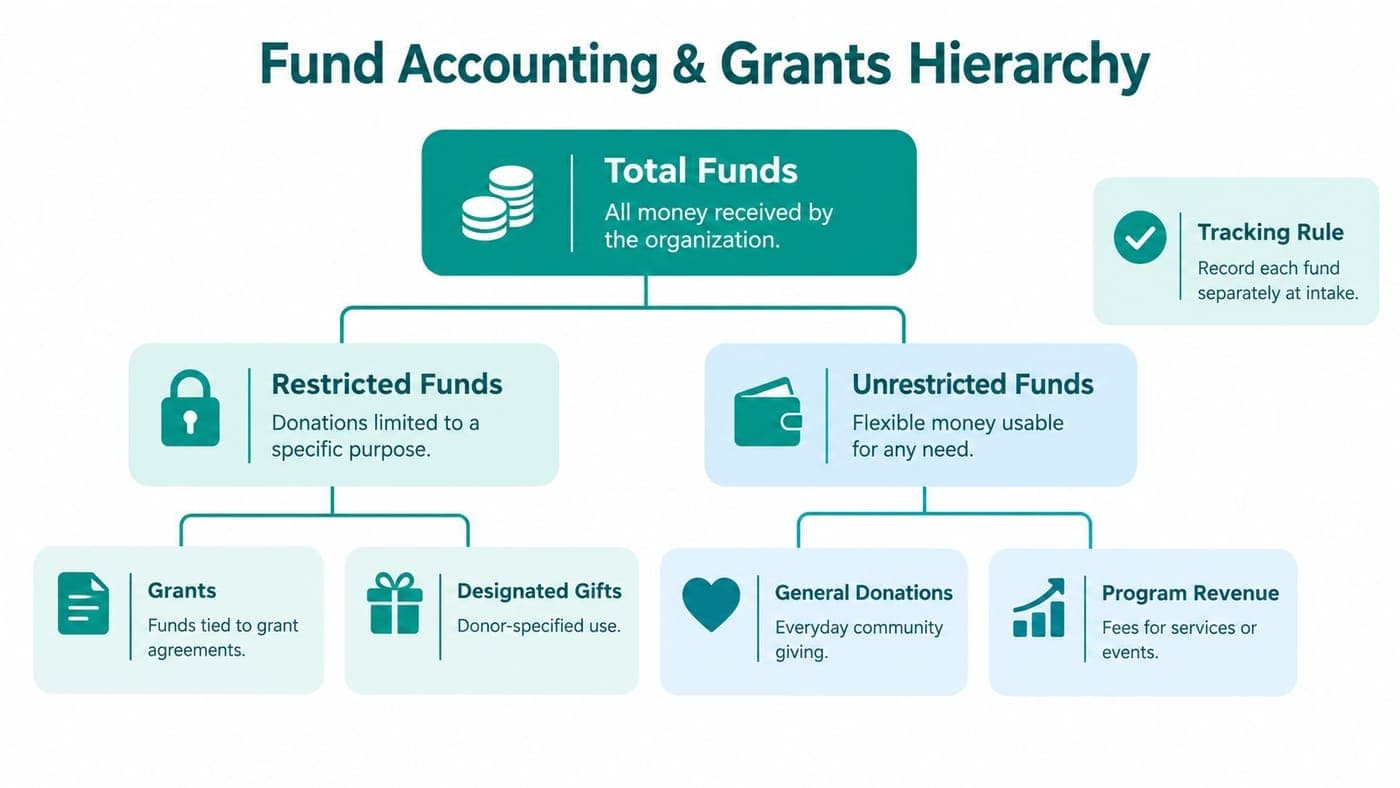
Fund accounting answers one essential question: What may we use this money for? It keeps donor- or grantor-imposed restrictions separate from flexible operating funds, so your reports reflect the promises your organization has made.
Under ASU 2016-14, nonprofits report net assets in two classes, with donor restrictions and without donor restrictions. Restricted contributions enter net assets with donor restrictions, then move when the organization satisfies the related purpose or time requirement, as explained in this overview of restricted funds for nonprofit accounting.
Treat restrictions as part of each transaction
A spreadsheet often records the amount first and asks questions later. That creates risk because someone must remember which funds were restricted, which expenses qualify, and when a release should occur.
A stronger design records the restriction, grant, and program as native dimensions of the transaction. Your finance team can then trace an expense from the original contribution through approval, payment, reporting, and any release from restriction.
The practical process looks like this:
- Classify funds at intake. Record whether a contribution is restricted, unrestricted, grant-related, or designated for a particular use.
- Map accounts consistently. Use a shared chart of accounts and clear codes for programs, grants, and funding categories.
- Connect records at entry. Synchronize donor, grant, and accounting information instead of reconciling unrelated exports later.
- Review exceptions regularly. Assign someone to check contribution totals, restriction codes, and unusual transactions.
- Document releases. When a time or purpose restriction is met, record the release so financial statements show the correct classification.
Give grant reporting a reliable foundation
Restricted income should appear separately in financial reporting. When a restriction is satisfied, a release from restrictions entry moves the amount between the relevant net asset categories, as described in this guide to managing restricted funds.
That accounting treatment protects more than compliance. It lets your board understand what resources remain flexible, helps program leaders plan within approved boundaries, and gives grantors confidence that your reports match your records.
Integration also reduces manual close work. When donor, grant, and accounting records connect at the point of entry, your team has fewer duplicate entries, mismatched restriction codes, and late-night spreadsheet comparisons. A grant management best practices guide can help your team document responsibilities, reporting dates, and supporting records.
Integrating Volunteer and Event Data
A volunteer isn't only a name on a shift list. That person may be a program advocate, event host, donor, referral source, or future board member. You can't understand that relationship if volunteer activity lives in one database and supporter history lives somewhere else.
A connected record adds context without requiring staff to remember every interaction. You might see that a supporter donated, attended a community event, completed service hours, and has a particular skill your program needs.
Record participation, not just attendance
Volunteer management software should capture more than contact details. Useful records include event participation, volunteer work completed, outreach, skills, availability, and donor reporting, consistent with the nonprofit donor management best practices.
That information supports practical decisions:
- A program manager can match volunteers with suitable assignments.
- An event coordinator can identify people who regularly help with registration.
- A development officer can understand a supporter's broader involvement before making contact.
- An executive director can describe community participation without assembling separate reports.
The value comes from combining records carefully. Volunteer hours shouldn't replace program outcome measures, and event attendance shouldn't automatically signal fundraising capacity. Instead, each data point adds another piece to the relationship.
Let events strengthen your supporter picture
Suppose your organization holds a community event. The event record should connect registrations, attendance, volunteer roles, donations, follow-up, and communication preferences. That connection helps your team thank people appropriately and understand which activities create deeper engagement.
An integrated volunteer management system can also reduce duplicate entry. Staff shouldn't need to type the same person into a volunteer tool, event platform, and donor database whenever that person changes roles.
Data management becomes mission management here. A volunteer who gives time, a donor who attends programs, and an event participant who shares your work may be one person with a rich relationship. Your systems should help your team recognize that whole person.
Ensuring Security and Data Governance
Centralizing information improves visibility, but visibility must come with control. Nonprofits often hold sensitive donor, beneficiary, volunteer, and personnel information across several disconnected systems, sometimes without a formal policy for access, retention, or disposal.
Recent independent coverage notes that nonprofits often keep these records across four or more disconnected systems without formal data governance covering those decisions, creating security and operational gaps, as discussed in this nonprofit data security and governance analysis.

Decide who may see and change information
Access should follow responsibility. A finance employee may need accounting and grant records, while a volunteer coordinator may need schedules and skills. Neither role necessarily needs unrestricted access to sensitive case notes or personnel information.
Use role-based permissions to answer four questions:
- Who can view this record?
- Who can edit it?
- Who approves a change?
- Who reviews access later?
Remove access for former employees and inactive board members promptly. Review permissions periodically, especially after staff changes or a new program involving sensitive information.
Security also includes ordinary habits. Use password protection, limit downloads, document approved systems, and teach staff how to recognize suspicious requests. IT Cloud Global, LLC offers a practical playbook for SMB security that can help smaller organizations discuss everyday protections without turning the conversation into a technical exercise.
Write the rules people can follow
A governance policy should explain what your organization collects, where it stores information, who owns each dataset, and how long records remain active. It should also explain when your team archives or deletes information, subject to legal, grant, and accounting requirements.
Keep the policy short enough for staff to use. Define terms such as donor, volunteer, participant, household, active record, and restricted contribution. Then assign one person to coordinate questions and recurring reviews.
The nonprofit software security guidance provides another useful reference point for discussing encryption, isolation, permissions, and security expectations with your leadership team.
Good governance protects more than confidential information. It prevents competing definitions from producing conflicting board reports, grant submissions, and program decisions.
How AlignMint Simplifies Your Operations
A nonprofit leader may begin the day checking a fundraising system, an accounting tool, a volunteer spreadsheet, and an event platform. Each record may be accurate on its own, yet the full picture remains scattered. The right platform reduces those separate checks instead of adding another dashboard for staff to maintain.
Salesforce, Microsoft, and Blackbaud's Raiser's Edge serve organizations with different needs, such as customization, workplace integration, or fundraising-focused workflows. Bloomerang, HubSpot, and other specialized tools can suit teams that want separate systems for particular functions. The choice depends on how much coordination your team can support.
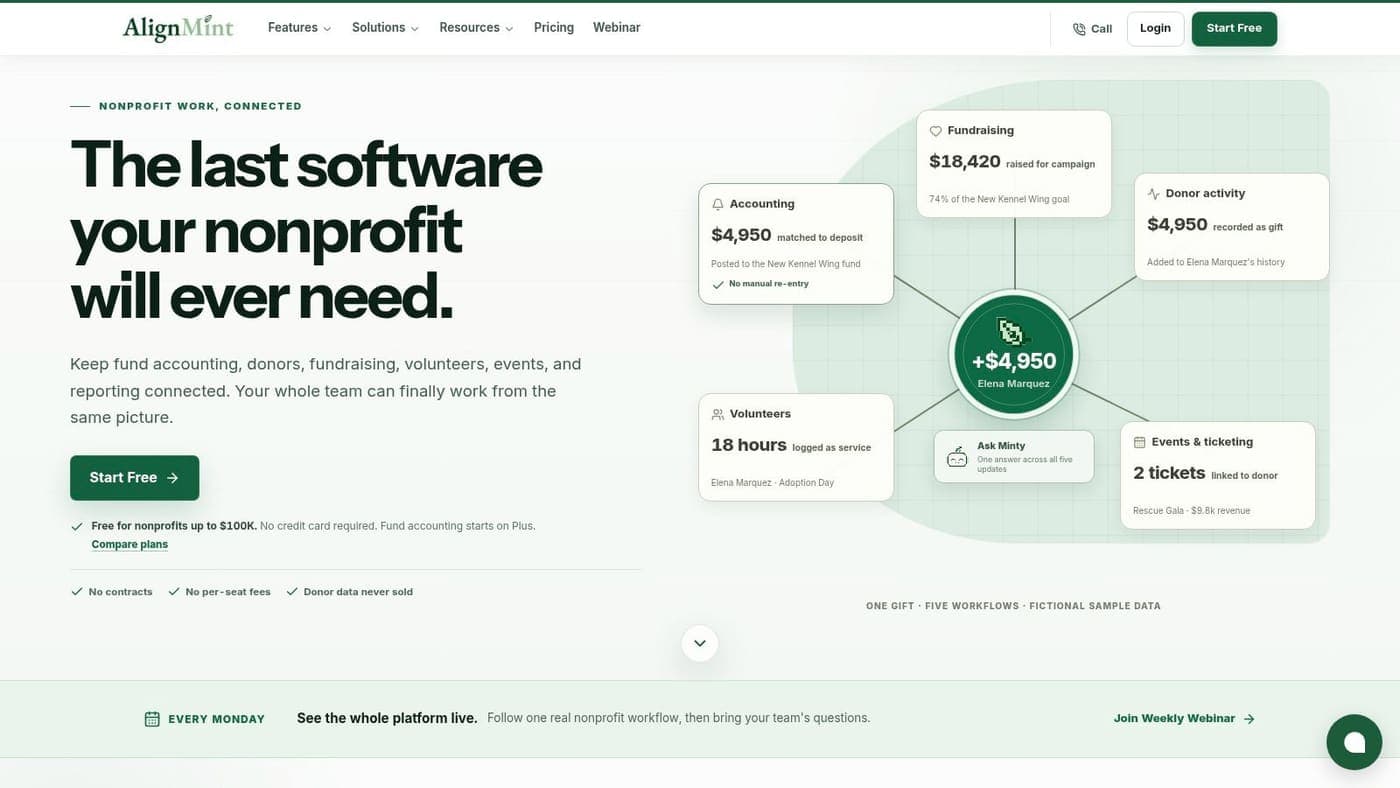
Separate tools often create extra work through integrations, exports, duplicate records, and manual comparisons. Leadership may need to assemble several reports before seeing how fundraising, finance, programs, volunteers, events, and marketing connect. An all-in-one system places those activities in one operating environment, helping scattered records become information people can use for decisions.
Connect finance with the relationships behind it
AlignMint is an all-in-one nonprofit operations platform for accounting, fundraising, volunteers, events, and marketing. Built by nonprofit directors, it models restricted funds, grants, and programs through true fund accounting rather than treating them as simple QuickBooks classes.
That difference becomes clear when staff need to connect available balances, grant activity, program costs, and donor intent. A donor-centric CRM can place giving history, receipts, notes, pledges, follow-up, and finance information in the same record. Instead of piecing together a story from separate files, staff can examine the financial and relationship context together.
The platform includes volunteer tracking, event management, online giving pages, email and text campaigns, and a built-in marketing suite. Churches and faith-based organizations can use that shared structure to view donations and programs together. Schools and educational nonprofits can apply the same foundation to grants, events, volunteers, and communications.
Keep access practical for a small team
Plan-based access without per-seat fees can make shared information easier to adopt when staff, volunteers, finance leaders, and board users need different access levels. Fiscal sponsors can also use consolidated oversight while tracking sponsored projects separately within a broader organizational structure.
Minty, the built-in AI assistant, can answer questions about an organization's data and surface insights without requiring exports or add-ons. Its usefulness still depends on accurate records and appropriate permissions, so sound governance remains part of the system.
For organizations raising under $100K per year, the free tier offers an accessible starting point for a unified data practice. AlignMint features bank-level encryption, complete data isolation, and 99.9% uptime, as described in AlignMint's platform information.
The practical test is simple: can your team find needed information, understand its source, and act without rebuilding the report elsewhere?
Your Path Forward to Data Confidence
You don't need to rebuild every process at once. Start with the decisions that currently consume the most staff time or create the greatest reporting risk.
Begin by identifying your essential records. List the information needed for fundraising, finance, programs, grants, volunteers, events, and leadership reporting. Then mark where each record lives and who currently maintains it.
Use a manageable improvement sequence
A practical sequence keeps the work focused:
- Choose your source of truth. Decide where supporter, financial, volunteer, and grant records should live.
- Define shared terms. Agree on what counts as an active donor, completed volunteer service, restricted contribution, program expense, and current contact.
- Clean priority records first. Remove duplicates, correct obvious errors, complete important fields, and archive inactive information according to your policy.
- Connect entry points. Make online giving, event registration, volunteer activity, and accounting entries flow into the records staff use.
- Assign ownership. Name the person responsible for each dataset, review process, and access decision.
- Train through real work. Show staff how to record a donation, update a relationship, approve an expense, or close a volunteer shift.
- Review a small decision set. Choose a few measures your leadership team can discuss regularly rather than building more dashboards than anyone uses.
NTEN's earlier research shows why the final step matters. The 2022 Data Empowerment Report found that over 60% of nonprofit respondents said they always or frequently used data for almost all purposes. Yet only 39% used donor data for budgeting decisions, and only 26% used it for program decisions. The report also found that 71% customized reporting for grantmaker needs, showing how external accountability can dominate internal learning.
Your goal is not to collect more information. It's to make the information you already need accurate, accessible, secure, and useful for mission decisions.
AlignMint brings true fund accounting, donor and volunteer records, events, marketing, online giving, team communication, and Minty AI into one nonprofit operations platform. Visit AlignMint to explore the free tier for organizations raising under $100K and see whether a unified data foundation fits your team.
Ready to try AlignMint with your nonprofit?
Start free — set up donor tools, giving pages, and Minty. Upgrade when you need accounting.