

A donor sends a $250 check in March and gives $40 online in November. Your bank statement shows both deposits. Your spreadsheet shows one donor, your email tool shows another, and the receipt went out under a third spelling of the name.
That gap is what donor data management exists to close. It isn't a software purchase or a single cleanup weekend. It's the set of habits that keeps every record about a donor, a gift and a relationship in one place you trust, and it takes a few hours a month rather than a new budget line.
Quick Answer: Donor Data Management
Donor data management is one record per person, with the restriction, the people who can change it, and the opt-out stored there. This page is that record habit. The 2026 system checklist, the software comparison, and organization-wide data management are separate guides.
Start with donor management and the donor management systems guide. For software comparisons, see donor management software. For organization-wide data, see data management for nonprofits.
What Donor Data Covers and Where Each Type Belongs
The check and the online gift are the same person, and nothing in your files says so. One lives in a bank download, one in a giving platform, and the thank-you letter went to an address that changed two years ago. Multiply that by forty donors and it stops being a nuisance and starts being a reporting problem.
Donor data management is the practice of collecting, organizing, protecting and using every record about a donor, a gift and the relationship between them. It covers six kinds of information, and each kind needs one home rather than whichever tool happened to capture it first.
Nonprofits have been moving toward structured records for two decades, and the history explains the split you need to build. The IRS launched its Modernized e-File system in 2004 and made electronic filing mandatory for certain larger exempt organizations from tax year 2006, as the IRS's review of e-file growth records. Electronically filed Forms 990 and 990-EZ went from 28,806 to 48,073 between tax years 2006 and 2007, a rise of nearly 67% in a single year.
The detail worth copying is what stayed private. That public dataset deliberately excludes donor information, and the IRS redacts certain tax-identification numbers. Reporting data gets structured for analysis, while donor identities get controlled access. Your own system needs the same division, and a shared spreadsheet provides neither half of it.
The Six Data Types and Their Homes
Match each type to one place below, and write the answer down where your team can find it.
| Data type | What it includes | Where it should live | Who needs it |
|---|---|---|---|
| Donor contact and household | Names, addresses, email, phone, household links | One donor record in your CRM | Development, receipting, events |
| Giving history | Gifts, pledges, payment method, dates | Linked to the donor and the fund | Finance, development, board reports |
| Restriction and purpose | Donor-imposed conditions, grant terms, release dates | Attached to each gift or fund | Finance, grants, Form 990 preparer |
| Campaign and event activity | Appeals, event tickets, attendance | Linked to the donor and campaign | Development, events team |
| Communication preferences | Opt-outs and channel consent | Shared suppression list across email, text and mail | Every staff member who contacts donors |
| Receipts and tax records | Acknowledgment letters, deductible amounts | Attached to each gift | Finance, donor services |
The five-minute test. Can you answer three questions for any gift in the last twelve months? Who gave it, what purpose it was for, and whether that person can still be contacted. If any answer means opening a second file, that record is the one to fix first.
How to Set Up Donor Records Step by Step
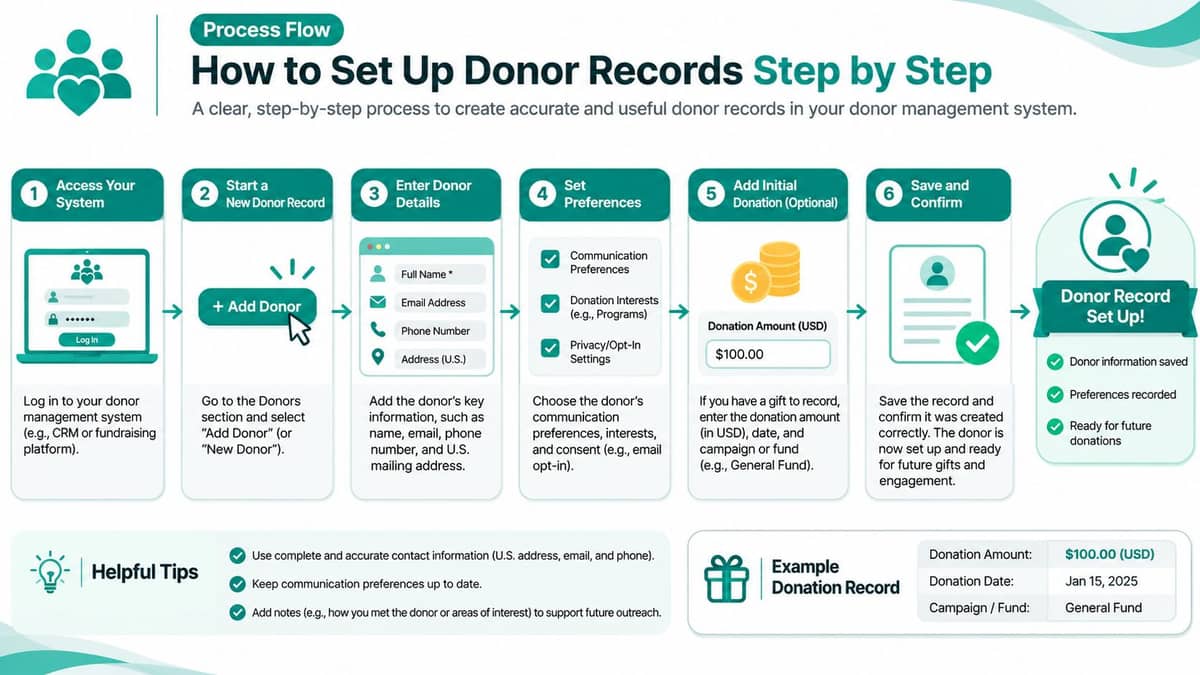
Seven steps take you from scattered files to one donor record you can defend. None of them need a budget decision, and most small teams finish the first pass in one afternoon.
-
Inventory every place donor data lives. List each spreadsheet, bank download, event sheet, volunteer list and email tool you use. You can't merge what you haven't named, and the list usually surprises the director who thought there were three.
-
Choose one record per person, then a matching rule. Match on email first, then on name plus mailing address, and write the rule down. The common slip is a second record created because a volunteer searched a nickname instead of a legal name. A structured data import process prevents that on day one rather than after the third duplicate.
-
Set the required fields. Name, address, email, household link and the source of the first gift. That last field tells you which appeal or event brought the person in, which no bank statement will ever show you.
-
Link every gift at the moment of entry. Donor, fund, campaign and receipt, all attached while you still remember the context. The slip here is batching month-end gifts from a bank line with no donor attached, which turns into hours of detective work in January.
-
Add a restriction field to every gift and default it to unrestricted. Change the value only when a donor or grantor sets a condition in writing. Defaulting to unrestricted keeps entry fast, and it forces the exception to be a deliberate act rather than a guess made under deadline.
-
Record consent and channel preferences on the donor record itself. Note the date and the source of the preference. If the answer lives only in your email tool, a phonathon volunteer or an event check-in sheet will contradict it within a month.
-
Book a 30-minute monthly check. Match deposits to gifts, review possible duplicates, and clear any gift with no donor or fund attached. Small drifts cost minutes to fix and cost weekends once they age.
What Clean Looks Like
You'll know the setup works when three things hold at once. Every deposit matches a gift, every gift matches a donor and a fund, and no donor appears twice under two spellings.
The test of a clean file: every deposit matches a gift, every gift matches a donor and a fund, and no donor has two records.
The monthly check is what keeps it true. Put it on your calendar as a standing appointment with a named owner, because a routine with no owner disappears after the second busy month.
Tracking Restricted Gifts Through Form 990 Reporting
A restriction that never got recorded is money you will spend twice. The board sees a healthy program balance, approves a transfer, and the grant agreement gets broken by a decision nobody knew they were making.
Form 990 handles this through Part X, which separates unrestricted net assets from donor-restricted ones. The IRS defines a donor-imposed restriction as a contribution condition specifying a use more specific than the organization's broad charitable purpose, and it does not treat a board-designated fund as automatically restricted. The condition has to come from the donor or the grantmaker, as the Form 990 instructions set out.
The Four Facts to Keep on Every Gift
For each restricted gift, record the restriction, the purpose, the release condition and the end date if there is one. A community grant that covers one after-school program for twelve months is four facts, not one note in a memo line. A family gift earmarked for a specific capital project is the same shape.
With those fields attached, a restricted balance reports itself. Without them, an available-looking balance is a guess, and guesses are what auditors and grant reviewers find first.
Splitting Expenses for Form 990
Form 990 also asks you to report expenses by function: program services, management and general, and fundraising. When your accounting system doesn't allocate costs automatically, the IRS permits a reasonable allocation method, provided you document it in your records, per the Form 990 reporting instructions. A program coordinator who splits time between two programs and a fundraising event is the usual case, and timesheets or a written percentage both work as long as the method is written down before anyone asks.
QuickBooks Online handles classes well for basic bookkeeping, and plenty of small shops run clean books on it. The gap is that a class shows where money went, not which donor restriction still governs the balance. Bloomerang and Little Green Light are strong donor databases and honest about being CRMs, which leaves the restriction living in a separate ledger from the gift. Keeping fund balances and the rules attached to them in one place is what our restricted funds tracking is built to do.
Who Can See and Change Donor Records
Most small nonprofits give every staff member the same login and call it trust. It's really a bet that no laptop gets stolen and nobody leaves on difficult terms. Donor records combine names, addresses, giving histories, payment details, campaign preferences and tax-receipt records in one place, and the FTC treats that combination as private and financial information.
The Federal Trade Commission's cybersecurity resources for nonprofits recommend a layered baseline: automatic security-software updates, offline or cloud backups, written cybersecurity policies, employee training, vendor and physical-security review, and email-authentication controls. It also singles out multi-factor authentication for employee access to network areas holding sensitive information. Your organization controls access to its own records, so this is a decision you make and review, not one your vendor makes for you.
Set Access by Role, Not by Seniority
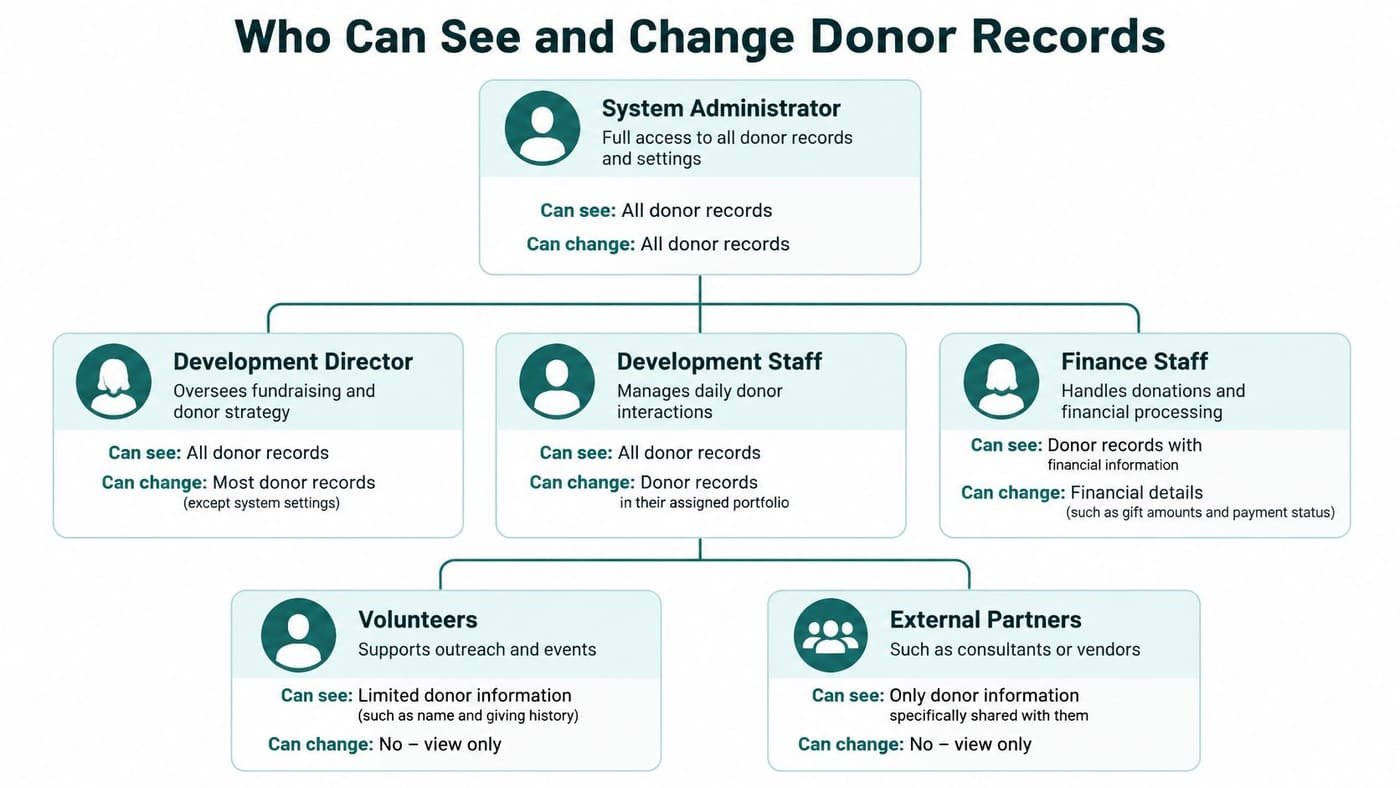
Write the answer down for each role and adjust it to your own staffing. The point is that the table exists in writing, not that it matches someone else's org chart.
| Role | View donor records | Edit gifts | Export data |
|---|---|---|---|
| Development staff | Yes, for their campaigns and donors | Yes | Limited to their campaigns |
| Finance staff | Yes, all gifts | Yes, with a second review | Yes, logged |
| Volunteers | Assigned contacts only | No | No |
| Executive director | Yes, all records | Approves changes | Yes, logged |
| Outside vendor | Only for the contracted task | No | No |
The Controls Behind the Table
Four habits carry most of the weight. Give every person their own login so the audit trail names a human. Require multi-factor authentication for staff and for any vendor with access. Limit full exports to a short list of named roles, and log who pulled them. Remove access the same day someone leaves, including volunteers who drift away.
That last one bites hardest. A former volunteer coordinator whose login still works six months later is the most common finding in a small-org access review, and nobody notices until a mail merge goes out under someone else's name. Access should follow the role a person holds, not the number of licenses you bought.
Access should follow the role someone holds, not the number of licenses you bought.
Run a quarterly access review: list every account, confirm the role still fits, and remove anyone who no longer needs it. Volunteer records deserve the same care, and they carry their own cost. Independent Sector's figures, reported by NonProfit PRO, put the share of nonprofit leaders who call recruiting enough volunteers a major problem at 46.8%, with a volunteer hour valued at $33.49. Missed coverage is a number, not a feeling.
Consent, Opt-Outs and Retention Rules Donors Expect
Donors ask a simple question before giving to an unfamiliar organization. What happens to my information? Some ask you directly. Most look for an answer on your website and decide from what they find.
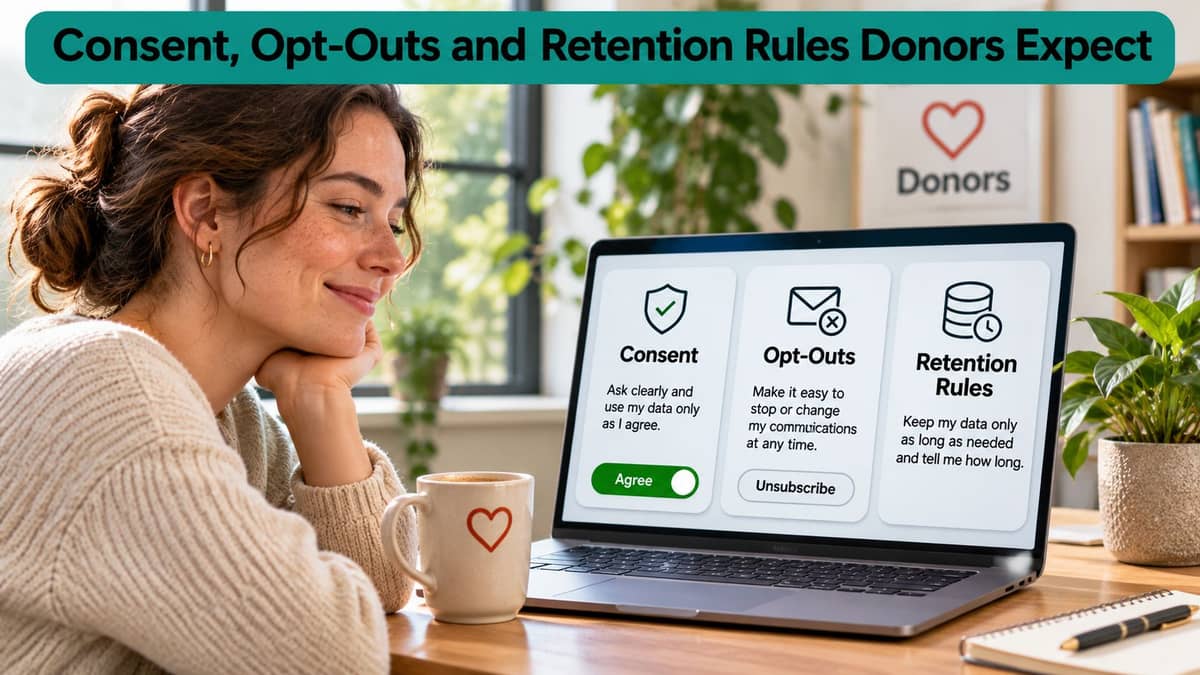
Charity Navigator describes a donor privacy policy as an extra disclosure beyond your ordinary terms of use and general privacy policy, and it expects plain statements about whether donor names or personal information are sold, shared, traded or used for third-party mailings, as its donor data protection guidance explains. That's a fair standard, and one page is enough to meet it.
Many organizations still lack a visible way out. NTEN's 2025 Data Empowerment Report found that approximately 35% of surveyed nonprofits provide constituents with an opt-out form for removal from organizational data systems.
One Preference Every Tool Reads
Build the opt-out path once, on the donor record, and make every email, text, event and mail tool read it before a send. A preference stored in a single campaign tool is a promise you can't keep the moment someone exports a list. If you're setting retention and notification rules from scratch, this guide to breach notification timelines explains what a reasonable notification window looks like in practice.
A Retention Rule You Can Defend
Keep giving history for the reporting periods your accountant requires, and remove contact details when a donor asks for deletion, where the law allows it. Confirm exact periods with your accountant or counsel rather than copying a default from another organization. Your customers, which here means your donors, expect you to hold only data you have the right to hold and to handle it under applicable privacy laws. We never sell donor data.
Using Donor Data for Stewardship Without Overreach
The everyday uses pay off quickly. Send thank-you notes within days of a gift. Ask for the next gift based on what someone gave last time and when. Group donors by the fund or program they chose, and invite last year's event guests to the event they're most likely to want.
A donor who gives every December to the food pantry should hear about the pantry in November. Not a general appeal that mentions fourteen programs and asks them to care about all of them.
Then there's the line. Using what donors gave and told you is stewardship. Using inferred wealth, guessed life events or vulnerability scores is overreach, and it costs trust the moment a donor works out how you knew.
Ask before you act: would this donor be surprised that you know this, and could you explain where the information came from?
That test matters more as automation spreads. Nonprofit Quarterly's review of nonprofit AI adoption reports that more than three-quarters of donors considered disclosure of when and how AI is used important, while only about one-quarter of nonprofit staff reported making such disclosures. Write the rule before any automated prediction touches a donor record, and say plainly when a tool shaped what someone received. For more on the stewardship side of that balance, these donor stewardship insights are worth a read.
Three uses are safe to start this quarter: thank-you timing, fund-based segments, and event follow-up. Our guide to donor journeys shows how those three look when the record, the gift and the next step sit together.
Common Donor Data Problems and How to Fix Them
Most problems announce themselves as a symptom long before anyone finds the cause. A donor gets the same appeal twice, or a year-end report doesn't match the bank, and the scramble starts.
| Symptom | Likely cause | Fix |
|---|---|---|
| Same donor appears twice | Name variations entered as new records | Merge on email or address, then keep one record ID and a merge log |
| Gift totals do not match the bank | Gifts entered by hand and never reconciled | Match each deposit to its donor and fund in the monthly check |
| Restricted gift spent on the wrong program | Restriction never recorded at entry | Tag the restriction at entry and review fund balances monthly |
| Donor contacted after opting out | Opt-out saved in one tool only | Sync the suppression list across email, text and mail |
| Full donor list exported to a laptop | Shared logins and no export limits | Give individual logins and restrict exports to named roles |
| Year-end report takes weeks | Gifts recorded across several spreadsheets | Record each gift once in one system with its donor and fund attached |
Fix in This Order
Start with consent and restrictions, because those carry legal and trust risk that doesn't wait. Then take duplicates and reconciliation, which are one-day tasks once the routine exists. Reporting speed comes last, and it usually improves on its own once the first two are handled.
When you merge two records, write one line in a merge log: which record survived and why. Six months later, that line answers the question a board member will ask about a missing gift. Our nonprofit data migration checklist covers the merge and import steps in order.
Keep a running list of every symptom you notice for one month. The pattern in that list points to the cause faster than any single fix does, because most of these symptoms trace back to two habits: gifts entered without a fund, and preferences saved in one tool only.
Start Your First Donor Data Fix This Week
Pick one fix from the table above, based on what hurts most right now. Unclear restrictions if you report to a board or a funder, duplicate donors if appeals go out twice, or opt-outs if a donor has complained. One fix, chosen this week, beats a plan that starts next quarter.
Then finish three things before the month ends. Write a one-page donor data notice in plain language, set your first access review date on the calendar, and run the monthly reconciliation once so you know how long it takes.
A fund-aware system keeps gifts, donors, restrictions and reports on one record, which is the part a spreadsheet and a set of QuickBooks classes can't hold together for you. The Free plan covers donor records, giving pages, and fundraising drafts for one user, for nonprofits with up to $100K in annual donations, and no credit card is required.
AlignMint keeps donor records and gifts on the same operating record, so the habits in this guide hold without a second system to reconcile. Restricted fund balances start with fund accounting on Plus. The Free plan includes donor records, giving pages, and fundraising drafts for one user, for nonprofits with up to $100K in annual donations, and no credit card is required, which is enough to prove one fix before you commit to anything. Visit AlignMint to see the workflow end to end, or join the weekly walkthrough and watch a real gift move from giving page to fund to report.
Frequently Asked Questions
It is the habit of one record per person, with the restriction, who can change it, and the opt-out stored on that record. A donor system checklist and a software comparison are separate guides.
Free is one user for nonprofits with up to $100K in annual donations, and no credit card is required. It includes donor records, giving pages, and fundraising drafts. Fund accounting starts on Plus.
Ready to try AlignMint with your nonprofit?
Start free — set up donor tools, giving pages, and Minty. Upgrade when you need accounting.