

How to Create Promo Codes for Nonprofits
Your gala is approaching, sponsor tickets are promised, early registrations are slow, and loyal members are asking for recognition. You need a discount that fills seats without creating a financial mess after the event. The right approach to how to create promo codes connects audience, campaign, ticket eligibility, and fund accounting from the beginning.
Quick Answer: How to Create Promo Codes
Create promo codes as campaign records: name the audience, discount type, ticket eligibility, usage limits, and accounting treatment before anyone shares the code. That keeps sponsor comps, early-bird rates, and member discounts reconcilable after the event.
Pair this with events and how do you promote an event. For ticketing, see ticket management.
Why Nonprofits Use Promo Codes in the First Place
At a gala planning meeting, the development director may need to deliver ten VIP tickets promised in a corporate underwriting agreement. Meanwhile, the marketing team wants early-bird registrations before the save-the-date deadline, and members are asking for a rate that recognizes their loyalty.
A promo code can address all three needs without another spreadsheet. One code can reserve sponsor benefits, another can encourage early action, and a third can support a member-only offer. The important point is that each code should have a distinct audience and financial purpose.
Practical rule: Treat every promo code as a campaign record, not a clever string of characters.
A code helps you fill capacity at specific revenue points, reward sponsors and volunteers, and attribute registrations to a channel. You can create separate codes for an email appeal, a social campaign, a partner organization, or a board referral. That gives your leadership team a clearer view of which outreach produced registrations.
The code also strengthens donor relationships. A sponsor can see how many seats their underwriting provided, while your team can distinguish complimentary benefits from discounted sales. That distinction matters when you later reconcile event revenue, restricted sponsorships, and donor records.
For broader event planning, Live Tourney's guide to profitable charity golf event tips offers useful ideas for connecting registration strategy with fundraising goals. Your event team can apply the same principle to galas, golf tournaments, school benefits, and church gatherings.
Before creating anything, map the campaign, audience, offer, and accounting treatment. The event promotion guide can help your team coordinate those pieces across email, social media, volunteers, and partner outreach.
Choosing the Right Code Type and Discount Structure
Choose the financial structure before opening your ticketing dashboard. The wrong discount shape can confuse buyers, weaken your message, or make reconciliation harder than necessary.
A percentage discount, such as SPRING20, works when ticket prices vary across tiers. It adjusts with the ticket price and can protect the relationship between general admission and premium seating. A fixed amount, such as GALA10, is easier to explain in an email and usually simpler to trace in your records.
A fixed-price override, such as EARLY, makes sense when you want a specific group to pay one defined rate. A buy-one-get-one code can support committee tables, while a free companion ticket can reward a member without reducing the member's own ticket price.
| Discount Type | Example Code | Best For | Accounting Note |
|---|---|---|---|
| Percentage off | SPRING20 | Variable ticket tiers | Record the discount against each applicable ticket value |
| Fixed amount off | GALA10 | Clear, simple campaign offers | Track the fixed reduction as contra-revenue |
| Fixed price override | EARLY | Early-bird or member pricing | Map the resulting price to the correct event revenue category |
| Buy one, get one | BOARD-BOGO | Committee or group attendance | Separate paid tickets from complimentary admissions |
| Free companion ticket | MEMBERPLUS | Member recognition | Record the companion ticket according to your receipt policy |
Next, define the code's scope. Decide which ticket tiers qualify, whether service fees receive the discount, and whether buyers can combine the code with another offer. Don't leave those settings to default behavior.
Your campaign objective should drive the decision. If the objective is attendance, a companion ticket may work better than a percentage reduction. If the objective is early cash flow, a fixed-price offer may communicate the deadline more clearly.
Keep the event structure visible in your documentation. AlignMint's event types documentation can help your team distinguish event configurations before attaching discounts to ticket inventory.
The platform you choose also affects the available options. HubSpot supports fixed-amount and percentage discounts for payment links, with settings for maximum usage and expiration, although its documented discount-code workflow applies specifically to payment links rather than every payment object. That's a useful reminder to confirm the platform's actual limitations before promising a campaign feature.
Setting Up Your Promo Code Step by Step
A good setup should remain understandable months later, when someone else reviews the event report. Use a naming convention that records the campaign, audience, and timing in one readable label.
Start with a name such as GALA25-SPONSOR-EARLY. The code itself can be shorter for customers, but the internal name should help your finance and development teams identify its purpose without opening another record.
Build the financial rules first
Select the discount structure you already chose. Confirm whether the reduction applies to service fees, ticket prices, or both. Then limit the code to the intended ticket tiers rather than applying it across the entire inventory by accident.
Set both a start date and an end date. Expiration is not a cosmetic setting, because expired codes can frustrate buyers and damage confidence at checkout. A recent market snapshot found that expiration was the most common reason shoppers experienced code failure, so your team should review active codes before every campaign launch (market snapshot on promo-code usage and failures).
Add a total redemption cap. Then add a per-user limit when a member, sponsor, or volunteer code could be reused by one buyer. If the offer has a fixed budget, consider limiting the total discounted value rather than relying only on a redemption count.
Restrict access and explain the offer
Use member lists, sponsor rosters, email segments, or gated links when your platform supports them. Your checkout message should explain who qualifies, what the code changes, and when the offer ends.
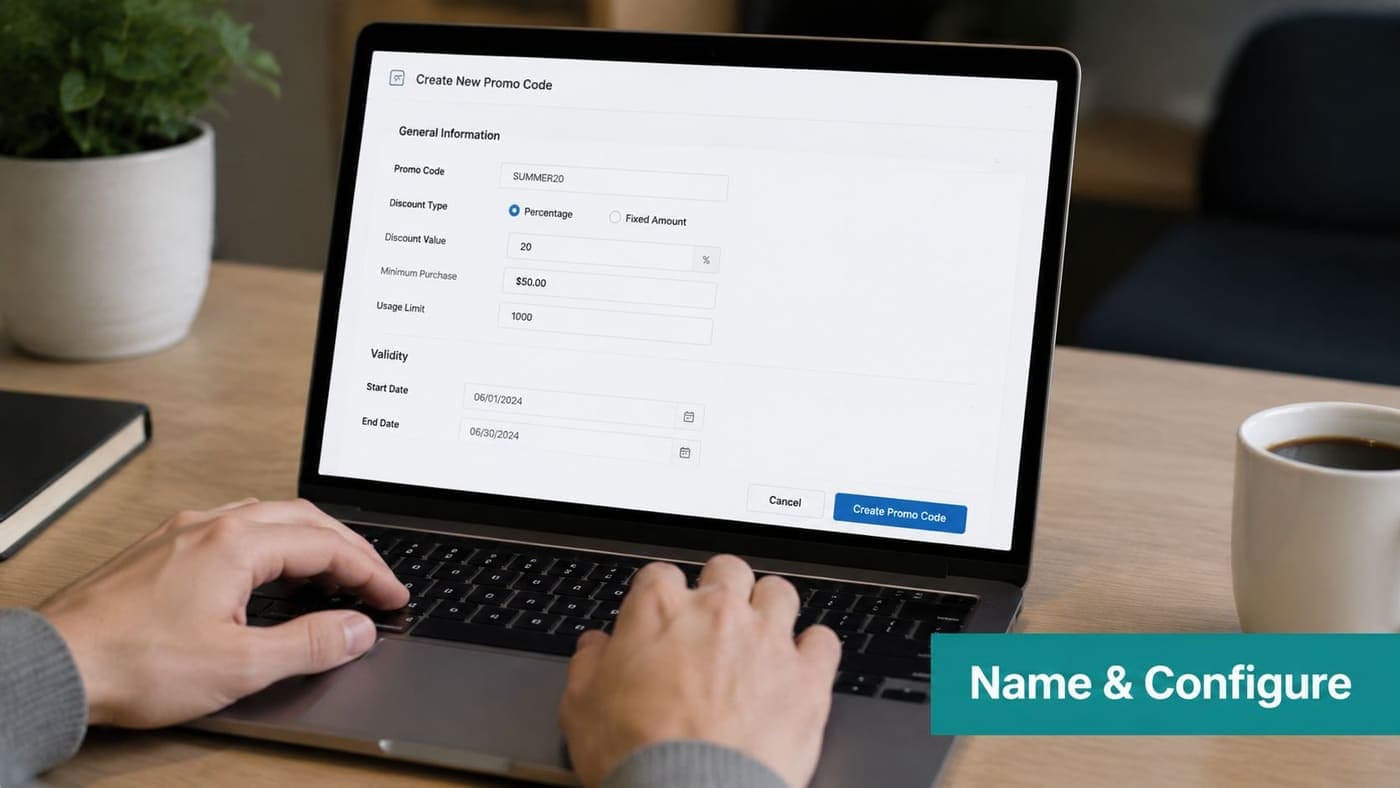
Before publishing, ask a colleague to test the code using the exact ticket combination your audience will purchase. Confirm the receipt, ticket quantity, discount line, and remaining inventory.
Your ticketing tool should preserve the code with the registration and payment record. AlignMint's ticket management documentation provides a useful reference for reviewing ticket settings before the offer reaches the public.
Public, Private, or Personalized Codes
The audience determines the code model. Don't use a public code because it's easier to type.
A public code appears on your website, social posts, public emails, or event flyers. It suits broad awareness campaigns, such as a community day or general early-bird push. The tradeoff is obvious. Anyone can share it, and your team has less control over eligibility, attribution, and discount exposure.
A private code travels through a defined channel, such as a sponsor packet, board list, volunteer group, or member email. It gives you stronger audience control while remaining shareable. This model often fits nonprofit campaigns where trust matters more than strict identity verification.
A personalized code belongs to a specific donor, member, sponsor, or invitee record. It usually offers the strongest attribution and the lowest exposure to unauthorized sharing, although your team must prepare the records and monitor exceptions.
| Attribute | Public Code | Private Code | Personalized Code |
|---|---|---|---|
| Reach | Broad | Segment-based | Individual |
| Risk | Highest sharing risk | Moderate sharing risk | Lowest sharing risk |
| Attribution strength | General channel | Stronger segment data | Direct person-level data |
| Best use case | Community awareness | Members, sponsors, volunteers | VIP invitations or high-value offers |
Use a public code when reach matters more than exclusivity. Use a private code when you need a defined audience but can tolerate some sharing. Choose personalized codes when the offer has meaningful financial value or when donor-level attribution matters.
Security guidance increasingly recommends redemption caps, expiration windows, account limits, and unique codes for high-value offers (coupon fraud prevention guidance). That advice fits nonprofit operations especially well, because a leaked code can distort both event economics and donor records.
Testing and Rolling Out Your Code Safely
A controlled launch protects revenue and your reputation. Start with an internal dry run before sending the offer to anyone outside your organization.
Create the code, place a test transaction in sandbox mode, and review the checkout result. Confirm the discount calculation, ticket tier, fees, confirmation email, receipt language, and ledger mapping. Your test should resemble a real registration, not a simplified administrator transaction.
Next, release the code to a small group. That might include the planning committee, selected board members, or one partner organization. Keep the cap tight enough that a leak won't create a material financial problem.
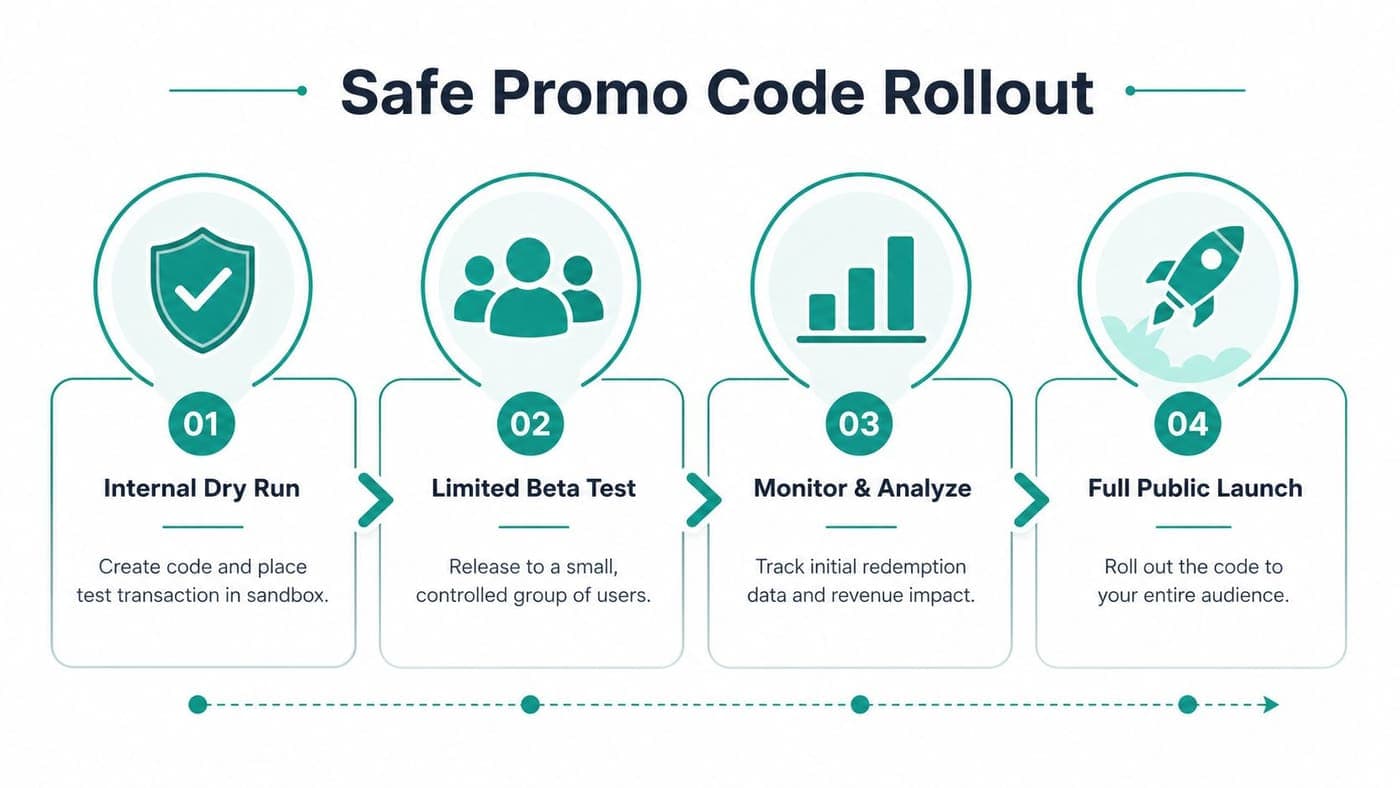
After the pilot, compare the order details with your expected accounting treatment. Check whether the code affected fees, ticket inventory, donor acknowledgements, or restricted campaign tags. Fix those issues before expanding distribution.
Set a clear launch window and assign one owner. That person should review the dashboard daily during the first week, watch for unexpected redemptions, and deactivate the code if the offer spreads beyond its intended audience.
Industry benchmarking reports show redemption differs by delivery channel, with email-delivered codes at 8.1%, website-posted codes at 4.2%, and social-media codes at 3.8% (channel redemption benchmarks). Treat those figures as directional context, not a promise for your event.
Your team should also understand payment timing and reconciliation. Review the payment processing documentation before launch, especially when your platform handles payments and code usage in separate steps.
Tracking Redemption and Reporting Results
A code can fill seats and still weaken the campaign's finances. Give the board a report that connects attendance, marketing performance, and reconciled net revenue.
Build a scorecard with these fields:
- Total redemptions: Separate completed, paid transactions from complimentary tickets.
- Gross revenue: Show ticket value before the discount.
- Discount value: Record the reduction as its own contra-revenue amount.
- Net revenue: Reconcile discounts and applicable fees to the deposited amount.
- Average gift size: Compare coded and uncoded registrations, recognizing that the audiences may differ.
- Channel conversion: Separate email, partner referral, social, and other sources.
- Campaign tag: Preserve the originating campaign in registration and donor records.
A campaign tag must follow the transaction into your donor system. That connection supports accurate acknowledgements and gives finance a traceable record. Review your donation receipts documentation before finalizing the report, especially if the discount changes the amount a donor paid.
Ask whether the code brought in people who would not have attended otherwise. Then measure whether the offer protected net revenue after discounts, fees, and fulfillment costs. Redemptions alone do not answer either question.
A large redemption count can signal costly revenue leakage. A smaller group may justify the offer if it fills a weak ticket tier without distorting restricted or unrestricted revenue classifications.
Board-ready question: What net revenue did each campaign generate beyond the attendance we likely would have received without the code?
Check the report for common errors. Free sponsor tickets may appear as redemptions even though they were not discounted sales. Stacked codes can create duplicate discount lines, and sponsor-included tickets should not be classified as ordinary discounted revenue.
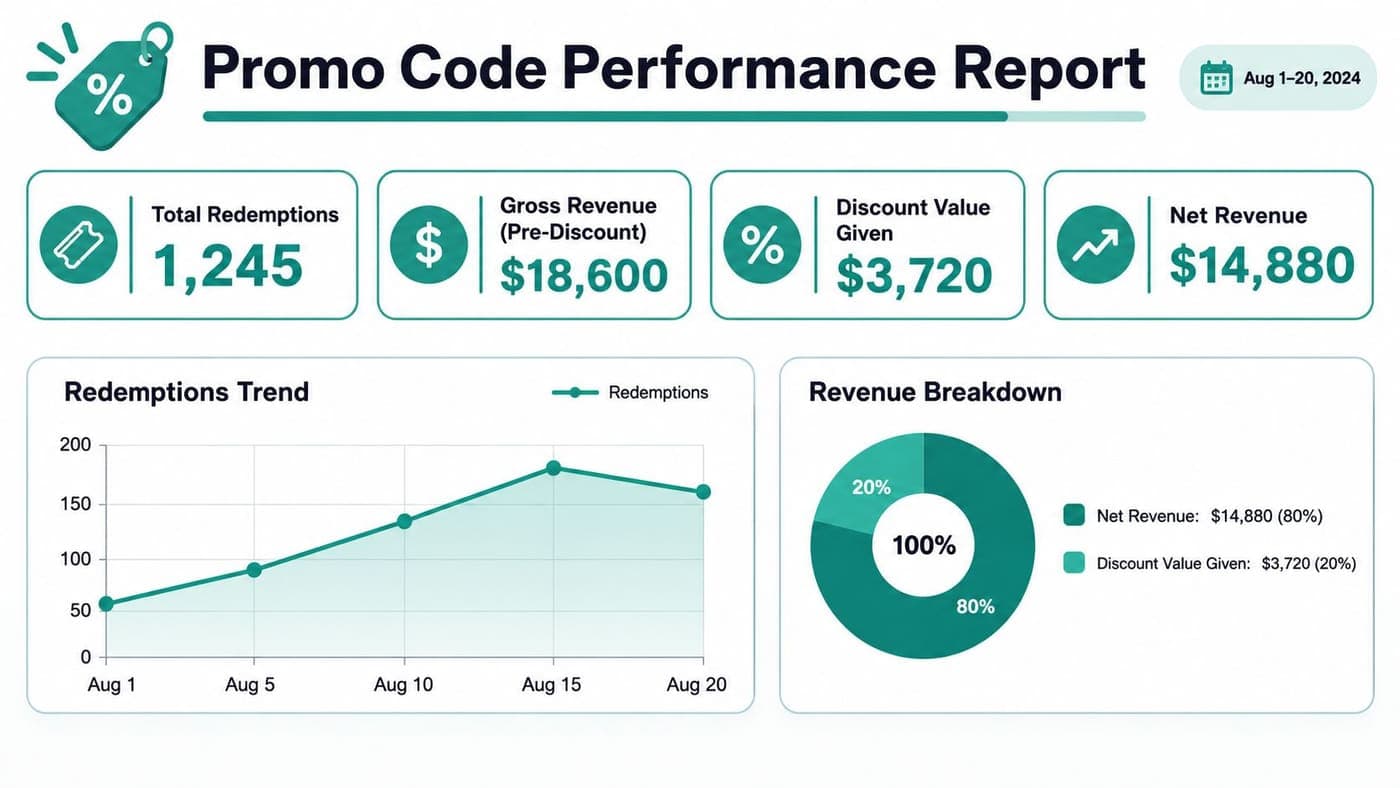
Review results daily during launch week, at the midpoint, and after the event. If paid search is part of the campaign, Silva Marketing's guide to maximize Google Ads ROI provides context for connecting campaign tracking with conversion reporting.
Accounting, Donor Receipts, and Audit Readiness
A promo code becomes a financial instrument when it changes the amount your organization records. Your accounting system should preserve the gross ticket value, the discount, the net deposit, the payment fee, and the campaign source without manual reconstruction.
A simple ledger pattern separates the pieces:
| Ledger Line | Without Promo Code | With $10 Promo Code |
|---|---|---|
| Gross ticket revenue | Full ticket price | Full ticket price |
| Contra-revenue discount | None | $10 reduction |
| Processing fee | Recorded according to processor settlement | Recorded according to processor settlement |
| Net deposit | Gross amount less applicable fee | Discounted amount less applicable fee |
Your finance team should decide whether ticket discounts reduce event revenue, sponsorship benefits, or another revenue category. Don't combine a sponsor's included tickets with discounted public sales, because those transactions have different purposes and may carry different restrictions.
Donor receipts require the same discipline. If a discount changes the amount a donor paid, review the deductible amount and acknowledgement language before issuing the receipt. If your team later discovers an incorrect amount after year-end, revised acknowledgements can create avoidable confusion.
For fiscal sponsorship, the distinction is especially important. Donations are made to the fiscal sponsor, not directly to the sponsored project, and the sponsor handles donor acknowledgements, income and expenditure records, and donor restrictions (National Council of Nonprofits fiscal sponsorship resources). Sponsored projects are accounted for through fund-based accounting, while the sponsor's Form 990 generally consolidates activity into its overall financial statements (Social Impact Commons fiscal sponsorship FAQ).
Keep restricted event sponsorships, unrestricted ticket revenue, discounts, and complimentary admissions separately identifiable. That structure supports board reporting, audit trails, fiscal-sponsor reporting, and Form 990 preparation.
Use a dedicated giving page when a promo campaign supports donations rather than tickets. A nonprofit donation page is a solicitation, and guidance recommends a prominent Give link, a clear mission message, visible giving options, recurring-gift information, fund explanations, and tax-deductibility details (donation page guidance).
On DonorsChoose, donors apply a promo code during checkout, and qualifying donations use credit or debit cards or PayPal. The offer may also cap the matched amount per donor (DonorsChoose promo-code instructions).
Choose more advanced promo controls when the campaign involves restricted funds, sponsors, high-value invitations, or multiple channels. Simplify the offer when the administrative burden exceeds its attendance or net-revenue benefit, and let donor trust guide the final decision.
AlignMint combines event ticketing, promo codes, donor records, true fund accounting, marketing, volunteer coordination, and team communication in one nonprofit platform, with plan-based access and a free tier for nonprofits under $100K. Visit AlignMint to see how your team can create campaigns that reconcile cleanly from checkout through financial reporting.
Ready to try AlignMint with your nonprofit?
Start free — set up donor tools, giving pages, and Minty. Upgrade when you need accounting.