
What Is Online Ticketing
Online ticketing is the digital purchase and delivery of event access, replacing paper tickets and manual checkout lines with a secure, donor-friendly web experience. The global online event ticketing market was estimated at $55.40 billion in 2022 and projected to reach $89.44 billion by 2030, implying about 61% growth, according to Softjourn's ticketing industry summary.
You may be managing event admissions with a clipboard, a cash box, and several volunteers answering the same questions at the door. Meanwhile, you're trying to reconcile receipts, identify attendees, and keep restricted event revenue properly accounted for.
That pressure is exactly why understanding what is online ticketing matters for nonprofit leadership. It isn't merely a way to sell admission. It connects registration, payment, attendance, donor information, and follow-up in one process, reducing administrative work while protecting the trust your organization has built.
Quick Answer: Online Ticketing
Online ticketing lets a supporter buy event access on the web and arrive with a scannable ticket. For a nonprofit, the same sale should also land in attendance, donor, and fund records instead of a door clipboard.
Start with event ticketing software for nonprofits and events. For discounts, see event ticket promo codes.
What Online Ticketing Means for Your Nonprofit
Three weeks before an event, a coordinator may be collecting checks, updating a spreadsheet, and answering the same registration questions. At the door, volunteers still need to match names with payments while handling new purchases and late changes. That manual chain consumes time that nonprofit leaders need for donors, programs, and event decisions.
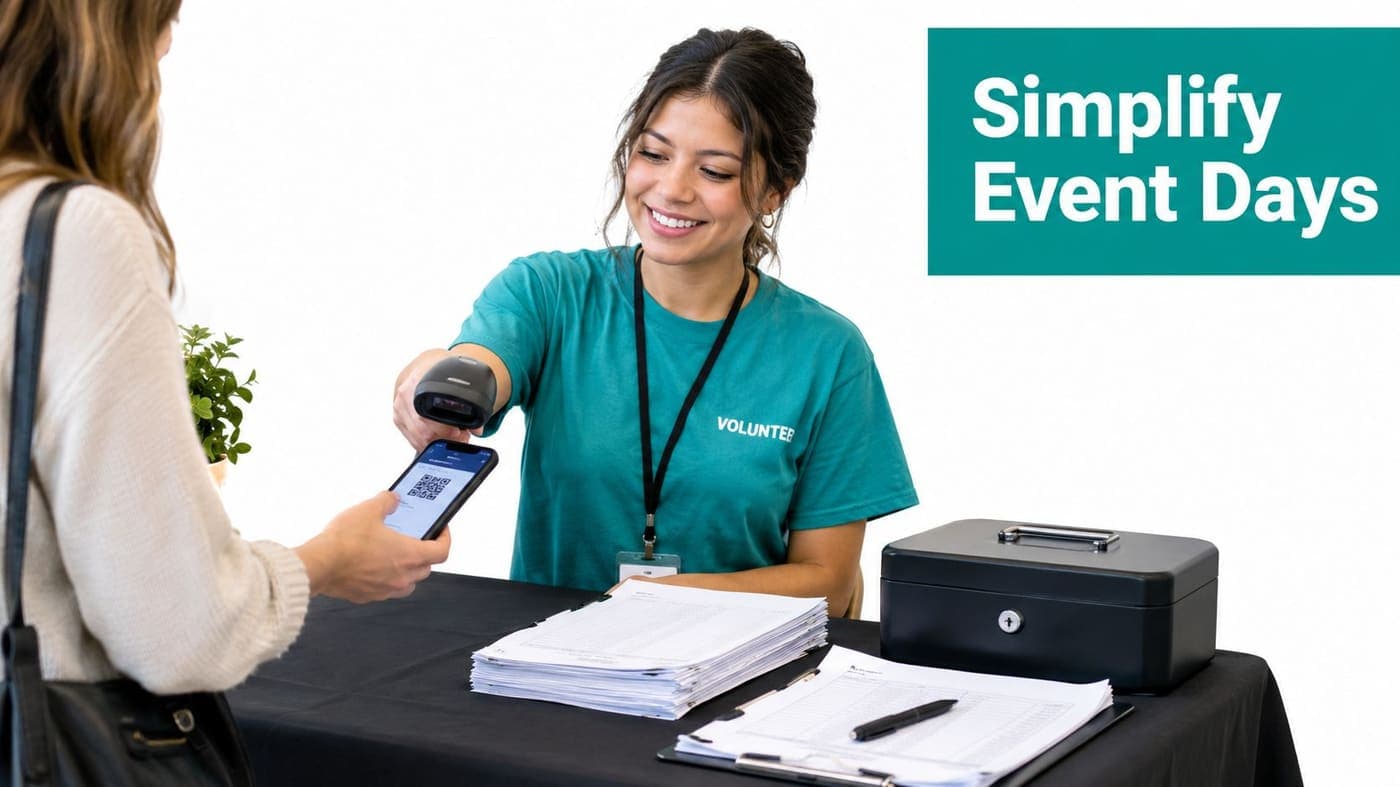
Online ticketing replaces that chain with a digital purchase process for event access. A supporter opens the event page, chooses a ticket type, pays online, and receives an electronic ticket. At check-in, a volunteer scans the ticket instead of searching through envelopes or handwritten lists.
The operational gain is straightforward: fewer registration corrections, clearer attendance records, and less pressure on the entrance team. Staff can spend more of the event welcoming guests, speaking with donors, and resolving exceptions that require human judgment.
Ticketing is part of nonprofit operations
Ticket revenue needs more context than a sales total. Your event may include general admission, sponsor tickets, complimentary seats, a mission-related program, or revenue assigned to a restricted fund.
A useful system records who purchased, what they purchased, how they paid, and which event or fund received the revenue. Finance staff can reconcile deposits with less manual reconstruction, while development staff can distinguish a donor relationship from a one-time admission purchase.
Online ticketing is also a mobile-first channel. Business Research Insights reports that mobile devices accounted for about 58.4% of online event ticket transactions in 2025, and smartphones held over 60% of the online ticketing platform market share. Build and test the event page for phone users, including payment, confirmation, and ticket retrieval.
The nonprofit outcome
The result is a calmer operating day, cleaner records, and a confirmation experience that respects supporters' time. Event management tools for nonprofits can connect event pages, ticket types, registration, check-in, attendance, and event revenue in one workflow. That connection helps leaders reduce administrative work while keeping donor trust and restricted-funding records in view.
How Digital Ticketing Works Behind the Scenes
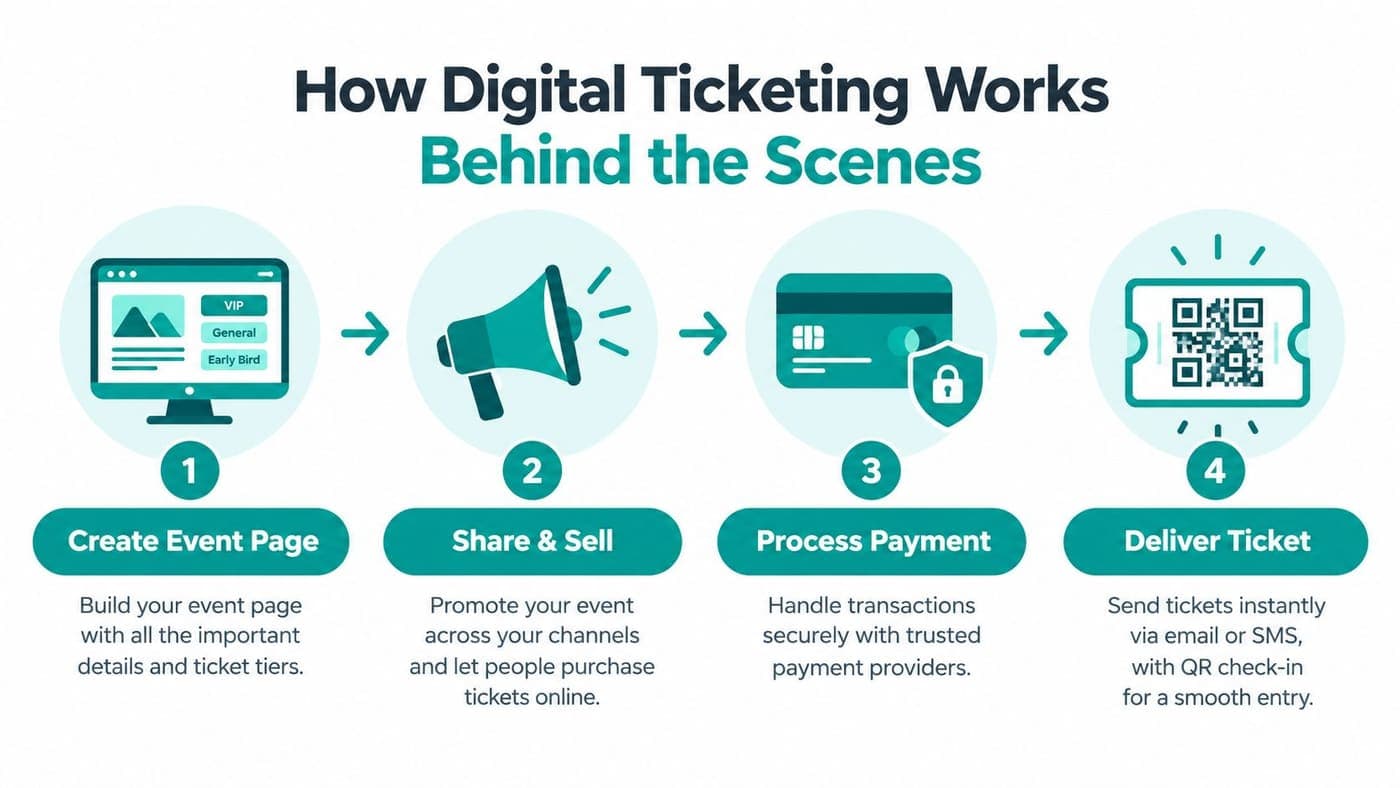
An online ticketing system connects four activities that manual processes usually separate: event setup, promotion, payment, and access validation. Each step creates information the next step can use, so your staff doesn't need to re-enter the same details.
Start with the event page
You create a public page containing the event name, date, location, description, ticket types, capacity, and purchase terms. Clear information matters because attendees often make decisions quickly, particularly on a phone.
Ticket types can reflect your nonprofit's needs. You might offer standard admission, a supporter ticket, a group option, or a complimentary registration. If the system records each type separately, your team can review attendance and revenue without reconstructing the sales history later.
Let payment and delivery happen together
After a supporter selects tickets, the payment gateway authorizes the transaction. The platform should connect the payment record to the purchaser and the relevant event, giving your finance team a usable trail for reconciliation.
The system then delivers an e-ticket by email or text message. A QR code or other unique identifier allows your volunteer to validate entry without manually locating a name. Good ticket management documentation should explain how your team handles ticket types, capacity, payments, and check-in before the event opens.
Validate access at the door
The final stage is scan-time validation. The system checks whether the ticket is valid and whether it has already been used, helping prevent duplicate entry.
Large events need more than a high sales limit. They must synchronize inventory, payment authorization, and scanning during busy periods. TicketSpice's evaluation of ticketing software for large events emphasizes sustained volume, inventory control, offline scanning, and real-world peak performance because a failure in one layer can create oversells, delayed reconciliation, or entrance bottlenecks.
Practical rule: Judge a ticketing platform by the full journey from purchase to scan, not by its advertised ticket capacity alone.
Why Move Away From Manual Event Registration
Manual registration feels familiar because your team already knows how to run it. That familiarity can hide the cost, including duplicate data entry, unclear payment status, slow check-in, and limited visibility while sales are underway.
Online ticketing doesn't remove every responsibility. You still need to set prices, communicate clearly, monitor attendance, and prepare volunteers. It does, however, move repetitive work from people to a consistent process.
| Task | Manual Method | Online Method |
|---|---|---|
| Event registration | Paper forms, phone calls, or spreadsheets | Public event page with structured fields |
| Payment collection | Cash, checks, and manual receipts | Secure online payment record |
| Attendee list | Staff retype names and contact details | Purchaser information captured during checkout |
| Ticket delivery | Paper confirmation or email typed manually | Automatic electronic ticket |
| Check-in | Search printed lists or mark names by hand | Scan QR code or validate digital ticket |
| Reconciliation | Match receipts and deposits manually | Review event-linked payment records |
| Discount handling | Volunteers calculate prices at the door | System applies approved codes automatically |
The operational difference
With a manual process, one mistake can travel through several records. A misspelled name may affect the registration list, the receipt, and the follow-up message. An unrecorded cash payment can create confusion for your finance team and discomfort for the attendee.
An online workflow gives your team a shared record before guests arrive. That means staff can answer questions from current information rather than relying on separate notebooks, inboxes, and spreadsheets.
Your event registration workflow should also include a fallback plan. Ask whether volunteers can check people in if connectivity becomes unreliable, and decide who can resolve a duplicate registration or payment question.
A simpler door process gives volunteers more time to greet people, notice accessibility needs, and represent your mission well.
Using Promo Codes to Grow Your Audience
Promo codes help you widen access without changing the public ticket structure for everyone. They can support early registration, community partnerships, group attendance, or recognition for donors and volunteers.
The important point is control. A discount should have a purpose, a defined audience, and a clear end date or usage condition. Otherwise, staff may apply inconsistent prices and struggle to explain the final revenue totals.
Build the offer around a goal
Start by deciding what you want the code to accomplish.
- Encourage earlier purchases: Offer a limited early registration price to improve planning and identify demand sooner.
- Welcome groups: Create a group code for partner organizations, schools, congregations, or community networks.
- Support access: Give selected participants a reduced price without changing the standard public price.
- Recognize relationships: Provide a code for volunteers, members, sponsors, or recurring supporters.
- Fill a specific audience need: Share a private code through a targeted email rather than publishing it publicly.
Each code should have a clear name that your staff can understand later. Avoid labels that reveal sensitive information about a recipient group, particularly when several people share access to the system.
Protect the accounting trail
Configure the discount before sales begin, then test it as an attendee would. Confirm that the code applies only to the intended ticket type and that the confirmation reflects the correct amount.
This matters for fund accounting. Your finance team needs to distinguish the gross ticket value, the discount, the amount paid, and any related fund or program. Automatic application reduces calculations at the door, but it doesn't replace review.
Event ticket promo codes can also support communication planning. Tell recipients what the code covers, when it expires, and whether it can be combined with another offer. Plain terms prevent awkward conversations during check-in.
Review the result afterward
Look at which audiences used each code and whether those attendees arrived. Then decide whether the offer expanded participation, rewarded an existing relationship, or reduced revenue without a clear benefit.
You don't need a complicated pricing strategy. A few well-defined codes are easier for volunteers to explain and easier for finance staff to reconcile than a collection of informal exceptions.
Security and Fraud Prevention in Digital Sales
An online ticket purchase is usually a card-not-present transaction, so your organization needs controls beyond a cash box and a receipt book. Payment security protects more than the transaction. It protects the donor's confidence in your stewardship.
Independent industry reporting finds that digital ticket fraud in U.S. ticketing is nearly twice as high as fraud involving physical tickets. The same Riskified analysis of card-not-present fraud in ticketing reports fraud exceeding 3.08% for tickets priced from $51 to $115, rising above 20% for tickets priced over $200, while friendly fraud represents about 34% of ticketing chargebacks.
Safeguards should support trust
Choose a platform that uses secure payment processing, encryption, access controls, and clear records of changes. You should also understand how it handles refunds, duplicate purchases, suspicious activity, and chargeback evidence.
Risk controls may include velocity checks, purchase pattern review, and rules for unusual transactions. These controls shouldn't create unnecessary barriers for legitimate supporters, especially when your audience includes older donors or people who need assistance at checkout.
Your staff also needs practical security awareness. For teams seeking structured education, essential security courses from GM GROUP Services may help build safer habits around passwords, phishing, and account access.
Protect the ticket after purchase
A digital ticket can carry a unique barcode or QR code. Tell attendees not to post screenshots that expose the code, order number, personal details, or payment information. If someone obtains a usable code, they may attempt to duplicate or misuse it.
Limit administrative access to people who need it, and remove access promptly when staff or volunteers leave. Unlimited access for everyone may sound convenient, but clear permissions make accountability easier.
Donor trust grows when your organization treats payment information and event access as responsibilities, not merely technical details.
Best Practices for Event Success and Donor Stewardship
A guest arrives, cannot find the confirmation email, and joins a check-in line already backing up. Staff search spreadsheets while a volunteer tries to answer questions. A well-planned ticketing workflow prevents that pressure and gives your team better information for donor follow-up.
Ticketing should begin a relationship, not end at payment confirmation. Buying admission shows interest in your work, but the purchase alone does not create long-term donor engagement.
The retention challenge deserves attention. According to the 2026 M+R Benchmarks, new online donors accounted for 31% of online revenue in 2025, while their retention rate was only 24%. Treat attendees as people who need relevant communication, not names on an attendance report.
Make registration easy to complete
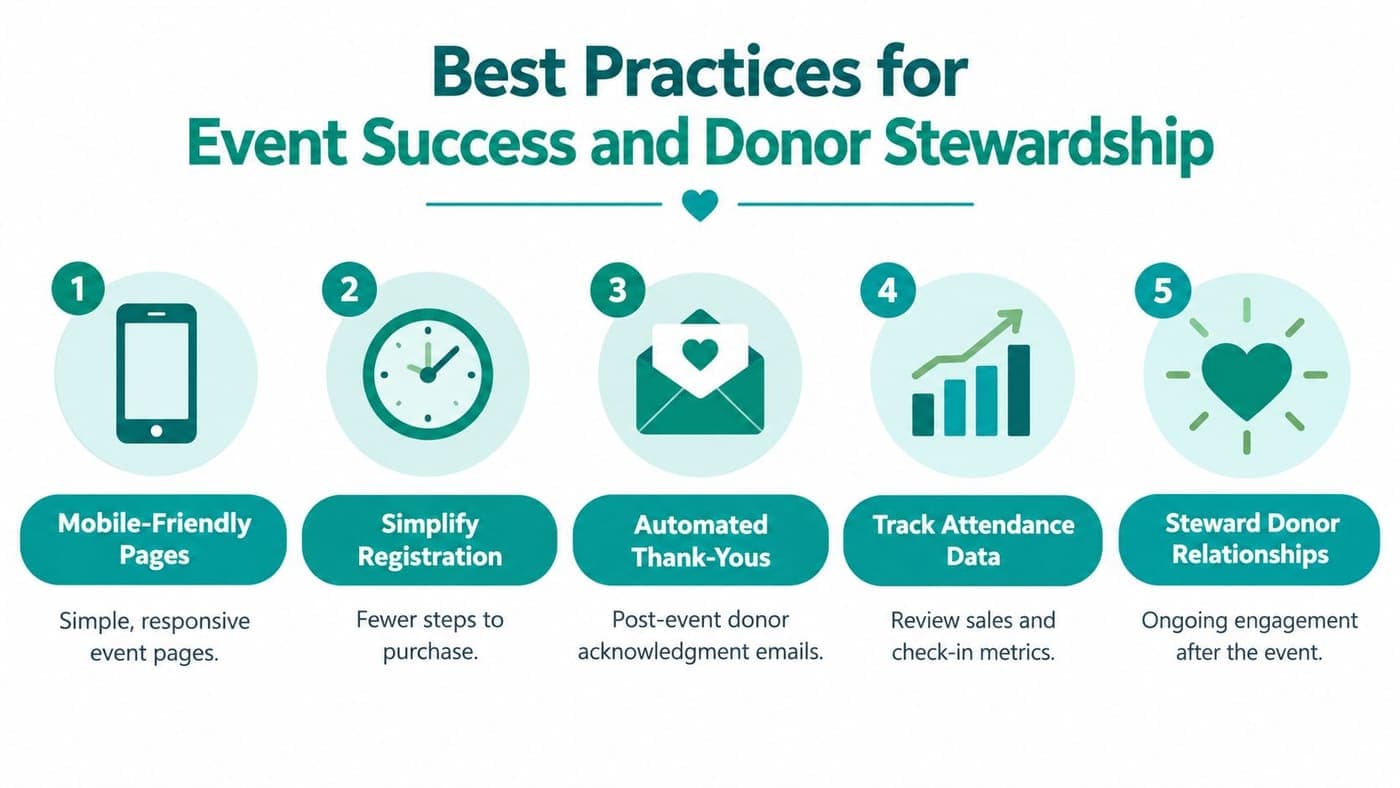
Keep the event page focused. Include the date, location, schedule, accessibility information, ticket terms, and a clear purchase button. Remove unnecessary screens and fields that slow registration.
Test the page on a phone. Mobile use represents a substantial share of online ticket purchases, so small text fields, unclear buttons, or a confusing checkout can stop supporters before they complete payment.
Prepare volunteers for check-in and guest support
Give volunteers a short script for common questions, a way to identify completed check-ins, and a process for exceptions. They should know whom to contact when a guest cannot find a ticket or appears on the wrong registration list.
Volunteer coordination needs assigned ownership. A 2023 national volunteer engagement study found that 63% of nonprofits involving volunteers had a paid staff member or volunteer engagement professional managing them, while earlier research found that more than a third of nonprofits working with volunteers invested no staff time in management, according to the Do Good Institute study.
Follow up with purpose
Send a clear confirmation immediately, then acknowledge attendance after the event. Thank people for joining, share a meaningful outcome, and offer a relevant next step. That step could be another program, a volunteer opportunity, a recurring gift, or a personal conversation.
Avoid sending every attendee the same fundraising appeal. Segment people by ticket type, attendance, stated interests, and existing donor relationship. A sponsor should receive different communication from a first-time guest, even when both attended the same event.
Your operational system should keep the information together. AlignMint combines accounting, CRM, volunteer management, events, and marketing, with true fund accounting, a free tier for nonprofits under $100K, plan-based access without per-seat fees, and Minty AI for questions about organizational data. Its ticketing tools support event pages, ticket types, secure payments, promo codes, registration, attendance, and QR check-in.
Donor stewardship practices work best when your team can act while the interaction is still fresh. Review attendance, record meaningful notes, reconcile event revenue, and schedule the next communication before the event leaves everyone's calendar.
The workflow should also reflect your organization's structure. Churches and schools may need registration tied to programs and groups. Fiscal sponsors may need each event connected to the correct sponsored project. Your marketing suite should support email and text campaigns, while fund accounting records restricted revenue accurately.
The best ticketing workflow gives your team fewer administrative tasks and more opportunities to practice genuine stewardship.
AlignMint brings event ticketing, registration, QR check-in, donor management, volunteer coordination, marketing, and true fund accounting into one nonprofit platform. Visit AlignMint to see whether its free tier and unified workflow fit your organization's next event.
Ready to try AlignMint with your nonprofit?
Start free — set up donor tools, giving pages, and Minty. Upgrade when you need accounting.