

The venue is booked, the date is on the board calendar, and a board member asked last week whether tickets are on sale yet. You have a half-built event page, a price in your head, and a quiet worry that the money side will become a January cleanup project. Learning how to sell event tickets online is mostly a bookkeeping and compliance job wearing a marketing hat, and the groups that get it right settle the money questions before they design the page.
Quick Answer: Selling Event Tickets Online
Selling event tickets online is a setup sequence: payments, prices, access, and the fund each sale posts to, before the page opens. Platform comparisons and the definition of online ticketing are separate guides.
Start with events and what online ticketing is. For software, see event ticketing software for nonprofits and the best event ticketing system.
Your Ticket Sales Plan at a Glance
Online is the default channel now, not a helpful extra. A U.S. Government Accountability Office review found that Ticketmaster's parent company reported 93% of its primary tickets were sold online in 2017.
The usual failure isn't the software. It's the order of work. Someone builds the event page while prices are still moving, then tests payments the week sales open. A failed test pushes the launch, and the early-bird deadline you announced gets extended, which teaches buyers to wait for the next concession.
Run the six phases in sequence and each one rests on the one before it.
| Phase | What you set | What to verify | When |
|---|---|---|---|
| Plan | Date, capacity, ticket types and prices | Capacity matches the venue and all fees are known | 8-12 weeks before |
| Set up | Event page, tickets, promo codes, refund terms | Page previews correctly on a phone and as a guest | 6-8 weeks before |
| Payments | Payment method, fee display, receipts | A test purchase reaches your account with a correct receipt | 4-6 weeks before |
| Accessibility | Keyboard, screen reader and seat details | A full purchase completed with the keyboard only | 4 weeks before |
| Launch | Early-bird tier, reminder schedule | Sales dashboard shows each tier and sales source | Launch day |
| Close | Final sales, check-in, reconciliation | Ticket totals match deposits and donor records | 1-2 weeks after the event |
Two decisions belong in the Plan phase rather than later: whether the event is eligible for online payments, and how sales tax applies to it. Both change the price you enter during Set up, so answering them first saves you a rebuild.
The one-sentence test: name the capacity, the prices, the refund policy and the deposit account in a single sentence. If you stumble on any of the four, go back to Plan.
Lead time isn't fixed. A gala for 200 guests with a live auction needs more runway than a 60-person workshop, so treat the schedule as a starting point and move dates earlier when a printed program or a sponsor deadline is involved.
The fields you collect at checkout also decide how well you can thank people afterwards. A short guide to donor follow-up after local fundraisers is worth ten minutes before you build the page, because it shows what useful follow-up needs from the buyer record.
The remaining sections take each phase and name the settings to check, ending with the event financial report that ties the whole campaign back to your books.
How to Set Up Payments and a Checkout Buyers Finish
Eligibility comes first, because it decides whether anything else matters. In AlignMint, event payments are available only for eligible non-taxable events, and only after Giving Setup and event-revenue mapping are complete. Confirm that before you promise a sponsor a sale date.
Then walk the checkout the way a buyer will. Here's the moment most of them are having.

What the buyer sees, screen by screen
- Event and ticket choice. Date, time, venue, what each ticket includes, and how many remain.
- Price summary. The full total with fees and taxes included, the refund terms, and the payment methods you accept, all before the buyer commits.
- Payment. Card entry with the fewest required fields the event can survive on.
- Confirmation. A receipt, a ticket link, and one line about what happens at the door.
That order matters more than it looks. Baymard Institute's aggregate of 50 checkout studies reports roughly 70% cart abandonment, and the leading causes are unexpected costs shown late (40%), forced account creation (18%), and a checkout that runs too long (17%).
The settings that decide whether a buyer finishes
- Guest checkout on. Forced account creation is the second-biggest reason people leave.
- Shorter forms. A 2024 benchmark cited in the same review found the average checkout carried 11.3 fields, while many sites could work with about eight.
- Saved entries. Keep what the buyer typed when a card is declined, so they retry instead of starting over.
- Optional questions after payment. Demographic or fundraising questions belong on the confirmation page, not between the buyer and the pay button.
For a nonprofit, keep name, email, ticket type, attendee count, and any accessibility or dietary need the event will act on. Everything else can wait until after the money clears.
Track abandonment by device, traffic source, ticket type and payment method rather than watching total sales. A page that fails on phones and converts on desktop is a usability problem, not a demand problem.
Price the fee before you set the price
Card processing comes off the top. Fifty tickets at $50 is $2,500 gross and something less than $2,500 in the bank, so run that arithmetic before the committee approves a price. The processor's cut is set in your platform's pricing and doesn't soften for a good cause.
Settle sales tax at this point too, because it changes the total a buyer sees before paying and the total you have to record afterwards.
Before launch, buy one ticket with a personal card, refund it, and confirm three things match: the receipt the buyer receives, the donor record in your constituent database, and the deposit against your bank feed. If any of the three is off, fix it while the order count is one. Our online payments flow keeps each confirmed payment attached to its donor, fund and receipt, which is the part spreadsheets lose.
How to Set Ticket Types, Prices and Promo Codes
Pricing set in a committee meeting tends to arrive at checkout as seven half-explained options. Work through the steps below in order and the page stays short enough for a first-time buyer to finish.
Demand is wider than event committees usually assume. The Congressional Research Service reports that about 122 million people attended concerts in the United States in 2024 and cites an IBISWorld estimate of $12.5 billion in U.S. online ticket-sales revenue for 2025, including $4.1 billion, or 32.9%, from sporting-event tickets. Concerts, sports and theater price differently, so the ticket-type list comes before anything else.
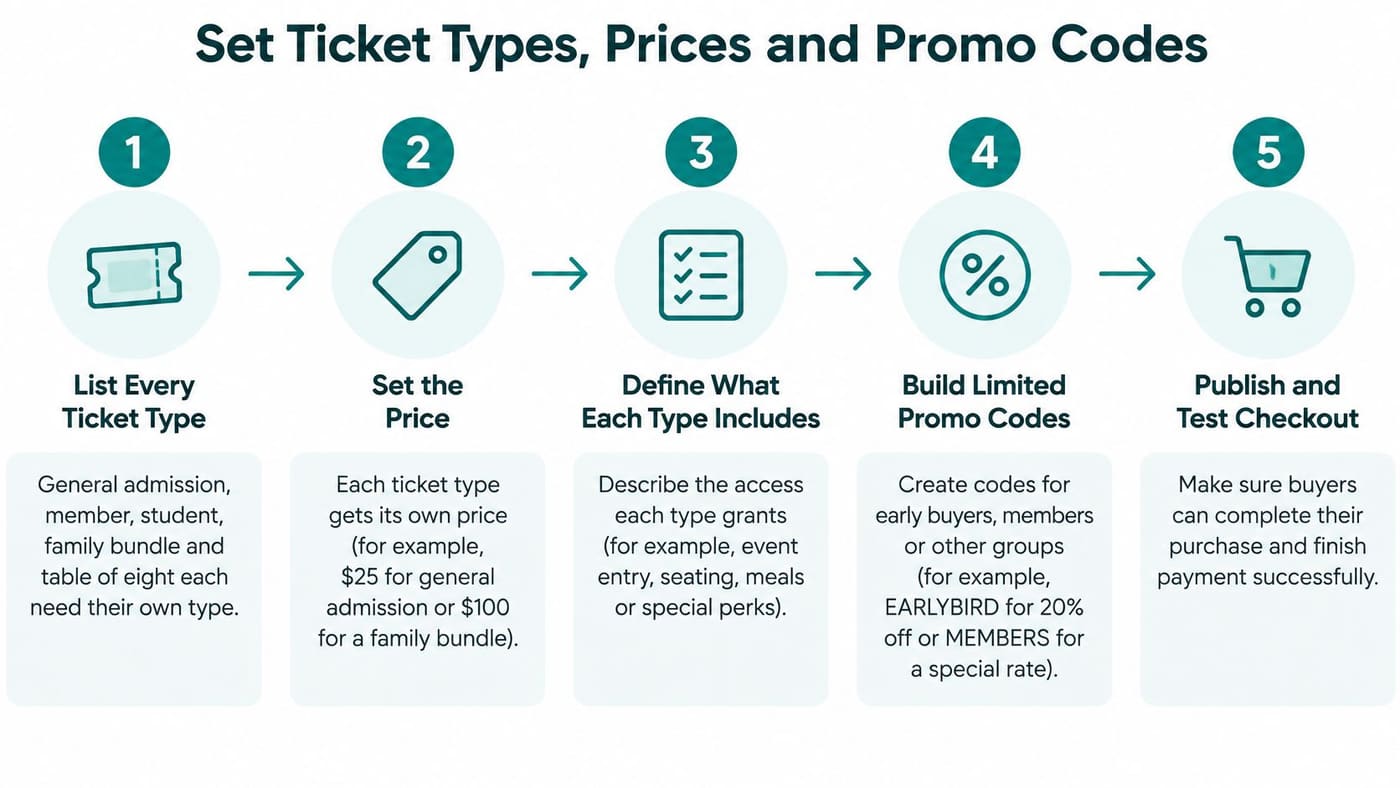
- List every type you need. General admission, member, student, family bundle, table of eight. Each carries its own price, capacity and a short description of what the extra money buys.
- Set capacity per type from the venue limit, not from the number you hope to sell, and hold back a small reserve for staff, sponsors and the auctioneer's table.
- Enter the price the donor pays, with fees displayed, so the page total and the checkout total are the same figure.
- Open with a clearly limited early-bird tier, with a fixed quantity or an end date, so the next tier opens without anyone editing the page at 11pm.
- Build promo codes with a usage limit, an expiry date and one ticket type each, so a sponsor's code stays out of the VIP tier.
- Write the refund and transfer rule on each ticket, visible before payment rather than buried in a confirmation email.
- Place a test order on every tier and confirm the available count drops by one.
The infographic below condenses the process into the five moves that carry the most weight.
Early-bird depth has a practical ceiling. The timing guidance in Tickpick's early-bird pricing writeup places early-bird discounts around 15% to 30% below standard pricing, with 15% to 25% the practical range, and cites an Eventbrite study of U.S. music events in which roughly 57% of tickets sold during the final week. Read that figure as a scheduling instruction. A quiet third week usually means the reminder sequence has not run yet, so send it before you touch the price.
Model the discount before you approve it
Work one example before the pricing meeting. Say your gala seats 200 and the standard ticket is $50. A 40-ticket early-bird tier at 20 percent off sells at $40, which gives up $10 a seat, or $400 across the whole tier. In return you hold 40 committed buyers and $1,600 in the bank about two months early, which is usually a fair trade for the certainty.
The discount stops paying for itself when it runs all the way to the event. Buyers who would happily have paid $50 learn to wait for the next markdown instead.
Watch the dashboard, not the ticket count
Track tickets sold per tier, daily sales velocity, conversion by source, refund rate and revenue per visitor. Those five numbers tell you whether to send a reminder, extend a tier, or stop discounting and let the deadline do the work.
The check that matters: the number on the event page and the number on the dashboard have to be the same number. When they drift apart, someone is selling seats you already promised to a sponsor.
Set the fair market value of each ticket as you build it, too. When a donor pays $100 for a seat worth $50, the receipt has to state the difference, and reconstructing that in February is miserable work.
Record the split between the ticket price and the fair market value on each order, so the receipt shows the deductible portion. The quid pro quo rules for auctions and premium tickets spell out how to document that split when an auction item or a premium seat is involved.
Accessibility Checks to Run Before You Sell
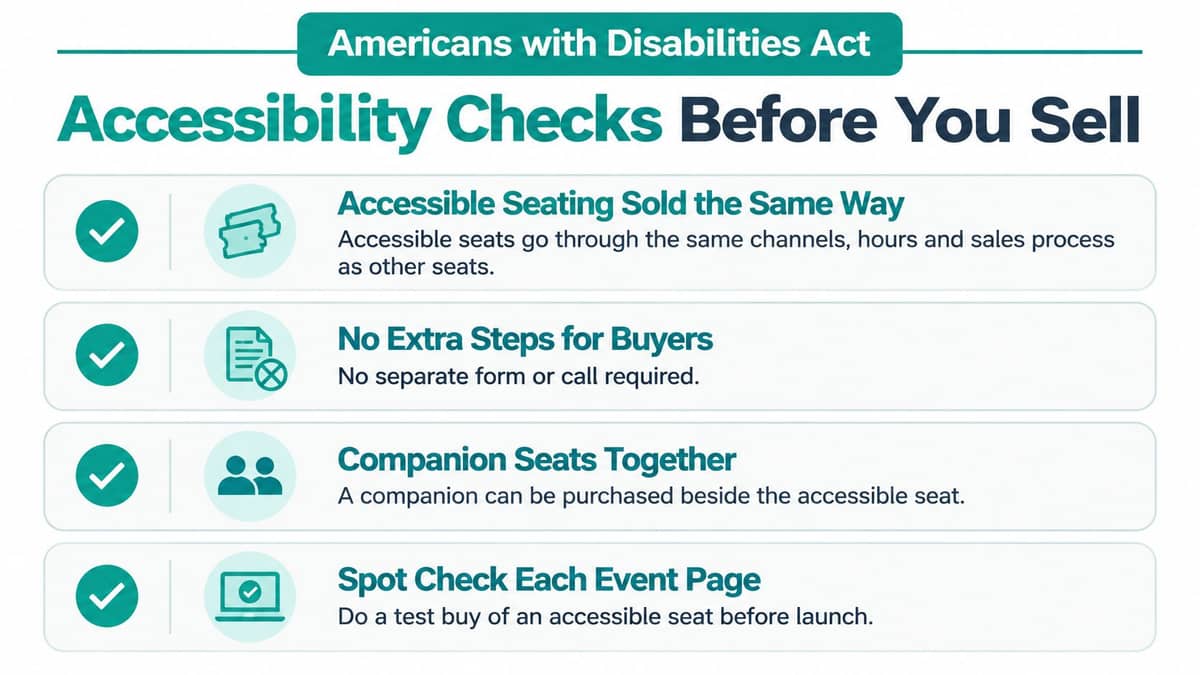
Under the Americans with Disabilities Act, accessible tickets go on sale through the same channels, during the same hours and at the same sales stages as every other seat, including websites, telephone sales, in-person sales and third-party vendors (ADA ticket sales guidance). That covers presales, promotions, lotteries, waitlists and general sales.
Pricing follows the same rule. An accessible seat cannot cost more than a comparable seat in the same section, and accessible options have to be offered at every price level, from the back row to the premium tier.
Description matters as much as availability. ADA guidance on ticketing says seating features must be described in enough detail for a person with a disability to decide independently whether the seating meets their needs, and that available accessible seats must be communicated to patrons and companions. "Accessible seating available" is not a description. Wheelchair locations, companion seats, step-free routes and sight lines are.
Same channels, same prices, real descriptions. Check your event page against all three before sales open.
Six checks you can finish in an afternoon
- Keyboard only. Buy a ticket from the event page to the confirmation screen without touching a mouse.
- Screen reader. Have ticket selection, the promo-code field and the payment form read aloud, and listen for a field with no label.
- Zoom to 200 percent. Buttons and the pay field need to stay visible and clickable at that size.
- Captions and plain language. Caption any event video, and rewrite the refund rule without legal phrasing.
- An older phone. Run the whole flow on the oldest device your team owns, on mobile data.
- Spot check an accessible seat. Buy one before launch the way a patron would, so you know the description on the page matches the seat that exists.
A third-party ticketing service doesn't remove your responsibility for the pages you publish. Public entities can remain answerable for digital content delivered through contractual or licensed arrangements, which is the sentence that matters when a complaint arrives. If your site fails the zoom test, this ADA compliance advice for small businesses covers practical fixes without a full redesign.
If you sell to buyers in the European Union, check whether the European Accessibility Act applies to your ticket page and checkout before launch. Then save the test results and the seating descriptions in the event file. When a patron emails six weeks later asking what "Row J, seat 12" means for a wheelchair user, you want the answer on file, not a guess and another round of testing.
Stopping Bots and Chargebacks Without Turning Away Donors
Two buyers reach your page in the same minute. One is a grandmother buying four seats for the family, paying with a card in her son's name. The other is software buying forty. Every control you add to stop the second one risks blocking the first.
Here's a patron arriving with the ticket already on her phone.

The FTC's refresher on the BOTS Act sets out the legal line: bypassing a ticket issuer's security measures or purchase limits through automated software, fake identities, concealed IP addresses or multiple payment cards is against the law. The same guidance, citing one 2025 industry analysis, puts total chargeback costs at 2.5 to 3.5 times the transaction amount after fees, lost inventory and staff time, with friendly fraud behind more than a third of live-event ticketing chargebacks.
Your side of that bargain is a written rule, applied evenly. A per-order cap, a per-email cap, and a velocity rule that flags several orders from one card within minutes cover most community events. Send tickets after payment clears, and hold unusual orders for a person to look at rather than auto-cancelling them.
| Warning sign | What it often means | Response |
|---|---|---|
| Many orders from one card or device in minutes | Automated buying or a reseller | Hold the orders for review and cap orders per device |
| Billing name and ticket email differ | Card testing or a gift purchase | Ask the buyer to confirm before tickets are sent |
| Several accounts share one phone number or address | Duplicate or fake accounts | Merge the accounts and apply a per-person limit |
| Repeated card declines on one event | Card testing | Block the IP range and require verification |
| Dispute filed after the event | Friendly fraud or a real refund request | Send scan records, the refund policy and the confirmation email as evidence |
Keep the evidence in one place: the order log, the scan records, the refund policy text you published, and the buyer's confirmation email. Then give a legitimate donor a way back in. A reply address that reaches a person, with tickets reissued within one business day, keeps a false positive from turning into a lost supporter.
Tax Rules, Records and Reconciliation After the Event
The tax question rarely turns on the rate. It turns on the day count.
Minnesota's guide to fundraising sales lets qualifying nonprofits with 24 or fewer fundraising-event days a year sell otherwise taxable admissions without charging sales tax. Pass 24 days and sales from the first 24 become taxable retroactively, with the remaining days taxable as well. Whether or not you're in Minnesota, the habit to copy is the same: record the event date and its tax treatment on every order, because you cannot rebuild that in April.
Two more obligations land on the same sale. The IRS treats special fundraising events as reportable fundraising activity, filed on Form 990 or Form 990-EZ with Schedule G where it applies, as the IRS fundraising guidance for charities(3)Organizations/FundraisingGuidelinesCharities) explains. Keep the event name, the buyer, the ticket price and any separately stated donation on the order record.
What to record while the sale is happening
- Event date and running day count, so a tenth event in the same fiscal year doesn't surprise anyone.
- Tax treatment per order, including the rule and the state you applied.
- Fair market value per ticket, so a receipt can show the deductible portion.
- Separately stated donations, kept apart from the ticket price from the first sale.
- Refund and transfer history, because a refunded ticket changes both revenue and the count.
Our platform doesn't collect tax on events, so if your state requires sales tax on admissions, calculate it yourself and note the treatment on each order before the event, not after.
Close the books in this order
- Match ticket totals to the scan report.
- Match deposits to payments, order by order.
- Confirm every paid order has a donor record and a receipt.
- Check the net amount landed in the correct fund, restricted or unrestricted.
With real numbers, say you sold 180 tickets at $50, issued 12 refunds, and a donor gave $1,500 as a separately stated gift. Gross ticket revenue is $9,000, refunds come to $600, so 168 net tickets and $8,400 in ticket revenue, plus $1,500 sitting on its own contribution line. If the scan report shows 168 and the deposit shows $9,900, the sale reconciles before anyone opens a spreadsheet.
Two lines, not one: ticket revenue and a separately stated donation are different income, and they belong in different accounts on the same night.
Fund coding earns its keep here. True fund accounting keeps restricted and unrestricted dollars in separate ledgers, so the gala's net doesn't prop up the general fund and then need untangling at year end. For states other than Minnesota, check the state revenue office rule before the event and write the answer onto the order.
Confirm Your Setup Before You Open Sales
Five decisions this week, in this order.
- Eligibility and tax. Confirm the event qualifies for online payments and record its sales tax treatment.
- The early-bird tier. A fixed quantity or end date, with the next tier ready to open on its own.
- One keyboard purchase. Start to finish, no mouse, on the actual event page.
- Screen reader results. Run the check and save what you found.
- The refund and transfer rule. One plain sentence a buyer can read before paying.
With those settled, the sale and the ledger can live in one system. AlignMint's events and ticketing puts the event, tickets, capacity, dates and registration in one builder, and check-in, attendance and the final event report follow the same flow. The revenue reconciliation guide shows how ticket totals and deposits get matched afterwards.
Eventbrite and Givebutter both sell tickets well for small events, and if selling tickets is the whole job, either is a fair choice. The gap most nonprofits hit is where the money lands: in the right fund, kept apart from unrestricted cash, rather than a QuickBooks class that someone re-sorts in January.
For the accounting side, read the fund accounting software guide and the guide to fund accounting for nonprofits. Then reply with the event you're planning and the ticket price you have in mind, and I'll tell you which phase to start with.
AlignMint brings tickets, donors and fund balances into one place, so a $40 ticket and a $1,500 gift land in the correct fund with a receipt attached, without a spreadsheet in between. You get fund accounting built for restricted dollars, a donor record for every buyer, and a free tier for one user at nonprofits with up to $100K in annual donations, with no credit card required. Fund accounting starts on Plus. Visit AlignMint to see how the events builder and the ledger work as one system before your next sale opens.
Frequently Asked Questions
Set the payment test, ticket types, accessibility checks, and the fund each sale posts to before you open sales. Software comparisons are separate guides.
No. Free is one user for nonprofits with up to $100K in annual donations, and no credit card is required. Fund accounting starts on Plus.
Ready to try AlignMint with your nonprofit?
Start free — set up donor tools, giving pages, and Minty. Upgrade when you need accounting.