

A Leader's Guide to Church Management Software
Quick Answer: A Leader's Guide to Church Management Software
Church management software that unifies fund accounting, giving, volunteers, and communications - plus how to compare point solutions, all-in-ones, and pricing traps. The sections below walk through practical steps, examples, and what to watch for.
For related tools, see AlignMint features. Running a church means you do more than ever before. You juggle donations, organize volunteers, send emails, and keep the finances straight. Often, this requires many separate tools. This guide shows how modern church management software brings everything into one place. It frees you to focus on your ministry.
Why Juggling Multiple Tools Slows Your Ministry
If you spend more time on administration than ministry, you are not alone. Many church leaders manage a patchwork of tools just to keep things running. This often looks like one system for emails, another for financial records, and spreadsheets for everything else.
This approach creates information silos. It makes seeing your church’s full picture impossible. Your donor information is in one place, and your financial data is in another. Getting a simple report can be a frustrating hunt.
The Real Cost of Disconnected Systems
This problem is more than a simple inconvenience. When your systems don’t talk to each other, you lose valuable time and insight. This disconnect can lead to real challenges.
- See the full story of your members. You can't easily see if a family that gives generously also volunteers consistently. This makes personal follow-up much harder.
- Gain true financial clarity. Using general business software like QuickBooks requires complicated workarounds for designated funds. It is hard to get an accurate, real-time view of your building fund.
- Reduce administrative work for your team. Your staff spends hours on manual data entry and fixing errors. This is time that could be spent building relationships.
This administrative burden is a story we hear all the time. Good church management software gives you back your time. It puts everything you need in one easy-to-use place.
A Better Way to Manage Your Ministry
Imagine a single place where your accounting, donors, and communications are connected. This is the promise of an all-in-one church management software like AlignMint. Instead of wrestling with separate tools, you get one unified view.
For example, our system includes true fund accounting. You can manage restricted gifts with confidence and integrity. It also offers a built-in marketing suite. This helps you send targeted communications to your members without a separate service. When all your tools work together, you spend less time on paperwork. Find more strategies in our guide on how to start a nonprofit.
What Is Church Management Software, Really?
As a church leader, your time is your most precious gift. It belongs to your people, not to a wrestling match with scattered spreadsheets. If you've ever felt buried trying to piece together giving records and volunteer lists, this is for you.
Think of church management software (ChMS) as the central hub for your ministry. It’s a single, secure place designed to give you a clear view of your community. It also shows your church’s financial health.
With a proper system, you can see a person's entire journey with your church. Their donation, their volunteering, and their group attendance are all connected. This is the story of their engagement, helping you serve them better.
It's More Than General Accounting
One of the biggest struggles for churches is managing finances with tools built for business. This is where a true ChMS makes a world of difference. It’s built around true fund accounting, a system designed to honor the trust of your donors.
When someone gives a designated gift, that money is tracked separately. This is a core need that general accounting tools like QuickBooks were not built for. They often force you into complicated workarounds using "classes," a manual and error-prone process.
The goal is financial clarity and integrity. You should be able to see the exact balance of your building fund in seconds.
This growing need for specialized tools is why so many churches are making a change. The church management software market is projected to grow by 22% each year through 2033. You can dig deeper into these trends in the full market report.
The Power of an All-in-One Operations Hub
Beyond finances, a unified platform brings all your key activities under one roof. Imagine managing your community from a single place that connects every touchpoint. That’s the real advantage.
- See the whole story. Connect a member's giving history directly to their group attendance and volunteer schedule. This gives you a complete picture of their involvement.
- Communicate with purpose. A built-in marketing suite lets you send targeted emails or texts without a separate tool. You can easily reach your entire congregation or just the worship team.
- Simplify stewardship for your members. Give your members simple, secure online giving pages. Donations are tracked and receipts are sent automatically.
At AlignMint, we built our platform to be this central hub. It combines fund accounting, donor management, volunteer coordination, and communications. User access scales by plan, from 1 user on Free to unlimited users on Enterprise. We also offer a free tier for nonprofits under $100K, making powerful tools accessible.
Key Features to Simplify Your Operations
Good church management software is about getting real results, not adding another program. The right tools should genuinely lighten your administrative load. Let's walk through the core features that make a meaningful difference.
When everything is connected, you finally get a complete picture of each member's journey. With integrated donor management, you have their full history in one place. This makes personal outreach simpler and more impactful.
See Your Financial Picture with Total Clarity
One of the biggest sources of stress is managing money with integrity. True fund accounting gives you instant and accurate reports on every restricted fund. You will always know exactly where you stand with your building fund or missions trip accounts.
This is a critical difference from standard business software. Tools like QuickBooks force you to use "classes" as a clunky workaround. With true fund accounting, financial transparency is built in.
Your software should give you confidence, not create more work. You can pull a real-time balance for any fund in just a few clicks.
Engage Your Community with a Built-in Marketing Suite
Imagine improving communication without needing a separate service like Mailchimp. A built-in marketing suite lets you send targeted emails and texts directly from your central hub. This keeps your community informed and engaged.
For example, you could easily send a message to:
- All volunteers who served last month to say thank you.
- Everyone registered for an upcoming retreat with a reminder.
- Your entire congregation with the weekly newsletter.
Because it's all part of one system, your contact lists are always up-to-date. No more exporting and importing lists, which saves time.
Manage Your Most Valuable Resource - Your People
You can finally ditch the confusing spreadsheets and endless email chains. You can track your volunteers' skills, background checks, and availability in one place. Scheduling becomes incredibly simple.
Likewise, strong donor management tools are essential. They help you cultivate a culture of generosity. When your software gives you a complete picture, you can steward support with greater care. We explore this in our guide to improving donor management.
Strong church management software often includes modules for financial contributions. This lets ministries focus on the spiritual side of giving, as described in "The Blessings Of Tithing And Giving."
The Advantage of a True All-in-One Platform
Tying all these pieces together is what truly sets a great system apart. When your accounting, donor data, and marketing tools live in the same house, they work together. This is the core idea behind AlignMint.
We provide a single platform that includes all of these features. We even added our AI assistant, Minty, to help you find information just by asking a question. With plan-based user allowances (1 on Free, up to 10 on Plus, up to 25 on Pro, and unlimited on Enterprise) and a free tier for nonprofits under $100K, we make powerful tools accessible.
How to Compare Your Software Options
Choosing the right software can feel daunting when every platform claims to solve your problems. Let's cut through the noise and look at the different kinds of tools you’ll find. This will help you make a clear-headed decision for your ministry.
This is a critical choice. It pays to take your time and compare software options to find the best fit.
Comparing Church Software Approaches
You’ll generally find two main kinds of church software: specialized point solutions and all-in-one systems. Each has pros and cons. Understanding the trade-offs is key to making a wise choice.
The table below breaks down the landscape.
| Software Type | Primary Focus | Common Challenge | Best For |
|---|---|---|---|
| Point Solution (e.g., Tithe.ly, Planning Center) | Excels at one specific task like giving or service planning. | Creates "data silos" and forces you to manage multiple subscriptions. | Churches with a specific need and the technical savvy to connect tools. |
| Enterprise All-in-One (e.g., Church Community Builder) | Tries to do everything, from accounting to childcare check-in. | Can be overly complex, hard to learn, and very expensive. | Very large churches with a dedicated administrative team and a large budget. |
| Unified Platform (e.g., AlignMint) | Integrates essential functions (accounting, donors, volunteers) into one system. | May not have every niche feature an enterprise system offers. | Small to mid-sized churches needing core operations to work together. |
As you can see, the path you choose has a big impact on your budget and workload.
The Problem with Patchwork Systems
Many platforms specialize in just one thing. You’ll see names like Tithe.ly, which is excellent for online giving. Planning Center is the go-to for scheduling services and volunteers. These tools are often best-in-class at what they do.
The challenge is that these point solutions force you to piece together different systems. This often creates the very same disconnected feeling you’re trying to solve. You wind up juggling multiple subscriptions and trying to get different programs to talk to each other.
The Challenge of Traditional All-in-Ones
Other platforms, like Church Community Builder, take an all-in-one approach. These systems can be incredibly powerful, bringing dozens of functions under one umbrella.
However, they can also be notoriously complex and carry a hefty price tag. This puts them out of reach for most small and mid-sized churches. This is a crucial factor as you weigh your options.
It’s no surprise that the trend is moving toward cloud-based church management software. It offers an ease of access that older systems just can't provide.
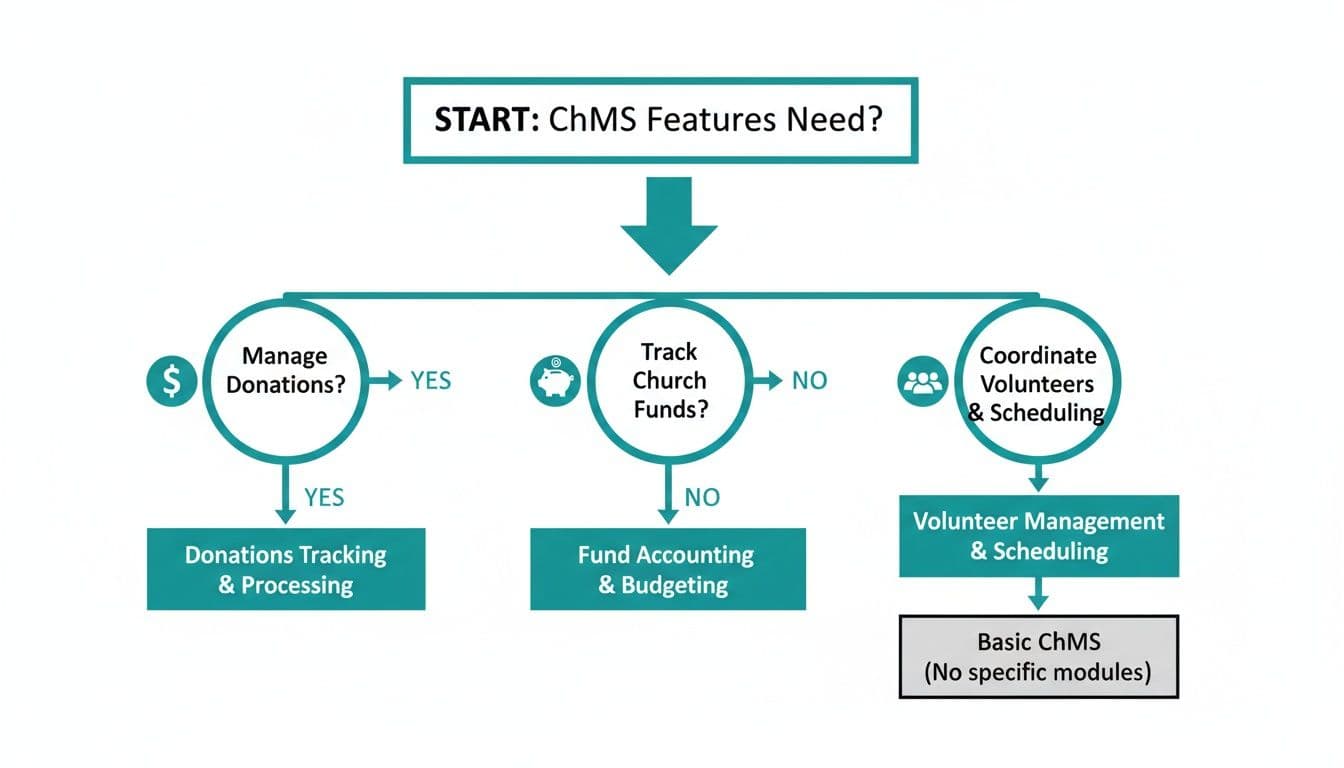
The flowchart makes a simple but powerful point. Let your core needs guide your software choice from the very beginning.
A Different Model for Your Ministry
At AlignMint, we built a practical alternative. We offer a single, unified platform that includes true fund accounting, a complete donor CRM, and tools for volunteers and communications. You get an integrated system without the complexity or high cost.
The goal is to find a partner, not just a product. Your software should work for your ministry, not the other way around.
A key difference is our pricing model. We believe your software should fuel your growth, not penalize you for it. That's why we do things differently.
- A completely free tier. If your church has an annual revenue under $100,000, you can use all of AlignMint for free.
- Plan-based user allowances (1 on Free, up to 10 on Plus, up to 25 on Pro, and unlimited on Enterprise). we publish user allowances by plan, so your entire team can have access without driving up your costs.
This approach addresses a common frustration we hear from church leaders. You can see exactly how we stack up in our detailed comparison of AlignMint vs. Planning Center. Our goal is to provide a complete, affordable solution that grows with you.
A Simple Checklist for Choosing the Right Software
Picking new software can feel overwhelming. I know you’re wary of slick sales pitches and just want a tool that solves your problems. This isn't about buying features; it's about buying back your time. Let's walk through a practical plan to help you make a decision with confidence.
Start with Your Biggest Headaches
Before you look at a single website, look at your own weekly routine. What are the top three administrative tasks that drain your energy?
- Is it the Sunday scramble to get donation reports right?
- Is it that anxiety about managing restricted funds for missions?
- Is it the chaotic group texts you use to organize volunteers?
By identifying your most pressing needs first, you create a powerful filter. This forces you to focus on features that will bring immediate relief. You're not just shopping for church management software; you're looking for a solution.
The right software should feel like a weight has been lifted. If a platform doesn't directly solve your biggest challenges, it's not the right one.
Insist on a Relevant Demonstration
When you’re ready to see a product, don't settle for a generic tour. A canned sales pitch is designed to show off shiny objects, not solve your problems. You need to see how it would work for your church.
Ask the salesperson to walk you through a live demo using your scenarios. For instance, say, "Show me how I would enter a $5,000 designated gift for our sound system." Or, "Walk me through scheduling my nursery volunteers for the next month."
This approach forces them to prove the software's value in a context that matters to you. Find more tips in our guide to nonprofit organization software.
Confirm the True Cost of Ownership
Pricing can be one of the most confusing parts of buying software. Some platforms charge you per user or even per church member. That means your bill goes up as your church grows.
Ask this question directly: "Does your price increase if I add more staff, volunteers, or members?"
A platform like ours with plan-based user allowances (1 on Free, up to 10 on Plus, up to 25 on Pro, and unlimited on Enterprise) gives you a predictable, flat cost. This ensures your entire team can collaborate without a surprise bill. To make powerful tools accessible, AlignMint also offers a free tier for nonprofits under $100K in annual revenue.
Verify It Has True Fund Accounting
This last point is critical for your church's financial integrity. Lots of general software systems claim they can handle nonprofit finances. They just use "classes" or "tags" as a clumsy workaround. This is not the same as true fund accounting.
Ask this simple question: "Does your software have native fund accounting, or does it use classes?" Their answer will tell you if the system was actually built for a ministry. Proper fund accounting is automated and error-proof, providing clarity and confidence. You can explore more in our post about nonprofit financial reporting.
How to Make the Switch Without the Headache
Moving your church’s data to a new system feels like a monumental task. The thought of losing or scrambling that information is enough to stop you. It’s a completely valid worry.
But making the switch to a new church management software doesn't have to be painful. A good software partner will make the transition as smooth as possible. A little preparation on your end can also prevent major headaches.
Start with a Clean Slate
Before you move your data, take the opportunity to do some spring cleaning. Over the years, every database accumulates outdated profiles and duplicate records. This is the perfect moment to tidy your financial records.
Think of it like moving to a new house. You wouldn't pack boxes of junk you no longer need. Cleaning up your data first ensures you’re starting fresh in your new system.
Ask About Migration Support
When you’re evaluating providers, this is a critical question to ask: "What does your data migration process look like?" Their answer will tell you a lot about how they view partnership. Will they give you hands-on help, or will you be left to figure it out alone?
You are not just buying software; you are investing in a support system. A good partner will have a clear, supportive process to help you.
At AlignMint, we know how daunting this step can be, which is why we guide you through it. You can see our approach in our guide on importing data. A clear process removes the guesswork and gives you confidence.
Adopt the Software in Phases
Don't try to do everything at once. Switching all of your operations on the same day is a recipe for stress. A much more manageable approach is to roll out the software in stages.
Consider these steps for a phased rollout:
- Start with Donor Management. Begin by moving your giving records and donor information. This lets your finance team get comfortable first.
- Introduce Volunteer Management. Once giving is running smoothly, roll out the volunteer scheduling tools. Get your ministry leaders trained on the new system.
- Expand to Communications. Finally, bring in the communications tools. Your team can then start sending targeted emails and texts.
This phased approach gives everyone time to learn one part of the software at a time. It makes the change feel gradual and achievable.
Common Questions About Church Management Software
As you think about a new system, a few big questions always come up. You’re investing in a tool that will handle your congregation’s data and your church’s finances. Here are some straightforward answers to what we hear most often from church leaders.
Will My Less Tech-Savvy Members Be Able to Use This?
This is a very important question. Your congregation is a diverse family, and any new tool has to work for everyone. The key is finding software that values simplicity. For example, your online giving pages should be clean and uncluttered.
But a good system also has to respect tradition. It should make it just as easy for your team to manually enter cash and check donations. That way, you’re meeting your entire congregation where they are. We designed our giving pages with this exact balance in mind.
How Secure Is Our Congregation's Data in the Cloud?
Putting your community’s sensitive information online can feel like a leap of faith. But it's almost always safer than the alternative. Reputable church management software providers use bank-level encryption. They store your data in professionally managed, high-security data centers.
When you're evaluating your options, always ask a potential provider about their security practices.
Security isn't a feature; it's a promise. You should feel completely confident that your congregation's personal and financial data is protected.
For instance, AlignMint provides bank-level security and guarantees 99.9% uptime. It's a commitment to ensuring your data is always safe and available.
Is This Kind of Software Too Expensive for a Small Church?
It absolutely doesn’t have to be. Many providers understand the tight budgets smaller ministries operate on. Some platforms, including our own, offer a free tier for nonprofits with revenue under $100,000. This gives you access to powerful tools without adding to your budget.
Just be wary of solutions with complex pricing, especially those with per-user fees. An all-in-one platform with a free or flat-rate plan gives you great value and budget predictability.
What Is True Fund Accounting and Why Does It Matter?
Think of fund accounting as a system of digital "envelopes." It’s designed to manage money designated for a particular purpose, like a building campaign. It automatically keeps those funds walled off from your general budget, which is essential for integrity.
Generic business software like QuickBooks tries to fake this with a feature called "classes." That’s a manual workaround that is prone to human error. A system with native fund accounting gives you an accurate, real-time balance for every restricted fund. This makes reporting to your congregation transparent and effortless.
Related:
- Church Growth Strategies That Actually Work - Practical outreach, small groups, digital giving, and volunteer engagement
- AlignMint vs Planning Center - Worship planning vs full operations
- Fundraising in churches - Giving, funds, and engagement
- Fund accounting - True funds for tithes and designations
Frequently Asked Questions
Ready to try AlignMint with your nonprofit?
Start free — set up donor tools, giving pages, and Minty. Upgrade when you need accounting.