

Your campaign email is nearly ready, but the donation button still sends supporters to an outdated, confusing form. To create an online donation page that works, you need a straightforward giving experience and a dependable process afterward. Here's how to connect both without turning the project into another software headache.
Quick Answer: Online Donation Pages
An online donation page should record the gift, the donor, and the fund, then send the receipt. The page is working when staff do not have to rebuild the transaction after checkout.
Start with donation pages and how to set up an online fundraising page. For the page layout, see donation page templates.
What Makes a Donation Page Work
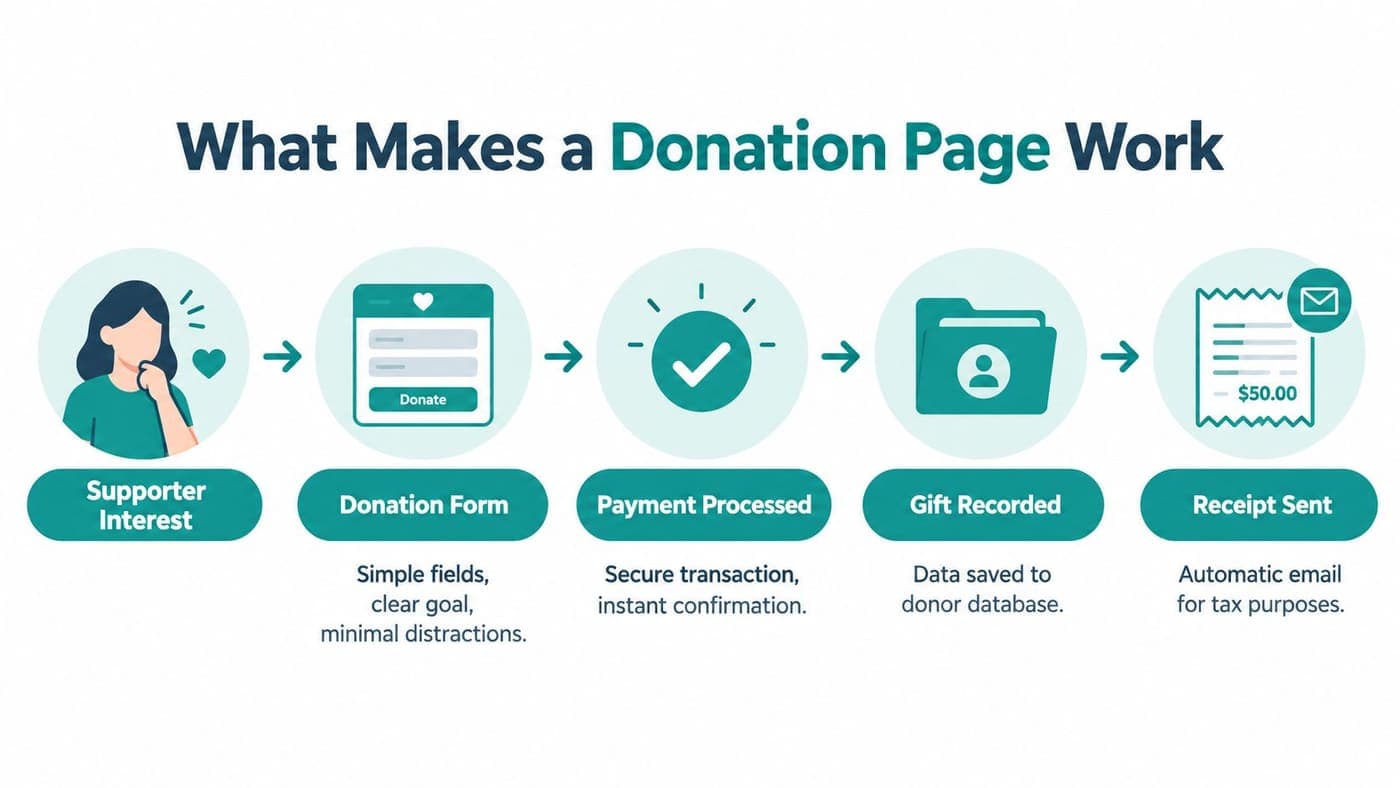
You need a supporter's gift to arrive completed, recorded, and receipted, without your staff reconstructing what happened afterward. A successful donation page supports that entire journey, not just the moment someone enters payment details.
The visible page includes your message, suggested amounts, recurring option, donor information, payment fields, and confirmation. Behind it, your team needs a reliable handoff into donor records, financial records, and acknowledgment workflows.
Give the page a clear job
Choose a primary purpose before discussing colors, photographs, or button labels with whoever maintains your website. A program appeal should explain that program, rather than ask donors to wade through every activity your organization runs.
A general giving page can offer designations, but it still needs a clear default and understandable choices. Don't make supporters learn your internal department structure before they can contribute to your work.
Donation page components
| Component | Director's review question |
|---|---|
| Message | Can a supporter explain what their gift supports? |
| Amount choices | Are suggested amounts helpful without limiting generosity? |
| Recurring option | Is the ongoing commitment clear before payment? |
| Donor information | Does every required field have an operational purpose? |
| Confirmation | Will donors know whether their gift succeeded? |
| Internal handoff | Can staff find the gift without searching separate systems? |
Decide what you'll measure
Ask your website administrator to track landing-page visits, donation-page visits, form starts, payment attempts, and completed gifts. Keep device type, traffic source, and one-time versus recurring selections alongside those stages.
These events form a conversion funnel, a practical record of where supporters continue or stop during checkout. Ask for a plain-language report your fundraising and finance colleagues can both understand, rather than a dashboard nobody reviews.
Prepare Your Giving Strategy
Your strongest starting point is a short planning conversation with the people responsible for fundraising, finance, and donor follow-up. Agree on the intended supporter, the purpose of the appeal, and what staff need after someone gives.
Write a headline that names the outcome, followed by a credible explanation of the need and your response. Connect suggested amounts to actual program costs only when your team can substantiate those connections.
Practical rule: Don't promise that a gift buys a specific outcome unless your program budget supports that statement.
Match the page to the commitment
Different giving contexts need different questions, even when the page design looks similar across your organization's website. Decide whether someone is making an unrestricted contribution, supporting a designated purpose, or paying for something they'll receive.
Page purpose by nonprofit context
| Page purpose | Define before building | Example donor decision |
|---|---|---|
| General giving | Default use and available designations | Support current organizational priorities |
| Campaign | Specific need and permitted uses | Contribute toward a focused appeal |
| Event | Gift versus registration payment | Donate without attending |
| Church or ministry | Ministry designation and benefit treatment | Support missions rather than purchase admission |
| School | Charitable appeal versus tuition-related payment | Give to a scholarship appeal |
| Sponsored project | Receiving charity and project designation | Support a project through its fiscal sponsor |
For churches, acknowledgment language must distinguish ordinary contributions from payments involving goods, services, or intangible religious benefits. The IRS guidance on written acknowledgments explains those distinctions, including the special treatment of intangible religious benefits.
Schools and fiscal sponsors should also settle classification questions before publishing, rather than asking bookkeepers to interpret ambiguous payments afterward. Have your finance adviser review any uncertain treatment of tuition, registrations, or benefits connected with a contribution.
Use our fundraising feature overview to frame the workflow discussion before comparing individual page-building controls.
Finish planning with a concrete handoff question: What should happen after this donor gives? Name who handles acknowledgment, financial review, and personal follow-up, then confirm they can access the information they need.
Build a Donor-Friendly Giving Experience
Help supporters understand the appeal and begin giving without searching through menus, lengthy introductions, or competing requests. Put your purpose, primary amount choices, and recurring selection near the top of the page.
Choose a small, useful selection of preset amounts alongside a clearly labeled custom amount field for other gifts. Keep ongoing giving optional and obvious, with the frequency stated before donors authorize their payment.

Make the commitment easy to understand
Explain processing fees, optional donor contributions toward costs, and the final payment total in ordinary language before submission. Don't preselect an extra charge that a supporter could reasonably overlook while completing their gift.
For ongoing gifts, explain how donors can update or stop their commitment without calling during office hours. Our recurring-gifts guide provides related reading when you're reviewing that part of the donor experience.
Consider a hypothetical school library appeal that invites families to support books and learning materials throughout the year. Its page can offer a custom gift and recurring support without adding student names or classroom details unnecessarily.
A church ministry or community pantry can follow the same layout while changing the purpose and relevant designation. Keep the example grounded in your own work, rather than borrowing claims or impact promises from another organization.
Mobile and desktop review points
| Review point | Mobile expectation | Desktop expectation |
|---|---|---|
| Reading | Clear text without zooming | Comfortable line lengths |
| Amount selection | Large, well-spaced controls | Easy comparison between choices |
| Information entry | Autofill and minimal typing | Optional details without clutter |
| Payment methods | Relevant wallet or bank options | Clear available payment choices |
| Accessibility | Labels and usable touch targets | Keyboard access and visible focus |
Treat accessibility as part of giving
Ask someone to complete the form using only a keyboard, then review labels, error messages, and color contrast. Don't rely on pale placeholder text to explain what belongs inside a required field.
Offer payment methods appropriate to your supporters, and confirm they work on the devices those supporters use. A visually attractive mobile page isn't enough if the form still requires excessive typing or an unfamiliar payment process.
Choose the Right Nonprofit Platform
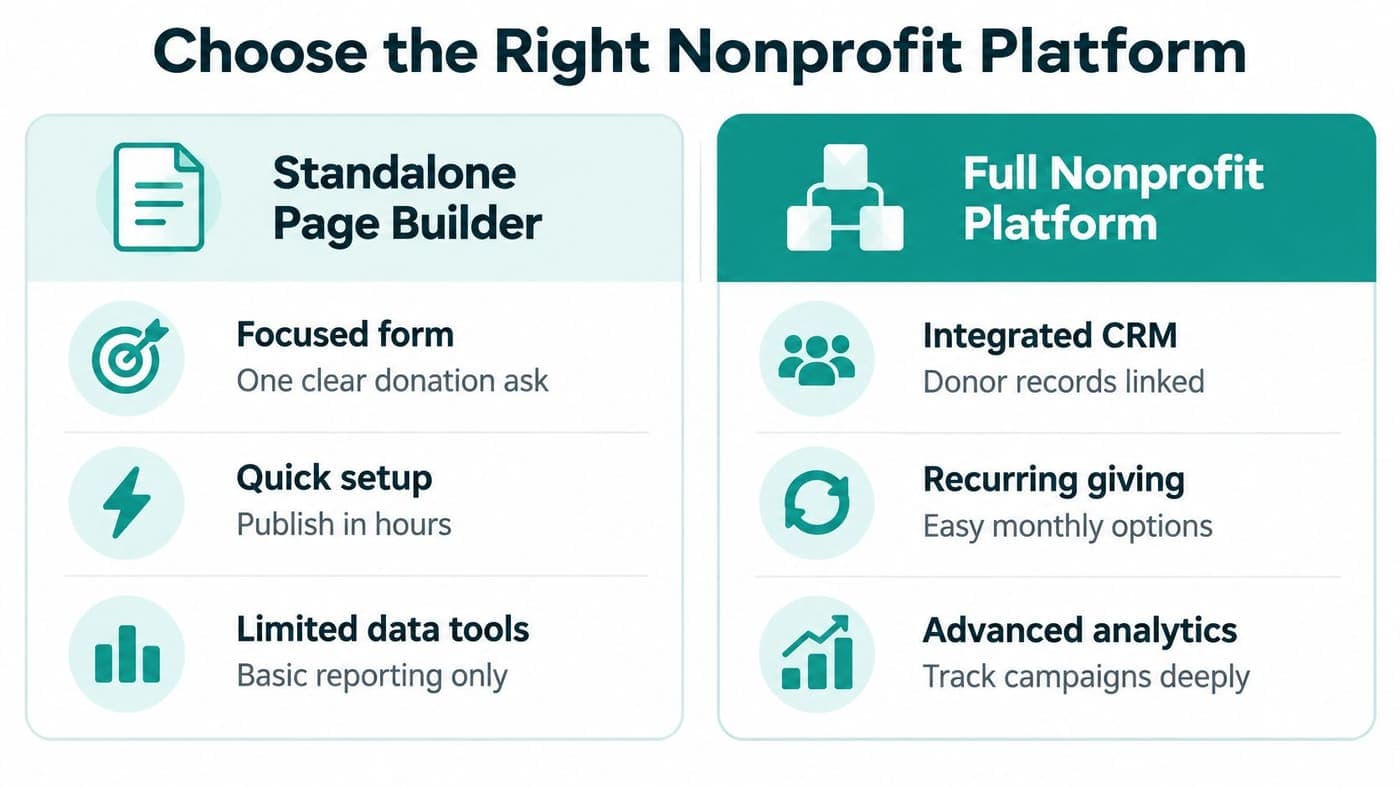
Choose the system that removes work your staff currently perform, rather than the system with the longest feature list. A standalone donation tool can be sensible when your existing donor database and accounting processes already work well.
A broader platform deserves consideration when staff repeatedly copy gifts between systems or disagree about which totals are correct. Neither approach is automatically better, and replacing a functioning setup creates work of its own.
Compare the work, not the sales presentation
Include Blackbaud, PayPal Giving Fund, and Donorbox in your comparison when they fit your organization's shortlist and giving model. Give each option credit for the tasks it demonstrates well, rather than assuming familiar names have identical capabilities.
Ask representatives to demonstrate your actual workflow, including an ordinary gift, a restricted contribution, and a recurring payment. Verify current terms, eligibility, data access, and financial handoffs directly instead of relying on general product comparisons.
Platform choice by operational need
| Option | Best when | Worth checking | Possible limitation |
|---|---|---|---|
| Standalone page tool | Existing back-office systems work well | Data transfer and receipt ownership | Additional handoffs may remain |
| Broader fundraising platform | Donor and campaign work needs attention | Accounting connection and exports | Finance may remain separate |
| All-in-one operations platform | Several departments share disconnected records | Fund structure, permissions, migration | Changing systems requires preparation |
At AlignMint, we bring accounting, donor CRM, volunteers, events, marketing, and online giving pages into an all-in-one platform. Our donor-management overview explains the donor-record side of that connected approach.
We offer a free tier for organizations raising up to $100K per year, with plan-based access and no per-seat fees. Review current terms and payment-processing costs before deciding what your organization will spend.
Require proof of the operational fit
For restricted gifts and grants, ask to see true fund accounting, not merely a category label attached to transactions. If you currently use QuickBooks classes, compare your actual restriction-tracking process rather than treating classes and native funds as interchangeable.
Our platform also includes automatic receipting, donor self-service, bank-feed reconciliation, and a built-in marketing suite for follow-up. Integrated volunteer management and events may matter when the same supporters participate across several parts of your mission.
Minty AI answers questions about your organization's data, but staff should still review the underlying records before making decisions. Demonstrate a real reporting question, a permissions check, and a team communication handoff before committing to a change.
Buy the smallest setup that solves your actual problem, with room for the work you already know is coming.
Connect Payments to Your Nonprofit Systems
Your finance colleague should be able to trace a gift without opening an email chain or rebuilding a spreadsheet. Start with the successful payment, then confirm the donor, campaign, designation, acknowledgment, and accounting treatment remain connected.
Assign responsibility for exceptions before launch, especially when payment succeeds but a later step fails or needs human review. Our payment-processing documentation is useful preparation for that conversation with whoever configures your checkout.
Preserve meaning alongside the money
A tribute gift needs more context than an amount, particularly when someone expects an acknowledgment sent to another person. Recurring gifts need a schedule and authorization record, while event-related payments need any relevant benefit details preserved.
What the donation workflow should preserve
| Workflow moment | Record or action | Why it matters |
|---|---|---|
| Payment completion | Transaction reference and payment status | Supports tracing and reconciliation |
| Donor matching | Existing or new donor record | Helps prevent fragmented histories |
| Campaign assignment | Appeal and source information | Keeps fundraising reporting useful |
| Designation | Fund, program, or sponsored project | Supports the intended financial treatment |
| Acknowledgment | Gift-specific receipt language | Provides relevant donor documentation |
| Follow-up | Assigned colleague and next action | Prevents missed donor communication |
For a single contribution of $250 or more, donors need a contemporaneous written acknowledgment meeting IRS substantiation requirements. It must include the charity's name, cash amount, and whether goods or services were provided, with applicable descriptions and value estimates.
The acknowledgment must reach donors before they file the relevant return or its deadline, including extensions, whichever comes first. Configure donation-specific receipts accordingly, and have your finance adviser approve the wording before those messages begin sending.
Make reconciliation and reporting usable
Keep gross gifts, processing costs, refunds, and bank deposits distinguishable so staff can explain differences rather than adjust totals blindly. Connect donor records to accounting entries without assuming the payment processor's payout equals the campaign's gross donations.
Your team may need campaign summaries, restricted balances, or event follow-up, but it doesn't need every possible report immediately. Agree on the reports staff will use, then confirm the underlying fields support them.
Test and Improve the Page
Test the complete donation journey before sharing the page with your mailing list, board, or community partners. A successful preview doesn't prove that payments, receipts, donor records, and financial entries will behave correctly together.
Assign a colleague to observe the donor experience and another to check the resulting records after each test. Record problems in plain language, with a named owner and a clear description of the expected result.
Test difficult situations deliberately
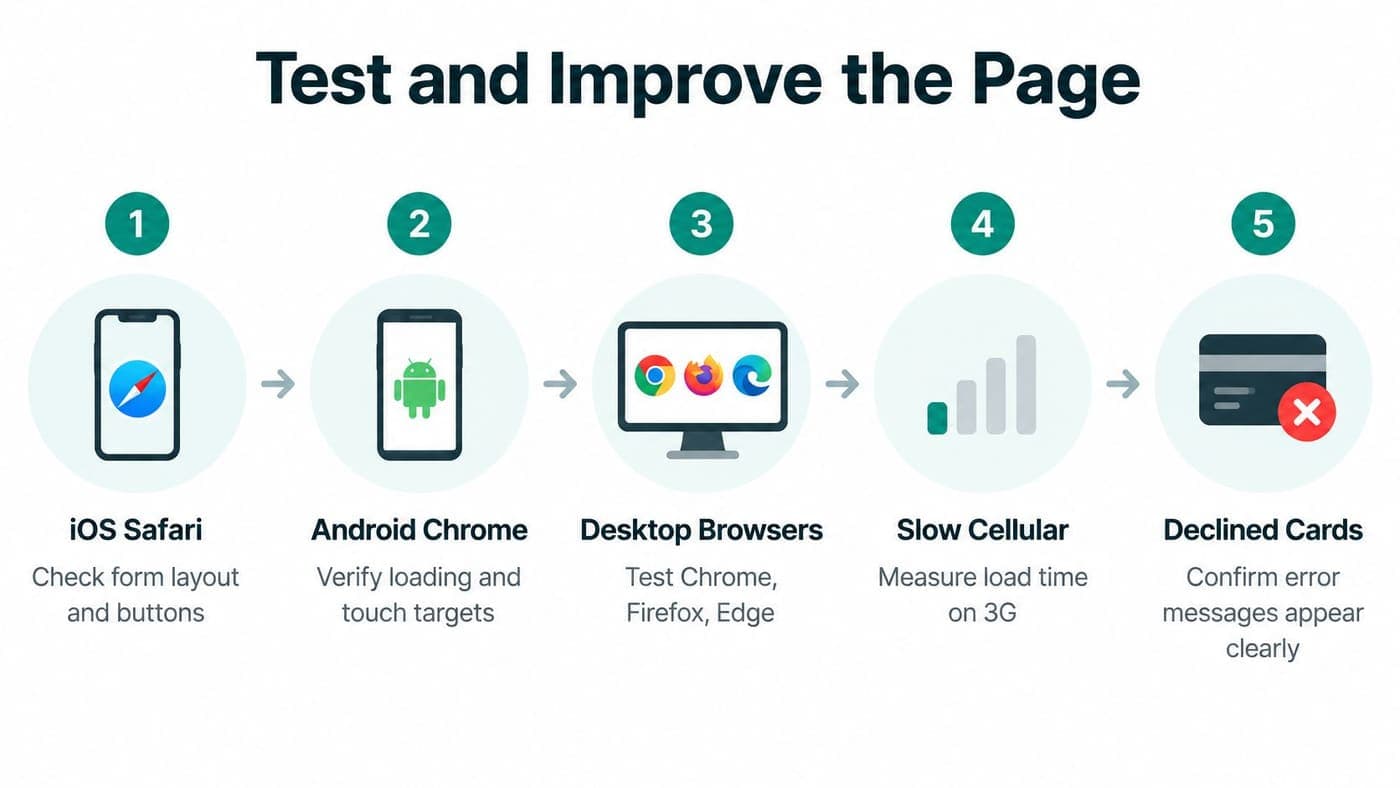
Ask your technical provider to demonstrate failures as well as successful gifts, using an appropriate testing environment where available. You don't need to understand the code, but you should understand what staff and donors will see.
- Browser coverage: Complete the flow on iOS Safari, Android Chrome, and desktop browsers.
- Connection problems: Try slow cellular service and an interrupted payment session.
- Payment errors: Check declined cards and confirm that correction instructions are understandable.
- Duplicate submissions: Verify repeated clicks don't create unintended gifts or duplicate records.
- Delivery failures: Test what happens when the processor's payment notification, called a webhook, doesn't arrive.
Require a unique transaction ID, preserved campaign-tracking tags called UTM parameters, and deduplication between browser and webhook events. Reconcile successful payment events against the accounting ledger before treating your analytics dashboard as reliable.
Use benchmarks without turning them into promises
Published benchmarks report approximately 11% desktop donation-page conversion, 8% mobile conversion, and 1.6% conversion across all website visitors, according to iDonate's benchmark discussion. These denominators differ, so don't compare general website traffic directly with visitors who have already reached checkout.
Mobile gifts also deserve separate review, with typical gifts of about $79 on mobile versus $118 on desktop, in the recurring-giving benchmark report. Treat those figures as comparison points, not predictions for your donor audience or reasons to neglect mobile supporters.
Optimization test plan
| Test area | Change to evaluate | Primary outcome |
|---|---|---|
| Required fields | Remove nonessential questions | Completed-gift conversion |
| First screen | Raise amount and recurring controls | Recurring-gift rate |
| Amount labels | Explain credible program relevance | Average gift |
| Payment clarity | Clarify fees, privacy, and receipts | Payment completion |
| Device experience | Compare a shorter mobile path | Net revenue by device |
Change a specific element, compare results, and keep other conditions as consistent as practical during your evaluation. Don't declare a winner because more people start the form if fewer complete successfully settled gifts.
Launch With Confidence
You're ready to launch when staff can explain both the supporter's experience and the records created afterward. Don't postpone publishing for decorative refinements once the important safeguards work and someone owns the remaining minor tasks.
Make security visible before supporters enter financial details, including clear organizational identity and an understandable explanation of payment handling. The FTC's charity-giving guidance recommends checking for HTTPS, which indicates encrypted transmission, but doesn't replace broader payment-security practices.
Confirm ownership before promotion
Final launch checklist
| Check | Ready when |
|---|---|
| Purpose | The appeal and intended use are clear |
| Donor path | A supporter can complete the form without coaching |
| Security presentation | Identity and secure payment handling are understandable |
| Receipts | Wording matches the actual contribution |
| Records | Staff can trace the gift through connected systems |
| Exceptions | A named colleague handles failures and corrections |
| Reporting | Fundraising and finance agree on the totals being compared |
Review our donation-receipts guide with the person responsible for acknowledgments before sending your launch announcement. For further operational reading, revisit the recurring-gifts and payment-processing guides linked earlier with your fundraising and finance colleagues.
Before promotion: Ask someone who didn't build the page to complete the journey and explain anything that feels uncertain.
Investigate differences instead of guessing
If gifts appear twice, compare transaction references before deleting records or issuing refunds that might create another problem. If campaign attribution disappears, inspect the tracking handoff between the original appeal and checkout.
Unexpected declines need investigation by payment method and device, not an immediate assumption that supporters changed their minds. When totals differ across the page, processor, CRM, and ledger, check statuses, reporting dates, fees, refunds, and payout timing.
Keep the launch manageable by choosing a review schedule and assigning responsibility for donor questions and financial exceptions. You don't need a complicated setup, just a dependable process your team can explain and maintain.
We offer connected giving pages, donor records, and fund accounting so your team can manage what happens after a gift. Visit AlignMint to request a demonstration using your current donation workflow, then choose the smallest setup that solves a real operational problem.
Ready to try AlignMint with your nonprofit?
Start free — set up donor tools, giving pages, and Minty. Upgrade when you need accounting.