

Your pantry shift starts Tuesday, and you're still searching emails to find someone who can cover packing. A useful volunteer management template shows who fits, when they're available, and which hours were worked. You don't need a longer form or another login to get those answers.
Quick Answer: Volunteer Management Template
A volunteer management template is one master sheet for the person, the role, the risk, the shift, and the verified hours. This page is that sheet. Best practices, the director's guide, and the hour-log comparison are separate pages.
Start with volunteer scheduling and volunteer management best practices. For the director's guide, see volunteer management for directors. For the hour log, see volunteer hour log templates.
Why a Name List Leaves Shifts Empty
Say your food pantry has forty names in a spreadsheet, yet two packing slots are still empty. You can't tell who can lift boxes, who needs transportation, or who already served this month.
Your coordinator starts calling people, working from memory instead of a clear view of available help. Meanwhile, someone who could cover a short shift never hears about it because they can't promise weekly attendance.
You need a placement record, not just a contact list. Keep enough information to connect each person with a specific task, date, supervisor, and completed assignment.
The recruitment challenge is real: Points of Light reported that 23% of Americans formally volunteered with an organization, while the global formal-volunteering rate was 6.5%. Those figures describe formal volunteering, so don't mix casual neighborhood help into your organization's participation totals.
Count available help, not registered names
A bigger list won't tell you whether your next pantry shift has enough people to operate safely. Keep these measures separate so you can see where recruitment turns into actual service:
- Registered volunteers: People who have expressed interest, whether or not they've accepted an assignment.
- Confirmed volunteers: People who have agreed to a named task and service date.
- Active volunteers: People who completed service during the reporting period you've chosen.
- Verified hours: Completed time that a supervisor has checked, rather than time someone originally promised.
Keep the recruitment source alongside each person's record: individual, employee group, school, faith community, or partner. Preserve service dates, too, so you can compare participation without overwriting last season's history.
Practical rule: A name belongs on your roster. A confirmed person belongs on your shift plan.
Make the immediate decision easy: who can cover this opening, and what might prevent them from arriving? An arrival contact and communication preference are more useful here than another open-ended question about someone's motivation.
Keep the same distinction when reviewing volunteer scheduling: a profile isn't a commitment, and an invitation isn't a confirmation. Your sheet should show those differences before you consider changing software.
Fields to Keep on Your Master Sheet
Copy this table into Excel or Google Sheets, then remove applicant-facing questions that don't serve the assigned role. Keep the master record complete, but don't ask every volunteer to complete every column.
Volunteer management template fields
| Block | Columns to copy | Why you keep them | Leave blank when |
|---|---|---|---|
| Profile | Name, phone, email, emergency contact, source | You can reach the person and sort by recruitment channel | You are tempted to add extra demographics |
| Skills and interests | Skills, languages, interests, preferred role | The match is a written decision | The role is a supervised one-day helper |
| Schedule | One-time or repeating, min and max shift, notice, travel limit | You can fill a short gap without a weekly promise | You only need a single named date |
| Access and limits | Accommodation needs, interpreter or support person, caregiving limit, language, digital access | A short shift stays possible for that person | The person has stated no limit |
| Communication | Email, text, phone, or portal, plus split consents | The message arrives in a form they will read | You are about to use one bundled checkbox |
| Hours | Date, program, place, activity, in, out, verified hours | Grants and the board can see capacity | You would book the hours as cash income |
| Screening | Role risk, check type, decision, renewal, who can view | Safety stays tied to the role | The role has no vulnerable contact and is supervised |
| Follow-up | Supervisor, training date, recognition, cancel reason, return status | You can see who comes back and why others do not | The person has not served yet |
The last column tells you when to leave unnecessary detail blank, not when to erase essential controls. A supervised helper still needs an approved role; a new applicant still needs a staff member responsible for follow-up.
Separate your working file into a volunteer roster and an assignment log, connected by a consistent volunteer identifier. Otherwise, changing someone's phone number means finding every past shift where you copied their contact details.
Protect sensitive documents outside the shared roster, and record only their status and authorized owner in the sheet. You don't need reference letters, identification documents, or screening results visible to every event lead.
Make placement decisions visible
A usable record shows what must happen before someone moves forward, rather than leaving those decisions in email. The Nonprofit Snapshot volunteer-management overview connects effective management with written roles, screening and matching, training, supervision, recognition, and tracking involvement.
Use these approval points to make that sequence practical:
- Before publishing: Require a role title, written task, location, supervisor, and clear description of physical demands.
- Before placement: Record the screening decision and the reason the person fits the assignment.
- Before service: Confirm required orientation, role training, and any applicable consent or waiver.
- After service: Close the assignment with checked hours and a short supervisor note.
Keep role-level information in a separate reference tab, including liability coverage review and staff training responsibilities. Those details matter, but volunteers shouldn't have to enter information your organization already owns.
For distributed activities, doornoc's guide to field team volunteer planning offers useful context for coordinating assignments across locations. Keep your own task descriptions concrete enough that another coordinator could make the same placement decision.
Reduce paperwork confusion by keeping signatures separate from attendance, using the digital waiver documentation when designing that workflow. Signing a form doesn't establish attendance, prove training, or validate completed hours.
Skip recognition questions on a brand-new application, and avoid collecting demographics without a defined reporting purpose. Copy the fields this week, but leave screening details unfilled until you've assessed each role's actual risk.
Shape the Sheet for Risk and Short Shifts
Ask less of low-risk helpers and more of people carrying greater responsibility. A conditional template gives you a defensible placement process without making every applicant complete a youth-mentor application.
The 2025 What We're Hearing sector report identifies duplicated screening processes, data systems, and uneven accessibility support as participation barriers. Its recommendation for proportional risk management supports a simple decision: collect information because the role requires it, not because another form included it.
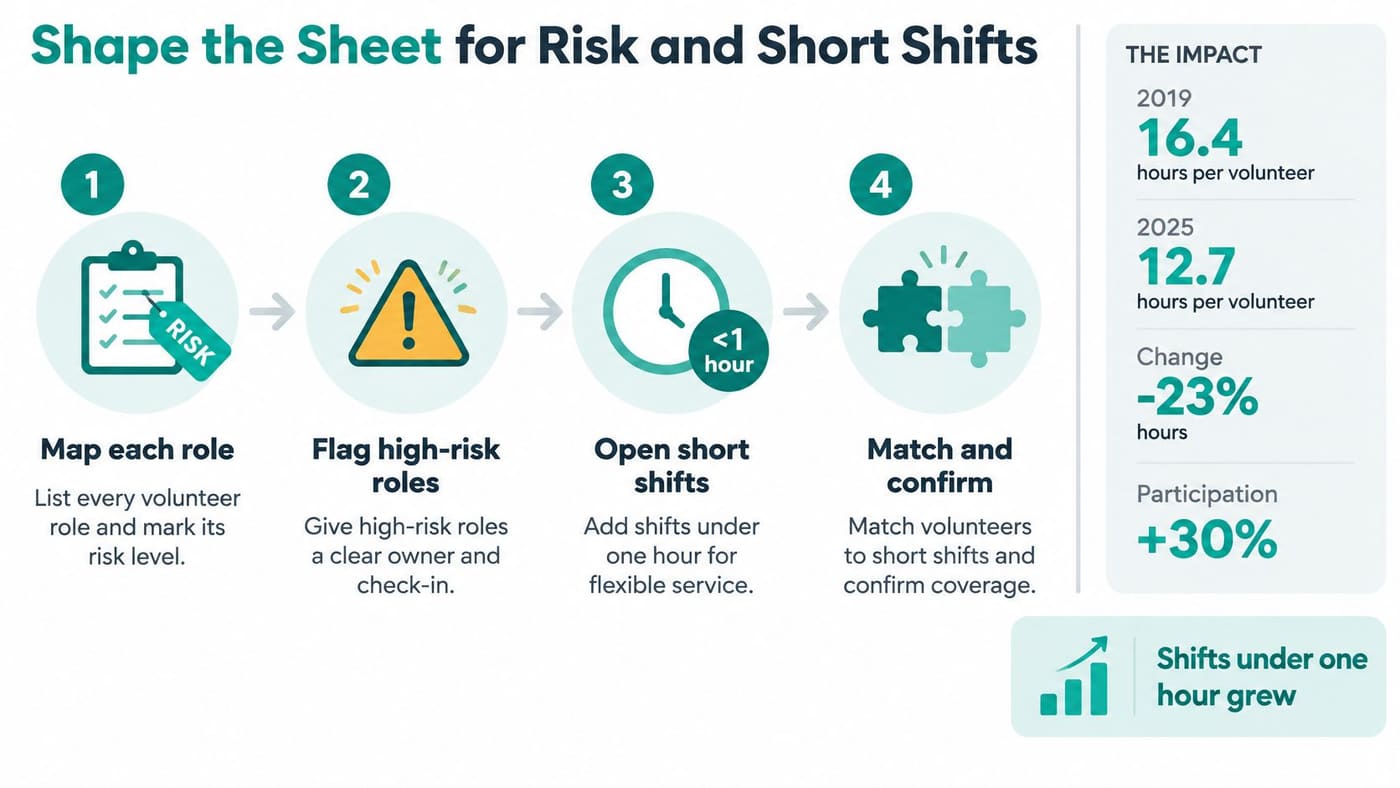
Short commitments need deliberate planning too. A two-hour setup helper can still create a coverage gap if the task, arrival time, supervisor, and finish condition are vague. Build the sheet so a brief assignment is easy to accept, easy to staff, and easy to verify.
Use this process to connect role requirements with realistic availability, rather than treating weekly attendance as the default.
Set the requirements before inviting applicants
-
Make the task understandable before publishing it. Describe what someone will do, where they'll work, and who will supervise them. A church nursery helper needs different preparation from someone arranging chairs after worship.
-
Assign risk from the actual responsibilities. Review contact with vulnerable people, driving, money handling, confidential information, and the degree of supervision. Record the decision-maker, not just a low, medium, or high label.
-
Show only the fields that support that role. Use the matrix below as a starting policy, then adjust for jurisdiction, insurer requirements, and safeguarding responsibilities. A label alone never overrides those requirements.
Role risk and the minimum you collect
| Role | Risk | Minimum fields | Check | Renew |
|---|---|---|---|---|
| One-day event helper | Low, supervised, no vulnerable contact | Name, phone, emergency contact, shift | None beyond sign-in | None |
| Remote translator | Low to medium | Language, sample of work, availability, message channel | Work sample or reference | Yearly skill confirm |
| Youth mentor | High | Full profile, references, training date, supervisor | Background check and separate consents | Annual or local policy |
| Driver | High | License status, insurance note, travel limit, dates | License, insurance, driving record where required | Each season or yearly |
| Board volunteer | Medium-high, governance | Skills, conflicts, meeting times | Conflict disclosure, not a youth-work check | Yearly |
These renewal intervals are suggested operating rules, not universal legal requirements or evidence that a check remains sufficient. Record your approved interval and retention period beside each role, with a named owner responsible for review.
Context can raise or lower the requirement inside the same job title. A remote translator handling confidential case files needs stronger access controls than someone translating a public event flyer. A school reading tutor's supervision arrangement matters more than whether the school calls the assignment informal.
For a fiscal-sponsor event greeter, identify whether the sponsor or sponsored project approves placement and handles incidents. Responsibility should be explicit when both organizations appear on the event materials.
Keep the decision and renewal status visible, while limiting access to underlying documents through your background-check workflow. Hiding a spreadsheet column isn't a privacy control; protect the file and its sharing permissions.
Match the person's actual availability
-
Make the match explicit. Record relevant skills and interests, assign the role, and update the assignment when responsibilities change. Approval for greeting visitors does not automatically extend to driving them home, handling cash, or supervising children.
-
Offer service windows people can realistically keep. Capture one-time or seasonal availability, shortest and longest shift, notice needed, and travel limits. Ask what practical adjustment would help, rather than requesting a diagnosis or personal explanation.
Someone managing caregiving duties may need a firm finish time, while another volunteer needs an interpreter or support person. Record the arrangement staff must provide, and confirm who will organize it before accepting the booking.
Language preference and digital access belong here because a portal-only process can exclude an otherwise suitable helper. Offer a phone-based route when someone can't comfortably complete the digital process.
-
Use the communication method the volunteer chooses. Record email, text, phone, or portal, and keep screening, photography, emergency-contact, and update permissions separate. A person declining promotional photographs shouldn't disappear from an otherwise suitable shift.
-
Hold placement until required preparation is complete. Give orientation and role training their own completion fields, rather than burying both inside a general approved status. For a church nursery, document safeguarding preparation and the supervising staff member before confirming service.
-
Finish the assignment with evidence and feedback. Confirm hours, record cancellations, collect a brief feedback score, and update return status after subsequent service. Keep the question consistent so supervisors can compare responses without interpreting different scales.
A short contribution is still a real commitment. Judge whether the person completed the agreed task.
Build a weekly habit of follow-through
Review unmatched applicants, confirm arrival details, and resolve missing support arrangements during a regular coordinator check-in. Use filtered tabs for risk levels, but keep a single master record so corrections don't create competing versions.
Make recognition personal and connected to the contribution, with milestone triggers chosen for your program's service pattern. Ten hours or five visits can be meaningful triggers inside one program without serving as sector benchmarks.
A U.S. government publication on volunteer management and retention associates recognition, training, and suitable screening-and-matching practices with higher retention. Use that finding to support consistent follow-through, not to promise a particular retention result.
Calculate period retention as returning volunteers divided by volunteers active at the period's start, using a documented definition. Review results by role, site, recruitment source, training completion, and supervisor before drawing conclusions about why people leave.
Compare no-shows and completed assignments by shift length, too, so you can distinguish scheduling problems from individual circumstances. Keep cancellation reasons factual and brief; the purpose is to improve coverage, not build a personal dossier.
Record Hours the Board Can Trust
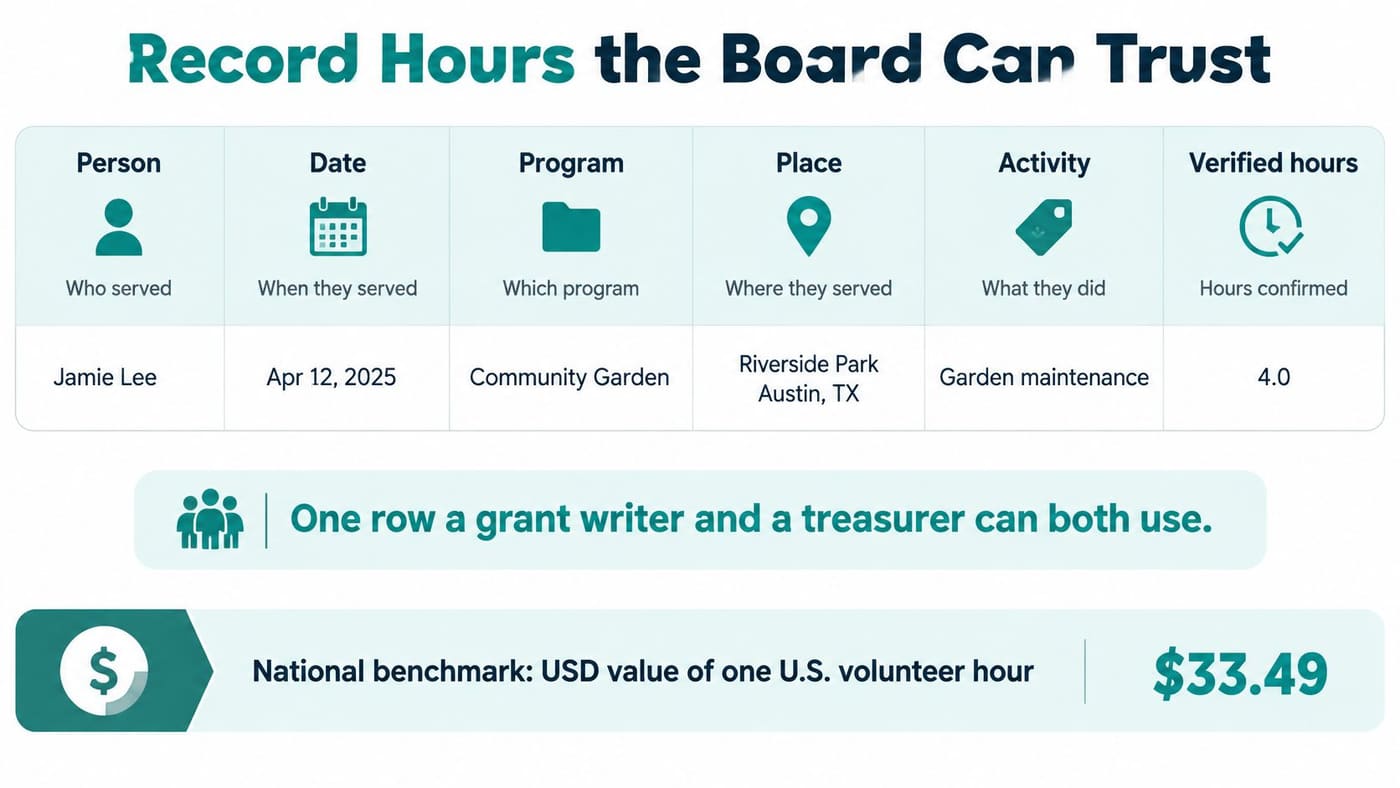
Give your grant writer and treasurer the same verified service record. Each assignment row needs the person, service date, program, place, activity, and confirmed hours, with the verifier recorded alongside it.
Keep planned time separate from completed time, and record adjustments without overwriting the original entry. A person booked for a full shift may arrive late, leave early, or complete a different assignment.
Use a consistent program code rather than free-text labels that vary between coordinators, campuses, and sponsored projects. That lets your finance lead place service volume beside program spending without rebuilding the categories every month.
The following visual shows the basic log row, without adding unnecessary personal information to your monthly report.
Apply a documented valuation method
Independent Sector and the University of Maryland's Do Good Institute estimated one U.S. volunteer hour at $33.49 using 2023 data, a 5.3% increase over the prior year, as reported in Independent Sector's annual report. The following table uses that report's national and geographic estimates, with the worked total calculated from the national rate.
2023 value of a volunteer hour
| Place or example | Value | How to use it |
|---|---|---|
| United States national | $33.49 per hour | Default only when you have no better local figure |
| Puerto Rico | $15.82 per hour | Use for service logged there |
| Washington, D.C. | $50.88 per hour | Use for service logged there |
| 2,000 hours at the national rate | About $66,980 | Board and grant narrative, never cash revenue |
Choose your valuation method before preparing the report, and document its geography, reference year, and intended reporting use. Keep it consistent across the reporting year, unless you clearly explain a change.
For a multi-site church or school, preserve location and service date so you can apply the appropriate geographic benchmark. Don't describe an older benchmark as today's rate, or assume a grant accepts the same valuation method.
You can start with the volunteer hour tracking template, then add your program codes and verification fields. Keep a clear approval deadline so late entries don't change an already-issued board report without explanation.
Keep impact estimates outside cash balances
Estimated contributed labor isn't cash revenue, and it doesn't increase the money available to pay your bills. Any financial-statement recognition of donated services requires a separate accounting assessment; multiplying hours by a benchmark doesn't settle that question.
Restricted gifts and program expenses belong in fund records, with their own supporting documentation and approval process. Our fund accounting guide for nonprofits explains the distinction between tracking purpose-restricted resources and tracking program activity.
Board reporting boundary: Show volunteer capacity beside financial results, not inside the available-cash total.
Volunteer time alone doesn't release a donor restriction; that decision follows the gift's terms and your accounting treatment. Finish the monthly capacity note with these clearly labeled lines:
- People who served: Distinct volunteers with completed assignments during the reporting period.
- Verified hours: Approved service time, grouped by the programs your finance team already uses.
- Estimated contributed labor: The calculated value, explicitly labeled as an estimate with its valuation basis.
Start With One Sheet This Week
Make your next shift easier to fill before changing your software. Give a coordinator ownership of the file and a regular review appointment, rather than adding another task nobody maintains.
Start Monday with a short, concrete list:
- Copy the field blocks: Keep the master roster separate from the assignment log and sensitive supporting documents.
- Assess upcoming roles: Approve the risk level, task description, supervisor, and minimum information needed for placement.
- Complete this month's log: Resolve missing dates, program codes, and approvals before preparing totals.
- Write the board note: Report people, verified hours, and estimated labor without confusing service value with cash.
Keep the sheet until coordination needs more
Stay with Excel or Google Sheets if your coordinator can keep assignments current and answer coverage questions promptly. Move when shift decisions live in scattered emails and finance repeatedly rebuilds program totals by hand.
Grasshopper Signup suits event signups and small teams that need a clear roster without unnecessary administration. Bloomerang offers donor management and volunteer tools, so don't assume it requires separate donor and volunteer spreadsheets.
The comparison is about your remaining gaps, not whether either product is good software for its intended work. Ask whether finance, supporter relationships, program assignments, and team communication still require staff to reconcile separate records.
Choose shared records when they save real work
We bring money, donors, programs, and people together in AlignMint, with accounting, CRM, volunteers, events, and built-in marketing. Our volunteer tools cover schedules, reminders, waivers, assignment groups, and hours by person, event, and program.
Volunteers can accept or decline through an email link without signing in, while existing users can use the volunteer portal. Our Free plan includes donor records, online giving pages, and fundraising drafts for one user, for organizations with up to $100K in annual donations.
Plus adds true fund accounting, bank feeds, and volunteer and event management. Minty, our AI assistant, answers questions from your records on every plan. For the finance decision, compare requirements through our nonprofit accounting software guide, including whether QuickBooks classes meet your restricted-fund needs.
If the sheet already answers Tuesday's staffing question, keep it and maintain it. If it doesn't, carry these same field definitions into a shared system rather than rebuilding your process around software.
We offer volunteer scheduling and service-hour records alongside donor management and fund accounting, so your staff can work from connected information. Visit AlignMint with your next shift roster and program list, and compare the workflow against the questions your sheet can't answer.
Frequently Asked Questions
One master sheet for the person, the role, the risk level, the shift, and the verified hours. Best practices, the director's guide, and the hour-log comparison are separate pages.
Free is one user for nonprofits with up to $100K in annual donations, and no credit card is required. It includes a volunteer roster. Scheduling, events, and fund accounting start on Plus.
Ready to try AlignMint with your nonprofit?
Start free — set up donor tools, giving pages, and Minty. Upgrade when you need accounting.