

For related tools, see the Nonprofit 990 Directory, the Form 990 checklist template, and nonprofit fund accounting.
Quick Answer: How to Find a Nonprofit's Form 990
You can find any tax-exempt organization's IRS Form 990 for free by searching its 9-digit EIN or legal name in the AlignMint Nonprofit Directory, IRS Tax Exempt Organization Search (TEOS), ProPublica Nonprofit Explorer, or Candid (GuideStar). Under Internal Revenue Code Section 6104, every 501(c)(3) must make its three most recent annual returns (Form 990, 990-EZ, 990-PF, or 990-N) open to public inspection.
| Lookup Source | Cost | Best For | What You Get |
|---|---|---|---|
| AlignMint Nonprofit Directory | Free (no login) | Fast donor & board readiness checks | Public 990 financial summaries, program/admin ratios, filing recency, and state/category browse |
| IRS Tax Exempt Organization Search (TEOS) | Free (no login) | Official IRS verification & 990-N e-Postcards | Determination letters, Pub 78 deductibility status, 990-N filings, and raw IRS XML/PDFs |
| ProPublica Nonprofit Explorer | Free (no login) | Multi-year PDF downloads & compensation | Full downloadable Form 990 PDFs, Schedules A–R, and historical revenue/expense trends |
| Candid (GuideStar) | Free basic (login) | Funder due diligence & profile seals | Recent Form 990 PDFs plus self-reported nonprofit demographics and program metrics |
| State Charity Registries (AG / SOS) | Free (no login) | State solicitation & audit filings | State renewal forms and audited financial statements where state thresholds apply |
| Direct Request to the Nonprofit | Free (by law) | Latest return not yet indexed by the IRS | The 3 most recent Form 990 returns and original Form 1023 application under IRC § 6104 |
Whether you are a donor checking how a charity spends its money, an executive director benchmarking peer compensation, a grantmaker running due diligence, or a board treasurer verifying your own organization's public record, knowing how to find and read a Form 990 takes less than five minutes once you look in the right place.
Step-by-Step: How to Look Up a Form 990 in Under 5 Minutes
Step 1: Get the 9-digit EIN (not just the public brand name)
Many nonprofits campaign under a program or "doing business as" (DBA) name that does not match the legal name on their IRS determination letter. Searching "Grace Community Project" may return dozens of unrelated organizations across 50 states, whereas searching the 9-digit Employer Identification Number (EIN) (formatted XX-XXXXXXX) pinpoints the exact legal entity immediately.
You can usually find a nonprofit's EIN in three places:
- The footer of the nonprofit's website or online donation page
- Your tax-deductible donation acknowledgment receipt
- The AlignMint Nonprofit Directory search bar by typing the city, state, or partial name
Step 2: Choose the right free Form 990 lookup tool
Not every database carries the same filings. Use the source that matches what you need to verify:
- For a fast plain-English financial summary: Start at the AlignMint Nonprofit Directory. It organizes public IRS filing data into readable summaries showing the latest tax year, total revenue, total expenses, net assets, program-to-expense ratios, and leadership records without requiring an account.
- For official IRS status and small nonprofits under $50,000: Use the official IRS Tax Exempt Organization Search (TEOS). TEOS is the authoritative source for Form 990-N (e-Postcard) filings — which third-party PDF databases often omit — as well as automatic revocation notices and IRS determination letters.
- For full historical PDF returns and schedules: Use ProPublica Nonprofit Explorer. It hosts millions of complete Form 990, 990-EZ, and 990-PF PDFs along with attached schedules (such as Schedule A for public support and Schedule I for grants paid).
- For foundation grant research: Check Candid (GuideStar) or the Foundation Directory when you want to see which private foundations funded peer nonprofits on Form 990-PF.
Step 3: Check Which Version of Form 990 the Nonprofit Filed
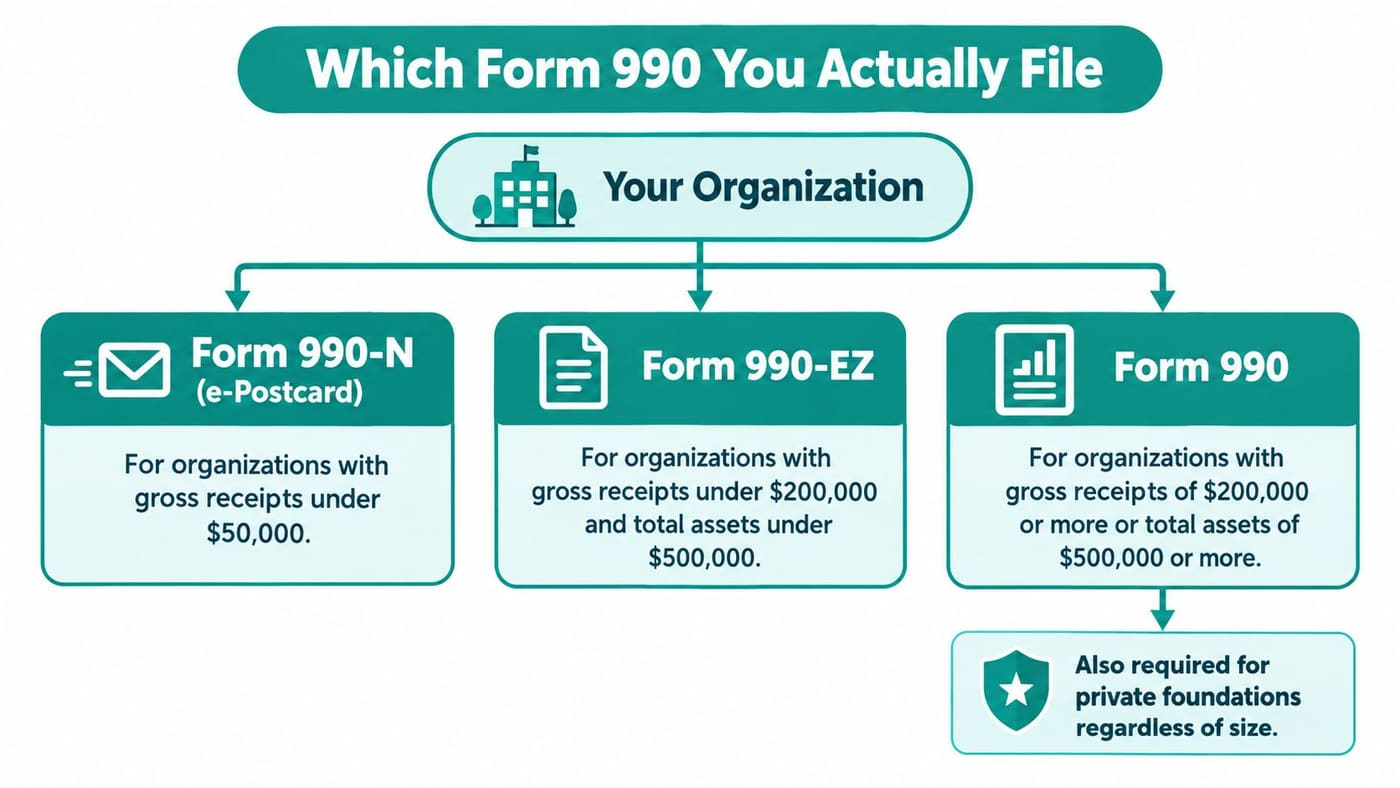
The IRS assigns different annual returns based on gross receipts, total assets, and tax-exempt classification. If you expect a 12-page financial packet and only find a five-line electronic notice, check the thresholds below:
| IRS Return Type | Who Files It | Public Detail Included |
|---|---|---|
| Form 990-N (e-Postcard) | Gross receipts normally $50,000 or less | Legal name, DBA, mailing address, EIN, tax year, principal officer, and confirmation that receipts were under $50,000 (no financial statements). |
| Form 990-EZ | Gross receipts under $200,000 and total assets under $500,000 | Condensed 4-page return covering revenue, expenses, balance sheet summary, officers, and program accomplishments (see our Form 990-EZ guide). |
| Form 990 (Full Return) | Gross receipts $200,000 or more or total assets $500,000 or more | Full 12-part return with detailed governance (Part VI), compensation (Part VII), revenue (Part VIII), functional expenses (Part IX), and balance sheet (Part X). |
| Form 990-PF | All 501(c)(3) Private Foundations (regardless of size) | Investment assets, excise tax calculation, minimum payout requirements, and full list of grants awarded. |
| Form 990-T | Nonprofits with $1,000 or more in gross unrelated business income (UBIT) | Publicly inspectable for 501(c)(3) organizations; reports taxable commercial revenue and expenses. |
For a full breakdown of filing thresholds and deadlines, see our guide to nonprofit tax filing requirements and Form 990 reporting.
How to Read a Form 990 Once You Find It
Finding the PDF is only half the job. Whether you are evaluating a charity before giving or auditing a potential fiscal sponsor, focus on five core sections rather than reading all 40+ pages top to bottom:
- Header & Part I (Summary): Check the tax period at the top right first. Because nonprofits file by the 15th day of the 5th month after their fiscal year ends (May 15 for calendar-year nonprofits, or November 15 with a Form 8868 extension), the newest public 990 is often 9 to 18 months behind today's date.
- Part III (Statement of Program Service Accomplishments): Shows the organization's mission statement and its top three programs by expense and revenue.
- Part VII (Compensation of Officers, Directors, Key Employees): Lists board members (who generally serve unpaid) and the compensation of the Executive Director, CFO, and highest-paid employees.
- Part IX (Statement of Functional Expenses): Breaks expenses into three columns: Program Services, Management and General, and Fundraising. Compare these against our statement of functional expenses guide.
- Part X (Balance Sheet): Compare Line 27 (Net assets without donor restrictions) and Line 28 (Net assets with donor restrictions) to see whether the nonprofit has healthy operating reserves or is sitting on unspent restricted funds.
- Schedule A & Schedule L: Schedule A proves the charity passes the IRS public support test; Form 990 Schedule L discloses interested-person transactions or conflicts of interest.
Want a guided walkthrough of what those signals mean for an organization's health? Run our free Nonprofit Readiness Check.
5 Reasons You Cannot Find a Nonprofit's Form 990
If a search returns zero results, do not assume the organization is operating illegally. Check these five common exceptions first:
- Churches and religious organizations: Under IRC Section 6033(a)(3), churches, integrated auxiliaries, and conventions or associations of churches are exempt from filing an annual Form 990. Many churches publish voluntary annual reports or audited statements instead (see church financial reporting).
- Fiscally sponsored projects: Nearly 19,000 charitable projects operate under a fiscal sponsor. Under Model A, the project's finances are combined inside the sponsor's Form 990; under Model C, the project appears as a grant recipient on the sponsor's Schedule I. Search the fiscal sponsor's EIN, not the project name.
- Subordinates under a Group Exemption (Model D): Local chapters of national federations (such as scouting troops, PTAs, or veterans posts) may be included in a consolidated group return filed by the parent organization rather than under their own standalone PDF.
- 990-N e-Postcard filers: Small all-volunteer nonprofits with gross receipts under $50,000 file an electronic postcard that does not generate a standard PDF in third-party aggregators. Look them up directly in the IRS TEOS database under the Form 990-N (e-Postcard) filter.
- IRS processing and extension lag: Even after mandatory Form 990 e-filing, there is often a 30- to 90-day delay between the date a return is transmitted to the IRS and the date it appears in public bulk data feeds.
Your Right to Request Form 990 Directly (IRC Section 6104)
If a recent filing is not yet online, federal public inspection rules give anyone the right to request it directly from the nonprofit:
- What must be provided: The organization's three most recent annual information returns (Form 990, 990-EZ, 990-PF, and 990-T) including all schedules except Schedule B donor names and addresses (for public charities), plus its original Form 1023 or Form 1024 exemption application and IRS determination letter.
- Response deadlines: In-person requests at the nonprofit's principal office during regular business hours must generally be honored the same day. Written requests (mail or email) must be fulfilled within 30 days (or the organization can post the exact PDF freely downloadable on its website).
Keep Your Own Form 990 Public Record Clean
Donors, grantmakers, and AI research tools now pull Form 990 summaries automatically before making funding decisions. When your general ledger tracks restricted funds, functional expenses, and Form 990 Part VIII/IX/X mappings from day one, year-end filing stops being a scramble.
AlignMint maps your chart of accounts directly to Form 990 lines, separates restricted and unrestricted funds, and includes a built-in Form 990 Builder on Pro and Enterprise so your public filing reflects disciplined stewardship. You can also download our free Form 990 preparation checklist to get your records ready before tax season.
Frequently Asked Questions
Yes. Under Internal Revenue Code Section 6104, every tax-exempt organization's Form 990, 990-EZ, 990-PF, and 990-N filings are open to public inspection. Donor names and addresses on Schedule B are redacted for public charities, though private foundations must disclose Schedule B contributors.
The four most common reasons are: (1) it is a church or church-integrated ministry exempt from filing Form 990; (2) its gross receipts are normally $50,000 or less and it files the 990-N e-Postcard instead of a full return; (3) it operates as a fiscally sponsored project under another charity's EIN; or (4) the IRS has not finished indexing the most recent filing year.
Searching by the 9-digit Employer Identification Number (EIN) is the most accurate method because many charities use a DBA name that differs from their legal IRS name. Enter the 9-digit EIN (with or without the hyphen) into the AlignMint Nonprofit Directory, IRS Tax Exempt Organization Search, or ProPublica Nonprofit Explorer.
Yes. Federal law requires tax-exempt organizations to provide copies of their three most recent annual information returns (Form 990) and their original exemption application (Form 1023 or 1024) upon request in person or in writing.
Ready to try AlignMint with your nonprofit?
Start free — set up donor tools, giving pages, and Minty. Upgrade when you need accounting.